# The Colony Front-End Living Standard
### A set of principles and guidelines to ensure we correctly balance speed, consistency and code quality when developing for the Colony front-end.
These docs are a collective effort to document the current state of best practices when developing at Colony. If you think they could be improved, please submit a pull request to the repo (todo: add link once up on github).
This guide is not intended to be exhaustive. For further information, or to clarify specific cases not covered here, it's best to either infer best practice from recently submitted code, or speak to one of the team.
It's also written as an overview. The expectation is that you independently familiarize yourself with the concepts and technologies referenced herein as much as possible.
# Directory Structure (CDapp)
## Components
Inside the "Components" folder, we have three subfolders:
#### Common: More complex pieces of UI, often piecing together components from the “shared” directory
#### Frame: Layout and app structure
#### Shared: “Core” / generic components
Please ensure your components end up in the correct one.
### Structure
When developing a new component, or extracting reusable components, the folder structure should look something like this:
└── common/
└── NewComponent/
├── index.ts
├── NewComponent.tsx
├── NewComponent.css
├── NewComponent.css.d.ts
├── (optional) types.ts
└── (optional) helpers.ts
**index.ts**: the file that exports the component, and anything else from within the sub-directory
**NewComponent.tsx**: the file the actual component lives in
**NewComponent.css**: where component styles live
**NewComponent.css.d.ts**: Automatically-generated file so that the style object (a post-css enhacement) is typed correctly
Optional:
**types.ts**: where component-specific types live
**helpers.ts**: where you put functions that help make business logic more concise and reusable
### Imports
Imports belong at the top of the file, and in the following order:
1. External library imports
2. Imports from other folders (typically accessed via '~', e.g. '~common/SomeComponent')
3. Imports from this folder or parent folder
4. The style import
Note that we use webpack to transform paths, so if a path is registered in the webpack config, you can access via the ~ prefix.
### DisplayName and Component naming
Ensure components names are PascalCase, named logically given the component they represent, and have a displayName property (which makes debugging easier). The displayName should be assigned to a `const` at the top of the file, so it can be reused in the `MSG` object, and should more or less mirror the file structure (e.g. `common.NewComponent.SubComponent`)
### The MSG object
We use [React-Intl](https://formatjs.io/docs/react-intl/) to format strings for an international audience. Often, you will find a `MSG` object at the top of a component file. All user-facing strings belong inside it.
### File length
Generally, we want to keep files as small as possible and break code up into its constituent parts where possible. This makes code easier to debug, reuse, and review in the future. This applies to both React components as well as ordinary javascript.
Components over 100-150 lines could probably be refactored either using hooks or encapsulating parts of the view into their own components. This is not a strict rule, but it's important to keep in mind as a component grows. Even if you weren't initially responsible for the component, once you start adding code that takes the file length beyond this limit, it's **your responsibility** to refactor it.
### Styles
Consult our `variables.css` folder for a list of frequently used styles. If your style already exists in here, please access it via a css variable, and generally avoid adding new variables (especially if it's very similar to an existing one)
## todo: document other important folders, e.g. `amplify`, graphql
# Code Quality
## Linting / Prettier
In the CDapp we have linting rules enabled. When commiting, a number of pre-commit checks will run to ensure your code is consistent with these.
Many of us also use Prettier to ensure that our code is formatted neatly on the page. We don't (yet) have a prettier config, but something simple like the following suffices:
``` json
{
"singleQuote": true,
"trailingComma": "all"
}
```
## Refactoring
Set aside time / issues for refactoring… but not too early (nor too late). Generally when you start to notice copy/pasted code or that files are becoming too long, is a good sign that you could start refactoring.
## Types
We generally try to be as specific as possible with our types. That means avoiding `any` and type-casting.
Whenever we create a component with props, we always create an `interface` to describe the shape of the props object. If these props are being passed through multiple components, please reuse the interfaces higher up either by importing them as is, or by extending them in the child component.
### Defining types in components
If you're defining a type inside of a component file, ensure you define it at the top of the file and outside of the component.
## React best practices
We generally follow guidance from the [new react docs](https://react.dev/) when assessing react-specific best practices.
Answers to the following questions and more can be found therein:
- When to use useMemo/useCallback (hint: not unless you have to)
- When (and when not!) to use useEffect
- How to correctly implement useContext
If a question can't be resolved by the react docs (or other authoritative source), then we default to sound programming practices (DRY/SOLID etc.). Finally, if neither of the previous stages produce a definitive answer, the preference of the person committing takes precedence.
With that said, here are some other things we like to see.
### Using useContext
We generally prefer to use `useContext` than prop drill to pass state down multiple levels of the component hierarchy.
Some exceptions to this might include:
-> State that's needed in multiple parts of the app. If it doesn't belong in the `AppContext` provider, consider using redux.
-> State that should persist across sessions: use local storage or the db
-> When introducing an additional context provider is awkward/impractical or clutters the existing set of providers. In cases such as this, prop drilling is acceptable.
### Passing props
We prefer to pass props explicitly:
``` jsx
const name = "Tim"
const age = 100
<MyComponent name={name} age={age} />
```
As opposed to
``` jsx
<MyComponent {...{name, age}} />
```
This is certainly true if there aren't many props. Sometimes the spread syntax is preferable if for whatever reason you have to pass many props.
### Boolean logic
Sometimes we render components conditionally:
``` jsx
const itsMyBirthday = true;
{itsMyBirthday && <Card />}
```
What we don't like to see is the following chaining of booleans:
``` jsx
const todayIsSunday = true;
const itsMyBirthday = true;
const monthIsMarch = true;
{todayIsSunday && itsMyBirthday && monthIsMarch && <Card />}
```
Wrap up your booleans into a single boolean:
``` jsx
const displayCard = todayIsSunday && itsMyBirthday && monthIsMarch
{displayCard && <Card />}
```
Much nicer.
### Object destructuring
When destructuring an object that may be undefined, employ the following syntax:
``` jsx
const { nativeToken } = colony || {};
```
## Javascript best practices
### Explicitly scoping `if` statements
Prefer brackets when writing `if` statements
```js
// Yes
if(true) {
doSomething()
}
// No
if(true) doSomething()
```
### Type casting
Prefer casting via the constructor when casting numbers:
```js
const a = '1'
// Yes
const b = Number(a)
// No
const b = +a
```
But via the `!!` syntax when casting booleans:
```js
const c = 0
// Yes
const d = !!0
// No
const d = Boolean(0)
```
## Forms best practices
We use forms all the time to take user input and do something with it (usually pass it on to a saga).
In general, we aim to:
### Validation
Handle all validation in the validation schema. There’s generally no need for “custom” errors, since the validation schema can be generated dynamically, either by defining it inside the component’s scope or wrapping it in a function that is called with the required data as arguments.
### Size
Ensure forms follow all the ordinary component rules regarding file size and component encapsulation. No single part should be more than 100-150 lines.
### Managing complexity
As forms grow they have a tendency to become complex, unwieldy, and fragile.
Bear in mind that there is usually always something you can do better if you feel like your form is getting out of hand.
Signs you have an unruly form:
1. You're using multipe `useEffects` to keep state in sync across multiple components at different nesting levels). You find it hard to reason about the values of variables because of this.
2. Small changes to one part of the form break other parts unexpectedly. Could the form be redesigned to make the data flow more explicit and easier to reason about?
# Architecture overiew
## How data flows through the CDapp
In principle, we want to handle all interactions with the chain outside of the client. We do this using the block ingestor and lambda functions.
### The Block Ingestor
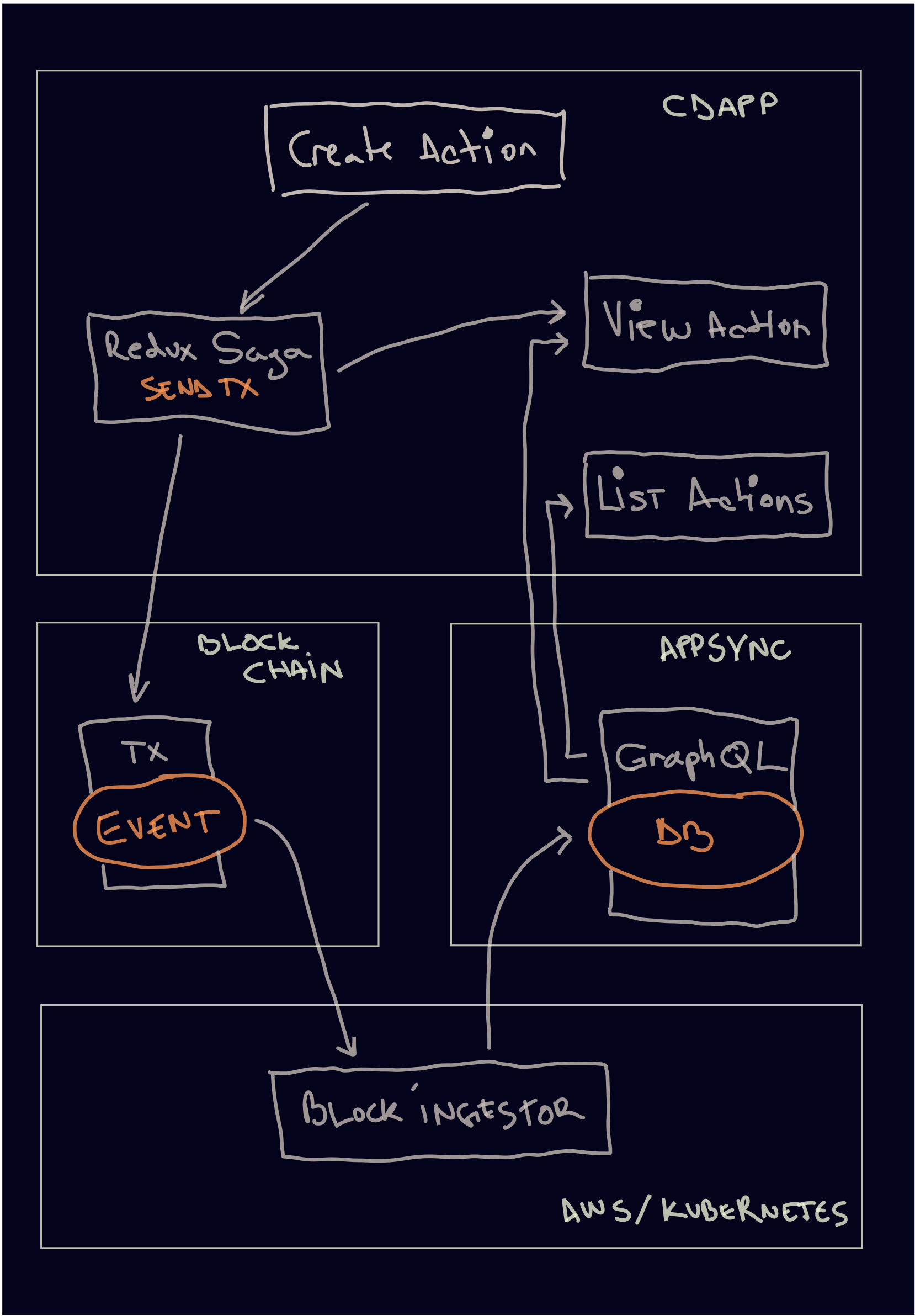
A very common pattern at Colony is taking some data from the user in the ui (usually via a form), and then using that data to call some method in the `colony-js` library, which in turn calls the respective method on the colony network contracts (written in solidity). We coordinate all of this via `redux` actions.
At a glance:
1. Use the ActionForm or ActionButton components to dispatch an action to the store
2. That action will get picked up by the `redux-saga` middleware, and if there's a listener attached, will run the corresponding saga
3. Inside the saga, we interact with our ColonyNetwork contracts using `colony-js`. We also maintain dispatch actions to the store every time the state of a transaction changes, so the `GasStation` can display this information to the user.
4. If the side effect triggers an on-chain event, we listener for that event in a separate service called the [block ingestor](https://github.com/JoinColony/block-ingestor). Generally, we handle all database mutations inside the block-ingestor.
5. The ui will then implement some kind of "optimstic ui" with the intended changes, or poll the database until the block-ingestor's changes show up.
It looks something like:
### Lambda functions
Sometimes you need on-chain data that either isn't saved in the db, or doesn't itself trigger an event to be picked up in the block ingestor.
For example, the current state of a motion. If you create a motion, it will start in staking mode. Then, if, say a week goes by, and no-one has staked, the motion will fail (assuming the staking phase duration is less than a week). Because the motion's state can change depending on the time that has elapsed since the last state change, we can't rely on the db to be up-to-date (in this case, after a week, the db would still show that the motion is in its staking phase.)
For cases such as this, we fetch the latest data from the chain in a [lamda function](https://docs.amplify.aws/cli/function/#set-up-a-function), and then handle any relevant database mutations from there.
This means that in the front-end, all we need to do is make a query to the backend like normal, and it will handle running the code inside the lamda function and return its result.
# Teamwork (makes the dream work)
Programming is a team sport. We adhere to the following practices to make working together as enjoyable as possible.
## Small prs
Try to keep PRs as small as possible. There are no hard and fast rules here, but anything over 1,000 lines can probably be split up into smaller parts.
You can think of a pr as a unit of self-contained work. So if a PR is getting long, ask yourself if it could be split up into smaller units of self-contained work.
If you do **have** to submit a large pr (you probably don't), leave a note at the top explaining why. (Especially true if there are a large number of automatically generated diffs in your pr, e.g. adding a new package or lamda: this gives reviewers a better sense of the "true" size of the pr).
## Commits and commit messages
Keep commits on-topic. Ideally, a commit does one, specific thing, and that thing is described accurately by the commit message.
## Synchronous communication
While we generally handle the code review process asynchronously on github, sometimes it's just better to catch up in real time. Don't be afraid to do so, but bear in mind they be in the middle of something and not be able to respond straight away.
Also, make sure you've made effort to resolve the problem yourself before you ping someone else (a google search is the bare minimum). Context switching is super expensive!
## Creating issues to keep track
If somebody brings a potential improvement to your attention during a code review, it's often up to you whether to tackle it in the same pr or in a different one.
Generally, and especially if the improvement is not the direct focus of the branch being reviewed, it's better to open a new issue and submit a separate pr.
It is up to you as the branch-owner to do this, not the reviewer suggesting the improvement.
 Google Drive
Gist
Clipboard
Google Drive
Gist
Clipboard
 Sign in with Wallet






