firefox 120 release notes 翻譯共筆 (done)
===
###### tags: `moztw.org`
1. 複製 mozilla.org 上 [最新版 release notes](https://www.mozilla.org/en-US/firefox/120.0/releasenotes/) 的內容
2. 透過 [html to markdown](https://codebeautify.org/html-to-markdown) 轉成 md 格式
3. 貼到 [hackmd](hackmd.io/@moztw) 開一個新版共筆(slug: `firefox-release-notes-xxx`)
5. 翻譯完成後,[建立新的 release notes 網頁](https://github.com/moztw/www.moztw.org/tree/master/firefox/releases)
---
翻譯時請直接寫在英文下方,便於對照
---
https://www.mozilla.org/en-US/firefox/120.0/releasenotes/
November 21, 2023
Version 120.0, first offered to Release channel users on November 21, 2023

### New
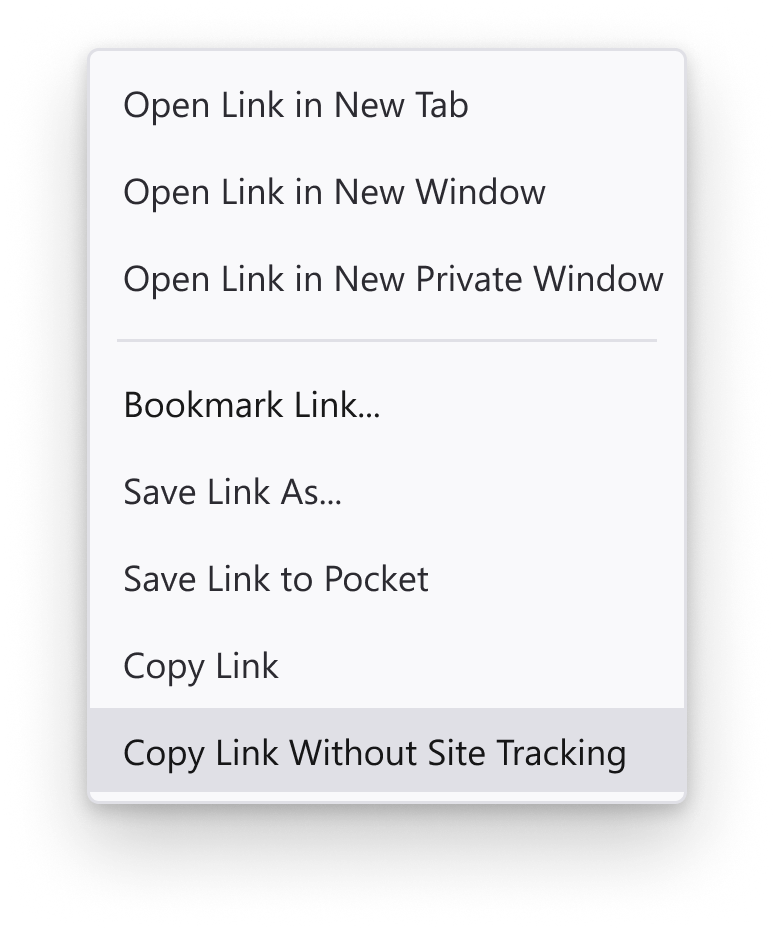
* Firefox supports a new “Copy Link Without Site Tracking” feature in the context menu which ensures that copied links no longer contain tracking information.
* Firefox 支援在右鍵選單中新的「複製不含追蹤碼的鏈結」功能,確保複製的連結不包含追蹤資訊。

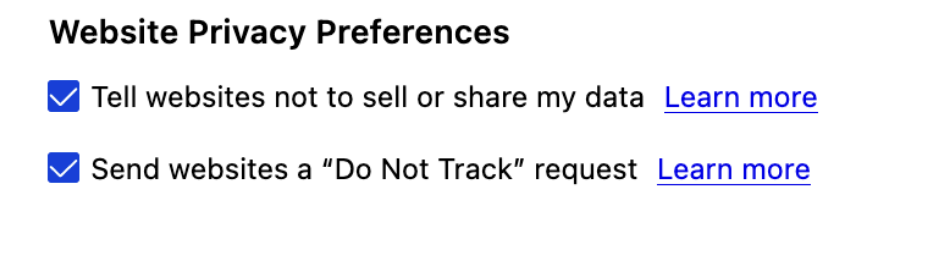
* Firefox now supports a setting (in Preferences → Privacy & Security) to enable [Global Privacy Control](https://globalprivacycontrol.org/). With this opt-in feature, Firefox informs the websites that the user doesn’t want their data to be shared or sold. This feature is enabled in private browsing mode by default.
* Firefox 現在在「偏好設定 → 隱私權與安全性」中支援設定 [全球隱私控制 (Global Privacy Control, GPC)](https://globalprivacycontrol.org/),透過這項「告訴網站不要銷售或分享我的資料」的自願加入功能,Firefox 會告知網站使用者不希望其資料被共享或出售。此功能在隱私瀏覽模式下預設啟用。
* Firefox’s private windows and ETP-Strict privacy configuration now enhance the Canvas APIs with Fingerprinting Protection, thereby continuing to protect our users’ online privacy.
* Firefox 的隱私視窗和「加強型追蹤保護」的「嚴格」模式現在增強 Canvas API 的指紋保護,以持續保護我們使用者的線上隱私。
* Firefox is rolling-out Cookie Banner Blocker by default in private windows for users in Germany during the coming weeks. Firefox will now auto-refuse cookies and dismiss annoying cookie banners for supported sites.
* 在接下來的幾週內,Firefox 將會在德國使用者的隱私視窗中預設啟動「Cookie 橫幅阻擋器」(Cookie Banner Blocker)。Firefox 現在將自動拒絕 cookie,並關閉支援網站上討人厭的 cookie 橫幅。
* Firefox has enabled URL Tracking Protection by default in private windows for all users in Germany. Firefox will remove non-essential URL query parameters that are often used to track users across the web.
* Firefox 現在在德國所有使用者的隱私視窗中預設啟用 URL 追蹤保護。Firefox 將移除經常用來追蹤使用者的非必要 URL 查詢參數。
* Firefox now imports TLS trust anchors (e.g., certificates) from the operating system root store. This will be enabled by default on Windows, macOS, and Android, and if needed, can be turned off in settings (Preferences → Privacy & Security → Certificates).
* Firefox 現在會從作業系統的根憑證庫匯入 TLS 信任錨點(例如憑證)。這將在 Windows、macOS 和 Android 上預設啟用,如有需要的話,可在設定中關閉(偏好設定 → 隱私權與安全性 → 憑證)。
* Keyboard shortcuts have now been added for editing and deleting a selected credential on `about:logins`. For editing - `Alt + enter` (`Option + return` on macOS) and for deleting - `Alt + Backspace` (`Option + Delete` on macOS).
* `about:logins` 中新增了編輯和刪除選定憑證的鍵盤快速鍵。編輯為 `Alt + enter`(macOS 上為 `Option + return`),刪除為 `Alt + Backspace`(macOS 上為 `Option + Delete`)。
* Users on Ubuntu Linux now have the ability to import from Chromium when both are installed as Snap packages.
* 在 Ubuntu Linux 上,當 Chromium 和 Firefox 都是透過 Snap 安裝時,可從 Chromium 匯入資料。
* Picture-in-Picture now supports corner snapping on Windows and Linux - just hold `Ctrl` as you move the PiP window.
* 子母畫面在 Windows 和 Linux 上支援角落吸附功能-只需在移動子母畫面時按住 `Ctrl` 鍵。

### Fixed
* Various [security](https://www.mozilla.org/security/advisories/mfsa2023-49/) fixes.
* 各種安全性修正。

### Enterprise
* You can find information about policy updates and enterprise specific bug fixes in the [Firefox for Enterprise 120 Release Notes](https://support.mozilla.org/kb/firefox-enterprise-120-release-notes).
* 您可以在 Firefox for Enterprise 120 版本發佈說明中找到有關政策更新和企業特定錯誤修正的資訊。

### Developer
* [Developer Information](https://developer.mozilla.org/docs/Mozilla/Firefox/Releases/120)
* The [User Activation API](https://developer.mozilla.org/docs/Web/API/UserActivation) has now been added, allowing JavaScript to check if the user currently is or has been active with the page (clicking, etc) with `navigator.userActivation`.
* 新增 [User Activation API](https://developer.mozilla.org/docs/Web/API/UserActivation),允許 JavaScript 透過 `navigator.userActivation` 檢查使用者目前或曾經與頁面有所互動(如點擊等)。
* Early Hints Preconnect, the informational [status code 103](https://developer.mozilla.org/docs/Web/HTTP/Status/103), is now enabled. This allows servers to send resource Link headers before the final HTTP response and improves performance on servers using this feature. ([read more)](https://blog.cloudflare.com/early-hints/)
啟用「Early Hints Preconnect」(預先連線的提前提示),支援提供資訊的 [103 Early Hints](https://developer.mozilla.org/docs/Web/HTTP/Status/103) 狀態碼,使伺服器能夠在最終 HTTP 回應之前先行傳送含所需資源連結的檔頭,為使用此功能的伺服器改善效能。([詳細資訊)](https://blog.cloudflare.com/early-hints/))
* Users can now use an added devtools feature to simulate browser tabs to be offline.
* 使用者現在可以透過新增的開發者工具,來模擬瀏覽器分頁處於離線狀態。
* The Style Editor panel now features a new "Pretty Print" button located in the footer of the panel, similar to the pretty print button found in the Debugger panel. This can be used to format stylesheets (e.g., those that are minified). The previous functionality, where minified files were automatically formatted, has been removed.
樣式編輯器面板底部現新增了一個「Pretty print 樣式表」按鈕,類似於除錯器面板中的 Pretty Print 原始碼按鈕。可用於格式化樣式表(例如哪些被壓縮過的樣式表)。先前自動格式化壓縮文件的功能已移除。
* The Rules panel within the Inspector panel no longer displays colors in the new CSS Color 4 formats (e.g., OKLCH) as hexadecimal/named colors. This ensures that it matches the original values used.
檢測器面板中的規則面板,不再將新的 CSS Color 4 顏色(例如 OKLCH)顯示為十六進位/命名顏色,以確保它與原來使用的值相符。

### Web Platform
* `lh` and `rlh` units can now be parsed and computed correctly as [lengths](https://developer.mozilla.org/docs/Web/CSS/length). This allows authors to specify lengths in terms of the element's (or the root element's) line height.
* 現在可以正確解析和計算 `lh` 及 `rlh` 單位為 [長度](https://developer.mozilla.org/docs/Web/CSS/length),讓作者能根據元素(或根元素)的行高來指定長度。
* [WebAssembly GC](https://github.com/WebAssembly/gc/blob/main/proposals/gc/Overview.md) is now enabled by default, which allows new languages, such as [Dart](https://docs.flutter.dev/platform-integration/web/wasm) or [Kotlin](https://kotlinlang.org/docs/wasm-overview.html#browser-support), to run on Firefox. This makes it possible for reference cycles between the guest language and host browser to be collected.
* [WebAssembly GC](https://github.com/WebAssembly/gc/blob/main/proposals/gc/Overview.md) 現已預設啟用,這允許新的語言—如 [Dart](https://docs.flutter.dev/platform-integration/web/wasm) 或 [Kotlin](https://kotlinlang.org/docs/wasm-overview.html#browser-support)—在 Firefox 上運行。這使得來自客戶語言和主瀏覽器之間的參考循環可以被回收。

### Unresolved
未解決
* We're aware of a startup crash affecting Linux users on some aarch64 systems, those with page sizes other than 4KB such as Apple Silicon. To workaround the issue compile Firefox with `--disable-phc`.
我們已注意到某些分頁大小不是 4KB 的 aarch64 系統(如 Apple Silicon)上的 Linux 使用者的啟動時當機問題。為繞過此問題,請使用 `--disable-phc` 參數編譯 Firefox。

### Community Contributions
* With the release of Firefox 120, we are pleased to welcome the developers who contributed their first code change to Firefox in this release, 10 of whom were brand new volunteers! Please join us in thanking each of these diligent and enthusiastic individuals, and take a look at their contributions:
隨著 Firefox 120 的發布,我們歡迎在此版本中首次為 Firefox 貢獻代碼的開發人員,其中包括 10 位全新志願者!請加入我們感謝這些勤奮和熱情的個體,並查看他們的貢獻:
* Ajay: [1857745](https://bugzilla.mozilla.org/1857745), [1857750](https://bugzilla.mozilla.org/1857750)
* Alexander Sergeyev: [1855731](https://bugzilla.mozilla.org/1855731)
* Antoine: [1857751](https://bugzilla.mozilla.org/1857751)
* Calum Smith \[:cpmsmith\]: [1859079](https://bugzilla.mozilla.org/1859079)
* Fidelius: [1856287](https://bugzilla.mozilla.org/1856287)
* Kushal Pokharel: [1857752](https://bugzilla.mozilla.org/1857752)
* Scott Jehl: [1836128](https://bugzilla.mozilla.org/1836128), [1841432](https://bugzilla.mozilla.org/1841432)
* Sebastian \[:sebcode\]: [366374](https://bugzilla.mozilla.org/366374)
* tiuna.angelini: [1857747](https://bugzilla.mozilla.org/1857747)
* vitaspiros: [1013947](https://bugzilla.mozilla.org/1013947)
 Google Drive
Gist
Clipboard
Google Drive
Gist
Clipboard
 Sign in with Wallet






