Mozilla 台灣社群
      • Sharing URL Link copied
      • /edit
      • View mode
        • Edit mode
        • View mode
        • Book mode
        • Slide mode
        Edit mode View mode Book mode Slide mode
      • Customize slides
      • Note Permission
      • Read
        • Owners
        • Signed-in users
        • Everyone
        Owners Signed-in users Everyone
      • Write
        • Owners
        • Signed-in users
        • Everyone
        Owners Signed-in users Everyone
      • Engagement control Commenting, Suggest edit, Emoji Reply
    • Invite by email
      Invitee

      This note has no invitees

    • Publish Note

      Share your work with the world Congratulations! 🎉 Your note is out in the world Publish Note

      Your note will be visible on your profile and discoverable by anyone.
      Your note is now live.
      This note is visible on your profile and discoverable online.
      Everyone on the web can find and read all notes of this public team.
      See published notes
      Unpublish note
      Please check the box to agree to the Community Guidelines.
      View profile
    • Commenting
      Permission
      Disabled Forbidden Owners Signed-in users Everyone
    • Enable
    • Permission
      • Forbidden
      • Owners
      • Signed-in users
      • Everyone
    • Suggest edit
      Permission
      Disabled Forbidden Owners Signed-in users Everyone
    • Enable
    • Permission
      • Forbidden
      • Owners
      • Signed-in users
    • Emoji Reply
    • Enable
    • Versions and GitHub Sync
    • Note settings
    • Note Insights New
    • Engagement control
    • Make a copy
    • Transfer ownership
    • Delete this note
    • Insert from template
    • Import from
      • Dropbox
      • Google Drive
      • Gist
      • Clipboard
    • Export to
      • Dropbox
      • Google Drive
      • Gist
    • Download
      • Markdown
      • HTML
      • Raw HTML
Menu Note settings Note Insights Versions and GitHub Sync Sharing URL Help
Menu
Options
Engagement control Make a copy Transfer ownership Delete this note
Import from
Dropbox Google Drive Gist Clipboard
Export to
Dropbox Google Drive Gist
Download
Markdown HTML Raw HTML
Back
Sharing URL Link copied
/edit
View mode
  • Edit mode
  • View mode
  • Book mode
  • Slide mode
Edit mode View mode Book mode Slide mode
Customize slides
Note Permission
Read
Owners
  • Owners
  • Signed-in users
  • Everyone
Owners Signed-in users Everyone
Write
Owners
  • Owners
  • Signed-in users
  • Everyone
Owners Signed-in users Everyone
Engagement control Commenting, Suggest edit, Emoji Reply
  • Invite by email
    Invitee

    This note has no invitees

  • Publish Note

    Share your work with the world Congratulations! 🎉 Your note is out in the world Publish Note

    Your note will be visible on your profile and discoverable by anyone.
    Your note is now live.
    This note is visible on your profile and discoverable online.
    Everyone on the web can find and read all notes of this public team.
    See published notes
    Unpublish note
    Please check the box to agree to the Community Guidelines.
    View profile
    Engagement control
    Commenting
    Permission
    Disabled Forbidden Owners Signed-in users Everyone
    Enable
    Permission
    • Forbidden
    • Owners
    • Signed-in users
    • Everyone
    Suggest edit
    Permission
    Disabled Forbidden Owners Signed-in users Everyone
    Enable
    Permission
    • Forbidden
    • Owners
    • Signed-in users
    Emoji Reply
    Enable
    Import from Dropbox Google Drive Gist Clipboard
       Owned this note    Owned this note      
    Published Linked with GitHub
    • Any changes
      Be notified of any changes
    • Mention me
      Be notified of mention me
    • Unsubscribe
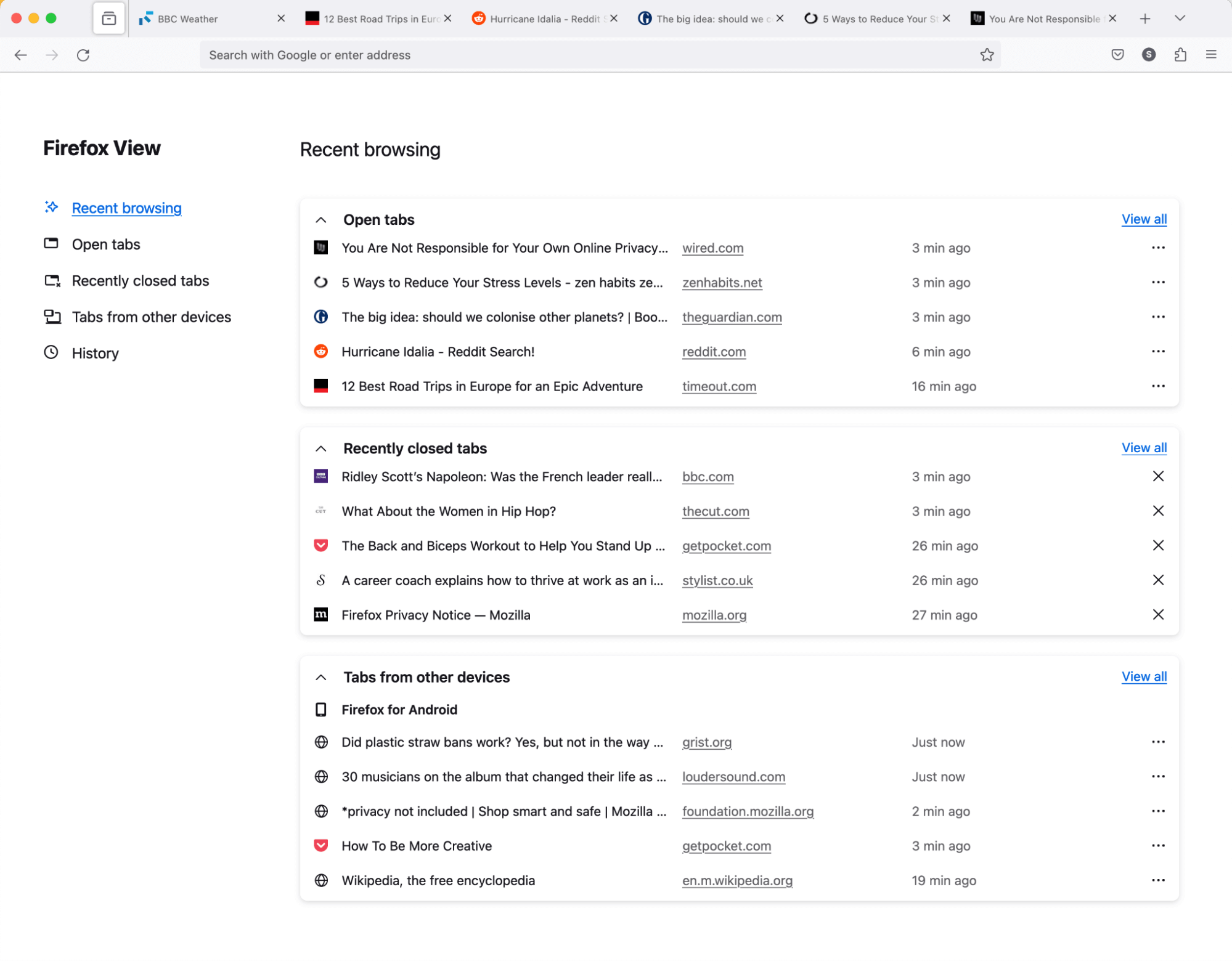
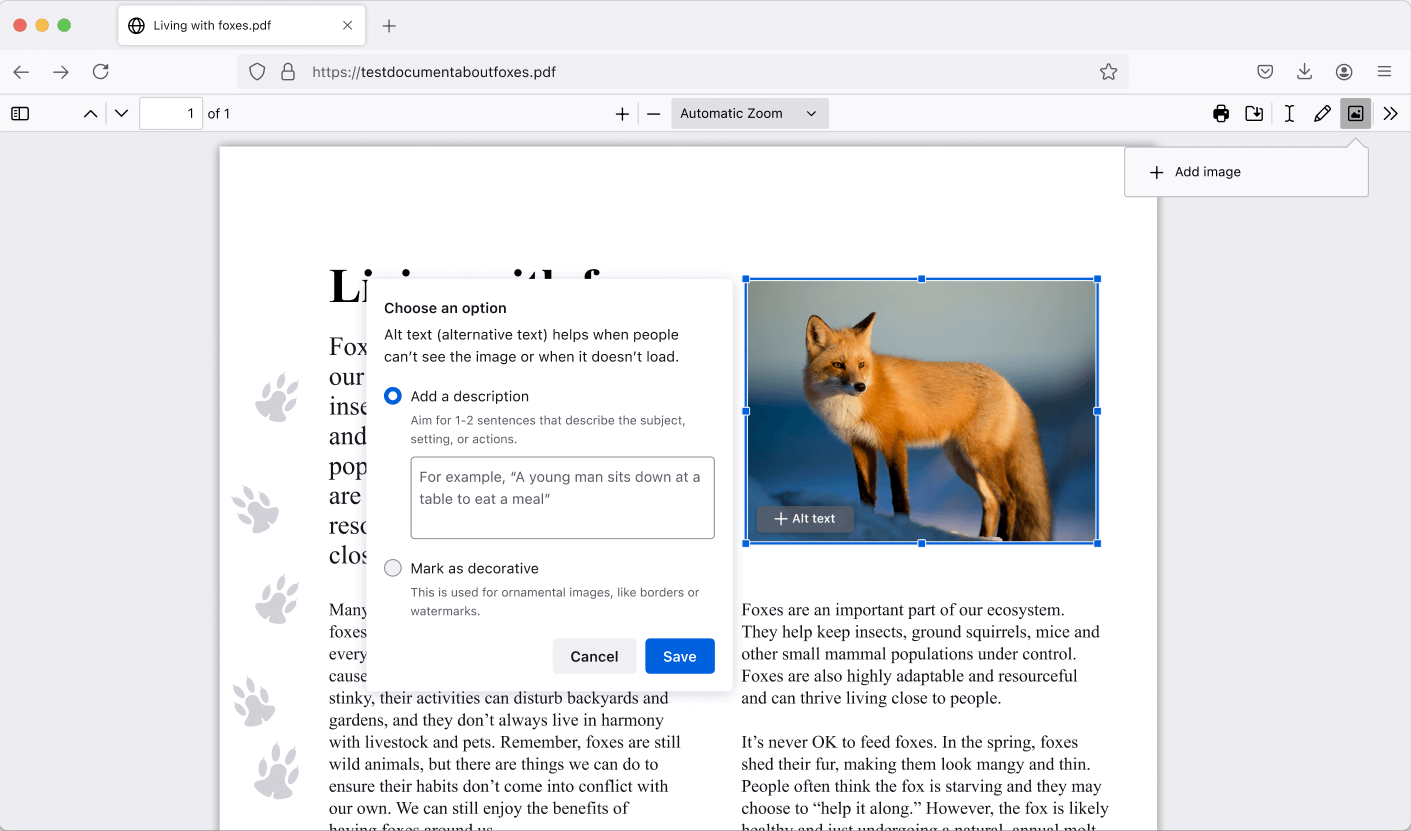
    firefox 119 release notes 翻譯共筆 (done) === ###### tags: `moztw.org` 1. 複製 mozilla.org 上 [最新版 release notes](https://www.mozilla.org/en-US/firefox/119.0/releasenotes/) 的內容 2. 透過 [html to markdown](https://codebeautify.org/html-to-markdown) 轉成 md 格式 3. 貼到 [hackmd](hackmd.io/@moztw) 開一個新版共筆(slug: `firefox-release-notes-xxx`) 5. 翻譯完成後,[建立新的 release notes 網頁](https://github.com/moztw/www.moztw.org/tree/master/firefox/releases) --- 翻譯時請直接寫在英文下方,便於對照 --- https://www.mozilla.org/en-US/firefox/119.0/releasenotes/ Version 119.0, first offered to Release channel users on October 24, 2023 ![](https://www.mozilla.org/media/protocol/img/icons/highlight.07fce9e0e5f3.svg) ### New * Gradually rolling out in Fx119, [Firefox View](https://support.mozilla.org/kb/how-set-tab-pickup-firefox-view) includes more content. You can now see all open tabs, from all windows. If you sync open tabs, you’ll see all tabs from other devices. Browsing history is now listed and you can sort by date or by site. As before, recently closed tabs are also listed on Firefox View. 逐漸釋出包含更多內容的 [Firefox View](https://support.mozilla.org/kb/how-set-tab-pickup-firefox-view) 給 Firefox 119 使用者。你現在可以看到來自所有視窗的已開啟分頁。如果您有同步「開啟分頁」,你也將看到來自其他裝置的分頁。現在會列出瀏覽記錄,你可以按日期或按網站排序。如同以往,「最近關閉的分頁」也列在 Firefox View 中。 To access Firefox View, select the file folder icon at the top left of your tab strip. 若要使用 Firefox View,請點擊分頁列最左方的「資料夾」圖示。 ![螢幕截圖:Firefox View 顯示開啟分頁與其他裝置的分頁的](https://www.mozilla.org/media/img/firefox/releasenotes/note-images/119_firefox_view.png) * Gradually rolling out in Fx119, Firefox now allows you to edit PDFs by adding images and alt text, in addition to text and drawings. 逐漸釋出給 Firefox 119 使用者:在編輯 PDF 時,除了新增文字和繪畫之外,Firefox 現在讓你可以新增圖像和替代文字。 ![螢幕截圖:一個紅色狐狸的圖片被加入 PDF 中。替代文字工具在照片的左方開啟並得以加入圖片說明文字](https://www.mozilla.org/media/img/firefox/releasenotes/note-images/119_pdf_alt_text.png) * Recently closed tabs now persist between sessions that don't have automatic session restore enabled. Manually restoring a previous session will continue to reopen any previously open tabs or windows. 「最近關閉的分頁」現在會在未啟用「開啟先前的視窗與分頁」時保留。手動「回復先前的瀏覽狀態」仍將重新打開任何先前開啟的分頁與視窗。 * If you're migrating your data from Chrome, Firefox now offers the ability to import some of your extensions as well. 如果您從 Chrome 匯入資料,Firefox 現在提供匯入部分擴充套件的功能。 * As part of [Total Cookie Protection](https://blog.mozilla.org/mozilla/firefox-rolls-out-total-cookie-protection-by-default-to-all-users-worldwide/), Firefox now supports the partitioning of [Blob URLs](https://developer.mozilla.org/docs/Web/API/Blob), this mitigates a potential tracking vector that third-party agents could use to track an individual. 作為 [全方位 Cookie 保護](https://blog.mozilla.org/mozilla/firefox-rolls-out-total-cookie-protection-by-default-to-all-users-worldwide/) 的一部分,Firefox 現在支援 [Blob URL](https://developer.mozilla.org/docs/Web/API/Blob) 的分隔儲存,以減少可被第三方代理用來追蹤個人的潛在追蹤要素。 * The visibility of fonts to websites has been restricted to system fonts and language pack fonts in [Enhanced Tracking Protection](https://support.mozilla.org/kb/enhanced-tracking-protection-firefox-desktop#w_strict-enhanced-tracking-protection) strict mode to mitigate font fingerprinting. 在「[加強型追蹤保護](https://support.mozilla.org/kb/enhanced-tracking-protection-firefox-desktop#w_strict-enhanced-tracking-protection)」的嚴格模式下,網站可見的字體已限制在系統字體和語言包字體,以減緩字體指紋辨識。 * The [Storage Access API](https://developer.mozilla.org/docs/Web/API/Storage_Access_API) web standard was updated to improve security while mitigating website breakages and further enabling the phase out of third-party cookies in Firefox. 更新 [Storage Access API](https://developer.mozilla.org/docs/Web/API/Storage_Access_API) 網路標準,以提高安全性,同時減少網站故障,並使 Firefox 向淘汰第三方 Cookie 再進一步。 * Encrypted Client Hello (ECH) is now available to Firefox users, delivering a more private browsing experience. ECH extends the encryption used in TLS connections to cover more of the handshake and better protect sensitive fields. Read more about the launch of ECH on [Mozilla Distilled](https://blog.mozilla.org/en/products/firefox/encrypted-hello/). 加密客戶端問候 (Encrypted Client Hello, ECH) 現在可供 Firefox 使用者使用,提供更隱私的瀏覽體驗。ECH 將 TLS 連線時的加密擴展到更多的握手步驟,並更好地保護敏感欄位。[到 Mozilla Distilled 進一步閱讀 ECH 釋出的更多資訊](https://blog.mozilla.org/en/products/firefox/encrypted-hello/)。 * Media sniffing is no longer applied to files served as type `application/octet-stream`, this allows these files to be downloaded instead of attempting playback. 多媒體探測(Media sniffing)不再用於 `application/octet-stream` 類型的檔案,因而得以下載這些檔案而非嘗試播放。 * On Windows, the mouse pointer will disappear while typing if the relevant Windows [mouse properties](https://support.microsoft.com/windows/change-mouse-settings-e81356a4-0e74-fe38-7d01-9d79fbf8712b) system setting is enabled. 在 Windows 上,如果在 [滑鼠設定](https://support.microsoft.com/zh-tw/windows/變更滑鼠設定-e81356a4-0e74-fe38-7d01-9d79fbf8712b) 中啟用「打字時隱藏指標」,則在輸入時將會隱藏滑鼠指標。 * Firefox is now available in the Santali (sat) language. Firefox 現在提供桑塔利文(Santali, sat)版本。 ### Fixed * Fixed an issue causing unexpected jumps in scroll position on Facebook. 修復了導致在 Facebook 上捲動位置時意外跳動的問題。 * Various [security](https://www.mozilla.org/security/advisories/mfsa2023-45/) fixes. * 各種安全修復。 ### Enterprise * You can find information about policy updates and enterprise specific bug fixes in the [Firefox for Enterprise 119 Release Notes](https://support.mozilla.org/kb/firefox-enterprise-119-release-notes). 您可以在 [Firefox for Enterprise 119 Release Notes 版本資訊](https://support.mozilla.org/kb/firefox-enterprise-119-release-notes) 中找到有關政策更新和修復企業特定錯誤的資訊。 ![](https://www.mozilla.org/media/protocol/img/icons/developer.fc7d2d65df74.svg) ### Developer * [開發人員資訊](https://developer.mozilla.org/docs/Mozilla/Firefox/Releases/119) * Several enhancements have been made to the Inactive CSS styles feature. This feature assists in identifying CSS properties that have no effect on an element. Pseudo-elements such as [::first-letter](https://bugzilla.mozilla.org/show_bug.cgi?id=1842175), [::cue](https://bugzilla.mozilla.org/show_bug.cgi?id=1849235), and [::placeholder](https://bugzilla.mozilla.org/show_bug.cgi?id=1849255) are now fully supported. 對非作用 CSS 樣式(Inactive CSS styles)功能進行了數個改進。此功能可協助識別對元素沒有影響的 CSS 屬性。現在完整支援諸如 [::first-letter](https://bugzilla.mozilla.org/show_bug.cgi?id=1842175)、[::cue](https://bugzilla.mozilla.org/show_bug.cgi?id=1849235) 和 [::placeholder](https://bugzilla.mozilla.org/show_bug.cgi?id=1849255) 等偽元素。 * The JSON viewer is particularly useful for debugging REST APIs, as it displays formatted JSON responses. Now, if the JSON is invalid or broken, it automatically [switches](https://bugzilla.mozilla.org/show_bug.cgi?id=1764897) to a raw data view, improving the user experience. JSON 檢視器在 REST API 除錯時特別有用,它會以格式化的樣式顯示回應的 JSON 內容。現在,如果 JSON 無效或損毀,會自動[切換回](https://bugzilla.mozilla.org/show_bug.cgi?id=1764897)原始資料檢視,改善使用者體驗。 ![](https://www.mozilla.org/media/protocol/img/icons/globe.b1488be03021.svg) ### Web Platform * [ARIA reflection](https://developer.mozilla.org/docs/Web/API/Element#instance_properties_included_from_aria) for simple attributes and default Accessibility Semantics for [Custom Elements](https://developer.mozilla.org/docs/Web/API/ElementInternals#instance_properties_included_from_aria) are now supported. Note this includes boolean, enum, number, and string attributes, but not attributes that reference other elements. 現在支援 [Custom Elements](https://developer.mozilla.org/docs/Web/API/ElementInternals#instance_properties_included_from_aria) 的簡單屬性(simple attributes)和預設可及性語意(default Accessibility Semantics)的 [ARIA reflection](https://developer.mozilla.org/docs/Web/API/Element#instance_properties_included_from_aria) 。請注意,這包括布林值、枚舉、數字和字串屬性,但不包括參考其他元素的屬性。 * `credentialless` is now supported in [Cross-Origin-Embedder-Policy](https://developer.mozilla.org/docs/Web/HTTP/Headers/Cross-Origin-Embedder-Policy). [Cross-Origin-Embedder-Policy](https://developer.mozilla.org/docs/Web/HTTP/Headers/Cross-Origin-Embedder-Policy) 現在支援 `credentialless`。 * The CSS [attr()](https://developer.mozilla.org/docs/Web/CSS/attr) function now supports a fallback parameter, for example `attr(foobar, "Default value")`. CSS [attr()](https://developer.mozilla.org/docs/Web/CSS/attr) 函數現在支援帶入一個預設參數,例如 `attr(foobar, "Default value")`。 * Grouping of items in an array (and iterables) is now easier by using the methods `Object.groupBy` or `Map.groupBy`. 現在可以透過使用 `Object.groupBy` 或 `Map.groupBy` 方法,以更輕鬆地對陣列(和可迭代物件)中的項目進行分組。 ![](https://www.mozilla.org/media/img/firefox/releasenotes/community.e1943a67466a.svg) ### Community Contributions * With the release of Firefox 119, we are pleased to welcome the developers who contributed their first code change to Firefox in this release, 4 of whom were brand new volunteers! Please join us in thanking each of these diligent and enthusiastic individuals, and take a look at their contributions: 我們很高興歡迎在本版本中為 Firefox 做出首次程式碼變更的開發人員,其中有 4 位是全新的志願者!請加入我們,感謝這些勤奮和熱情的個人,並查看他們的貢獻: * Abdullah Farweez): [1850608](https://bugzilla.mozilla.org/1850608) * fanzhuyifan (Yifan Zhu): [148624](https://bugzilla.mozilla.org/148624), [1852191](https://bugzilla.mozilla.org/1852191) * Nagendra: [1849316](https://bugzilla.mozilla.org/1849316) * pommicket: [1248186](https://bugzilla.mozilla.org/1248186)

    Import from clipboard

    Paste your markdown or webpage here...

    Advanced permission required

    Your current role can only read. Ask the system administrator to acquire write and comment permission.

    This team is disabled

    Sorry, this team is disabled. You can't edit this note.

    This note is locked

    Sorry, only owner can edit this note.

    Reach the limit

    Sorry, you've reached the max length this note can be.
    Please reduce the content or divide it to more notes, thank you!

    Import from Gist

    Import from Snippet

    or

    Export to Snippet

    Are you sure?

    Do you really want to delete this note?
    All users will lose their connection.

    Create a note from template

    Create a note from template

    Oops...
    This template has been removed or transferred.
    Upgrade
    All
    • All
    • Team
    No template.

    Create a template

    Upgrade

    Delete template

    Do you really want to delete this template?
    Turn this template into a regular note and keep its content, versions, and comments.

    This page need refresh

    You have an incompatible client version.
    Refresh to update.
    New version available!
    See releases notes here
    Refresh to enjoy new features.
    Your user state has changed.
    Refresh to load new user state.

    Sign in

    Forgot password

    or

    By clicking below, you agree to our terms of service.

    Sign in via Facebook Sign in via Twitter Sign in via GitHub Sign in via Dropbox Sign in with Wallet
    Wallet ( )
    Connect another wallet

    New to HackMD? Sign up

    Help

    • English
    • 中文
    • Français
    • Deutsch
    • 日本語
    • Español
    • Català
    • Ελληνικά
    • Português
    • italiano
    • Türkçe
    • Русский
    • Nederlands
    • hrvatski jezik
    • język polski
    • Українська
    • हिन्दी
    • svenska
    • Esperanto
    • dansk

    Documents

    Help & Tutorial

    How to use Book mode

    Slide Example

    API Docs

    Edit in VSCode

    Install browser extension

    Contacts

    Feedback

    Discord

    Send us email

    Resources

    Releases

    Pricing

    Blog

    Policy

    Terms

    Privacy

    Cheatsheet

    Syntax Example Reference
    # Header Header 基本排版
    - Unordered List
    • Unordered List
    1. Ordered List
    1. Ordered List
    - [ ] Todo List
    • Todo List
    > Blockquote
    Blockquote
    **Bold font** Bold font
    *Italics font* Italics font
    ~~Strikethrough~~ Strikethrough
    19^th^ 19th
    H~2~O H2O
    ++Inserted text++ Inserted text
    ==Marked text== Marked text
    [link text](https:// "title") Link
    ![image alt](https:// "title") Image
    `Code` Code 在筆記中貼入程式碼
    ```javascript
    var i = 0;
    ```
    var i = 0;
    :smile: :smile: Emoji list
    {%youtube youtube_id %} Externals
    $L^aT_eX$ LaTeX
    :::info
    This is a alert area.
    :::

    This is a alert area.

    Versions and GitHub Sync
    Get Full History Access

    • Edit version name
    • Delete

    revision author avatar     named on  

    More Less

    Note content is identical to the latest version.
    Compare
      Choose a version
      No search result
      Version not found
    Sign in to link this note to GitHub
    Learn more
    This note is not linked with GitHub
     

    Feedback

    Submission failed, please try again

    Thanks for your support.

    On a scale of 0-10, how likely is it that you would recommend HackMD to your friends, family or business associates?

    Please give us some advice and help us improve HackMD.


    Thanks for your feedback

    Remove version name

    Do you want to remove this version name and description?

    Transfer ownership

    Transfer to
      Warning: is a public team. If you transfer note to this team, everyone on the web can find and read this note.

        Link with GitHub

        Please authorize HackMD on GitHub
        • Please sign in to GitHub and install the HackMD app on your GitHub repo.
        • HackMD links with GitHub through a GitHub App. You can choose which repo to install our App.
        Learn more  Sign in to GitHub

        Push the note to GitHub Push to GitHub Pull a file from GitHub

          Authorize again
         

        Choose which file to push to

        Select repo
        Refresh Authorize more repos
        Select branch
        Select file
        Select branch
        Choose version(s) to push
        • Save a new version and push
        • Choose from existing versions
        Include title and tags
        Available push count

        Pull from GitHub

         
        File from GitHub
        File from HackMD

        GitHub Link Settings

        File linked

        Linked by
        File path
        Last synced branch
        Available push count

        Danger Zone

        Unlink
        You will no longer receive notification when GitHub file changes after unlink.

        Syncing

        Push failed

        Push successfully

