# PyCon TW 2016 Collaborative Talk Notes <br> Day 2 - R1
> ### Quick Links
> - [Portal for Collobration Notes 共筆統整入口](https://hackfoldr.org/pycontw2016) (hosted by [hackfoldr](https://hackfoldr.org/about) and [HackMD](https://hackmd.io/))
> - [Program Schedule 議程時間表](https://tw.pycon.org/2016/events/talks/)
> - [PyCon TW 2016 Official Site 官網](https://tw.pycon.org/2016/)
>
> ### How to update this note?
> - Everyone can *freely* update this note. 任何人都能自由地更新內容。
> - Please respect all the participants and follow our [code of conduct](https://tw.pycon.org/2016/about/code-of-conduct/) during discussion. 討論、記錄時,請遵守大會的[行為準則](https://tw.pycon.org/2016/about/code-of-conduct/)。
## Talk: How to create high available Pycon application with MySQL techniques
- Info: https://tw.pycon.org/2016/events/talk/39346130420498441/
- Speaker: 杜修文
- MySQL 高可用階層(可用性由上往下遞增)
- Replication
- Shared Disk / Virtualization Options
- Group Replication
- Cluster
- MySQL Fabric
- 做data shared
- Fabric aware connection(支援java,php,python) 或是使用 MySQL Route
- MySQL 5.7可做多源複製:
- 使用場景,當有很多分公司或是搜集資料的master db,可以把資料都回傳給主公司的slave
- Group Replication
- 只支援InnoDB
- 每個表都要有pk
- 需要開啟GTID
- 不能線上同時多地DDL
- 交易會因為跟其他台衝突而中止
- Cluster(架構由上而下)
- client(PHP,python)
- Application (MySQL, apache, java, nodes)
- Data node
## Talk: 用Google Cloud Platform玩交通資料分析
- Info: https://tw.pycon.org/2016/events/talk/39018216764211208/
- Speaker: 柯維然
- 投影片: https://docs.google.com/presentation/d/19AeaYxblhQ4lbZ_gReZAnBuOmzBu6UjXUWCV61DwV94/edit#slide=id.p
- 交通資料介紹
- 資料爬蟲
- App Engine
- 資料儲存
- Datastore, BigQuery
- 資料分析
- Datalab
> 台灣國道是全世界埋感測器最密集的道路。
## Talk: 連淡水阿嬤都聽得懂的機器學習套件入門 scikit-learn
- Info: https://tw.pycon.org/2016/events/talk/69843418095812674/
- Speaker: Cicilia Chia-ying Lee
- Slide : http://www.slideshare.net/aacs0130/scikitlearn-62706630
#### Scikit Learn 數字辨識
1. Load data
2. Set a classifier
3. Laern a model
4. Predict the result
5. Evaluate
> scikit learn 有很多 classifier,只需要參考 doc 給他參數就能夠使用了
#### 前處理(對原始資料先做些處理)
1. Clean data
2. Feature extraction
3. Convert category and string to number
4. Sparse data
5. Feature selection
> raw data -> [前處理] -> 餵進去的向量
- Reference:
- [Scikit-learn 官網](http://scikit-learn.org/stable/index.html)
- [Scikit-learn數字範例](http://scikit-learn.org/stable/auto_examples/classification/plot_digits_classification.html)
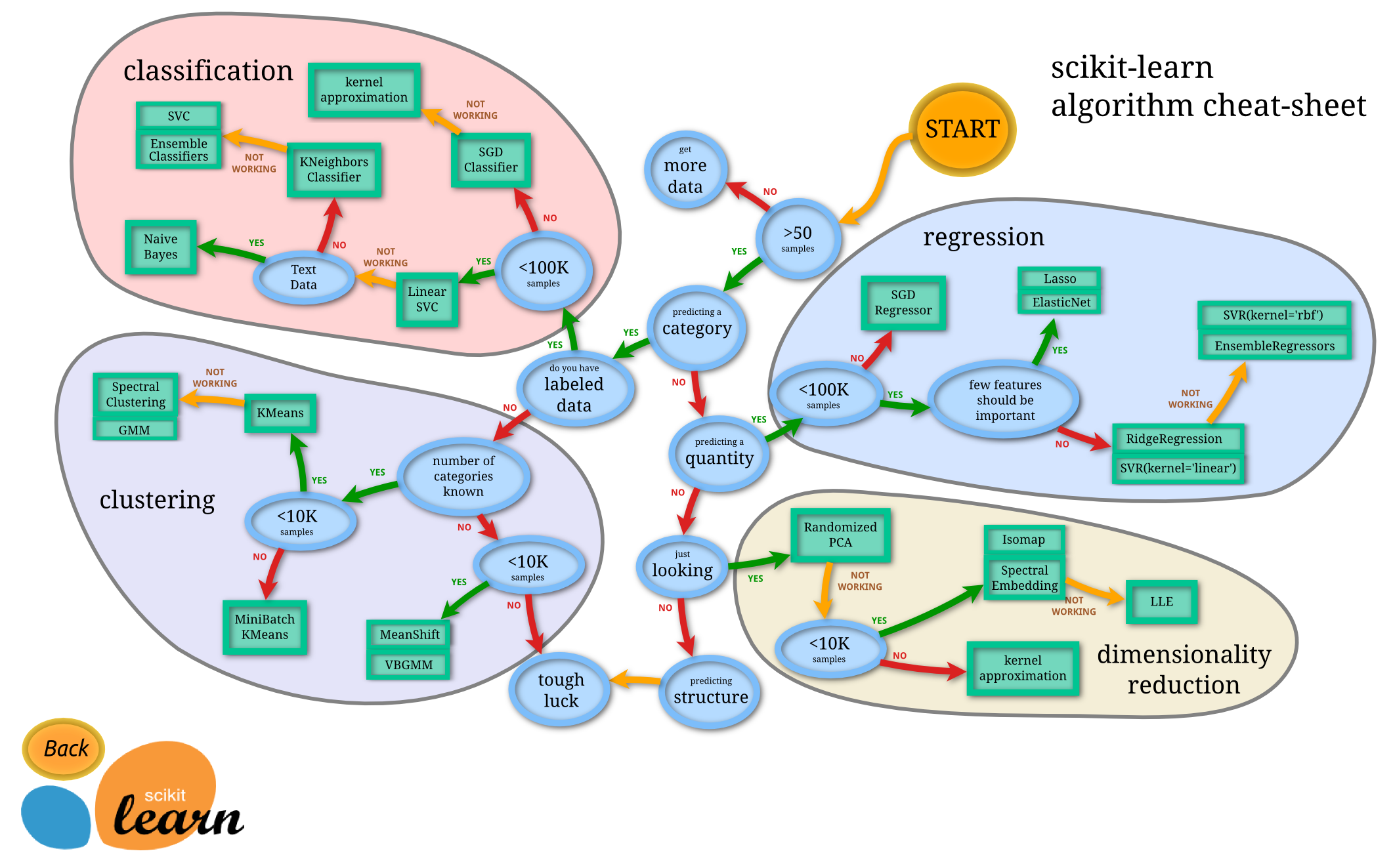
- [選擇機器學習演算法](http://scikit-learn.org/stable/tutorial/machine_learning_map/index.html)
- [林軒田教授的機器學習教學影片](https://www.youtube.com/playlist?list=PLXVfgk9fNX2I7tB6oIINGBmW50rrmFTqf)
## Talk: 什麼是色彩管理 & 用 Python 自幹一個好嗎 ?
- Info: https://tw.pycon.org/2016/events/talk/66630011804713004/
- Speaker: Kilik Kuo
- Slide : https://goo.gl/j0sS6z
- Questions: https://goo.gl/slides/s4uqbn
#### What is Color Management
在各個裝置上面轉換 color 的轉換系統
#### Why color Management
> Obtain a good match across color devices
我想要把鮮豔的紅傳遞給每一個人,不要有色偏,讓大家有相同的 experience
MAC OS >>>>>> Windows
[Kilik] 補充,
Mac 上由於 OSX framework stack 內建了 color management compoent "ColorSync" [1][2],
在Application 層開發透過系統提供的 API 時都會經過 ColorSync 做轉換, 省卻不少問題.
Windows 上則有 WIC [3] (win7以前) 用來擷取影像色彩資訊, WIA/WCS [4][5] (win8之後)給應用層使用.
註 : Windows 內建的 image viewer 有做 Color management, 小畫家沒有, 可以用來開圖測試 :)
[1] https://developer.apple.com/library/mac/technotes/tn2115/_index.html
[2] https://developer.apple.com/library/mac/documentation/GraphicsImaging/Reference/ColorSync_Manager/
[3] https://msdn.microsoft.com/zh-tw/library/windows/desktop/ee719902%28v=vs.85%29.aspx
[4] https://msdn.microsoft.com/en-us/library/windows/hardware/ff542835%28v=vs.85%29.aspx
[5] https://msdn.microsoft.com/library/windows/desktop/dd372231%28v=vs.85%29.aspx
#### Befor We Start - COLOR
Light > Eyes > Colors
Wavelength(nm) Blue -> Green -> Red (波長短到長)
天色變暗時,人類的尖銳敏銳度對紅色的辨色力會最先喪失
紅色有助於增快暗適應 (光適應 ~ 5min, 暗適應 ~ 20 min)
#### Befor We Start - CIE RGB matching function
- David Wright / John Guild's experiment
找一群健康的人,讓他們控制三個燈光(RGB)的比重,讓他們盡力控制燈光顏色比例來盡力調出他隨意指定的顏色
到最後算出一個公式,把色光的組合,用波長 input 來算出顏色
```
Color λ = r(λ') * R + g(λ') * G + b(λ') * B
R = 700nm, G = 546.1nm, B = 435.8nm
```
#### Before We Start - CIE XYZ(1931)
#### Before We Start - CIE XYZ(imaginary) to xyY(a cousin color space, visible in 2D)
- 定義**色度**座標(chromaticity)
```
x = X / (X + Y + Z)
y = Y / (X + Y + Z)
z = Z / (X + Y + Z) = 1 - x - y
X = (Y / y) * x
Z = (Y / y) * (1 - x - y)
```
#### Before We Start - Define RGB color Space Matrix in XYZ
- Specify a RGB color space matrix
- Reddest red / Greenest green / Bluest blue
- 3 vertices
要找到三個覺得最紅、最綠、最藍 的點
- 定義黑白
- Darkest dark / Lighest light
- A space where Y1 < Y2
- RGB from XYZ
- Define (0, 0, 0) -> (1, 1, 1)
- 000(black) / 100(red) / 010(blue) / 001(green)
- 111(white) ... 110 / 101 / 011
- 8 vertices, 6 sides
> 所以我們可以藉由 color management ,跳到其他 color space 而不會有 color(data) loss
#### Before We Start - Reference white point
- 什麼是參考白
- What we perceived as 'white' depends on the type of light that's illuminating a scene
- D50 / 5003K, D65 / 6504 K
- Changing colors to match a new ref. white is called **adaptation**.
- K (KelvinScale)
#### Before - ICC Profile ( 定義 RGB 的 space )
定義白點是甚麼、定義 RGB、 ...,預設的白點是 D50
#### Before - TRC( Tone Response Curve )
- 25 個燈泡,一個代表 RGB + 10
- 25 盞燈全開 = Max value
- 人類對於低暗度的變化感受比較強,高亮度變化比較弱
- ICC profile 裡面會放 curve,表示變化的曲線
#### Color Managment Flow
1. Non-linear Color space A
2. Linear Color Space A'
3. D65 - XYZ
4. D50 - XYZ
5. Linear Color Space B'
6. Non-linear Color space B
#### Pillow.ImageCms
- The ImageCms module
- LittleCMS2 color management engine, based on PyCMS library.
#### ImageCms APIs
1. [Information] Profile Information
2. [Creation] Default profile
3. [Transformation] Directly from profile A to B
4. ...
https://github.com/kilikkuo/Python_ColorManagement
[Kilik] answer to 用純 python 自幹一個, 好嗎 ?
A : 效能上來, 拜偷不要 Orz...
但如果用一種追尋心靈平靜的角度來看, 還不錯 ! 讓我挖掘了一段深刻的色彩與影像知識.
1) 為了用 OpenCL 硬體加速轉換色彩空間, 需要一個 CPU 版本對照, 所以開始自幹.
2) 為了確認 CPU 版本的正確性, 先得搞懂 Color Space & ICC Profile 相關知識, 然後自幹
3) 為了讀取於影像中的 ICC profile, 用 python 開始寫 metadata parser, 又是一個 K spec後自幹.
4) 為了不讓演講沒有太多 python, 找一個別人寫的 python CMM 使用看看.
對我來說, frameworks / tools 的汰換日新月異, 除了"知道"這些春筍, 找一個題目往下挖掘1~3年,
整個人生的職涯可以累積數個"根基穩固"的技術本, 甚至能在其他工作經驗中交互發揮, 很有好處,
分享一點心得給大家.
## Talk: Jupyter kernel: How to speak in another language
- Info: https://tw.pycon.org/2016/en-us/events/talk/56754637675429904/
- Slides: http://www.slideshare.net/AdrianLiaw/jupyter-kernel-how-to-speak-in-another-language
- Speaker: 廖偉涵 Adrian Liaw
#### agenda
1. Jupyter, IPython, notebook, console, clinet, kernel
2. The Interactive Computing Protocol
3. Implementing a kernet
4. Live Demo
#### Jupyter
> Client <- $\varnothing MQ$ Socket -> Kernel
- 也可以支援多個 client 連到相同的 Kernel 上面
#### What's inside IPython
- The interactive ipthon shell (No $\varnothing MQ$)
- Magic commands, ( e.g. ls, pwd, cd )
- Auto word completer
- beautiful traceback
- shell history management
[IPyKernel's repo](https://github.com/ipython/ipykernel)
#### What's inside jupyter
- web-based notebook interface & nbconvert
#### interactive computing protocol
>定義 kernel 和 client 要怎麼溝通
>有提供一些 pattern: request, reply, ...
- i.e. jupyter messaging protocol
- Communication between Kernel and Client
- Base on $\varnothing MQ$ and JSON
```sequence
Note left of Client: DEALER
Client->Kernel: SHELL
Note right of Kernel: ROUTER
Kernel->Client: SHELL
Note left of Client: DEALER
Note right of Kernel: PUB
Kernel->Client: IOPub
Note left of Client: SUB
Note right of Kernel: IOPub 會推\n執行的 Status
Note right of Kernel: ROUTER
Kernel->Client: stdin
Note left of Client: DEALER
Client->Kernel: stdin
Note right of Kernel: ROUTER
Note left of Client: DEALER
Client->Kernel: control
Note right of Kernel: ROUTER
Kernel->Client: control
Note left of Client: DEALER
Note left of Client: REQ
Client->Kernel: heartbeat
Note right of Kernel: REP
Kernel->Client: heartbeat
Note left of Client: REQ
```
[Jupyter 官方說明](http://jupyter-client.readthedocs.io/en/latest/api/client.html)
#### Kernel Types
- Native Kernel
- Python Wrapper Kernel
- 在 IPyKernel 這個套件裡
- REPL Wrapper Kernel
## Talk: Authentication with JSON Web Tokens
- Info: https://tw.pycon.org/2016/events/talk/67002934621110318/
- Speaker: Shuhsi Lin
- Slide: http://www.slideshare.net/sucitw/2016-pycontw-web-api-authentication
#### IAA
- Identity
- Authentication
- Authorization
#### Server Based Authentication
需要在 server 上面儲存 session 資訊,容易被公ㄐㄧ
#### Token Based Authentication
Server 上不用存東西
## Talk: You Might Not Want Async (in Python)
- Info: https://tw.pycon.org/2016/events/talk/69195601836769336/
- Speaker: Tzu-ping Chung
### 共筆
> `asyncio`很雷~~~
#### async
* 整個python都會變成async,沒有partial
* is not parallelism
* 3rd party support
* 很難做unit test
* 需要用decorator
* add coverage to test code
* consider asynctest
* 使用pytest-asyncio 或 pytest
> 推pytest! (可參考Day1 R1 Talk: We Made the PyCon TW 2016 Website)
#### alternatives
* concurrency with multiprocessing
* Greenlets: 用coroutine做concurrency
* threading
* pypy: good choice,自動變multithread
> async 會被 standard IO blcok
 Google Drive
Gist
Clipboard
Google Drive
Gist
Clipboard
 Sign in with Wallet






