###### tags: `前端設計工程師養成班`
# DD103 Web/APP前端設計工程師養成班
# html 測驗
https://docs.google.com/forms/d/e/1FAIpQLSelZV549JOKFjKIhv8LumENb3kAzSKi-ZDX2Ourr_lJqpnTRA/viewform
# caniuse
https://caniuse.com/
# 上課檔案
https://github.com/sexfat/dd103
# 講義
https://cookies.gitbook.io/dev-something/
# Git 講義
https://bryant-huang.gitbook.io/git/
# 網站分享
- https://www.cssawards.net/
- https://dribbble.com/
- https://www.awwwards.com/
- http://nipponcolors.com/#tonoko
- https://www.behance.net/
- http://4db.cc/
# 網頁溝通流程
- 網路連線:讓你可以在網路傳送與接收資料。
- TCP/IP:傳輸控制協定和網際網路協定(Transmission Control Protocol and Internet Protocol)是定義資料如何在網路通行的通訊協定。這就像是方便你去商店買東西的交通工具。
- DNS:網域名稱系統(Domain Name Servers)就像是網站的電話簿。當你在瀏覽器輸入網址時,瀏覽器會在取得網站前,先去看 DNS 以查到網站的真實地址。瀏覽器需要找到哪個伺服器在託管指定的網站、這樣才能把 HTTP 訊息傳送到對的地方。
- HTTP超文本傳輸協定(Hypertext Transfer Protocol)是定義用戶端語言,和伺服器如何對話的應用協議。可以想成你買東西時會用來溝通的語言。
- Component files:網站由許多不同的文件組成
程式檔:網站主要是由 HTML、CSS、JavaScript 建立
其他檔案 : 這是構成網站其他內容的集體名稱,裡面可能包含圖像、音樂、影片、Word、PDF ……

# chrome plugin
- 網站技術分析 https://www.wappalyzer.com/
- grid 尺規 https://chrome.google.com/webstore/detail/grid-ruler/joadogiaiabhmggdifljlpkclnpfncmj
- colorpick https://chrome.google.com/webstore/detail/colorpick-eyedropper/ohcpnigalekghcmgcdcenkpelffpdolg
- 同文堂 https://chrome.google.com/webstore/detail/new-tong-wen-tang/ldmgbgaoglmaiblpnphffibpbfchjaeg?hl=zh-TW
- 尺規 https://chrome.google.com/webstore/detail/page-ruler/emliamioobfffbgcfdchabfibonehkme/related
# 編輯器安裝
1. https://code.visualstudio.com/
2. https://www.sublimetext.com/
# 編輯器安裝 Vscode

# html 結構
```htmlmixed=
<!--註釋文字 -->
<!-- 第1行為代碼註釋標籤,代碼註釋的作用是幫助程序員標註代碼的用途,不會直接呈現在網頁上,我們會通過這樣的方式讓大家來了解一個網頁 -->
<!--<!DOCTYPE> 不是html標籤,但它會告訴瀏覽器html的版本,下面這個寫法就是html5啦 -->
<!DOCTYPE html>
<html>
<!-- 文檔的頭部描述了文檔的各種屬性和信息,包括文檔的標題等、Meta以及css等外部鏈接的引入-->
<head lang="en">
<!-- meta標籤定義了網頁的一些信息,比如charset是編碼格式,http-equiv向瀏覽器傳回一些有用的信息,以幫助正確和精確地顯示網頁內容,viewport,則定義頁面的寬度與打開頁面的屏幕寬度的關係等,keywords和description則是SEO的關鍵,大家可以去研究一下大網站的頭部信息 -->
<meta charset="utf-8">
<meta http-equiv="X-UA-Compatible" content="IE=edge">
<meta name="viewport" content="width=device-width, initial-scale=1">
<meta name="keywords" content="">
<meta name="description" content="">
<!-- 網頁的title標籤會在瀏覽器中的標題欄上顯示(包括微信瀏覽器)用於告訴用戶和搜索引擎這個網頁的主要內容是什麼。搜索引擎可以通過網頁標題,迅速的判斷出網頁的主題,所以它也是SEO幾乎最為關鍵的信息。
每個網頁的內容都是不同的,每個網頁都應該有一個獨一無二的title。 -->
<title>HackWork官方網站</title>
<!--link 標籤通常會引入css或者icon小圖標,css樣式引入有三種寫法,這是其中之一 -->
<link href="style.css" rel="stylesheet">
<!--script 標籤會引入javasript文件,通常情況下,這個會放在網站的尾部 -->
<script src="js/index.js"></script>
<!--style標籤是網站的css樣式,css樣式引入有三種寫法,這是其中之一 -->
<style></style>
</head>
<!-- 在<body>和</body>標籤之間的內容是網頁的主要內容,在網頁上要展示出來的頁面內容一定要放在body標籤中。 -->
<body>
<!-- 這是一段註釋,以後大部分的代碼都會寫在body標籤裡面 -->
要寫Hello,World麼?會不會太簡單。
</body>
</html>
```
- style.css
```css=
h1 {
color: #1271db;
font-size: 155px;
}
```
- ### 什麼是html
>HTML (Hypertext Markup Language) 並不是一種程式語言,而是一種用來告訴瀏覽網頁的人該如何組織該網頁的標記式語言(markup language)
- 是一個人骨架 + css是外觀 + javascripts 是動作行為
最後構成網頁
所以先寫好骨架,才開始裝飾我們的網頁外觀,最後才給他行為
**來動手創造你們的第一個html元素**
- ### 巢狀元素

1. 起始標籤 (The opening tag)
2. 結束標籤 (The closing tag)
3. 內容(The content)
4. 元素(The element)
- ### 元素還可以有「屬性(Attribute)」

```htmlmixed=
<div class="wrapper">
<h1>標題</h1>
<div>
內容
</div>
</div>
```
```htmlmixed=
<!DOCTYPE html>
<html lang="en">
<head>
<meta charset="UTF-8">
<meta name="viewport" content="width=device-width, initial-scale=1.0">
<meta http-equiv="X-UA-Compatible" content="ie=edge">
<title>index</title>
<style>
.title {
color: #f20;
font-size: 80px;
}
</style>
</head>
<body>
<div class="wrapper">
<div class="header">
<h1 class="title">標題</h1>
<h2>標題2</h2>
<h3>標中3</h3>
<h4>標題4</h4>
<h5>標題5</h5>
</div>
<div>段落元素1</div> <div>段落元素2</div>
<span>段落元素1</span><span>段落元素2</span>
<p>段落元素1</p> <p>段落元素2</p>
</div>
<h1>底層</h1>
</body>
</html>
```
## 何謂塊元素,內聯元素
- 何謂塊元素
通常會佔據一整行的,我們叫做塊元素。例如 `<div>`
- 何謂內聯元素
通常只會佔據內容區的元素。例如 `<span>`
打開你們的編輯器
```htmlmixed=
<div>塊元素</div>
<div>塊元素</div>
<span>內聯元素</span><span>內聯元素</span>
```
# 標題元素
```htmlmixed=
<h1><h2>......<h6>
<title></title>
```
# 段落元素
```htmlmixed=
<div></div>
<span></span>
<p></p>
<ul>
<li></li>
</ul>
<h1>段落文字</h1>
<div>區塊內容</div>
<p>文章內容</p>
<span></span>
<em>強調</em>
<br> 斷行
<hr> 水平線
<strong>加粗文字</strong>
<dfn>定義項目</dfn>
<code>程式編碼</code>
<samp>計算機樣本</samp>
<kbd>鍵盤輸入</kbd>
<var>變數</var>
<i>斜體字</i>
<del>刪除字體</del>
<mark>記得標籤我</mark>
<small>小而美</small>
<meter value="8" min="0" max="10">度量衡</meter>
<meter value="0.6">60%</meter>
<sub>下標</sub>
<sup>上標</sup>
```
# 連結元素
```htmlmixed=
<a href="" target=""></a>
target="_blank" 另開新頁
```
# 結構元素
```htmlmixed=
<body>
<section>
<article>
<aside>
<header>
<section>
<main>
<footer>
```
# 圖像元素
`src` 主要是連結路徑 `alt` 是圖片說明
```htmlmixed=
<img src="images/.." alt="圖片說明">
```
# 結構

- 圖庫
https://www.flaticon.com/
https://www.pinterest.com/
```htmlmixed=
<body>
<header>
<h1>logo</h1>
<!-- 選單 -->
<nav>
<ul>
<li>
<a href="https://www.free-css.com/free-css-templates/page241/neat" target="_blank">選單一
</a>
<a href="#">子選單</a>
</li>
<li>
<a href="page/about.html">about Us </a>
</li>
<li>選單二
</li>
<li>
選單三
</li>
</ul>
<ol>
<li>選單一</li>
<li>選單二</li>
</ol>
</nav>
</header>
<div class="wrapper">
<div>
<img src="images/youtube.png" alt="youtube">
<img src="https://i.pinimg.com/564x/39/87/02/398702a898b89bcac79fb82576e0de35.jpg" alt="">
</div>
<div class="prod">
產品
</div>
<div class="intro">
<!-- 內文介紹 -->
<article>
<h3>工廠一</h3>
<p>工廠介紹</p>
</article>
<article>
<h3>工廠二</h3>
<p>工廠介紹</p>
</article>
</div>
</div>
<footer>
<div class="logo">logo</div>
<nav>選單</nav>
<div class="info">公司資訊</div>
</footer>
</body>
```
# 表格
```htmlmixed=
<table>
<tr>
<td>1</td>
<td>2</td>
<td>3</td>
</tr>
<tr>
<td>4</td>
<td>5</td>
<td>6</td>
</tr>
</table>
```
- css
```css=
table, th, td {
border: 1px solid black;
}
th, td {
padding: 0 15px;
text-align: center;
}
```
- 合併儲存格
```htmlmixed=
<table>
<tr>
<td colspan="2">1</td>
<td rowspan="2">3</td>
</tr>
<tr>
<td>4</td>
<td>5</td>
</tr>
</table>
```

# form 表單
```htmlmixed=
<form action="backend.php">
帳號<input type="text" name="" id="">
密碼<input type="password" name="" id="">
</form>
```
```htmlmixed=
<form action="backend.php" method="GET">
<fieldset>
<legend>
帳號登入
</legend>
<p> 帳號*<input type="text" name="" id="" placeholder="�帳號ID" required> </p>
<p> 密碼<input type="password" name="" id=""> </p>
<p> 身分證字號<input type="text" name="" id="" minlength="9" maxlength="10" size="20"> </p>
<p>性別
男<input type="radio" name="sex" id="" value="male" >
女<input type="radio" name="sex" value="female" checked>
其他<input type="radio" name="sex" value="other">
</p>
<p>我喜歡的運動
游泳<input type="checkbox" name="exce" id="" value="swim">
籃球<input type="checkbox" name="exce" id="" value="basketball" checked>
</p>
<p>
<h3>我要留言</h3>
<textarea name="message" id="" cols="40" rows="20"></textarea>
</p>
<p>我居住的台灣地址
<select name="location" id="" size="3" multiple>
<option value="taipei" selected>台北市</option>
<option value="new taipei">新北市</option>
<option value="tau">桃園縣</option>
<option value="tachi">台中市</option>
</select>
</p>
<input type="submit" value="send">
<input type="reset" value="重置">
</fieldset>
```
## 網站分享
- 網站大全
https://hao.uisdc.com/
- uiflow
https://medium.com/monospace-tw/%E6%9B%B4%E9%81%A9%E5%90%88-ui-%E8%A8%AD%E8%A8%88%E5%B8%AB%E8%A3%BD%E4%BD%9C%E7%9A%84%E9%A0%81%E9%9D%A2%E6%B5%81%E7%A8%8B%E5%9C%96-wireflow-d51b785d85c2
- design system
https://designsystemsrepo.com/design-systems/
- #### UI flow

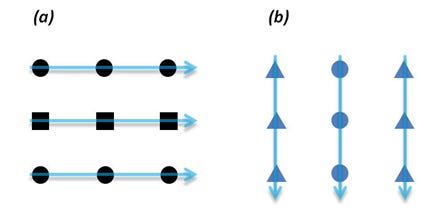
1. #### 相似性 (Similarity) — 我們的大腦會把相似的事物看成一體
如果數個元素具有類似的尺寸、體積、顏色,使用者會自動為它們建立起關聯。這是因為我們 的眼睛和大腦較容易將相似的事物組織在一起。如下圖所示,當一連串方塊和一連串的圓形並排時,我們會看成(a)一列方塊和兩列圓形 (b)一排圓形和兩排三角形。
2. #### 接近性 (Proximity) — 我們的大腦會把把靠近的事物看成一體
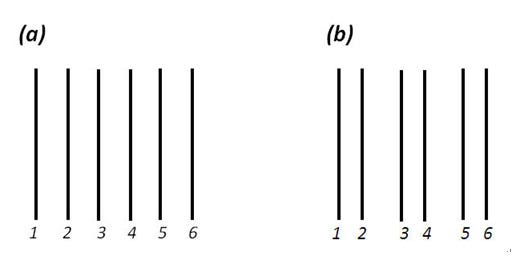
讓我們先來觀察(a),它是由6條直線均等分布,也因此我們的大腦很容易將六條直線視為一組。但很神奇地,若我們將(1)(2)靠近,(3)(4)靠近,(5)(6)靠近,是不是覺得直線們從一組變為三組呢?
範例 可以用來規劃 組元件

3. #### 連續性 (Continuity)-我們的大腦會把事物看成連續的形體
- 瀑流網站
http://wp-royal.com/hyper-x/ares/

- UI 參考
http://collectui.com/designs
https://html5up.net/
https://the12principles.tumblr.com/
https://www.invisionapp.com/inside-design/
# 網站
- Grid 套件
https://chrome.google.com/webstore/detail/design-grid-overlay/kmaadknbpdklpcommafmcboghdlopmbi?hl=zh-TW
樣板 https://colorlib.com/wp/templates/
選單主要功能
引導
標示所在位址
選單的位址
1. 正常選單
https://prtimes.co.jp/
http://outdoor.kwst.net/site/index.html
2. 左側選單
http://www.themezaa.com/html/pofo/home-creative-simple-portfolio.html
http://nakamurakenzai.jp/
3. hamburger 選單
https://bsc-int.co.jp/
http://www.themezaa.com/html/pofo/home-portfolio-minimal.html
https://www.hayama-honten.com/
https://demo2.madrasthemes.com/electro-wide/
https://www.glossom.co.jp/
https://www.globalmaritimeforum.org/
4. 特殊選單
https://www.unitrust.co.jp/
https://slowmuffin.jp/
https://whereispoland.com/intro
https://1964tokyo-vr.org/
https://nanameinc.jp/
5. 購物網站選單
https://flatsome3.uxthemes.com/
https://flatsome3.uxthemes.com/demos/shop-demos/classic-shop/
https://xstore.8theme.com/
https://demo2.madrasthemes.com/electro-wide/
https://preview.themeforest.net/item/woodmart-woocommerce-wordpress-theme/full_screen_preview/20264492?_ga=2.124851338.1479057777.1563464568-552096446.1562772068
6. 背景融合選單
https://www.66nord.com/
https://www.tombow.com/sp/abt/
7. 島嶼式選單
https://beartail.jp/
https://shiroki-clinic.com/index.html
8. 設計不良的選單
https://labandevideo.com/fr/
https://trippin.world/
# 網站參考
http://bm.s5-style.com/
https://uimovement.com/
http://collectui.com/designs
## Grid system psd
https://1440px.com/
http://gridcalculator.dk/
https://cssauthor.com/bootstrap-grid-system-psd-templates/
https://colorlib.com/wp/free-html-website-templates/
https://coreui.io/#live-preview
## 程式設計重點
## RWD響應式網站 vs AWD自適應式網站

## 流動性

## 相對單位

## 斷點設計

## 最大最小值設定

## 組件寫法

## 系統字型vs 網頁字體

## 點陣圖vs 向量圖

# 版本控制
### git 下載
https://git-scm.com/
1. 選擇好版本後,安裝一路按 “下一步” 按到底
2. 檢查是否有安裝成功
指令
```
git --version
```
## 版本控制介紹
透過文件控制(documentation control),能記錄任何工程專案內各個模組的改動歷程,並為每次改動編上序號。
## 版本控制主要功能
1. 每個專案完整長期的歷史修改紀錄(人,時間,內容)
2. 程式分支建立和合併
3. 多人協作開發同步和遠端備份
4. 開發流程建立

## github 註冊
https://github.com/
## 查詢識別資料
```
git config --list
```
## 設定識別資料
```
git config --global user.name "sexfat"
git config --global user.email "bryant6831@gmail.com"
```
## 專案版本控制
```
進入目錄\ git init
```
## git 原理

## git add 檔案名稱
加入暫存區 `git add index.html`
## git commit -m "註記"
加入本機數據庫 `git commit -m "第一次"`
## 查詢提交狀態
提交狀態 `git status`
# 以上完成第一次版本紀錄
## 常用linux 指令
|Mac | Windows | 說明 |
| -------- | -------- | -------- |
| cd | cd | 進入資料夾 |
| ls | dir | 查詢資料夾內容 |
| pwd | cd | 列出資料夾位址 |
| whoami | whoami | 查詢使用者是誰 |
| touch | *** | 建立檔案 |
| rm | del | 刪除檔案 |
| clear | cls | 清除終端機畫面 |
| mkdir | mkdir | 建立目錄 |
# sass
## 安裝node.js
https://nodejs.org/en/
`node -v`
`npm -v`
## 安裝sass
https://sass-lang.com/install
安裝指令`npm i -g sass`
`sass --version`
## vscode sass plugin
https://marketplace.visualstudio.com/items?itemName=ritwickdey.live-sass
```jsonld=
"liveSassCompile.settings.formats":[
// This is Default.
{
"format": "expanded",
"extensionName": ".css",
"savePath": null
},
// You can add more
{
"format": "compressed",
"extensionName": ".min.css",
"savePath": "/dist/css"
},
// More Complex
{
"format": "compressed",
"extensionName": ".min.css",
"savePath": "~/../css/"
}
]
```
## 變數
```css=
$fontsize : 20px;
$color : #333;
body {
font-size: $fontsize;
margin: 0;
padding: 20px;
color: $color;
font-family: $fontfamily;
.container {
width: 1200px;
margin: 0 auto;
header {
background-color: #333;
height: 300px;
.logo {
width: 300px;
height: 20px;
}
}
.content {
background-color: #fff;
}
footer {
height: 300px;
background-color: rgb(14, 190, 235);
}
}
}
```
### html
```htmlmixed=
<div class="wrapper">
<header>
<div class="logo">logo</div>
</header>
<div class="content">
</div>
<footer>
</footer>
</div>
```
# @mixin 函式
### 沒帶值
```css
@mixin margincenter {
margin: 0 auto;
width: 80%;
background-color: rgb(235, 10, 10);
}
.box01 {
@include margincenter();
}
.box2 {
@include margincenter();
}
.box3 {
@include margincenter();
}
```
### 傳多值
```css
mixin rect($width , $bgc) {
width: $width;
height: $width;
background-color: $bgc ;
}
.rect {
@include rect(180px , #00ffdd);
}
.rect300 {
@include rect(300px , #00ff2a);
}
.rect400 {
@include rect(120px , rgb(255, 0, 0))
}
```
### 跳脫字串#{}
```css
@mixin btn($classname , $width, $bgc) {
#{$classname} {
width: $width;
height: $width;
background-color: $bgc;
}
}
@include btn(".btns" , 300px , #333);
```
### 預設值 跟 null值 用法
```css
@mixin rect_01($width:400px , $height:300px) {
.rect01 {
width: $width;
height: $height;
}
}
@include rect_01(500px , 300px);
@mixin rect_01($width:400px , $height:null) {
.rect01 {
width: $width;
height: $height;
}
}
@include rect_01(500px);
```
```css
@mixin btn_module($btn_name,$width, $height, $bgc, $color, $border:null) {
.#{$btn_name} {
text-align: center;
width: $width;
height: $height;
line-height: $height;
background-color: $bgc;
color: $color;
cursor: pointer;
border: $border;
&:hover {
background-color: darken($bgc, 40%);
}
}
}
@include btn_module("btn_wide" ,300px, 40px , #f20 ,#333 )
@include btn_module("btn_big" ,500px, 50px , #00a2ff ,rgb(26, 26, 26) , 2px solid #333 )
```
### @mixin and @extend 差異
```css=
@mixin rect_01($width:400px, $height:300px) {
width: $width;
height: $height;
}
.green {
background-color: green;
}
.yellow {
background-color: yellow;
}
@mixin green(){
background-color: green;
}
.box-green {
@include rect_01();
// @extend .green;
@include green();
}
.box-yellow {
@include rect_01();
@extend .yellow;
}
```
### 占位符號
```
%green {
background-color: green;
}
.box-green {
@include rect_01();
@extend %green;
// @include green();
}
```
### 運算
```css=
$fontBasesize : 20px;
@mixin fontsize($fontBasesize) {
h1 {
font-size: $fontBasesize * 5
}
h2 {
font-size: $fontBasesize * 4.3
}
h3 {
font-size: $fontBasesize * 3.4
}
h4 {
font-size: $fontBasesize * 2.1
}
h5 {
font-size: $fontBasesize * 1.4
}
}
@include fontsize($fontBasesize);
```
### 判斷式
```css=
.box_area {
$margintop : 50px;
@if ($margintop <=20px) {
margin-top: $margintop
}@else {
margin-top: ($margintop/2)
}
}
```
### border-radius
```css=
@mixin btn_module($btn_name, $width, $height, $bgc, $color, $border:null ,$radius: 'false') {
.#{$btn_name} {
text-align: center;
width: $width;
height: $height;
line-height: $height;
background-color: $bgc;
@if ($radius == 'true') {
border-radius: 10px
}
color: $color;
cursor: pointer;
border: $border;
&:hover {
background-color: darken($bgc, 40%);
}
}
}
```
### @content
```css=
@mixin section($i, $bgc) {
.section_#{$i} {
width: 100vw;
height: 100vh;
background-color: $bgc;
@content
}
};
@include section('01' , #333){
h2 {
color: #00ff2a;
}
}
@include section('02' , rgb(252, 0, 0)){
h2 {
color: #00b7ff;
}
}
```
### @for 迴圈
```css=
@for $i from 1 through 10 {
.for_#{$i} {
margin-top: $i * 1px;
}
}
```
### grid
```css=
@mixin grid($num) {
@for $i from 1 through $num {
.col-#{$i} {
width: ($i / $num) * 100%
}
}
}
@media screen and (min-width: 768px) {
@include grid(12);
}
```
### RWD
```css=
//rwd 斷點
$large : 1024px;
$medium : 950px;
$small : 768px;
@mixin respond($breakpoint) {
@if $breakpoint=='desktop' {
@media all and (min-width: $large) {
@content;
}
}
@else if $breakpoint=='medium' {
@media all and (min-width: $medium) {
@content;
}
}
@else if $breakpoint=='small' {
@media all and (max-width: $small) {
@content;
}
}
}
```
### 呼叫
```css
@include respond(small) {
body {
font-size: 40px;
}
}
```
### @each
```css=
$list: a1,
a2 ,a3 ,a4;
@each $var in $list {
.img_#{$var} {
background-image: url('img/#{$var}.jpg');
width: 100px;
height: 30px;
}
}
```
### 使用函式如果變數是多值...
```css=
//$list 多值 ...
@mixin eachlist($list...) {
@each $var in $list {
.img_#{$var} {
background-image: url('img/#{$var}.jpg');
width: 100px;
height: 30px;
}
}
}
@include eachlist(a1,a2, sss);
```
### @content
```css=
@mixin eachlist($list...) {
@each $var in $list {
.img_#{$var} {
background-image: url('img/#{$var}.jpg');
width: 70px;
height: 30px;
cursor: pointer;
@content;
//@include margincenter();
}
}
}
@include eachlist(a1, a2) {
&:hover {
opacity: 80%;
}
}
```
```css=
$maps : (
h1 : 30px,
h2 : 26px,
h3 : 20px);
h1 {
font-size:map-get($maps ,h1);
}
h2 {
font-size:map-get($maps ,h2);
}
h3 {
font-size:map-get($maps ,h3);
}
```
### @each + map
```css=
$maps : (h1 : 30px,
h2 : 26px,
h3 : 20px,
h4 : 18px,
h5 : 16px
);
@each $title, $num in $maps {
#{$title} {
font-size: $num;
}
}
```
```css=
$color_theme : (
main_page : #fff,
aboutus_page : #333,
contact_page : #999,
product_page : #666
);
@each $themeName, $color in $color_theme {
.#{$themeName}_wrapper {
background-color:$color;
}
}
```
# theme
https://coreui.io/demo/#buttons/buttons.html
```css=
$btncolor : (primary : rgb(100, 195, 255),
secondary : rgb(227, 227, 227),
success : rgb(147, 249, 127),
);
@each $title,
$bgcolor in $btncolor {
.btn_#{$title} {
background-color: $bgcolor;
padding: 30px;
text-align: center;
color: #fff;
&:hover {
background-color:darken($bgcolor ,40);
}
}
}
```
# +@mixin
```css=
@mixin btn_theme($btncolor){
@each $title,$bgcolor in $btncolor {
.btn_#{$title} {
background-color: $bgcolor;
padding: 10px;
width: 120px;
font-size: 16px;
line-height: 30px;
border-radius: 5px;
text-align: center;
color: #fff;
cursor: pointer;
transition: .4s all;
&:hover {
background-color: darken($bgcolor, 40);
}
}
}
}
@include btn_theme (
(primary : rgb(255, 217, 2),
secondary : rgb(198, 198, 198),
success : rgb(147, 249, 127),
)
)
```
# gulp
講義
https://bryant-huang.gitbook.io/-1/
## gulp-cli
npm install gulp-cli -g
## 安裝gulp
npm install gulp --save-dev
## 安裝 gulp mini css
https://www.npmjs.com/package/gulp-clean-css
## 第一步安裝
`npm install gulp-clean-css --save-dev`
### gulpfile.js
```jsx=
var cleanCSS = require('gulp-clean-css');
gulp.task('minicss', function () {
gulp.src('dev/css/*.css')
.pipe(cleanCSS({compatibility: 'ie8'}))
.pipe(gulp.dest('dest/css/'));
})
```
執行`gulp minicss`
```htmlmixed=
<!DOCTYPE html>
<html lang="en">
<head>
<meta charset="UTF-8">
<meta name="viewport" content="width=device-width, initial-scale=1.0">
<meta http-equiv="X-UA-Compatible" content="ie=edge">
@@include('./template/metacss.html')
@@include('./template/title.html', {
"title": "關於我們"
})
</head>
<body>
@@include('./template/header.html')
</body>
</html>
```
# Tweenmax
網站:https://greensock.com/
### ease
https://greensock.com/docs/Easing
https://cdnjs.cloudflare.com/ajax/libs/gsap/2.1.3/TweenMax.min.js
```jsx=
TweenMax.to('.a1' ,1,{
x:100
})
```
## option
```jsx=
opacity:1,//透明度
scale:2,放大
x: 100,//x軸位移
y: 100,//y軸位移
width: 0,//寬度屬性
delay: .6, //延遲秒數
repeat: -1, //重複
rotation: 360,//旋轉
transformOrigin : 'left top',//旋轉中心點位址
repeatDelay: 2,//重複延遲時間
yoyo: true,//動畫順序1-2-2-1
//增加一組class
className: "+=box10",
//覆蓋掉本來的class
className: "box10"
```

# scrollmagic
https://scrollmagic.io/docs/index.html#usage
### CDN
https://cdnjs.com/libraries/ScrollMagic
```htmlmixed=
<script src="https://cdnjs.cloudflare.com/ajax/libs/ScrollMagic/2.0.7/ScrollMagic.min.js"></script>
<script src="https://cdnjs.cloudflare.com/ajax/libs/ScrollMagic/2.0.7/plugins/animation.gsap.min.js"></script>
<script src="https://cdnjs.cloudflare.com/ajax/libs/ScrollMagic/2.0.7/plugins/debug.addIndicators.min.js"></script>
```
https://github.com/sexfat/dd103/invitations
 Google Drive
Gist
Clipboard
Google Drive
Gist
Clipboard
 Sign in with Wallet






