# High Performance Computing
[](https://hackmd.io/SzLd0RM_T06bCwP4XsdW1g)
## An introduction to parallelisation and workflow automation by Alan O'Cais and Peter Steinbach
With this single day introduction, we want to take your HPC cluster skills to the next level. We plan to introduce automated pipelines and parallelization suited to our learners. We assume that learners are able to submit single jobs to a SLURM based scheduler and have a basic understanding of the UNIX shell and Python. For parallelization, we aim to provide a thorough introduction on how to approach implementing data parallelism in Python. For this, we will use shared memory parallelisation using multiprocessing and distributed memory parallelisation using message-passing-interface for a compute intensive problem. The day will be concluded with an introduction on how to automate pipelines on a cluster - which are typically found with data intensive tasks. All teaching will be performed hands-on on a custom cluster provided to the students.
## Some House keeping
- :handshake: please be advised that we conduct this lesson under [The Carpentries Code of Conduct](https://docs.carpentries.org/topic_folders/policies/code-of-conduct.html)
- :pencil: this is the shared document for collaboarative notes, please use it for notes, links, code snippets that support the content
## Agenda
| time | topic |
|:--------- |:------------------------------ |
| 9am | Meet and Greet, icebreakers |
| 9.15am | Jargon Busting Parallelisation |
| 9.45/10am | Meet the cluster |
| 10:15am | parallelisation for pi |
| ~12-1pm | lunch break |
| ~1pm-3pm | parallelisation for pi |
| ~3.30-5pm | automated workflows |
The timings above are estimates. If we finish earlier, we will do so.
## Ice breakers
### Share with us a mythical creature from the region where you grew up! Share what people attribute to this creature.
- Rübezahl: a magical giant that roams the mountains, helps the poor and punishes the greedy
- Lyho, a one-eyed flash eating entity that inhabits abandoned windmills and sleeps on a bed of bones
- Baba Jaga, basically a witch which has something against kids
- Кощей бессмертный, undead dude as the character to scare kids in fairytales
- Garuda, brave eagle-stands up to evil.
- Forest Witch: We lived near a forest which brought up the idea that a witch could live there like in the tale Hänsel und Gretel
- Nixenkind (mermaid child), a stone figure of a child next to the church door. The legend claims it's the child of a mermaid and a human that was thrown against the church in anger and turned to stone.
- Cu Chulainn, a big dog!
- Rat catcher of Hameln - supposedly kidnapped the children of the town Hameln (as kind of revenge to the people who didn't treat him nicely I guess ?!?)
- PG tips monkey
- dragon(different from western dragon)-control the rain of the area,represents high authority.
- Struwwelpeter: Boy who doesn't want to wash
- Wolpertinger, a mixture of multiple animals living in the forrest.
### Share with us the moment you conciously used a (personal) computer for the first time in your life! What did you use the computer for?
- playing CS1.6 at a lan party
- playing a game called "Wolkanoid" on py parent's PC.
- played FIFA 2000, maybe back in 2004, on a cousin's computer.
- playing minesweeper on my father's PC, but not understanding how it actually works
- Before getting my IBM-PC in 1985 (Intel 8088 without any x86 copro and 64kB RAM, no HDD and 360k Floppies), I won a BASIC handbook in a radio competition. As all my friends only had /other/ computers, I could not share games, but started try out all the BASIC language elements that I have read in the book to prove they are working as described.
- playing brick buster on my father's windows 3.11 486 machine
- we had a game called smelly mysteries on my paero
- I got a book from the library that had a program in BASIC and tried to input it into our BBC Micro (it was a computer game and did not work!)
- playing computer games, I remember things like Turrican
- school project, internet/word processor
- Playing a Winnie the Pooh game and Ms Pac Man on my family's Windows 98 PC when I was 3 or 4 years old.
- playing some games when I was in primary school
- helping my brother play lhx, a 386 game flying heli
- playing Moorhuhn, a game where you shoot chicken
# Introduction to Parallelisation
## Jargon Busting
This exercise will guide us through the first half of the day.
1. Split up in 3 teams!
2. We will send you into break-out rooms.
For each team: **Talk for three minutes on any terms, phrases, or ideas around parallelisation or HPC that you’ve come across and perhaps feel you should know better.** Collect these terms below.
A list of terms/phrases/ideas around parallelisation or HPC that you’ve come across and perhaps feel you should know better (Retain duplicates.):
- __Room 1:__
- OpenMPI : Open Source Library that implements message passing for hpc (MPI=Message Passing Interface)
- "Scaling" in the hpc context
- performance of parallel code/program on the computing cluster (HPC) when using resources on different scales
- slurm
- A job scheduler that organizes the execution of multiple computing jobs submitted to a HPC cluster
- Parallel file system
- read and write accessing by multiple nodes at the same time
- CPU/Core/Node
- A node refers to the physical box, i.e. cpu sockets with north/south switches connecting memory systems and extension cards, e.g. disks, nics, and accelerators .
- A cpu socket is the connector to these systems and the cpu cores, you plug in chips with multiple cpu cores. This creates a split in the cache memory space, hence the need for NUMA aware code.
- A cpu core is an independent computing with its own computing pipeline, logical units, and memory controller. Each cpu core will be able to service a number of cpu threads, each having an independent instruction stream but sharing the cores memory controller and other logical units.
- __Room 2:__
- Message passing:
- A system for communication between threads and processes on different nodes.
- *Distributed storage*: disks for storing data that are located in different nodes/computers and only connected by a network
- *CUDA*: a programming paradigm to use GPUs for scientific computing (published/support mostly by Nvidia)
- SLURM
- A job scheduler for shared computing on one or more machines in a "cluster".
- A job can be a script or program that a user wants done.
- Manages resources (i.e. RAM, available CPUs, disk space, GPUs, etc.)
- *Ansible*: a system for automated server/node configuration
- *I prefer Julia*
- __Room 3:__
- thread safety
- *POSIX threads*
- *mutexs*
- *semaphores*
- shared memory
- memory that can be simultaneously accessed by multiple programs to communicate without redundant copying of data
- to avoid race conditions and simultaneous writes to shared memory, techniques like mutex exist to flag that another process is wri
- ting to that memory chunk (depending on the program logic, these techniques are more or less the necessity)
- CPU utilization from many cluster nodes seems as one node
- Infiniband basically allows this to work performant
- Neihboring CPUs can access memory of other Servers/CPUs
- How to go beyond symmetrical multi-processing
- This is the same like stated above in other words.
- Maybe Edge/Fog Computing could be an answer to this question?
- *Frameworks for parallel computing on GPUs (coming from CPUs development), ideally python, C/C++ work, agree on Julia*
- the jist is, that it depends on your use case and the objects you like to work with (matrices, tensors, graphs, text, ...) - GPU or multi-core backends are prolific in many domains
- C/C++: concentrating on the more low level ones, the most prominent are OpenMP/OpenACC for CPU+GPU workloads (expect OS dependencies), CUB/thrust or plain CUDA for Nvidia GPUs, SYCL and friends (which is btw adopted by more and more parties in the industry), OpenCL (experiences an orphaned status)
- python: depends on what you want to do, there are high level libs like tensorly etc that focus on a domain (like tensor algebra), the more low level ones are numba, numpy/scipy and the ML-inspired libs like pytorch/jax/...
- julia has multi-core and GPU backends AFAIK
Things in *italics* we won't have time to touch today (unfortunately!).
3. We will send you into break-out rooms again.
For each team: **Identify common words from the list above as a starting point - spend 10 minutes working together to try to explain what the terms, phrases, or ideas on your list mean.** Note: use both each other and the internet as a resource. Identify the terms your groups were able to explain as well as those you are still struggling with.
## Notes
In this part of the course, we will go through HPC Carpentries' [hpc-parallel-novice](http://www.hpc-carpentry.org/hpc-parallel-novice/). In case anyone has to leave, this is the material we are teaching and to which you can return on your own in any case.
Note that this material is in alpha stage. In case you discover bugs/errors, feel free to let us know or submit an issue to the [repo](https://github.com/hpc-carpentry/hpc-parallel-novice/issues?q=is%3Aissue+is%3Aopen+sort%3Aupdated-desc).
### Access to `heibrids.learnhpc.eu`
```
ssh <username>@heibrids.learnhpc.eu
```
Reconvening at 10:10am!
* There was a question about frameworks to schedule python kernels. Alan mentioned that Dask might be a good way to help manage this, there was a recent workshop about Dask that might be interesting https://www.youtube.com/playlist?list=PLmhmpa4C4MzZ2_AUSg7Wod62uVwZdw4Rl
#### Preparing our environment
* Making sure we are all using the same Python, let's load a Python *module* (we can use `module avail` to see what modules are available), `/Python` lets you search for `Python` e.g.:
```
module load Python/3.8.2-GCCcore-9.3.0
```
* You will also need `numpy`, this comes from a different module. You can search for this python extension with `module spider numpy` (`module spider ...` is a search functionality that comes from our environment module tool, Lmod). It will tell you that you can find it in `SciPy-bundle/2020.03-foss-2020a-Python-3.8.2`
```
module load SciPy-bundle/2020.03-foss-2020a-Python-3.8.2
```
#### Calculating pi
* We write a simple Python code based on numpy that calculates pi
* You can find the code that Peter wrote in `/tmp/serial_pi.py` on the login node, take a copy of this if you need it:
```
cp /tmp/serial_pi.py ~/
```
* Let's time our code execution using the unix function `time`
```
time python ./serial_pi.py 50000000
```
* Install `line_profiler` python module using (`--user` installs it to the home directory and for the user only)
```
python -m pip install --user line_profiler
```
* some users experience trouble installing kernprof (please list them here and include what you invoked and what you get)
* input: as above
* output:
```
WARNING: The directory '/home/.../.cache/pip/http' or its parent directory is not owned by the current user and the cache has been disabled. Please check the permissions and owner of that directory. If executing pip with sudo, you may want sudo's -H flag.
WARNING: The directory '/home/.../.cache/pip' or its parent directory is not owned by the current user and caching wheels has been disabled. check the permissions and owner of that directory. If executing pip with sudo, you may want sudo's -H flag.
* one workaround is adding `--prefix=` to use `python -m pip install --user line_profiler --prefix=`
* this works: python -m pip install line_profiler --prefix=/home/<user_dir>/.local
* another solution was to run `export HOME=/home/<username>` and then install with `python -m pip install --user line_profiler`
* This will install an application `~/.local/bin/kernprof`. We can use `kernprof` to get a profile of our code
```
~/.local/bin/kernprof -l prof_serial.py 50000000
```
* We need to use the decorator `@profile` to profile different parts of the code. Starting from `main` and then narrowing our focus to find the hot spots (moving `@profile` from `main()` to `estimate_pi()` to...)
* We then can profile our program and see the results:
```
python -m line_profiler prof_serial_pi.py.lprof
```
###### Using `kernprof`
* Download a python script `count_lines.py` and profile it
```
wget http://www.hpc-carpentry.org/hpc-parallel-novice/downloads/count_lines.py
```
# Lunch break
## Please share with us something that you liked or you understood in the morning session :+1:
- Like the the little bit of theory and examples from real life. Very interactive and the speed of teaching is perfect !
- I very much liked that it was interactive. At one time I did not correctly copy the python code, and I could not listen to what you were saying, because I was trying to fix the code. After copying your script from tmp I was back on +
- very practical
- Nice hands-on sessions with simple, yet very enlighting examples +
- I like the taks we have been given, I think it is a good example.
- great entry level learning curve!
- emphasis on thinking about WHAT to paralellize
## Please share with us something that you didn't like, were confused about or want us to improve :-1:
- sometimes a little bit fast for me as I am not so familiar with unix command +
- i think the general pace could have been a bit faster, but as you announced, this will anyhow happen in the afternoon
- I am no so sure about the difference between kernprof an line_profile modules, maybe I missed it but a more explicit differentiation would be lovely!
- I'm not so sure about what the purpose of the 'Jargon Busting' was. ++
**We reconvene at 1pm!**
## Comparing numbers
### Estimate the expected Speed-up `S` for your version and for your timings to the actual speed-up that you encounter
To calculate the actual speed-up, measure the serial runtime and the parallel runtime for a fixed number of samples and cores, speed-up is then calculated by `t_serial / t_parallel`
- estimated speed-up S = 1.92 (p = .957, s=2), observed S = 1.7289
- estimated S = 2 and S = 4 (p = 1.0), observed S = 1.49 and S = 2.46
- estimated S=2, observed S=1.5
- estimated S=4 (p= 1., s=4) ; observed S=2.076
- estimated S=2; observed S= 1.4
## Message Passing Interface
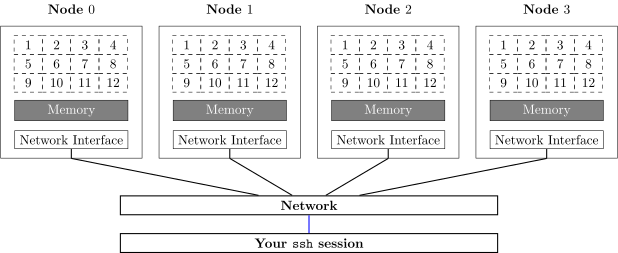
### Mental model of a cluster
### Check your environment
```
#check module setup
$ module list
```
If OpenMPI is not there
```
module load OpenMPI
```
```
#check if mpirun is available in my current shell setup
$ which mpirun
```
```
#running hostname on 4 different processes at the same time
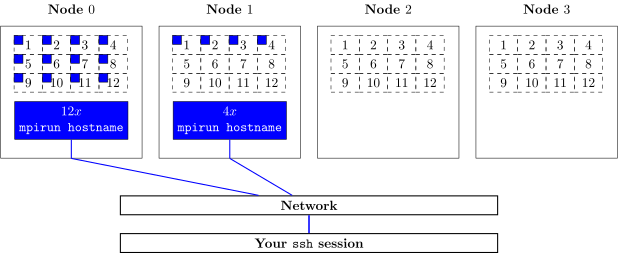
$ sbatch --wrap="mpirun -np 4 hostname" -n 4 -o hostname.out
```
This is what happens in our mental model when we extend across multiple nodes:
### Using `mpi4py`
Make sure `mpi4py` is in your environment:
```
module load SciPy-bundle/2020.03-foss-2020a-Python-3.8.2
```
(you could have used `module spider mpi4py` to search for `mpi4py`)
The Python script that Peter wrote can be copied from `/tmp/print_hostname.py`
```
cp /tmp/print_hostname.py ~/
```
### Parallelising our pi caluculation
Script that Peter wrote can be copied from `/tmp/mpi_pi.py`
```
cp /tmp/mpi_pi.py ~/
```
We should be careful about how we seed our random numbers, the seed should be unique per rank.
**break time: we reconvene at 2:50pm!**
# Introduction to Automating Workflows
Top500 list of HPC
https://top500.org/lists/top500/2020/11/
In this part of the course, we will go through the second half of HPC Carpentries' [hpc-python](http://www.hpc-carpentry.org/hpc-python/07-snakemake-intro/index.html) lesson. In case anyone has to leave, this is the material we are teaching and to which you can return on your own in any case.
other engines would be: https://nextflow.io/
To get started, please download the lesson tarball that contains the input data and much more.
http://www.hpc-carpentry.org/hpc-python/files/snakemake-lesson.tar.gz
```
$ wget http://www.hpc-carpentry.org/hpc-python/files/snakemake-lesson.tar.gz
# ...
$ tar xf snakemake-lesson.tar.gz
# optional
$ mv snakemake-lesson workflows
```
To try out the wordcount, if matplotlib is not loaded yet, use the `module load` command provided here:
```
$ python wordcount.py books/isles.txt isles.dat
$ head -5 isles.dat
$ module load matplotlib/3.2.1-foss-2020a-Python-3.8.2
$ python plotcount.py isles.dat ascii
$ python plotcount.py isles.dat isles.png
```
Executing the zipf test (to verify [Zipf's law](https://en.wikipedia.org/wiki/Zipf%27s_law)):
```
$ python zipf_test.py abyss.dat isles.dat
```
For snakemaking:
```
$ module load snakemake/5.32.2-foss-2020a-Python-3.8.2
$ snakemake --version
```
After generating a `'Snakemake'` file:
```
$ snakemake -j1
```
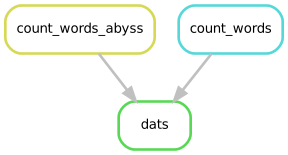
Visualising the `dats` rule:
For the `Snakefile` that Peter was working on:
```
cp /tmp/Snakefile .
```
- content on resource management with snakemake was skipped, for those interested consult the following page
http://www.hpc-carpentry.org/hpc-python/12-resources/index.html
To see the SLURM configuration that Peter created:
```
cp -r /tmp/slurm .
```
## Quality assurance questionaire
Please do us the favor and fill in this questionaire:
https://forms.gle/G1hNsmE1J8MWEebr6
## Reference Material
* Prerequisite material: https://carpentries-incubator.github.io/hpc-intro/
* http://www.hpc-carpentry.org/hpc-parallel-novice/
* http://www.hpc-carpentry.org/hpc-python/07-snakemake-intro/index.html (and after)
 Google Drive
Gist
Clipboard
Google Drive
Gist
Clipboard
 Sign in with Wallet






