+++
title = 'ZKML Framework Comparison'
date = 2024-01-09T09:27:40+00:00
draft = false
+++

## Introduction
Questions about comparative performance of ZKML approaches are frequent. In this article, we aim to shed light on this topic by benchmarking EZKL against [RISC0](https://www.risczero.com/) and [Orion](https://orion.gizatech.xyz/welcome/readme), two of the most popular alternative ZKML frameworks.
We have ommitted comparisons to Modulus Labs' Remainder prover as code for the prover is not public at the time of writing. We've also omitted Aleo, as their system doesn't have sufficient coverage of model architectures to be comparable to other frameworks (it currently only supports decision tree classifiers and small MLP neural nets).
We will explore the proving times for four types of models: linear regression, random forests, SVM classification and tree ensemble regressions.
> **Note**: You can generate the same benchmarking data on your machine with the [repo](https://github.com/zkonduit/zkml-framework-benchmarks). Although you will need to execute on a machine with atleast 16 gb of ram and it will take a few hours to complete.
EZKL outperforms RISC0 and Orion in proving times by a significant margin across all four models. On average EZKL is 65.88 times faster than RISC0 and 2.92 times faster than Orion. Furthermore, EZKL offers a more streamlined development experience with minimal context switching, contrasting sharply with the more segmented workflows of RISC0 and Orion, where the data science and zk aspects operate in different contexts.
We'll also look at the setup steps for each framework and the architectural differences that contribute to performance disparities.
## Model Accuracy
A critical challenge in benchmarking ZKML frameworks lies in ensuring that the accuracy of the models remains consistent. This is essential because often in ZKML circuits, there's a trade-off between model accuracy and proving costs. For RISC0, model inputs are ingested as raw f64 values, and RISC0 internally manages the quantization of these inputs. The outputs are then fixed as either u32 or i32, depending on the model. This inherent quantization can impact the precision of the computations and thus the final accuracy of the model.
In contrast, EZKL offers flexibility in managing the fixed-point scaling factor for converting floating points to fixed-point values for quantization. By fine-tuning this parameter, users can balance the trade-off between accuracy and proving efficiency, which is crucial for applications where precision is as important as computational efficiency.
Orion introduces another dimension to this challenge. Users can select the fixed-point tensor type for inputting data into their model. In our benchmarks, we selected a 2^4 (or 16 times) fixed-point scaling factor for Orion's tensor library. To ensure a level playing field, we matched this input scaling by setting the input scale parameter for EZKL to 4, corresponding to 2^4. This careful calibration across frameworks is vital to ensure that the accuracy of the models is comparable and that the benchmarks reflect real-world applicability.
However, it's important to note a limitation we encountered with Orion. Due to an issue with how cairo-run displays complex data, we were unable to accurately view the outputs of the Cairo benchmarks. This limitation has been recognized by the Giza team, and they are actively working on a [fix](https://github.com/lambdaclass/cairo-vm/issues/1564).
## Setup
We selected smaller machine learning models; ideally these would be supported by all three frameworks. This would require finding models supported by [SmartCore](https://smartcorelib.org/), exportable to the [ONNX](https://onnxruntime.ai/) format used by EZKL and Orion, and using only Ops currently supported by Orion (excluding convolution and random forests for example). SmartCore, a Rust-based library used for RISC0-based proving, also supports a limited array of models. Each model type must be explicitly defined in Rust, with detailed specifications for parameters and data types.
ONNX offers broader flexibility, accommodating virtually any model defined using the [PyTorch](https://pytorch.org/) or [Tensorflow](https://www.tensorflow.org) frameworks, and many [scikit-learn](https://scikit-learn.org/) models. This discrepancy necessitated a careful selection of models that are both representable in SmartCore's more rigid structure and exportable to ONNX. After evaluating the supported models, we chose Linear Regression, Decision Tree Classifier, and SVC (support vector machine classification) for our benchmarks.
> **Note**: Despite our best efforts to benchmark the performance of a random forest classifier model using Orion, we faced significant challenges. Our testing environment, equipped with a robust 1000GB of RAM and a 64-core CPU, seemed more than capable of handling this task. We followed the procedure outlined in the Orion documentation, using [this](https://colab.research.google.com/drive/1qem56rUKJcNongXsLZ16_869q8395prz#scrollTo=V3qGW_kfXudk) TreeEnsembleClassifier notebook to translate parameters from an ONNX TreeEnsembleClassifier model into Cairo code. However, we consistently encountered out-of-memory errors when attempting to run the code, even for relatively small random forest models. This issue suggests a potential memory leakage within the transpiler-generated Cairo program, though further investigation is needed to confirm and address the underlying cause.
### EZKL
Setting up and generating proofs with EZKL is remarkably straightforward, making it accessible even to those with minimal technical background. The process begins by opening one of our [example](https://github.com/zkonduit/ezkl/tree/main/examples/notebooks) Jupyter notebooks, which can be run locally or on Google Colab . Users simply progress through the notebook cells, following the instructions and executing the code. The journey from setup to obtaining proofs culminates in a 'proving cell', which when run, generates the zk proofs based on the predefined models and inputs. For the notebooks used for benchmarking, we simply forked the existing example notebooks making modification to the inputs to match the corresponding example SmartCore notebooks used by RISC0.
### RISC0
Getting started with RISC0 involves a more intricate setup. One must first is set up a new Risc0 zkVM project, which lays the foundation for a user's work. Unlike EZKL, RISC0 requires users to spin up a dedicated Rust-based Jupyter notebook server on their computer.
> **Note**: Rust notebooks are not supported by Google Colab
Once the environment is ready, the user must define both a [host](https://dev.risczero.com/api/zkvm/developer-guide/host-code-101) and [guest](https://dev.risczero.com/api/zkvm/developer-guide/guest-code-101) program for the zkVM. The host, essentially the machine running the zkVM, is an untrusted agent responsible for setting up the environment and managing inputs/outputs. In contrast, the guest code is what will be executed and proven within the zkVM. This distinction is crucial in understanding how RISC0 secures and verifies computations.
For benchmarking, the process diverges further. With EZKL, the 'tests/benchmark_tests.rs' file can directly execute the Jupyter notebooks to gather proving data. However, with RISC0, one must first navigate through the Jupyter notebook to generate the model and input data. Only then can you run the host program, which orchestrates the execution and generation of proofs.
### Orion
Transitioning to Orion introduces a different setup complexity. Initially, users must install [scarb](https://docs.swmansion.com/scarb/), the development toolchain for Cairo and Starknet. Similar to EZKL, the process begins in a Python environment within a Jupyter notebook, where the model and data are set up. Subsequently, the data is written to a 'Cairo' file in the form of a 'Tensor,' as defined by the Orion library. The next step involves reimplementing the model, initially built using numpy, into the Cairo language with the assistance of the Orion library. Finally, a 'cairo.inference' file is created for executing a forward pass of the model within the Cairo environment. This step is crucial as it times the execution, thereby determining the proving time.
## Performance Comparison
### Linear regressions
| Framework | Memory Usage (avg) | Memory Usage (std) | Proving Time (avg) | Proving Time (std) |
|-----------|--------------------|---------------------|--------------------|--------------------|
| ezkl | 19.38mb | 102.01mb | 0.000s | 0.009s |
| orion | 58.78mb | 98.03mb | 0.001s | 0.010s |
| riscZero | 1320.92mb | 695.96mb | 0.010s | 0.093s |
### Random forests
| Framework | Memory Usage (avg) | Memory Usage (std) | Proving Time (avg) | Proving Time (std) |
|-----------|--------------------|---------------------|--------------------|--------------------|
| ezkl | 382.78mb | 1358.36mb | 0.006s | 0.262s |
| riscZero | 10189.34mb | 209.00mb | 0.173s | 1.639s |
### Svm classifications
| Framework | Memory Usage (avg) | Memory Usage (std) | Proving Time (avg) | Proving Time (std) |
|-----------|--------------------|---------------------|--------------------|--------------------|
| ezkl | 23.69mb | 118.36mb | 0.000s | 0.027s |
| orion | 58.81mb | 84.08mb | 0.001s | 0.011s |
| riscZero | 5107.03mb | 830.08mb | 0.037s | 0.332s |
### Te regressions
| Framework | Memory Usage (avg) | Memory Usage (std) | Proving Time (avg) | Proving Time (std) |
|-----------|--------------------|---------------------|--------------------|--------------------|
| ezkl | 23.69mb | 89.45mb | 0.000s | 0.015s |
| orion | 67.59mb | 53.70mb | 0.001s | 0.056s |
| riscZero | 1320.77mb | 690.86mb | 0.010s | 0.062s |
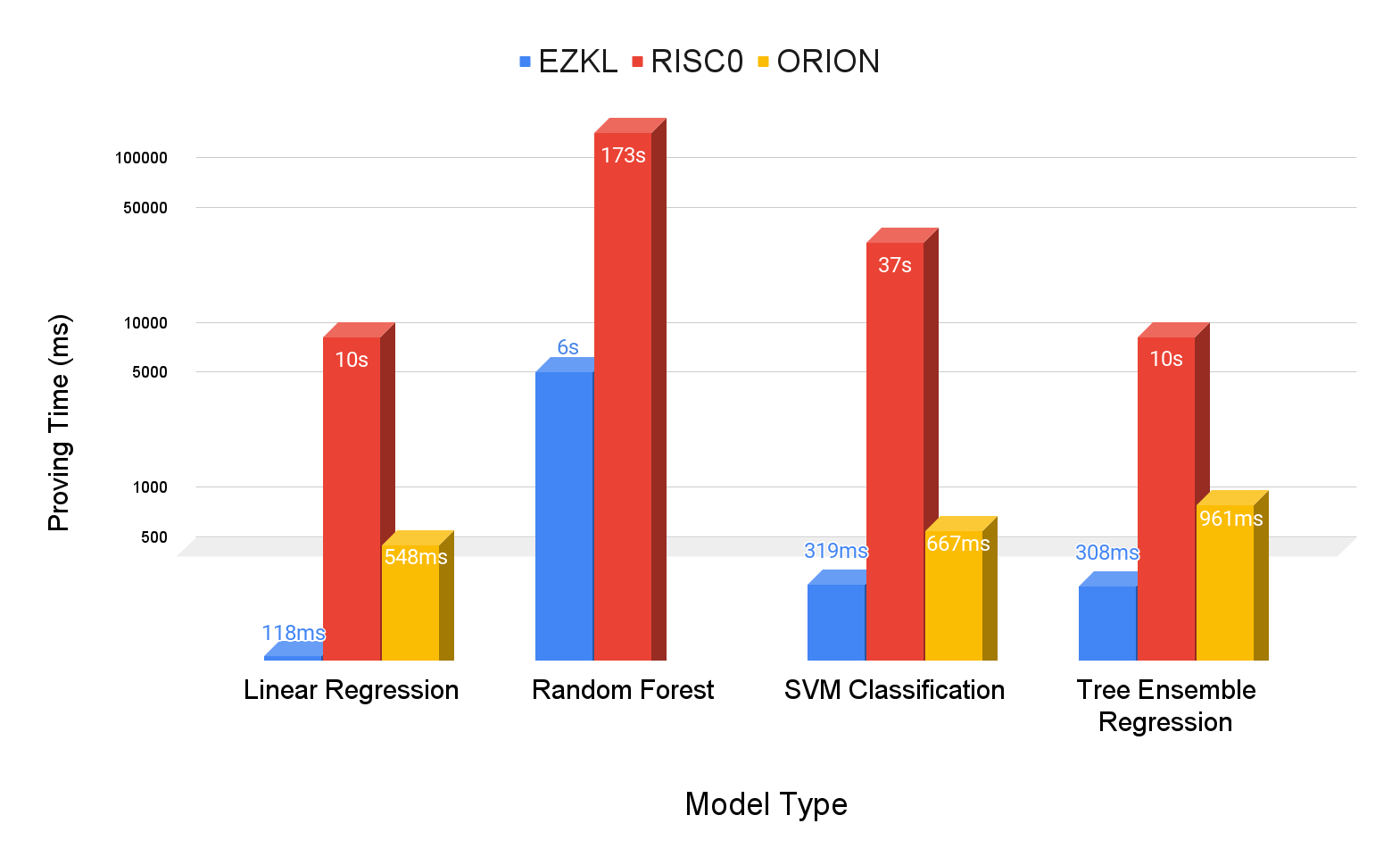

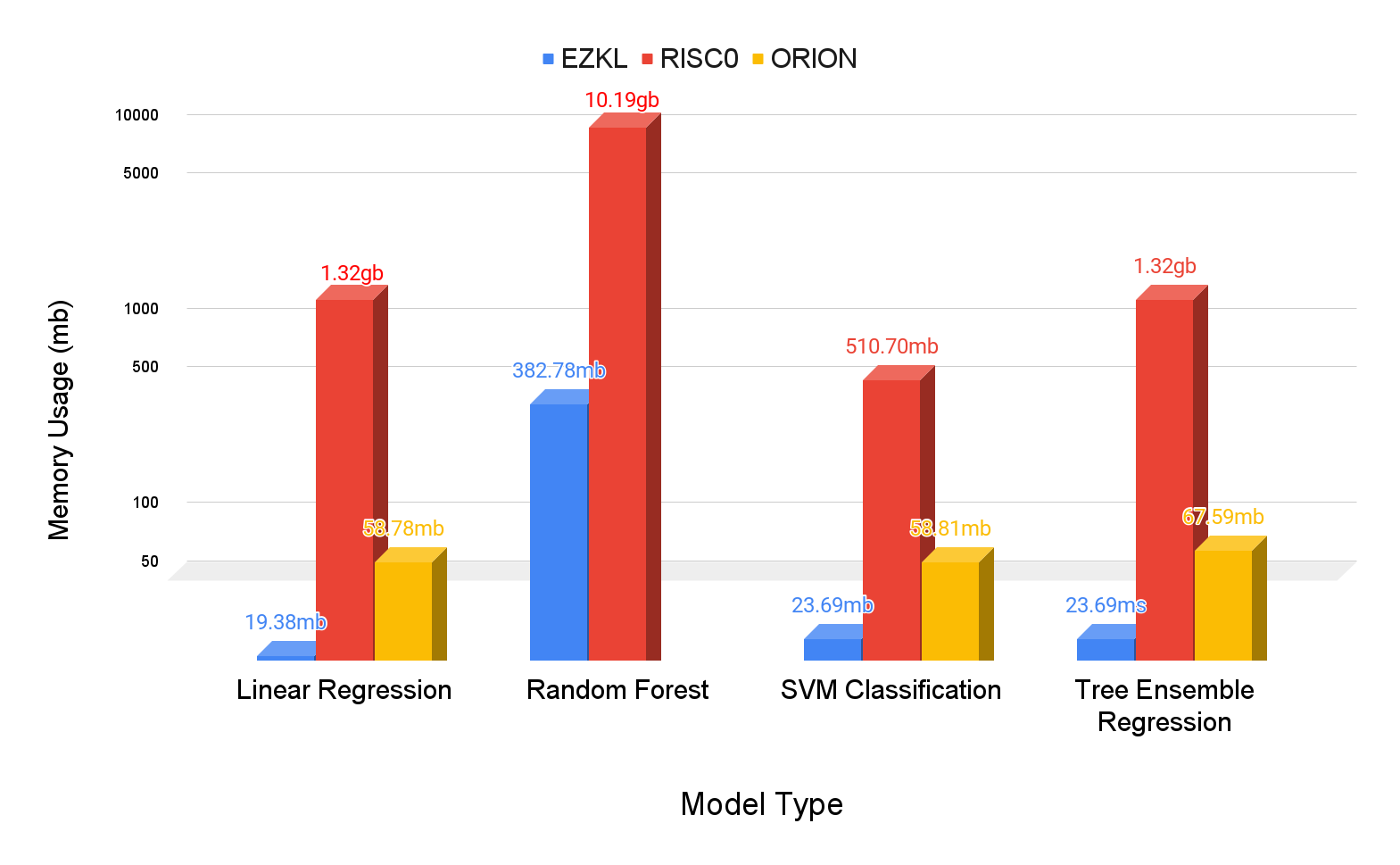
> **Note**: The benchmarks displayed here were conducted on a linux box equipped with 2× AMD Epyc 7302 - 16c/32t - 2.8 GHz/3.35 GHz RAM 1000 GB ECC 2400 MHz. You can view the raw data [here](https://github.com/zkonduit/zkml-framework-benchmarks/actions/runs/7609045070/job/20719442408#:~:text=12-,%7B,%7D,-Post%20Run%20actions)
## Analysis
EZKL demonstrates significant speed advantages over its competitors across all model types:
> **Note**: All of the data below you can generate for yourself by running this benchmarking analysis [notebook](https://github.com/zkonduit/zkml-framework-benchmarks/blob/main/notebooks/benchmark_analysis.ipynb) in the ZKML framework benchmarks repo
### Linear Regression Model Results
- **Proving Time Speedup**: EZKL demonstrates remarkable speed, being approximately 4.65 times faster than Orion and about 85.13 times faster than RISC0.
- **Memory Usage Reduction**: EZKL shows efficient memory usage, utilizing roughly 67.04% less memory compared to Orion and about 98.53% less than RISC0.
### Random Forest Model Results
- **Proving Time Speedup**: EZKL is about 28.14 times faster than RISC0.
- **Memory Usage Reduction**: EZKL's memory efficiency is notable, using about 96.24% less memory than RISC0.
### SVM Classification Model Results
- **Proving Time Speedup**: In this category, EZKL is approximately 2.09 times faster than Orion and about 117.59 times faster than RISC0.
- **Memory Usage Reduction**: Here again, EZKL leads with roughly 59.72% less memory usage compared to Orion and 99.54% less than RISC0.
### Tree Ensemble Regression Model Results
- **Proving Time Speedup**: EZKL is approximately 3.12 times faster than Orion and about 32.65 times faster than RISC0.
- **Memory Usage Reduction**: EZKL continues to outperform, using roughly 64.95% less memory compared to Orion and about 98.21% less than RISC0.
### Overall Mean Results
- **Proving Time Speedup**: On average, EZKL is approximately 2.92 times faster than Orion and about 65.88 times faster than RISC0.
- **Memory Usage Reduction**: EZKL consistently uses less memory, averaging roughly 63.95% less than Orion and about 98.13% less than RISC0.
## Reflections on the Results
So what explains EZKL's superior performance? Let's take a closer look at the underlying proof systems between the frameworks to find out why:
**Underlying Proof Systems:**
- **RISC0:** Implements a zk-STARK proof system using the FRI protocol, DEEP-ALI, and an HMAC-SHA-256 based PRF.
- **Orion:** Based on Cairo, which also uses a zk-STARK proof system.
- **EZKL:** Uses a proof system based on Halo2 and elliptic curve cryptography. It swaps the default Halo2 lookup for the [logUp lookup argument](https://www.youtube.com/watch?v=qv_5dF2_C4g).
The substantial performance efficiency of EZKL over RISC0 and Orion can be largely attributed to the use of lookup table arguments and efficient einsum operations in Halo2. By representing non-linearities as lookup tables in the circuit, EZKL significantly reduces proving costs. These pre-computed input-output pairs for each non-linearity mean that complex computations are bypassed during the proof generation, leading to faster proving times.
Additionally, the fact that EZKL is not a virtual machine (VM), unlike Cairo and RISC0, contributes to its efficiency. VM-based systems inherently introduce additional proving overhead because they cannot "see" and optimize higher-level operations. For example, applying 1000 nonlinearities, one after another, requires 1000 computations in a zkVM, whereas in EZKL the cost would be the same as if there was only one nonlinearity. In contrast, EZKL's domain-optimized and high-level approach to handling models and proofs enables it to compile circuits that are as fast as if they were hand-written.
## Conclusion
The benchmark results show EZKL's significant performance advantages over RISC0 and Orion, in terms of proving times across various models. The underlying technologies, particularly the use efficient logUP and einsum arguments and the streamlined, non-VM approach, are key contributors to this efficiency. This makes EZKL an attractive option for applications where quick proof generation is paramount. EZKL can also handle a much wider variety of models.
Beyond raw performance, EZKL minimizes the need for context switching. Our library enables users to execute the entire data science and zero-knowledge (zk) pipeline within a single Jupyter notebook. This seamless transition from model training to proving to verification is not just a matter of convenience; it represents a significant reduction in the cognitive load and technical barriers typically involved in such processes. Users can focus more on the analysis and less on the mechanics of transitioning between different stages of their workflow.
In contrast, frameworks like RISC0 and Orion necessitate a considerable shift from the traditional data science workflow to the zk-specific tasks. This shift is not just conceptual but also practical. While the data science components are handled within a Jupyter notebook, the zk aspects are managed in a distinct Domain-Specific Language (DSL) environment outside the notebook. This bifurcation of workflow creates a disjointed experience, requiring users to mentally and technically switch between different environments and toolsets. For those who prefer to run the entire process within a notebook, RISC0 and Orion require the execution of a subprocess within a cell to initiate the necessary CLI command for proving.
Therefore, EZKL's streamlined approach, which integrates the full data science and zk pipeline in a familiar and cohesive environment, stands out not just for its performance but also for significantly enhancing the overall developer experience. This ease of use, combined with superior performance, positions EZKL as the clear choice for developers and researchers building Zero-Knowledge Machine Learning technology.
 Google Drive
Gist
Clipboard
Google Drive
Gist
Clipboard
 Sign in with Wallet






