# 拯救機概
## 大家應該知道怎麼用吧 不懂的人看這裡 [Hackmd語法大全](https://hackmd.io/@eMP9zQQ0Qt6I8Uqp2Vqy6w/SyiOheL5N/%2FBVqowKshRH246Q7UDyodFA?type=book)
[數學的打法](https://math.meta.stackexchange.com/questions/5020/mathjax-basic-tutorial-and-quick-reference)
目錄
===
# Ch8 基礎演算法
:::success
概念: 提出有效率解決問題的一種方式
定義: 有其先後順序、明確步驟、產生結果、有限時間內結束
演算法的三種結構:循序、選擇、重複
:::
UML 統一塑模語言,以圖畫方式表示 ex:案例圖、狀態圖
persudocode 虛擬程式碼,一種代碼的表示方式,但只有大略簡寫而已
----------
### (一) 排序
1. 選擇排序 Seletion sort
[圖示化影片](https://youtu.be/g-PGLbMth_g?si=YTmV4qJdF0njJdlf)
程式碼範例:
```python!
def selection_sort(deta):
for i in range(len(deta)- 1):
for j in range(i,len(deta)):
m = max(deta)+1#表示很大的值
if deta[j] < m:
m = deta[j]
index = j
deta[i],deta[index] = deta[index],deta[i]
return deta
nums = [2,1,3,5,4]
selection_sort(nums)
```
2. 泡沫排序 Bubble sort
[圖示化影片](https://youtu.be/xli_FI7CuzA?si=_Qtosz-MGNGdKhcs)
程式碼範例:
```python!
def bubble_sort(nums):
n = len(nums)
for i in range (n-1):
for j in range (n-i-1):
if nums[j] > nums[j+1]:
temp = nums[j]
nums[j] = nums[j+1]
nums[j+1] = temp
nums = [2,1,3,5,4]
bubble_sort(nums)
```
3. 插入排序 Insertion sort
[圖示化影片](https://www.youtube.com/watch?v=JU767SDMDvA)
程式碼範例:
```python!
def insertion_sort(nums):
n = len(nums)
for i in range(1,n):
for j in range (i,0,-1):
if nums[j] < numd[j-1]:
nums[i],nums[i-1] = nums[i-1],num[i]
else:
break
return nums
nums = [2,1,3,5,4]
insertion_sort(nums)
#以上排序後都為[1,2,3,4,5]
```
### (二) 搜尋
:::info
Problem:
$$
如何在五個數中找到最大or最小整數,那有10^9個數呢?
$$
#hint 資料結構 Array(在python中稱為list)
:::
1. 循序搜尋(暴力法) Sequential search
* 最大的數
```python!
n = [1,2,3,4,5]
ans = -1 #答案
for i in n:
if i>ans:
ans = i
```
* 最小的數
```python!
n = [1,2,3,4,5]
ans = 10**10 #答案
for i in n:
if i>ans:
ans = i
```
* 懶人法
```python!
n = [1,2,3,4,5]
min_ans = min(n)
max_ans = max(n)
```
:::info
練習
請在2秒內建立一個1000000以內的質數表,並計算出有幾個質數
hint [埃拉托斯特尼篩法](https://zh.wikipedia.org/zh-tw/%E5%9F%83%E6%8B%89%E6%89%98%E6%96%AF%E7%89%B9%E5%B0%BC%E7%AD%9B%E6%B3%95)
:::
2. 二分搜尋法 Binary search
:::warning
當你的資料量很大怎麼辦? 這時候需要二分搜尋法幫你找問題了
注意! 只有在資料經過排序之後才能夠使用
:::
```python!
n=[1,2,3,4,5] #需先排序
left=0 #最左項
right=len(n)-1 #最右項
while left<=right:
mid=(left+right)//2
#切一半後判斷
if n[mid]>target:
right=mid-1 #超過取左邊串
elif n[mid]<target:
left=mid+1 #未達取右邊串
elif n[mid]==target:#找到目標
return mid
```
$$
二分搜速度是非常快的,當你有n=10^{10}個資料的時候,大概只需要跑\log_2 n次迴圈就可以找到答案。
$$
### (三) 遞迴 Recursion
定義: 演算法中出現演算法本身(反之,為反覆式)白話文:重複呼叫自己
優點: 程式精簡
缺點: 速度慢,不容易實作,需要透過大量練習才能掌握
:::warning
使用python實作時只能遞迴3000次,超過記憶體會爆
解決方法:
import 標準函式庫sys 中的setrecursionlimit
```python!
import sys
sys.setrecursionlimit(100000)#可自由增加遞迴次數,太大扔會造成memory error
```
:::
以自訂義函式實作
ex: 1+2+3+....+n-1
```python!
def g(n):
if n<0:
return 0
return g(n-1)+n
#g(10) = 55
```
**Tower of Hanoi(河內塔)**
* Problem: move n disks from A to C
* Rules
* Move one disk at a time
* Cannot place a larger disk onto a smaller disk
簡易規則:小盤子一定要在大盤子上面,一次只能移動一個

:::info
* How to move n disks?
* How many moves in total?
$$2^{n-1}+1次$$
:::
* To move n disks from A to C (for n > 1):
1. 移動 Disk 1~n-1 form A to B
2. 移動 Disk n from A to C
3. 移動 Disk 1~n-1 from B to C
```python!
#sudo code
Hanoi(n, src, dest, spare)
if n == 1 # base case
Move disk from src to dest
else # recursive case
Hanoi(n-1, src, spare, dest)
Move disk from src to dest
Hanoi(n-1, spare, dest, src)
```
實作
```python!
def Hoi(n,a,b,c):
if n ==0:
print(f"desk {n} from {a} to {c}")
else:
Hoi(n-1,a,c,b)
print(f"desk {n} from {a} to {c}")
Hoi(n-1,b,a,c)
Hoi(10,"a","b","c")
```
**GCD(輾轉相除法)**
```python!
#a>b
def GCD(a,b):
if a%b==0 :
return(b)
else:
return(GCD(b,a%b))
```
**費氏數列(Fibonacci)**
```python!
def Fib(n):
if n==1 or n==2:
return(1)
else:
return(Fib(n-1)+Fib(n-2))
```

### 外傳 stack
#### ps.很佔記憶體
--------------------------------------------------------------
# Ch9 程式語言
### 演化
1. 機器語言(0與1位元樣式所構成)
2. 組合語言Assembly(符號語言symbolic)
:::info
* 二進位碼->指令,記憶體位址->符號or助憶碼
* 組譯器(assemlber)程式:符號碼轉機器碼
:::
3. 高階語言
依解決問題的方法分為4種:程序式、物件導向式、函數式、宣告式
- 程序式 : C, Fortran, COBL, BASIC, Pascal, Ada
- 物件導向式 : c++, c#, JAVA, python, Visual Basic, Smalltalk
- 函數式 : LISP, Scheme
- 宣告式 : prolog
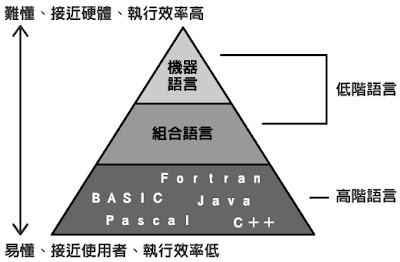
~~外傳 [x86 compiler](https://onecompiler.com/assembly/3w22x43ev)~~
### 高階程式語言
1. 為了解決難以讀懂程式碼的問題
2. 通常為直譯或編譯方式轉譯成機器語言
### 轉譯
1. 編譯 Compilation:整個轉譯
2. 直譯 Interpretation:逐行轉譯,有兩種
:::info
第一種:Java前的,逐行轉譯為對應電腦的機器語言,並立即執行
第二種:Java開始,先編譯成位元組碼,並於有 JVM 的電腦執行
:::
### 原始程式的轉譯處理

1. 語彙分析器(lexical analyzer):讀入符號,並產生符記(tokens)
2. 語法分析器(syntax analyzer):將符記剖析為指令
3. 語意分析器(semantic analyzer):檢查產生的指令,確保語意不會產生混淆
5. 程式碼產生器(code generator):將其轉換為一組機器語言所構成的指令,以供電腦執行
### 物件導向(使用python實作)
#### 範例 建立使用者跟使用者id
```python!
class User:
# Attribute
def __init__(self,user_id,username):
self.id = user_id
self.name = username
self.follower = 0 #Attribute 可以預設,也可以內建
self.following = 0
#Method
#Method always need to have self parameter
def follow(self,user):
user.follower += 1
self.following += 1
user_1 = User("11211109","daidai0000")
#print(user_1.id,user_1.name)
#print(user_1.follwer)
user_2 = User("777","taro")
user_1.follow(user_2)
print(user_1.follower)
print(user_1.following)
print(user_2.follower)
print(user_2.following)
# 可以拿去執行看看
```
:::danger
##### CH10老師跳過
:::
# CH11 資料結構Data Structure
## 函式中資料的傳遞 - 傳值,傳址,傳參考
:::info
* 引數(argument)~~又稱實際參數(實參,actual parameter)~~
是主程式用於「呼叫函式」,也就是「執行函式」時的「輸入值」
* 函式內的參數(parameter)~~又稱形式參數(形參,formal parameter)~~
是用於「函式的宣告」,也就是定義函式
:::
1. 傳值(pass by value):把值「複製」到函式中


2. 傳址(pass by address):傳遞記憶體位址


* ##### 事實上pass by address也是在傳值,只不過這個值剛好是記憶體位址(指標)
3. 傳參考(pass by reference):類似傳址,但不會分配記憶體給參數x、y,所需記憶體較少

4. 二維陣列到多維陣列
5. struct
* 特性
* first in first out
* 像疊積木一樣一層一層
* 經典範例 (請看CH8 合內塔演算法)
*
7. link-list(鏈結串列)
:::info
鏈結串列(Linked List)常用來處理相同類型資料,在不連續的記憶體位置,以隨機的方式儲存,由於不用事先宣告一塊連續記憶體空間,所以較不會造成記憶體的浪費。
由許多節點組成,每個節點包含**資料欄**與**指標欄**,指標欄會指向下一個資料所在的記憶體位置。因此再追加或刪除資料相當方便,因為只需要更動指標的指向,但在讀取資料就會較費時,因為必須從串列的頭開始尋找。
:::

* 實作
:::danger
以上由chat-gpt生成,可能果會跟預期結果不太一樣
(基本上還是看得懂,好像也沒差)
:::
```python!
class Node:
def __init__(self, data):
self.data = data
self.next_node = None
class LinkedList:
def __init__(self):
self.head = None
def is_empty(self):
return self.head is None
def append(self, data):
new_node = Node(data)
if self.is_empty():
self.head = new_node
else:
current_node = self.head
while current_node.next_node:
current_node = current_node.next_node
current_node.next_node = new_node
def delete(LinkedList, current_node, pre):
if pre == None:
# 如果 pre 為 None,表示要刪除的是鏈結串列的第一個節點
# 將 LinkedList 更新為 cur 節點的下一個節點,即將頭指針指向下一個節點
LinkedList = current_node.next_node
else:
# 如果 pre 不為 None,表示要刪除的是中間或尾部的節點
# 將 pre 節點的 next 指向 cur 節點的下一個節點,即跳過 cur 節點
pre.next_node = cur.next_node
return LinkedList
def display(self):
current_node = self.head
while current_node:
print(current_node.data, end=" -> ")
current_node = current_node.next_node
print("None")
# Create a linked list
my_linked_list = LinkedList()
# Append elements to the linked list
my_linked_list.append(1)
my_linked_list.append(2)
my_linked_list.append(3)
# Display the linked list
my_linked_list.display()
```
:::info
執行結果 1 -> 2 -> 3 -> None
:::
-----------------------------------------------
# Ch12 抽象資料型態ADT
:::warning
複雜抽象資料型態:
* 串列:list
* 堆疊:stack,後進先出(Last In First Out LIFO)
* 佇列:quene,先進先出(First In First Out FIFO)
:::
## Stack 堆疊
1. 限制性的線性串列
2. 增加和移出都在頂端(先進後出)
3. 資料的存取必須符合LIFO
### 運算格式
* stack(stackName):建立空堆疊
* push(stackName,deta_whichin):在頂端推入元素
* pop(stackName,deta_whichdelete):刪除頂端元素,可被使用或被丟棄
* empty(stackName):檢查堆疊是否為空的
### 應用
* 反轉資料:完整建立堆疊後再pop輸出
* 配對資料:
#### stack 經典應用例子一
以作業十的「1,2,3」數字序列為例,要輸出以下數字的步驟為:
* 123: push 1, pop, push 2, pop, push 3, pop
* 132: push 1, pop, push 2, push 3, pop ,pop
* 213: push 1, push 2, pop, pop, push 3, pop
* 231: push 1, push 2, pop, push 3, pop, pop
* 312: 無法產生
* 321: push 1, push 2, push 3,pop, pop, pop
括號匹配問題 現在有一堆左括號跟右括號,現在你要判斷他能不能符合數學上的表示方式
simpal input
```
(((())))))
((((()))))
((((((((())))))))
```
simpal ouput
```
no
yes
no
```
## Queue 佇列
1. 先進先出 FIFO:
輸入順序:123 輸出順序:123

## 樹上演算法
:::warning
nodes(節點):根、樹葉、內部節點
root(根):最上面沒有進入弧線的節點
leaves(樹葉):最下方的節點
internal nodes(內部節點):如其名,是在中間的節點
arcs(弧線):連結節點的線
path(路徑):一連串弧線
child(子):從一個已知節點可以直接存取的節點
parent(父):可以直接存取子的節點
siblings(兄弟):有共同的父的節點
descendents(後代):全部可被同個節點到達的節點
ancestor(祖先):全部可到達同個節點的節點
subtree(子樹):一個節點的所有子和每個子的後代,一個子和他的後代算一個子樹
:::
### BST(二元樹)
##### DFS(深度優先)
前序 (preorder), 中序 (inorder) 和後序 (postorder) 是指遍歷二元樹 (binary tree) 時,父節點相對於左右節點的順序。
假設二元樹如下:
4 #4為根
/ \
2 6 #2、6為內部節點
/ \ / \ #123為左子樹,246為右子樹
1 3 5 7 #1、3、5、7為樹葉
則三種遍歷的順序依序為:
* 前序 (preorder): 中 -> 左 -> 右,4213657
* 中序 (inorder): 左 -> 中 -> 右,1234567
* 後序 (postorder): 左 -> 右 -> 中,1325764
:::danger
對二元搜尋樹 (binary search tree, BST) 做 inorder traversal 就是由小到大依序遍歷。
:::
例子
```python!
stack=[reference link]
rpn=['1','2','3','*','+']
for i in range (len(rpn)):
if rpn[i] not in {'+','-','*','/'}:
node=Node(rpn[i])
stack.append(node)
else:
node=Node(rpn[i])
node.right=stack.pop()
node.left=stack.pop()
stack.append(node)
bet=stack,pop()
```
##### BFS(Breadth-First 廣度優先)
4 #4為根
/ \
2 6 #2、6為內部節點
/ \ / \ #123為左子樹,246為右子樹
1 3 5 7 #1、3、5、7為樹葉
順序:4->2->6->1->3->5->7
#### GRAPH(圖)
#### 四則運算(應用)
利用二元樹概念處理運算問題
ex: 1+2*3 => 1 2 3 * + (輸入數字,遇符號先計算後兩者數字
---------------------------------------------------
# CH8 資訊安全(全華那本
## 基本原則 CIA
資料機密性(Confidenriality):防治未經授權第三者
資料完整性(Integrity):避免遭到竄改
系統可用性(Availability):確保資料、系統可即時提取
不可否認性(Non-Reputation):提供訊息傳送方與接受方的交易證明
## 其他需求
信賴性(authenticity):資料本身或來源可被驗證
究責性(accounability):確保資料的不可否認性,提供可靠的紀錄
## 資料機密性:對稱式加密 vs. 非對稱式加密
:::warning
密碼法(crypotography)
加密法(ciphers)
加密(encryption)
解密(decryption)
明文(plaintext)
密文(ciphertext)
:::
### 對稱式金鑰密碼加密法(Symmteric-key ciphers,密鑰加密法):
:::info
加解密時使用相同密鑰
:::
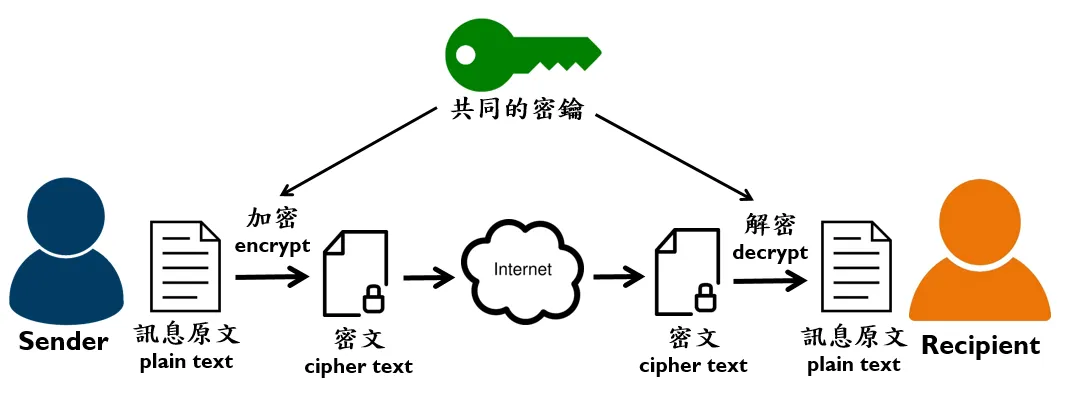
#### 方法
##### 傳統對稱式:
1. 替換式加密:用一個符號替換另一個符號
* 移位密碼(加密時將每個符號往前後移N格) ex:凱薩加密法
* 替換密碼(製作一個轉換表) ex:[跳舞小人密碼](https://codepen.io/anie116/full/jdzvJK)
2. 區塊式加密:多個等長的模組(block),各區塊各自加解密
* 事先約定一個短字串當作秘密ex:ENIGMA
* XOR運算(先轉換二進位利用XOR進行加密,再轉ACSII code)
IV加密
IV初始向量
運作方式
搭配區塊式
會在內容中添入文本(增加複雜度)
#### 優點
簡單好用,是一個有效率又省錢的方案
#### 缺點
易破解(被攔截到金鑰)
### 非對稱式金鑰密碼加密法(Asymmetric-key ciphers,公鑰密碼加密法):
:::info
兩組密碼:一組加密,一組解密
公鑰(Public key):公開(大家都知道)
私鑰(Private key):隱藏(個人)
:::
常見應用
1. 加密
2. 數位簽章Digital Signature(私鑰簽章,公鑰驗證)
3. 密碼交換
:::danger
加解密的鑰匙要是完整一對(pair)的,所以可以是公鑰加密私鑰解密,也可以是私鑰加密公鑰解密,沒有一定。
:::
ex:RSA, Diffie-Hellman
#### 基本原理

[圖片來源](https://medium.com/@RiverChan/%E5%9F%BA%E7%A4%8E%E5%AF%86%E7%A2%BC%E5%AD%B8-%E5%B0%8D%E7%A8%B1%E5%BC%8F%E8%88%87%E9%9D%9E%E5%B0%8D%E7%A8%B1%E5%BC%8F%E5%8A%A0%E5%AF%86%E6%8A%80%E8%A1%93-de25fd5fa537)
使用數學上的難解問題(以下為例子)
離散:給定二數$x$和$y$
例子:給$x^y$,求$x$、$y$
因數分解:給定二個質數$p$和$q$
例子:給定$pq$,求$p$、$q$
### RSA加密演算法
#### 優點
1. 可配合對稱式加密運算
#### 缺點
1. 大量運算
2. 耗時特長
假設甲乙加換密碼
兩者有著共同密碼
第三者難以計算出(目前)
例子:
甲密碼為$x^a$除以$q$的餘數,乙密碼為$x^b$除以$q$的餘數
共同密碼:$x^{a+b}$除以$q$的餘數
## 資料完整性
驗證密碼是否被修改
例子:雜湊函數
### 雜湊函數(HashTable Function)
任意長度字串運算後,得到固定長度的雜湊函數
#### 應用
1. 驗證資料傳輸是否無誤
2. 訊息驗證碼(MAC)
#### 優點
1. 高敏感度(微小改動,結果不同)
2. 單向函數(無法回推)
3. 不易發生碰撞(不同輸入,不易得到相同結果)
### HMAC基本概念
傳送端和接受端共享一組密碼(驗證來源,目的地正確性)
實際配合其他參數,避免被不同類型的網路攻擊
### 數位簽章
確認資料是來自特定使用者
特定使用者,使用其私要進行簽章
### PGP加密(雙層加密)
利用會議金鑰進行加密
會議金鑰使用公開金鑰加密
### PGD解密
先用公鑰解密,在使用會議金鑰解密出密文
### 公開金鑰管理
集中式管理
PKI
CA(憑證授權中心)認證公鑰
分散式管理:Web of Trust
故障偵測機制:常用<心跳機制>
## 8-5網路攻擊
目的
未經許可的存取
中斷服務氣正常運作
<駭客>
hacker:專精某領域的專家
 Google Drive
Gist
Clipboard
Google Drive
Gist
Clipboard
 Sign in with Wallet






