Sameer Gupta
    • Create new note
    • Create a note from template
      • Sharing URL Link copied
      • /edit
      • View mode
        • Edit mode
        • View mode
        • Book mode
        • Slide mode
        Edit mode View mode Book mode Slide mode
      • Customize slides
      • Note Permission
      • Read
        • Only me
        • Signed-in users
        • Everyone
        Only me Signed-in users Everyone
      • Write
        • Only me
        • Signed-in users
        • Everyone
        Only me Signed-in users Everyone
      • Engagement control Commenting, Suggest edit, Emoji Reply
    • Invite by email
      Invitee

      This note has no invitees

    • Publish Note

      Share your work with the world Congratulations! 🎉 Your note is out in the world Publish Note

      Your note will be visible on your profile and discoverable by anyone.
      Your note is now live.
      This note is visible on your profile and discoverable online.
      Everyone on the web can find and read all notes of this public team.
      See published notes
      Unpublish note
      Please check the box to agree to the Community Guidelines.
      View profile
    • Commenting
      Permission
      Disabled Forbidden Owners Signed-in users Everyone
    • Enable
    • Permission
      • Forbidden
      • Owners
      • Signed-in users
      • Everyone
    • Suggest edit
      Permission
      Disabled Forbidden Owners Signed-in users Everyone
    • Enable
    • Permission
      • Forbidden
      • Owners
      • Signed-in users
    • Emoji Reply
    • Enable
    • Versions and GitHub Sync
    • Note settings
    • Note Insights New
    • Engagement control
    • Make a copy
    • Transfer ownership
    • Delete this note
    • Save as template
    • Insert from template
    • Import from
      • Dropbox
      • Google Drive
      • Gist
      • Clipboard
    • Export to
      • Dropbox
      • Google Drive
      • Gist
    • Download
      • Markdown
      • HTML
      • Raw HTML
Menu Note settings Note Insights Versions and GitHub Sync Sharing URL Create Help
Create Create new note Create a note from template
Menu
Options
Engagement control Make a copy Transfer ownership Delete this note
Import from
Dropbox Google Drive Gist Clipboard
Export to
Dropbox Google Drive Gist
Download
Markdown HTML Raw HTML
Back
Sharing URL Link copied
/edit
View mode
  • Edit mode
  • View mode
  • Book mode
  • Slide mode
Edit mode View mode Book mode Slide mode
Customize slides
Note Permission
Read
Only me
  • Only me
  • Signed-in users
  • Everyone
Only me Signed-in users Everyone
Write
Only me
  • Only me
  • Signed-in users
  • Everyone
Only me Signed-in users Everyone
Engagement control Commenting, Suggest edit, Emoji Reply
  • Invite by email
    Invitee

    This note has no invitees

  • Publish Note

    Share your work with the world Congratulations! 🎉 Your note is out in the world Publish Note

    Your note will be visible on your profile and discoverable by anyone.
    Your note is now live.
    This note is visible on your profile and discoverable online.
    Everyone on the web can find and read all notes of this public team.
    See published notes
    Unpublish note
    Please check the box to agree to the Community Guidelines.
    View profile
    Engagement control
    Commenting
    Permission
    Disabled Forbidden Owners Signed-in users Everyone
    Enable
    Permission
    • Forbidden
    • Owners
    • Signed-in users
    • Everyone
    Suggest edit
    Permission
    Disabled Forbidden Owners Signed-in users Everyone
    Enable
    Permission
    • Forbidden
    • Owners
    • Signed-in users
    Emoji Reply
    Enable
    Import from Dropbox Google Drive Gist Clipboard
       Owned this note    Owned this note      
    Published Linked with GitHub
    • Any changes
      Be notified of any changes
    • Mention me
      Be notified of mention me
    • Unsubscribe
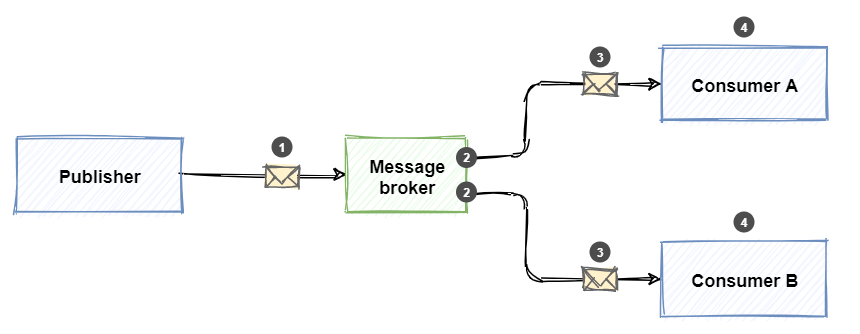
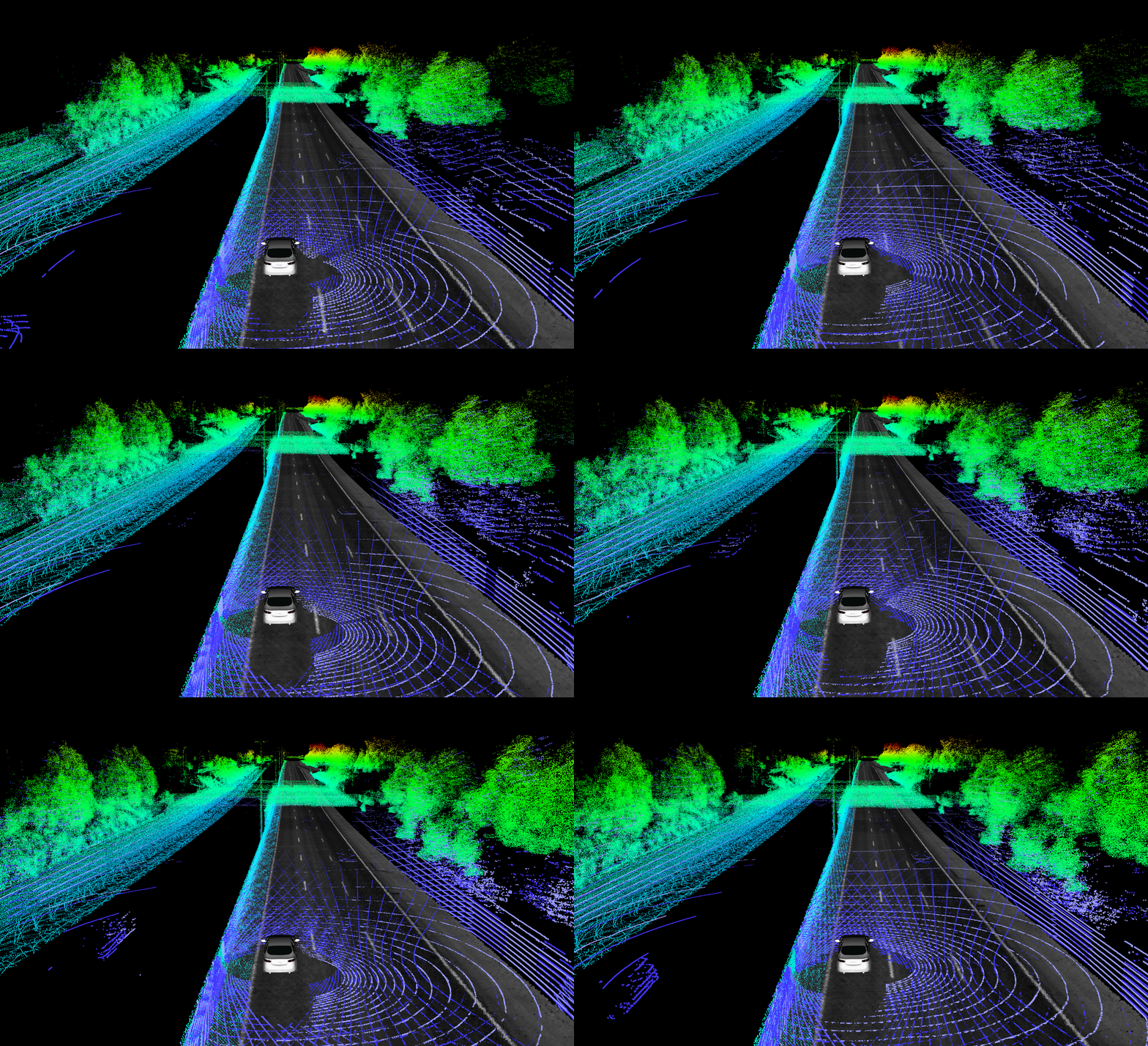
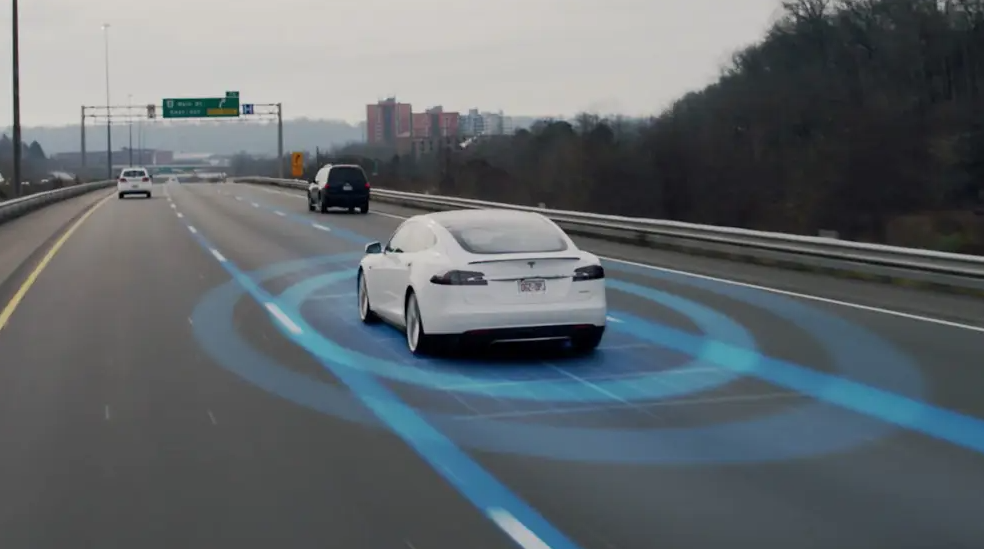
    # Follow Your Goal, Avoiding Them All As the title suggest our project in a nutshell was to design a moving robot vehicle, with automated driving feature, which would be capable of avoiding dynamic obstacles and Line following just as added bonus. We started this project as complete beginners and was worried how could we manage to do this stuffs. So Let's Start from beginning. --- > ### Now where to start from ? >![](https://i.imgflip.com/3y6qmf.jpg) obviously, designing. ### The Creator of Racecar : SolidWorks ![](https://media-exp1.licdn.com/dms/image/C5112AQFiC-hYeyvK7A/article-inline_image-shrink_1000_1488/0/1585760509518?e=1670457600&v=beta&t=Faf4027r51OqiApwxRzTt_SU453sxc4clxyCO39RoUI) To start designing on solidworks it's better if you have some drawing or some reference that you want to improvise and re-create The best place to find references is YouTube So go on YouTube and search for "How to make a car in solidworks" ![](https://i.imgur.com/P0ZxHRk.jpg) Look for a reference that's easy to make and improvise Now looking at this picture making a Toy car is definitely easier than making a Nissan GTR and Ford GT 16 (I wish I could make a more cool car) Following steps were used in making the car: 1. Make all the parts mentioned in the video (.sldprt) 2. Assemble these parts on solidworks (.sldasm) 3. While making the report you can use drawings (.slddrw) 4. Make sure that you have added all the coordinate systems, points and axes for URDF > Tip: get a big cup of coffee and follow and make the car while following the video 🍵 After few hours of redoing and few cups of coffee we were finally done with the model. Tadaaa!! ![](https://i.imgur.com/h2Idu0Q.jpg) ![](https://i.imgur.com/xYOHDSQ.jpg) >Tip: Don't be lazy and add colors and maybe your initials too Now you have your super car ready To actually be able to stimulate this car and spawn it we need to convert our CAD model to URDF ([Universal Robot Description Format](https://wiki.ros.org/urdf)). For making our life easier we have an [URDF exporter](http://wiki.ros.org/sw_urdf_exporter#:~:text=The%20SolidWorks%20to%20URDF%20exporter,and%20robots%20(urdf%20files)) (Bless the maker) --- > ### Nice, Racecar looks a renegade, Now It's time to provide a playground to virtually simulate how it's going to be in real. ### Software and Simulators #### 1. [ROS (Robot Operating Software)](http://wiki.ros.org/) The Robot Operating System (ROS) is an open-source framework that helped us build and reuse code between robotics applications. [ROS Node](http://wiki.ros.org/ROS/Tutorials/UnderstandingNodes) All processes in ROS run in a Node. For eg: In our Car each wheel Link (the joint between the wheel and the base), the camera, IMU sensors are all nodes. The python script we write itself creates many nodes. [ROS Topics](http://wiki.ros.org/Topics) Topics are named buses over which nodes exchange messages. Topics have anonymous publish/subscribe semantics, which decouples the production of information from its consumption for example: ![image alt](https://learn.microsoft.com/en-us/dotnet/architecture/dapr-for-net-developers/media/publish-subscribe/pub-sub-pattern.png) Over here ```Message Broker``` is a topic #### 2. [Gazebo](https://gazebosim.org/home) So now URDF has all about your car, ROS will help you in controlling the car but where will this happen? That's where gazebo helps you Gazebo is a powerful robot simulator used by industry and academia that calculates physics, generates sensor data and provides convenient interfaces. --- > We hope you are familiar enough with the software now. Let's simulate our Racecar in world to Drive-in. ### Let's Burn Some Rubber 🏎 🔥 ![](http://img.soogif.com/C9xreA41W9rVlfQjOp7B6dLyyMcvm62m.gif) #### [World File](https://classic.gazebosim.org/tutorials?tut=components&cat=get_started#WorldFiles) Now we have everything we need but where is your car going to be on ? float in air? obviously not for all the movements of our car we need a platform for it or you can say a world for it to be in ![](https://i.imgur.com/AVSQU4o.png) ![](https://i.imgur.com/AOlG52t.png) #### [diff_drive_controller](http://wiki.ros.org/diff_drive_controller) Now our car is all set for moving! the wheels of our vehicle can only rotate so how will our car turn? to counter this aspect we use the diff_drive_controller which would turn the car by rotating the wheels in 2 different direction ![](https://i.imgur.com/WrYT8bL.png) we don't have to look at the math behind it thanks to the lovely guy who made these formulas for us to use ![](https://i.imgur.com/heRtC1v.png) --- > Vooho... Our **Racecar** not only looks great but also glides like wind on the track. Now, the most important aspect of our project the **Algorithm**. ### Racecar has Self-Control ⚙️ ![](https://media3.giphy.com/media/H7rpSYHRyYgamxQNqw/giphy-downsized-large.gif) With Developing world the latest technologies like self-driven car attracts most of us but, have you ever thought how this machines are built, what are their requirements in terms of hardware, coding, testing and simulations? Talking about the hardwares ignoring the vehicle, the most importants are **Sensors**. What kind of specially? As for self-driving we need to know the surrounding environment, a very renowned sensor called as the LiDar Sensors, are used to get the a rough view of environment. #### Lidar Sensors ![](https://raw.githubusercontent.com/Ford/AVData/master/ford_demo/doc/rviz.gif) Now what is a Lidar Sensor? Lidar is an acronym for “light detection and ranging.” It is sometimes called “laser scanning” or “3D scanning.” The technology uses eye-safe laser beams to create a 3D representation of the surveyed environment. Lidar is used in many industries, including automotive, infrastructure, robotics, trucking, UAV/drones, industrial, mapping, and many more. Because lidar is its own light source, the technology offers strong performance in a wide variety of lighting and weather conditions. We had used **hokuyo.dae** mesh in our Racecar for Lidar sensing which can be easily plugged-in from Gazebosim [head_hokuyo_sensor plugin](https://classic.gazebosim.org/tutorials?tut=ros_gzplugins#AddingaSensorPlugin). ``` <gazebo reference="hokuyo_link"> <sensor type="gpu_ray" name="head_hokuyo_sensor"> <pose>0 0 0 0 0 0</pose> <visualize>false</visualize> <update_rate>40</update_rate> <ray> <scan> <horizontal> <samples>720</samples> <resolution>1</resolution> <min_angle>-1.570796</min_angle> <max_angle>1.570796</max_angle> </horizontal> </scan> <range> <min>0.10</min> <max>30.0</max> <resolution>0.01</resolution> </range> <noise> <type>gaussian</type> <!-- Noise parameters based on published spec for Hokuyo laser achieving "+-30mm" accuracy at range < 10m. A mean of 0.0m and stddev of 0.01m will put 99.7% of samples within 0.03m of the true reading. --> <mean>0.0</mean> <stddev>0.01</stddev> </noise> </ray> <plugin name="gazebo_ros_head_hokuyo_controller" filename="libgazebo_ros_gpu_laser.so"> <topicName>/rrbot/laser/scan</topicName> <frameName>hokuyo_link</frameName> </plugin> </sensor> </gazebo> ``` We had added two hokuyo sensor on the Racecar and shown below are the GPU-rays of Lidar. ![](https://media.discordapp.net/attachments/1006253253064937472/1015573905676709928/Screenshot_2022-09-03_at_4.16.49_PM.png?width=1660&height=1038) #### Visualizing Point cloud in RViz :- ![](https://media.discordapp.net/attachments/1006253253064937472/1015573905336967292/Screenshot_2022-09-03_at_4.16.26_PM.png?width=1660&height=1038) As we have two sensors, their are two point-clouds made for each obstacle, on analyzing closely we get to know their is a bit distant error in the point-clouds due to different positions of Lidars. So, we use an open-source library called as the ira_laser_tools for Lidar Scan-Data Merging, you can check this out [here](https://arxiv.org/pdf/1411.1086v1.pdf). Finally we have the perfect laser scan data to be used in our algorithm (will be discussed in the next section). Aaa aa a.. We are not over yet, we need one more sensor the imu sensor to get the orientations of the robot specially the yaw which is the orientation about the z-axis so, as to keep track were the Racecar is heading and in which angle and to much extent we have to rotate it to counter the obstacles. #### [Imu Sensor](https://classic.gazebosim.org/tutorials?tut=ros_gzplugins#AddingaSensorPlugin) An IMU is a specific type of sensor that measures angular rate, force and sometimes magnetic field. IMUs are composed of a 3-axis Accelerometer and a 3-axis gyroscope, which would be considered a 6-axis IMU. They can also include an additional 3-axis magnetometer, which would be considered a 9-axis IMU. Technically, the term “IMU” refers to just the sensor, but IMUs are often paired with sensor fusion software which combines data from multiple sensors to provide measures of orientation and heading. In common usage, the term “IMU” may be used to refer to the combination of the sensor and sensor fusion software; this combination is also referred to as an AHRS (Attitude Heading Reference System). As we move on to our next section we shall know all the available Algorithms for Obstacle Avoidance. Here, are some of them :- * [Bug Algorithm](https://en.wikipedia.org/wiki/Bug_algorithm#:~:text=The%20most%20basic%20form%20of,%2C%20walking%20around%20the%20obstacle) * [Artificial Potential Field Algorithm]() * The Conventional Potential Field Method * The Follow-The-Gap Method * The Advanced Fuzzy Potential Method * The Obstacle Dependent Gaussian Potential Field Method All algorithm except the The Obstacle Dependent Gaussian Potential Field Method (ODG-PF) has their own drawbacks due to errors and in-efficiency. --- > Impressive... I hope we are clear with the algorithms available in our toolbox and why **ODG-PF** is most suitable. It's Time to implement this. ### :Construction: Obstacles, We are not Afraid of You 🦾 ![](https://1734811051.rsc.cdn77.org/data/images/full/374838/tesla-autopilot.png) #### Flow of the Algorithm ![](https://user-images.githubusercontent.com/95731926/193303926-14bc111d-c998-436c-acae-effe77a4ccc0.png) **1. Range Data From Lidar** After merging the lidar data of two Sensors we get an array of distance readings of Lidar of length 542, in 180 degree angle, ranging from 0-11m. **2. Threshold** Threshold is the step which we use to specify the the range at which Racecar should start avoiding the obstacle here we are taking it as 3m. **3. Defining and enlarging the obstacles** After we had decided the range we need to clearly define the obstacle and to enlarge it. Now, why we are enlarging the obstacles ? As, we want to avoid the obstacle and also very safely, we enlarge the obstacle so that, the racecar is not much close to an object. **4. Repulsive Field** We calculate the repulsive field for the range data readings using the formula shown below. ![](https://i.imgur.com/QpwAqdn.png) But, the problem here is the algorithm according to the research paper is for 180 degrees from -90 to 90 degrees and we have around 542 readings. So, to solve this we used the unitary method to convert 542 reading <-> 180 degree => 1 reading <-> 0.33 degree, And here's the graphical representation of the field. ![](https://cdn.discordapp.com/attachments/1006253253064937472/1019124122137133097/Screenshot_2022-09-13_at_11.24.14_AM.png) ![](https://cdn.discordapp.com/attachments/1006253253064937472/1019124121768050739/Screenshot_2022-09-13_at_11.24.05_AM.png) **5. Attractive Field** Similar to the repulsive field it's calculated using the formula shown below. ![](https://i.imgur.com/8tZCu6e.png) where, gamma is an constant and is chosen to be 5, After performing tasks, also theta_goal is taken to be zero so as to keep the racecar moving straight. **6. Total Field and Suitable angle with Minimum Field value** Now, you have the values of attractive as well as the repulsive fields, you just need to add them both with their respective indexes of each element. The resultant field values are total field and simply now we have to calculate the local minima of the total field array and the index where the value is minimum is the required index position our racecar should move but index is for array and we need an angle for racecar so simply again use unitary method to convert the index to angle. The racecar is published with the required Twist message to achieve found using the IMU ![](https://cdn.discordapp.com/attachments/1006253253064937472/1019253809077305465/Screenshot_2022-09-13_at_7.59.52_PM.png) ![](https://media.discordapp.net/attachments/1006253253064937472/1019253809551245352/Screenshot_2022-09-13_at_7.59.49_PM.png?width=1660&height=1038) The image shows that we should follow an angle of around -25 degree to avoid obstacle which seems acceptable. ### Demos and Results #### The static obstacle avoidance: https://user-images.githubusercontent.com/95731926/195905534-36b4bf22-bf20-4839-8e3b-0d61bfe03c86.mp4 #### The Dynamic obstacle avoidance: https://cdn.discordapp.com/attachments/1006253253064937472/1020028138199195750/Screen_Recording_2022-09-15_at_11.11.06_PM.mp4 --- > Well Done... I hope you are thorough with the implementation and didn't found it intimidating. You have now reached the **Bonus Section (Line-Following).** ### 📈 PID help me Follow the right Way 🛣 ![](https://miro.medium.com/max/960/1*mL7xeXiSs-K9pQv70FB2Qg.gif) Line Following is really popular feature and you can get tons of examples, source code, explanations, etc. It's really simple, steps for Line following are: 1. Subscribe to the raw image topic and convert raw image to cv2 image using the cv2bridge method. 2. the image obtained is RGB image convert this image to HSV for better comparison and definition. 3. define upper bound and lower bound of the color you want racecar to follow 4. After Masking the image we get contour of the red line whose centroid is calculated and compared with the center of the image and error is the required counter deviation. ![](data:image/jpeg;base64,/9j/4AAQSkZJRgABAQAAAQABAAD/2wCEAAkGBwoNCggNDQgKCA0ICA0HDggICA8ICQcNIBEiIiAdHxMkKCgsJCYxJxMfLTEtJzAwMC8wIys/PTM4OSgtLisBCgoKDg0OGhAQFy0lICEvNzc3NzctNy0tKysrLS03LS4xKy4uLi4uKystLS0tLjcrKys3Li0tLS0tKysrLS0tLf/AABEIAJMBCQMBIgACEQEDEQH/xAAbAAACAgMBAAAAAAAAAAAAAAAAAgEDBAUGB//EAFAQAAEDAQQFCAQKBwUGBwAAAAEAAgMRBAUSIRMxQVFhBlNUcYGRodEiUpOxFBUkMjRyouHw8RYjRFVidMFCkpSy4gczNUPC0iZFc4KDhLP/xAAaAQADAQEBAQAAAAAAAAAAAAAAAQIDBAUG/8QAOREAAgECAgUJBgYCAwAAAAAAAAECAxEEIRIxQVHRFFNhcYGRkqGxBSIyQlLwE3KCssHSNMIjM2L/2gAMAwEAAhEDEQA/AONsF3ue+aSWaQjTvwsxmmtbURQin6utNuSUHIj+Jx8VOJQUNgh5seCMEPNjwV932C02onRR0a04TO8+gD1a1sX8lraG1Fps0mVdGyN4c7tKzdWCdmzSFCpJaSi7Gn0cPNDwRgh5seCJ2SRSOjljdE9v9l1PSHWlxDuWhFrZMbBDzY8EYIebHgrLJZJ56mNmFgNNM/5lerWsp9yWtoqJoJf4GMcD3oFcwcEPNjwRgh5seCVxc1xY9hje3Wx2vvRiQA2CHmx4IwQ82PBLiUF4H3AlAD4IebHgjBDzY8FUyZprTFl60bm+KfEgBsEPNjwU6OHmx4JMaMSAH0cPNjwUYIebHglxIxIAbBDzY8EYIebHglxoxIAbBDzY8EaOHmh4JcSMXBADaOHmh4I0cPNDwS4kYkANgh5seCMEPNjwS40Y0ANgh5seCMEPNjwS4kY0ANgh5seCNHDzQ8EuJGJADYIebHgjRw80PBLiRiQBVabFFI0gF0RI1xmma1XxHaOmP/vuW6xKcfAIAprr+s73p4IjLLDEDTSvw14U+5UF2Z+s73q6wziO02aQmgjeanrH3qKjai2tdi6KTqRUtV16ndOmbDCBFC5zYW0bDEM3BUi+Y3aER4p3Sn5kfzmCuZKpmkkwnRBpeR6Ie/A3vWHFY5IXiSN7ZXvNJg/DE143g9i8Sm1KN3r9fU+mqKcZJRWW3LVxMrlFA2ezOdQB9nGla/aGjX7lydmbpZIGVppfTPUM1016WkMs1oJIGNroacSFytgl0ctmcTTA0s7xRej7Pk5U3c8j2rCMaytrazOta5rQGtAa1gwho1NCnSLXSiN9A9peAagB7mZ9ir+DWXmT7d67jzbFl9xtfDpKUfZ/SxDW5m5aUOyHEVWzvG0BtnlFaaRphHd9y04OQ4Ae5AItqun/ANnthhtFvndKwSfBYGSsY75uIkhcniXY/wCzE/Kr0/kWe8pxeTfQTLZ1o2vLOG9Zo7PC6KwBk1r0UXweSQzudh2gilMti0Nt5FXnBZ5bRJLY9HBEZ3Na9+kwgLFuN7zf9jrJI/5c7J8rnBvo7lk8vnPN7uYJ5GB+FmESuEbQR6upTGN9G2uRpJ20r6o8WFi5E3pPCyVk9ia2UFzWyPfjcO5a4XJbfhwsRjbHaC0vo+ujc3fVdq67LJYH3Y1l32u2vmc1xtTJptHCa7QDTarLYP8AxRYDSlbDJ10wJ5OWWrPyX3sM89F31pLzdvvM5ybkFe7Gg6Sxy6vQie8v7qcVTbeRN6wQmVxs8zWtxGKzlxnaOorobknk/SK9maR5YWH0C8lrczsS8j5pHXnyjjdI+RjXOcGPeXhhqFDb0br6dLzsXZKVv/VvK5xl0XVa7bKY7PGHFvzpX10MXWe1Zt78lLysUWll0M8Y1vspcRF11XTcgNCbuvdoj0r/AIU/FE0lsj203jNUWq82wWG8IG3FbrLHPE+J0toZNJG0ka8Tid6up7t0tlu377RQz19Jw2JGJUhybEgCyqKqvEjEgCyqKqvEjEgCyqMSrxIxIAsqjEq8SMSALKoqq8SMSALMSK8VXiRiQBS4+k767veoJUuhmxPpBKavcaiJxDhXeoEE3R5vYOQI2thvl8bQyQGRoyEgObQsx1/WYDIved2jczxXPiCbo83sHKNDN0eb2DlxTwFGctJo9Cn7UxEI6N0+tZmVb7e+dwr6DG6oxmsYnijQy9Hl9i5Ggm6PN16By64QjBaMVkcU6kpycpO7ZlQW9zQA4YgMg/bTqVhvJmwOcdxBCwdDNzEvsHKDFKK1glFNpicA1UQyyed8jg52QGpgzDUuJVF/Ed6gOHrDvCY0mW4uK2F0Xza7E6V1mkjidaGCJ5lhEwc3q7VqsQ3jvCMQ3jvCA0XuM6z2+eK0stLHNE0TzM1zmBzWupu7VN53laLXMZp3sfI4ULo4xEO5YOIesO8IxcR11CSWroB3z6TobNyzviGNsbLVCWsyGnsjZntHWVjnlJeJtjLYZ4nWiNhjbIYBo2gj1OxaXEN471OIbx3hPPWGi7WsbiDlDb47XNamTRtntAo97rO1zHD6vaosPKK32ea1TQyxskttTK59nEjX57Bs1LUsa91cMb5KbWMc/D3J9BP0eb2DkuFuzcGfnftMuwXparNMZYJzE8kk5Esea7WrYXjyuva1QuhntMT435FsdlbEXCm/tWk0E/RpvYOUmCfo83sHIaTVmCyzRAKKqdBP0ebr0DkaCbo83sHIAjEpxI0E3R5vYOUaCbo83sHIC5OJGJKIJujzewcp0E3R5vYOQAVRiUaGbo83sHI0E3R5vYOQK42JRVRoJujzewcjQzdHm9k5AXJqiqgwzcxL7JyNDL0eX2TkDuTiRVGhl5iX2TkaKXmJfYuQB6zdTj8DsWZ+jM28FlYnbysK6iPglk/l2e5ZgKkkfGW7TXfXYqS57tpCalVcxgbmc+CkBYYicy4/cmmmI9FpOeVaqJJdgSMbv26+tBQzKtBzNTrCptID2uYTXG0inrBNNLsGZ37EjGbzUn7KQzyq0Wf4LHeOOyWa0yRXmyzgWmzGYBhjxLA+MW/uq6f8CfNdXypsujvF5GIm9bJJdwNKxMkcWgV4ZLh5Wua5zSaljnMrscQaf0XIqEJVJKau9et6n2nBDDU51aiqK7vfW9Ul16k0102Zn/GTf3Xdf+Bd5o+Mo/3XdQ/+kfNazEglXyal9Pm+JryGh9Pm+JsvjSP91XT/AIE+an43A/8AKrqoBX6BX+q1RKAc+wrr9n4Wk8XSWj80dr+pdJNTA0NCXu7N74my+Nm/um6dWr4CfNN8bN/dV06ugnzWrGodQUVXG8LRu/d83xLWBw6+XzlxPReSN5FlsgEccTILfZGxudZf1cDLS0VcKb813WlcNp79a8ZuCYuc6AklzXG2Wcn/AHVncPnZ8RkvWbttbbRZoJh/zo2vp6hVUsk4PZ6bPIvCtxj+E9cMutbHx6U9hn6bie/5pTaWmZJPCqocA0VcaHd6yrLq7eoLU6tZkmdx2kDYKpdK7ee9UYkF3FAF+lO89dU2kO896xcakP8Ax6yaEZAed571OM+seuqoD+z/AKVOP8gqJLS8+seqqMR3lVg96MXZwQIsLjvOSQk55nqqitexH4r6qpEsU13lLhOfpHJWoVIRQWnPM/8Acq8PF3eVeczT8BNo/wCIIEYN2H5LZP5ZnuWUD2LEuz6JY8/2dnuWQ9+tQxlulA47D/CUhkJP9VWATX8Yk+5IZYD47dyHvyy2Kuqkd/FMYzG7TtTvIaNeZ2KoO7a7FMbS5xcTkNX8SgZouWNiMt3yOBLDZj8JDhk6gG/tXnfKGhtAeBWOSCPDK2mje4Nzz6161bg17Hxu9ISNLC3gvMb4szmWa0tkArYrYyCINywROBPbqWc8pRl2d/36s56vu1IT/T4tXml2XOdRVAP5KDt2cFodIHZnRAOfYUEKGjPsK7PZ3+XR/PH9yIqfA+oK6upQjd1BSuSWtlF9htL4po5GnCQcDjQElhPpZdRXo/Iy8WMdLA2gjtLPjWytdXF8Hc6jRTfkV5lXiui5P29zIY3AmR9ithtchdkWWXDQUPWdSxmnGamtuT/j723tkYVPcqxqLU/dfbqffl+pLI9QLnE57c/qoDtfuTxgOaHNIcC0GoUmL81oddxMXFJiTaIoMZQBGJTiSkKOzsTQhsfbwVgdSnvVQy412oJ/JCRLZkB35IDvzVDT+akOVEmSHfjcmBWNj1KRJlrVITZkV46tvqpSTq1qsSg5DMqxop27VQhwAAN52qNINyVxSUG8oEYd2D5JZP5dnuWQRqVN2n5JY82j5MzaNyvJHrN/vhZtreMEpP5KTTe3vCUn+JveEXW8Y2Kn4+cguHYfspMt7e8KMQ3jqqEroZYHahtTPdQYRkBtSxgD0qtO7MKJHClagYteYSuhoWJpLi47Ni5HlfYA2U466K8AXAgnF8LaMMYruJK7Rj2taCS30RUCo9JajlBCJ7LK6gJsxbbWCoo57cx4hZ1EpQaTz2daMq9NzptR1611rV5nkcrXMe5hbhdG4scKg4XA559iTEs6+IAHsmYS5lqGldJixNFo1uaDwJWvJH4KqFRTipIqlUVSCktv21bo+7PICVIAr2FIfxmEA766iu72d/mUfzx/ch1PgfUN6uewKCorq1agoxHPV3rketlDUWz5OuHwyFpNGTB0bmOI0craai3sWrxlDXCrduFwNKDVVRUjpRcd6Mq9P8SnKG9HsfJC16W77PiJxw1heHAgtNVvcTVx3JG2h8kxphF6RfHDQ6gdGK4aE78l0+frN7wpp1FOKkXRq/iU1PejJL28EheO/asc/WHeEBh3jvCvST2mhY4hK6nXxRhp/ab3hKQN47wi63iAjxUU49qKcW9dQlOz0h3hPSW8LEV1+5GLWgkes3vCCRvHeFSaJCvGiWpOQzISF9TTEO8K+ItaNYJO2oTTT2iLIm4RvJ2q0OKqLx6zeqoUaQb25cQquhFxdx7d6KHcqw5u9veFOkHrt7wndAam77hu59msznWKNzpIWyOeS6rnEdav/R27egR5cXeay7ldisF3uOt9ihcSNVcO7tWYQujl2K56fjlxI0Y7jTfo7dvQY+93mg8nbu6BH3u1963Bb+OKUt8NiOXYvn5+OXENCO41B5PXd0CLvd5oHJ+7cvkMee2rvNbdw/NJSlTq/wClHLsXz0/HLiPQjuRq3XBdmIAWGPjm7zSOuG7S+gsMWX1s/FbUei0uOsqmMeiTqLkuX4vn5+OXEahHcu41rrju4vAFhjAOVKupXvWQ/k9dgaPkEXHN3ms2zs9KtKUVsh150ptRy/F8/Pxy4j0I7keX3/Y3Rx2yInA27pxPFox88SO1Hq2Ll8bs6u8F6LymjY+1MYWgx2myzPeznHMZUZ9a85rkFhSx2KjKUFWnrv8AHL5s9+u92+swowipzg0snfsln63fagxv9f3KKk0qajPaMlB7kDWNutejgMdipYqlF1ptOUfnk9bW9s0nCKi/dXcAlf63H5oUaV/r/ZCUjV1BKuV4/F3f/PU8cv7F6EPpXcOZH+tq4BSJH+v9kKuvYj+qXL8Xz9Txy/sChDcu477krDBPLdDLRG2dpuHEGuJAxaY7l2I5O3Z0CPPbV3muB5GWhxN3vdRzoLzZdDHasFnMZNO9emCQ9Q9yww2OxShoqtPJtfHLf1nNgoRVLRt8La1dJhDk5dvQIvtej4qTydusfsER41d5rO03H/UlMq35fi+fqeOXE6tCO5dxgnk9dnQIu93moPJ67MvkMXe70vFZ4k4avtIL0+X4vn6njlxDQjuXca48n7s2WCMdrvNR+jt3dBiy4u81tAfyUOd2I5fi+en45cRaEdy7jVHk/dvQY+93mqzyfsDiA2wxinF3mtriLjQDX9lZDGho3nemsdi+fn45cSdCO41I5N3cAK2KInfid5pf0fu3P5BF3u9HxW1c7X+MKrJqVXLsXz8/HLiLQjuRqzcF3dAj73eaYXBdo/YY8+LvR8Vsjlt7fVSE8EcuxfPz8cuI9GO41xuG7egRntd5o+Irs6BH3u81sK8VGLgE+X4rn5+OXENCO4e4f+HXZl+wQf5Fn0/NYFyAi77uGoiwQgjb8xZtfFcY2SUU8M68Eyg96LALh8fspHCpAV2zr96ljaAk6/8AMkBjTx/Nb4pS3LV2K0ZkuO0od+P4kJDEbkCsed+WEf2suLVlSj0QPxVRBZtb35Ab0rDTOU5SRFsti9GnyO25+t+rC8ucRQcF6tyztIHwSQMLmh7rEHDWDJ6OvtXltsg0M08RdpDBK6HGBQPIO5YL/tkuhcDnp5V5roj/ACUvNfJDPnDtSk8VLT6Q6ivR9n54uj+eP7kbVPgfUKTq6goJRXV1BBPZ1LmetlgepAKUlASA6jkvIGxWU1xaK/mTua3N0bNAc6bs16ia0FNRAP1hReN3ASDepGRFyymo1/OavYbJK10MBrWsbc+xYU8nNdPqrnNhspVI7peqT/kAD96k/gJi5uuvYq3PWx1BiOXvTB35JACa5Jw0b9SdibjB+rPjVRjLjSnYqnEk0bnxH9lXxMw02nemFzIjaGjjrqoc/wAUhdx/0qpxO/sVIQ5fVSMvPcqxl171IPigCSVBKKpSmIg9XYlwqwj8b0mIbggC66z8ksfCzM9yysS192O+S2TPVZ2e5ZWNRtBl4drTA+Kxg/tonDkwLxmerYpkdWg1cVSH02/eoD9u9FgMgUA1alW0YndSV7+KYOAG7bVFgGLW1qTRoWFarUZHYG5Nb9pU2m0ucS0GgOxTFHSnvSGablgylhbl+32X/wDYLzG+/p14fz03+Zep8rRWw0GdLdZjT/5QvLL7+n2/I/Tpt/rLCzdf9P8AsYRu8S/yf7GAmZ85vaopwKGA4hRpOZ2Er0/Z0Xyujl88f3I6KkXovLYKTmOoIUHqPio/9p8VyNO7yKUXuJQoz3HxU04HxRovcGi9xs+TzvlIhpVl4M+ASH/mMY419E78l6jc5BscGEkgYmiuugdT+i8r5Pf8Su3X9Mj969O5Lyh1hiGZwSSj63plYxi1VkuhfzwOWPu4ia3qL7byXol3I2TASrRFxqpAH3p1tY6LgBTuVT3Emg27Uz3VyHerI2ADVmqETFEGjipJ4/6VDn9vFVl3alYVxnOKhvX2qCpqgCezsUB3htU9qVMGMHILvySfiixb0cW2W1uBphs0jgRracKMwMomu3tUdy5m4bVbrLZ7sZb82XhZI7RBbRXRy1FcJO+i6PGzeO9Awu/6LZf5dvuWSNvUhCjaIAmG1CE0IQk5Zqxn9FCEwGHzlXO40GalCAMVmvtWWzUhCaBmn5TfRXf+sw/bXnXxvayKmZpOLWYI/JCFz1aNOpL34p5LWr7TnrUKVWS/EgpWW1X2veKb2tfOt9hH5Jor3tZd/vW+wj8lCFeEwlB4imnTj8S2LeYVMDhlF2pR8K4Cuva15/rW7f2eLyU/G1r51vsI/JCFg8JQ5uPct7KWBw3NR8K4Em9rVzrfYR+SPja1c63/AA8fkoQk8JQ5uPchchwvNR8K4B8cWwFhEzQa69BH5LuuR2d2wE5lz5Knaf1hUIW9KlCm3oRS6lY6KNCnSv8AhxSvuVvQ3qgqULoeo3HiAzyTb0IUoCtyluxQhNiGUoQmAFSVCEgArDvj6Fbf5ST/ACoQhBtN4yxQT8jbuEsLZgy6LM9uOtWnCF4r8YWnpEn95CEFH//Z) 5. this error is resolved using PID. https://user-images.githubusercontent.com/95731926/195905945-6cd707a3-23ca-4dc1-bdb5-43566de89396.mp4 --- > Racecar is perpetually following the line... Now, It's time to wrap-up. Let's us brief the blog. ### Conclusion Being Second Year students there were a few things which we learned (Some of them were learned the hard way 🥲) So here's what we learned * Bunking lectures is fine as long as you're doing something productive 😜 * Ctrl C + Ctrl V is your best friend * Break down the project into smaller goals 🤓 * Working offline together is more productive than zoom and gmeets * Effective googling is one of the best skills 🤹🏻 * Projects are really fun when you get along with your mentors and teammates * All you need is a big cup of coffee and an all nighter to cover up 😇 So for everyone who survived this tsunami of information or skipped directly to conclusions we would like to conclude by saying that **It's not about what you know. It's all about how much more effort you put in to learn** After all we were just 2 SYs thinking about making the next Tesla --- ### References * the Basic Science Research Program through the National Research Foundation of Korea (NRF) for [ODG-PF resource paper](https://www.hindawi.com/journals/jat/2018/5041401/). * [ira_laser_tools](http://wiki.ros.org/ira_laser_tools). * [Documentation inspiration](https://github.com/Jash-Shah/Eklavya---Drone).

    Import from clipboard

    Paste your markdown or webpage here...

    Advanced permission required

    Your current role can only read. Ask the system administrator to acquire write and comment permission.

    This team is disabled

    Sorry, this team is disabled. You can't edit this note.

    This note is locked

    Sorry, only owner can edit this note.

    Reach the limit

    Sorry, you've reached the max length this note can be.
    Please reduce the content or divide it to more notes, thank you!

    Import from Gist

    Import from Snippet

    or

    Export to Snippet

    Are you sure?

    Do you really want to delete this note?
    All users will lose their connection.

    Create a note from template

    Create a note from template

    Oops...
    This template has been removed or transferred.
    Upgrade
    All
    • All
    • Team
    No template.

    Create a template

    Upgrade

    Delete template

    Do you really want to delete this template?
    Turn this template into a regular note and keep its content, versions, and comments.

    This page need refresh

    You have an incompatible client version.
    Refresh to update.
    New version available!
    See releases notes here
    Refresh to enjoy new features.
    Your user state has changed.
    Refresh to load new user state.

    Sign in

    Forgot password

    or

    By clicking below, you agree to our terms of service.

    Sign in via Facebook Sign in via Twitter Sign in via GitHub Sign in via Dropbox Sign in with Wallet
    Wallet ( )
    Connect another wallet

    New to HackMD? Sign up

    Help

    • English
    • 中文
    • Français
    • Deutsch
    • 日本語
    • Español
    • Català
    • Ελληνικά
    • Português
    • italiano
    • Türkçe
    • Русский
    • Nederlands
    • hrvatski jezik
    • język polski
    • Українська
    • हिन्दी
    • svenska
    • Esperanto
    • dansk

    Documents

    Help & Tutorial

    How to use Book mode

    Slide Example

    API Docs

    Edit in VSCode

    Install browser extension

    Contacts

    Feedback

    Discord

    Send us email

    Resources

    Releases

    Pricing

    Blog

    Policy

    Terms

    Privacy

    Cheatsheet

    Syntax Example Reference
    # Header Header 基本排版
    - Unordered List
    • Unordered List
    1. Ordered List
    1. Ordered List
    - [ ] Todo List
    • Todo List
    > Blockquote
    Blockquote
    **Bold font** Bold font
    *Italics font* Italics font
    ~~Strikethrough~~ Strikethrough
    19^th^ 19th
    H~2~O H2O
    ++Inserted text++ Inserted text
    ==Marked text== Marked text
    [link text](https:// "title") Link
    ![image alt](https:// "title") Image
    `Code` Code 在筆記中貼入程式碼
    ```javascript
    var i = 0;
    ```
    var i = 0;
    :smile: :smile: Emoji list
    {%youtube youtube_id %} Externals
    $L^aT_eX$ LaTeX
    :::info
    This is a alert area.
    :::

    This is a alert area.

    Versions and GitHub Sync
    Get Full History Access

    • Edit version name
    • Delete

    revision author avatar     named on  

    More Less

    Note content is identical to the latest version.
    Compare
      Choose a version
      No search result
      Version not found
    Sign in to link this note to GitHub
    Learn more
    This note is not linked with GitHub
     

    Feedback

    Submission failed, please try again

    Thanks for your support.

    On a scale of 0-10, how likely is it that you would recommend HackMD to your friends, family or business associates?

    Please give us some advice and help us improve HackMD.


    Thanks for your feedback

    Remove version name

    Do you want to remove this version name and description?

    Transfer ownership

    Transfer to
      Warning: is a public team. If you transfer note to this team, everyone on the web can find and read this note.

        Link with GitHub

        Please authorize HackMD on GitHub
        • Please sign in to GitHub and install the HackMD app on your GitHub repo.
        • HackMD links with GitHub through a GitHub App. You can choose which repo to install our App.
        Learn more  Sign in to GitHub

        Push the note to GitHub Push to GitHub Pull a file from GitHub

          Authorize again
         

        Choose which file to push to

        Select repo
        Refresh Authorize more repos
        Select branch
        Select file
        Select branch
        Choose version(s) to push
        • Save a new version and push
        • Choose from existing versions
        Include title and tags
        Available push count

        Pull from GitHub

         
        File from GitHub
        File from HackMD

        GitHub Link Settings

        File linked

        Linked by
        File path
        Last synced branch
        Available push count

        Danger Zone

        Unlink
        You will no longer receive notification when GitHub file changes after unlink.

        Syncing

        Push failed

        Push successfully

