---
tags: 発表, JuliaTokyo, Julia
slideOptions:
transition: slide
theme: league
---
機械学習 × <span>名古屋 ×<!-- .element: style="display:inline-block;font-size:0.6em;line-height:1.2em;vertical-align: top;" --></span> Julia
===
<!-- .slide: data-background-color="rgba(102,130,223,0.3)" -->
2018/10/20 Julia Tokyo \#8
antimon2(後藤 俊介)
Note:
名古屋でJuliaやってますよな発表ですっ
----
<!-- .slide: data-background-color="rgba(102,130,223,0.3)" -->
## お品書き
+ :small_blue_diamond: 私 × Julia
+ :small_blue_diamond: 機械学習 × Julia
+ :small_blue_diamond: 実績 × Julia
---
<!-- .slide: data-background-color="rgba(102,130,223,0.3)" -->
+ :arrow_right: 私 × Julia
+ :small_blue_diamond: 機械学習 × Julia
+ :small_blue_diamond: 実績 × Julia
---
<!-- .slide: data-background-color="rgba(102,130,223,0.3)" -->
# 私 × Julia
----
<!-- .slide: data-background-color="rgba(102,130,223,0.3)" -->
## 私
----
<!-- .slide: data-background-color="rgba(102,130,223,0.3)" -->
### 自己紹介
+ 名前:後藤 俊介
+ 所属:**[有限会社 来栖川電算](https://www.kurusugawa.jp)**
+ コミュニティ:**[機械学習名古屋](https://machine-learning.connpass.com/)**, Python東海, NGK2018B, Ruby東海, Rails Girls Nagoya(コーチ), …
+ 言語:**[Julia](https://julialang.org)**, Python, Scala(勉強中), Ruby, …
+ <!-- .element: class="plain" style="vertical-align:middle;background:transparent" --> [@antimon2](https://twitter.com/antimon2) / <!-- .element: class="plain" style="vertical-align:middle;background:transparent" --> [antimon2](https://www.facebook.com/antimon2)
+ <!-- .element: class="plain" style="vertical-align:middle;background:transparent" --> [antimon2](https://github.com/antimon2/) / <!-- .element: class="plain" style="vertical-align:middle;background:transparent" --> [@antimon2](http://qiita.com/antimon2)
Note:
今日は思いっきり Julia の話っ
----
<!-- .slide: data-background-color="rgba(102,130,223,0.3)" -->
[
https://www.kurusugawa.jp](https://www.kurusugawa.jp)<!-- .element: style="font-size:0.7em" -->
Note:
「いいソフトウェアを楽に作る」技術を追求する企業。今は、機械学習、画像認識中心。
オレオレツールや小実験は Julia で実施っ!
----
<!-- .slide: data-background-color="rgba(102,130,223,0.3)" -->
[
https://machine-learning.connpass.com/event/104440/](https://machine-learning.connpass.com/event/104440/)<!-- .element: style="font-size:0.7em" -->
Note:
主催&Juliaの発表(LT)予定っ
てか毎回 Julia の紹介発表してますっ
詳細後ほどっ
---
<!-- .slide: data-background-color="rgba(102,130,223,0.3)" -->
## 私 × Julia
----
<!-- .slide: data-background-color="rgba(102,130,223,0.3)" -->
### 私 × REPL × Julia
Note:
皆さん REPL のカスタマイズしてますよね?
----
<!-- .slide: data-background="https://i.imgur.com/H8YTfRm.png" data-background-color="rgba(102,130,223,0.3)" -->
Note:
私の REPL はシンプルにこんな感じっ

----
<!-- .slide: data-background-color="rgba(102,130,223,0.3)" -->
#### `~/.julia/config/startup.jl`
```jl=
import REPL
atreplinit() do repl
if !isdefined(repl, :interface)
repl.interface = REPL.setup_interface(repl)
end
# prompt with version
Base.active_repl.interface.modes[1].prompt = "julia-$(VERSION)> "
end
using Pkg
haskey(Pkg.installed(), "BFREPL") && using BFREPL
```
Note:
`startup.jl` も至ってシンプルっ
----
<!-- .slide: data-background-color="rgba(102,130,223,0.3)" -->
#### BFREPL.jl
[https://github.com/antimon2/BFREPL.jl](https://github.com/antimon2/BFREPL.jl)<!-- .element: style="font-size:0.7em" -->
Note:
`pkg> add https://github.com/antimon2/BFREPL.jl.git` でインストールできます。
----
<!-- .slide: data-background-color="rgba(102,130,223,0.3)" -->
### 私 × 馴れ初め × Julia
----
<!-- .slide: data-background-color="rgba(102,130,223,0.3)" -->
[https://www.amazon.co.jp/dp/4774170577](https://www.amazon.co.jp/dp/4774170577)<!-- .element: style="font-size:0.7em" -->
Note:
この書籍で名前を知ったのがたぶん初めて
----
<!-- .slide: data-background-color="rgba(102,130,223,0.3)" -->
[https://qiita.com/advent-calendar/2014/julialang](https://qiita.com/advent-calendar/2014/julialang)<!-- .element: style="font-size:0.7em" -->
Note:
この年の Julia Advent Calendar で Julia の概要を知りました
----
<!-- .slide: data-background-color="rgba(102,130,223,0.3)" -->
[https://qiita.com/antimon2/items/96e3bd6e452e03cf98db](https://qiita.com/antimon2/items/96e3bd6e452e03cf98db)<!-- .element: style="font-size:0.7em" -->
Note:
約1ヶ月後(投稿日:2015/02/02)に Julia 記事初投稿!
その後、何かと Julia について記事書いてます(現在進行形)ということで。
---
<!-- .slide: data-background-color="rgba(102,130,223,0.3)" -->
## 私 × Qiita × Julia
----
<!-- .slide: data-background-color="rgba(102,130,223,0.3)" -->
[https://qiita.com/tags/julia](https://qiita.com/tags/julia)<!-- .element: style="font-size:0.7em" -->
Note:
※2018/10/18 現在
----
<!-- .slide: data-background-color="rgba(102,130,223,0.3)" -->
[https://qiita.com/tags/julia](https://qiita.com/tags/julia)<!-- .element: style="font-size:0.7em" -->
Note:
※2018/10/18 現在
所属会社があたかも「Juliaで仕事している会社」みたいになっちゃってますっ
----
<!-- .slide: data-background-color="rgba(102,130,223,0.3)" -->
[https://qiita.com/search?q=tag:Julia+user:antimon2](https://qiita.com/search?q=tag%3AJulia+user%3Aantimon2&sort=stock)<!-- .element: style="font-size:0.7em" -->
Note:
※2018/10/18 現在っ
----
<!-- .slide: data-background-color="rgba(102,130,223,0.3)" -->
[https://qiita.com/antimon2/items/89562cf7c1115c500f02](https://qiita.com/antimon2/items/89562cf7c1115c500f02)<!-- .element: style="font-size:0.7em" -->
Note:
Julia v0.5-dev をキャッチアップっ
----
<!-- .slide: data-background-color="rgba(102,130,223,0.3)" -->
[https://qiita.com/antimon2/items/d0f4ccd4fae8209f8138](https://qiita.com/antimon2/items/d0f4ccd4fae8209f8138)<!-- .element: style="font-size:0.7em" -->
Note:
Julia v0.6-dev をキャッチアップっ
----
<!-- .slide: data-background-color="rgba(102,130,223,0.3)" -->
[https://qiita.com/antimon2/items/8b1a96d1370bb6252757](https://qiita.com/antimon2/items/8b1a96d1370bb6252757)<!-- .element: style="font-size:0.7em" -->
Note:
Julia v0.7-DEV をキャッチアップっ
----
<!-- .slide: data-background-color="rgba(102,130,223,0.3)" -->
**<big>Qiita での Julia 普及に貢献しています</big>**
<span>…たぶん。<!-- .element: class="fragment" --></span>
---
<!-- .slide: data-background-color="rgba(102,130,223,0.3)" -->
## 私 × Mathtodon × Julia
Note:
Mathtodon は数学愛好者が集まっている Mastodon インスタンスです。
----
<!-- .slide: data-background-color="rgba(102,130,223,0.3)" -->
[
https://mathtod.online/@koshix/65893](https://mathtod.online/@koshix/65893)<!-- .element: style="font-size:0.7em" -->
Note:
昨年、こんなトゥートがありました。
----
<!-- .slide: data-background-color="rgba(102,130,223,0.3)" -->
[
https://mathtod.online/@antimon2/67341](https://mathtod.online/@antimon2/67341)<!-- .element: style="font-size:0.7em" -->
Note:
Julia で試してみたら思ったより速かった話。
ちなみに Python2 で約38秒、Python3 で2分弱かかりました。
ちなみにちなみに、最新の Julia v1.0.1 でさっき試したら 約0.35秒でした。何コレ爆速。何があった
----
<!-- .slide: data-background-color="rgba(102,130,223,0.3)" -->
[https://mathtod.online/@genkuroki/70978](https://mathtod.online/@genkuroki/70978)<!-- .element: style="font-size:0.7em" -->
Note:
直後に Julia を試してみたと言う方(その筋では割と有名な方)のトゥート。
これ以降(現在に至るまで)この方MathtodonやTwitterでJuliaでの実験をたくさんつぶやいてくれています。
----
<!-- .slide: data-background-color="rgba(102,130,223,0.3)" -->
**<big>数学界隈での Julia 普及に貢献しています</big>**
<span>…たぶん。<!-- .element: class="fragment" --></span>
Note:
Twitter や Mathtodon で Julia の数値計算やプロットのツイート/トゥートをしている人の多くは、私のあのトゥート以降にJuliaを触り始めています(ただし因果はおろか相関も不明です)
そこまで調べて報告しようかとも思ったのですがどんどん脱線していくので省略!
---
<!-- .slide: data-background-color="rgba(213,99,92,0.3)" -->
+ :white_check_mark: 私 × Julia
+ :arrow_right: 機械学習 × Julia
+ :small_blue_diamond: 実績 × Julia
---
<!-- .slide: data-background-color="rgba(213,99,92,0.3)" -->
# 機械学習 × Julia
Note:
やっと本題!
----
<!-- .slide: data-background-color="rgba(213,99,92,0.3)" -->
## 機械学習 × 名古屋
Note:
まずは主催している勉強会の紹介
----
<!-- .slide: data-background="https://i.imgur.com/v8F7pzK.jpg" data-background-color="rgba(213,99,92,0.3)" -->
Note:
前回の勉強会の様子

----
<!-- .slide: data-background-color="rgba(213,99,92,0.3)" -->
[https://machine-learning.connpass.com/](https://machine-learning.connpass.com/)<!-- .element: style="font-size:0.7em" -->
Note:
主催(共催)している勉強会『機械学習名古屋』の connpass ページ
----
<!-- .slide: data-background-color="rgba(213,99,92,0.3)" -->
[https://www.facebook.com/mlnagoya](https://www.facebook.com/mlnagoya)<!-- .element: style="font-size:0.7em" -->
Note:
主催(共催)している勉強会『機械学習名古屋』の Facebook ページ
---
<!-- .slide: data-background-color="rgba(213,99,92,0.3)" -->
## 機械学習 × 名古屋 × Julia
----
<!-- .slide: data-background-color="rgba(213,99,92,0.3)" -->
[http://antimon2.github.io/MLNGY_201511/slides/AboutJulia.slides.html](http://antimon2.github.io/MLNGY_201511/slides/AboutJulia.slides.html)<!-- .element: style="font-size:0.7em" -->
Note:
第2回勉強会(2015/11/28)の発表資料
自力で regression や K-means を実装したコード、当時公開されていたパッケージを使った例等を紹介
----
<!-- .slide: data-background="https://i.imgur.com/p0yTtBw.png" data-background-color="rgba(213,99,92,0.3)" -->
Note:
K-means

----
<!-- .slide: data-background-color="rgba(213,99,92,0.3)" -->
[http://antimon2.github.io/MLNGY_201604/slides/DNNWithJulia.slides.html](http://antimon2.github.io/MLNGY_201604/slides/DNNWithJulia.slides.html)<!-- .element: style="font-size:0.7em" -->
Note:
第3回勉強会(2016/04/16)の発表資料
Mocha / MXNet / PyCall+Tensorflow の3パターンを紹介
----
<!-- .slide: data-background="https://i.imgur.com/ijnQM0N.png" data-background-color="rgba(213,99,92,0.3)" -->
Note:
MXNet(予測精度確認)

----
<!-- .slide: data-background-color="rgba(213,99,92,0.3)" -->
[http://antimon2.github.io/MLNGY_201605/slides/CNNWithMXNet.slides.html](http://antimon2.github.io/MLNGY_201605/slides/CNNWithMXNet.slides.html)<!-- .element: style="font-size:0.7em" -->
Note:
第4回勉強会(2016/05/21)の発表資料
この頃は「Julia で機械学習(Deep Learning)なら MXNet で決まりかな」とか思ってました。
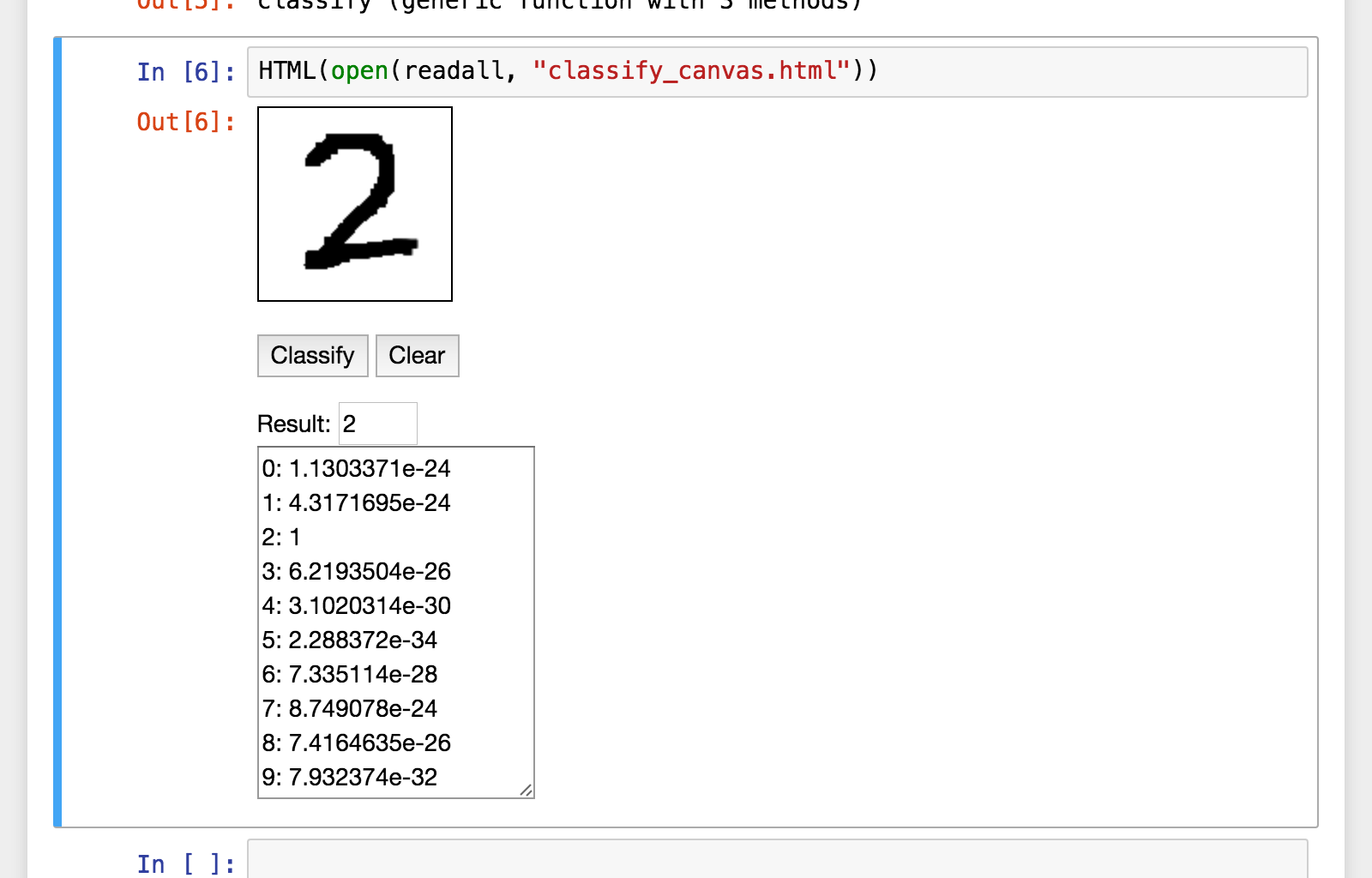
----
<!-- .slide: data-background="http://antimon2.github.io/MLNGY_201605/slides/canvas_classify_sample_CNN3_TRAINED_result.png" data-background-color="rgba(213,99,92,0.3)" -->
Note:
MNIST on Jupyter Notebook
----
<!-- .slide: data-background-color="rgba(213,99,92,0.3)" -->
[https://qiita.com/antimon2/items/a370ed6e91d0f2764e80](https://qiita.com/antimon2/items/a370ed6e91d0f2764e80)<!-- .element: style="font-size:0.7em" -->
Note:
第8回勉強会(2016/12/03)の発表資料 兼 Qiita の Julia Advent Calendar 2016 の投稿
「『ゼロから作る Deep Learning』を Julia でやってみた」がメインテーマ。
----
<!-- .slide: data-background="https://i.imgur.com/M3wypaJ.png" data-background-color="rgba(213,99,92,0.3)" -->
Note:
スライドの最後の方の学習曲線

----
<!-- .slide: data-background-color="rgba(213,99,92,0.3)" -->
[https://hackmd.io/p/H1uGEnNmW](https://hackmd.io/p/H1uGEnNmW)<!-- .element: style="font-size:0.7em" -->
Note:
第11回勉強会(2017/07/02)の発表資料
この時から発表スライドは [HackMD](https://hackmd.io) を利用。
----
<!-- .slide: data-background="https://i.imgur.com/Fh9C3Yu.png" data-background-color="rgba(213,99,92,0.3)" -->
Note:
ベンチマーク実験結果

----
<!-- .slide: data-background-color="rgba(213,99,92,0.3)" -->
<video controls src="https://s3-ap-northeast-1.amazonaws.com/mlnagoya/movies/19669130_284321108643377_5414019349935554560_n.mp4#t=348"></video>
<span>https://www.facebook.com/mlnagoya/videos/1773207879636754/?t=348<!-- .element: style="font-size:0.7em" --></span>
Note:
この回は発表大会で、試験的に動画配信もしました。その録画ムービーです。Facebook で公開しています。
----
<!-- .slide: data-background-color="rgba(213,99,92,0.3)" -->
[https://hackmd.io/p/r1iFiQXyf](https://hackmd.io/p/r1iFiQXyf)<!-- .element: style="font-size:0.7em" -->
Note:
第13回勉強会(2017/11/11)の発表資料
「速いよ書きやすいよ良いよ」だけじゃなくて「実用的だよ」を言いたかった発表。
----
<!-- .slide: data-background="https://i.imgur.com/58KdDrf.png" data-background-color="rgba(213,99,92,0.3)" -->
Note:
RemoteChannel を利用した実装例

----
<!-- .slide: data-background-color="rgba(213,99,92,0.3)" -->
[https://hackmd.io/p/Hk0x7U-LM](https://hackmd.io/p/Hk0x7U-LM)<!-- .element: style="font-size:0.7em" -->
Note:
第14回勉強会(2018/02/03)の発表資料
「実用的だよ」その2。前回の「バッチ生成」の具体例などなど。
----
<!-- .slide: data-background="https://i.imgur.com/QKJKbfU.png" data-background-color="rgba(213,99,92,0.3)" -->
Note:
ねこ認識

----
<!-- .slide: data-background-color="rgba(213,99,92,0.3)" -->
[https://hackmd.io/p/BkIPJ5gGm](https://hackmd.io/p/BkIPJ5gGm)<!-- .element: style="font-size:0.7em" -->
Note:
第16回勉強会(2018/06/30)の発表資料
OpenAI Gym(強化学習フレームワーク)回だったので「Julia でも動かせるよ!」を実際にやってみた発表。
----
<!-- .slide: data-background="https://i.imgur.com/2v6Uf7j.png" data-background-color="rgba(213,99,92,0.3)" -->
Note:
ブロック崩し

----
<!-- .slide: data-background-color="rgba(213,99,92,0.3)" -->
[https://hackmd.io/p/HyHP1am_m](https://hackmd.io/p/HyHP1am_m)<!-- .element: style="font-size:0.7em" -->
Note:
第17回勉強会(2018/09/15)の発表資料
Julia の新パッケージマネージャ・プロジェクト管理・ユニットテストを紹介(機械学習色ゼロ)(主催者特権で発表枠を確保し(ry)。
----
<!-- .slide: data-background="https://i.imgur.com/lJkrFes.jpg" data-background-color="rgba(213,99,92,0.3)" -->
Note:
前回の勉強会の様子 (2)

----
<!-- .slide: data-background-color="rgba(213,99,92,0.3)" -->
+ 他の回でも Julia の紹介
+ 他の勉強会でも Julia の紹介
Note:
Python東海では「**PyCall.jl**を使って」とか「Ju**pyt**er Notebook を使って」とかで Python も絡んでるよアピールしながら Julia メインの発表したり。
---
<!-- .slide: data-background-color="rgba(96,173,81,0.3)" -->
+ :white_check_mark: 私 × Julia
+ :white_check_mark: 機械学習 × Julia
+ :arrow_right: 実績 × Julia
---
<!-- .slide: data-background-color="rgba(96,173,81,0.3)" -->
# 実績 × Julia
---
<!-- .slide: data-background-color="rgba(96,173,81,0.3)" -->
## 実績 × 製作物 × Julia
----
<!-- .slide: data-background-color="rgba(96,173,81,0.3)" -->
[https://juliaobserver.com/packages/QDates](https://juliaobserver.com/packages/QDates)<!-- .element: style="font-size:0.7em" -->
Note:
Julia のパッケージ開発(と ccall の使い方)を勉強するために作ったパッケージ。
公式パッケージだから `pkg> add QDates` でインストールできるよ!
Julia v0.5 以降対応(もちろん v1.0 でも動くよ!)
----
<!-- .slide: data-background="https://i.imgur.com/xQJ5nsO.png" data-background-color="rgba(96,173,81,0.3)" -->
Note:
QDates

----
<!-- .slide: data-background-color="rgba(96,173,81,0.3)" -->
[https://github.com/antimon2?…&language=julia](https://github.com/antimon2?utf8=%E2%9C%93&tab=repositories&q=&type=&language=julia)<!-- .element: style="font-size:0.7em" -->
Note:
GitHub に今まで作ったものいくつか公開中。
最近だと(実験的に)FluxMNIST.jl とか、(ジョークアプリとして)BFREPL.jl とか、(ユニットテスト紹介記事と連動して)FizzBuzzQuiz.jl とか。
---
<!-- .slide: data-background-color="rgba(96,173,81,0.3)" -->
## 実績 × 仕事 × Julia
----
<!-- .slide: data-background-color="rgba(96,173,81,0.3)" -->
### ※実績なし
<!-- .element: class="fragment" -->
Note:
会社としてJuliaを使用した製品・サービスはまだ実績がありません…。
----
<!-- .slide: data-background-color="rgba(96,173,81,0.3)" -->
### でも仕事で使ってるよ
----
<!-- .slide: data-background="https://i.imgur.com/EWnvcxx.gif" data-background-color="rgba(96,173,81,0.3)" -->
#### PCL × Julia
+ [PCL (Point Cloud Library)](http://pointclouds.org/) を Julia から利用する実験
+ ↑Jupyter Notebook 上で3次元物体認識をやりたかった
+ ビルドがうまくいかず断念<!-- .element: class="fragment" -->
Note:
案件そのものは違う形で納品までは持って行った
----
<!-- .slide: data-background="https://i.imgur.com/39xYGkv.png" data-background-color="rgba(96,173,81,0.3)" -->
#### Kinect v2 × OpenNI × Julia
+ Kinect v2 × [OpenNI](https://structure.io/openni) を利用して人の姿勢を検知する実験
+ Julia から利用する実験
+ 案件そのものがお蔵入りに<!-- .element: class="fragment" -->
Note:
あと Kinect とか OpenNI とかがそもそも消えていく運命
----
<!-- .slide: data-background-color="rgba(96,173,81,0.3)" -->
+ 細かい社内ツールは Julia で作っている<span>(ものもある)<!-- .element: class="fragment" data-fragment-index="1" --></span>
+ というかオレオレツール類<!-- .element: class="fragment" data-fragment-index="1" -->
+ ファイル一括変換とか<!-- .element: class="fragment" data-fragment-index="1" -->
Note:
「Linux なら初めから入っているコマンドでシェル芸でできるよ」なものを敢えて Julia で実装してみたりとか…。
---
<!-- .slide: data-background-color="rgba(96,173,81,0.3)" -->
## 実績 × 準備 × Julia
Note:
いろいろ技術調査・内容まとめをやってますの紹介。
----
<!-- .slide: data-background-color="rgba(96,173,81,0.3)" -->
[https://qiita.com/antimon2/items/5222f4f773bf1944b745](https://qiita.com/antimon2/items/5222f4f773bf1944b745)<!-- .element: style="font-size:0.7em" -->
Note:
Julia 標準機能でユニットテストする方法を調査・まとめ。
----
<!-- .slide: data-background="https://i.imgur.com/Ybk2Y9C.png" data-background-color="rgba(96,173,81,0.3)" -->
Note:
実行例:

----
<!-- .slide: data-background-color="rgba(96,173,81,0.3)" -->
[https://github.com/antimon2/FluxWiG.jl](https://github.com/antimon2/FluxWiG.jl)<!-- .element: style="font-size:0.7em" -->
Note:
読んだ論文で紹介されていたアルゴリズム(等)を Julia で実装。
それを実験できるサンプルとともに公開。
----
<!-- .slide: data-background="https://i.imgur.com/lVX2vzV.png" data-background-color="rgba(96,173,81,0.3)" -->
Note:
実行例:

----
<!-- .slide: data-background-color="rgba(96,173,81,0.3)" -->
#### その他まとめ
+ Julia プロジェクトの作り方
+ Julia 特有の書き方・機能等
+ Julia(+Flux)による機械学習タスクの回し方
<span>いつでも誰でも Julia で開発が出来るように!<!-- .element: class="fragment" --></span>
Note:
を Qiita なり 会社内のドキュメントスペースなりにまとめていっています。
これからまとめるものも含むw
---
<!-- .slide: data-background-color="rgba(170,121,193,0.3)" -->
+ :white_check_mark: 私 × Julia
+ :white_check_mark: 機械学習 × Julia
+ :white_check_mark: 実績 × Julia
---
<!-- .slide: data-background-color="rgba(170,121,193,0.3)" -->
# まとめ
----
<!-- .slide: data-background-color="rgba(170,121,193,0.3)" -->
## `I ♥ Julia`<!-- .element: style="font-size:200%" -->
---
<!-- .slide: data-background-color="rgba(170,121,193,0.3)" -->
ご清聴ありがとうございます。
 Google Drive
Gist
Clipboard
Google Drive
Gist
Clipboard
 Sign in with Wallet






