# 推甄筆記(甘芭爹!!!!)
## 戊組
- 給定 n 跟 L,求 L 最後會是啥(略過)
```python=
def f(n, L):
if n > 0:
L.append(n)
if n is odd:
n = n - 1
else:
n = n / 2
f(n, L)
```
- VM 跟 container 差異
VM 模擬整個作業系統(包含kernel),container 是建立在本機作業系統上的軟體
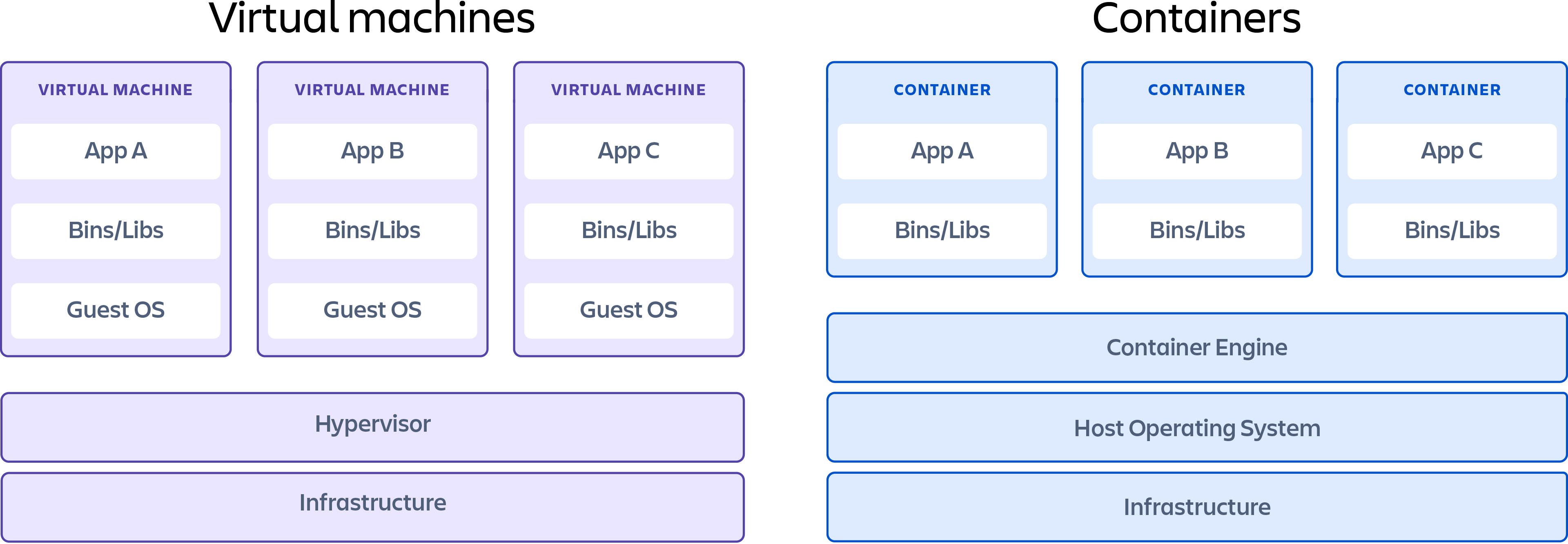
容器(Container):以應用程式(App)為單位的虛擬化技術,應用程式與其相依性資源(Dependency)會被封裝在容器(Container)中,使其可以重複利用與搬遷,容器間彼此獨立運行,互不干擾。
- 題目給 192.0.2.96/19 這類的東西,求子網路 IP 遮罩範圍
範圍為 2^(32-19) - 2,2的部分為255.255.255.255, 255.255.255.0
解釋:

網路位址是172.16.0.0,而後面的16則代表「網路遮罩的二進位表示法中,前面16個數字為1」
如果把網路遮罩用二進位來表示,就是相當於下面這樣的表示方式:

前面16個都是1,若把這樣的網路遮罩轉換成10進位,也就是說,網路遮罩為255.255.0.0,因此16所代表的是網路遮罩。
從上面這個例子來看,由於網路遮罩是255.255.0.0
代表在分配IP位址時,前面16個數字不能變動,只有後面16個數字能夠變動,而前面不能變動的之處就是使用網路位址的部分。
現在,來看網路位址,上面的範例中網路位址是172.16.0.0,轉成二進位就是:

而能夠分配的IP位址為:
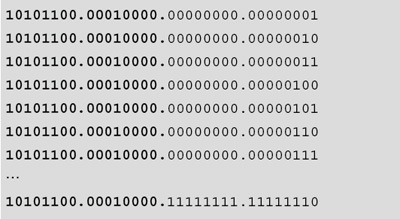
轉成十進位的話,就代表可使用的IP位址範圍為172.16.0.1到172.16.255.254。
所以這個子網路中可以使用的IP數量為2的16次方減2,也就是216-2=65534個IP位址。減去兩個的部分分別是172.16.0.0和172.16.255.255這兩個IP位址,為什麼這兩個要減去呢?因為172.16.0.0已經被拿來使用成這個子網路的網路位址,而172.16.255.255則是廣播位址,不能被拿來分配成一般IP位址使用。現在讀者對於IP位址分配應該已經有初步的概念了。
- XSS 跟 SQL injection 是什麼?怎麼防禦?
SQL Injection 的本質就是把「 輸入的惡意資料」 變成「 程式的一部分」
XSS(Cross-Site Scripting) : 當網站沒有做好的驗證,就可以輕易輸入惡意程式碼(HTML or JS)在網站上,以此攻擊網站
防禦:驗證使用者輸入訊息、request接收白名單
第一關
1. 意識到哪邊是使用者可以自己輸入資料的地方
2. 針對不同情境去做 XSS 的防禦
3. 可以考慮導入現成的 WAF(Web Application Firewall)
4. cookie使用HttpOnly
5. Two-factor authentication
第二關
CSP(Content Security Policy):
用來跟瀏覽器講說哪些來源的資源可以被載入,哪些不行,可以利用 response header 或是 <meta> tag 來指定頁面的 CSP 規則
### 補充: CSRF

防禦:

- 分別解釋
- strong type
每個變數型別在編譯時期就完全決定好(Java,C,C++)
int a = 0;
- weak type
不需要宣告變數(python)
a = 0;
- static type
變數會被綁定到某個型別,除非經過明顯的型別轉換,不然型別不會任意改變(Python)
```python
x = 3
y = '4'
print(x+y) // wrong,因為 StaticType
```
- dynamic type
變數的型別可能隨時會經過隱性的轉換(JS)
```javascript
var x = 3
var y = '4'
alert(x + y) //Produces "34"
```
- 分別解釋
- Object Oriented Programming
1. 封裝 -> 一個物件封裝 (Encapsulation)
2. 繼承 -> 繼承者擁有某些屬性或是方法
3. 多型 -> 使用相同名稱的方法,傳入不同的參數,會執行不同的指令 (Constructor)
4. 抽象 -> 將此物件的某些屬性與方法隱藏起來
- Functional Programming
1. pure function -> 避免在運算時發生「外部狀態改變」的情境
2. First-class -> 直接賦予值或者存至陣列中當作參數傳遞
ex: const a = (x,y) => x * y
call a(2,4) return 8
3. higher-order functions ->
1. 可以將函式(至少一個)當成參數傳入另一個函式。
2. 可以將函式當成另一個函式的回傳值。
ex:
```javascript
var add = function(x) {
return function(y) {
return x + y;
};
};
var addFive = add(5);
var addTen = add(10);
addFive(2); // 7
addTen(2); // 12
```
- Concurrent Programming -> 使用不同 CPU 分別運行程式來提高效率 ,或是當程式在等待執行結果時 (如等待 request 請求),先執行其他程式函式 (Coroutine)
- Concurrent Programming 為什麼比 Object Oriented Programming 好 -> 因為它融合OO加上Concurrent,像是Java的Thread,使得程式效率更好。
- 你最常使用的 framework 是什麼?舉出三個,並說明你為什麼用它(略過)
- 使用任意三種語言達成下述功能:
讀入一檔案 zero_one.in,只包含 0, 1 兩種字元,輸出 0 和 1 哪個較多次(不會有同樣多次的情況)
- 何謂雲端運算?舉出三大雲端廠商,並比較各自差異。
| | pros | cons |
| -------- | ----------------- | -------- |
| AWS | •**主導的市場地位**<br>•**廣泛而成熟的產品**<br>•對大型組織的支持<br>•廣泛的培訓<br>•全球影響力 | •使用困難<br>•**成本管理**<br>•壓倒性的選擇 |
| Azure | •**與Microsoft工具和軟體結合**<br>•廣泛的功能集<br>•**混合雲**<br>•**支持開源** | •文檔問題<br>•管理工具不完整 |
| GCP | •**專為雲原生業務設計**<br>•致力於開源和可移植性<br>•大幅折扣和靈活的合同<br>•**DevOps專業知識** | •IaaS市場的新進入者<br>•功能和服務較少<br>•歷來並非以企業為中心 |
- Microservice 是什麼
相較於Monolith,他將許多服務分解成微小的service,每個是獨立的元件,在部署及開發上達成優良的敏捷性以及良好的擴充性
- DevOps 是什麼?有哪些相關的工具?
1. Development + Operations -> 開發、測試、維運三集合 CI/CD
2. 工具:
- Docker將架構服務容器化,幫助統一整合開發環境
- K8S幫助管理多個容器
- CI/CD相關 -> Jenkins、Github Actions、Travis CI、Drone CI
- SQL 將兩個 table 合併排序
UNION 需要兩table同行數,不足用null補起來
```sql
SELECT OrderID,CustomerID,EmployeeID,OrderDate,ShipperID FROM Orders
UNION
SELECT ShipperID,ShipperName,Phone,null,null FROM Shippers
ORDER BY OrderID
```
選擇題:
- http vs https
| HTTP | HTTPS |
| -------- | -------- |
| http:// | https:// |
| unsecured | secured |
| port 80 | port 443 |
| application layer | transport layer |
| no SSL certificate | SSL certificate |
| no domain validation | domain validation |
| no encryption | data is encrypted |
- Internet message control protocol
網路七層協定中的第三層,解析網路封包或是分析路由的情況
- ping: 由 Echo Request 及 Echo Reply 互相配合
- traceroute: 以遞增的方式設定封包的 TTL,搭配 Router 在收到 TTL 為 1 的封包後,會傳送 Time Exceeded ICMP 封包給主機
- .com .edu .org
為域名
.net(網路技術公司或機構)
.org(非營利組織)
.edu(教育機構)
.int(國際組織)
.gov(政府機關)
.com(國際網域/商業性質)
手寫
1. What is NaN in porgraming
「解釋」那些無法定義或無法表現的浮點運算內容、無限、無意義數學式、非數字等
2. OOP 繼承 composition
composition:has a(擁有) -> Car has a Handle
Inheritance:is a(是) -> Car is a vehicle

3. List three popular cloud service
AWS、GCP、Azure
4. What is cloud native computing 並舉特性
在軟體開發初始,就使用以雲端為基礎的設施,並結合開發原則(DevOps)+開發方法(微服務架構+容器化技術),達成快速建置/測試/部署/維運的目的
5. 常用的框架,簡介及為何用他(至多三個)(略過)
6. Graph database
使用節點、邊和屬性來表示和儲存資料
1. Property Graphs
Neo4j 就是這一類,藉由許多的 nodes、relations、properties 所組合而成
2. Hypergraphs
和前者的差別在於,一個 relation 可以連接多個 nodes,很適合用於資料彼此有大量的「多對多」關係的情境
3. Triple Stores
使用 W3C 的 RDF(資源描述框架)
7. 提出sql有那些join並舉範例比較產生結果
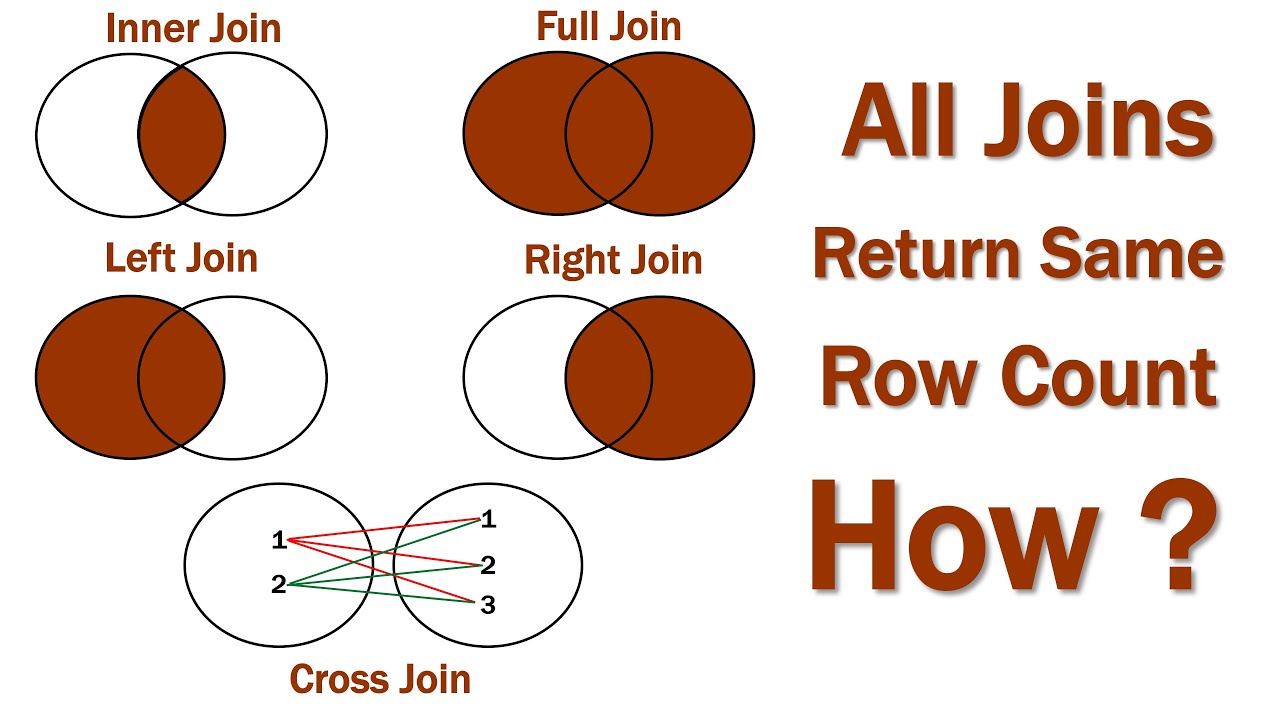
1. inner Join 內部合併查詢 -> 顯示兩個資料表所重複的資料
2. left (outer) Join 左外部合併查詢 -> 在左邊資料表中有這筆資料,才不管右邊的資料表有沒有這筆資料呢哼!
3. right (outer) Join 右外部合併查詢
像2.的改右邊
4. full (outer) Join 完全外部合併查詢 -> 全拿回來(UNION)
5. cross Join 交叉合併查詢
8. Stack and Queue 的差異並用程式語言實作(略實作)
Stack: First In Last Out
Queue: First In First Out
9. C++結果,並解釋
比較ASCII -> 兩個true -> print 11
```cpp
int main()
{
std::cout << ("a" < "") << ("" < "b") << "\n"; //第一題
return 0;
}
```
10. C++結果,並解釋
比較ASCII -> 兩個true -> print 10
```cpp
int main()
{
std::cout << ('a' < 'c') << ('c' < 'b') << "\n"; //第二題
return 0;
}
```
11. immutable data type -> 不可變動的

12. mutable data type -> 可變動的

13. What is NULL in C
NULL就是系统定義特殊的0,NULL和0的值都是一樣的;但NULL用於指標和對象,0用於數值
14. NULL pointer in C exception
嘗試存取空指標所指向之物件時,就會發生 NullPointerException
15. How to prevent NULL
1. 避免使用null
2. 如果必須使用null,應建立明確的null語意,開發程式時必須統一(例如沒有字串,到底應該是空字串或是null)
## 其他組(有趣題目)
- viewport 是什麼
通過標籤控制用戶的 viewport (可見區域),viewport 隨著設備的不同而變化
- promise 作用為何
| Async | sync |
| ----- | ---- |
| one at a time | more one at a time |
| 執行了就馬上換下一個指令 | 第一個執行完才執行下一個 |
Promise 物件代表一個即將完成、或失敗的Async操作,以及它所產生的值。 -> 用此物件來處理完成或是失敗的Async操作
- Ajax(Asynchronous JavaScript and XML) 什麼時候使用? 有什麼好處? 舉一個程式範例
Async Actions -> 可以僅向伺服器傳送並取回必須的資料
因為在伺服器和瀏覽器之間交換的資料大量減少,伺服器回應更快了
```javascript
function loadDoc() {
var xhttp = new XMLHttpRequest();
xhttp.onreadystatechange = function() {
if (this.readyState == 4 && this.status == 200) {
document.getElementById("demo").innerHTML =
this.responseText;
}
};
xhttp.open("GET", 檔案在伺服器上的位置, true);
xhttp.send();
}
```
- 如果網頁有大量資料要渲染,如何加速(可從前後端角度敘述)
前端:preload第三方資源及重要資源、圖片大小優化、Cache、Lazy Load Image
後端:
- 闡述前端網頁模版使用經驗(略)
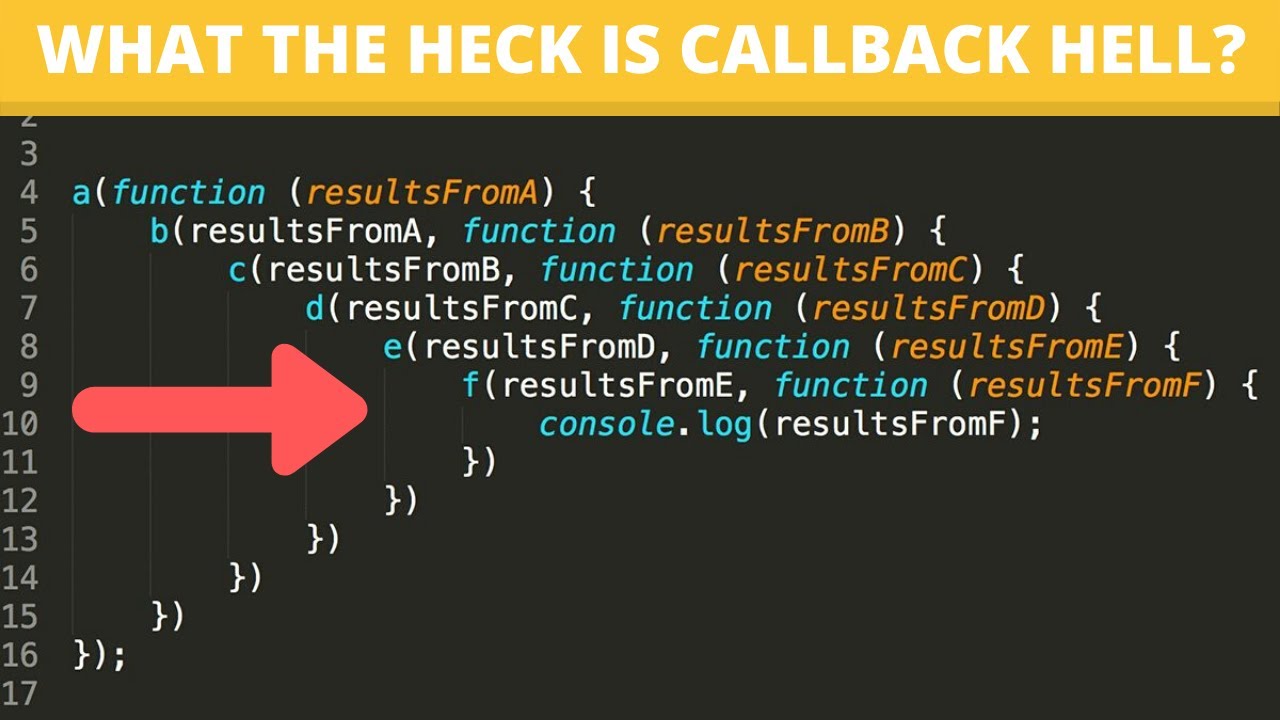
- JavaScript Callback Hell 是什麼
如果一個function被作為參數傳進另一個function,這種行為稱為"Callback
Callback被一層層嵌套,導致 程式碼難以閱讀和維護 的情況,就被稱作 Callback Hell。
### css
- css selector 選取以下該行如何選取
```css=
<head> /* hello, im here */
```
- css id class 優先權
id > class

- css class="a b" 優先權
a > b
- em, px, pt vh, vw 差別
1. em -> 相對單位,繼承基準是父元素
2. rem -> 相對單位,繼承基準是\<html\>根元素
3. px -> 像素
4. pt -> 相較於px,為一個絕對大小的單位
5. vh, vw -> 它們的v是viewport,奠基在viewport寬、高度做百分比伸縮的單位
### backend
- 用過什麼Framwork?(略)
- 什麼是Mvc?

- 你做什麼專案用什麼技術? 目的是什麼?(略)
- 資料庫 RMDB Nosql 比較優缺點是啥?
| | pros | cons |
| -------- | -------- | -------- |
| Nosql |- 資料可以為任意結構,提供彈性的開發<br>- 對於未來有大量擴充需求的系統,會更容易的去擴充,且擴充的成本也較低 |- 不確保 ACID 特性 |
| RMDB |- 可以使用 JOIN 來連結多個資料表,做較複雜的查詢<br>- 具備 ACID 特性 | - Schema 必須先定義好,往後如果要修改 schema 必須對於已存在的資料做相對應的處理較為麻煩<br> |
補充:NOSQL 本身就是基於分散式系統架構,且不具備 ACID 的特性,因此更適合 horizontal scaling。在做水平擴充之後,只需要把資料分散儲存到各個 server 中,不用去處理資料之間的關聯性。比起關聯式資料庫,能夠更簡單的做到 horizontal scaling。
- OAuth2.0 Access token是什麼?
[連結](https://www.ruanyifeng.com/blog/2014/05/oauth_2_0.html)
- GitLab 是什麼?有什麼特性?
1. 可以創建私人倉庫
2. 允許用戶設置 project 的獲取權限,進一步提升安全性
- 比較 ORM 優缺點
- pros:
1. 安全簡單(可以做一些初步的防堵或者安全性檢查)
2. 程式碼乾淨
3. 泛用(因為ORM是介於程式與資料庫之間,會自行轉換成原生SQL)
- cons:
1. 效能
2. 複雜的SQL語法不好處理
- 如何加速網站(如上)
- 遇到 DDOS 怎辦
1. 先了解正常和異常流量(透過分析個別封包僅接受合法的流量)
2. 使用 Web 應用程式防火牆 (WAF) 來防止攻擊(SQL injection or CSRF)
### Linux/BSD
- 闡述你知道的 Linux 網路管理指令
- ping -> ICMP echo request echo respond
- traceroute ->
- curl -> 透過 HTTP Protocol 上傳或是下載
- nslookup -> DNS 查詢
- Linux 如何做系統備援
寫一個腳本+cron task 執行腳本,定期做系統備份
- freeBSD, openBSD, NetBSD 講出優缺點
- freeBSD -> 注重穩定
- openBSD -> 注重安全
- NetBSD -> 注重多平台
- 計中的主機有可能被學生惡意使用或是當跳板來攻擊他人主機?身為網管該如何防範,以及該如何偵測該行為(略,不確定)
- 講出你知道的 Linux Distribution 版本以及特性
- Ubuntu -> 容易上手、良好桌面UI環境
- Debian -> 穩定、多平台
- Cent OS -> 非常穩定的系統,很適合作為伺服器作業系統使用
### DevOps
- 用過什麼CI/CD 軟體?
- Github Actions
- Jenkins
- K8s 中Pod service deployment node 什麼意思?

- pod -> K8S 運作的最小單位,可以有一個或是多個 Container
- node -> K8S 運作的最小硬體單位,一個 Worker Node(簡稱 Node)對應到一台機器
- Master Node -> 簡化看成一個特化的 Node 負責管理所有其他 Node。
- Cluster -> K8S 中多個 Node 與 Master 的集合。基本上可以想成在同一個環境裡所有 Node 集合在一起的單位。
- service -> K8S 中用來定義「一群 Pod 要如何被連線及存取」的元件。
- deployment -> 複製多個相同的 Pod 在 Cluster 中同時提供服務,可以幫我們做到無停機的系統升級(Zero Downtime Rollout)
- Ingress -> Ingress 可以透過 HTTP/HTTPS,在我們眾多的 Service 前搭建一個 reverse-proxy。這樣 Ingress 可以幫助我們統一一個對外的 port number,並且根據 hostname 或是 pathname 決定封包要轉發到哪個 Service 上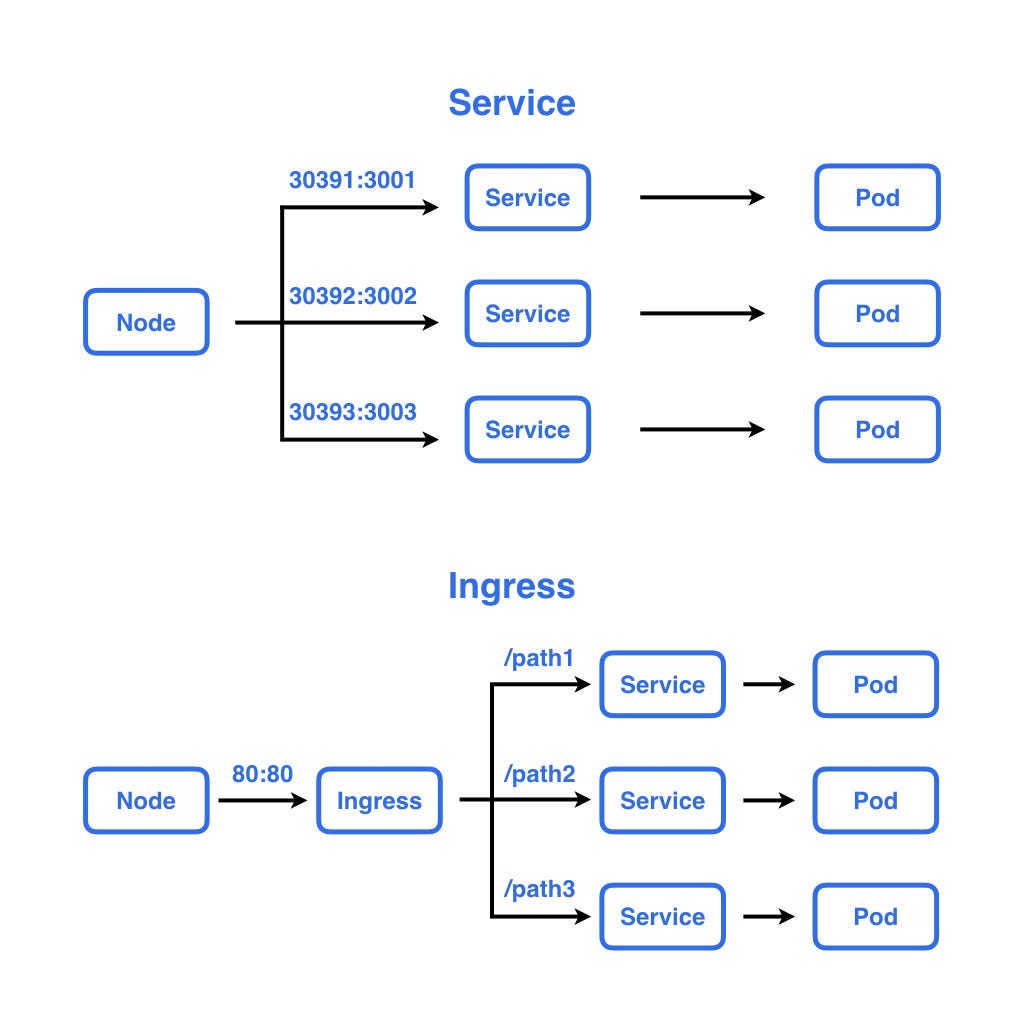
### 虛擬化
- docker 與 VM 差異(上)
- 闡述你知道的 vm 種類以及特性


- 使用 k8s 或是 openshift 相關經驗(略)
- Live migration ? 不同代cpu有什麼問題? 如何避免
將正在運行的虛擬機器從一台實體機器移動到另一台實體機器,達到零停機狀態下遷移虛擬機器;
可以在不同代同廠商下轉移,但需要先啟用處理器相容性設定
### git/軟工
- git pull, git fetch 差異
pull = fetch + merge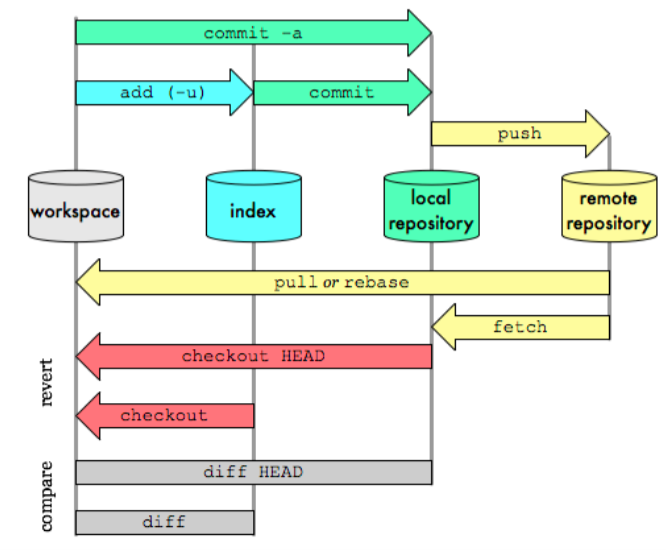
- git 如何將刪除的 branch 找回
1. git reflog 看 commitID
2. git checkout commitID
3. git checkout -b [branchname]
- 如何保持量好程式碼的品質
(略)
- 團隊合作開發經驗?擔任什麼角色(略)
- Git 考題給你 graph log,問你 rebase -i 之後長怎樣,還有要怎麼還原
(就像是複製貼上)
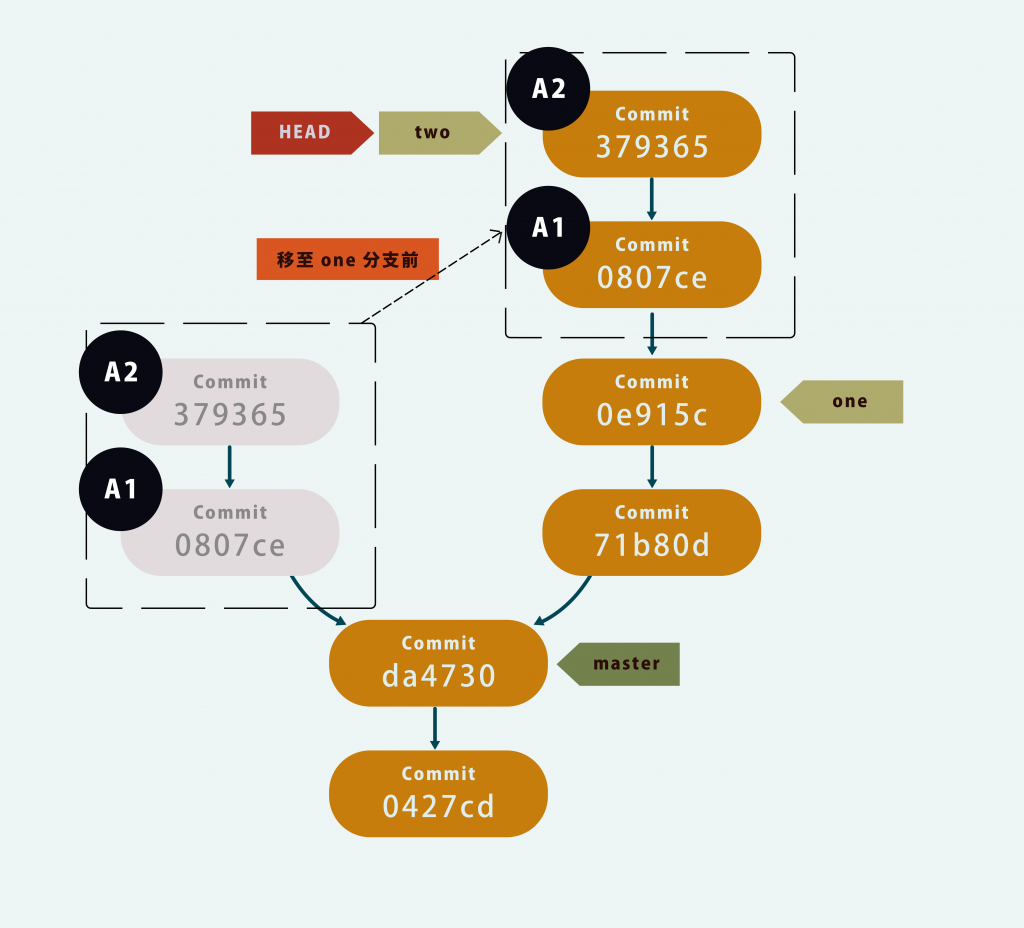
取消:git reflog -> git reset 回到 rebase 前的 id
### switch
- vlan 使用以及切割經驗
### 其他
- Node.js 的出現有什麼很大的影響?他有什麼特色?
- 比較分析 React vs Vue or Angular or 你用過的前端框架
- memory allocation 太慢怎麼 debug?可以用什麼工具如何解決?
malloc debug工具
- 為什麼 hashing 在 linux kernel 那麼常見?
透過設計良好的hash函數,可以將kernel的性能提高O(n/m) m為hash的項次
- IDS(Intrusion-detection system) 跟 AV(Anti virus)差在哪,各是檢查封包的什麼東西?為什麼很難擋住 APT ?
- Android 手機有辦法搞 IP Spoofing 嗎?怎麼做?
- Server虛擬化有甚麼好處?你用過什麼server虛擬化工具?(VMWare、VirtualBox)
- 提高伺服器可用性
- 降低營運成本
- 消除伺服器複雜性
- 增進應用程式效能
- 加快工作負載部署速度
- 若你的程式以下環節效能不好,你會如何偵錯並解決?
(a)program bottleneck (b)cache miss (c)locality issue
- DNS反射是一種攻擊手法,通常是利用大型DNS Server,將封包反射至目標電腦進行攻擊,請說明如何實作
## 演算法
- 一個 function int freq_mode(int a, int b, int c, int d),回傳其眾數出現的次數。例如 freq_mode(1, 3, 3, 4) 要回傳 2,因為 3 出現 2 次。求最優雅的解法?
- 實作演算法:給三維平面上的 n 個點,求一個球型能包住所有點,半徑必須小於最小半徑解的 2 倍,要是 O(n) 解。
- 實作演算法:找出陣列 int A[n] 第二小的數, O(n) 解,並證明所有可能的解都不可能比 Ω(n) 好
- 舉出一個你會實作的較複雜的演算法,並用 30 字簡介
## mail
- Open relay 是什麼?
- SPF 作用
- IMAP, POP3 差異
- 如何防止垃圾郵件
- 畫出可擴展的 mail server 架構,並且以文字說明
- postfix table 使用過哪些
- Dovecot中userdb、passdb分別是什麼?
- 是否有管過G suite 、Line work?有什麼優點可以借鏡的?
- 追蹤Mail log 並且找出被退信的原因
 Google Drive
Gist
Clipboard
Google Drive
Gist
Clipboard
 Sign in with Wallet






