# パRails輪読会
# 目次
- [概要](#概要)
- [Part1.Rails](#Part1.Rails)
- [Part2.Railsの周辺知識](#Part2.Railsの周辺知識)
- [Part3.Webアプリケーション開発](#Part3.Webアプリケーション開発)
- [Part4.Railsアプリケーションの拡張・運用](#Part4.Railsアプリケーションの拡張・運用)
- [Part5.エキスパートRails](#Part5.エキスパートRails)
<!-- [目次の書き方(ページ内リンク)](#目次の書き方ページ内リンク) -->
ゆうやさんから共有。ターミナルにgitのブランチが表示されるようにするやつ
```zshrcに次のを書いて、source ~/.zshrc とするとターミナルにブランチ名とかカレントディレクトリが表示されるようになります
PROMPT='%F{green}%n@%m%F{white}:%F{033}%~ $vcs_info_msg_0_
%F{white}$ '
[17:19]
ブランチ名表示の場合は
autoload -Uz vcs_info
setopt prompt_subst
zstyle ':vcs_info:git:*' check-for-changes true
zstyle ':vcs_info:git:*' stagedstr "%F{red}+"
zstyle ':vcs_info:git:*' unstagedstr "%F{red}*"
zstyle ':vcs_info:*' formats "%F{red}(%b)%c%u%f"
zstyle ':vcs_info:*' actionformats '[%b|%a]'
precmd () { vcs_info }
```
も書かないとだめかも
[17:21]
他に、こんなのをzshrcに書くとエイリアスを登録できるし、
```
# linux
alias ll='ls -la'
# git
alias gb='git branch'
alias gc='git commit'
alias gs='git status'
alias ga='git add'
alias gd='git diff'
alias gg='git grep'
# rails
alias rs='rails s'
alias rc='rails c'
.gitconfigファイルに
[alias]
co = checkout
みたいなのを書くと、git co で git checkout になります
[17:22]
git push時に毎回うまく行かず、ターミナルに表示されたのをコピペしてる方は.gitconfigファイルに次のを書くといきなりgit pushできるようになります
[push]
default = current
[17:23]
念の為共有でした
```
# 概要
## 目的
輪読会を進める上で、詰まった点や疑問に思ったことをメモし、記録として残す
## メンバー
肉みち 三浦さん めぐさん ゆうやさん まことさん たけむー
## 日時
水曜日:21:00〜 日曜日:15:00〜
## 使い方
各々気になったことや疑問点、気付きなどを書く
好きに書いてどんどん汚してもらってOK👍
# Part1.Rails
- bundle updateすると、らんてくんが実行できなくなるのはなぜ?
運営側で用意したgemなどのバージョンと差異が生まれてしまうから?
- bundle initする意味は?
しなくてもいけるのでは?
- RESTって何?
- rails newで指定したrailsのバージョンにならない
```bash
*バージョン指定しても切り替わらなかったので、指定してnew
rails _6.0.3_ new hello_rails --skip-bundle
```
[https://qiita.com/nozomi_nozomi/items/01f9471c1c82faf63cb3](https://qiita.com/nozomi_nozomi/items/01f9471c1c82faf63cb3)
```ruby=
gem ‘rails’, ‘~> 5.0.2’
rails は 5.0.xで利用可。
```
```ruby=
変更前
gem 'rails', '~> 6.0.3'
変更後
gem 'rails', '= 6.0.3'
$ bundle update
```
bundle execを付けるとgemfile.lockに基づいて事項される。
- Rubyのバージョンを切り替える
```ruby
$ rbenv local 2.7.3
```
local の意味
今使ってる作業ディレクトリでのバージョンを指定するため。作業する内容によってバージョンの違いがあるので「このディレクトリではこのバージョンを使う」というもの
bin/rails をつけるとspringが起動してサーバーの立ち上がりが速くなる
→2回目以降はbinを付けなくても良い...?
*裏側でspringが走っているので止めなければならない場合がある
- 止める時のコマンド
```ruby=
作業ディレクトリに移動して、
# コマンドで
$ bin/spring status # で状態を確認
Spring is running:
# となっていれば
$ bin/spring stop #を入力
Spring stopped.
# となっているのを確認
# 一応もう一回
$ bin/spring status #を打って
Spring is not running.
# となっていればよし。
```
[rails new するとできる bin ディレクトリまとめ](https://qiita.com/ayasuda/items/7edcef9f9508d35cb3dd)
- 普通のrails s
```ruby=
hello_rails % rails s
=> Booting Puma
=> Rails 6.0.3 application starting in development
=> Run `rails server --help` for more startup options
Puma starting in single mode...
* Version 4.3.8 (ruby 2.6.6-p146), codename: Mysterious Traveller
* Min threads: 5, max threads: 5
* Environment: development
* Listening on tcp://127.0.0.1:3000
* Listening on tcp://[::1]:3000
Use Ctrl-C to stop
```
- bin/rails s
```ruby=
hello_rails % bin/rails s
=> Booting Puma
=> Rails 6.0.3 application starting in development
=> Run `rails server --help` for more startup options
Puma starting in single mode...
* Version 4.3.8 (ruby 2.6.6-p146), codename: Mysterious Traveller
* Min threads: 5, max threads: 5
* Environment: development
* Listening on tcp://127.0.0.1:3000
* Listening on tcp://[::1]:3000
Use Ctrl-C to stop
```
- bundle exec rails s
```ruby=
% bundle exec rails s
=> Booting Puma
=> Rails 6.0.3 application starting in development
=> Run `rails server --help` for more startup options
Puma starting in single mode...
* Version 4.3.8 (ruby 2.6.6-p146), codename: Mysterious Traveller
* Min threads: 5, max threads: 5
* Environment: development
* Listening on tcp://127.0.0.1:3000
* Listening on tcp://[::1]:3000
Use Ctrl-C to stop
```
[rails db:reset、rails db:migrate:reset、rails db:setupの違い](https://qiita.com/kenkentarou/items/9d2dd0d032f530311d2a)
db:setupには以下が含まれる
- db:create
- db:load
- db:seed
[Rails マイグレーションの廃止とRidgepoleの導入・利用方法](https://qiita.com/ayies128/items/c84db2ea41210eae0577)
マイグレーションファイルを使わずに、直接スキーマファイルをいじってテーブルの作成、変更、削除できる
豆知識:クックパッドが使ってる
---
7/11
- todo アプリ rails new
```bash=
rails new todo \
--skip-action-mailer \
--skip-action-mailbox \
--skip-action-text \
--skip-action-storage \
--skip-action-cable
```
```bash
bin/rails g scaffold task content:text
```
- `-1FA`
先頭に付け足して打つとリスト化されて隠しファイルも表示してくれる
```bash
ls -1FA db/migrate
```
[よくわからないけど `bin/rails`を使うと起動が速い 🤔](https://www.notion.so/_-Rails-8297c8e64d1444cb931fe0598debf814)
7/17
2章
2-1
```ruby
$ rails new book_admin --skip-action-mailer --skip-action-mailbox --skip-action-text --skip-active-storage --skip-action-cable
```
```ruby
$ rails g model Book name:string published_on:date price:integer
```
- エイリアスとは?
updateとupdate_attributesの違い
同じ捉えて良い?
- 53p: 2-2-1 モデルを扱う
rails cで以下を入力
```ruby
(1..5).each do |i|
Book.create(
name: "Book #{i}",
published_on: Time.parse("20191224").ago(i.months),
price: (i * 1000),
)
end
```
7/18
## Active Recordについて
---
[Active Record の基礎 - Railsガイド](https://railsguides.jp/active_record_basics.html)
## Active Record Query Interface
---
[Active Record クエリインターフェイス - Railsガイド](https://railsguides.jp/active_record_querying.html)
### クエリとは?
---
[クエリとは|「分かりそう」で「分からない」でも「分かった」気になれるIT用語辞典](https://wa3.i-3-i.info/word11290.html)
### リレーションとは?
---
[リレーションとは|「分かりそう」で「分からない」でも「分かった」気になれるIT用語辞典](https://wa3.i-3-i.info/word11596.html)
[【初心者向け】RailsのActive Recordの解説&メソッドまとめ - Qiita](https://qiita.com/ryokky59/items/a1d0b4e86bacbd7ef6e8)
7/21
- scope
```ruby=
scope :costly, -> { where("price > ?", 3000) }
scope :written_about, ->(theme) { where("name like ?", "%#{theme}%") }
scope :find_price, ->(price) { find_by(price: price) }
```
scopeをざっくりと言うと
`scope :costly` の場合、
「costlyというメソッドを使えば、定義した処理をいつでも呼びだせるよ!」っていう
scopeって便利だね!
- seed.rb(自作)
```ruby=
db/seed.rb
Book.create(
[
{ name: 'ruby', published_on: "2021-7-21", price: 1000 },
{ name: 'java', published_on: "2021-7-21", price: 2000 },
{ name: 'javascript', published_on: "2021-7-21", price: 3000 },
{ name: 'php', published_on: "2021-7-21", price: 4000 },
{ name: 'C', published_on: "2021-7-21", price: 5000 },
{ name: 'C#', published_on: "2021-7-21", price: 6000 },
{ name: 'python', published_on: "2021-7-21", price: 7000 },
{ name: 'html', published_on: "2021-7-21", price: 8000 },
{ name: 'css', published_on: "2021-7-21", price: 9000 },
{ name: 'C++', published_on: "2021-7-21", price: 10000 }
]
)
```
rails cにて
```ruby
> Book.find_price(10000)
> Book.written_about("java").find_price(10000)
```
- **default_scope**
モデル内の全てに適用される
[#git push でリモートブランチ名を指定なしで実行できるようにする ( $ git config --global push.default current ) - Qiita](https://qiita.com/YumaInaura/items/c493471db12c342e5256)
7/25
- モデルの作成(Publisher, Author)
```ruby
$ rails g model Publisher name:string address:text
$ rails g model Author name:string penname:string
$ rails db:migrate
```
```ruby
$ rails g migration AddPublisherIdToBooks publisher:references
```
生成されたマイグレーションファイル変更
```ruby
class AddPublisherIdToBooks < ActiveRecord::Migration[6.1]
# 変更前
def change
add_reference :books, :publisher, null: false, foreign_key: true
end
# 変更後
def change
add_reference :books, :publisher, foreign_key: true
change_column :books, :publisher_id, :integer, null: false
end
end
```
- マイグレーションファイルの、null: falseを分ける意味
### 疑問点
[p.60 モデル同士の関連付け マイグレーションファイルでカラム追加とnotnull制約を2行で記述する意図](https://www.notion.so/_-Rails-8297c8e64d1444cb931fe0598debf814)
外部キーを追加時に、デフォルト値を設定しないのであればDBをリセットするから別々に分ける必要はないのでは?
デフォルト値を設定する場合は、リセットする必要はない
7/28
- 多対多
中間テーブルを作成
```ruby
$ rails g model BookAuthor book:references author:references
```
app/models/
```ruby
class Book < ApplicationRecord
belongs_to :publisher
has_many :book_authors
has_many :authors, through: :book_authors
略
end
```
```ruby
class Auther < ApplicationRecord
has_many :book_authors
has_many :books, through: :book_authors
end
```
- reloadメソッドとは
DBに保存されているデータを参照する?コンソールにて
```ruby
user.name
=> 'hoge'
user.name = 'foo'
=> 'foo'
user.reload
=> 'hoge'
```
- db/seed.rb(publisherをアソシエーションを組んだため、再度seedファイルを作成)
```ruby
Publisher.create(
[
{ name: 'Gihyo inc.', address: 'Ichigaya' }
]
)
Book.create(
[
{ name: 'book 1', published_on: Time.current, price: 1000, publisher_id: 1 },
{ name: 'book 2', published_on: Time.current, price: 2000, publisher_id: 1 }
]
)
```
8/4
- enum
マジックナンバーを避ける
- マジックナンバー
[マジックナンバーとrailsにおける定数管理gem "config" - Qiita](https://qiita.com/koki0527/items/41e8288b202d3c4d0c64)
[マジックナンバーとは|「分かりそう」で「分からない」でも「分かった」気になれるIT用語辞典](https://wa3.i-3-i.info/word12868.html)
[ハードコーディングとは|「分かりそう」で「分からない」でも「分かった」気になれるIT用語辞典](https://wa3.i-3-i.info/word12866.html)
enumを定義しておくと、定義箇所を変更するだけで反映される
単に数字だと意味が伝わらないので、文字にする
respond_toメソッド
- リクエストされるフォーマットによって処理を分ける
[respond_toメソッドの使い方をマスターしてリクエストのフォーマットで処理を分けよう!](http://pikawaka.com/rails/respond_to)
- **Variant**
variantについて
[Ruby on Rails 4.1 リリースノート - Railsガイド](https://railsguides.jp/4_1_release_notes.html#action-pack-variant)
**request.user_agent**
[request | Railsドキュメント](https://railsdoc.com/page/request)
[[Rails]コントローラでUserAgentを取得する - Qiita](https://qiita.com/maifj08/items/0226102f8d5f2c227594)
=~
[String#=~ (Ruby 3.0.0 リファレンスマニュアル)](https://docs.ruby-lang.org/ja/latest/method/String/i/=3d=7e.html)
8/15
[time_ago_in_words | Railsドキュメント](https://railsdoc.com/page/time_ago_in_words)
## 2-5 ビューテンプレートについて
- ビューの整形に関するコードはモデルクラスじゃなくてヘルパーメソッドを使うのが一般的
- url_forとlink_toは、細かく指定できる(開発中で試すときに使う?)
- エスケープ処理
エスケープ処理とは、プログラムの中で使う特殊な記号を「ただの文字」として扱いたい時に行う処理です。
[HTML特殊文字のエスケープ](https://www.javadrive.jp/rails/template/index7.html)
[html_safe、raw、「<%==」の比較 - Qiita](https://qiita.com/iwamot/items/74c2bd9ebd3ac6458837)
2-5-4
- jbuilder
[Rails による API 専用アプリケーション - Railsガイド](https://railsguides.jp/api_app.html)
railsをAPIモードでnewすると、jbuilderが含まれずに生成される
```jsx
普通にrails newすると以下が追加されている
gem 'jbuilder', '~> 2.7'
```
※標準でjbuilderがgemで入っている。active_model_serializersというgemもあるので、使う時要検討
(ざっくり)APIモードと、いつもカリキュラムでやってるrails new の違い
- 裏側の処理をRailsで、表はVue.jsなどのフロントのフレームワークなどを使う場合
- `rails new` で `--api` と、オプションをつけるとjbuilder のgemが生成されない
- viewが作られない
コラム p.115 参照
[週刊Railsウォッチ(20210427後編)RactorでUDPサーバーを作る、JSONシリアライザalba gem、AppleのAirTagほか|TechRacho(テックラッチョ)〜エンジニアの「?」を「!」に〜|BPS株式会社](https://techracho.bpsinc.jp/hachi8833/2021_04_27/107435)
3章
3-1は省略
3-2 RackとRailsの関係
[Rails と Rack - Railsガイド](https://railsguides.jp/rails_on_rack.html)
[第23回 Rackとは何か(1)Rackの生まれた背景](https://gihyo.jp/dev/serial/01/ruby/0023)

[Railsのデザインパターンまとめ](https://applis.io/posts/rails-design-patterns)
---
---
8/18
Rackはミドルウェア。スマホやPCとかの予約変換みたいな中身を自分で作れる。
「a」と打ったら「apple」が出てくるみたいなのを自分で作れるよ。という、ざっくりとしたイメージ(肉)
以下を書くことで「Cloud9でローカル接続するときに楽になる」という初期設定的なことを自分でできる

[Rails と Rack - Railsガイド](https://railsguides.jp/rails_on_rack.html)
8/22
複数のDBを接続する
DBにアクセスできる
[pgAdmin](https://www.pgadmin.org/)
8/28

[【図解】HTTP/2って?HTTP/1.1との違いと導入メリット・課題まとめ | カゴヤのサーバー研究室](https://www.kagoya.jp/howto/webhomepage/http-2/)
### パース
[パースとは - IT用語辞典](https://e-words.jp/w/%E3%83%91%E3%83%BC%E3%82%B9.html)
HTTP/2
[普及が進む「HTTP/2」の仕組みとメリットとは | さくらのナレッジ](https://knowledge.sakura.ad.jp/7734/)
### Early Hints
homebrew経由でH2Oというのをインストールすることでhttpsでローカルサーバー起動できるよ!
httpよりhttpsの方がデータを細かく各々処理してくれるから表示が速いよ!
### CSP(Content Security Policy) *セキュリティのお話
`rails new` した段階で
`<%= csrf_meta_tags %>
<%= csp_meta_tag %>`
content_security_policy.rbが設定ファイルとなっている
↑がapplication.html.erbの<head>の中に書かれている(Rails5.2から自動で生成される)
[Rails セキュリティガイド - Railsガイド](https://railsguides.jp/security.html#content-security-policy%EF%BC%88csp%EF%BC%89)
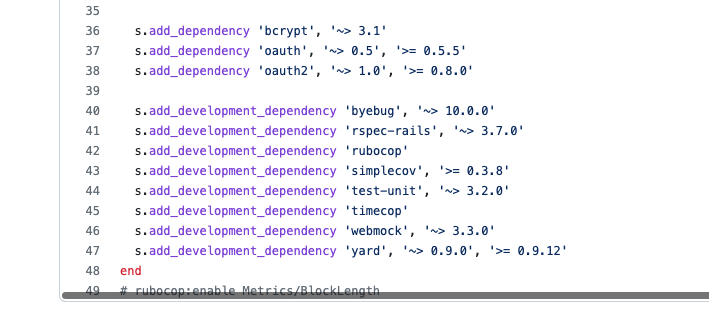
## gemの選定
更新頻度・スターの数・依存gem
例: sorcery
[sorcery/sorcery.gemspec at master · Sorcery/sorcery](https://github.com/Sorcery/sorcery/blob/master/sorcery.gemspec)
この辺?
# Part2.Railsの周辺知識
8/29
### webpack
- jsをはじめとして様々な形式のファイルをまとめるモジュールバンドラー
- npmモジュールとして配布されているライブラリ
- jsのコンパイルや圧縮を行う
### webpacker
Railsから扱いやすくするためのラッパー(サランラップ!!)
### webpackerの設定を供給する


---
---
### 9/1 4-2
## Sporockets
CSS拡張言語からCSSへの連結など効率的な形へ変換(コンパイル)する処理をしてくれる。
```scss=
/*
*= require_tree
*/
```
`*=` は**ディレクティブ**というもので「この部分はSprocketsの処理をしてね」というもの。コメントアウトでは無い。
## source map
source mapコンパイル前後のファイルを関連付ける。変換した時の履歴情報。
(vscodeでコンパイルの拡張機能入れるとmapファイルも生成される)
style.scss
```scss=
.border-red {
border: 1px solid red;
}
```
⬇️
style.css.map
```scss=
{
"version": 3,
"mappings": "AAAA,AAAA,WAAW,CAAC;EACV,MAAM,EAAE,aAAa;CACtB",
"sources": [
"style.scss"
],
"names": [],
"file": "style.css"
}
```
⬇️
style.css
```scss=
.border-red {
border: 1px solid red;
}
/*# sourceMappingURL=style.css.map */
```
---
- precompile(プリコンパイル)
- 'pre' は '先に'という意味で、[先にコンパイルする] という意味になる
プリコンパイルすることで、コンパイルしたファイル内のプログラムが縮小される。ただし、縮小によりdevelopment環境とproduction環境ではファイル名に付与されるフィンガープリントが異なることに注意。
- production環境を軽量にする設定(p.193あたり)
環境変数に以下を設定することで、ファイル内のプログラムが縮小され、軽量なファイルが生成される。
```jsx
$ RAILS_ENV=production bin/rails assets:precompile
```
[アセットパイプライン - Railsガイド](https://railsguides.jp/asset_pipeline.html#%E3%82%A2%E3%82%BB%E3%83%83%E3%83%88%E3%82%92%E3%83%97%E3%83%AA%E3%82%B3%E3%83%B3%E3%83%91%E3%82%A4%E3%83%AB%E3%81%99%E3%82%8B)
**9/5 4-3 Railsに組み込まれているJavascript機能**
### rails-ujs
デフォルトで使える状態
rails-ujsにより、二重送信防止やajax通信が可能となっている
```ruby=
<%= form_with model :hoge ,local: true do |f| %>
<%= f.submit data: { confirm: '実行して良いですか?', disable_with: '送信中'} %>
# confirm(コンファーム)と呼ぶ(jsのアラートの様にモーダルが出る)
# disable_with は二重送信を防いでくれる役割がある
```
**プロパティ**
プロパティとは名前(キー)と値(バリュー)が対になったものです。 プロパティのキーには文字列または Symbol が利用でき、値には任意のデータを指定できます。 また、1つのオブジェクトは複数のプロパティを持てるため、1つのオブジェクトで多種多様な値を表現できます。
### Turbolinks
jsのライブラリとして提供されてる。Railsではgemと合わせて利用している。が、シンプルな画面遷移以外の場合、turbolinksは邪魔になる時があるのでnewの段階で
`rails new --skip-turbolinks`
の様にスキップできる。(skipする場合が多い印象。。。)
## 9月8日(p.215~
**Active Job**
[Railsガイド](https://railsguides.jp/active_job_basics.html)
- 非同期で処理をしてほしい時に**Active Job**というライブラリを使う
- メール送信やデータ集計など時間がかかるものを裏側で処理することによって、ユーザー側の画面は他のページにアクセスしていても裏側でも処理は続くようにしている。
キュー
FIFO(FastIn FastOut: 先入れ先出し)
追加した順に実行する
例:
追加順: A→B→C
実行順: A→B→C
バックエンドキューというモデルの中に、非同期で実行したいジョブを格納していく感じ。
実行するタイミングを指定できる
- **シリアライズ**
プログラミングでオプジェクト化されたデータを、ファイルやストレージに保存したり、ネットワークで送受信したりできるような形に変換すること。
- **デシリアライズ**
シリアライズされたデータをプログラミングで扱えるようにオブジェクトの型に復元すること。
>※頭文字にデが付くと逆のイメージ。「バフとデバフ(ゲーム脳)」
<br>
ActiveRecordオブジェクトにはGlobal IDライブラリを使ってモデルオブジェクトの情報をURI文字列に変換する処理をする`to_global_id`メソッドが追加されている
URIに変換し=>僕らの見えるように
オブジェクトを渡したときに識別子がないと「それなんのオブジェクト?」と聞かれるから一意のIDを持たせる
- 値も保存してる? -> **そもそも値を渡していない**
モデルオブジェクトの情報全てを変換している?
つまり値も変換して保存している。
[URIとURLとURN](https://ferret-plus.com/4637)
```ruby=
gid:// YourApp / Some :: Model / id
# ↑ globalid
```
[RailsのグローバルID](https://github.com/rails/globalid)
```
グローバルIDは、モデルインスタンスを一意に識別するアプリ全体のURIです。
gid:// YourApp / Some :: Model / id
これは、異なるクラスのオブジェクトを参照するために単一の識別子が必要な場合に役立ちます。
一例は、ジョブスケジューリングです。オブジェクト自体をシリアル化するのではなく、モデルオブジェクトを参照する必要があります。ジョブを実行するときにモデルを見つけるために使用できるグローバルIDを渡すことができます。ジョブスケジューラは、モデルの命名とIDの詳細を知る必要はなく、モデルを参照するグローバル識別子を持っているだけです。
別の例は、ユーザーとグループの両方で構成されるオプションのドロップダウンリストです。通常、それらを参照するには、独自のアドホックスキームを考え出す必要があります。グローバルIDを使用すると、両方のクラスのオブジェクトに対して機能するユニバーサル識別子があります。
(GitHubより)
```
大規模だとsidekiq使わないとキツい
参照:
[シリアライズとは](https://e-words.jp/w/%E3%82%B7%E3%83%AA%E3%82%A2%E3%83%A9%E3%82%A4%E3%82%BA.html)
[ActiveJob/GlobalIDについて(qiita)](https://qiita.com/seiya1121/items/dfae32976f67090b8764)
## 9月12日 P.218〜
[sidekiq](https://qiita.com/yumiyon/items/6835d90e621e73268021)
[sidekiqのgit hub](https://github.com/mperham/sidekiq/wiki/Getting-Started)
現場railsだと324p~
[railsガイド](https://railsguides.jp/active_job_basics.html#%E3%83%90%E3%83%83%E3%82%AF%E3%82%A8%E3%83%B3%E3%83%89)
## Active Storage
使うためには以下のコマンドを入力する
`bin/rails active_storage:install`
[Active Storageの使い方、Qiita記事](https://qiita.com/hmmrjn/items/7cc5e5348755c517458a)
>カラムをもたないのに画像アップロードが簡単にできる。なぜか?
↓
ActiveStorage::Blobがカラムの代わり
ActiveStorageは2つのモデルで作られており
**ActiveStorage::Attachment**(中間テーブル)、と
**ActiveStorage::Blob**(メタ情報を管理するモデル)
↑ なんで保存してくれるのか、この辺の中身はよく分かっていない
一言で言うと
>Active Storageをインストールすることで、全モデルに関連付けすることができるファイルアップロード用のカラムのようなものを作成できる。
保存先の指定方法
[アマゾンS3を使う時の設定](https://railsguides.jp/active_storage_overview.html#%E3%82%BB%E3%83%83%E3%83%88%E3%82%A2%E3%83%83%E3%83%97)
#### variantメソッド
variantについて(復習!!!)
[Ruby on Rails 4.1 リリースノート - Railsガイド](https://railsguides.jp/4_1_release_notes.html#action-pack-variant)
https://railsguides.jp/active_storage_overview.html#%E7%94%BB%E5%83%8F%E3%82%92%E5%A4%89%E6%8F%9B%E3%81%99%E3%82%8B
[Active Strage](https://takapinosuke.hatenablog.com/entry/2020/10/21/234140)
```
variantメソッド
ActiveStorageで使用可能。ファイルの表示サイズを指定できる。
モデル.ファイル名.variant(resize: '幅x高さ')
```
MiniMagickのgemを入れてあげればImageMagickのコマンドとして実行されます。
- [ImageMagick](https://ja.wikipedia.org/wiki/ImageMagick)はオープンソースのソフトウェアで「Ruby専門の〜」とかではなく他の言語環境やWindowsなどでも使える。
---
### 9/18 ・5-2-4 ファイルへのアクセス制限
Active Storageはファイル用の期限付きURLを作成し、そこへリダイレクトします(デフォルトは5分)
- 画像に対するアクセス制限
[これかな?](https://teratail.com/questions/184775)
本来は鍵アカウントの人の投稿は見れない

しかし、画像自体へのURLはアクセスすることが出来るので画像が表示される。
### ダイレクトアップロード
[ダイレクトアプロード/railsガイド](https://railsguides.jp/active_storage_overview.html#%E3%83%80%E3%82%A4%E3%83%AC%E3%82%AF%E3%83%88%E3%82%A2%E3%83%83%E3%83%97%E3%83%AD%E3%83%BC%E3%83%89)
### Active Storageの問題点
違うライブラリを使っている場合、移行した方が良いのか?
→移行する必要はない。メリットよりもコストの方が勝る
これからアップロード機能を使う場合は、Active Storageを使えば良い?
→要件によって最適なライブラリは変わるので、無理に使う必要はない
### 不足している機能
- バリデーションヘルパーが無い
- 画像形式、サイズ、ファイル用量等をチェックするためのヘルパーがないという欠点がある
- cache(キャッシュ)もない
- 他のバリデーションで弾かれると画像をもう一度アップロードしなければならない
## Action Mailer によるメール送信
[Action Mailer/railsガイド](https://railsguides.jp/action_mailer_basics.html)
`bin/rails g mailer クラス名Mailer`で生成
```ruby=
% bin/rails g mailer UserMailer
create app/mailers/user_mailer.rb
invoke erb
create app/views/user_mailer
invoke test_unit
create test/mailers/user_mailer_test.rb
create test/mailers/previews/user_mailer_preview.rb
```
ActionMailerではmailメソッドを呼び出すとHTMLとテキストの2種類のテンプレートがあるか探してテンプレートを作成します。
railsサーバーを起動して、以下へアクセスするとHTMLとテキストを切り替えることで両方の形式を確認できる
http://localhost:3000/rails/mailers/user_mailer/welcome
(rails/mailersの後は各々変わる?)
>multipart alternativeって?
1通のメールの中に複数の形式の本文を含められる機能
例:
html 形式と text 形式、両方のメール本文を含めれば、html 対応のメール表示ソフトではリッチな html 形式で表示させ、そうでなければ text 形式で表示させることが可能
- メール送信処理の同期・非同期の設定
同期 :deliver_now
非同期:deliver_later
## 9/19 p.239 5-3-2 メール送信の動作確認
`% cat "中身をみたいファイルpath"`コマンドはファイルの中身を見る
開発環境で実際にメールを送信せずに、メールをファイルとして保存し、
メール送信の確認ができる。
### SMTPサーバ
SMTP(Simple Mail Transfer Protocol)サーバとは、メールの送信元と宛先の間で、メールを送受信または中継することを主な目的としたアプリケーションです。 SMTPサーバは通常、”smtp.serveraddress.com” といった形式のホスト名を持っています。
- SendGridは実務でも使う
[SendGrid公式サイト](https://sendgrid.com/)
5-3-4 省略
## 5-4 Action Mailbox
[Action Mailboxの基礎 Railsガイド](https://railsguides.jp/action_mailbox_basics.html)
メールを受信したときに処理を行う機能を提供するライブラリ
### 処理の流れの例(たけむーさんの認識)
GitHubを例とする
1. GitHubのPRのメールが来る。
2. そのメールに返信すると、SendGridにメールが届く。
3. SendGridがrailsアプリにこのメソッドを実行しろみたいなリクエストが送られる。
4. railsのメソッド(メールで来たコメントをGitHubに反映させる)が実行される
5. メールで送信したコメントがGitHubに反映される。
5-4-4以降 略
## 5-5 Action Textによるリッチテキスト機能
Action Textとは、Rails6から追加された新機能でリッチテキストを編集するためのエディタが簡単に作れるようになります。 Action Textはモデルやビューヘルパーなど、サーバーサイドの範囲内で機能を提供しており、js部分はTrixという名前のnpmライブラリに依存しています。
5-5-3以降 略
---
---
---
---
---
---
---
---
# 9/26 rails new(竹)
# Part3(6章).Webアプリケーション開発
## ここからはハンズオン形式で進めていく
- 誰か代表1人が実際にコードを書く
- コードを書く人を会ごとに変える
## リポジトリ
https://github.com/shogo-08020318/perfect_rails
## 9月26日 竹村
#### newする
`rails _6.0.3_ new awesome_events --skip-action-mailer --skip-action-mailbox --skip-action-text --skip-action-cable`
#### 入れたジェム
`gem 'slim-rails'`
`gem 'html2slim'`
bundle install する
git pushする
#### githubでPRを作る
PRのタイトルでは【】のカッコを使いましょう。
[erbをslimに変換する](https://qiita.com/hmuronaka/items/f0e4da231ce97da49043)
※⌘+Shift+K(一気に消せる、vim使いの人は不要)
`yarn install`してエラーが出た
Webpacker::Manifest::MissingEntryError
`brew install yarn` した(めっちゃ時間かかった)が同じエラー
`rails webpacker:install` してから`rails webpacker:compile`したらサーバー立ち上がった!
(もしかしたら`rails webpacker:compile`だけでいけたかも…🤔)
## 9月29日 おにく
### 手順
#### 1,クローンする
`% git clone https://github.com/shogo-08020318/awesome_events.git`
出来たら
`bundle`
#### 2,yarnのインストール
`yarn`
---
<br>
今日はここから!
#### 3,bootstrapのインストール
`% bin/yarn add bootstrap@4.4.1 jquery@3.5.1 popper.js@1.16.1`
### インポート
`app/javascript/packs/application.js`
で以下を追記
```
import "bootstrap"
import "bootstrap/scss/bootstrap.scss"
```
HAMLからSlimへの変換で詰まる...
gemを入れるが、更新が10年前だったので使用をやめた
結局
HAMLで進める
### GitHubの複数人で共有
https://reasonable-code.com/github-collaborators/
## 10月3日 三浦
P.288 OAuthを利用して「GitHubログイン」機能を作る
### OAuthとは
第三者となるアプリケーションに対して安全にアクセス権限を提供するためのプロトコル
**通常**
GitHubのユーザーIDとパスワードをアプリケーションAに預ける必要がある。この手法ではパスワード漏洩の危険が増す。
**OAuthを使用した場合**
パスワードをアプリケーションに渡さなくてもよくなる。
アプリケーションAがその機能を提供するのに必要な権限だけを与えることができる。
GitHubアプリケーションの登録
書籍参考
-ここまで書籍通り-
gemの追加して、bundle installを実行
# rails sができない時
config配下のmaster_keyを削除し
`EDITOR="vi" bin/rails credentials:edit`?
たけむーさんのmaster_keyを入力して開けた!
master.keyを共有する必要がある
設定したデータを呼び出すには以下のようにする
```
Rails.application.credentials.github[:client_id]
```
1行目にあるsecret_key_baseは消さない
# クローンするときはSSHで!!!
→理由はgit push出来ないから
(HTTPからSSHに変更するとpushできないのは、公開鍵と秘密鍵が影響してるっぽい?)
##### rails g モデル生成時のコマンド
`% rails g model user:string provider:string uid:string name:string image_url:string`
上の様に**stringの型の場合**は型の指定を省略できる
`% rails g model user provider uid name image_url`
## 10月6日 もこち 6-3-5 296p~
### ログイン処理
```
request.env["omniauth.auth"]
```
には、Hashに似たOmniAuth:AuthHashというクラスのオブジェクトを利用する。
その中には、ユーザー情報や、OAuthのアクセストークンが核にされる。
これらの情報を受け取るメソッドとして、
```
User.find_or_create_from_auth_hash
```
を使用する(今から実装するメソッド)。
`find_or_create_by!`メソッド
https://railsdoc.com/page/find_or_create_by
> 登録に値しないデータがあった時に例外的な。
validation引っかかったりとか、文字数引っかかったりとかだと思われ。
## 次回10月10日 マコト 6-3-6 300p~
マスターキーは毎回確認。
[Qiita](https://qiita.com/YumaInaura/items/c493471db12c342e5256)
1回目のgit pushで upstreamを指定しなくてもpushできるようになる
```
git config --global push.default
git config --global push.default current
```
上記コマンドでgit push省略出来る
## 次回10月13日 たけむーさん 6−4 302p~
- githubからpull
- bundle install
- yarn install --check-files
- rails db:migrate
- bin/webpack-dev-serverでyes
```
def start_at_should_be_before_end_at
# 開始日と終了日が存在すればfalseなので、if文が実行される
# 開始日と終了日が存在しなければ、returnが実行される
# unlessは, trueがfalse、falseがtrue
return unless start_at && end_at
# 上記と等価
# unless start_at && end_at
# return
# end
# return if !(start_at && end_at)
# return unless true => false
# return if start_at.blank? || end_at.blank?
# 開始日と終了日を比較
if start_at >= end_at
errors.add(:start_at, "は終了時間よりも前に設定してください")
end
end
```


## 10月17日 基道さん 6-4-3 306p~
6-4-3 ログイン状態を管理する処理を作る
6-4-4 イベント登録用のフォームを作る
## 10月20日 三浦さん 6-4-5 310p~
# Part4.Railsアプリケーションの拡張・運用
# Part5.エキスパートRails
```ruby
%h1.mt-3.mb-3= @event.name
.row
.col-8
.card.mb-2
- if @event.image.attached?
= image_tag @event.image, class: "card-img-top"
.card.mb-2
%h5.card-header イベント内容
.card-body
%p.card-text= @event.content
.card.mb-2
%h5.card-header 開催時間
.card-body
%p.card-text= "#{l(@event.start_at, format: :long)} - #{l(@event.end_at, format: :long)}"
.card.mb-2
%h5.card-header 開催場所
.card-body
%p.card-text= @event.place
.card.mb-2
%h5.card-header 主催者
.card-body
- if @event.owner
= link_to(url_for_github(@event.owner), class: "card-link") do
= image_tag @event.owner.image_url, width: 50, height: 50
= "@#{@event.owner.name}"
- else
退会したユーザです
.col-4
- if @event.created_by?(current_user)
= link_to "イベントを編集する", edit_event_path(@event), class: "btn btn-info btn-lg btn-block"
= link_to "イベントを削除する", event_path(@event), class: "btn btn-danger btn-lg btn-block", method: :delete, data: { confirm: "本当に削除しますか?" }
- if @ticket
= link_to "参加をキャンセルする", event_ticket_path(@event, @ticket), method: :delete, class: "btn btn-warning btn-lg btn-block"
- elsif logged_in?
%button.btn.btn-primary.btn-lg.btn-block{ "data-toggle" => "modal", "data-target" => "#createTicket" }
参加する
%div.modal.fade#createTicket
.modal-dialog
.modal-content
.modal-header
%h4.modal-title#dialogHeader 参加コメント
%button.close{ type: "button", "data-dismiss" => "modal" } ×
= form_with(model: @event.tickets.build, url: event_tickets_path(@event)) do |f|
.modal-body
#createTicketErrors
= f.text_field :comment, class: "form-control"
.modal-footer
%button.btn.btn-default{ type: "button", "data-dismiss" => "modal" }
キャンセル
= f.button "送信", class: "btn btn-primary"
- else
= link_to "参加する", new_event_ticket_path(@event), class: "btn btn-primary btn-lg btn-block"
%hr
.card.mb-2
%h5.card-header 参加者
%ul.list-group.list-group-flush
- @tickets.each do |ticket|
%li.list-group-item
- if ticket.user
= link_to(url_for_github(ticket.user), class: "card-link") do
= image_tag ticket.user.image_url, width: 20, height: 20
= "@#{ticket.user.name}"
= ticket.comment
- else
退会したユーザです
```
 Google Drive
Gist
Clipboard
Google Drive
Gist
Clipboard
 Sign in with Wallet






