Angular Note
============
[TOC]
Basic Structure
===
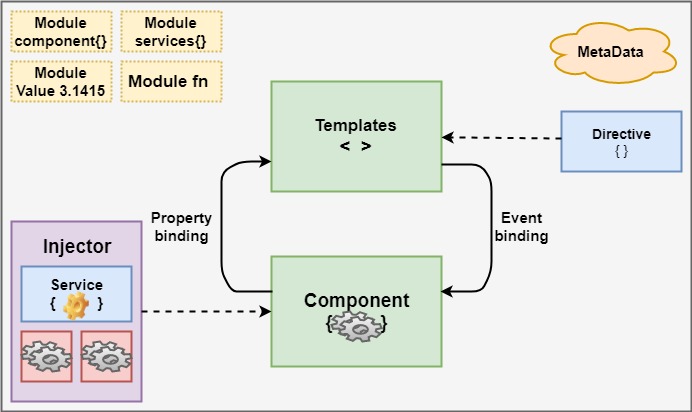
Component
===
## Basis
selector: 以自定义元素形式展现在view 层
template: 可以是文件路径(templateUrl)也可以是内容(template)
style: 外联属性为``styleUrl``, 外联属性会覆盖内联属性中的相同样式
父子组件可通过数据绑定来交互,template作为连接桥梁
`Input`: 属性绑定.
`Output`: 事件绑定.
输入输出可以使用属性annotation修饰, 也可以使用组件元数据. eg:
```
@Component({
inputs:['propertyA'],
outputs:['propertyB']
})
export class DemoComponent {
propertyA:any={};
propertyB = new EventEmitter<number>();
}
```
customize component bidirectional data binding
https://www.jianshu.com/p/752844cd6651
Angular 的组件概念基于W3C的 WebComponent
### W3C WebComponent
1. Customize Element
1. Template
1. Shadow DOM
1. HTML import
### 引用
#### Import view class
若要在组件的模板中使用其他组件element, 需要在当前组件所属的模块中声明(declarations)需要的其他组件
#### Export view class
若要在其他模块中使用当前组件,需要将组件在当前模块中导出(exports), 然后在其他模块中导入(imports)当前模块
### Inject service
#### from module
模块中的组件都可以使用注入的服务
#### from component
组件及子组件可使用注入的服务
## Interaction
数据流入组件时会调用组件的setter 并触发`ngOnChange` hook, 因此数据拦截, 验证, 日志可以在这两处处理.
基于event driven, 更倾向于后者.
### 父组件中获取子组件
#### 模板中使用
模板的子组件元素中设置局部变量代表子组件实例(加前缀`#`表示),即可调用子组件方法. eg:
```html
<contact-collect (click)="collect.collectThecontact()" #collect></contact-collect>
```
该方法的限制是 模板变量只能用在模板中, 不能用在父组件类
#### 组件类中使用
```
...
template:`
<contact-collect (click)="collectTheContact()" ></contact-collect>
`
})
export class CollectionComponent{
@ViewChild(ContectCollectComponent) contactCollect: ContactCollectComponent;
...
collectTheContact(){
...
}
}
```
##### decorator
获取页面元素使用`@ViewChild`,
获取内容嵌入的元素列表使用`@ContentChildren`。
##### pick element
* 通过类名.
若是自定义标签: `@ViewChild(ContectCollectComponent)`。
若是非自定义标签, 可创建Directive 来添加对应的类
```
@Directive({selector: 'li'})
export class ListItem{}
```
* 通过html 变量需要使用 `'`包裹: `@ViewChild('collect')`
##### property class
若是自定义标签,使用对应的类; 若非自定义标签, 使用`ElementRef`。
`@ContentChildren`修饰的属性类型应包裹在集合中。如:`QueryList<ListItem>`
## 内容嵌入
某组件的样式(或样式组合)被多次使用时可用内容嵌入来打造一个相对复杂的公共组件模板
```
@Component({
selector: 'spi-field',
template:`
<div>
<div style="....">
<ng-content select="label"></ng-content>
</div>
<div style="...">
<ng-content select=".upperCase"></ng-content>
</div>
</div>
`
})
export class SpiFieldComponent{}
```
```
@Component({
selector: 'bank-detail',
template:`
<div style="....">
<ng-content select="title"></ng-content>
</div>
<div style="....">
<ng-content select="spi-field"></ng-content>
</div>
`
})
export class BankDetailComponent{}
```
```
@Component({
selector: 'spi-entry',
template:`
<third-party></third-party>
<bank-deail>
<title>Intermediary Bank Details (SWIFT Field 56)</title>
<spi-field>
<label>BIC</label> <input class="upperCase"></input>
</spi-field>
<spi-field>
<label>TypeValue</label> <bank-code class="upperCase"></bank-code>
</spi-field>
</bank-detail>
<bank-deail>
<title>Beneficiary Bank Details</title>
<spi-field>
<label>BIC</label> <input class="upperCase"></input>
</spi-field>
<spi-field>
<label>TypeValue</label> <bank-code class="upperCase"></bank-code>
</spi-field>
</bank-detail>
`
})
export class SpiEntryComponent{}
```
## LifeCycle
Angular provide a series of hooks to invoke callback funtions when event is triggered.
### ngOnChanges
Invoked when property with `@Input` is updated.
### ngOnInit
组件属性的初始化放在构造函数中, 业务功能相关的初始化放在该hoot 中.
### ngDoCheck
用于变化监测, 钩子在每次变化监测发生时被调用
### ngAfterContentInit
组件中使用`<ng-content>` 将外部内容嵌入到组件视图后调用.
在第一次`ngDoCheck` 执行后调用, 且只执行一次.
### ngAfterContentChecked
使用`<ng-content>` 嵌入内容后调用, 或每次变化监测时调用
### ngAfterViewInit
组件视图及其子视图被创建后调用
### ngAfterViewChecked
`ngAfterViewInit` 结束后调用 或每次子组件变化监测时调用
### ngOnDestroy
组件销毁前调用, 用于手动销毁那些不被gc自动回收的资源. eg:
- 销毁已订阅的观察者事件
- 销毁绑定过的DOM 事件
- 销毁计时器(`setTimeout`, `setInterval`)
## 变化监测
Angular 提供了数据绑定功能,所以需要监测到数据的变化以更新绑定的DOM。
Anuglar 不通过捕捉对象的变动来察觉变化, 而是通过NgZone服务自己的机制去检查对象的值是否变动
### 数据变化源头
- 用户操作. 如click, change, hover
- 后端服务数据返回.
- 定时任务. 如setTimeout, setInterval, requestAnimationFrame
### 通知机制
从全局`Zone`中fork 出了一份实例并拓展, 即`NgZone`. Angular 环境中注册的异步事件都在`NgZone`中
NgZone 提供了一些自定义事件
- onUnstable
单次事件启动前, 触发消息通知订阅器
- onMicrotaskEmpty
事件完成时, 通知订阅者
- onStable
`onMicrotaskEmpty` 回调函数完成后, 视图变化前, 通知订阅者。(常用来做验证)
### 响应处理
每一个组件都有一个变化监测器, 组件树即变化监测树。
变化监测从根组件开始依次触发子组件的变化监测器.
### 监测类
Angular在运行时会给每个组件创建一个监测类, 该类可通过声明的`ChangeDetectorRef`类型的变量控制,以实现:
* markForCheck()
标记根组件到当前组件的路径, 路径上的所有组件必须被Angular检查
* detach()
分离变化监测器(disable detect)
* reattach()
(enable detect)
* detectChanges()
手动触发变化监测
### 监测策略
#### Default
变化监测检查所有数据, 效率低。
#### OnPush
仅检查输入属性, 但是无法感知到`引用不变而其内容变化` 的情况, 因此array, map等传值必须用`Immutable` 对象
code:
```
@Component({
...
changeDetection: ChangeDetectionStrategy.OnPush
})
export class Foo{}
```
Template
===
## 数据绑定
### 单向绑定
#### 输入
- DOM property: `[propertyName]`
- HTML attribute: `[attr.attrName]`
- 样式: `[class.form-group]` `[style.color]`
#### 输出
* 事件: (eventName)
* 显示变量(interpotation) : ``{{prop}}``
格式化显示 : `{{prop | pipes}}`, eg :
`{{wire.netAmount | amount }} `
属性可能不存在时使用`?` :
`{{spi?.reasonCode}}`
### 双向绑定
一般用于表单:
* Value of `<input>` element:
```html
<input [(ngModule)]="SSI.ssiName" />
```
* property of element:
```html
<div [(title)]="name"></div>
```
Directive
===
## 结构指令
should start with `*` eg: `*ngIf`, `*ngFor`
## 属性指令
looks like property binding. eg:`[ngStyle]`, `[ngClass]`
Service
===
Dependency Injection
===
被注入的服务、模块及其依赖都会被Angular 自动初始化. 无需显式初始化。
每次被注入到组件providers 中的服务都是一个新的实例.
子组件通过继承父组件可使用父组件中注入的服务, 此时该服务是单例的.
Router
===
Module
===
一个模块可由多个组件、指令、路由、服务组成以提供一个完整的功能单元
## 模块导入
子模块导入根模块后, 模块功能即被引入.
### Angular 常用module
* ApplicationModule
启动相关
* CommonModule
内置命令及内置管道
* BrowserModule
浏览器运行的工具库. 已包含ApplicationModule and CommonModule
* FormsModule and ReactiveFormsModule
表单相关组件指令
* RouterModule
路由相关的组件指令
* HttpModule
网络请求相关的服务
### 路由
路径可被合并使用
### component and directive
组件和指令被封装在子模块中, 根模块无法使用
### Service
Service in sub-module can be used by root module
## Bootstrap
### Dynamic
浏览器加载代码后编译
```
platformBrowserDynamic().bootstrapModule(AppModule);
```
### Static
浏览器加载编译后的文件
```
platformBrowser().bootstrapModuleFacotry(AppModuleNgFactory);
```
## 标签主要数据
1. declarations
当前模块可使用的视图类(view class)[^1]
1. exports
导出给外部模块使用的视图类
1. imports
导入的其他模块
1. providers
注入的服务
[^1]: view class includes component, directive and pipe
Module VS Component
===
Consider your angular Application as a building. A building can have N number of apartments in it. An apartment is considered as a module. An Apartment can then have N number of rooms which correspond to the building blocks of an Angular application named components.
Now each apartment (Module) will have rooms (Components), lifts (Services) to enable larger movement in and out the apartments, wires (Pipes) to transform around and make it useful in the apartments.
You will also have places like swimming pool, tennis court which are being shared by all building residents. So these can be considered as components inside SharedModule.
Unit Test
===
Best Practice
===
 Google Drive
Gist
Clipboard
Google Drive
Gist
Clipboard
 Sign in with Wallet






