---
tags: DDIA
---
# 資料模型和語法
選擇的資料模型種類,決定我們如何看待問題
[文本於此](https://evan361425.github.io/feedback/designing-data-intensive-applications/foundation-model/)
note:
開發應用程式時,選擇的資料模型,代表著我們嘗試如何解決資料儲存的問題。
----
- 階層式樹狀結構(Hierarchical Tree)
- 關聯式模型(Relational model)
- 文件式模型(Document model)
- 圖像式模型(Graph-like model)
note:
一開始資料儲存僅以 Hierarchical Tree 的形式儲存資料,但是當需要考慮到多對多(many-to-many)的關係時,就開始出現困境。
當關聯式模型不再滿足需求,例如:資料格式需要做轉換、無法快速做 scaling 等等時,便相繼發展出其他模型。
---
## 關係
資料的關係,會決定你應該用哪種模型。
note:
先來梳理一下資料庫中會有的關係。
----
### 一對多
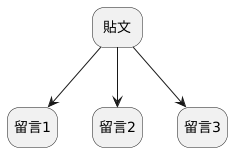
note:
這種狀況其實很適合階層式樹狀結構和文件式模型
----
### 多對一(多)
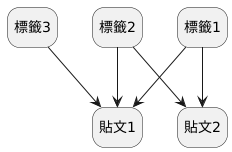
note:
多對一和多對多很像,你可以想像貼文有「貼文1」和「貼文2」
階層式樹狀結構在這種狀況下難以儲存,且難以 query,需要使用迴圈
----
## 階層式樹狀結構
Conference on Data System Language(CODASYL)
找到「年輕的註冊者的職業」
```codasyl
MOVE 'ACCOUNTANT' TO TITLE IN JOB.
FIND FIRST JOB USING TITLE.
IF NOT-FOUND GO TO EXIT.
FIND FIRST EMP WITHIN ASSIGN.
IF END-OF-SET GO TO 0.
GET EMP.
IF EMP.BIRTHYR I 1950 GO TO N.
FIND OWNER WITHIN WORKS-IN.
GET DEPT.
...
FIND NEXT EMP WITHIN ASSIGN.
GO TO M.
FIND NEXT JOB USING TITLE.
GO TO L.
EXIT.
```
*-- RH Katz.: "[Decompiling CODASYL DML into Relational Queries.](https://citeseerx.ist.psu.edu/viewdoc/download?doi=10.1.1.86.3853&rep=rep1&type=pdf)", 1982*
note:
每個註冊者當作一個樹,註冊者會有年紀和職業。請問要找出「年輕的註冊者的職業」該怎麼搜尋?
---
## 關聯式模型
- 相似資料被整合進同一關係(relations/tables)中
- 而各個關係裡是一系列的非順序性組合(tuples/rows)。
*-- Edgar Codd(1970)*
note:
不再有複雜的路徑需要去探索,可以透過各種篩選去取得你所想要的資料。不管是調整順序、聯合其他關係等等。
透過聯合(join)可以避免應用程式去考慮一致性(consistency)。例如,每個使用者對應一個他現在的職稱,在關聯式中是透過不同關係(table)的 ID 去做連結,所以職稱改變只需要調整職稱的關係裡的文字就可以改變所有和其對應的使用者職稱
----
### 查詢最佳化器
<!-- .slide: data-background-color="grey" -->

note:
我們前面看到階層式的樹狀結構在做搜尋時,是每一個需求都要設計一個邏輯,然而關聯式卻不同。
SQL 是關聯式模型在做搜尋語言時的一種協定。
SQL 推出時的創新思考:透過一個泛用的最佳化器,讓你可以用抽象的方式去查詢,而非每次搜尋都要設計一種。比較細的比較待會會在查詢語言中討論。
這裡重點是,透過查詢最佳化器,工程師不再需要根據各個查詢(查文章、查留言),去設定獨立的搜尋機制,像上面的樹狀結構那般。
結論就是比起讓大家在各自的請求中,設計一個搜尋機制,不如花很多心力去建立一個泛用的搜尋工具。而歷史證明這個方向是大家較能接受的。
---
## 文件式模型
他走回頭路了嗎?
note:
這樣看起來,文件式模型好像又如同樹狀結構資料那般,有一些查詢上的先天缺失,他走回頭路了嗎?
確實他在多對多或多對一個關係中仍然不像關聯式模型那麼方便,即使現在有些技術幫助他讓不同文件做聯合,例如透過文件參考(document reference)。
但是,因為他在處理一對多的關係時非常單純,不會像關聯式一樣有各種 join 和 group,讓他在分散式的資料庫下非常好做,這會在我們後面做複製(replication)和分區(partition)時和考慮競賽狀況時更能體會到。
除此之外...
----
### 綱目(schema)
取得使用者 ID 123 的第三個工作經歷
```sql
SELECT experience FROM experience_relation WHERE use_id=123 AND index=3
```
```javascript
db.get("users.123.experiences.3");
```
note:
兩種不同的取得方式,就可以感受到文件式和關聯式資料庫的儲存方式差異。
同時,你也可以想像到這兩種儲存方式對於資料的格式是有要求的。
第一個需要關係中所有的組合(row)都要有 user_id 和 index。所以當你新增欄位的時候,所有舊的組合都會需要更新他的值來保持格式的一致性。
雖然大部分資料庫都會讓這機制做比較軟性的限制,例如預設所有舊的資料為 null 時,不會強制讓資料重洗一遍(MySQL 除外)
第二個則是所有資料格式不必一致,僅在我讀取的時候我預設他應該要有值。
----
1. schema-on-write
2. schema-on-read
- schemaless?
note:
所以總結第一種方式會在寫入的時候就要求資料保有一定格式,我們稱為 schema-on-write
反之第二種,在讀取時,應用程式會預設他有某些資料。要注意他並非沒有綱目,而是這個綱目是應用程式在讀取時去決定的(隱晦)。
除此之外,當綱目更新的時候,第一種除了在應用程式做調整外也會需要在資料庫做手腳,第二種僅需在應用程式做手腳。
有什麼差別?
- 應用程式可以退版,所以需要考慮臨時有狀況時,退版是否會影響。(forward compatible)
- 對資料庫做手腳會不會吃掉線上使用者的效能
這段細節會在「編碼和進程」做更深的討論
----
### 除此之外
關聯式資料庫 v.s. 文件式資料庫
- 資料局部性(data locality)
- 資料的轉換(impedance mismatch)
- 思想的轉換
note:
資料局部性是什麼?如果你的應用程式需要拿完整資料來做運算,例如:你要做點餐的系統,你會需要把設計好的菜單拿來渲染出點餐頁面。
相對關聯式資料庫需要各種聯合(join)和取得不同 table 的資料,文件式資料只要拿一次就可以。這就是資料局部性,完整的資料在本地位置就可以取得,不需要再去和其他位置拿。
再來,關聯式資料庫通常都需要應用程式去轉換資料的格式。因為你從資料庫拿到的只會是 k-v 的組合,而一般程式碼使用的都是 class 或是 map/array 等等。
第三點是思想轉換,如果以前用關聯式資料庫用的很習慣,文件式資料庫會少了一些多對多的連結。這在設計應用程式的時候需要考慮,這是我根據實務經驗得出的感想。
例如 Firestore 是適用在攜帶型裝置(mobile device)的文件式資料庫。他為了讓不同的裝置、應用程式同步資料,設計成文件式資料庫會讓他好用很多,但也少了關聯式資料庫可以的一些特性。
----
### 收斂
- 關聯式資料庫支援 JSON 格式的欄位
- 資料式資料庫透過文件參考(document reference)做聯合(join)
- 關聯式資料庫的資料局部性(data locality)
note:
兩者間越來越相似,這是好事,也是資料庫未來應有的方向。
- PostgreSQL, MySQL, IBM DB2 也相繼支援 JSON 格式的欄位
- RethinkDB, MongoDB 的 driver 在文件式資料庫中可以做聯合
- 資料局部性
- Google Spanner 透過綱目宣告其屬於哪個母表(parent table)來做到局部性
- Oracle 的 multi-table index, Bigtable(Cassandra, HBase) 的 column-family 也都類似
---
## 圖像式模型
資料的關係中,有大量多對多(many-to-many)
note:
前面我們有提到資料的關係會決定使用的模型。
當資料有很多一對多的關係時,文件式模型就很適合。反之,簡單的多對多,關聯式資料庫就可以輕易上手。
但是當資料有大量多對多的關係時,就需要考慮其他的方式。
----
### 多對多
- 人際關係
- 網頁連結
- 道路
note:
我們在上一次報告有提到這問題。可能應用是
- 人際關係
- 網頁關係
- 道路
雖然例子都是同值性資料的應用,但是實際上,每個節點可以不是同值性的資料。例如 Facebook 的圖像式模型會把使用者的事件、位置、打卡、留言等等當成節點。
----

note:
以書中範例來做講解,每個節點會有個 metadata:`type`,去說明這個節點代表的資料。可能是 state、departement、person 等等。
這邊也可以注意到因為每個國家對於地區的分界有不同名稱,法國的 departement 和英國的 country,雖然在這張表中層級一樣,但是意義可能不一樣。你可以想像如果是做成關聯式資料庫,地區的表就會需要有很多欄位。
再來看線,每個線因為代表著點和點的關係,所以可以有不同意義。
待會再回來看這張圖,我們對圖像式模型有個概念之後,就先來看看他有哪些實作。
----
### 圖像式模型種類
- *屬性圖模型*(property graphs model)
- *三元組模型*(triple-stores model)
note:
我們會來介紹一下圖像式模型的兩種結構
屬性圖模型
- Neo4j
- Titan
- InfiniteGraph
三元組模型
- Datomic
- AllegroGraph
但是這兩種東西其實大同小異,我們待會介紹的時候可能會比較有感。
---
#### 屬性圖模型
每個點和線會有很多屬性:
- 點:ID、種類、屬性
- 線:ID、起始點、終點、標號(label)、屬性
----
```sql
CREATE TABLE vertices (
vertex_id integer PRIMARY KEY,
vertex_type text,
properties json
)
CREATE TABLE edges (
edge_id integer PRIMARY KEY,
tail_vertex integer REFERENCES vertices (vertex_id),
head_vertex integer REFERENCES vertices (vertex_id),
label text,
properties json
)
```
note:
如果使用關聯式資料庫,可能就會長成這個樣子
----

note:
這裡有幾點要注意:
- 任何點和其他任何點都可以連結
- 給定一個點,可以快速找到和其有所連結的點。不管是進還是出。
- 因為線上有標號,所以可以賦予線不同意義
這樣做除了可以保持資料庫結構的乾淨,不需要一直調整綱目外,也賦予圖像式模型很大的彈性,例如:
- *國家A* 被*國家B* 併購,變成*城市A*。原本出生於*國家A* 的人,要改成出生於*國家B* 下的*城市A*。如果是關聯式資料庫,因為層級改變了,要調整的東西很多。
- 今天除了要設定國家外,還想要設定使用者喜歡吃的食物,可以不需要調整綱目直接增加節點和線。
----
```cypher
CREATE
/* vertices */
(NAmerica:Location {name:'North America', type:'continent'}),
( USA:Location {name:'United States', type:'country' }),
( Idaho:Location {name:'Idaho', type:'state' }),
( Lucy:Person {name:'Lucy'}),
/* edges */
(Idaho) -[:WITHIN]-> (USA) -[:WITHIN]-> (NAmerica),
(Lucy) -[:BORN_IN]-> (Idaho)
```
note:
因為圖像式資料庫已經幫你預設好綱目要長的樣子,所以不需要設定,我們直接看添加資料時會要跑的程式碼。
----
```cypher
/* 建立 */
CREATE
...
(Idaho) -[:WITHIN]-> (USA) -[:WITHIN]-> (NAmerica),
(Lucy) -[:BORN_IN]-> (Idaho)
/* 搜尋 */
MATCH
(Person) -[:BORN_IN]-> () -[:WITHIN*0..]-> (us:Location {name:'United States'}),
(Person) -[:LIVES_IN]-> () -[:WITHIN*0..]-> (en:Location {name:'Europe'}),
RETURN Person.name
```
note:
這個聲明式語言讓查詢透過較為高層次的邏輯去執行,我們不必在意實作細節,例如該從頭找還是從屁股找。
除此之外,可能應用還有推薦使用者餐廳:有哪個人的朋友有在沒去過的餐廳打卡?
---
#### 三元組模型
和屬性圖模型大同小異,以 `(subject,predicate,object)` 方式存在。
----
**建立**
```turtle=
@prefix : <urn:example:>.
_:lucy a :Person; :name "Lucy"; :bornIn _:idaho.
_:idaho a :Location; :name "Idaho"; :type "state"; :within _:usa
_:usa a :Loaction; :name "United States"; :type "country"; :within _:namerica.
_:namerica a :Location; :name "North America"; :type "continent".
```
note:
prefix 可以想像成 namespace 的概念。
上面的表達格式是 [Turtle](http://www.w3.org/TeamSubmission/turtle/) 格式
----
**搜尋**
```sparql
PREFIX : <urn:example:>
SELECT ?personName WHERE {
?person :name ?personName.
?person :bornIn / :within* / :name "United States".
?person :livesIn / :within* / :name "Europe".
}
```
---
## 查詢語言(query language)
- 聲明式(Declarative)
- 命令式(Imperative)
- 邏輯式(Deductive)
note:
前面在圖像式模型看到很多聲明式查詢語言,他的概念就是把搜尋時的抽象程度拉高,不必讓開發人員去了解或選擇實作方式。
相對而言,還有命令式語言和邏輯式語言,我們以程式碼為範例。
----
### 聲明式
```javascript
return animals.filter((animal) => animal.family === 'Sharks');
```
```sql
SELECT * FROM animals WHERE family = 'Sharks'
```
note:
你不需要考慮怎麼做迴圈,也不需要考慮怎麼收集篩選後的資料。
----
### 命令式
```javascript
function getSharks(animals) {
var sharks = [];
for (var i = 0; i < animals.length; i++) {
if (animals[i].family === "Sharks") {
sharks.push(animals[i]);
}
}
return sharks;
}
```
----
### 聲明式好處
- 高抽象程度,好理解
- 更新底層運作方式而不用改動程式碼
note:
底層運作方式包括:
- 搜尋演算法
- 並行處理(parallel processing)
- 等等
----
### 命令式好處
每月觀察到的鯊魚數
```javascript=
db.observations.mapReduce(
function map() {
var year = this.observationTimestamp.getFullYear();
var month = this.observationTimestamp.getMonth() + 1;
emit(year + "-" + month, this.numAnimals);
},
function reduce(key, values) {
return Array.sum(values);
},
{
query: { family: "Sharks" },
out: "monthlySharkReport"
}
);
```
note:
上圖是 MongoDB MapReduce 的擴充套件的規則。MapReduce 之後在批次處理會講,但其概念大概是:
- Map 代表從資料庫中每筆(row/document)篩選出多組 k-v 組合,就好像資料結構中的 map 一樣。
- Reduce 代表從 Map 中的 k-v 組合,相同的 key 會被分配到同一組,然後做降冪
事實上,上述的例子中,是介於命令式和聲明式之間,例如第 11 行就是聲明式的方式去篩選種類為鯊魚的動物。
一開始看,可能會看不太出來命令式的好處。但是:
- 若考慮細緻調整,例如機器學習
- 單純呼叫函式可以很快速的把這個運算分配到多台資料庫中(宣告式一樣可以做到,但是會很不直觀,例如 MPP)
---
### 邏輯式
發生一場命案,請透過互斥的證詞找出誰在說謊:
- A: B 是 受害者(V) 的朋友,且 C 和 V 互相討厭。
- B: 事情發生時我不在現場,而且我不認識 V。
- C: 我是無辜的,但事發時,我看到 A 和 B 在現場,可是我不知道究竟誰做的。
note:
Prolog(Programming in Logic)就是透過邏輯的方式去寫程式碼。不像其他類型的語言比較像是命令式的方式去撰寫。
然而,早在 1970 年代邏輯式的語言就已經發展了。早期在研究時,這種邏輯式的語言相對於命令式更容易讓人理解。
----
```prolog=
% 定義證詞
testimony(a, friend(b)). % testimony(a, knew(b)).
testimony(a, enemy(c)). % testimony(a, knew(c)).
% testimony(a, innocent(a)).
testimony(b, out_of_town(b)).
testimony(b, stranger(b)).
testimony(c, in_town(c)). % testimony(c, innocent(c)).
testimony(c, in_town(a)).
testimony(c, in_town(b)).
% 宣告什麼是衝突的
inconsistent(friend(X), enemy(X)).
inconsistent(friend(X), stranger(X)).
inconsistent(enemy(X), stranger(X)).
inconsistent(out_of_town(X), in_town(X)).
% 找出說謊者
lier(L) :-
member(L, [a, b, c]), % 從 a, b, c 中拉出一個人叫 L(lier)
select(L, [a, b, c], Witness), % 剩下的人算進證人
consistent(Witness). % 證人的證詞是合理的
% 群組中大家證詞都是合理的
consistent(W) :-
\+ inconsistent_testimony(W).
% 群組中有人有衝突的證詞
inconsistent_testimony(W) :-
member(X, W), % 從群組中挑出 X 和 Y
member(Y, W),
X \= Y, % X 和 Y 不同人
testimony(X, XT), % 拿出 X 的其中一個證詞
testimony(Y, YT), % 拿出 Y 的其中一個證詞
inconsistent(XT, YT). % 他們是衝突的
```
----
**Datalog**
```datalog
within_recursive(Location, Name) :- name(Location, Name).
within_recursive(Location, Name) :- within(Location, BiggerLoc),
within_recursive(BiggerLoc, Name).
migrated(Name, BornIn, LivingIn) :- name(Person, Name),
born_in(Person, BornLoc),
within_recursive(BornLoc, BornIn),
lives_in(Person, LivingLoc),
within_recursive(LivingLoc, LivingIn).
?- migrated(Who, 'United States', 'Europe').
/* Who = 'Lucy'. */
```
note:
Datalog 是 Prolog(Programming in Logic)下的集合。就像 SQL 是一種規範一樣,Datalog 也是一種軌範,有不同的搜尋語言去實踐它。
Datalog 宣告沒有順序,和 Prolog 相反。
---
## 總結
<!-- .slide: data-background-color="grey" -->

note:
這章討論了一些模型,但是並未深入探討其內部運作方式。事實上,要深入了解一個模型是需要大量時間和精神的,但是對於不同模型有些初步和概念性的了解,可以幫助你在選擇時加入一些參考。
下一章我們將討論實作資料庫時,需要考慮的不同取捨。
----
如果現在有一個製作菜單的應用程式,其資料架構如下:
```
漢堡
├── 火腿漢堡
│ ├── 火腿
│ └── 麵包
└── 起司漢堡
├── 起司
└── 麵包
飲料
├── 鮮奶茶
│ ├── 牛奶
│ └── 紅茶
└── 紅茶
└── 紅茶
```
note:
我們以問題來做總結。
漢堡是「種類」,火腿漢堡是「產品」,麵包是「成分」,請問該用什麼資料模型?
文件式模型。
試想,如果用關聯式模型他的表會長這樣:
```sql
CREATE TABLE dim_catalogs (
catalog_id int PRIMARY KEY,
);
CREATE TABLE dim_products (
product_id int PRIMARY KEY,
);
CREATE TABLE dim_catalog_product_lookups (
catalog_id int,
product_id int,
FOREIGN KEY (catalog_id) REFERENCES dim_catalogs(catalog_id),
FOREIGN KEY (product_id) REFERENCES dim_products(product_id)
);
```
然後取得時,就要這樣做:
```sql
SELECT * FROM dim_catalogs AS c
JOIN dim_catalog_product_lookups AS lkup ON lkup.catalog_id = c.catalog_id
LETF JOIN dim_products AS p ON p.product_id = lkup.product_id
```
這就是文件式的資料局部性(data locality)好處。
----
隨著應用程式演進,新增了「成分庫存系統」的功能:
```
漢堡
├── 火腿漢堡
│ ├── 火腿
│ │ └── 20
│ └── 漢堡
│ └── 30
└── 起司漢堡
├── 起司
│ └── 15
└── 漢堡
└── 30
```
note:
請問如果你為了方便保持資料的一致性,該用什麼模型?
關聯式資料庫。
所以根據商務邏輯,這些都是取捨。
----
收斂。
- 關聯式資料庫的 json 格式。
- 文件式資料庫的文件參考(document reference)。
----
補充:
- 其他模型
- 使用 SQL 來達成圖像式模型的搜尋
- 圖像式模型 v.s. CODASYL
- 語意網站(semantic web)
note:
- 其他模型
- 科學上使用,需要儲存大量狀態的資料庫。例如,強中子對撞機
- 基因資料庫,長字串的相似性。例如,GenBank
- 文本搜尋。例如,Elasticsearch
- 圖像式模型和上面提的 CODASYL 看起來好像都要循線去找到某個點,但是有些差異:
- 圖像式模型的綱目很單純,任何點都可以和其他任何點連結
- 圖像式模型的線是沒有順序性的,CODASYL 在考慮儲存時的狀況,一對多關係是有順序性的
- CODASYL 是命令式的搜尋語言,大部分圖像式模型的搜尋語言式宣告式的
- 語意網站和三元組模型很像,但是卻是兩個意義不同而實作方式相似的東西。
 Google Drive
Gist
Clipboard
Google Drive
Gist
Clipboard
 Sign in with Wallet






