---
title: 底層機制遊記 x86 篇
description: 現在還太菜,看的資料還不夠多到可以系統化,所以寫遊記,意思就是隨意寫寫的
tags: 底層, x86_64
lang: zh_tw
---
# 底層機制遊記 x86 篇
[TOC]
## 前言
這篇是講 x86_64 架構,其他如 MIPS 或 ARM 我就不確定是不是這樣ㄌ
## Booting Process
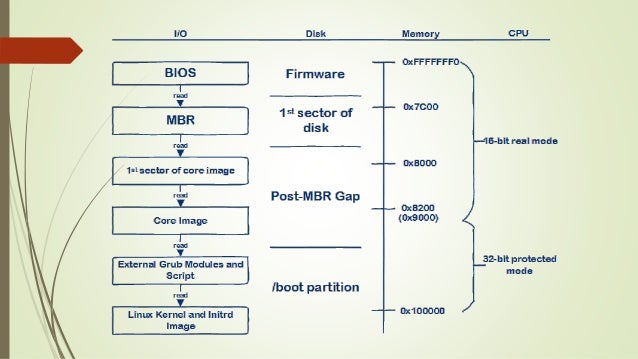
1. BIOS 執行並讀取 MBR
- 0xFFFFFFF0 映射到 ROM
- MBR 會被讀取到 0000:7c00,此為 BIOS 固定行為
- 初始為 16-bit real mode
- Real mode 相對於 Protected mode
- Real mode 沒有任何限制
- Protected mode 不能使用 BIOS interrupt
2. MBR 執行並讀取 Loader
- MBR 後的世界都可以自己寫
3. Loader 執行並讀取 Kernel (OS),**或是 Load 其他 Loader**
- 總之,Loader 也可以自己寫,可以自己寫的意思就是,Loader 的行為可以自己決定
### Boot Loader
從上面可以知道,從 BIOS 執行,到 OS 執行,中間的過程是先進 MBR
而因為進到 MBR 後,開始可以自己寫 code 操控電腦
所以說 MBR 也是 Loader,好像也沒錯
所以名詞部分,再說一次
BIOS 是 BIOS
MBR 跟 Loader 之後就都概括在 Boot Loader 這個名詞中
所以開機流程寫成這樣
BIOS -> Boot Loader -> Kernel (OS)
參考 [GRUB2 以及啟動過程詳解](https://wenku.baidu.com/view/77c60ac2d4bbfd0a79563c1ec5da50e2524dd153.html?re=view)
Boot Loader 現在有很多類型,大致如下
- Linux: GRUB2
- Windows: Bootmgr/BCD
- Apple: BootX
## MBR
參考 [X86 Assembly/Bootloaders](https://en.wikibooks.org/wiki/X86_Assembly/Bootloaders)
> The first 512 bytes of a disk are known as the bootsector or Master Boot Record. The boot sector is an area of the disk reserved for booting purposes. If the bootsector of a disk contains a valid boot sector (the last word of the sector must contain the signature 0xAA55), then the disk is treated by the BIOS as bootable.
>
- 1 Sector -> 512Bytes
- MBR (Master Boot Record) = 磁碟的第一個 sector (磁區)
- MBR 的最後 2 Bytes 必須為 0xAA55,才會被 BIOS 認為是 bootable device
- BIOS 執行的最後,JMP 到 0000:7c00,也就是 MBR 被讀取到 RAM 的位置,此時 DL 會放開機裝置號
參考 [主開機紀錄 Wiki](https://zh.wikipedia.org/wiki/%E4%B8%BB%E5%BC%95%E5%AF%BC%E8%AE%B0%E5%BD%95)
可參考裡頭的**標準MBR結構**
### My Ubuntu
```shell
lsb_release -a
No LSB modules are available.
Distributor ID: Ubuntu
Description: Ubuntu 18.04.2 LTS
Release: 18.04
Codename: bionic
```
### What about my MBR ?
```shell
# 將 disk 第一個 sector 取出來,即 MBR
sudo dd if=/dev/sda of=sda.bin count=1 bs=512
# 逆向一下
objdump -D -M intel,i8086 -b binary -m i386 sda.bin | less
```
後來發現 `/boot/grub/i386-pc/boot.img` 行為就跟上面 dd 出來的 `sda.bin` 一樣
```shell
cd /boot/grub/i386-pc
objdump -D -M intel,i8086 -b binary -m i386 boot.img | less
```
簡單 hexdump 看一下
```shell
sudo hexdump -C /dev/sda -n 512
```

最後面的 word 的確是 0xAA55 (little-endian)
可以 file 一下
```shell
file /boot/grub/i386-pc/boot.img
/boot/grub/i386-pc/boot.img: DOS/MBR boot sector
```
好奇了一下到底憑什麼判斷是 boot sector
該不會是判斷 file size 512 Bytes、最後是 0xAA55 就說是 boot sector 吧
來做一個符合這兩個條件的假 boot sector
```shell
dd if=/dev/zero of=test.img bs=510 count=1
echo '\x55\xaa' >> test.img
# 因為 echo 有多 echo 1 Byte EOL 字元
# 可以 ls -al 看一下,size 為 513
# 萃取前 512 Bytes
dd if=test.img of=test2.img bs=512 count=1
file test2.img
test2.img: DOS/MBR boot sector
```
噢還真的
那再進一步驗證,是否 size 要剛好 512 Bytes?
延續上面的指令
```shell
dd if=/dev/urandom of=random bs=512 count=1
cat random >> test2.img
file test2.img
test2.img: DOS/MBR boot sector; partition 1 : ID=0xaa, active 0xe0, start-CHS (0x75,225,7), end-CHS (0x9a,41,60), startsector 1483234983, 135635970 sectors; partition 2 : ID=0x52, active 0xa9, start-CHS (0x51,123,1), end-CHS (0x1be,94,41), startsector 3502776151, 2374752414 sectors
```
看來只要 magic number 0xAA55 有就好了
### DPT
Disk Partition Table (DPT) 是 MBR 中其中一個欄位
我自己爆改過空 img,用 fdisk 看是有效果的
```shell
dd if=/dev/zero of=test.img bs=512 count=1
vi test.img
# 使用 %!xxd 換成 hex editing mode
# 改完後再用 %!xxd -r 反轉回來,並且 wq 儲存
```
改成以下:

觀看 DPT
```shell
fdisk -l test.img
```

對照一下
```shell
hexdump -C test.img -s 0x1be
000001be 00 00 00 00 83 00 00 00 00 08 00 00 00 10 00 00 |................|
000001ce 00 00 00 00 83 00 00 00 00 10 00 00 00 20 00 00 |............. ..|
000001de 00 00 00 00 00 00 00 00 00 00 00 00 00 00 00 00 |................|
*
000001fe 55 aa 41 41 41 41 0a |U.AAAA.|
00000205
```
每個 DPT 是 16 Bytes,MBR 中固定有 4 個 DPT 紀錄
像是此例中的第一個 DPT
```
000001be 00 00 00 00 83 00 00 00 00 08 00 00 00 10 00 00 |................|
```
- 0x83 表示 Type,為 Linux
- 8 ~ 11 Bytes 表示起始 sector,注意 little-endian
- 00 08 00 00 因為 little-endian 倒過來變成 00 00 08 00
- 0x00000800 = 2048
- 12 ~ 15 Bytes 表示結束 sector
- 00 10 00 00 倒過來變成 00 00 10 00
- 0x00001000 = 4096
DPT Format:
| Offset | 0x00 | 0x01 | 0x02 | 0x04 | 0x05 | 0x06 | 0x08 | 0x0c |
| -------- | -------- | -------- | - | - | - | - | - | - |
| Meaning | 表明是否為活動分區 | 起始磁頭 | 起始 sector: 6 bits; 起始 Cylinder: 10bits | 分區類別 | 結束磁頭 | 結束 sector: 6 bits; 結束 Cylinder: 10bits | 起始 sector | 結束 sector |
分區類別 (Partition Type Indicator) 太多了不附上了
But 有個特殊的
擴充分區的號碼為 0x85
## LBA
Logical Block Address (LBA)
TBD
## Practice
可以參考這個 repos
- [實作 Bootloader](https://github.com/andrewli315/ais3_rev_final_project)
## Manual
[這篇](https://hackmd.io/@LJP/rkQsP54S8)紀錄閱讀 `Intel 64 and IA-32 Architectures Software Developer's Manual Volume3 System Programming Guide` 的筆記
## Other Topics
### Bootable USB ?
參考 [What makes a USB flash drive bootable?](https://www.quora.com/What-makes-a-USB-flash-drive-bootable)
> You have to have a boot sector written to the USB medium that the system BIOS will recognize.
>
> For USB, there have been a lot of variations of boot sector models, including USB-ZIP, USB-FLOPPY and USB-HDD.
>
> USB drives may emulate one or more of these boot types. Over time, everything has converged to USB-HDD. Any modern USB stick emulates a USB hard drive (USB-HDD).
>
> At boot time, the BIOS can be configured to check the USB stick to see if it has been marked as bootable with a valid boot sector. If so, it will boot just as a hard drive with similar settings in the boot sector would.
統整上一篇文說的
- USB: Three type of boot sector
- USB-ZIP
- USB-FLOPPY
- USB-HDD
- 大部分都是 USB-HDD
補充知識: [boot sector](https://en.wikipedia.org/wiki/Boot_sector)
參考 [Writing a Tiny x86 Bootloader](http://joebergeron.io/posts/post_two.html),實作看看 Bootable USB (TBD.)
<style>
/* fix mathjax rwd scroll
* #Research-direction > simple model
*/
ul > li > .mathjax {
width: 100%;
overflow-x: scroll;
overflow-wrap: break-word;
display: inline-block;
}
/* Dark mode */
/* <!-- todo: fix highlight.js blocks; some code blocks do not render correctly --> */
body {
background-color: #23272a !important;
}
.ui-view-area {
background: #23272a;
color: #ddd;
}
.ui-toc-dropdown {
background-color: #23272A;
border: 1px solid rgba(255,255,255,.15);
box-shadow: 0 6px 12px rgba(255,255,255,.175);
}
.ui-toc-dropdown .nav > li > a {
color: #ccc;
}
.ui-toc-dropdown .nav > .active:focus > a,
.ui-toc-dropdown .nav > .active:hover > a,
.ui-toc-dropdown .nav > .active > a {
color: #bbb;
}
.ui-toc .open .ui-toc-label {
color: #777;
}
table * {
background-color: #424242;
color: #c0c0c0
}
button,
a {
color: #64B5F6;
}
a:hover,
a:focus {
color: #2196F3;
}
a.disable,
a.disable:hover {
color: #EEEEEE;
}
/* Dark mode code block */
/* Imported from titangene/hackmd-dark-theme */
.markdown-body pre {
background-color: #1e1e1e;
border: 1px solid #555 !important;
color: #dfdfdf;
font-weight: 600;
}
.token.operator, .token.entity,
.token.url, .language-css .token.string,
.style .token.string {
background: unset;
}
/* Dark mode alert boxes */
.alert-info {
color: #f3fdff;
background: #40788A;
border-color: #2F7A95;
}
.alert-warning {
color: #fffaf2;
background: #936C36;
border-color: #AE8443;
}
.alert-danger {
color: #fff4f4;
background: #834040;
border-color: #8C2F2F
}
.alert-success {
color: #F4FFF2;
background-color: #436643;
border-color: #358A28;
}
/* Stylized alert boxes */
.alert-danger>p::before {
content: "❌ Dangerous\A";
}
.alert-warning>p::before {
content: "⚠ Warning\A";
}
.alert-info>p::before {
content: "ℹ Information\A";
}
.alert-warning>p::before,
.alert-danger>p::before,
.alert-info>p::before {
white-space: pre;
font-weight: bold;
}
</style>
<style>
/*
* Visual Studio 2015 dark style
* Author: Nicolas LLOBERA <nllobera@gmail.com>
*/
.hljs {
display: block;
overflow-x: auto;
padding: 0.5em;
background: #1E1E1E;
color: #DCDCDC;
}
.hljs-keyword,
.hljs-literal,
.hljs-symbol,
.hljs-name {
color: #569CD6;
}
.hljs-link {
color: #569CD6;
text-decoration: underline;
}
.hljs-built_in,
.hljs-type {
color: #4EC9B0;
}
.hljs-number,
.hljs-class {
color: #B8D7A3;
}
.hljs-string,
.hljs-meta-string {
color: #D69D85;
}
.hljs-regexp,
.hljs-template-tag {
color: #9A5334;
}
.hljs-subst,
.hljs-function,
.hljs-title,
.hljs-params,
.hljs-formula {
color: #DCDCDC;
}
.hljs-comment,
.hljs-quote {
color: #57A64A;
font-style: italic;
}
.hljs-doctag {
color: #608B4E;
}
.hljs-meta,
.hljs-meta-keyword,
.hljs-tag {
color: #9B9B9B;
}
.hljs-variable,
.hljs-template-variable {
color: #BD63C5;
}
.hljs-attr,
.hljs-attribute,
.hljs-builtin-name {
color: #9CDCFE;
}
.hljs-section {
color: gold;
}
.hljs-emphasis {
font-style: italic;
}
.hljs-strong {
font-weight: bold;
}
/*.hljs-code {
font-family:'Monospace';
}*/
.hljs-bullet,
.hljs-selector-tag,
.hljs-selector-id,
.hljs-selector-class,
.hljs-selector-attr,
.hljs-selector-pseudo {
color: #D7BA7D;
}
.hljs-addition {
background-color: #144212;
display: inline-block;
width: 100%;
}
.hljs-deletion {
background-color: #600;
display: inline-block;
width: 100%;
}
</style>
 Google Drive
Gist
Clipboard
Google Drive
Gist
Clipboard
 Sign in with Wallet






