Alvaro Luken
    • Create new note
    • Create a note from template
      • Sharing URL Link copied
      • /edit
      • View mode
        • Edit mode
        • View mode
        • Book mode
        • Slide mode
        Edit mode View mode Book mode Slide mode
      • Customize slides
      • Note Permission
      • Read
        • Only me
        • Signed-in users
        • Everyone
        Only me Signed-in users Everyone
      • Write
        • Only me
        • Signed-in users
        • Everyone
        Only me Signed-in users Everyone
      • Engagement control Commenting, Suggest edit, Emoji Reply
    • Invite by email
      Invitee

      This note has no invitees

    • Publish Note

      Share your work with the world Congratulations! 🎉 Your note is out in the world Publish Note

      Your note will be visible on your profile and discoverable by anyone.
      Your note is now live.
      This note is visible on your profile and discoverable online.
      Everyone on the web can find and read all notes of this public team.
      See published notes
      Unpublish note
      Please check the box to agree to the Community Guidelines.
      View profile
    • Commenting
      Permission
      Disabled Forbidden Owners Signed-in users Everyone
    • Enable
    • Permission
      • Forbidden
      • Owners
      • Signed-in users
      • Everyone
    • Suggest edit
      Permission
      Disabled Forbidden Owners Signed-in users Everyone
    • Enable
    • Permission
      • Forbidden
      • Owners
      • Signed-in users
    • Emoji Reply
    • Enable
    • Versions and GitHub Sync
    • Note settings
    • Note Insights New
    • Engagement control
    • Make a copy
    • Transfer ownership
    • Delete this note
    • Save as template
    • Insert from template
    • Import from
      • Dropbox
      • Google Drive
      • Gist
      • Clipboard
    • Export to
      • Dropbox
      • Google Drive
      • Gist
    • Download
      • Markdown
      • HTML
      • Raw HTML
Menu Note settings Note Insights Versions and GitHub Sync Sharing URL Create Help
Create Create new note Create a note from template
Menu
Options
Engagement control Make a copy Transfer ownership Delete this note
Import from
Dropbox Google Drive Gist Clipboard
Export to
Dropbox Google Drive Gist
Download
Markdown HTML Raw HTML
Back
Sharing URL Link copied
/edit
View mode
  • Edit mode
  • View mode
  • Book mode
  • Slide mode
Edit mode View mode Book mode Slide mode
Customize slides
Note Permission
Read
Only me
  • Only me
  • Signed-in users
  • Everyone
Only me Signed-in users Everyone
Write
Only me
  • Only me
  • Signed-in users
  • Everyone
Only me Signed-in users Everyone
Engagement control Commenting, Suggest edit, Emoji Reply
  • Invite by email
    Invitee

    This note has no invitees

  • Publish Note

    Share your work with the world Congratulations! 🎉 Your note is out in the world Publish Note

    Your note will be visible on your profile and discoverable by anyone.
    Your note is now live.
    This note is visible on your profile and discoverable online.
    Everyone on the web can find and read all notes of this public team.
    See published notes
    Unpublish note
    Please check the box to agree to the Community Guidelines.
    View profile
    Engagement control
    Commenting
    Permission
    Disabled Forbidden Owners Signed-in users Everyone
    Enable
    Permission
    • Forbidden
    • Owners
    • Signed-in users
    • Everyone
    Suggest edit
    Permission
    Disabled Forbidden Owners Signed-in users Everyone
    Enable
    Permission
    • Forbidden
    • Owners
    • Signed-in users
    Emoji Reply
    Enable
    Import from Dropbox Google Drive Gist Clipboard
       Owned this note    Owned this note      
    Published Linked with GitHub
    • Any changes
      Be notified of any changes
    • Mention me
      Be notified of mention me
    • Unsubscribe
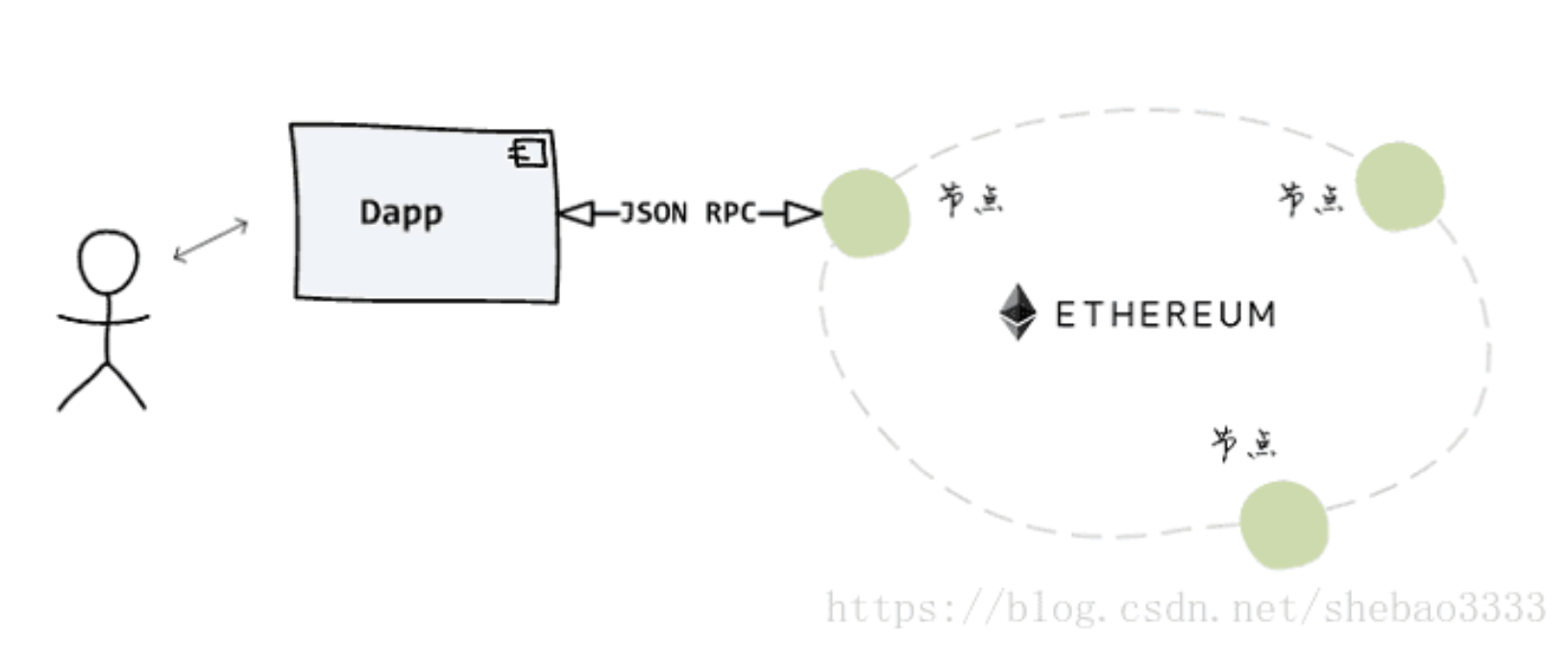
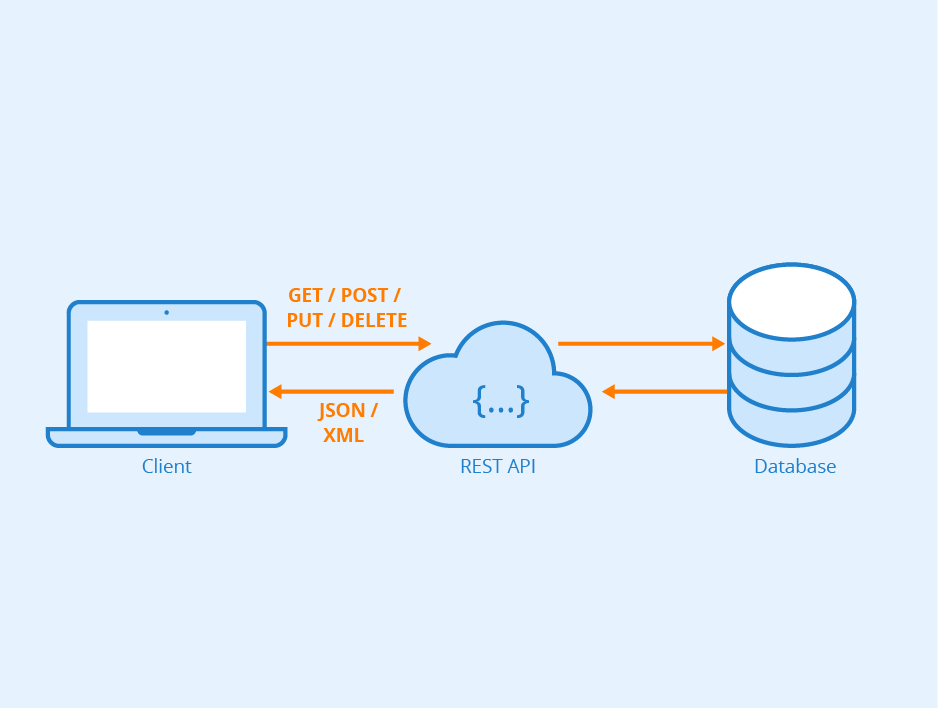
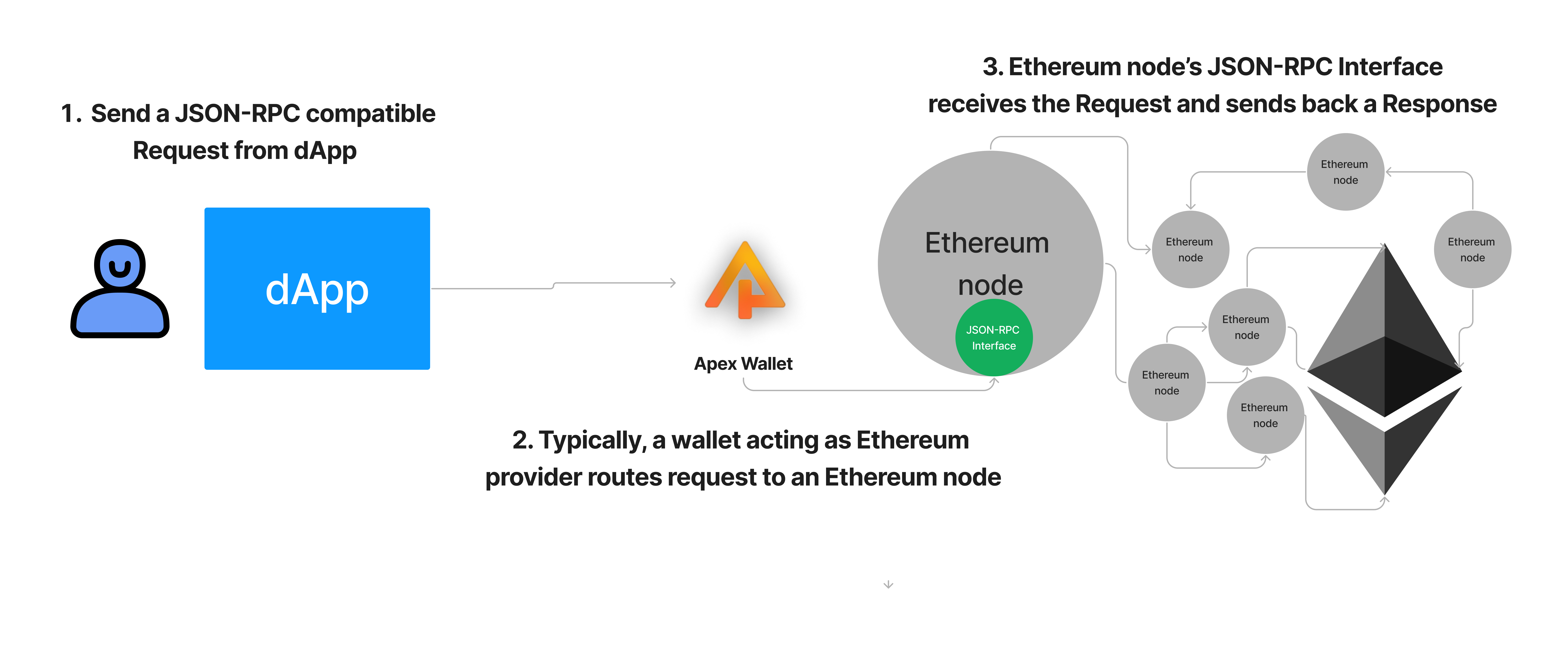
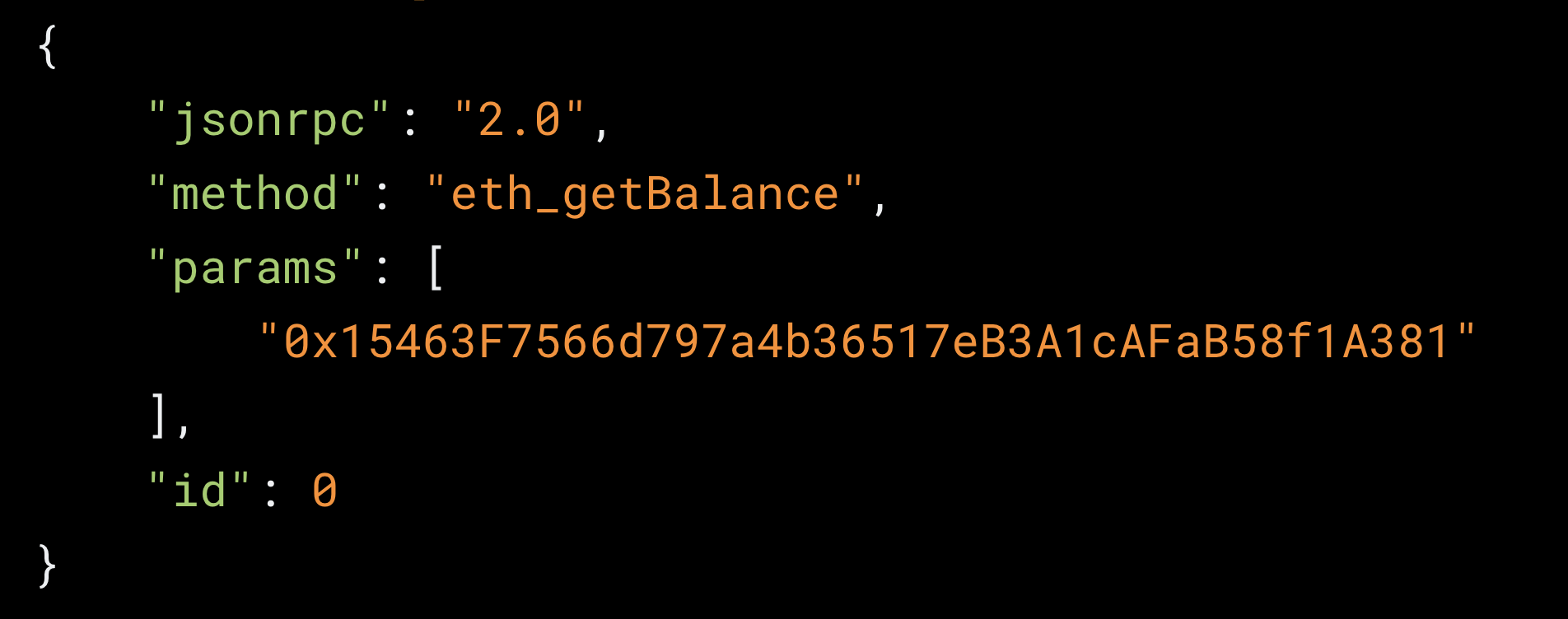
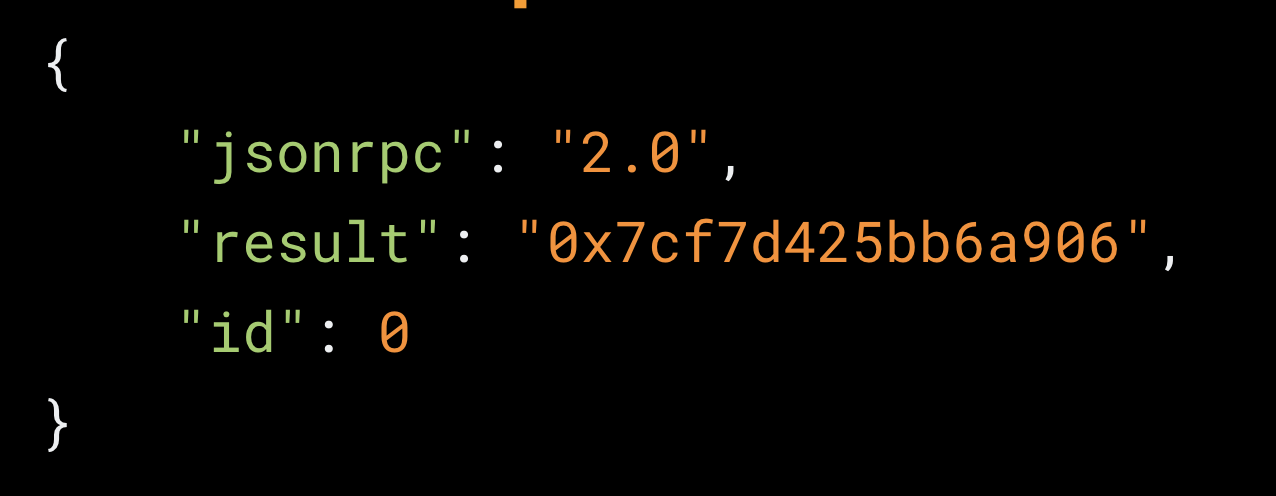
    # Intro to JSON-RPC <details><summary><b>Previous Section Recap</b></summary><br/> In the previous section, we learned that **Ethereum is simply a computer**. This computer has the following properties: - **Censorship Resistance**: programs (aka: smart contracts) on the Ethereum computer are permanent executables - except in the case where the program explicitly is built with a path to call `selfdestruct()` - **Ubiquitious**: where there is Internet, there is Ethereum. - **Cryptographic assurances for data permanence, integrity, & verifiability** In the Ethereum computer, there are only **two** types of accounts that can have a public address: - **EOAs** (Externally Owned Accounts): accounts that own a private key, typically humans but can be bots set up by humans too - **Smart Contracts**: don't own a private key, are only triggered by being called by an EOA first </details> ### Intro Ethereum is simply a computer for all intents and purposes. The main difference is that this single computer is spread out over thousands of nodes worldwide. The Ethereum computer is built in such a way that it does not matter which of these nodes you communicate with, you are ultimately only affecting one single instance: the Ethereum world state trie singleton. Conceptually, that's all fine and well. But how *do* we actually communicate with the Ethereum computer? The answer is: **JSON-RPC**. ### What We Are Ultimately Trying To Build ![build-this](https://res.cloudinary.com/divzjiip8/image/upload/v1670367843/alchemyu/Screen_Shot_2022-12-06_at_3.03.59_PM.png) The above image is a super simplified view of what we will learn today: JSON-RPC is the bridge we use to connect any dApp we use/build to an Ethereum node, and thus the greater Ethereum network. > Keep this diagram in mind as we further learn about communicating data via JSON-RPC! 🧠 ## Core Concept: Ethereum Clients [To run an Ethereum node, you must run one of the various Ethereum client implementations.](https://ethernodes.org/) You will see, there are quite a few including: - [**geth**](https://github.com/ethereum/go-ethereum): Ethereum client written in Go - [**erigon**](https://github.com/ledgerwatch/erigon): Etheruem client also written in Go - [**nethermind**](https://github.com/NethermindEth/nethermind): Ethereum client written in .NET [Here is some more information on Ethereum nodes and clients](https://ethereum.org/en/developers/docs/nodes-and-clients/). The main takeaway at this point is: in order to run a node, you must download, install and run an Ethereum client implementation. These Ethereum clients use JSON-RPC, and thus define methods like `eth_getBlockByNumber` that are by-default queryable by any JSON-RPC compatible Request. More below... ## Core Concept: JSON-RPC [JSON-RPC](https://www.jsonrpc.org/) is a remote procedure call (RPC) protocol that uses JSON to encode messages. In other words, JSON-RPC is simply another API standard. > JSON-RPC is a similar API standard to [REST](https://www.redhat.com/en/topics/api/what-is-a-rest-api), typically considered useful for [CRUD](https://en.wikipedia.org/wiki/Create,_read,_update_and_delete). JSON-RPC deals exclusively with transporting data in the syntax form of [JSON](https://www.w3schools.com/js/js_json_intro.asp). RPC (remote procedure call) on the right hand side of the term simply gives us more clues that this is a communication protocol. Whenever you see "RPC", think: "there is a server out there and I want to call a method on it by executing a remote procedure call". All Ethereum nodes contain a [JSON-RPC interface](https://ethereum.org/en/developers/docs/apis/json-rpc/). This means that some of the following methods are directly queryable to an Ethereum node: - [`eth_blockNumber`](https://docs.alchemy.com/reference/eth-blocknumber) - [`eth_getBalance`](https://docs.alchemy.com/reference/eth-getbalance) - [`eth_getBlockByNumber`](https://docs.alchemy.com/reference/eth-getblockbynumber) - [`eth_sendRawTransaction`](https://docs.alchemy.com/reference/eth-sendrawtransaction) (covered in the next module) Here's a [fuller documentation of all the methods](https://docs.alchemy.com/reference/ethereum-api-faq#what-methods-does-alchemy-support-for-the-ethereum-api) that are contained in the Ethereum JSON-RPC interface, ready to be pinged at any moment by the dApps we will build! ### Visualization of API Standards: REST and JSON-RPC REST is a very popular API standard. If you've ever worked with databases and record-keeping, chances are you've used the REST API standard. This is what that flow looks like: ![rest-api](https://www.seobility.net/en/wiki/images/f/f1/Rest-API.png) **REST flow:** 1. You have some client application (ie. Twitter) 2. The client application sends a request, for example: DELETE_TWEET 3. The database, loaded with a REST API standard interface, accepts the request, updates the resource (deletes a tweet) and sends back a response, either success or fail JSON-RPC is a very similar flow, in the sense that you are sending Requests and getting back Responses to a server - in our case, an Ethereum node acting as a listening server! ![json-rpc-figma](https://res.cloudinary.com/divzjiip8/image/upload/v1670369945/alchemyu/Untitled_1.png) **JSON-RPC flow:** 1. On the client side, formulate a JSON-RPC request. Typically, this would be you or a user clicking a button that initiates some action to the Ethereum computer, for example, a button that is rigged to make a `eth_blockNumber` request to the provider 2. Your web3 wallet, acting as a provider, will route the `Request` to the Ethereum node it is connected to 3. The Ethereum node will receive the `Request`, run the `eth_blockNumber` method in the request and send back a `Response` containing the latest block # on Ethereum > Remember, `provider` is just a fancy term for something representing a connection to an Ethereum node! ### JSON-RPC Request ![json-rpc-request](https://res.cloudinary.com/divzjiip8/image/upload/v1670370933/alchemyu/Screen_Shot_2022-12-06_at_3.55.15_PM.png) The above is what a JSON-RPC [`Request`](https://www.jsonrpc.org/specification#request_object) that asks for the account balance of an address looks like. It specifies: 1. The `jsonrpc` version, which is **always** `2.0` 2. The specific `method` that you would like to call (must be a method in the interface!) 3. Any `params` relevant to the `method` called 4. The `id` of the request is any arbitrary number you choose. The `id` property is only relevant when you are batching requests, if you are making stand-alone requests you can just use `0`. ### JSON-RPC Response ![json-rpc-response](https://res.cloudinary.com/divzjiip8/image/upload/v1670371227/alchemyu/Screen_Shot_2022-12-06_at_4.00.23_PM.png) The above is what a JSON-RPC [`Response`](https://www.jsonrpc.org/specification#response_object) looks like, in particular the response to the `eth_getBalance` request made above. The `Response` contains: 1. The `jsonrpc` version just mirrored back, always `2.0` 2. The `result` of the `eth_getBalance` query, in this case `0x7cf7d42bb6a906`, which is the hexadecimal representation of `35175387750639880 wei` which is simply `0.03517538775063988 ETH` worth of an account balance 💯 > We used this converter: https://www.alchemy.com/gwei-calculator to convert from `wei` to `ether` 3. The `id` of the single request ### JSON-RPC Tools Try using the [Alchemy Composer](https://dashboard.alchemy.com/composer) to make JSON-RPC requests in an instant! Try a few different methods! ### Suggested Reading 1. [Why is Etheruem using hexadecimal for numbers?](https://ethereum.stackexchange.com/questions/26710/why-is-ethereum-json-rpc-using-hexidecimal-for-numbers) ### Conclusion Thanks to every [Ethereum node containing a JSON-RPC interface](https://ethereum.github.io/execution-apis/api-documentation/), we can communicate with the Ethereum blockchain in an instant. We can make important READ requests like `eth_getBlockByNumber` and `eth_getBalance` to the Ethereum blockchain at any time. In this section, we learned how to manage basic **read** requests from Ethereum. What if we want to **write** to the Ethereum computer? As in, actually make a change of state! Anyone can ask for information any time (did you try the Alchemy Composer?), but what about requests to write information to Ethereum? These write requests can be contract interactions or even a simple Ethereum transfer. The next section covers *signed* JSON-RPC requests, in other words: ***transactions***.

    Import from clipboard

    Paste your markdown or webpage here...

    Advanced permission required

    Your current role can only read. Ask the system administrator to acquire write and comment permission.

    This team is disabled

    Sorry, this team is disabled. You can't edit this note.

    This note is locked

    Sorry, only owner can edit this note.

    Reach the limit

    Sorry, you've reached the max length this note can be.
    Please reduce the content or divide it to more notes, thank you!

    Import from Gist

    Import from Snippet

    or

    Export to Snippet

    Are you sure?

    Do you really want to delete this note?
    All users will lose their connection.

    Create a note from template

    Create a note from template

    Oops...
    This template has been removed or transferred.
    Upgrade
    All
    • All
    • Team
    No template.

    Create a template

    Upgrade

    Delete template

    Do you really want to delete this template?
    Turn this template into a regular note and keep its content, versions, and comments.

    This page need refresh

    You have an incompatible client version.
    Refresh to update.
    New version available!
    See releases notes here
    Refresh to enjoy new features.
    Your user state has changed.
    Refresh to load new user state.

    Sign in

    Forgot password

    or

    By clicking below, you agree to our terms of service.

    Sign in via Facebook Sign in via Twitter Sign in via GitHub Sign in via Dropbox Sign in with Wallet
    Wallet ( )
    Connect another wallet

    New to HackMD? Sign up

    Help

    • English
    • 中文
    • Français
    • Deutsch
    • 日本語
    • Español
    • Català
    • Ελληνικά
    • Português
    • italiano
    • Türkçe
    • Русский
    • Nederlands
    • hrvatski jezik
    • język polski
    • Українська
    • हिन्दी
    • svenska
    • Esperanto
    • dansk

    Documents

    Help & Tutorial

    How to use Book mode

    Slide Example

    API Docs

    Edit in VSCode

    Install browser extension

    Contacts

    Feedback

    Discord

    Send us email

    Resources

    Releases

    Pricing

    Blog

    Policy

    Terms

    Privacy

    Cheatsheet

    Syntax Example Reference
    # Header Header 基本排版
    - Unordered List
    • Unordered List
    1. Ordered List
    1. Ordered List
    - [ ] Todo List
    • Todo List
    > Blockquote
    Blockquote
    **Bold font** Bold font
    *Italics font* Italics font
    ~~Strikethrough~~ Strikethrough
    19^th^ 19th
    H~2~O H2O
    ++Inserted text++ Inserted text
    ==Marked text== Marked text
    [link text](https:// "title") Link
    ![image alt](https:// "title") Image
    `Code` Code 在筆記中貼入程式碼
    ```javascript
    var i = 0;
    ```
    var i = 0;
    :smile: :smile: Emoji list
    {%youtube youtube_id %} Externals
    $L^aT_eX$ LaTeX
    :::info
    This is a alert area.
    :::

    This is a alert area.

    Versions and GitHub Sync
    Get Full History Access

    • Edit version name
    • Delete

    revision author avatar     named on  

    More Less

    Note content is identical to the latest version.
    Compare
      Choose a version
      No search result
      Version not found
    Sign in to link this note to GitHub
    Learn more
    This note is not linked with GitHub
     

    Feedback

    Submission failed, please try again

    Thanks for your support.

    On a scale of 0-10, how likely is it that you would recommend HackMD to your friends, family or business associates?

    Please give us some advice and help us improve HackMD.


    Thanks for your feedback

    Remove version name

    Do you want to remove this version name and description?

    Transfer ownership

    Transfer to
      Warning: is a public team. If you transfer note to this team, everyone on the web can find and read this note.

        Link with GitHub

        Please authorize HackMD on GitHub
        • Please sign in to GitHub and install the HackMD app on your GitHub repo.
        • HackMD links with GitHub through a GitHub App. You can choose which repo to install our App.
        Learn more  Sign in to GitHub

        Push the note to GitHub Push to GitHub Pull a file from GitHub

          Authorize again
         

        Choose which file to push to

        Select repo
        Refresh Authorize more repos
        Select branch
        Select file
        Select branch
        Choose version(s) to push
        • Save a new version and push
        • Choose from existing versions
        Include title and tags
        Available push count

        Pull from GitHub

         
        File from GitHub
        File from HackMD

        GitHub Link Settings

        File linked

        Linked by
        File path
        Last synced branch
        Available push count

        Danger Zone

        Unlink
        You will no longer receive notification when GitHub file changes after unlink.

        Syncing

        Push failed

        Push successfully

