# Hardhat Guide: How to Unit Test a Contract
In this guide, we'll cover the fundamentals of using Hardhat to unit test a Solidity smart contract. Testing is one of the most important parts of smart contract development, so let's jump right in! We will be setting up some simple tests on a `Faucet.sol` smart contract and covering some of the different aspects of Solidity testing using JavaScript.
## Guide Requirements
- **[Hardhat](https://hardhat.org/)**: Hardhat is an Ethereum development platform that provides all the tools needed to build, debug and deploy smart contracts.
## Useful JS + Solidity Testing Resources
We will use these resources throughout this guide but bookmark these for any other testing you do!
- **[ChaiJS](https://www.chaijs.com/)**
- **[Chai BDD Styled](https://www.chaijs.com/api/bdd/)**
- **[Chai Assert](https://www.chaijs.com/api/assert/)**
- **[Mocha Hooks](https://mochajs.org/#hooks)**
- **[Solidity Chai Matchers](https://ethereum-waffle.readthedocs.io/en/latest/matchers.html)**
## Step 1: Hardhat Project Structure Setup
1. In a directory of your choice, run `npm init -y`
2. Run `npm install --save-dev hardhat`
3. Run `npx hardhat` and you will get the following UI on your terminal:
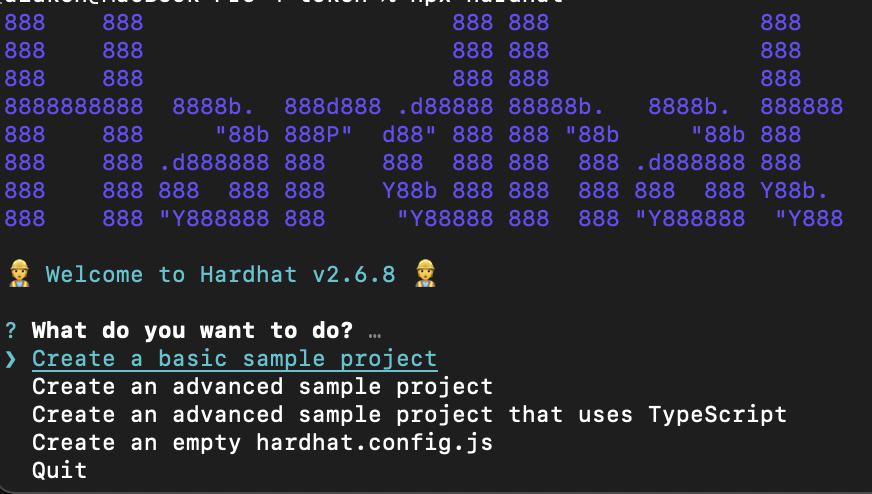
4. Select `Create a basic sample project`
You will then get a few more options such as if you want to create a .gitignore and install some dependencies like in the following image:

5. **Select yes to all of these options!**
It might take a minute or two to install everything!
Your project should now contain the following:
- Files: `node_modules`, `package.json`, `hardhat.config.js`, `package-lock.json`, `README.md`
- Folders: `scripts`, `contracts`, `test`
## Step 2: Add a Faucet Contract File
1. In your `/contracts` directory, go ahead and delete the `Greeter.sol` that Hardhat includes for you by default
> You can do this by running `rm -rf Greeter.sol` in your terminal
2. Run `touch Faucet.sol`
3. Open the file and copy-paste the following:
```solidity
//SPDX-License-Identifier: Unlicense
pragma solidity ^0.8.0;
contract Faucet {
address payable public owner;
constructor() payable {
owner = payable(msg.sender);
}
event FallbackCalled(address);
function withdraw(uint _amount) payable public {
// users can only withdraw .1 ETH at a time, feel free to change this!
require(_amount <= 100000000000000000);
payable(msg.sender).transfer(_amount);
}
function withdrawAll() onlyOwner public {
owner.transfer(address(this).balance);
}
function destroyFaucet() onlyOwner public {
selfdestruct(owner);
}
// function will be invoked if msg contains no data
fallback() external payable {
emit FallbackCalled(msg.sender);
}
modifier onlyOwner() {
require(msg.sender == owner);
_;
}
}
```
4. Save the file.
5. Check out / audit the contract! Start thinking about what we could possibly test for! 🤔 Lots of things right? *Let's list out a few*:
- **A lot of the logic in the contract depends on the owner being set correctly in the constructor, so we'll want to test that.**
- **We don't want someone instantly draining all of our funds, so we should check that the `require` clause in the `withdraw()` function works as expected**
- **The `fallback` function should be called if the `msg` to the contract contains no data. It should be testable by checking that the `FallbackCalled` event is emitted in the logs.**
- **The `destroyFaucet()` function should only be called by the owner, as should the `withdrawAll` function.**
Let's set up some unit tests to test that all of these assumptions are correct!
## Step 3: Add Test File Structure
We will build out our unit tests for our `Faucet.sol` in the `sample-test.js` file. As we build out the test script, we will cover some of the important parts of Solidity testing.
1. In your `/test` folder, open the `sample-test.js`
2. You are welcome to create your own test file in this folder from scratch. Hardhat already gives us a pre-written scaffold so better to take advantage of that and just re-name the sample file if needed.
3. We will keep it as-is and do the following to the test file:
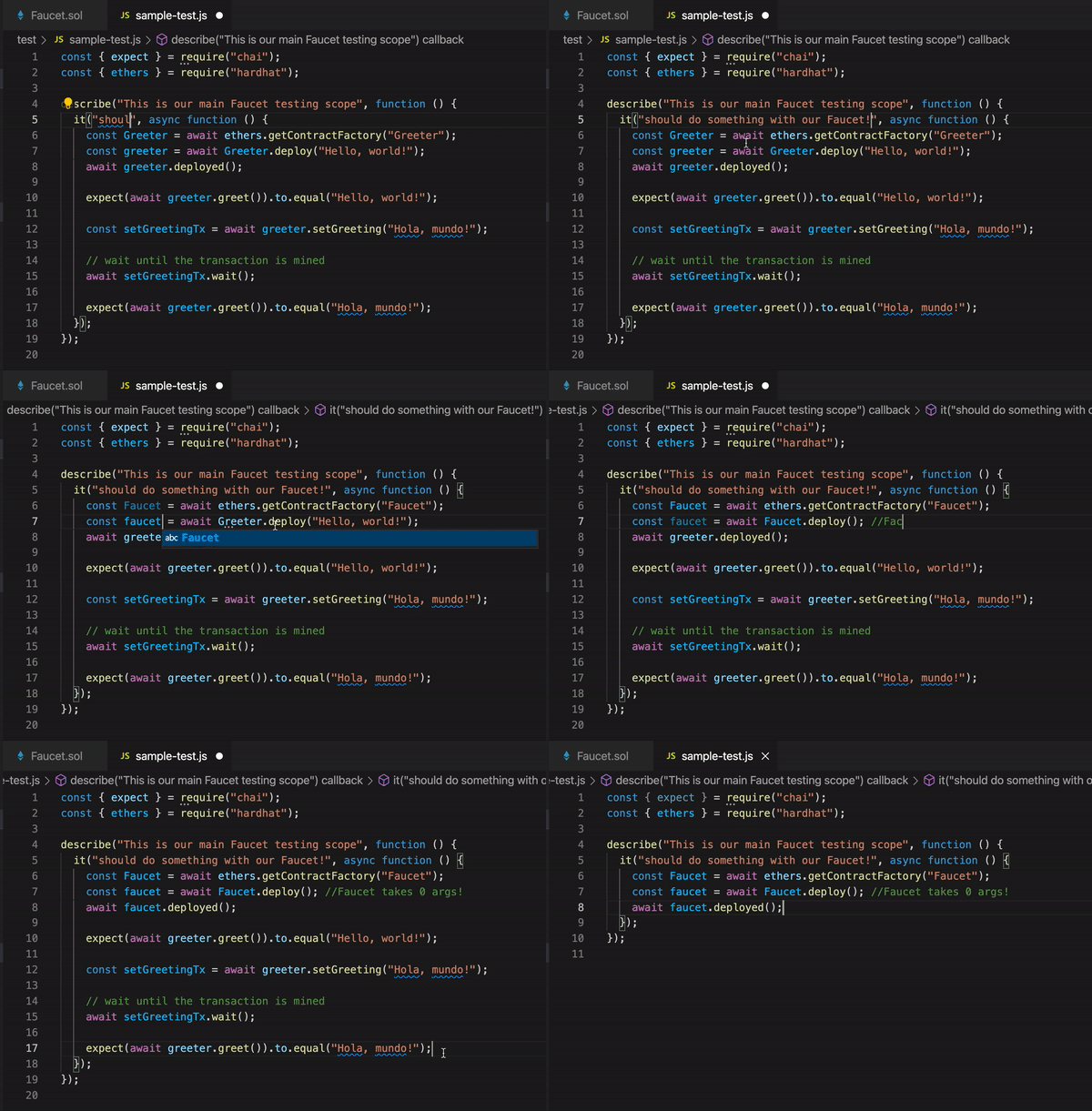
4. Change all of the references in the sample test file from `Greeter` to `Faucet` (or to the name of another contract you would be testing!)
Let's cover some important parts of our testing script so far:
```javascript
const { assert, expect } = require("chai");
const { ethers } = require("hardhat");
```
We first start by important the [ChaiJS testing library](https://www.chaijs.com/) with which we have access to the [`expect`](https://www.chaijs.com/api/bdd/) and [`assert`](https://www.chaijs.com/api/assert/) functions.
Then we import `ethers` so that we have access to the `ethers` library functions via the `hardhat` package.
We then open a `describe` function. The best way to think of this is just a general function scope that "describes" the suite of test cases enumerated by the "it" functions inside.
Inside that `describe`, we have an `it` function. These are your specific unit test targets... just sound it out!: "I want `it` to x.", "I want `it` to y.", etc.
We'll cover these more in-depth below.
We then use `contractFactory` abstraction provided to us by Ethers.
From the Hardhat docs: A `ContractFactory` in ethers.js is an abstraction used to deploy new smart contracts, so Faucet here is a factory for instances of our faucet contract.
We then `await` for the `faucet` instance we created from our `ContractFactory` to be mined. This is our basic setup - after all these lines, we now have a deployed contract instance with which we can test!
**But wait! "Listen!"**
 **
Since we are deploying a Faucet, we might want to make sure it is deployed with some ether in it - otherwise, the faucet will have no ether and what's the point! Change this line:
```javascript
let faucet = await Faucet.deploy();
```
to:
```javascript
let faucet = await Faucet.deploy({
value: ethers.utils.parseUnits("10", "ether"),
});
```
What we are doing with this change is we are running the exact same contract deployment but we also override the default transaction data to contain a `msg.value` (`value` since this is JS) to be `10 ether` using the ethers.utils.parseUnits function.
This isn't an argument to the constructor! This is an override of the deployment transaction data, which calls the constructor.
Now, our faucet contract will contain 10 ether at deployment!
## Step 4: Add First Unit Test
Let's go ahead and add some `it` functions to test the cases we highlighted in the last part of Step #2.
### - A lot of the logic in the contract depends on the owner being set correctly in the constructor, so we'll want to test that.
1. Rename the `It should do something with our Faucet` `it` function header to "it should set the owner to be the deployer of the contract".
2. Add the following logic to your `describe` function:
```javascript
let [signer] = await ethers.provider.listAccounts();
assert.equal(await faucet.owner(), signer);
```
We use the `assert.equal` function from the `chai` testing library here to make sure that the `owner` on our deployed `faucet` instance is equal to the default signer provided to us by Hardhat.
> We can access all of the test accounts that Hardhat gives us by using `ethers.provider.listAccounts()`. We can get more accounts by destructuring the array response like this: `let [signer, account2, account3] = await ethers.provider.listAccounts()` - you can fetch up to 100 accounts and they are each loaded with 10,000 ETH!
And that's it! Our assertion is set up!
3. Run `npx hardhat test`
You should get an output that looks like this:

We just wrote a simple unit test that makes sure that the `owner` state variable of the `Faucet` contract is set correctly. Nice!
## Step 5: Clean Up Test File To Support More Unit Tests
Since we are going to be adding more `it` functions - more specific areas of our contract to test - there are some parts of our testing code that we don't want to repeat per `it` function. It would make our code file very long if we had to deploy our contract instance every time we wanted to test something specific about the contract!
This is where we add the [**`before` hook**](https://mochajs.org/#hooks), which will help us maintain a clean and unified testing file.
The **`before` hook** allows us to run logic before we run a consequent series of tests - this is the perfect place to place our contract deployment code! This is what your testing file should look like, after adding the `before` hook:
```javascript
const { expect, assert } = require("chai");
const { ethers } = require("hardhat");
describe("This is our main Faucet testing scope", function () {
let faucet, signer;
before("deploy the contract instance first", async function () {
const Faucet = await ethers.getContractFactory("Faucet");
faucet = await Faucet.deploy({
value: ethers.utils.parseUnits("10", "ether"),
});
await faucet.deployed();
[signer] = await ethers.provider.listAccounts();
});
it("it should set the owner to be the deployer of the contract", async function () {
assert.equal(await faucet.owner(), signer);
});
});
```
Ah! Much cleaner! Now we can write as many `it` functions as we want within the "This is our main Faucet testing scope" `describe` function!
Notice, we had to declare the `faucet` and the `signer` variables above the `before` hook and then assign them value within it. You will need to do this in order to give all of your tests scope access to the variables you need to test!
## Step 6: Add More Unit Tests
Let's cover a couple more cases!
### - We don't want someone instantly draining all of our funds, so we should check that the `require` clause in the `withdraw()` function works as expected
Remember: we are using the latest code file from the end of Step #5!
1. Add a new `it` function scope
> Pro-tip: just copy-paste the entire previous `it` function and replace the contents for the new test! No need to write out the whole syntax again. Like this:
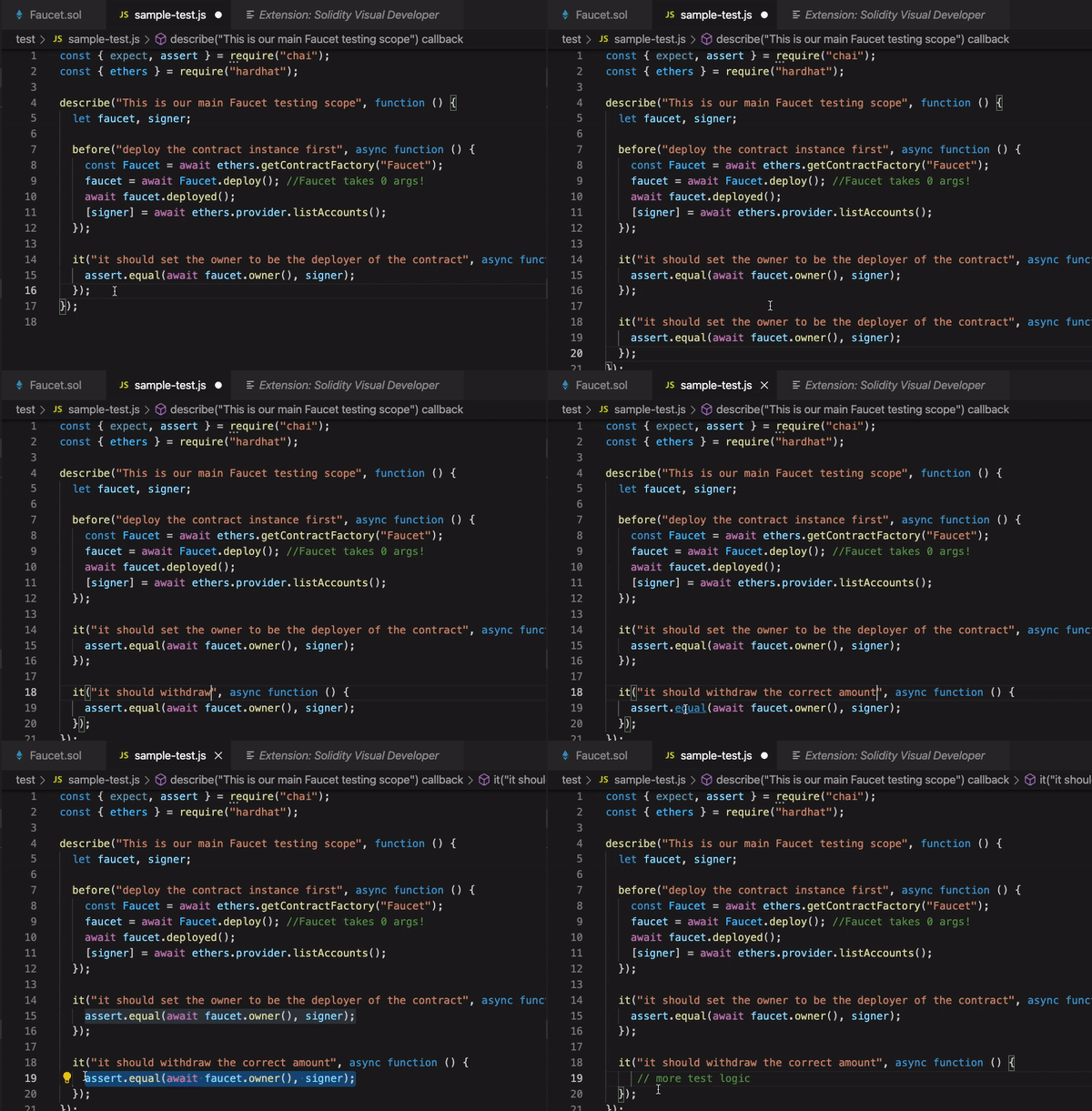
2. As above, name it something that denotes we are testing the withdraw functionality of the contract
For now, we want to test that we can't withdraw more than .1 ETH as denoted by the `require` statement in our contract's `withdraw()` function.
**It's time to use `expect`!**
Since we want to use `expect`, we'll need to import some special functionality more specific to Solidity. We will be using these [Solidity Chai Matchers](https://ethereum-waffle.readthedocs.io/en/latest/matchers.html).
3. `ethereum-waffle` should already be installed, but run `npm install ethereum-waffle` just in case
Cool, we have the necessary imports and installations.
We will the [**Revert** Chai Matcher](https://ethereum-waffle.readthedocs.io/en/latest/matchers.html#revert) to `expect` a transaction to revert. This is how we make sure we cover certain cases that we expect **should revert**.
4. Add the following to your `it` function:
```javascript
let withdrawAmount = ethers.utils.parseUnits("1", "ether");
await expect(faucet.withdraw(withdrawAmount)).to.be.reverted;
```
We are creating `withdrawAmount` variable equal to 1 ether, which is way over what the `require` statement in the `withdraw()` function allows; so we expect it to revert!
Go ahead and change the value to be less than .1 ETH and see the terminal get angry when you run `npx hardhat test`... not reverting! 😱
5. Our test file should look like this so far:
```javascript
const { expect, assert } = require("chai");
const { ethers } = require("hardhat");
describe("This is our main Faucet testing scope", function () {
let faucet, signer;
before("deploy the contract instance first", async function () {
const Faucet = await ethers.getContractFactory("Faucet");
faucet = await Faucet.deploy({
value: ethers.utils.parseUnits("10", "ether"),
});
await faucet.deployed();
[signer] = await ethers.provider.listAccounts();
});
it("it should set the owner to be the deployer of the contract", async function () {
assert.equal(await faucet.owner(), signer);
});
it("it should withdraw the correct amount", async function () {
let withdrawAmount = ethers.utils.parseUnits("1", "ether");
await expect(faucet.withdraw(withdrawAmount)).to.be.reverted;
});
});
```
Now, let's write another unit test!
### - The `fallback` function should be called if the `msg` to the contract contains no data. It should be testable by checking that the `FallbackCalled` event is emitted in the logs.
This one will be one of the more complicated ones to test (for such a simple function)! We will need to construct an empty transaction call into the `faucet` contract - in order to do this, we need to create an ethers [`wallet`](https://docs.ethers.io/v5/api/signer/#Wallet) instance and fund it with some ETH in order to be able to use [`sendTransaction`](https://docs.ethers.io/v5/api/signer/#Signer-sendTransaction).
Once an empty call reaches the faucet contract, it should call the `fallback` function which then emits the `FallbackCalled` event. We will then use the faucet interface and the empty transaction response to query the `FallbackCalled` event and make sure it was emitted - if it was the test passes and the fallback was successfully invoked!
1. Add a new `it` to under the last one - just copy-paste then modify it like in the last step and like so:
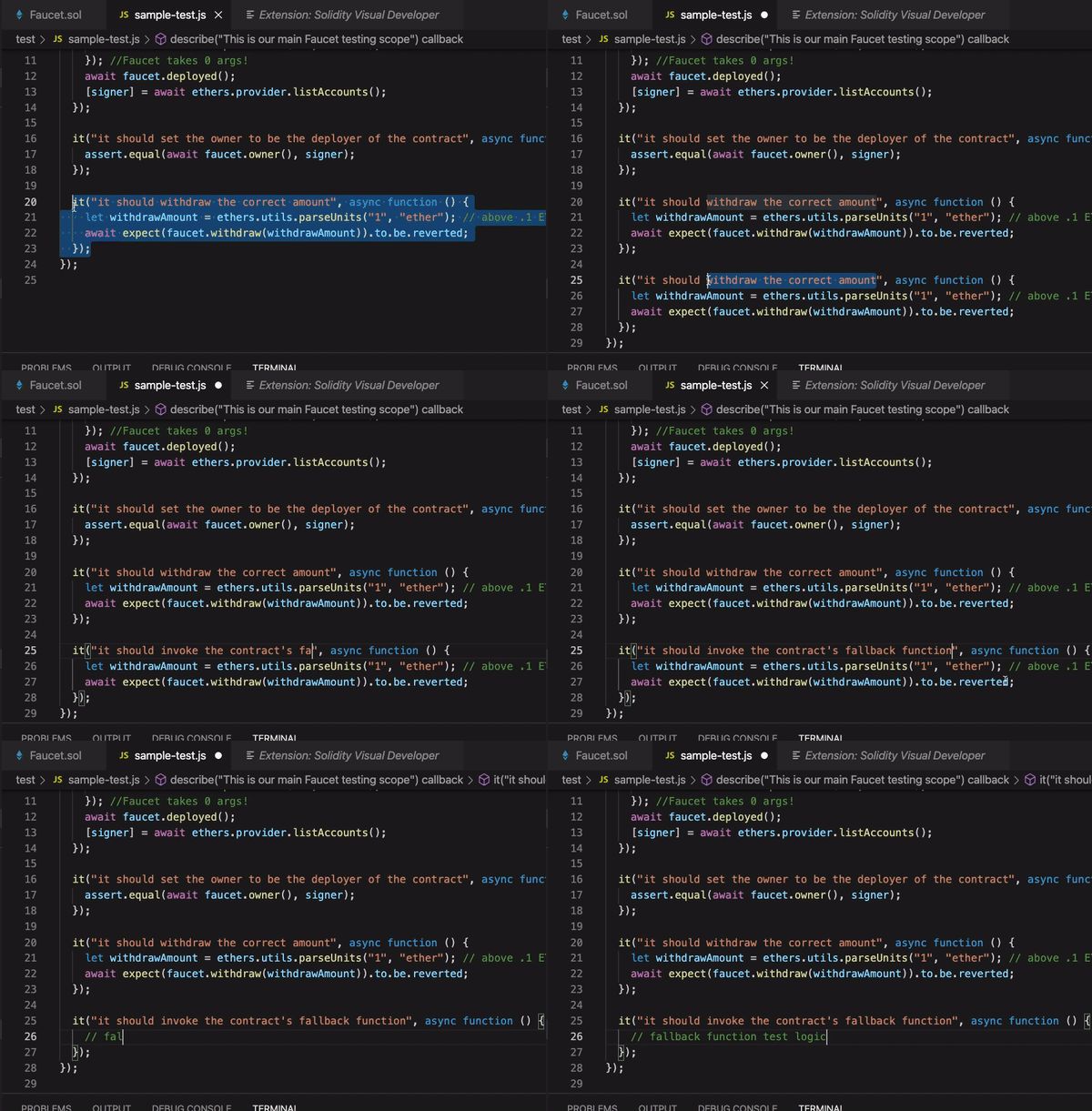
2. Add the following inside your new `it`:
```javascript
// declare a separate ethers signer
let signer1 = ethers.provider.getSigner(0);
// create an ethers wallet instance using a random private key
const wallet = new ethers.Wallet("0xac0974bec39a17e36ba4a6b4d238ff944bacb478cbed5efcae784d7bf4f2ff80", ethers.provider);
// send some ETH to our newly created wallet!
await signer1.sendTransaction({
to: wallet.address,
value: ethers.utils.parseUnits("1", "ether"),
});
// send an empty transaction to the faucet
let response = await wallet.sendTransaction({
to: faucet.address,
});
let receipt = await response.wait();
// query the logs for the FallbackCalled event
const topic = faucet.interface.getEventTopic('FallbackCalled');
const log = receipt.logs.find(x => x.topics.indexOf(topic) >= 0);
const deployedEvent = faucet.interface.parseLog(log);
assert(deployedEvent, "Expected the Fallback Called event to be emitted!");
```
## Step 6: Try Some Tests!
### - The `destroyFaucet()` function should only be called by the owner, as should the `withdrawAll` function.
This last one shouldn't be too bad to test! We just need to call make sure the `onlyOwner` modifier is working, similar to the first test. These are some of the most important functions in our contract so we want to make sure they are indeed only callable by the owner.
As a challenge, implement these tests! Some good corner cases to test with these two functions:
- can only the owner call them?
- does the contract actually self destruct when the `destroyFaucet()` is called? (this one is tricky! hint: [`getCode`](https://docs.ethers.io/v5/single-page/#/v5/api/providers/provider/-%23-Provider-getCode))
- does the `withdrawAll()` function successfully return all of the ether held in the smart contract to the caller?
There are many more cases that you can test for to create really iron-clad and comprehensive unit tests - and thus create iron-clad smart contracts! 💪
 Google Drive
Gist
Clipboard
Google Drive
Gist
Clipboard
 Sign in with Wallet






