# My first HackMD note (change me!)
###### tags: `Tag(change me!)`
> This note is yours, feel free to play around. :video_game:
> Type on the left :arrow_left: and see the rendered result on the right. :arrow_right:
## :memo: Where do I start?
### Step 1: Change the title and add a tag
- [x] Create my first HackMD note (this one!)
- [ ] Change its title
- [ ] Add a tag
:rocket:
### Step 2: Write something in Markdown
Let's try it out!
Apply different styling to this paragraph:
**HackMD gets everyone on the same page with Markdown.** ==Real-time collaborate on any documentation in markdown.== Capture fleeting ideas and formalize tribal knowledge.
- [x] **Bold**
- [ ] *Italic*
- [ ] Super^script^
- [ ] Sub~script~
- [ ] ~~Crossed~~
- [x] ==Highlight==
:::info
:bulb: **Hint:** You can also apply styling from the toolbar at the top :arrow_upper_left: of the editing area.

:::
> Drag-n-drop image from your file system to the editor to paste it!
### Step 3: Invite your team to collaborate!
Click on the <i class="fa fa-share-alt"></i> **Sharing** menu :arrow_upper_right: and invite your team to collaborate on this note!

- [ ] Register and sign-in to HackMD (to use advanced features :tada: )
- [ ] Set Permalink for this note
- [ ] Copy and share the link with your team
:::info
:pushpin: Want to learn more? ➜ [HackMD Tutorials](https://hackmd.io/c/tutorials)
:::
---
## BONUS: More cool ways to HackMD!
- Table
| Features | Tutorials |
| ----------------- |:----------------------- |
| GitHub Sync | [:link:][GitHub-Sync] |
| Browser Extension | [:link:][HackMD-it] |
| Book Mode | [:link:][Book-mode] |
| Slide Mode | [:link:][Slide-mode] |
| Share & Publish | [:link:][Share-Publish] |
[GitHub-Sync]: https://hackmd.io/c/tutorials/%2Fs%2Flink-with-github
[HackMD-it]: https://hackmd.io/c/tutorials/%2Fs%2Fhackmd-it
[Book-mode]: https://hackmd.io/c/tutorials/%2Fs%2Fhow-to-create-book
[Slide-mode]: https://hackmd.io/c/tutorials/%2Fs%2Fhow-to-create-slide-deck
[Share-Publish]: https://hackmd.io/c/tutorials/%2Fs%2Fhow-to-publish-note
- LaTeX for formulas
$$
x = {-b \pm \sqrt{b^2-4ac} \over 2a}
$$
- Code block with color and line numbers:
```javascript=16
var s = "JavaScript syntax highlighting";
alert(s);
```
- UML diagrams
```sequence
Alice->Bob: Hello Bob, how are you?
Note right of Bob: Bob thinks
Bob-->Alice: I am good thanks!
Note left of Alice: Alice responds
Alice->Bob: Where have you been?
```
- Auto-generated Table of Content
[ToC]
> Leave in-line comments! [color=#3b75c6]
- Embed YouTube Videos
{%youtube PJuNmlE74BQ %}
> Put your cursor right behind an empty bracket {} :arrow_left: and see all your choices.
- And MORE ➜ [HackMD Tutorials](https://hackmd.io/c/tutorials)
_____________
# DataTor Coding Guidelines
Our overarching goals are __conciseness__, __readability__ and __simplicity__.
# Git
## Branching Strategy
### Permanent Branches:
The branches will be available in your repository on permanent bases. Their naming convention is simple and straightforward.
### Development (dev)
is the main development branch.
The dev branch’s idea is to make changes in it and restrict the developers from making any changes in the master branch directly. Changes in the dev branch undergo reviews and, after testing, get merged with the master branch.
```
dev-020
```
### Main (main)
is the default branch available in the Git repository. It should be stable all the time and won’t allow any direct check-in. You can only merge it after code review. All team members are responsible for keeping the master stable and up-to-date.
```
main-020
```
### QA (QA), or test branch,
contains all the code for QA testing and automation testing of all changes implemented. Before any change goes to the production environment, it must undergo the QA testing to get a stable codebase.
```
qa-020
```
### Release (Stable)
A branch for tagging a specific release version
Examples:
```
release-020-DT-APP-v020
```
Git also supports tagging a specific commit history of the repository. A release branch is used if there is a need to make the code available for checkout or use.
### Temporary Branches
As the name indicates, these are the branches that can be created and deleted when needed. They can be as follows:
Types |
| ----------------- |
| Bug Fix |
| Hot Fix |
| Feature Branches |
| Experimental Branches |
| WIP Branches |
### Feature
Any code changes for a new module or use case should be done on a feature branch. This branch is created based on the current development branch. When all changes are Done, a Pull Request/Merge Request is needed to put all of these to the development branch.
```
feature-020-12-add-views
```
### Bug Fix
If the code changes made from the feature branch were rejected after a release, sprint or demo, any necessary fixes after that should be done on the bugfix branch.
```
bug-020-12-2-bug-in-login-view
```
### Hot Fix
If there is a need to fix a blocker, do a temporary patch, apply a critical framework or configuration change that should be handled immediately, it should be created as a Hotfix. It does not follow the scheduled integration of code and could be merged directly to the production branch, then on the development branch later.
```
hf-020-fall-through-fix
```
### Experimental
Any new feature or idea that is not part of a release or a sprint. A branch for playing around.
```
exp-020-new-views-trial
```
### Merging
A temporary branch for resolving merge conflicts, usually between the latest development and a feature or Hotfix branch. This can also be used if two branches of a feature being worked on by multiple developers need to be merged, verified and finalized.
### Build
A branch specifically for creating specific build artifacts or for doing code coverage runs.
:::info
:bulb: **Hint:** Here is a simple workflow of Git branches.
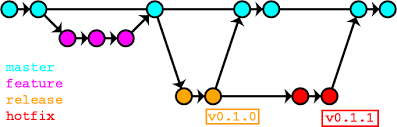
:::
## GIT Naming
### Start branch name with a Group word
It is one of the best practices. The group word can be anything to match your workflow.
I like short words like the following:
Bug – The bug which needs to be fixed soon
WIP – The work is in progress, and I am aware it will not finish soon
By looking at the branch name, you can understand what this Git branch is about and its purpose.
Have a look at the below examples:
```
bug-logo-alignment-issue
```
the developer is trying to fix the logo alignment issue.
```
wip-ioc-container-added
```
the branch relates to the task to add an IoC container in progress.
### Use Unique ID in branch names
You can use the issue tracker Id (AS MENTIONED IN THE TRELLO) in your branch name. I prefer this method when I work on fixing some bugs. For instance:
```
wip-8712-add-testing-module
```
The name shows that the branch applies to the task of adding a testing module, the tracking Id of the issue is 8712, and the work is in progress.
One more advantage of using an external tracking ID in the branch name is the possibility to track the progress from an external system.
### Use Hyphen or Slash as Separators
We prefer using hyphens as separators.
There are two main advantages of using a separator in the branch name:
* It increases the readability and helps to avoid confusion;
* It makes it easier to manage, especially if you are dealing with many branches.
Example 1. Git branch name without any separator:
```
featureupgradejqueryversionloginmodule
```
Example 2. By adding a separator (in this case, it is an underscore), you make the Git branch name readable:
```
wip-8712-add-testing-module
```
### Avoid using numbers only
Some developers only use the issue Id in the branch name, which is not helpful in the work progress.
For instance, there is a branch name 9912 – what should this magic number tell us? It only means more confusion and risk of mistakes, especially during merging with other git branches.
## Nomenclature
On the whole, naming should follow Java standards, as Kotlin is a JVM-compatible language.
### Packages
Package name: Fixed and should use the same for the entire app
```kotlin
com.datator.app
```
### Classes & Interfaces
Written in __UpperCamelCase__. For example `AppData`.
### Methods and Properties (Atrributes)
Written in __lowerCamelCase__. For example `setValue`.
### Fields
Generally, written in __lowerCamelCase__.
Name it understandably - syncing with the functionality of the variable
Example field names:
```kotlin
class MyClass {
var publicField: Int = 0
val person = Person()
private var privateField: Int?
}
```
Here you can see the private variable convention is as others
Constant values in the companion object should be written in __uppercase__, with an underscore separating words:
```kotlin
companion object {
const val THE_ANSWER = 42
}
```
Boolean Should be named with __be__ verbs. For example `isActive`.
### Variables & Parameters
Written in __lowerCamelCase__.
Single character values must be avoided, except for temporary looping variables.
### Kotlin Class File Names
All activity, Fragments, Adapters and Interfaces should be prefixed with the type that they represent.
__BAD:__
- `display.kt`
- `main.kt`
- `connectionListener.kt`
__GOOD:__
- `DisplayAdapter.kt`
- `MainActivity.kt`
- `ConnectionListenerFragment.kt`
### Misc
In code, acronyms should be treated as words. For example:
__BAD:__
```kotlin
XMLHTTPRequest
URL: String?
findPostByID
```
__GOOD:__
```kotlin
XmlHttpRequest
url: String
findPostById
```
## Declarations
### Visibility Modifiers
Only include visibility modifiers if you need something other than the default of public.
**BAD:**
```kotlin
public val wideOpenProperty = 1
private val myOwnPrivateProperty = "private"
val isInherited = true
```
**GOOD:**
```kotlin
val wideOpenProperty = 1
private val myOwnPrivateProperty = "private"
protected val isInherited = true
```
### Access Level Modifiers
Access level modifiers should be explicitly defined for classes, methods and member variables.
### Fields & Variables
Prefer single declaration per line.
__GOOD:__
```kotlin
username: String
twitterHandle: String
```
### Classes
Exactly one class per source file, although inner classes are encouraged where scoping appropriate.
File name and the Class name should be the SAME
### Data Type Objects
Prefer data classes for simple data holding objects.
Data Classes: Does not have any separate member functions - they preferrrably have GETTER, SETTER and DATA ATTRIBUTES
__BAD:__
```kotlin
class Person(val name: String) {
override fun toString() : String {
return "Person(name=$name)"
}
}
```
__GOOD:__
```kotlin
data class Person(val name: String){
override fun toString() : String {
return "Person(name=$name)"
}
}
```
### Enum Classes
Enum classes without methods may be formatted without line-breaks, as follows:
```kotlin
private enum CompassDirection { EAST, NORTH, WEST, SOUTH }
```
## Spacing
### Indentation
Indentation is using spaces - never tabs.
#### Blocks
Indentation for blocks uses 2 spaces (not the default 4):
__BAD:__
```kotlin
for (i in 0..9) {
Log.i(TAG, "index=" + i)//See the spacing
}
```
__GOOD:__
```kotlin
for (i in 0..9) {
Log.i(TAG, "index=" + i)//See the spacing
}
```
#### Line Wraps
Indentation for line wraps should use 4 spaces (not the default 8):
__BAD:__
```kotlin
val widget: CoolUiWidget =
someIncrediblyLongExpression(that, reallyWouldNotFit, on, aSingle, line)
```
__GOOD:__
```kotlin
val widget: CoolUiWidget =
someIncrediblyLongExpression(that, reallyWouldNotFit, on, aSingle, line)
```
### Line Length
Lines should be no longer than 100 characters long.
### Vertical Spacing
There should be exactly one blank line between methods to aid in visual clarity and organization. Whitespace within methods should separate functionality, but having too many sections in a method often means you should refactor into several methods.
## Comments
#### __MUST__:
==Use comments to explain **why** a particular piece of code does something==.
Comments must be kept up-to-date or deleted.
Avoid block comments inline with code, as the code should be as self-documenting as possible.
*Exception: This does not apply to those comments used to generate documentation.*
:::info
:bulb: **Hint:** Whenever needed - Write the Comments in HTML Format

:::
## Semicolons
Semicolons : You are freed from this piece of HIT.
__BAD__:
```kotlin
val horseGiftedByTrojans = true;
if (horseGiftedByTrojans) {
bringHorseIntoWalledCity();
}
```
__GOOD__:
```kotlin
val horseGiftedByTrojans = true
if (horseGiftedByTrojans) {
bringHorseIntoWalledCity()
}
```
## Getters & Setters
DO NOT use them
__Direct access to fields in Kotlin is preferred.__
## Brace Style
Only trailing closing-braces are awarded their own line. All others appear the same line as preceding code:
__BAD:__
```kotlin
class MyClass
{
fun doSomething()
{
if (someTest)
{
// ...
}
else
{
// ...
}
}
}
```
__GOOD:__
```kotlin
class MyClass {
fun doSomething() {
if (someTest) {
// ...
} else {
// ...
}
}
}
```
### You cannot type a loop without braces:
Conditional statements are always required to be enclosed with braces, irrespective of the number of lines required.
__BAD:__
```kotlin
if (someTest)
doSomething()
if (someTest) doSomethingElse()
```
__GOOD:__
```kotlin
if (someTest) {
doSomething()
}
if (someTest) { doSomethingElse() }
```
## When Statements
Unlike `switch` statements in Java, `when` statements do not fall through. Separate cases using commas if they should be handled the same way. Always include the else case.
__BAD:__
```kotlin
when (anInput) {
1 -> doSomethingForCaseOneOrTwo()
2 -> doSomethingForCaseOneOrTwo()
3 -> doSomethingForCaseThree()
}
```
__GOOD:__
```kotlin
when (anInput) {
1, 2 -> doSomethingForCaseOneOrTwo()
3 -> doSomethingForCaseThree()
else -> println("No case satisfied")
}
```
## Switch Statements
Make use of fall through in `switch` cases. It comes handy from our previous study did in front end View part of the code.
Refer the [following Fall through conditions](https://kotlinlang.org/docs/reference/properties.html)
This condition occurs in the switch control statement when there is no break keyword mention for the particular case in the switch statement and cause execution of the cases till no break statement occurs or exit from the switch statement. This condition has its own advantage and disadvantage and it totally depends upon the type of operation we want in our program.
__BAD:__
```kotlin
switch ( gfg ){
case 1:{
System.out.println("GeeksforGeeks number 1");
}
// Since break statement is missing
// it will lead to fall through condition
case 2:{
System.out.println("GeeksforGeeks number 2");
}
case 3:{
System.out.println("GeeksforGeeks number 3");
}
default :{
System.out.println("This is default case");
}
```
__GOOD:__
```kotlin
switch ( ch ){
case 'a':
case 'e':
case 'i':
case 'o':
case 'u':System.out.println("Vowel");
break;
default :{
System.out.println("Consonant");
}
```
## Types
Always use Kotlin's native types when available.
### Type Inference
Type inference should be preferred where possible to explicitly declared types. Do not Annotate Types, when using explicitly declared types.
__BAD:__
```kotlin
val something: MyType = MyType()
val meaningOfLife: Int = 42
```
__GOOD:__
```kotlin
val something = MyType()
val meaningOfLife = 42
```
### Constants vs. Variables
Constants are defined using the `val` keyword, and variables with the `var` keyword. Always use `val` instead of `var` if the value of the variable will not change.
*Tip*: A good technique is to define everything using `val` and only change it to `var` if the compiler complains!
### Nullable Types
Declare variables and function return types as nullable with `?` where a `null` value is acceptable.
For example.
```kotlin
var something:MyType = null
fun assignValue(){
something = MyType()
}
something?.execute()
```
Use implicitly unwrapped types declared with `!!` only for instance variables that you know will be initialized before use, such as subviews that will be set up in `onCreate` for an Activity or `onCreateView` for a Fragment.
For example.
```kotlin
var something:MyType = null
fun assignValue(){
something = MyType()
}
assignValue()
something!!.execute()
```
When naming nullable variables and parameters, avoid naming them like `nullableString` or `maybeView` or any Auxillary verbs since their nullability is already in the type declaration.
For example.
__BAD:__
```kotlin
val maybeView = null
val mayMightWouldCouldShouldOughtBecause = Null
```
When accessing a nullable value, use the safe call operator if the value is only accessed once or if there are many nullables in the chain:
```kotlin
editText?.formatText?.setText("foo")
```
## Language
Use `en-US` English spelling.
__BAD:__
```kotlin
val colourName = "red"
```
__GOOD:__
```kotlin
val colorName = "red"
```
## XML Guidance
Since Android uses XML extensively in addition to Java, we have some rules
specific to XML.
### XML File Names
View-based XML files should be prefixed with the type of view that they
represent.
__BAD:__
- `login.xml`
- `main_screen.xml`
- `rounded_edges_button.xml`
__GOOD:__
- `activity_login.xml`
- `fragment_main_screen.xml`
- `button_rounded_edges.xml`
### Indentation
Similarly to Java, indentation should be __two characters__.
### Use Context-Specific XML Files
Wherever possible XML resource files should be used:
- Strings => `res/values/strings.xml`
- Styles => `res/values/styles.xml`
- Colors => `res/color/colors.xml`
- Animations => `res/anim/`
- Drawable => `res/drawable`
### XML Attribute Ordering
Where appropriate, XML attributes should appear in the following order:
- `id` attribute
- `layout_*` attributes
- style attributes such as `gravity` or `textColor`
- value attributes such as `text` or `src`
Within each of these groups, the attributes should be ordered alphabetically.
 Google Drive
Gist
Clipboard
Google Drive
Gist
Clipboard
 Sign in with Wallet






