# Week 3 Project 2
## 題目
1. Callback and Promise for Asynchronous Flow (請完整描述觀念 + 簡單範例)
2. MVC Design Pattern (請描述此設計模式的關鍵思維方式,在前端的情境,以及在後端的情境)
3. Single Page Application v.s. Multi-page Application - Server Side Rendering (請描述兩種
做法的特色,並描述 SSR 要解決的問題,若能加上簡單範例更好)
4. Primitive Data Type v.s. Reference Data Type. (資料型態的分類方式,提供簡單的範例描述撰寫程式時,可能的影響
## 內容
## 1. Callback and Promise for Asynchronous Flow (請完整描述觀念 + 簡單範例)
就要先來提一下什麼是同步。原本寫的 JavaScript 就幾乎都是同步執行的。意思是他執行到某一行的時候,會等這行執行完畢,才執行到下一行,確保執行順序。
# 這樣的話會有什麼問題?
```javascript=
// Code Example --> Check code~
// //General function
let callPeng = () => {
let smartGuy = "Mr. Peng";
console.log(smartGuy);
}
callPeng();
```

```javascript=
//Oh NO Peng is always undefined 0.0
let beThereSoon = (pengResponse, time) => {
setTimeout( ()=>{
<!-- 等待setTimeout結束才能回傳 -->
return pengResponse;
}, time);;
}
let callPengScene = myCall => {
let drama = beThereSoon("Mr. Peng: Wait for a second !", 3000)
console.log(`Me: ${myCall} Mr. Peng: ${drama}`);
}
<!-- 呼叫取資料用的函式-->
callPengScene("Hey !");
```

需求-->為了解決非同步的流程控制 程式在進行時還能同時間同時刻進行別的動作,例子:AJAX取API,獲得資料的過程中,依然能夠在瀏覽器動作,其他程式不會特別等待
非同步的概念是發送 Request 之後,不用等 Response 回來,可以繼續執行程式下去。
等Response 回來之後,會幫我把結果送過來。
在 JavaScript 裡面呢可以透過 Function來達成非同步!
而這個 Function,我們就稱作 Callback Function (回呼函式)。
當非同步的操作完成時,就可以呼叫這個 Function,並且把資料帶進來。
Callback --> 是指能藉由參數(argument)通往另一個函式的函式。它會在外部函式內調用、以完成某些事情。 (MDN)
```javascript=
//see Peng by using callback function
let beThereSoon = (pengResponse, time, callback) => {
setTimeout( ()=>{
callback(pengResponse);
}, time);;
}
let callPengScene = myCall => {
let drama = beThereSoon("Wait for a second !", 3000, response => {
console.log(`Me: ${myCall} Mr. Peng: ${response}`);
})
}
callPengScene("Hey !");
```

另一種作法則是Promise
Promise --> 建立 Promise 物件代表一個可能還不能使用的值。可以用不同的方式接收一個 promise 的參照,比如作為一個異步 API 的回傳值。一但你有了 promise 的參照,你就可以呼叫它的 then() 方法來在它的值準備好後,或是,當錯誤發生時執行一些動作。
```javascript=
// Code Example --> Check code~
//see Peng by using Promise Obj
let beThereSoon = (pengResponse, time) => {
// 建立一個 Promise 物件,參數為一個執行函式,將想要做的事情放入此函式中
// 函式會有兩個參數 resolve, reject 瀏覽器自動生成
let p = new Promise( (resolve, reject) => {
setTimeout( ()=>{
resolve(pengResponse);
}, time);
});
return p;
}
let callPengScene = myCall => {
let drama = beThereSoon("Wait for a second !", 3000);
drama.then( response => {
console.log(`Me: ${myCall} Mr. Peng: ${response}`);
});
}
callPengScene("Hey !");
```


```javascript=
// //see Peng by using Promise Obj (Peng is not at home. Where is he going?!?!?!?)
let beThereSoon = (pengResponse, time) => {
let p = new Promise( (resolve, reject) => {
setTimeout( ()=>{
let error = true;
if(!error){
resolve(pengResponse);
} else {
reject("There is nobody at home !");
}
}, time);
});
return p;
}
let callPengScene = myCall => {
let drama = beThereSoon("Wait for a second !", 3000);
drama.then( response => {
console.log(`Me: ${myCall} Mr. Peng: ${response}`);
}).catch( e => {
console.log(`Me: ${myCall} Mr. Peng's chatBot: ${e}`);
});
}
callPengScene("Hey !");
```

## 2. MVC Design Pattern (請描述此設計模式的關鍵思維方式,在前端的情境,以及在後端的情境)
一種設計理念,最主要出發點是**讓寫程式的人好維護,分工合作**
**Model**:用於封裝與應用程式的業務邏輯相關的資料以及對資料的處理方法。「 Model 」有對資料直接存取的權力,例如對資料庫的存取。**「Model」不依賴「View」和「Controller」**,也就是說, Model 不關心它會被如何顯示或是如何被操作。但是 Model 中資料的變化一般會通過一種重新整理機制被公布。為了實現這種機制,那些用於監視此 Model 的 View 必須事先在此 Model 上註冊,從而,View 可以了解在資料 Model 上發生的改變。(比如:觀察者模式(軟體設計模式))
**View**:能夠實現資料有目的的顯示(理論上,這不是必需的)。在 View 中一般沒有程式上的邏輯。為了實現 View 上的重新整理功能,View 需要存取它監視的資料模型(Model),因此應該事先在被它監視的資料那裡註冊。
**Controller**:起到不同層面間的組織作用,用於控制應用程式的流程。它處理事件並作出回應。「事件」包括用戶的行為和資料 Model 上的改變。
由於MVC模式的三個模組相互獨立,改變其中一個不會影響其他兩個,所以依據這種設計思想能構造良好的少互擾性的構件。


**優點**:程式較容易閱讀和維護、加強程式的可測試性
**缺點**:變成需要許多個檔案、需要花額外心力分割、Controller換掉整個網頁就會出錯、前後端切得不夠開。
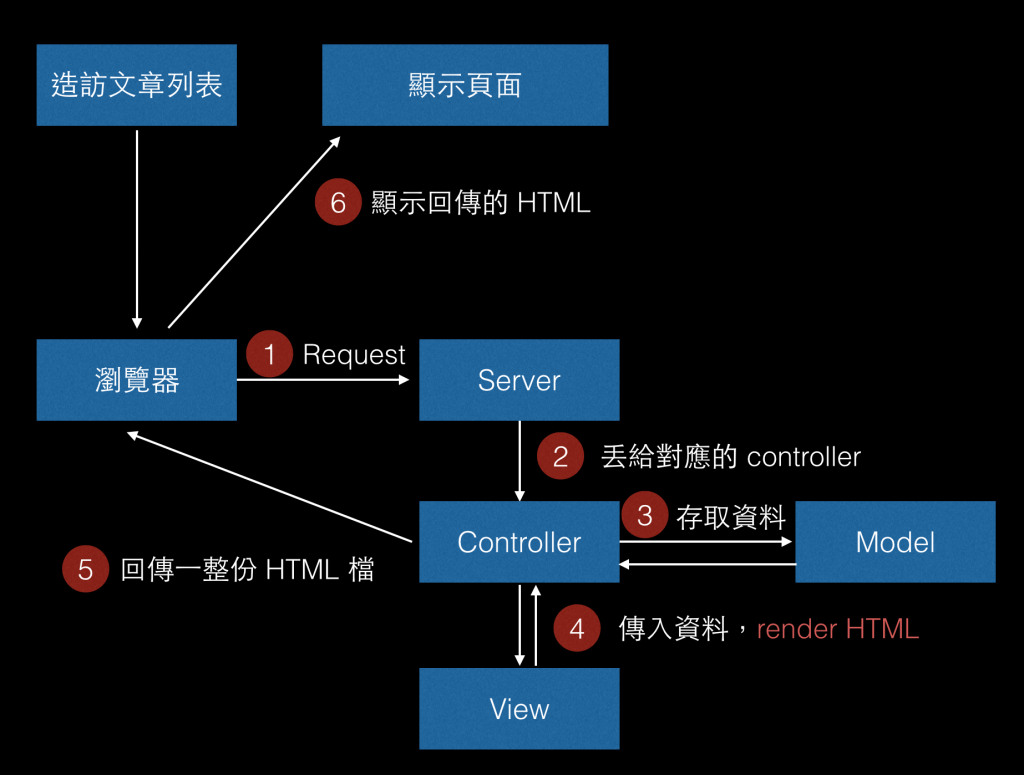
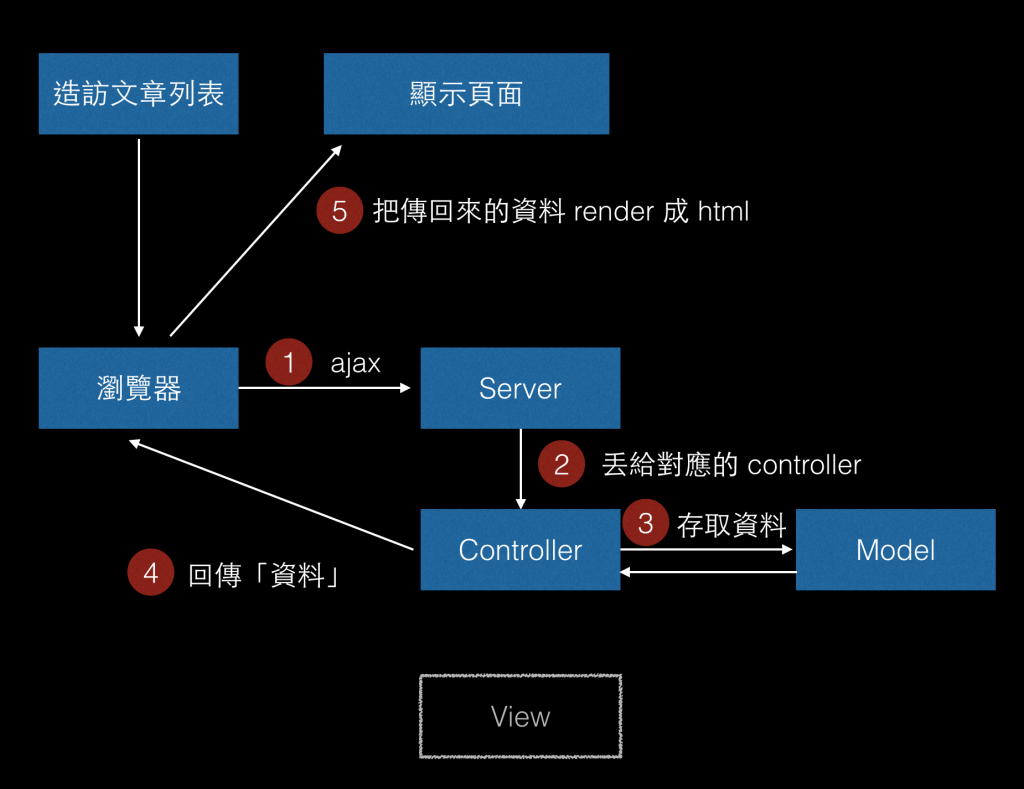
在Ajax出現之前,資料帶過去都必須透過 Form 的方式,一定要換頁,因此只有 server side render。可是有了 Ajax 以後,不換頁也能跟 Server 溝通。
換句話來說,把view和controller分開了,有了**server side render和client side render** 的差異產生。
這部分Andy等下會和大家說明。反正為了實踐client side render,前端越來越複雜,也需要MVC的架構。

總的來說,後端的V就是前端的MVC。


而前端MVC(MV*,MVVM):因為語言或是架構不同,統稱為MV*。
其實前後端做的事情都差不多,只是前端注重在 render 畫面,後端注重在輸出資料。
還可以畫出這一張完整的流程圖:

1.使用者造訪 /posts 這個網址,代表他想看全部文章
2.前端的路由去處理,負責呼叫對應到的 controller
3.前端 controller 去呼叫 Model 拿資料
4.前端 Model 透過 API,去 /api/posts 這個網址拿資料
------------------------------------------------------
5.後端路由接到 request,丟給對應到的後端 controller
6.後端 controller 跟後端 Model 拿資料
7.後端 controller 把資料傳回去
8.前端 Modle 拿到資料以後回傳給前端 controller,並且把資料丟給 view,由 view 回傳完整 HTML
9.client side render,把畫面渲染出來
後端只負責輸出資料,前端來負責抓資料跟渲染畫面。把前後端完完全全的切開了,就算你後端壞掉,你前端還是看得到畫面(只是可能會顯示個錯誤畫面之類的);你前端壞掉,後端還是能安穩的輸出資料。
應用:線上音樂播放,不會隨著頁面切換而被切歌。Gmail,使用者不會因為寄信等操作使頁面切換,產生一瞬間全白的頁面
結論:MVC只是一個架構,方便程式開發者分工,在實務上很難完全用語法去定義哪些語句是屬於哪個部分。也不是所有開發都適合這種架構,若是硬要去符合這種框架反而可能會增加開發難度,在使用上只要選擇自己需要的就好「能寫出好程式的,就是好框架」。
相關資料
https://medium.com/@hulitw/introduction-mvc-spa-and-ssr-545c941669e9
https://ithelp.ithome.com.tw/articles/10187675
https://blog.techbridge.cc/2017/09/16/frontend-backend-mvc/
## 3. Single Page Application v.s. Multi-page Application - Server Side Rendering
### 1. Single Page Application ( SPA ) 定義:
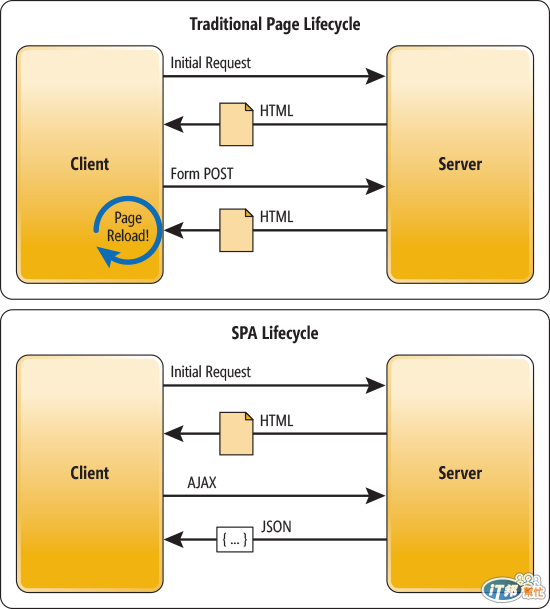
僅有一個頁面的應用程式,網頁不需跳轉頁面,就可以達到基本的建立、讀取、修改、刪除資料功能。
### 2. SPA 在資料更新後,不需要重新載入整頁:
### 3. server side render ( SSR ) vs client side render 定義:
server side render: server 輸出「完整的 HTML」
client side render: server 輸出「完整的資料」,client 再用 JavaScript 自己生成「完整的 HTML」
### 4. SPA 實作工具:
a. Ajax
b. jQuery、Websocket、伺服器傳送事件(SSE)
c. JavaScript 框架: AngularJS、React、Vue
d. 其他 JS 框架: Ember.js、Meteor.js、ExtJS、Aurelia、Fulcro...
### 5. SPA 優點:
a. 改善了一個小地方更新,網頁必須重新載入的困擾。
b. 不必一直跳轉頁面,使用者感受佳。
- 載入頁面都不是只有單純的 HTML 而已,還有其所需要的 CSS 與 JavaScript 檔,需要多花不少時間去下載
c. 前後端分離

### 6. SPA 缺點:
a. 搜尋引擎最佳化 ( SEO ) 問題
b. URL網址都沒有改變,所以必須自訂狀態來判斷資料的傳輸是否成功或失敗。
c. 回上一頁的功能失效: 當用戶按下後退按鈕時,頁面可能返回真正的上一個頁面,而非用戶所期望的上一個頁面。
d. 首頁開啟速度很慢,使用者首次載入需要先下載 SPA 框架及應用程式的程式碼,然後再渲染頁面。
### 7. SPA 缺點的解決:
a. 回到 Server side render
- PhantomJS:當讀取頁面的時候,先去判斷是不是 Robot,如果是 Robot,就使用 PhantomJS 餵它已讀取做好的靜態頁面內容。
- 各框架推出各自的解法:Angular Universal、React Next、Vue Nuxt
- commemt: 前後端分別維護各自的 view 及 routing,且要能互相對應,換言之就是後端要處理 API 的資料,同時也要負責在使用者 landing 的時候提供畫面的渲染。 而前端負責的是,當後端將第一頁畫面渲染之後,就得接手使用者的後續操作。這樣的解決方式就算是機器人來爬也絕對沒有問題,但等於開發人員需要做兩份工,專案複雜度也是倍數上升。
b. 無解(?) 只好麻煩一點
c. HTML5規範引入了 pushState 和 replaceState 來提供程式碼對實際網址和瀏覽器歷史的存取。
- 引入後範例: https://bl.ocks.org/kurotanshi/6448231
SPA + SSR Hybrid: First index page is rendered on server side first than pushed to client side
- solve SEO problem, cause all HTML with content is rendered to client side
- Better UX due to faster webpage loading
Tool: renderToString - Render a React element to its initial HTML. React will return an HTML string. You can use this method to generate HTML on the server and send the markup down on the initial request for faster page loads and to allow search engines to crawl your pages for SEO purposes.
Universal Web/Isomorphic Web : Web that runs the same code on both server-side and client-side in this case JS.
## 4. Primitive Data Type v.s. Reference Data Type
### Primitive Data
#### 1.What are Primitive Data Types?
Boolean — true or false
Null — null
Undefined — undefined
String — an array of characters i.e words
Number — integers, floats, NaN, +Infinity, -Infinity…
Symbol — a unique value that's not equal to any other value
Others?
#### 2.Definition
1. Get memory space every time a primitive data declared and assign value
var a = true/3/’string’

2. No method
3. Immutable

#### 3.Primitive Data: Null

Null v.s. Undefined
var x ;
=>value : undefined , type : undefined
var y = null ;
=>value : null , type : object
( x == y ) //true , ( x === y ) //false
#### 4.Primitive Data: Number - NaN


#### 5.JavaScript engine decide type
JavaScript : var x =3;
C++ : int x = 3;

parseInt(), String(num), Number(str)

#### 6.Primitive Data: Symbol
Created by Symbol()
Unique

#### Primitive Data: Symbol
Object identifier
Private property

### Reference Data Type
Def: Variables that are assigned a non-primitive value are given a reference to that value. That reference points to the object’s location in memory (heap). The variables ++don’t actually contain++ the value.

#### ++Examples 1:++
>var arr = [];
arr.push(1);
Varibale = 屋主
Value = GPS/座標 (reference point)
Address = 地址 (location in memory)
Object = 房子內容


Find the location through reference point then update the content to 1.
#### ++Example 2:++
>var reference = [1];
var refCopy = reference;

>reference.push(2);
console.log(reference, refCopy); // -> [1, 2], [1, 2]

#### ++Example 3:++
>var obj = { first: 'reference' };

>var obj = { first: 'reference' };
obj = { second: 'ref2' }

Creates a new Value & Address to store the new Object. JS performs ++garbage collection++ and safely deletes the object after #234 is no longer accessible.
#### ++Example 4:++
>var arr1 = [‘Hi’];
var arr2 = arr1;
console.log(arr1 === arr2);
> true;

>var arr1= [‘Hi’];
var arr2 = [‘Hi’];
console.log(arr1 === arr2);
> false;

>vat arr1str= JSON.stringify(arr1);
var arr2str = JSON.stringify(arr2);
console.log(arr1str === arr2str);
> true;
Same as: 'Hi' === 'Hi'
#### ++Example 5:++
>let hundred = 100;
let two = 2;
const multiply = (x, y) {
<font color='red'>++//PAUSE++</font>
return x * y
}
>let result = multiply(hundred, two)
console.log(result);
> 200
>

#### ++Pure Function / Impure Function++
##### ++Impure Function:++


##### ++Pure Function:++


#### ++Summary++
##### ++Primitive Data Type’s key concept:++
- Get memory space every time assign a primitive value
- No method & immutable
- JavaScript engine decide data type
##### ++Reference Data Type’s key concept:++
- Reference: the path used to find the address of the object
- Address: the location on the heap where the object is stored
- Object: The value of the object
- Using pure function is a good practice to avoid undesired side effects.
Reference:
https://codeburst.io/explaining-value-vs-reference-in-javascript-647a975e12a0
 Google Drive
Gist
Clipboard
Google Drive
Gist
Clipboard
 Sign in with Wallet






