# Minecraft Fabric Modding - Block Entity & Screen Handler
## 方塊實體理論
圖源:特別感謝 ***Tutorials by Kaupenjoe*** 提供
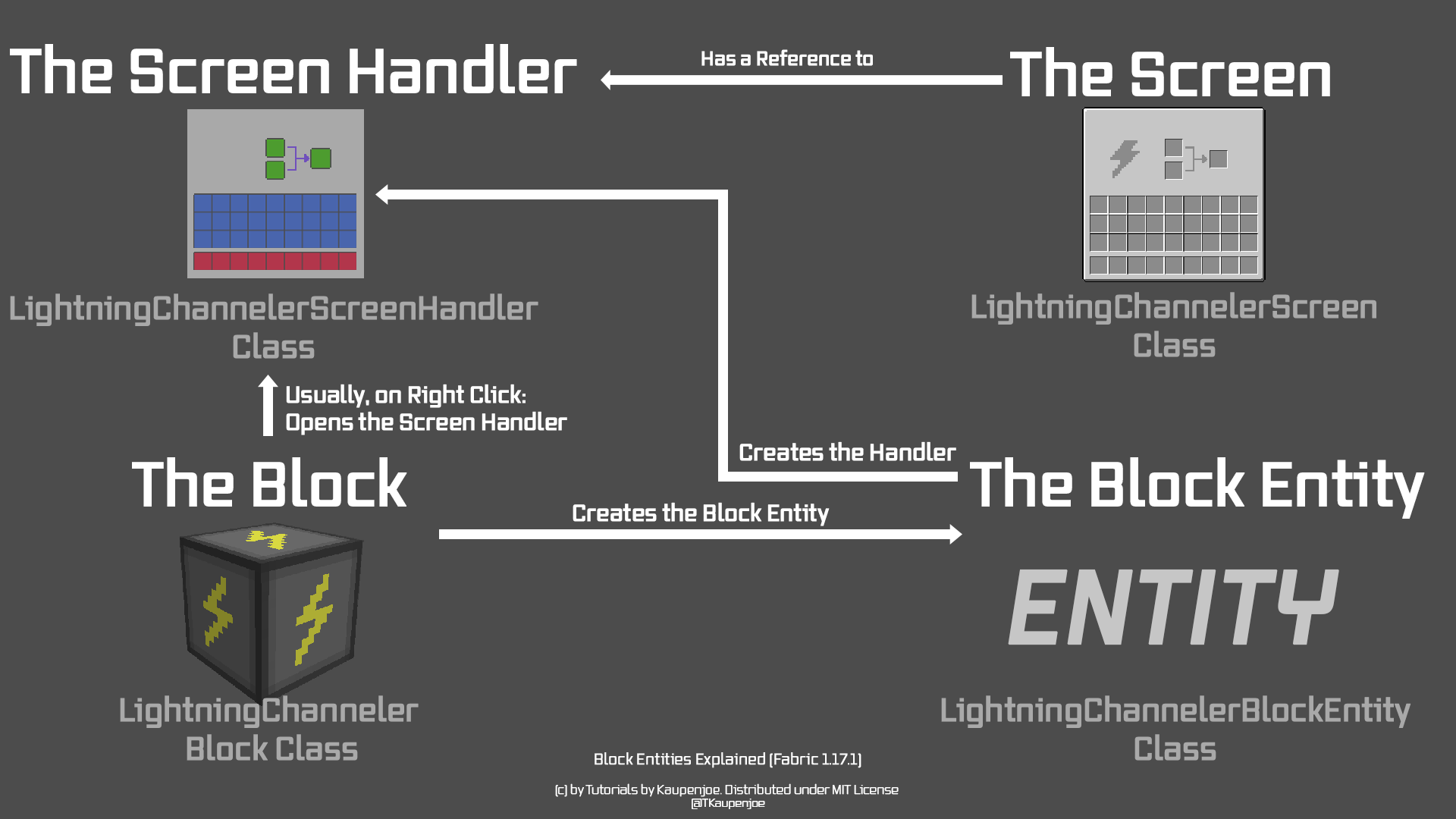
## 檔案位置樹狀圖
```java
ModId
├─ block
│ ├─ custom
│ │ └─ #Block.java
│ └─ entity
│ ├─ #BlockEntity.java
│ └─ ModBlockEntities.java
├─ item
│ └─ inventory
│ └─ ImplementedInventory.java
├─ recipe
│ ├─ #Recipe.java
│ └─ ModRecipes.java
├─ screen
│ ├─ #Screen.java
│ ├─ #ScreenHandler.java
│ └─ ModScreenHandlers.java
└─ ClientMod.java
```
"#" 代表你要取的名子
## BlockEntity 的建立
以下以 "AlloyManufactory" 代替上面的 "#"
### AlloyManufactoryBlockEntity.java
```java=
public class AlloyManufactoryBlockEntity extends BlockEntity implements NamedScreenHandlerFactory, ImplementedInventory {
private final DefaultedList<ItemStack> inventory = DefaultedList.ofSize(3, ItemStack.EMPTY);
public AlloyManufactoryBlockEntity(BlockPos pos, BlockState state) {
super(ModBlockEntities.ALLOY_MANUFACTORY_BLOCK_ENTITY, pos, state);
}
@Override
public DefaultedList<ItemStack> getItems() {
return inventory;
}
@Override
public Text getDisplayName() {
return new LiteralText("Alloy Manufactory");
}
@Nullable
@Override
public ScreenHandler createMenu(int syncId, PlayerInventory inv, PlayerEntity player) {
return new AlloyManufactoryScreenHandler(syncId, inv, this);
}
@Override
public void readNbt(NbtCompound nbt) {
super.readNbt(nbt);
Inventories.readNbt(nbt, this.inventory);
}
@Override
public void writeNbt(NbtCompound nbt) {
super.writeNbt(nbt);
Inventories.writeNbt(nbt, this.inventory);
}
public static void tick(World world, BlockPos pos, BlockState state, AlloyManufactoryBlockEntity entity) {
if(hasRecipe(entity)) {
craftItem(entity);
}
}
private static void craftItem(LightningChannelerBlockEntity entity) {
entity.removeStack(0, 1);
entity.removeStack(1, 1);
entity.setStack(2, new ItemStack(ModItems.STEEL_INGOT, entity.getStack(2).getCount() + 1));
}
private static boolean hasRecipe(LightningChannelerBlockEntity entity) {
boolean hasItemInFirstSlot = entity.getStack(0).getItem() == Items.IRON_INGOT;
boolean hasItemInSecondSlot = entity.getStack(1).getItem() == Items.COAL;
return hasItemInFirstSlot && hasItemInSecondSlot;
}
private static boolean hasNotReachedStackLimit(LightningChannelerBlockEntity entity) {
return entity.getStack(2).getCount() < entity.getStack(2).getMaxCount();
}
}
```
- 複製完後必定會發生一個問題,就是他找不到 `ImplementedInventory`,我們將在下個小節新增他。
- 關於第一行的程式碼,`ofSize` 裡面的數字表示總共有多少「物品放置格」
- 就我的看過的資料來說,教學影片以及 Fabric Wiki 的 `writeNbt` 都是錯的,原始碼的 `writeNbt` 型態是 `void`,因此測試如上程式碼是沒問題的。
- 此處的 `craftItem` 函數只是測試;事實上我們會利用 json 檔來生成食譜 (Recipe),詳細請見下面章節 ***"Recipe from json"***
### ImplementedInventory
如果你用的是 IntelliJ,在路徑 `item/inventory` 下新增檔案時需選擇「介面 (Interface)」實作

[Code - Originally By Junz](https://raw.githubusercontent.com/Tutorials-By-Kaupenjoe/Fabric-Tutorial-1.17.1/38-blockEntity/src/main/java/net/tutorialsbykaupenjoe/tutorialmod/item/inventory/ImplementedInventory.java)
### AlloyManufactoryBlock.java
直接複製以下程式碼,代換掉自己的名稱即可
```java=
public class AlloyManufactoryBlock extends BlockWithEntity implements BlockEntityProvider {
public AlloyManufactoryBlock(Settings settings) {
super(settings);
}
@Nullable
@Override
public BlockEntity createBlockEntity(BlockPos pos, BlockState state) {
return new AlloyManufactoryBlockEntity(pos, state);
}
@Override
public BlockRenderType getRenderType(BlockState state) {
//With inheriting from BlockWithEntity this defaults to INVISIBLE, so we need to change that!
return BlockRenderType.MODEL;
}
@Override
public ActionResult onUse(BlockState state, World world, BlockPos pos, PlayerEntity player, Hand hand, BlockHitResult hit) {
if (!world.isClient) {
//This will call the createScreenHandlerFactory method from BlockWithEntity, which will return our blockEntity casted to
//a namedScreenHandlerFactory. If your block class does not extend BlockWithEntity, it needs to implement createScreenHandlerFactory.
NamedScreenHandlerFactory screenHandlerFactory = state.createScreenHandlerFactory(world, pos);
if (screenHandlerFactory != null) {
//With this call the server will request the client to open the appropriate Screenhandler
player.openHandledScreen(screenHandlerFactory);
}
}
return ActionResult.SUCCESS;
}
//This method will drop all items onto the ground when the block is broken
@Override
public void onStateReplaced(BlockState state, World world, BlockPos pos, BlockState newState, boolean moved) {
if (state.getBlock() != newState.getBlock()) {
BlockEntity blockEntity = world.getBlockEntity(pos);
if (blockEntity instanceof CraftBlockEntity) {
ItemScatterer.spawn(world, pos, (CraftBlockEntity)blockEntity);
// update comparators
world.updateComparators(pos,this);
}
super.onStateReplaced(state, world, pos, newState, moved);
}
}
@Nullable
@Override
public <T extends BlockEntity> BlockEntityTicker<T> getTicker(World world, BlockState state, BlockEntityType<T> type) {
return checkType(type, ModBlockEntities.ALLOY_MANUFACTORY_BLOCK_ENTITY, AlloyManufactoryBlockEntity::tick);
}
}
```
### ModBlockEntities
最後,我們需要建立 `ModBlockEntities.java` 裡註冊新的方塊實體。
```java=
public static BlockEntityType<AlloyManufactoryBlockEntity> ALLOY_MANUFACTORY_BLOCK_ENTITY =
Registry.register(Registry.BLOCK_ENTITY_TYPE, new Identifier(More_Ores.MOD_ID, "alloy_manufactory_block_entity"),
FabricBlockEntityTypeBuilder.create(AlloyManufactoryBlockEntity::new, ModBlocks.ALLOY_MANUFACTORY).build(null));
```
## ScreenHandler 的建立
### ScreenHandler
【比較】
**ScreenHandler**:決定放物品的格子要「放哪裡」
**Screen**:繪製整個 Screen 的程式
```java=
public class AlloyManufactoryScreenHandler extends ScreenHandler {
private final Inventory inventory;
public AlloyManufactoryScreenHandler(int syncId, PlayerInventory playerInventory) {
this(syncId, playerInventory, new SimpleInventory(3));
}
public AlloyManufactoryScreenHandler(int syncId, PlayerInventory playerInventory, Inventory inventory) {
super(ModScreenHandlers.ALLOY_MANUFACTORY_SCREEN_HANDLER, syncId);
checkSize(inventory, 3);
this.inventory = inventory;
inventory.onOpen(playerInventory.player);
// Our Slots
this.addSlot(new Slot(inventory, 0, 39, 36));
this.addSlot(new Slot(inventory, 1, 63, 36));
this.addSlot(new Slot(inventory, 2, 137, 36)); // result
addPlayerInventory(playerInventory);
addPlayerHotbar(playerInventory);
}
@Override
public boolean canUse(PlayerEntity player) {
return this.inventory.canPlayerUse(player);
}
@Override
public ItemStack transferSlot(PlayerEntity player, int invSlot) {
ItemStack newStack = ItemStack.EMPTY;
Slot slot = this.slots.get(invSlot);
if (slot != null && slot.hasStack()) {
ItemStack originalStack = slot.getStack();
newStack = originalStack.copy();
if (invSlot < this.inventory.size()) {
if (!this.insertItem(originalStack, this.inventory.size(), this.slots.size(), true)) {
return ItemStack.EMPTY;
}
} else if (!this.insertItem(originalStack, 0, this.inventory.size(), false)) {
return ItemStack.EMPTY;
}
if (originalStack.isEmpty()) {
slot.setStack(ItemStack.EMPTY);
} else {
slot.markDirty();
}
}
return newStack;
}
private void addPlayerInventory(PlayerInventory playerInventory) {
for (int i = 0; i < 3; ++i) {
for (int l = 0; l < 9; ++l) {
this.addSlot(new Slot(playerInventory, l + i * 9 + 9, 8 + l * 18, 86 + i * 18));
}
}
}
private void addPlayerHotbar(PlayerInventory playerInventory) {
for (int i = 0; i < 9; ++i) {
this.addSlot(new Slot(playerInventory, i, 8 + i * 18, 144));
}
}
}
```
- 如果你用的是 pinta,`this.addSlot()` 中的 (x, y) 座標就是右下角顯示的像素;向右為 +x,向下為 +y。
- 定位位置為圖形右上角
### ModScreenHandlers
註冊新的一個 ScreenHandler 即可:
```java=
public static ScreenHandlerType<AlloyManufactoryScreenHandler> ALLOY_MANUFACTORY_SCREEN_HANDLER =
ScreenHandlerRegistry.registerSimple(new Identifier(More_Ores.MOD_ID, "alloy_manufactory"), AlloyManufactoryScreenHandler::new);
```
## Screen (GUI) 的製作與定位
### GUI 製作
推薦軟體:[Pinta](https://www.pinta-project.com/)

### Screen 設定
```java=
public class AlloyManufactoryScreen extends HandledScreen<AlloyManufactoryScreenHandler> {
private static final Identifier TEXTURE =
new Identifier(More_Ores.MOD_ID, "textures/gui/alloy_manufactory_gui.png");
public AlloyManufactoryScreen(AlloyManufactoryScreenHandler handler, PlayerInventory inventory, Text title) {
super(handler, inventory, title);
}
@Override
protected void init() {
super.init();
// Center the title
titleX = (backgroundWidth - textRenderer.getWidth(title)) / 2;
}
@Override
protected void drawBackground(MatrixStack matrices, float delta, int mouseX, int mouseY) {
RenderSystem.setShader(GameRenderer::getPositionTexShader);
RenderSystem.setShaderColor(1.0F, 1.0F, 1.0F, 1.0F);
RenderSystem.setShaderTexture(0, TEXTURE);
int x = (width - backgroundWidth) / 2;
int y = (height - backgroundHeight) / 2;
drawTexture(matrices, x, y, 0, 0, backgroundWidth, backgroundHeight);
}
@Override
public void render(MatrixStack matrices, int mouseX, int mouseY, float delta) {
renderBackground(matrices);
super.render(matrices, mouseX, mouseY, delta);
drawMouseoverTooltip(matrices, mouseX, mouseY);
}
}
```
## 製作時間設定
## Recipe from json
:::spoiler #Recipe.java
```java=
public class AlloyManufactoryRecipe implements Recipe<SimpleInventory> {
private final Identifier id;
private final ItemStack output;
private final DefaultedList<Ingredient> recipeItems;
private final int lavaAmount;
public AlloyManufactoryRecipe(Identifier id, ItemStack output, DefaultedList<Ingredient> recipeItems, int lavaAmount) {
this.id = id;
this.output = output;
this.recipeItems = recipeItems;
this.lavaAmount = lavaAmount;
}
@Override
public boolean matches(SimpleInventory inventory, World world) {
return recipeItems.get(0).test(inventory.getStack(0))
&& recipeItems.get(1).test(inventory.getStack(1));
}
@Override
public ItemStack craft(SimpleInventory inventory) {
return output;
}
@Override
public boolean fits(int width, int height) {
return true;
}
@Override
public ItemStack getOutput() {
return output.copy();
}
@Override
public Identifier getId() {
return id;
}
public int getLavaAmount() {
return lavaAmount;
}
@Override
public RecipeSerializer<?> getSerializer() {
return Serializer.INSTANCE;
}
@Override
public RecipeType<?> getType() {
return Type.INSTANCE;
}
public static class Type implements RecipeType<AlloyManufactoryRecipe> {
private Type() { }
public static final Type INSTANCE = new Type();
public static final String ID = "alloy_manufacture";
}
public static class Serializer implements RecipeSerializer<AlloyManufactoryRecipe> {
public static final Serializer INSTANCE = new Serializer();
public static final String ID = "alloy_manufacture";
// this is the name given in the json file
@Override
public AlloyManufactoryRecipe read(Identifier id, JsonObject json) {
ItemStack output = ShapedRecipe.outputFromJson(JsonHelper.getObject(json, "result"));
int lava = JsonHelper.getInt(json, "lava");
JsonArray ingredients = JsonHelper.getArray(json, "ingredients");
DefaultedList<Ingredient> inputs = DefaultedList.ofSize(ingredients.size(), Ingredient.EMPTY);
for (int i = 0; i < inputs.size(); i++) {
inputs.set(i, Ingredient.fromJson(ingredients.get(i)));
}
return new AlloyManufactoryRecipe(id, output, inputs, lava);
}
@Override
public AlloyManufactoryRecipe read(Identifier id, PacketByteBuf buf) {
DefaultedList<Ingredient> inputs = DefaultedList.ofSize(buf.readInt(), Ingredient.EMPTY);
int lava = buf.readInt();
for (int i = 0; i < inputs.size(); i++) {
inputs.set(i, Ingredient.fromPacket(buf));
}
ItemStack output = buf.readItemStack();
return new AlloyManufactoryRecipe(id, output, inputs, lava);
}
@Override
public void write(PacketByteBuf buf, AlloyManufactoryRecipe recipe) {
buf.writeInt(recipe.getIngredients().size());
for (Ingredient ing : recipe.getIngredients()) {
ing.write(buf);
}
buf.writeItemStack(recipe.getOutput());
}
}
}
```
:::
- `match` 函數中的`recipeItems.get(0).test(inventory.getStack(0))` 可檢查兩個物品是否相同
- `Serializer` class 中的 `read` 函數可以用來讀 json 檔案
---
###### tags: `Minecraft Fabric Modding`
 Sign in with Wallet
Connect another wallet
Sign in with Wallet
Connect another wallet