Benjamin Zbinden
    • Create new note
    • Create a note from template
      • Sharing URL Link copied
      • /edit
      • View mode
        • Edit mode
        • View mode
        • Book mode
        • Slide mode
        Edit mode View mode Book mode Slide mode
      • Customize slides
      • Note Permission
      • Read
        • Only me
        • Signed-in users
        • Everyone
        Only me Signed-in users Everyone
      • Write
        • Only me
        • Signed-in users
        • Everyone
        Only me Signed-in users Everyone
      • Engagement control Commenting, Suggest edit, Emoji Reply
    • Invite by email
      Invitee

      This note has no invitees

    • Publish Note

      Share your work with the world Congratulations! 🎉 Your note is out in the world Publish Note

      Your note will be visible on your profile and discoverable by anyone.
      Your note is now live.
      This note is visible on your profile and discoverable online.
      Everyone on the web can find and read all notes of this public team.
      See published notes
      Unpublish note
      Please check the box to agree to the Community Guidelines.
      View profile
    • Commenting
      Permission
      Disabled Forbidden Owners Signed-in users Everyone
    • Enable
    • Permission
      • Forbidden
      • Owners
      • Signed-in users
      • Everyone
    • Suggest edit
      Permission
      Disabled Forbidden Owners Signed-in users Everyone
    • Enable
    • Permission
      • Forbidden
      • Owners
      • Signed-in users
    • Emoji Reply
    • Enable
    • Versions and GitHub Sync
    • Note settings
    • Note Insights New
    • Engagement control
    • Make a copy
    • Transfer ownership
    • Delete this note
    • Save as template
    • Insert from template
    • Import from
      • Dropbox
      • Google Drive
      • Gist
      • Clipboard
    • Export to
      • Dropbox
      • Google Drive
      • Gist
    • Download
      • Markdown
      • HTML
      • Raw HTML
Menu Note settings Note Insights Versions and GitHub Sync Sharing URL Create Help
Create Create new note Create a note from template
Menu
Options
Engagement control Make a copy Transfer ownership Delete this note
Import from
Dropbox Google Drive Gist Clipboard
Export to
Dropbox Google Drive Gist
Download
Markdown HTML Raw HTML
Back
Sharing URL Link copied
/edit
View mode
  • Edit mode
  • View mode
  • Book mode
  • Slide mode
Edit mode View mode Book mode Slide mode
Customize slides
Note Permission
Read
Only me
  • Only me
  • Signed-in users
  • Everyone
Only me Signed-in users Everyone
Write
Only me
  • Only me
  • Signed-in users
  • Everyone
Only me Signed-in users Everyone
Engagement control Commenting, Suggest edit, Emoji Reply
  • Invite by email
    Invitee

    This note has no invitees

  • Publish Note

    Share your work with the world Congratulations! 🎉 Your note is out in the world Publish Note

    Your note will be visible on your profile and discoverable by anyone.
    Your note is now live.
    This note is visible on your profile and discoverable online.
    Everyone on the web can find and read all notes of this public team.
    See published notes
    Unpublish note
    Please check the box to agree to the Community Guidelines.
    View profile
    Engagement control
    Commenting
    Permission
    Disabled Forbidden Owners Signed-in users Everyone
    Enable
    Permission
    • Forbidden
    • Owners
    • Signed-in users
    • Everyone
    Suggest edit
    Permission
    Disabled Forbidden Owners Signed-in users Everyone
    Enable
    Permission
    • Forbidden
    • Owners
    • Signed-in users
    Emoji Reply
    Enable
    Import from Dropbox Google Drive Gist Clipboard
       Owned this note    Owned this note      
    Published Linked with GitHub
    • Any changes
      Be notified of any changes
    • Mention me
      Be notified of mention me
    • Unsubscribe
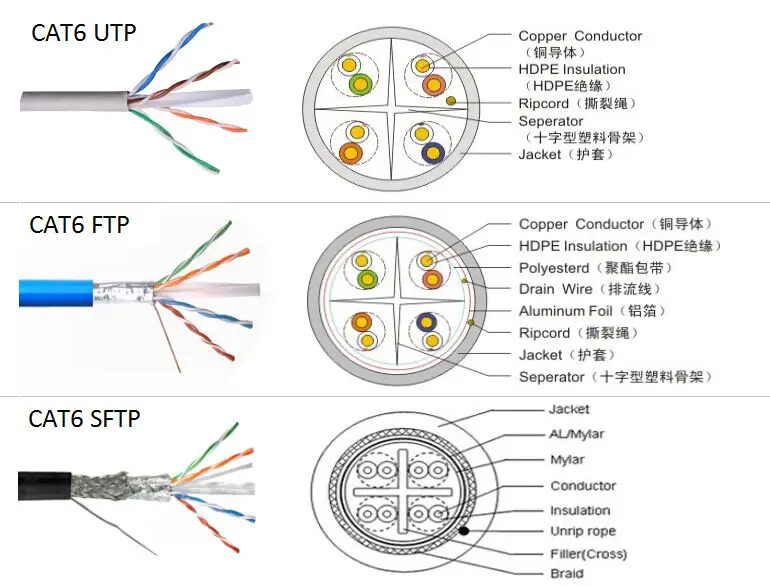
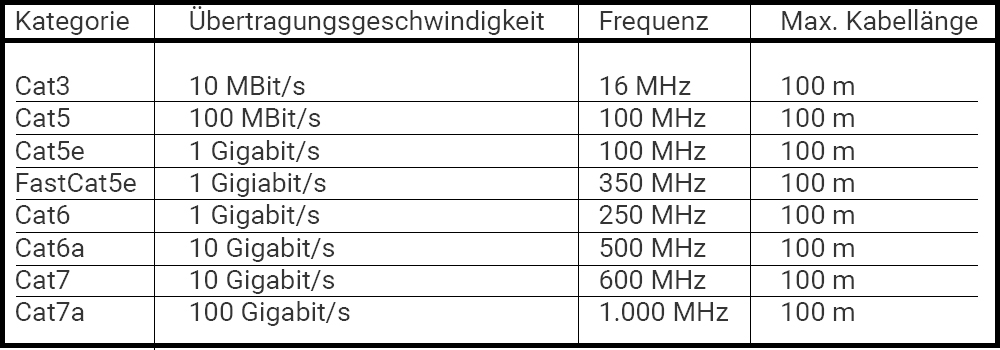
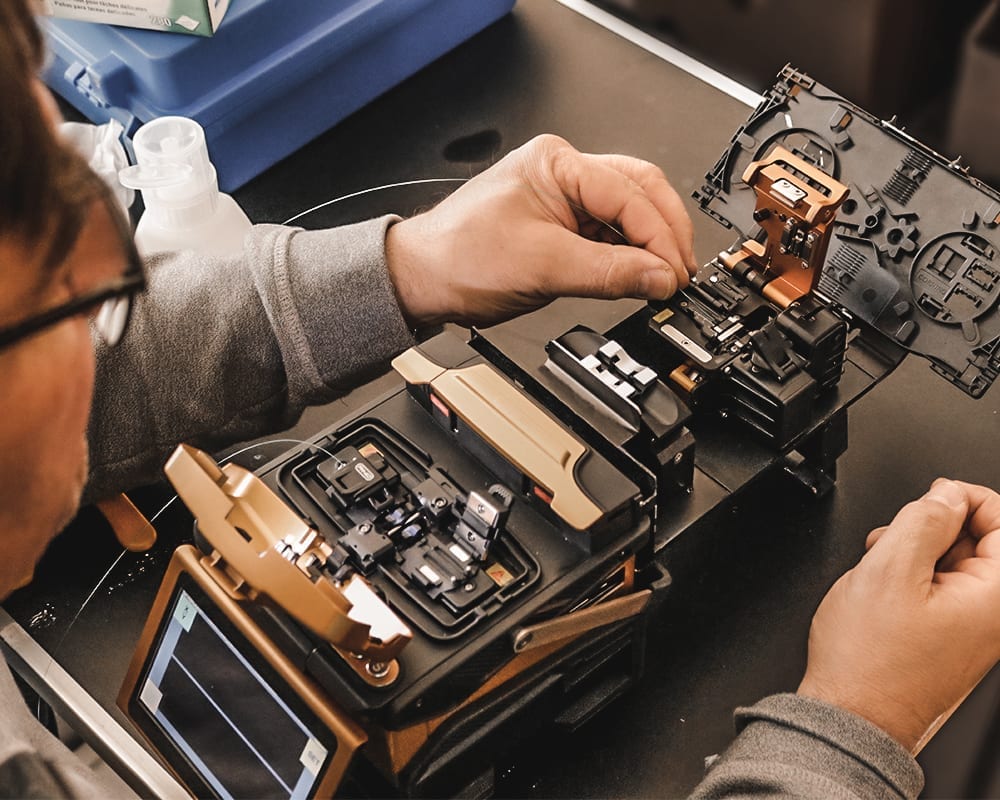
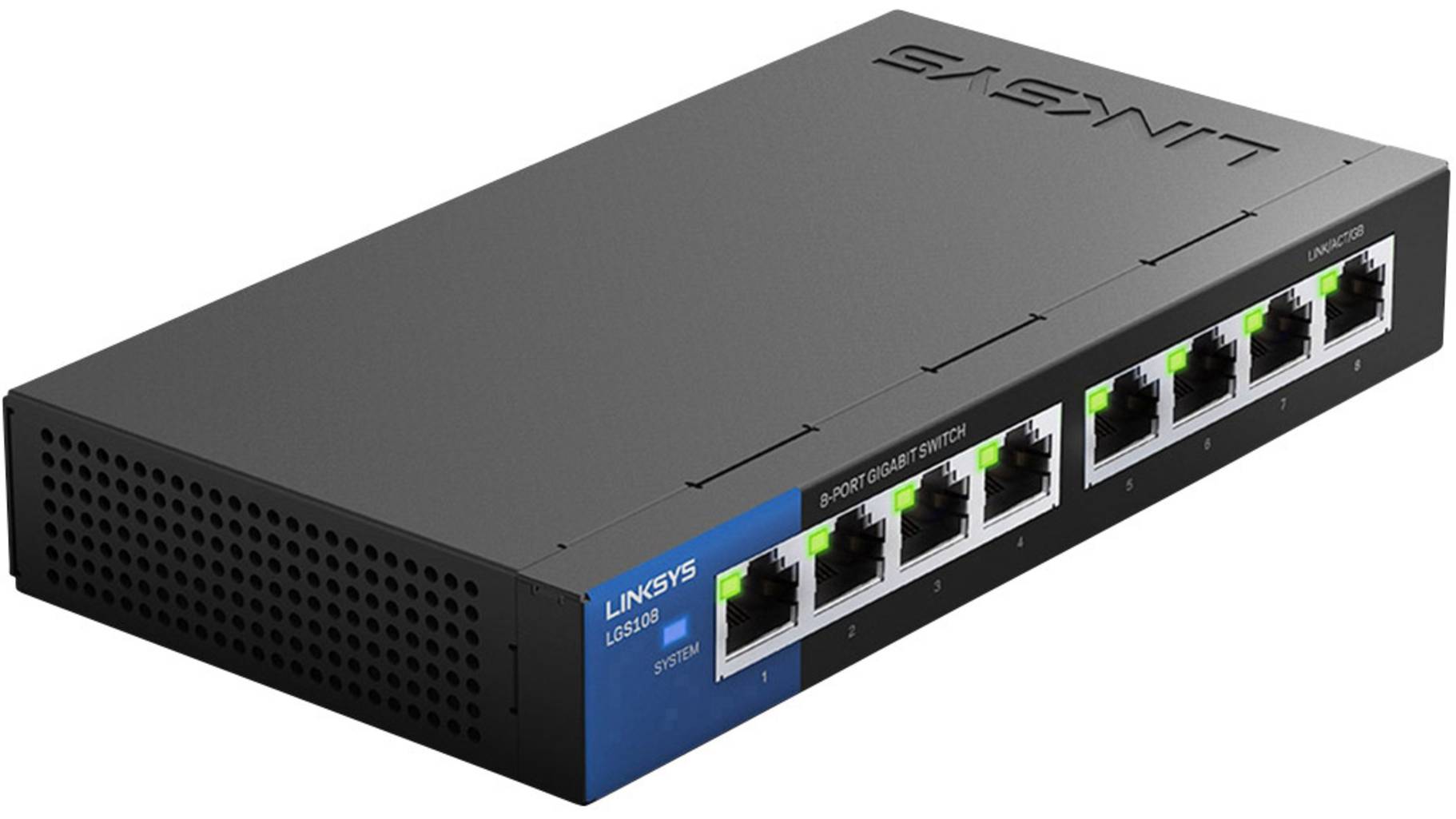
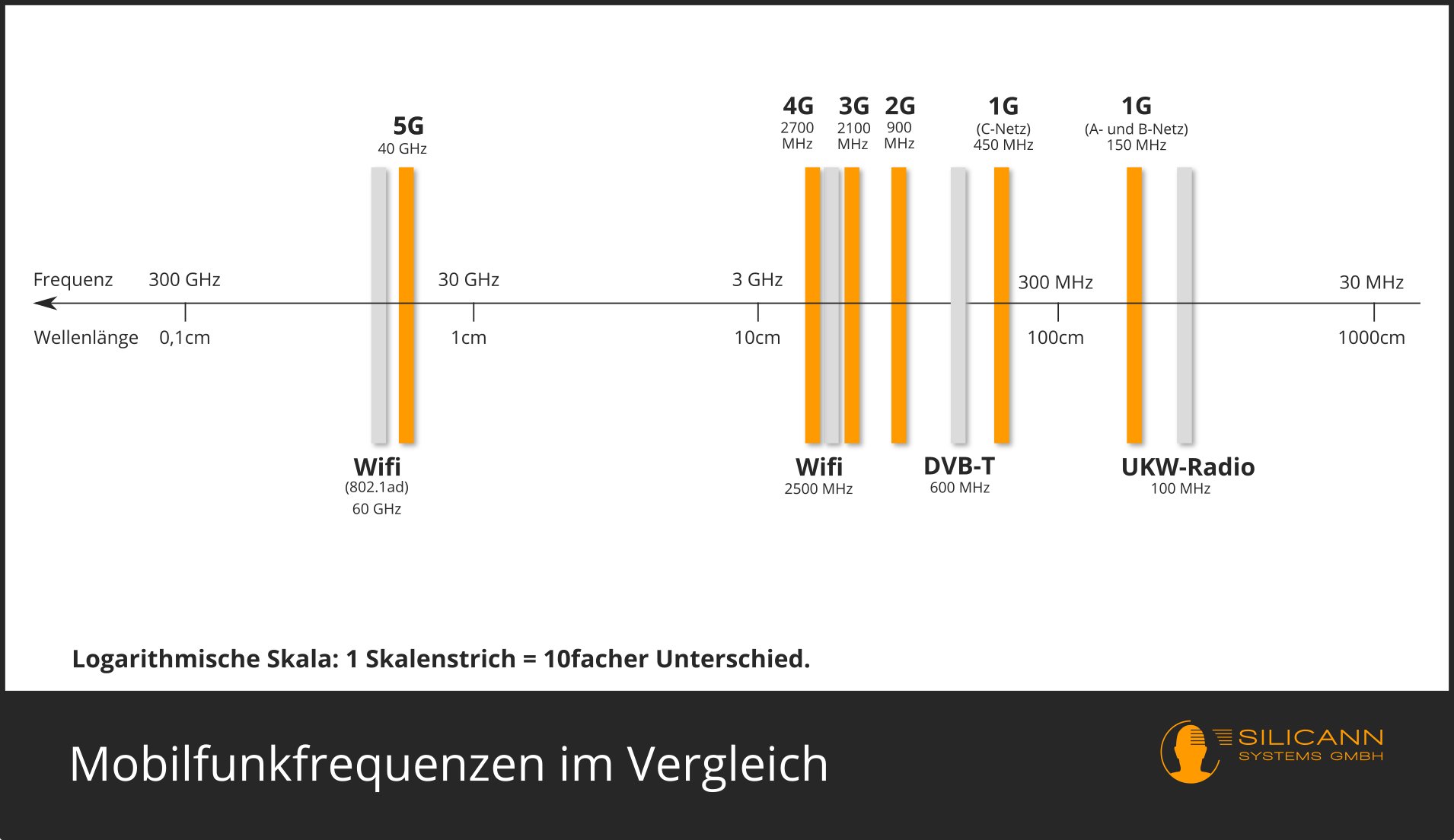
    --- tags: Netzwerk und Internet Technologien --- # Erklärungsvideo Netzwerk und Internet Technologien ### Die Verkabelung #### Cu-Kabel Verdrillt > Die Schiermungstypen beschreiben <S/UTP, SF/STP> U = Unshielded (Ungeschiermt) F = Foiled (Foliert) S = Screened (Netzschirm) SF = Screened Foiled (Netzschirm + Foliert) TP = Twisted Pair (Zweifachverdrillt) QP = Quad Pair (Vierfachcerdrillt) Aussenmantel / Innenmantel - Verdrillung U/UTP -> Unshielded / Unshielded Twisted Pair S/FTP -> Screened / Foiled Twisted Pair ![S/FTP](https://sc01.alicdn.com/kf/HTB13V7_XXdYMKJjSspbq6y2RVXaY/200596685/HTB13V7_XXdYMKJjSspbq6y2RVXaY.jpg) > Die Kategorien von Netzwerkkabel erklären <5, 5e, 6, 6e> Die Kabel (Sttecker/Buchsen) werden nach verschidenen Kategorien genormt. Diese versichern einen gewissen Datendurchsatz/Frequenz beständigkeit. ![Kat](https://www.jacob.de/pic/pages/network/patchkabel/cat-kabel-vergleich.jpg) >Preise für Kabel und Stecker <RJ45,> Netzwerkkabel ca. 25 - 150 CHF / 100m RJ45 Stecker/Buchse ca. 0.2 - 10 CHF / stk >Crimpzange für RJ45 zeigen ![Crimp](https://images-na.ssl-images-amazon.com/images/I/71qA3zkG6yL._AC_SL1500_.jpg) #### Glasfaser > Meterpreise Kabel ca. 1CHF / m > Spleisen erklären Die einzelnen Glasfasern werden schön säuberlich abgetrennt und mit einem Spleiss gerät miteinander verschweisst, damit das Licht möglichst störungsfrei weitergeleitet wird. ![Spleissen](https://www.anedis.de/wp-content/uploads/2020/04/inno-workbank-002.jpg) > POF erklären Polymere optische Faser (POF) Sind Lichtwellenleiter aus Kunststoff. Wird Hauptsächlich in Kurzstrecken-Datenübertragung verwendet durch die einfache Konfektionierung und Widerstandsfähigkeit gegenüber anderen Lichtwellenleiter. ![](https://i.imgur.com/4abIcNB.png) > Berichten "Marea Unterseekabel" Marea ist ein Seekabel zur Internetübertragung zwischen den Vereinigten Staaten und Europa. Dieses Transatlantik-Kabel verbindet Virginia Beach im US-Bundesstaat Virginia mit dem spanischen Bilbao. ![](https://i.imgur.com/IxzEECF.png) Für die Verlegung des Seekabels wurde eine Route mit einer durchschnittlichen Tiefe von 3,6 Kilometern kartiert, die teilweise durch vulkan- und erdbebengefährdete Gebiete verläuft. Das Kabel hat eine Länge von rund 6600 Kilometern, der Durchmesser entspricht in etwa der eineinhalbfachen Dicke eines Gartenschlauches. Das Kabel enthält acht mit Kupfer umschlossene Glasfaserpaare, eine Schutzschicht und eine wasserfeste Umhüllung ![](https://i.imgur.com/U0onpXi.png) Die Übertragungsgeschwindigkeit von 160 Terabit/Sec würde das gleichzeitige Senden von 71 Millionen HD-Videos ermöglichen. Damit ist es das derzeit leistungsfähigste transatlantische Unterseekabel. Die Wartung des Kabels erfolgt durch die Telefónica-Tochter Telxius, die auch für den Verkauf freier Kapazitäten des Kabels verantwortlich ist. Anfang 2018 ging Marea in Betrieb. CONTENT ### Die Netzwerkgeräte #### Repeater > Repeater im zusammenhang mit LAN WLAN und Glasfaser( unter dem Atlantik ). POE erklären + sinvoller einsatz. #### Switches >Managed Switches eine granularere Steuerung, Unmanaged Switches sind preiswerter. >Sie machen besonders in der Industrie Sinn, wo eine genauere Steurung das Arbeiten ermöglicht oder vereinfacht. > (Mit Managed Switches können Benutzer jeden Port des Switches auf jede beliebige Einstellung setzen und so das Netzwerk auf viele Arten verwalten, konfigurieren und überwachen. Sie bieten auch eine größere Kontrolle darüber, wie Daten über das Netzwerk übertragen werden und wer auf diese Daten zugreifen kann.) > (Zusätzlich verfügen Managed-Netzwerk-Switches in der Regel über eine aus der Ferne zugängliche Konsole (Befehlszeile oder Web-Interface), damit Administratoren Konfigurationsänderungen oder Anpassungen von verschiedenen physischen Standorten aus vornehmen können.) ![Switch](https://asset.re-in.de/isa/160267/c1/-/de/001092783PI05/Linksys-LGS108-Netzwerk-Switch-8-Port-1-GBit-s.jpg?x=1822&y=1025&ex=1822&ey=1025&align=center) ### Netzwerktypen #### LAN, WLAN, VLAN #### 'Mesh'-Technologie (WLAN) > Ausfallsicherer, praktisch wie ein repeater/extender. ersetzt jedoch den Router. > Besteht aus zwei oder mehr Routern die untereinander Kommunizieren können !['Mesh'-Technologie](https://i.pinimg.com/originals/97/49/54/974954f2092d35722a1c299c5ad50f79.png) #### VLAN > VLAN steht für Virtual LAN. > Ein VLAN trennt physische Netze in Teilnetze auf, indem es dafür sorgt, dass VLAN-fähige Switches Frames (Datenpakete) nicht in ein anderes VLAN weiterleiten (obwohl die Teilnetze an gemeinsamen Switches angeschlossen sein können). ##### Vorteile - Sicherheit: -- Erlaubt es (besser) zu steuern, welche Geräte wo zugriff haben -- Zum aufsetzten eines guest-networks (Ungeschütztes WLAN) - Performance: -- Teilnehmer die viel untereinander Kommunizieren können Gruppiert werden (über network switches) -- Broadcast Domains verkleinern, damit sie nicht über das gesamte Netz gehen -- Bestimmte funktionalitäten mit hoher Priorität können optimiert werden (zb. VoIP) ### Mobile Technologie: Verbindung über 3G / 4G / 5G #### 5G ![1G - 5G Frequenzbereich grafik](https://www.silicann.com/files/Blog/5G-Strahlung/Frequenzen_1G_2G_3G_4G_5G.png) ![5G Tower / 4G Tower](https://resize-europe1.lanmedia.fr/img/var/europe1/storage/images/media/images/600-x-30038/56385034-1-fre-FR/600-x-300.png) https://www.infineon.com/cms/de/discoveries/mobile-communication-5g/ ### Mobilfunk-Anbieter in der Schweiz - Salt - Sunrise - Sunrise Communications - Swisscom https://map.geo.admin.ch/?lang=de&topic=ech&bgLayer=ch.swisstopo.pixelkarte-farbe&layers=ch.swisstopo.zeitreihen,ch.bfs.gebaeude_wohnungs_register,ch.bav.haltestellen-oev,ch.swisstopo.swisstlm3d-wanderwege,ch.astra.wanderland-sperrungen_umleitungen,ch.bakom.mobilnetz-5g,ch.bakom.mobil-antennenstandorte-5g,ch.bakom.mobilnetz-4g,ch.bakom.mobilnetz-2g,ch.bakom.mobilnetz-3g&layers_opacity=1,1,1,0.8,0.8,1,1,1,0.75,0.75&layers_visibility=false,false,false,false,false,false,false,false,false,false&layers_timestamp=18641231,,,,,,,,,&catalogNodes=457,532,687,727&E=2613355.21&N=1191014.70&zoom=1.5666666666666602

    Import from clipboard

    Paste your markdown or webpage here...

    Advanced permission required

    Your current role can only read. Ask the system administrator to acquire write and comment permission.

    This team is disabled

    Sorry, this team is disabled. You can't edit this note.

    This note is locked

    Sorry, only owner can edit this note.

    Reach the limit

    Sorry, you've reached the max length this note can be.
    Please reduce the content or divide it to more notes, thank you!

    Import from Gist

    Import from Snippet

    or

    Export to Snippet

    Are you sure?

    Do you really want to delete this note?
    All users will lose their connection.

    Create a note from template

    Create a note from template

    Oops...
    This template has been removed or transferred.
    Upgrade
    All
    • All
    • Team
    No template.

    Create a template

    Upgrade

    Delete template

    Do you really want to delete this template?
    Turn this template into a regular note and keep its content, versions, and comments.

    This page need refresh

    You have an incompatible client version.
    Refresh to update.
    New version available!
    See releases notes here
    Refresh to enjoy new features.
    Your user state has changed.
    Refresh to load new user state.

    Sign in

    Forgot password

    or

    By clicking below, you agree to our terms of service.

    Sign in via Facebook Sign in via Twitter Sign in via GitHub Sign in via Dropbox Sign in with Wallet
    Wallet ( )
    Connect another wallet

    New to HackMD? Sign up

    Help

    • English
    • 中文
    • Français
    • Deutsch
    • 日本語
    • Español
    • Català
    • Ελληνικά
    • Português
    • italiano
    • Türkçe
    • Русский
    • Nederlands
    • hrvatski jezik
    • język polski
    • Українська
    • हिन्दी
    • svenska
    • Esperanto
    • dansk

    Documents

    Help & Tutorial

    How to use Book mode

    Slide Example

    API Docs

    Edit in VSCode

    Install browser extension

    Contacts

    Feedback

    Discord

    Send us email

    Resources

    Releases

    Pricing

    Blog

    Policy

    Terms

    Privacy

    Cheatsheet

    Syntax Example Reference
    # Header Header 基本排版
    - Unordered List
    • Unordered List
    1. Ordered List
    1. Ordered List
    - [ ] Todo List
    • Todo List
    > Blockquote
    Blockquote
    **Bold font** Bold font
    *Italics font* Italics font
    ~~Strikethrough~~ Strikethrough
    19^th^ 19th
    H~2~O H2O
    ++Inserted text++ Inserted text
    ==Marked text== Marked text
    [link text](https:// "title") Link
    ![image alt](https:// "title") Image
    `Code` Code 在筆記中貼入程式碼
    ```javascript
    var i = 0;
    ```
    var i = 0;
    :smile: :smile: Emoji list
    {%youtube youtube_id %} Externals
    $L^aT_eX$ LaTeX
    :::info
    This is a alert area.
    :::

    This is a alert area.

    Versions and GitHub Sync
    Get Full History Access

    • Edit version name
    • Delete

    revision author avatar     named on  

    More Less

    Note content is identical to the latest version.
    Compare
      Choose a version
      No search result
      Version not found
    Sign in to link this note to GitHub
    Learn more
    This note is not linked with GitHub
     

    Feedback

    Submission failed, please try again

    Thanks for your support.

    On a scale of 0-10, how likely is it that you would recommend HackMD to your friends, family or business associates?

    Please give us some advice and help us improve HackMD.


    Thanks for your feedback

    Remove version name

    Do you want to remove this version name and description?

    Transfer ownership

    Transfer to
      Warning: is a public team. If you transfer note to this team, everyone on the web can find and read this note.

        Link with GitHub

        Please authorize HackMD on GitHub
        • Please sign in to GitHub and install the HackMD app on your GitHub repo.
        • HackMD links with GitHub through a GitHub App. You can choose which repo to install our App.
        Learn more  Sign in to GitHub

        Push the note to GitHub Push to GitHub Pull a file from GitHub

          Authorize again
         

        Choose which file to push to

        Select repo
        Refresh Authorize more repos
        Select branch
        Select file
        Select branch
        Choose version(s) to push
        • Save a new version and push
        • Choose from existing versions
        Include title and tags
        Available push count

        Pull from GitHub

         
        File from GitHub
        File from HackMD

        GitHub Link Settings

        File linked

        Linked by
        File path
        Last synced branch
        Available push count

        Danger Zone

        Unlink
        You will no longer receive notification when GitHub file changes after unlink.

        Syncing

        Push failed

        Push successfully

