# Introduction
Welcome to the IDKIT API Documentation and guide. Here you will find everything you need to seamlessly integrate our next generation ID Verification API into your application. We offer you two simple methods.aaaa
1. Creating an ID Verification transaction.
2. Getting the ID Verification transaction results.
On your IDKit home screen is the [developer section](https://portal.au.idkit.com/developer), you will find your endpoints URL and API keys along with further instructions and tools to help make your integration process fast and seamless.
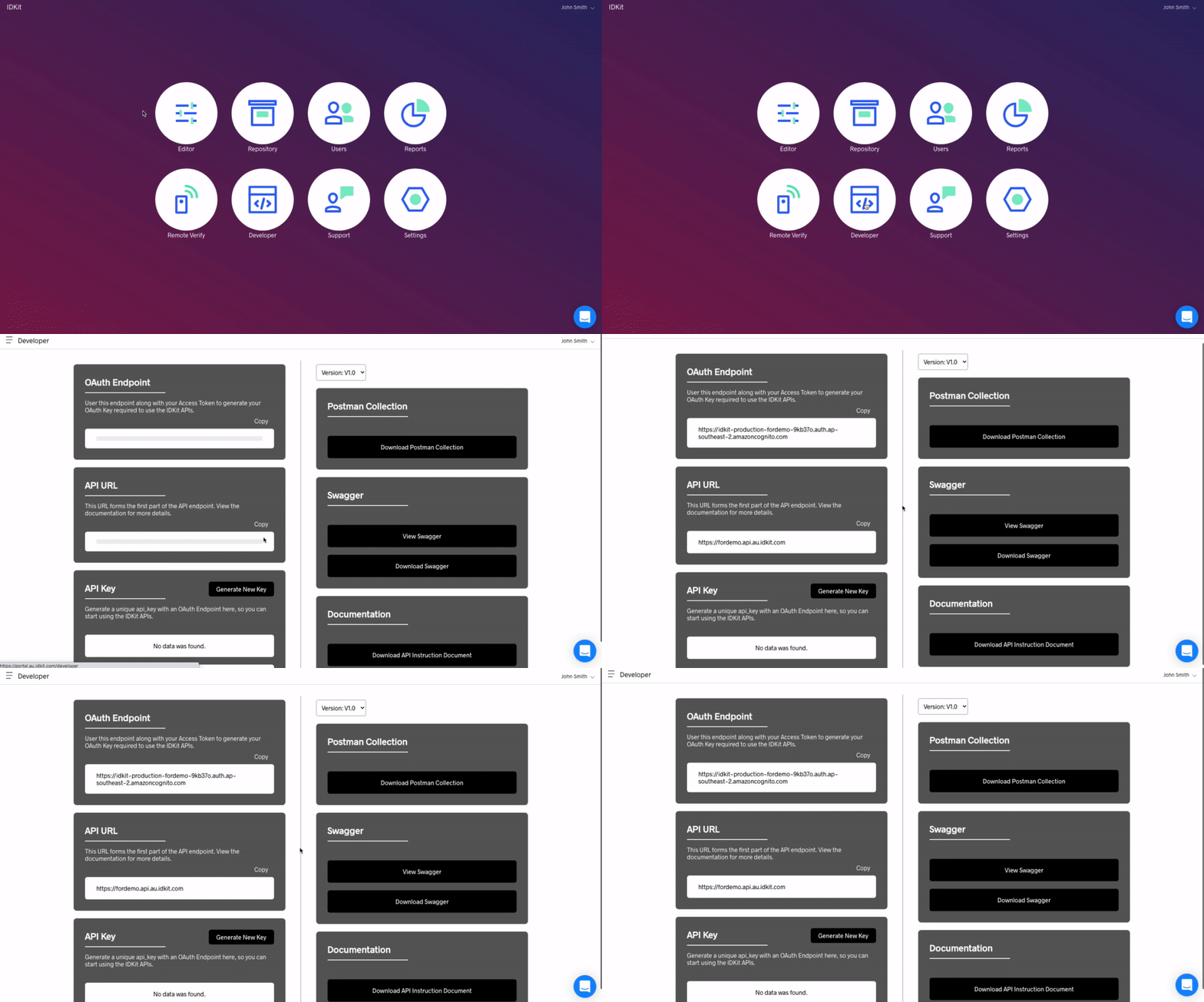
## Open API Spec & Posman Collection
You can download the [OpenAPI/Swagger spec file here](https://docs.idkit.com/assets/specs/idkit_v1-openapi_spec.yml),
and the [Postman Collection here](https://docs.idkit.com/assets/postman/idkit_v1-postman_collection.zip).
# The Transaction
In IDKit, the main resource is called a **Transaction**.
it represents a single Identity Verification.
It starts when you create it (either via Web portal or the API), typically resulting in an SMS being sent to the end user.
It is then populated by the end user and our systems,
and last, can be accessed (here again, either via the Web postal or the API).
## Anatomy of a Transaction
The data inside a transaction's record is a mix of the data populated by the user, the data extracted from their documents by our systems, the result of various validity checks also performed by our systems, and the result of external data providers (like government databases).
It also contains the images of the documents and the liveness video.
In the API, it is represented by a JSON object.
The assets (images and video) are represented as temporary links to downloadable files.
The links are valid for 10 minutes after fetching the transaction.
You can fetch the transaction again to generate a new set of links.
## Lifecycle
A transaction can have one of several states throughout its lifecycle. It is represented under the `status` attribute. - It starts as `PENDING` , after creation but before the user taps the link - evolves through `INPROGRESS` while the user is using identifying themselves - and `SUBMITTED` once they are done. - It ends with `COMPLETE` once the system has finished running the checks. - It can also be `EXPIRED` if the user did not submit before the expiration time - or `CANCELLED` if the user (or operator) explicitly exited/canceled the transaction.
We consider a transaction as closed when it reaches one of the last three statuses (`COMPLETE`, `EXPIRED`, or `CANCELLED`).
## Required Headers
On top of the [authentification](https://docs.idkit.com/#authentication) headers, **every call to the API must include `user-agent` header**. Lack of a user-agent header will result in a `401` error being thrown.
## Verifying a completed transaction
There are two methods to tell when a customer has completed their ID verification.
### Method 1: Webhook notification.
```json
"notifications": {
"complete": [
{
"type": "https",
"url": "https://example.com/auth",
"auth_header_name": "Authorization",
"auth_header_value": "Basic dXNlcm5hbWU6cGFzc3dvcmQ="
}
]
}
```
In the Create a transaction API request, you can specify your own notification webhook URL. Once the transaction is considered as closed, we send a notification to your endpoint with the `transaction_id` so you can retrieve the results.
You need to pass the connection details via the `notifications` object when creating the transaction:
`auth_header_name` and `auth_header_value` will be used to define an authentication header sent with the notification. They are both optional.
Currently, the only supported event is `complete` and the only supported type is `https`.
Your webhook endpoint must return a `200` response upon successful delivery of the notification.
### Method 2: Redirect and Poll.
In the Create a transaction API request, you can specify a `redirect_success_url` so that once a customer completes, we can redirect them to that URL.
Once the customer has accessed your given URL, you can then poll the Get Transaction endpoint until the overall status `Complete`.
Polling is required because we redirect the user before the results are ready, ensuring the best user experience -- it typically takes less than 30 seconds for a transaction to complete.
## **Interpreting Result**
The record for a completed transaction will contain a `results` object.
```json
"results": {
"overall": "FLAGGED",
"liveness": "FLAGGED",
"data": "FLAGGED",
"documents": "PASSED",
"facematch": "FLAGGED"
}
```
```
:warning: Only completed transaction results should be considered when evaluating the overall results.
```
### Overall Results
If the overall result (under `results.overall`) is `PASSED`, the customer has passed all checks including document fraud analysis, face matching between their face and ID document, the liveness check and where applicable, the check from a third party data provider.
If the overall result is `FLAGGED` we suggest analysing the breakdown of the results more carefully.
### Understanding the Breakdowns
The `results` objects breakdown of the checks:
* `liveness`: If liveness result is `FLAGGED`, manually check the video for suspicious activity.
* `data`: If the data check is `FLAGGED`, check that the data confirmed by the client matches what is on the identity document. If incorrect we recommend you get the customer to try again using correct data.
* `documents`: if this is `FLAGGED`, check the reason and then the document image.
* `facematch`: If face match is `FLAGGED`, manually check both faces and see if they match keeping in mind our result.
# Authentication
IDKit uses OAuth 2.0 authentication to grant access to the API and your data. Your code will ask for a temporary access token from the OAuth endpoint, and then make the actual API calls using this access token.
The OAuth endpoint URL is unique per tenant and you can create multiple API keys.
You will find both of them in the [developer section](https://portal.au.idkit.com/developer) of your IDKit portal.
Create an `api_key` by selecting "Generate New Key". You can generate as many API Keys as you like.
```
:warning: An API key grants access to the API and as such to the data. It must be treated with the outmost respect for security rules and best practices.
It is your responsibility to keep them secure and rotate them at regular interval.
```
## Fetching an Access Token
With the url and the API key token, you can request an access token. Pass your API key via the `Authorization` header (type `Basic`)
> Fetching an access_token
```json
curl -I --request POST {oauth_endpoint_url} \
--header 'Authorization: Basic {api_key}' \
--header 'Content-Type: application/x-www-form-urlencoded'
```
> Example Responses
```json
{
"access_token":"eyJr [SNIP] z_Q",
"expires_in":3600,
"token_type":"Bearer"
}
```
An `access_token` is valid for **60 minutes**. Your code should handle its caching and renewal.
### **Attributes**
| Attributes | Description |
|:--------------|:--------------|
|`oauth_endpoint_url` **Required**|The Oauth endpoint URL from the IDKit developer module.|
|`api_key` **Required**|The API key from the IDKit developer module.|
## **Making an API Call**
Once you have an access token, you can perform API calls.
The API URL is unique per tenant. You will also find it in the [developer section](https://portal.au.idkit.com/developer) of your IDKit portal.
See beside for an example of a GET transaction request
> Get a transaction record
```json
curl --request GET '{api_url}/v1/transactions/{transaction_id}/{format}' \
--header 'authorization: Bearer eyJraW [SNIP] kvogCA' \
--header 'Content-Type: application/json'
```
> Example Responses (See the endpoint's description for a complete response)
```json
{
"flow_type": "NORMAL",
"transaction_id": "01ERNGD38KE9T54YHJM7K1WAMV",
"created_at": "2020-12-03T23:53:38.324Z",
"tenant_id": "ap-southeast-2:b8381b45-a795-4d15-b184-d655c5262cf2",
"status": "COMPLETE",
...
}
```
### **Attributes**
|Attribute |Description |
|:----------|:--------------|
|`api_url` **Required**| The API URL from the IDKit developer module.|
|`access_token` **Required**|The Access Token you have fetched from the OAuth endpoint.|
# **IDKit API Spec**
```
Scroll down for code samples, example requests and responses. Select a language for code samples from the tabs above or the mobile navigation menu.
```
DEFAULT
Base URLs
* https://example.api.au.idkit.com/v1
Operations about Transactions
## **Create a transaction**
> POST /transactions
```json
curl -X POST https://example.api.au.idkit.com/v1/transactions \
-H 'Content-Type: application/json' \
-H 'Accept: application/json' \
-H 'Authorization: Bearer {access-token}'
```
Triggers an ID verification, either as an SMS we will send to your customers or as a link which you can pass on or redirect your customer to however you like.
> Body paramater
```json
{
"name": "MyTest",
"reference": "Demo",
"flow_type": "NORMAL",
"phone_region_code": "61",
"phone_number": "00000000",
"redirect_url_success": "https://google.com/?success",
"redirect_url_exit": "https://google.com/?exit",
"notifications": {
"complete": [
{
"type": "https",
"url": "https://example.com/auth",
"auth_header_name": "Authorization",
"auth_header_value": "Basic dXNlcm5hbWU6cGFzc3dvcmQ="
}
]
}
}
```
#### Parameters
**body** *body* object
Create Transaction Parameters
**» flow type** *body* <small>string</small>
**» name** *body* <small>optional|string</small>
You can specify a "name" reference that may be seen in the SMS and is stored in the transaction record. (eg. Daniel).
**» notifications** *body* <small>optional|object</small>
**»» complete** *body* <small>[object]</small>
**»»» auth_header_name** *body* <small>string</small>
Optional Name of an authorization header for us to use when contacting your webhook URL.
**»»» auth_header_value** *body* <small>optional|string</small>
Optional Value of an authorization header for us to use when contacting your webhook URL.
**»»» type** *body* <small>optional|string</small>
**»»» url** *body* <small>optional|string</small>
Your webhook URL for where we should send the notification that the transaction has been completed.
**» phone_number** *body* <small>optional|string</small>
The mobile number without region code (eg. 0400123456 or 400123456).
**» phone_region_code** *body* <small>optional¦string</small>
The region code for the mobile number (eg. +61)
**» redirect_url_exit** *body* <small>optional¦string</small>
A URL for the customer to be redirected to if exiting within the journey without completing.
**» redirect_url_success** *body* <small>optional¦string</small>
A URL for the customer to be redirected to once successfully completing the journey.
**» reference** *body* <small>optional¦string</small>
You can specify a reference that may be seen in the SMS and is stored in the transaction record. (eg. 0000001).
> Example responses
>
> 200 Response
```json
{
"transaction_id": "01ERZZN650QZM9N7C20E4G8760",
"url": "https://example.idkit.com/01ERZZN650QZM9N7C20E4G8760"
}
```
> 400 Response
```json
{
"message": "Bad Request."
}
```
### **Rensponses**
|Status |Meaning |Description |Schema |
|:------|:----------|:--------------|:------|
|200 |[OK](https://tools.ietf.org/html/rfc7231#section-6.3.1)| OK| Inline|
|400 | [Bad Request](https://tools.ietf.org/html/rfc7231#section-6.5.1)| The server could not understand the request due to invalid syntax. | [BadRequestResponse](https://docs.idkit.com/#schemabadrequestresponse)|
|401 | [Unauthorized](https://tools.ietf.org/html/rfc7235#section-3.1)| Although the HTTP standard specifies "unauthorized", semantically this response means "unauthenticated". That is, the client must authenticate itself to get the requested response.| [UnauthenticatedResponse](https://docs.idkit.com/#schemaunauthenticatedresponse)|
|404 | [Not Found](https://tools.ietf.org/html/rfc7231#section-6.5.4)| Although the HTTP standard specifies "unauthorized", semantically this response means "unauthenticated". That is, the client must authenticate itself to get the requested response.| [UnauthenticatedResponse](https://docs.idkit.com/#schemaunauthenticatedresponse)|
|500 | [Internal Server Error](https://tools.ietf.org/html/rfc7231#section-6.6.1)| The server has encountered a situation it doesn't know how to handle. | [InternalServerErrorResponse](https://docs.idkit.com/#schemainternalservererrorresponse)
```
:Warning: To perform this operation, you must be authenticated by means of one of the following methods: oAuth2ClientCredentials ( Scopes: transactions/post )
```
## Fetch a transaction
> GET /transactions/{transaction_id}/{format}
```json
curl -X GET https://example.api.au.idkit.com/v1/transactions/{transaction_id}/{format} \
-H 'Accept: application/json' \
-H 'Authorization: Bearer {access-token}'
```
Get the transaction payload data by `trasanction_id`. You can generate a PDF (Base64 data) by setting the `format` to "pdf".
### Parameters
**transaction_id** *path* string
Transaction ID
**format** *path* string
Available values are: json, pdf
> Example responses
>
> Get Transaction response after completion
```json
{
"current_step": "SUBMITTED",
"user_details": {
"country_code": "AUS",
"id_number": 123456789,
"document_number": 123456789,
"address": {
"street_address": "FakeData",
"country": "AUS",
"post_code": 9999,
"was_validated": true,
"suburb": "FakeData",
"full_address": "FakeData",
"state": "FakeData",
"street_address_2": "FakeData"
},
"date_of_expiry": "2030-12-31",
"date_of_birth": "1980-01-01",
"last_name": "FakeData",
"middle_name": "FakeData",
"first_name": "FakeData",
"document_type": "Driver Licence",
"licence_number": 123456789
},
"status": "COMPLETE",
"created_by": "API",
"transaction_id": "01FX6X3Y8M7FRNDE0G2WMRKPFQ",
"closed_at": "2022-03-03T03:30:41.095Z",
"spoof_result": "Low Risk",
"name": "MyTest",
"reference": "Demo",
"documents": [
{
"created_at": "2022-03-03T03:29:18.595Z",
"document_id": "2e20ccc18094d7f8760a6c76dc33fdb1",
"extracted": {
"country": "Australia",
"id_number": 123456789,
"address": "FakeData",
"document_number": 3333333333,
"city": "FakeData",
"expiry_date": "31/12/2030",
"birth_date": "01/01/1980",
"last_name": "FakeData",
"given_names": "FakeData",
"middle_name": "FakeData",
"country_code": "AUS",
"full_name": "FakeData",
"street": "FakeData",
"post_code": 9999,
"state": "FakeData",
"class": "C",
"first_name": "FakeData",
"document_type": "Driver Licence"
},
"asf_breakdown": {
"document_integrity": "PASSED",
"image_composition": "FLAGGED",
"photo_check": "PASSED",
"detail_check": "PASSED"
},
"identity_document_type": "AUS_NSW_DRIVERLICENCE",
"updated_at": "2022-03-03T03:29:18.595Z",
"ocr": true,
"face_photo": {
"url": "https://fakedomain.url",
"size": 7392,
"content_type": "image/jpeg"
},
"front_document": {
"url": "https://fakedomain.url",
"size": 70064,
"content_type": "image/jpeg"
},
"original_front_document": {
"url": "https://fakedomain.url",
"size": 100400,
"content_type": "image/jpeg"
},
"signature_photo": {
"url": "https://fakedomain.url",
"size": 23056,
"content_type": "image/jpeg"
}
}
],
"likeness_overall": "Fail",
"results": {
"liveness": "PASSED",
"overall": "FLAGGED",
"data": "PASSED",
"documents": "FLAGGED",
"facematch": "FLAGGED"
},
"invitation_phone_region_code": 61,
"data_provider": {
"DATA_CONNECT": {
"overall": "FAILED",
"data": {
"rapidID": "<check-id>",
"VerifyDocumentResult": {
"attributes": {
"i:type": "DriverLicenceResponse"
},
"VerificationResultCode": "N",
"OriginatingAgencyCode": "XXXX",
"ActivityId": "XXXXXXXX-XXXX-XXXX-XXXX-XXXXXXXXXXXX",
"VerificationRequestNumber": "XXXXXXXX-XXXX-XXXX-XXXX-XXXXXXXXXXXX"
},
"fieldDetails": {
"BirthYear": "No Match",
"BirthMonth": "No Match",
"FamilyName": "No Match",
"LicenceNumber": "No Match",
"GivenName": "No Match",
"BirthDay": "No Match",
"StateOfIssue": "No Match",
"ImmiCardNumber": "No Match",
"MiddleName": "No Match",
"ExpiryDay": "No Match",
"RegistrationState": "No Match",
"CardType": "No Match",
"CountryOfIssue": "No Match",
"BirthDate": "No Match"
}
},
"message": "OK",
"version": "1.0.0",
"xml": false
},
"GREEN_ID": {
"data": {
"individualResults": {
"background": [],
"dvs": [
{
"components": {
"dob": "PASS",
"firstName": "PASS",
"id": "PASS",
"surName": "PASS"
},
"label": "DVS - NSW Driver Licence",
"result": "PASS"
}
],
"watchlist": {
"ERROR": [],
"FOUND_ON_LIST": [],
"NOT_FOUND_ON_LIST": [
"Politically Exposed Persons Watchlist",
"Department of Foreign Affairs and Trade Watchlist",
"US, Dept of Treasury, Office of Foreign Assets Control - Specially Designated Nationals List",
"US, Dept of Treasury, Office of Foreign Assets Control - Palestinian Legislative Council (PLC) List",
"Consolidated list of persons subject to EU financial sanctions",
"UK, HM Treasury - Consolidated List of Financial Sanctions Targets in the UK",
"UK - Members of Parliament",
"New Zealand - Members of Parliament",
"Cyprus - Members of Parliament",
"Russia - Deputies of the State Duma",
"US, Immigration and Customs Enforcement - Most Wanted Fugitives List",
"US, System for Award Management - Exclusions List",
"INTERPOL - Wanted Persons List"
]
}
},
"overall": "VERIFIED",
"registrationDetails": [
{
"label": "Data Provider",
"value": "Illion / GreenID"
},
{
"label": "Time & Date",
"value": "2020-07-16T13:29:23.485+1000"
},
{
"label": "Reference",
"value": "1EwoGOGzO"
},
{
"label": "Rule ID",
"value": "default"
}
]
},
"encrypted_xml": "example/01ERZZN650QZM9N7C20E4G8760/encrypted-green-id-response.xml.enc",
"message": "OK",
"version": "1.0.0"
},
"ID_MATRIX": {
"data": {
"fraudAssessment": {
"dataSource": [
{
"name": "Politically Exposed Person (PEP) Verification",
"result": "PASS",
"score": "100.0",
"threshold": "50.0",
"weight": "0.25"
},
{
"name": "Velocity Verification",
"result": "PASS",
"score": "100.0",
"threshold": "50.0",
"weight": "0.25"
},
{
"name": "FraudCheck Shared Fraud Database",
"result": "PASS",
"score": "100.0",
"threshold": "50.0",
"weight": "0.25"
},
{
"name": "Sanctions Check",
"result": "PASS",
"score": "100.0",
"threshold": "50.0",
"weight": "0.25"
}
],
"overall": [
{
"name": "Overall Result",
"value": "PASS"
},
{
"name": "Overall Fraud Score",
"value": "100/100"
},
{
"name": "Overall Threshold",
"value": "50.0"
}
]
},
"overall": "ACCEPT",
"searchResults": {
"overall": "ACCEPT",
"rulesResults": [
{
"name": "Overall Decision",
"value": "ACCEPT"
},
{
"name": "Overall Points",
"value": "119.0"
},
{
"name": "IDMatrix Minimum Requirements Verification",
"value": "MATCH"
},
{
"name": "IDMatrix Safe Harbour Verification",
"value": "MATCH"
}
],
"searchResults": {
"fraudassessment": [
{
"components": {
"address": "NO MATCH",
"dob": "NO MATCH",
"fraud": "NO MATCH",
"full_name": "NO MATCH",
"id": "NO MATCH",
"name": "NO MATCH"
},
"name": "Velocity (v1.0)",
"points": "0",
"results": 0,
"searchName": "VEDA-EVVELOCITY-0026",
"value": "NO MATCH"
},
{
"components": {
"address": "NO MATCH",
"dob": "NO MATCH",
"fraud": "NO MATCH",
"full_name": "NO MATCH",
"id": "NO MATCH",
"name": "NO MATCH"
},
"name": "GlobalScreening - PEPs (Domestic) (v1.0)",
"points": "0",
"results": 0,
"searchName": "ACC-PEPS-0048",
"value": "NO MATCH"
},
{
"components": {
"address": "NO MATCH",
"dob": "NO MATCH",
"fraud": "NO MATCH",
"full_name": "NO MATCH",
"id": "NO MATCH",
"name": "NO MATCH"
},
"name": "GlobalScreening - Sanctions (International) (v2.0)",
"points": "0",
"results": 0,
"searchName": "ACC-COMPLINK-0021",
"value": "NO MATCH"
},
{
"components": {
"address": "NO MATCH",
"dob": "NO MATCH",
"fraud": "NO MATCH",
"full_name": "NO MATCH",
"id": "NO MATCH",
"name": "NO MATCH"
},
"name": "Fraud Lookup - Address (v1.0)",
"points": "0",
"results": "0",
"searchName": "VEDA-SFDADDR-0023",
"value": "NO MATCH"
}
],
"verification": [
{
"components": {
"address": "PASS",
"dob": "PASS",
"fraud": "PASS",
"full_name": "PASS",
"id": "PASS",
"name": "PASS"
},
"name": "Credit Bureau Consumer (v3.0)",
"points": "59",
"results": "98",
"searchName": "VEDA-CBCONS-0050",
"value": "PASS"
},
{
"components": {
"address": "PASS",
"dob": "PASS",
"fraud": "PASS",
"full_name": "PASS",
"id": "PASS",
"name": "PASS"
},
"name": "Credit Bureau Consumer (v3.2)",
"points": "0",
"results": "100",
"searchName": "VEDA-CBCONS-0066",
"value": "PASS"
},
{
"components": {
"address": "PASS",
"dob": "PASS",
"fraud": "PASS",
"full_name": "PASS",
"id": "PASS",
"name": "PASS"
},
"name": "Australian Electoral Roll (v3.0)",
"points": "60",
"results": "100",
"searchName": "AEC-ER-0049",
"value": "PASS"
}
]
},
"verificationOutcome": {
"indicator": "ACCEPT",
"totalPoints": "119"
}
},
"summary": [
{
"name": "Reference",
"value": "200822-98BE2-ADFA9"
},
{
"name": "Profile Name",
"value": "KYC-TEST_PROFILE_GEE-Service1"
},
{
"name": "Profile Version",
"value": "1"
}
]
},
"encrypted_xml": "example/01ERZZN650QZM9N7C20E4G8760/encrypted-id-matrix-response.xml.enc",
"message": "OK",
"version": "1.0.0"
}
},
"device_info": {
"browser": "Chrome 98.0.4758.101",
"country": "Japan",
"geolocation": "41.7531013,123.353001",
"ip": "91.207.174.99",
"ip_location": "35.6164,139.7425",
"isp": "M247 Ltd",
"os": "Android 12",
"vpn": true
},
"created_at": "2022-03-03T03:28:00.788Z",
"flow_type": "NORMAL2",
"liveness_attempts": [
{
"result": false,
"session_id": "FakeData",
"actions": "SMILE LEFT",
"video": {
"url": "https://fakedomain.url",
"size": 150688,
"content_type": "video/webm"
}
}
],
"activated_at": "2022-03-03T03:28:33.163Z",
"computed_statistics": {
"steps": [
{
"name": "PRIVACY",
"start_time": "2022-03-03T03:28:34.607Z",
"total_duration_seconds": 55
},
{
"name": "ID_INFORMATION",
"start_time": "2022-03-03T03:29:30.127Z",
"total_duration_seconds": 22
},
{
"name": "FACE_MATCH_CAPTURE",
"start_time": "2022-03-03T03:29:52.654Z",
"total_duration_seconds": 28
},
{
"name": "SUBMITTED",
"start_time": "2022-03-03T03:30:21.226Z",
"total_duration_seconds": 0
}
],
"total_duration_seconds": 105,
"total_duration_excl_privacy_seconds": 50
},
"invitation_phone_number": 0,
"likeness_features": {
"right_eye": "Fail",
"nose": "Fail",
"philtrum": "Pass",
"jaw": "Fail",
"middle_forehead": "Fail",
"mouth": "Fail",
"left_eye": "Fail",
"forehead": "Fail",
"left_cheek": "Fail",
"right_brow": "Fail",
"left_brow": "Fail",
"right_cheek": "Fail"
},
"facematch_best_frame": {
"url": "https://fakedomain.url",
"size": 24432
},
"pdf_report_number": "01FX6X3Y8M7FRNDE0G2WMRKPFQ"
}
```
> Get transaction response after redacted all data types (records, assets, face,data)
```json
{
"current_step": "SUBMITTED",
"user_details": {
"address": null,
"country_code": null,
"date_of_birth": null,
"date_of_expiry": null,
"document_type": null,
"edited_fields": null,
"first_name": null,
"last_name": null,
"middle_name": null
},
"status": "COMPLETE",
"created_by": "API",
"transaction_id": "01FXGZEDEZK44H0SHA90DHTHPW",
"closed_at": "2022-03-07T01:23:43.046Z",
"spoof_result": "Low Risk",
"record_redacted_at": "2022-03-07T01:24:57.007Z",
"name": null,
"data_redacted_at": "2022-03-07T01:24:57.007Z",
"reference": "Demo",
"documents": [
{
"asf_breakdown": {
"document_integrity": "PASSED",
"image_composition": "PASSED",
"photo_check": "PASSED",
"detail_check": "PASSED"
},
"created_at": "2022-03-07T01:22:26.637Z",
"document_id": "f398e839d348c7088cbea284d3c7caa7",
"extracted": null,
"identity_document_type": "AUS_NSW_DRIVERLICENCE",
"ocr": true,
"submitted_data": null,
"updated_at": "2022-03-07T01:22:26.637Z",
"face_photo": {
"url": null,
"size": 0,
"content_type": null
},
"front_document": {
"url": null,
"size": 0,
"content_type": null
},
"original_front_document": {
"url": null,
"size": 0,
"content_type": null
},
"signature_photo": {
"url": null,
"size": 0,
"content_type": null
}
}
],
"face_redacted_at": "2022-03-07T01:24:57.007Z",
"likeness_overall": "Fail",
"results": {
"liveness": "PASSED",
"overall": "FLAGGED",
"data": "PASSED",
"documents": "PASSED",
"facematch": "FLAGGED"
},
"invitation_phone_region_code": null,
"data_provider": {
"DATA_CONNECT": null
},
"device_info": {
"browser": "Mobile Safari 10.0",
"country": "United States",
"geolocation": "41.7531341,123.3531192",
"ip": "66.115.157.242",
"ip_location": "37.3881,-121.8756",
"isp": "Total Server Solutions L.L.C.",
"os": "iOS 10.3.1",
"vpn": true
},
"assets_redacted_at": "2022-03-07T01:24:57.007Z",
"created_at": "2022-03-07T01:21:05.503Z",
"flow_type": "NORMAL2",
"liveness_attempts": [
{
"actions": "SMILE LEFT",
"result": true,
"session_id": "5c0d45b8-406c-f210-8248-905e45-f18ccf71486d57a8",
"video": {
"url": null,
"size": 0,
"content_type": null
}
}
],
"activated_at": "2022-03-07T01:21:46.447Z",
"computed_statistics": {
"steps": [
{
"name": "PRIVACY",
"start_time": "2022-03-07T01:21:49.295Z",
"total_duration_seconds": 45
},
{
"name": "ID_INFORMATION",
"start_time": "2022-03-07T01:22:35.206Z",
"total_duration_seconds": 24
},
{
"name": "FACE_MATCH_CAPTURE",
"start_time": "2022-03-07T01:22:59.848Z",
"total_duration_seconds": 21
},
{
"name": "SUBMITTED",
"start_time": "2022-03-07T01:23:21.483Z",
"total_duration_seconds": 0
}
],
"total_duration_seconds": 90,
"total_duration_excl_privacy_seconds": 45
},
"invitation_phone_number": null,
"likeness_features": {
"right_eye": "Fail",
"nose": "Fail",
"philtrum": "Pass",
"jaw": "Fail",
"middle_forehead": "Fail",
"mouth": "Fail",
"left_eye": "Fail",
"forehead": "Fail",
"left_cheek": "Fail",
"right_brow": "Fail",
"left_brow": "Fail",
"right_cheek": "Fail"
},
"facematch_best_frame": {
"url": null,
"size": 0,
"content_type": null
},
"pdf_report_number": "01FXGZEDEZK44H0SHA90DHTHPW"
}
```
> OK
```json
{
"transaction_id": "01ERZZN650QZM9N7C20E4G8760",
"status": "COMPLETE",
"created_at": "2020-12-08T02:01:42.824Z",
"flow_type": "NORMAL",
"pdf_binary_base64": "AMgAuADYpCi9Qcm9kdWNlciAo/v8AUQB0ACAAN..."
}
```
> 400 Response
```json
{
"message": "Bad Request."
}
```
### responses
| Status | Meaning | Description | Schema |
| ------ | ------------------------------------------------------------ | ------------------------------------------------------------ | ------------------------------------------------------------ |
| 200 | [OK](https://tools.ietf.org/html/rfc7231#section-6.3.1) | OK | Inline |
| 400 | [Bad Request](https://tools.ietf.org/html/rfc7231#section-6.5.1) | The server could not understand the request due to invalid syntax. | [BadRequestResponse](https://docs.idkit.com/?shell#schemabadrequestresponse) |
| 401 | [Unauthorized](https://tools.ietf.org/html/rfc7235#section-3.1) | Although the HTTP standard specifies "unauthorized", semantically this response means "unauthenticated". That is, the client must authenticate itself to get the requested response. | [UnauthenticatedResponse](https://docs.idkit.com/?shell#schemaunauthenticatedresponse) |
| 404 | [Not Found](https://tools.ietf.org/html/rfc7231#section-6.5.4) | Although the HTTP standard specifies "unauthorized", semantically this response means "unauthenticated". That is, the client must authenticate itself to get the requested response. | [UnauthenticatedResponse](https://docs.idkit.com/?shell#schemaunauthenticatedresponse)] |
| 500 | [Internal Server Error](https://tools.ietf.org/html/rfc7231#section-6.6.1) | The server has encountered a situation it doesn't know how to handle. | [InternalServerErrorResponse](https://docs.idkit.com/?shell#schemainternalservererrorresponse) |
### Response Schema
```
:warning: To perform this operation, you must be authenticated by means of one of the following methods: oAuth2ClientCredentials ( Scopes: transactions/get )
```
## **Redact a Transaction**
> POST /transactions/redact
```json
curl -X POST https://example.api.au.idkit.com/v1/transactions/redact \
-H 'Content-Type: application/json' \
-H 'Accept: application/json' \
-H 'Authorization: Bearer {access-token}'
```
Redact the specified information of a certain transaction. Redacted transaction will contain timestamps “records_redacted_at”, “assets_redacted_at”, “face_redacted_at”, “data_redacted_at” depending on data redacted in Get Transaction response of the redacted transaction.
> Body Parameter
```json
{
"transaction_id": "01ERZZN650QZM9N7C20E4G8760",
"data_to_redact": [
"records",
"assets",
"face",
"data"
]
}
```
### **Parameters**
Redact Transaction Parameters
**» transaction_id** *body* <small>string</small>
Transaction ID
**» data_to_redact** *body* <small>[string]</small>
Data to redact. Can be an array of 'records', 'assets', 'face', 'data'
> Example responses
> OK
```json
{
"status": "success",
"transaction_id": "01ERZZN650QZM9N7C20E4G8760",
"redacted_at": "2022-02-03T05:35:09.843Z",
"redacted_data": [
"records",
"assets",
"face",
"data"
]
}
```
> 400 Response
```json
{
"message": "Bad Request."
}
```
### **Responses**
|Status |Meaning |Description |Schema |
|:------|:---------|:-------------|:---------|
|200 |[OK](https://tools.ietf.org/html/rfc7231#section-6.3.1)|OK |[RedactTransactionResponseJson](https://docs.idkit.com/#schemaredacttransactionresponsejson)|
|400 |[Bad Request](https://tools.ietf.org/html/rfc7231#section-6.5.1)|The server could not understand the request due to invalid syntax.|[BadRequestResponse](https://docs.idkit.com/#schemabadrequestresponse)|
|401 |[Unauthorized](https://tools.ietf.org/html/rfc7235#section-3.1)| Although the HTTP standard specifies "unauthorized", semantically this response means "unauthenticated". That is, the client must authenticate itself to get the requested response.|[UnauthenticatedResponse](https://docs.idkit.com/#schemaunauthenticatedresponse)|
|404 |[Not Found](https://tools.ietf.org/html/rfc7231#section-6.5.4)|Although the HTTP standard specifies "unauthorized", semantically this response means "unauthenticated". That is, the client must authenticate itself to get the requested response. |[UnauthenticatedResponse](https://docs.idkit.com/#schemaunauthenticatedresponse)|
|409 | [Conflict](https://tools.ietf.org/html/rfc7231#section-6.5.8)|Transaction itself is still in progress and not available for redaction yet. |[ConflictResponse](https://docs.idkit.com/#schemaconflictresponse)|
|500 |[Internal Server Error](https://tools.ietf.org/html/rfc7231#section-6.6.1)|The server has encountered a situation it doesn't know how to handle. |[InternalServerErrorResponse](https://docs.idkit.com/#schemainternalservererrorresponse)|
```
:warning: To perform this operation, you must be authenticated by means of one of the following methods: oAuth2ClientCredentials ( Scopes: transactions/get )
```
## **Redact Multiple Transaction**
> POST /transactions/batch_redact
```json
curl -X POST https://example.api.au.idkit.com/v1/transactions/batch_redact \
-H 'Content-Type: application/json' \
-H 'Accept: application/json' \
-H 'Authorization: Bearer {access-token}'
```
Redact transactions by certain condition. Redacted transactions will contain timestamps “records_redacted_at”, “assets_redacted_at”, “face_redacted_at”, “data_redacted_at” depending on data redacted in Get Transaction response of the redacted transaction.
> Body parameter
```json
{
"transaction_ids": [
"01ERZZN650QZM9N7C20E4G8760",
"01ERZZN650QZM9N7C20E4G8761"
],
"data_to_redact": [
"records",
"assets",
"face",
"data"
],
"closed_before": "2022-02-03T05:35:09.843Z"
}
```
### **Parameters**
**body** *body* <small>object</small>
Redact Transaction Parameters
**» data_to_redact** *body* <small>[string]</small>
Data to redact. Can be an array of 'records', 'assets', 'face', 'data'
**» transaction_ids** *body* <small>[string]</small>
Transaction ID array. One of transaction_ids or closed_before must be provided. If both are provided, closed_before will be used.
**» closed_before** *body* <small>string</small>
Those transactions that are closed before this timestamp(UTC) will be redacted. One of transaction_ids or closed_before must be provided.
> Example responses
>
> Accepted
```json
{
"status": "success",
"transaction_ids": [
"01ERZZN650QZM9N7C20E4G8760",
"01ERZZN650QZM9N7C20E4G8761"
],
"redacted_at": "2022-02-03T05:35:09.843Z",
"redacted_data": [
"records",
"assets",
"face",
"data"
]
}
```
> 400 Response
```json
{
"message": "Bad Request."
}
```
### **Responses**
|Status |Meaning |Description |Schema |
|:------|:----------|:--------------|:------|
|202 |[Accepted](https://tools.ietf.org/html/rfc7231#section-6.3.3)|Accepted |[BatchTransactionRedactionResponseJson](https://docs.idkit.com/#schemabatchtransactionredactionresponsejson)|
|400 |[Bad Request](https://tools.ietf.org/html/rfc7231#section-6.5.1)|The server could not understand the request due to invalid syntax.|[BadRequestResponse](https://docs.idkit.com/#schemabadrequestresponse)|
|401 |[Unauthorized](https://tools.ietf.org/html/rfc7235#section-3.1)|Although the HTTP standard specifies "unauthorized", semantically this response means "unauthenticated". That is, the client must authenticate itself to get the requested response.|[UnauthenticatedResponse](https://docs.idkit.com/#schemaunauthenticatedresponse)|
|404 |[Not Found](https://tools.ietf.org/html/rfc7231#section-6.5.4)|Although the HTTP standard specifies "unauthorized", semantically this response means "unauthenticated". That is, the client must authenticate itself to get the requested response.|[UnauthenticatedResponse](https://docs.idkit.com/#schemaunauthenticatedresponse)|
|500 |[Internal Server Error](https://tools.ietf.org/html/rfc7231#section-6.6.1)|The server has encountered a situation it doesn't know how to handle.|[InternalServerErrorResponse](https://docs.idkit.com/#schemainternalservererrorresponse)|
```
:warning: To perform this operation, you must be authenticated by means of one of the following methods: oAuth2ClientCredentials ( Scopes: transactions/get )
```
 Google Drive
Gist
Clipboard
Google Drive
Gist
Clipboard
 Sign in with Wallet






