# 2022: Компьютерные системы и сети. Лекция 4.
[TOC]
# Клиентский программный интерфейс XMLHttpRequest (XHR)
## Краткая история XHR
1999 IE5
2006 W3C XHR1 Draft стандарт
2011 W3C XHR2 стандарт
#### Основные особенности XHR2
* Поддержка тайм-аутов
* Поддержка бинарных и текстовых данных
* Поддержка прикладных расширений медиа-типов и кодирования ответов
* Поддержка мониторинга последовательности событий каждого запроса
* Поддержка эффективной отгрузки файлов
* Поддержка безопасных кросс-запросов
## Политика запросов (CORS) к разделенным серверам
Cross-Origin Resource Sharing (CORS)
### Пример XHR запроса к своему серверу
```js=
// script origin: (http, example.com, 80)
var xhr = new XMLHttpRequest();
xhr.open('GET', '/resource.js');
xhr.onload = function() { ... };
xhr.send();
```
### Пример XHR запроса к чужому серверу
```js=
// script origin: (http, example.com, 80)
var cors_xhr = new XMLHttpRequest();
cors_xhr.open('GET', 'http://thirdparty.com/resource.js');
cors_xhr.onload = function() { ... };
cors_xhr.send();
```
### Заголовок HTTP запроса к чужому для клиентского кода серверу, формируемый в браузере
```text
GET /resource.js HTTP/1.1
Host: thirdparty.com
Origin: http://example.com
...
```
### Фрагмент заголовка хорошего ответа чужого сервера на кросс-запрос
```text
HTTP/1.1 200 OK
Access-Control-Allow-Origin: http://example.com
...
```
Для разрешающего ответа на любой чужой запрос, сервер должен выдавать
```
Access-Control-Allow-Origin: *
```
## Загрузка данных с помощью XHR
XHR может передавать данные как в текстово-ориентированном, так и в двоичном формате. Браузер автоматически выполняет кодирование/декодирование множества базовых типов данных:
* ArrayBuffer
Буфер фиксированной длины двоичных данных
* Blob
Большой двоичный неизменяемый объект данных
* Document
Автоматически синтаксически разбираемвый HTML или XML документ
* JSON
JavaScript-объект, представляющий структурированные данные
* Text
Просто текстовая строка
В клиентском приложении можно переопределить тип данных во время запроса:
Почему xhr.responseType = 'blob', а не xhr.responseType = 'webp'?
```js=
var xhr = new XMLHttpRequest();
xhr.open('GET', '/images/photo.webp');
//Set return data type to blob
xhr.responseType = 'blob';
xhr.onload = function(){
if (this.status == 200){
//Create unique object URI from blob and set as image source
MyImg.src = window.URL.createObjectURL(this.response);
MyImg.onload = function() {
//Release the object URI once image is loaded
window.URL.revokeObjectURL(this.src);
}
}
};
xhr.send();
```
Передача данных по сети происходит в родном формате без перекодирования в кодировку base64 и без преобразования из data URI. Отсутствуют накладки при передаче или раздувание данных при преобразовании.
## Выгрузка данных при помощи XHR
Выгрузка данных на сервер при помощи XHR также проста и эффективна для стандартных типов данных.
Пример кода:
```js=
//Upload a simple text string to the server
var xhr = new XMLHttpRequest();
xhr.open('POST','/upload');
xhr.onload = function() { ... };
xhr.send("text string");
//Create a dynamic form via FormData API
var formData = new FormData();
formData.append('id', 123456);
formData.append('topic', 'performance');
//Upload multipart/form-data object to the server
var xhr = new XMLHttpRequest();
xhr.open('POST', '/upload');
xhr.onload = function() { ... };
xhr.send(formData);
var xhr = new XMLHttpRequest();
xhr.open('POST', '/upload');
xhr.onload = function() { ... };
//Create a typed array (ArrayBuffer) of unsigned, 8-bit integers
var uInt8Array = new Uint8Array([1, 2, 3]);
//Upload chunk of bytes to the server
xhr.send(uInt8Array.buffer);
```
Метод send() может работать с объектами DOM типа DOMString, Document, FormData, Blob, File, и ArrayBuffer, автоматически выполняя соответствующее кодирование, установку типа контента HTTP (content-type) и диспетчеризацию запроса.
### Пример фрагмента кода, разделяющего большой файл на небольшие блоки
```js=
//An arbitrary blob of data (binary or text)
var blob = ...;
//Set chunk size to 1 KB
const BYTES_PER_CHUNK = 1024;
const SIZE = blob.size;
var start = 0;
var end = BYTES_PER_CHUNK;
//Iterate over provided data in 1KB increments
while(start < SIZE) {
var xhr = new XMLHttpRequest();
xhr.open('POST', '/upload');
xhr.onload = function() { ... };
//Advertise the uploaded range of data (start-end/total)
xhr.setRequestHeader('Content-Range', start+'-'+end+'/'+SIZE);
//Upload 1 KB slice of data via XHR
xhr.send(blob.slice(start, end));
start = end;
end = start + BYTES_PER_CHUNK;
}
```
## Отслеживание прогресса загрузки и выгрузки данных
Сетевые соединения в интернете могут быть нестабильными, и *задержки* и *пропускная способность* очень сильно изменяются. Как проверить успешность, неудачу или задержки XHR запроса? Объект XHR предоставляет удобное API для отслеживания прогресса событий запроса.
```csvpreview {header="true"}
Тип события, Description, Times fired
loadstart, Transfer has begun, once
progress, Transfer is in progress, zero or more
error, Transfer has failed, zero or once
abort, Transfer is terminated, zero or once
load, Transfer is successful, zero or once
loadend, Transfer has finished, once
```
Каждая XHR передача данных начинается с события *loadstart* и заканчивается событием *loadend*, и между ними генерируются одно или несколько дополнительных событий для указания состояния передачи.
Пример фрагмента кода мониторинга XHR передачи:
```js=
var xhr = new XMLHttpRequest();
xhr.open('GET','/resource');
//Set request timeout to 5,000 ms (default: no timeout)
xhr.timeout = 5000;
//Register callback for successful request
xhr.addEventListener('load', function() { ... });
//Register callback for failed request
xhr.addEventListener('error', function() { ... });
// Function for computing a transfer progress
var onProgressHandler = function(event) {
if(event.lengthComputable) {
var progress = (event.loaded/event.total)*100;
...
}
}
//Register callback for upload progress events
xhr.upload.addEventListener('progress', onProgressHandler);
//Register callback for download progress events
xhr.addEventListener('progress', onProgressHandler);
xhr.send();
```
Для оценки количества переданных данных сервер должен сообщать длине данных в своем ответе: по умолчанию полная длина ответа обычно не известна заранее.
## Примитивные варианты стримминга с помощью XHR
```js=
var xhr = new XMLHttpRequest();
xhr.open('GET', '/stream');
xhr.seenBytes = 0;
//Subscribe to state and progress notifications
xhr.onreadystatechange =
function(){
if(xhr.readyState > 2){
//Extract new data from partial response
var newData = xhr.responseText.substr(xhr.seenBytes);
// process newData
....
//Update processed byte offset
xhr.seenBytes = xhr.responseText.length;
}
};
xhr.send();
```
Недостатки и подводные камни XHR стримминга :
* Необходимы ручное отслеживание смещения и обрезка полученных данных: *responseText* буферизирует весь поток! Для небольших данных - это не проблема, однако для длинных загрузок, особенно на мобильные устройства - это может быть недопустимо. Единственный способ освободить буфер - завершить текущий запрос и начать новый.
* Частичный ответ может быть прочитан только из аттрибута *responseText*, который используется при передаче текстовых данных. Нет способа прочитать частичный ответ для бинарных данных.
* Если частичный ответ все-таки был прочитан (для потоков, основанных на тексте), необходимо идентифицировать границы корректных блоков или объектов (логика приложения диктует свои требования к форматам данных), и только после этого продолжать буферизацию и выполнять парсинг для выделения индивидуальных сообщений и объектов.
* Существуют серьезные различия в поведении браузеров при буферизации
## Поллинг при помощи XHR
### Простейший пример кода, реализующего поллинг:
```js=
function checkUpdates(url){
var xhr = new XMLHttpRequest();
xhr.open('GET', url);
//Process received updates from server
xhr.onload = function() { ... };
xhr.send();
}
//Issue an XHR request every 60 seconds
setInterval(function(){ checkUpdates('/updates') }, 60000);
```
## Длинный поллинг при помощи XHR
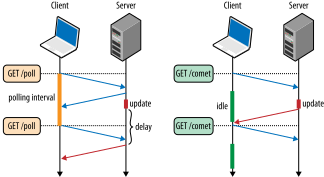
Рисунок. Сравнение обычного поллинга (слева) и длинного (справа)
## Пример кода с длинным поллингом
```js=
function checkUpdates(url){
var xhr = new XMLHttpRequest();
xhr.open('GET', url);
//Process received updates and open new long-poll XHR
xhr.onload = function() {
...
//Issue long-poll request for next update (and loop forever)
checkUpdates('/updates');
};
xhr.send();
}
//Issue initial long-poll XHR request
checkUpdates('/updates');
```
# Задание на лабораторную работу №3
1. Создать клиент-серверное приложение, использующее хостинги:
а) glitch.com,
б) replit.com,
которое обеспечивает работу node.js сервера и клиентской страницы с реализацией функционала при помощи функционала API XMLHttpRequest
**Проводится контест на максимально быструю круговую передачу 1 МB информации для каналов и серверов с заранее неизвестными ограничениями.**
2. Функции, которые должны быть реализованы на html-странице:
а) Приветствие посетителя и указание имени и фамилии создателя страницы;
б) 10-кратный тест на максимально быструю круговую передачу 1 МB информации.
Например,
```jsonld=
Вас приветствует html страница тестирования RTT с использованием API XMLHttpRequest
Автор страницы: maximov arthur leonidovich
Нажмите на кнопочку для тестирования кругового времени передачи сообщения
длиной 1 MB
min RTT =
avg RTT =
max RTT =
stddev RTT =
```
# Ресурсы
1. [CORS: история возникновения, как устроен и оптимальные методы работы](https://habr.com/ru/company/macloud/blog/553826/)
1. [XMLHttpRequest против Fetch API](https://dev-gang.ru/article/xmlhttprequest-protiv-fetch-api-czto-luczshe-dlja-otpravki-ajax-v-2019-godu-vd0qcrgiq5/)
2. [XMLHttpRequest](https://hpbn.co/xmlhttprequest/#:~:text=Submit%20Feedback-,XMLHttpRequest,-BROWSER%20APIS%20AND)
3. [Cсылка на реализацию асинхронной оболочки для socket.emit()](https://medium.com/@nikolozz/using-socket-io-with-async-await-13fa8c2dc9d9)
4. [Using WebTransport](https://web.dev/i18n/en/webtransport/)
5. [Streams_API](https://developer.mozilla.org/en-US/docs/Web/API/Streams_API)
6. https://mdn.github.io/dom-examples/streams/simple-random-stream/
 Google Drive
Gist
Clipboard
Google Drive
Gist
Clipboard
 Sign in with Wallet






