# KSL_translator
### CS470 Project
A real time vision-based Korean Sign Language translator
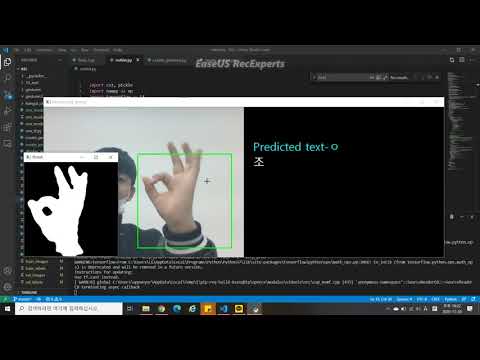
The main goal of this project is implementing a KSL translator which translates KSL to Hangul text. Our outcome is a python program, which detects KSL from real-time video, translates it into Hangul text, and displays it on the user interface.
Classes
>"ㄱ", "ㄴ", "ㄷ", "ㄹ", "ㅁ", "ㅂ", "ㅅ", "ㅇ", "ㅈ", "ㅊ", "ㅋ", "ㅌ", "ㅍ", "ㅎ", "ㅏ", "ㅓ", "ㅗ", "ㅜ", "ㅡ", "ㅣ"
<br>
## Creating data(train, validation, test)
We created monochrome hand image dataset for use in training, validating, and testing of our model. It is because our system feeds monochrome hand images to clafficiation models.
<div><img width="32%" src="https://user-images.githubusercontent.com/62564712/101983460-8c495100-3cbe-11eb-8e72-600fc0f8a309.PNG">
<img width="32%" src=https://user-images.githubusercontent.com/62564712/101983473-910e0500-3cbe-11eb-81bc-80af3068be6c.PNG>
<img width="32%" src="https://user-images.githubusercontent.com/62564712/101983479-93705f00-3cbe-11eb-8939-944c821cfa6e.PNG">
</div>
<br>
> ### 1. Set hand histogram
> set_hand_histogram.py extracts your hand's color and make a histogram of it. You can extract the histogram of hand by pressing 'c', and save and exit by pressing 's'.
>
> <div>
> <img width="30%" alt="Original frame" src="https://user-images.githubusercontent.com/62564712/101983485-9a976d00-3cbe-11eb-992e-fd77fa88317c.PNG">
> <img width="56.5%" alt="Thresh frame" align="right" src="https://user-images.githubusercontent.com/62564712/101983488-9f5c2100-3cbe-11eb-92bd-52be29469490.PNG">
> </div>
>
> ### 2. Capture image dataset
>
> create_gestures.py captures the frames from the real-time video and save their monochrome conversions into the dataset. The monochrome images are made by backprojecting the histogram, which makes pixels with the color of hand white, and the other black. We Built 900 images per class, for total 20 classes.
>
> <img width="70%" align="center" src="https://user-images.githubusercontent.com/62564712/101984259-8013c280-3cc3-11eb-89a6-584e6e26b1ab.PNG">
>
> <br>
>
> ### 3. Divide dataset
> load_images.py divides the whole dataset as below.
> - Train data : 600 <br>
> - Validate data : 150 <br>
> - Test data : 150
<br>
## Building and training CNN model
- Baseline model
[cnn_model_train.py](https://github.com/ismty0805/KSL_translator/blob/main/cnn_model_train.py)
```
model = Sequential()
model.add(Conv2D(16, (2,2), input_shape=(image_x, image_y, 1), activation='relu'))
model.add(MaxPooling2D(pool_size=(2, 2), strides=(2, 2), padding='same'))
model.add(Conv2D(32, (3,3), activation='relu'))
model.add(MaxPooling2D(pool_size=(3, 3), strides=(3, 3), padding='same'))
model.add(Conv2D(64, (5,5), activation='relu'))
model.add(MaxPooling2D(pool_size=(5, 5), strides=(5, 5), padding='same'))
model.add(Flatten())
model.add(Dense(128, activation='relu'))
model.add(Dropout(0.2))
model.add(Dense(num_of_classes, activation='softmax'))
sgd = optimizers.SGD(lr=1e-2)
model.compile(loss='categorical_crossentropy', optimizer=sgd, metrics=['accuracy'])
```
- Transformed models
[cnn_normalization.py](https://github.com/ismty0805/KSL_translator/blob/main/cnn_normalization.py) (with batch normalization layer)
[cnn_wm_dropout.py](https://github.com/ismty0805/KSL_translator/blob/main/cnn_wm_dropout.py) (with higher dropout rate)
## Final translator
translator.py runs the final translator program.
Below is our demonstration video. You can click the image to play. <br>
[](https://youtu.be/K3tHbIjavdM?t=0s)
## Tech Stack
- Python
- Tensorflow
- Keras
- OpenCV
 Google Drive
Gist
Clipboard
Google Drive
Gist
Clipboard
 Sign in with Wallet






