# Chat<!-- omit in toc -->
Uni4all chat backend implementation.
> **for developers**: write this as you build.
>
> **for outsiders**: take into account that this may not be the final implementation of the chat; as the backend evolves, it is due to change.
## Table of Contents<!-- omit in toc -->
- [Current Features](#current-features)
- [Dependencies](#dependencies)
- [Challenges and possible solutions](#challenges-and-possible-solutions)
- [Data Storage](#data-storage)
- [Real-time communication in chats](#real-time-communication-in-chats)
- [Notifications](#notifications)
- [Local Storage](#local-storage)
- [High-level Architecture](#high-level-architecture)
- [Technologies](#technologies)
- [Design and Architecture](#design-and-architecture)
- [POSA Patterns](#posa-patterns)
- [How to share knowledge in a small writes and reads environment?](#how-to-share-knowledge-in-a-small-writes-and-reads-environment)
- [Context](#context)
- [Solution](#solution)
- [Consequences](#consequences)
- [How to scale the application for a large user base?](#how-to-scale-the-application-for-a-large-user-base)
- [Context](#context-1)
- [Solution](#solution-1)
- [Consequences](#consequences-1)
- [How to communicate between the different services?](#how-to-communicate-between-the-different-services)
- [Context](#context-2)
- [Solution](#solution-2)
- [Consequences](#consequences-2)
- [Message Channel](#message-channel)
- [Context](#context-3)
- [Solution](#solution-3)
- [How to allow the receival of messages by a service?](#how-to-allow-the-receival-of-messages-by-a-service)
- [Context](#context-4)
- [Solution](#solution-4)
- [Consequences](#consequences-3)
- [How is a message sent to multiple users in a group?](#how-is-a-message-sent-to-multiple-users-in-a-group)
- [Context](#context-5)
- [Solution](#solution-5)
- [Consequences](#consequences-4)
- [Microservice API Patterns](#microservice-api-patterns)
- [How can the API endpoints' knowledge be shared with clients?](#how-can-the-api-endpoints-knowledge-be-shared-with-clients)
- [Context](#context-6)
- [Solution](#solution-6)
- [Mapping](#mapping)
- [Consequences](#consequences-5)
- [How can we limit the access and usage of the Mongo Chat Server API?](#how-can-we-limit-the-access-and-usage-of-the-mongo-chat-server-api)
- [Context](#context-7)
- [Solution](#solution-7)
- [Mapping](#mapping-1)
- [Consequences](#consequences-6)
- [How to provide only the number of messages that the client needs?](#how-to-provide-only-the-number-of-messages-that-the-client-needs)
- [Context](#context-8)
- [Solution](#solution-8)
- [Mapping](#mapping-2)
- [Consequences](#consequences-7)
- [How to inform users about communication and processing faults?](#how-to-inform-users-about-communication-and-processing-faults)
- [Context](#context-9)
- [Solution](#solution-9)
- [Consequences](#consequences-8)
- [Contributing](#contributing)
- [API Endpoints](#api-endpoints)
- [`GET` /chat/location](#get-chatlocation)
- [`GET` /chat/:group/message](#get-chatgroupmessage)
- [`GET` /chat/message](#get-chatmessage)
- [Mongo Chat Server Endpoints](#mongo-chat-server-endpoints)
- [Groups](#groups)
- [`GET` /group/](#get-group)
- [`GET` /group/:id/](#get-groupid)
- [`GET` /group/messages](#get-groupmessages)
- [`GET` /group/user/:up](#get-groupuserup)
- [`POST` /group/](#post-group)
- [Messages](#messages)
- [`GET` /message/](#get-message)
- [`GET` /message/:id](#get-messageid)
- [`POST` /message/](#post-message)
- [Users](#users)
- [`GET` /user/](#get-user)
- [`POST` /user/:up](#post-userup)
- [Chat socket events](#chat-socket-events)
- [Operations](#operations)
- [Non Functional Requirements](#non-functional-requirements)
- [Fitness Functions](#fitness-functions)
- [Logging](#logging)
- [Future Work](#future-work)
- [Architectural Goals](#architectural-goals)
## Current Features
- chat client
- see all user's groups
- see all groups messages
- send messages
- chat server
- create new chat
- join chat
- leave chat
- get groups or group (by id)
- get group messages w/ pagination
- get user's groups
- create new message
- update user info: username, name and whether is online or not
## Dependencies
The chat component has the following dependencies on other components of the created backend:
- **Authentication**
- To guarantee that nobody has access to information that does not belong to them, authentication is necessary with a token that identifies the user on the routes of the API related to the chat.
- **Notifications**
- As is current in chats, notifications are an enhancement feature that is expected by the users. This way, our component depends on the already created component of notifications.
- **Groups**
- The idea of a chat in uni4all is to communicate with people within our academic social circle. This includes people from the same degree, courses and classes. For this to work with our chat, the choice was made to in the first entry in the app all groups related to the person are created and this is possible using the endpoints created by the groups component.
## Challenges and possible solutions
### Data Storage
- Chats need lots of small writes and reads
- Scalability
- group formation deals with multiple degrees, multiple courses and multiple groups, so each students belongs by default to many groups
- Performance
- there can be a lot of groups writing/reading at the same time and the data storage needs to handle this smoothly
**Patterns**: Shared repository
### Real-time communication in chats
- Delay can be hard to deal with
- Some users might not be online at the time the messages are created
**Patterns**: Broker, Publisher-Subscriber
### Notifications
- The chat will need to use a notification/alert system to give users chat notifications
- We have 2 problems:
1. **Notifications** - sent in real-time, similar to the real-time communication in chats problem
2. **Alert** - sent at a reasonable time that would be most effective to your users (for example, some type of notifications will only be sent at some specific hour, taking into account the user's local timezone)
- The user should be able to **subscribe** to what type of information wishes to be notified about, based on their preferences.
**Patterns**: Publisher-Subscriber
### Local Storage
* If all the messages were to be kept in the database through the lifetime of the app, the database would need to scale a lot, as a lot of information would be stored. This could scale even more if the chat service had additional features.
* An ideal solution for the chat, as we will mention later on this document future work section, would be to only keep the messages until they are read by the user. When they are read by the user, they should be stored in local storage only.
## High-level Architecture
The following component diagram comprises the chat implementation. No activity or deployment diagram are displayed since there's no real use case for them in the chat component.
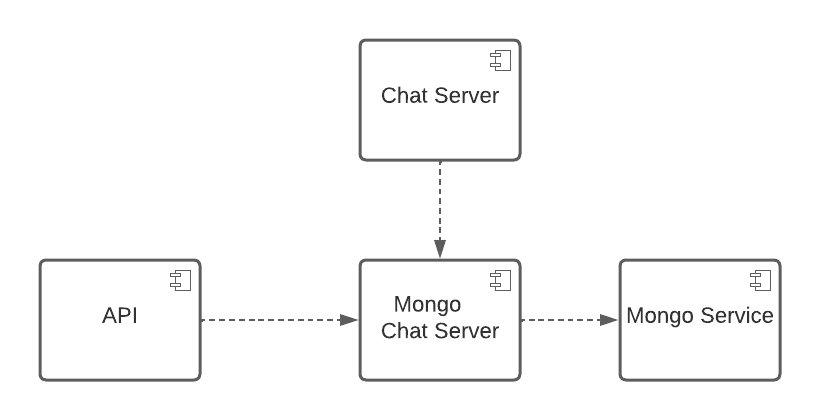
For communication with the client, the chat server needs to send messages autonomously. For this polling, long-polling, and websockets are possibilities. Polling and long-polling are more demanding computationally, hence the coice for **websockets**.
## Technologies
- Chat server
- **websockets** socket.io, is a common solution for most real-time chat systems, providing a bi-directional communication channel between a client and a server. It focus equally on reliability and speed.
- **backend** node.js with framework express, because is the most well documented technology with socket.io and socket.io is built on top of node.js.
- Database
- **mongoDB**, because there is no need to define schemas allowing for a more flexibility in the development. Is good for a large dataset, low latency and low response times. As it is a NoSQL database it has the characteristics of it, it was designed for fast and simple questions, large dataset and frequent application changes. It also scales well horizontally allowing more machines to be added and handle the data across multiple servers. However upon choosing a NoSQL database one looses on multi-row transactions and relations between different classes. These are not major concerns since the database is meant to be as simple as possible. Concluding: flexibility, scalability, high-performance, availability, highly functional.
## Design and Architecture
In the current state of the implementation, the chat backend does not have a complex structure. The chat backend is composed by 3 subcomponents:
- Chat Server
Responsible for direct communication with the clients. The clients will send the messages to the chat server which will, in real time, resend the same messages to the receiver clients. The communication between clients and the chat server is done via web sockets. Other options were available, such as polling, long-polling. However, these are more demanding computationally.
- Mongo Chat Server
Provides a communication interface for the database. When any other service in the backend wishes to communicate with the chat database, it should do so by making requests to the Mongo Chat Server.
- Mongo Service
Document database for chat.
---
Most communications between microservices occur using the **messages** pattern. This is due to its simplicity and modularization. Mongo chat server provides a REST API, awaiting requests in the form of messages, responding with a message as well. Even when the communication channel is a web socket - a stream of data - the meaningful information is compartmentalized into messages. The communication between the Mongo Chat Server and the actual Mongo Server is done via a library called [sequelize](https://sequelize.org).
When the chat server sends a message to a group, it is using [socket.io's `.to(room)` function](https://socket.io/docs/v4/#broadcasting). It is not clear how the implementation is done, precisely, however, on a higher level, **Publisher-Subscriber** is applied. When a client joins a group, the chat server makes the call `socket.join(room)`, which is parallel to a subscription; and when a message is sent to a group, the chat server calls `io.to(room).emit(...)`, which is parallel to a publication. In this scenario, every user in a group is both a publisher and a subscriber.
---
Besides the developed backend we also implemented a simple UI, _Chat Client_, that displays the specified user's groups and chat, providing an easier and more interactive interface to test and debug the chat features. Functionally, it behaves as a client that connects to a socket on _Chat Server_ and emits events on users connections and messages.
---
### POSA Patterns
#### How to share knowledge in a small writes and reads environment?
##### Context
A chat application will have in its data its biggest challenge. It works on massive amounts of data provided by its clients. Multiple components work with this data.
##### Solution
Make this data available to all services simultaneously in a **Shared Repository**.
That can be found in the *Mongo Service* and *Mongo Chat Service* services.
##### Consequences
- The same data can be found in real time by multiple services;
- The data is centralized;
- Simultaneous transactions are harder to deal with.
#### How to scale the application for a large user base?
##### Context
When systems increase in size, decoupling their implementation is essential. The looser the parts are coupled, the better they can be deployed in a computer network or composed into larger applications. When this happens, one can test distinct services independentely.
##### Solution
Encapsulate each business functionality into a self-contained service - a **Domain Object**, and provide them iwht an interface that is separate from their implementation.
As happens here with the *chat-service*, the database, and would happen in future implementation such as the online status.
##### Consequences
- Each service can be tested and used independently;
- Different teams can develop different services;
- DOS can happen in multiple instances.
#### How to communicate between the different services?
##### Context
In the chat backend, multiple services are coexisting. These services were developed independently. These services must interact reliably, but without tight dependencies.
##### Solution
Make the services agree on a message structure (a necessary coupling) and communicate between them with said messages.
##### Consequences
- Services must agree on a message structure and channel.
#### Message Channel
##### Context
As stated in the previous point, the chat backend uses a message-based communication. Messages only contain the data to be exchanged between the services, this is, they do not know who might be interested in them.
##### Solution
Connect the collaborating services using a message channel that allows them to exchange messages.
This could be HTTP for REST APIs, or a queue for more complex operations. Most channel are HTTP for this solution.
#### How to allow the receival of messages by a service?
##### Context
In message-oriented systems, such as this one, services must understand how to handle different messages.
##### Solution
Define specialized **Message Endpoints** that allow services to exchange and handle messages accordingly. This endpoints must be documented, so that developers of other services know how to take advantage of them.
For example, the *Mongo Chat Server* service has endpoints for both the retrieval of messages and the insertion of new messages.
##### Consequences
- Every service has know documentation on how to function with it;
- Different functionalities provided by the same service are more decoupled.
#### How is a message sent to multiple users in a group?
##### Context
The chat backend offers services that allow the sending of messages to groups. Groups are a set of users in the same academic social circle When a message is sent to one group, every user in that group must receive it.
##### Solution
Apply the **Publisher-Subscriber** pattern, making the users that are enrolled in a group subscribe to that group, and the make them publish a message whenever it is sent to said group. In this scenario, every member of the group is both a publisher and a subscriber.
##### Consequences
- A PubSub service is harder to implement;
- Every member of the group is assured to receive the message;
- A PubSub is not enough if not every member of the group is online.
### Microservice API Patterns
#### How can the API endpoints' knowledge be shared with clients?
##### Context
How should the *Chat Server* and *Mongo Chat Server* components' implemented endpoints be documented so the API clients can understand how to integrate them?
##### Solution
Create and provide an API Description that defines request and response message structures, error reporting, and other technical knowledge. **[API Description Pattern](https://microservice-api-patterns.org/patterns/foundation/APIDescription)**
##### Mapping
Swagger was integrated, providing a public URL with the endpoints' documentation.
##### Consequences
+ Minimal description, compact and easy to evolve and mantain;
+ Simple, easy to understand by the API clients, easing its integration;
- Requires continuous documentation mantainance.
#### How can we limit the access and usage of the Mongo Chat Server API?
##### Context
The *Mongo Chat Server* component exposes API endpoints, but those should only be acessible by other internal components (e.g *Chat Server*) and not be exposed publicly. **[Solution-Internal API](https://microservice-api-patterns.org/patterns/foundation/SolutionInternalAPI)**
##### Solution
Decompose the application into services that expose APIs, and offer those APIs only to other services in the backend.
##### Mapping
The Production Server does not publicly expose the *Mongo Chat Server* service's ports, or any ports other than the *main API*, thus only the backend services can communicate and request information from that service. The client must make requests to the *main API* that will then be responsible to forward the request to the *Mongo Chat Server*
##### Consequences
+ Full Control over API, since it is only available to the internal backend services;
+ No additional security issues;
- Aditional performance and configuration/management overhead;
- Limited to project scope.
#### How to provide only the number of messages that the client needs?
##### Context
The *Mongo Chat Server* component offers an endpoint to retrieve the messages for a given user's group.
How can the exposed API provide only the minimum number of messages, and load more as needed, in order to not overwhelm the client with to much data?
##### Solution
Split response messages into chunks (pages), sending only on chunk of partial results per response message. **[Pagination Pattern](https://microservice-api-patterns.org/patterns/structure/compositeRepresentations/Pagination)**
##### Mapping
The endpoint that retrieves a specified group's messages has also two more parameters, *page* and *perPage*, specifying the *offset* and the *number* of messages to retrieve. The query to the Mongo database will only retrive the messages with the limit and offset specified, returning to the client those items.
##### Consequences
+ Improved resource consumption and performance, sending only the chunks required;
- Increases API clients access complexity, as they need to compute the page index.
#### How to inform users about communication and processing faults?
##### Context
Both the *Mongo Chat Server* and the *Chat Server* offer multiple services that could face unexpected situations at runtime. The failure can be caused by excessive requests, invalid data or unknown problems.
##### Solution
Reply to the requests with an error code and a brief and readable description of the error. Simultaneously, log the error according to predefined formats and standards to the application administrators. **[Error Report](https://microservice-api-patterns.org/patterns/quality/qualityManagementAndGovernance/ErrorReport)**
##### Consequences
* A human readble report with the error code is sent to the end-user;
* A more detailed report with the error code is generated to the application stakeholders (administrators);
* Sensitive information has to be take in account while reporting these errors (*e.g.:* passwords cannot be reported).
## Contributing
The only requirement to set up the development environment is having [Docker](https://www.docker.com/) installed.
For the chat to be operational it needs three containers working: mongo-chat, mongo-chat-server and chat-server. The order by whitch they must go up can be seen and set up in the docker-compose, using _depends_on_: mongo-chat goes first to launch the mongo service, then mongo-chat-server that depends on mongo-chat, creating a server to use the mongo database, and lastly chat-server that depends on mongo-chat-server, creating the chat server for communication with the client.
To build and run these containers for development, run the `docker-compose -f docker-compose.dev.yml up --build` command. With this development docker-compose file the services reload the changes made to files automatically.
Check docker-compose _mongo-chat_, _mongo-chat-server_ and _chat-server_ services' ports to see which endpoints to acess in order to use those containers.
## API Endpoints
For more detailed documentation, refer to the swagger hub documentation.
### `GET` /chat/location
Gets the URL for the client to connect with.
To be used when the client wants to connect a socket to a chat server.
### `GET` /chat/:group/message
Gets messages for a given group.
This may be useful for when, for example, the user opens a chat group and scrolls up.
- [Information Holder Resource](https://microservice-api-patterns.org/patterns/responsibility/endpointRoles/InformationHolderResource);
- Returns a [Parameter Forest](https://microservice-api-patterns.org/patterns/structure/representationElements/ParameterForest) with information regarding each received message;
- Given the sheer amount of possible messages, includes [Pagination](https://microservice-api-patterns.org/patterns/structure/compositeRepresentations/Pagination):
- If the page is not requested it returns the first page.
### `GET` /chat/message
Gets all possible messages.
- Really a [Request Bundle](https://microservice-api-patterns.org/patterns/quality/dataTransferParsimony/RequestBundle) that verifies the groups in which the logged client is in, and performs a bunch of `/chat/:group/message` requests;
- Returns a [Parameter Forest](https://microservice-api-patterns.org/patterns/structure/representationElements/ParameterForest) with a list of groups, and a list of messages per group;
- Given the sheer amount of possible messages, includes [Pagination](https://microservice-api-patterns.org/patterns/structure/compositeRepresentations/Pagination):
- If the page is not requested it returns the first page.
## Mongo Chat Server Endpoints
To access the mongo chat server, use the following URL:
```
http://mongo_chat_server:3000/
```
### Groups
#### `GET` /group/
Gets all groups.
- Returns a [Parameter Forest](https://microservice-api-patterns.org/patterns/structure/representationElements/ParameterForest) with a list of groups;
- Pagination is not supported.
#### `GET` /group/:id/
Gets a group given a id.
- Needs the id of the group to get.
#### `GET` /group/messages
Gets all messages for a given group with pagination.
- Returns a [Parameter Forest](https://microservice-api-patterns.org/patterns/structure/representationElements/ParameterForest) with a list of messages per group;
- Given the sheer amount of possible messages, includes [Pagination](https://microservice-api-patterns.org/patterns/structure/compositeRepresentations/Pagination).
- Receives the following arguments:
- `groupID`: the group to get the messages for;
- `page`: the page to get (starts at 0);
- `perPage`: the amount of messages per page.
```json
{
"groupID": String required,
"page": Number required,
"perPage": Number required
}
```
#### `GET` /group/user/:up
Gets all groups for a given user.
- Returns a [Parameter Forest](https://microservice-api-patterns.org/patterns/structure/representationElements/ParameterForest) with a list of groups;
- Needs the username of the user to get the groups for.
#### `POST` /group/
Creates a new group.
- Receives the following arguments:
- `name`: the name of the group;
- `users`: the users that are part of the group.
```json
{
"name": String required,
"users": [String] required
}
```
### Messages
#### `GET` /message/
Gets all messages with pagination.
- Returns a [Parameter Forest](https://microservice-api-patterns.org/patterns/structure/representationElements/ParameterForest) with a list of messages;
- Given the sheer amount of possible messages, includes [Pagination](https://microservice-api-patterns.org/patterns/structure/compositeRepresentations/Pagination).
- Receives the following arguments:
- `page`: the page to get (starts at 0);
- `perPage`: the amount of messages per page.
```json
{
"page": Number required,
"perPage": Number required
}
```
#### `GET` /message/:id
Gets a message given an id.
- Needs the id of the message to get.
#### `POST` /message/
Creates a new message.
- Receives the following arguments:
- `group`: the group the message is for;
- `from`: the user that sent the message;
- `message`: the message itself.
```json
{
"group": String required,
"from": String required,
"message": String required
}
```
### Users
#### `GET` /user/
Gets all users.
- Returns a [Parameter Forest](https://microservice-api-patterns.org/patterns/structure/representationElements/ParameterForest) with a list of users;
- Pagination is not supported.
#### `POST` /user/:up
Updates user.
- Needs the username of the user to update.
- Receives the following arguments:
- `username`: the new username;
- `name`: the new name;
- `online`: the new online status.
```json
{
"username": String,
"name": String,
"online": Boolean
}
```
## Chat socket events
- In `/server` expect an implementation of a chat server.
- In `/client` expect an implementation of a frontend that tests and demonstrates the chat features.
There are different kinds of events:
- **connection**: receives the socket created between the client and the server and happens when the socket is created between client and server;
```js
{
socket: String
}
```
- **online**: receives the up (identifier of the user) that is getting online and happens when a user goes online in the app;
```js
{
up: String
}
```
- **disconnect**: receives the up (identifier of the user) that is disconnecting and happens when a user goes offline;
```js
{
up: String
}
```
- **chat message**: receives the message to be sent to the chat, the up(identifier) from the user sending, the chat room (identifier) for where it is being sent, and the timestamp when it was sent. This happens whenever a user sends a message to a chat room;
```js
{
message: String
up: String,
room: String,
timestamp: String
}
```
- **join room**: receives the up(identifier) from the user joining, and the chat room (identifier) it is joining. This happens when a user joins a new chat room.
```js
{
up: String
}
```
This implementation has event-driven architecture where the client emits events and triggers the communication with the server.
---
## Operations
This information can be found in the main README since it is common to all components.
Additionally, we implemented logging in our component as it is explained in the section [Logging](#Logging).
### Non Functional Requirements
The code is modular, so new features can easily be added.
Code convention are maintained using Eslint, a JavaScript linter that enables the enforcement of a set of style, formatting, and coding standards for the code, with airbnb rules.
#### Fitness Functions
Based on [ISO 25010](https://iso25000.com/index.php/en/iso-25000-standards/iso-25010).
| Name | Type | Quality Attribute | Min Value | Ideal Value | Max Value | Automation |
| ----------------------------------------------------------------------- | ----------- | ----------------- | --------- | ----------- | --------- | ---------------------------------------------------------------------------------------------------------------------------------------------------------------------------- |
| The number of users online per time unit | Performance | Capacity | 10 000 | - | - | Not on production, connect Y amount of machines |
| Latency: Time spent to send a chat message | Performance | Time Behaviour | - | 1sec | 10sec | Send message to self every X seconds and calculate the time between sending and receiving |
| Channel capacity: The number of messages we are able to send per X time | Performance | Capacity | 1/5sec | 1/1sec | - | Send a set of messages in a given rate to self, and calculate the time between sending and receiving, and verify if this time is still in between the acceptable time bounds |
| Respond to unusual number of simultaneous requests (such as DDOS) | Reliability | Availability | - | 20 000 000 | - | Try a DDoS attack every X time |
| Have a relatively high uptime with MTBF / MTRS | Reliability | Maturity | 99% | 100% | - | Try to connect to the chat server every X seconds, checking if its up or down, calculating MTBF / MTRS |
| CVE Analysis, should not use libraries with known vulnerabilities | Security | - | - | 0 | 0 | Defect tracking software |
---
#### Logging
In order to identify and observe the behavior of the system, logs are used.
For the mongo chat server there are three different log files in the `logs` folder:
- `requests.log`, contains the HTTP requests that are sent to the server in the Standard Apache Combined Log Format;
- `combined.log`, contains the combined logs of the system that have an importance level of `info` or less;
- each log line has the level (`info`, `warning`, `error`), the message, the service (default `app`), timestamp and other optional metadata;
- example:
```log
info: app started listening on port 3000 {"service":"app","timestamp":"2022-06-13T12:15:43.333Z"}
info: connected to database {"service":"database","timestamp":"2022-06-13T12:15:43.365Z"}
info: populating database... {"service":"database","timestamp":"2022-06-13T12:15:43.365Z"}
info: populated database {"service":"database","timestamp":"2022-06-13T12:15:43.415Z"}
```
- `error.log`, contains the combined logs of the system that have an importance level of `error` or less;
- each log line has the message, the service (default `app`), timestamp and other optional metadata;
- example:
```log
error: failed to populate database FALHOU DE PROPOSITO VOU DEIXAR O COPILOT COMPLETAR ESTA FRASE: "O copilot completa esta frase" {"service":"app","timestamp":"2022-06-13T12:18:27.544Z"}
error: failed to populate database FALHOU DE PROPOSITO VOU DEIXAR O COPILOT COMPLETAR ESTA FRASE: "O copilot completa esta frase" {"service":"app","timestamp":"2022-06-13T13:58:35.100Z"}
```
For the chat server there are two different log files in the `logs` folder:
- `combined.log`, same behaviour as in the mongo chat server
- `error.log`, same behaviour as in the mongo chat server
## Future Work
There were some tasks we were not able to implement because of the delay in finding a solution to work without the authentication from Sigarra.
Ideally, the messages would only be kept in our database until they were read by the user. Once the user has read them, they would be stored in the app's local storage and deleted from the database, as is the case of well-known apps such as Signal and Whatsapp.
Some further enhancements we had in mind were to allow to see who was online of that chat (if any user is online, the chat would be highlighted in a different colour in the frontend, for example); allow sending files and images; cache the messages and mark them as read and lastly, knowing everyone involved in their academic life, have the feature of creating chat groups with the people of the same social circle (everyone the user interacts in their academic life).
### Architectural Goals
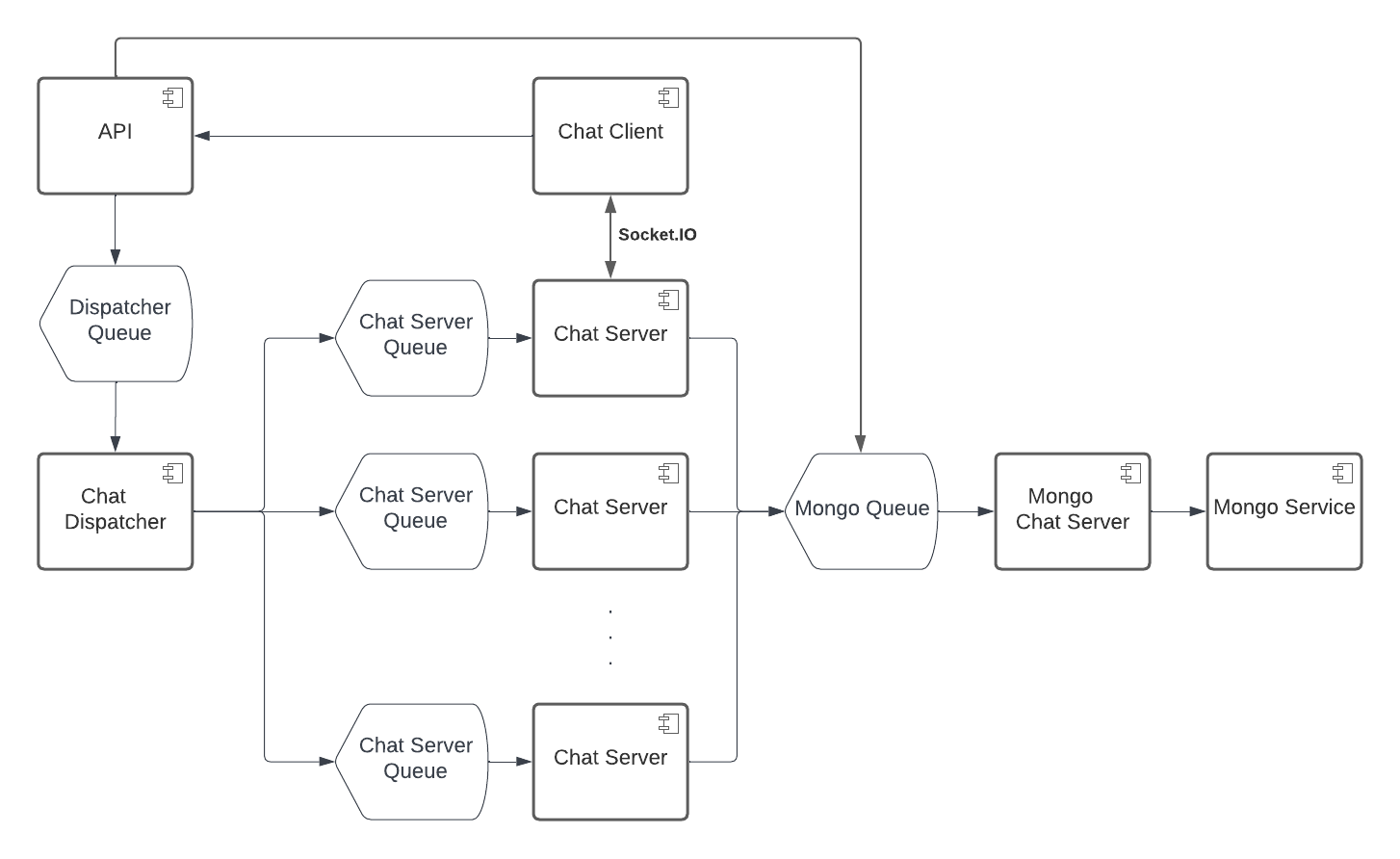
As the chat application scaled users, one would have to scale its architecture, as well.
For that, the most important choice, would be to increase the number of chat servers, this is, the number of servers that communicate directly with clients. To achieve this, one would have to split the clients by chat servers. This could be done in 2 ways:
- by doing it dynamically;
- by pre-assigning a server to a client.
Since we know that the users of this are FEUP students, we know a priori that they have a UP number. We can use that number to determine the chat server in which the client must connect to. For example, if we had 10 chat servers available, we could assign the chat server taking into account the last digit of the user's UP number. With this strategy, we can also scale dynamically. For example, if the chat server for the digit number 3 became went full, the system could launch yet another server for the same digit, and they could split the connections taking into account the last 2 digits: one would receive the clients that ended between 03 and 43, and the other would take care of the ones in between 53 and 93.
To achieve this, all chat servers are to be connected to a dispatcher. When the API requests a new connection for a client, it does so by requesting the dispatcher. Understanding the current state of the chat servers, the dispatcher then assigns the current server to the client, returning its URL.
To send a message to a group, a client needs to send the message to its chat server. The chat server will check the other members of the group, and to the ones that belong to the same server, it will send the message directly. Most of the time, not all members will be in the same chat server. In those occasions, the chat server sends the message to the chat dispatcher, which will redirect the message to the correct servers.
Given that the influx to both the dispatcher and the chat servers is going to be giant, one communicates with them not through REST, but rather through a queue, such as Kafka.
The same goes for the database. Given that multiple messages will only be stored temporarily in the system, a single database enough. But multiple chat servers will talk to the database at once. To optimize this process, one makes these communications via queue.
 Google Drive
Gist
Clipboard
Google Drive
Gist
Clipboard
 Sign in with Wallet






