# chap3 for基礎資料結構
{%hackmd @baiyanchen8/code %}
## Stack
- 推入:將資料放入堆疊頂端,堆疊頂端移到新放入的資料。
- 彈出:將堆疊頂端資料移除,堆疊頂端移到移除後的下一筆資料。

## 使用動態陣列的stack
```c=
struct Stack {
int *arr;
int len;
int capacity;
};
struct Stack stack1;
void stack_init() {
stack1.arr = (int *)malloc(INITIAL_SIZE * sizeof(int));
stack1.len = 0;
stack1.capacity = INITIAL_SIZE;
}
void resize_stack() {
stack1.capacity *= 2;
stack1.arr = (int *)realloc(stack1.arr, stack1.capacity * sizeof(int));
}
void push(int num) {
if (stack1.len == stack1.capacity) {
resize_stack();
}
stack1.arr[stack1.len++] = num;
}
void shrink_stack() {
if (stack1.len <= stack1.capacity / 2 && stack1.capacity > INITIAL_SIZE) {
stack1.capacity /= 2;
stack1.arr = (int *)realloc(stack1.arr, stack1.capacity * sizeof(int));
}
}
int pop() {
if (stack1.len > 0) {
int poppedElement = stack1.arr[--stack1.len];
shrink_stack();
return poppedElement;
} else {
printf("Stack underflow. Cannot pop from an empty stack.\n");
return -1;
}
}
```
## 佇列(queue)
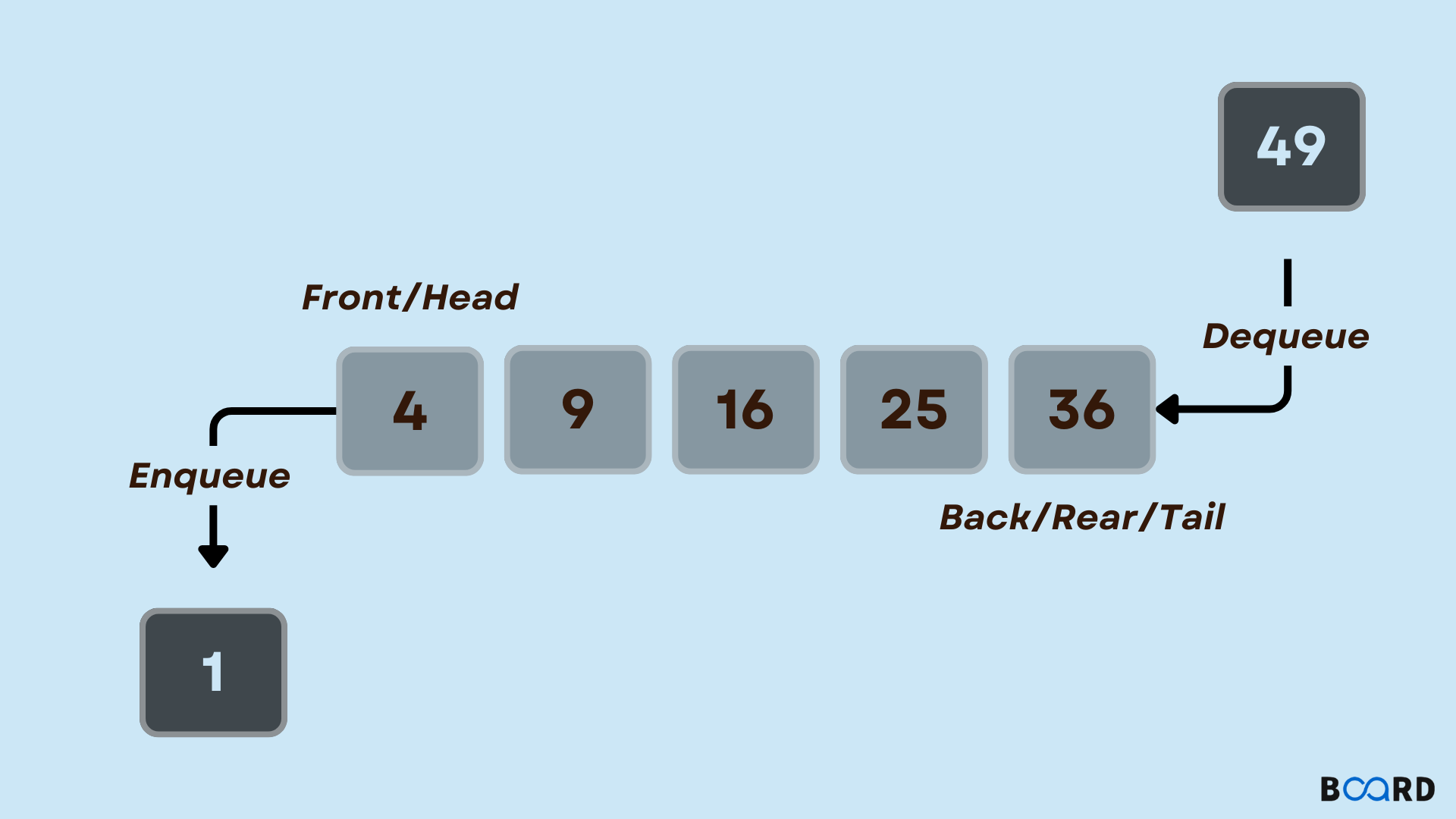
```clike=
struct Queue {
int *init;
int *arr;
int len;
int capacity;
};
// 初始化佇列
void Q_init(struct Queue *Q) {
Q->arr = (int *)malloc(sizeof(int) * 20);
Q->init=Q->arr;
Q->len = 0;
Q->capacity = 20;
}
// 入佇列
void enqueue(struct Queue *Q, int num) {
if (Q->len >= Q->capacity / 2) {
Q->capacity *= 2;
Q->arr = (int *)realloc(Q->arr, Q->capacity * sizeof(int));
}
Q->arr[Q->len++] = num;
}
// 出佇列
int deq(struct Queue *Q) {
int ans = Q->arr[0];
Q->len -= 1;
Q->capacity -= 1;
// 將陣列指標移動到下一個位置
if (Q->len>0){
Q->arr += 1;
}
return ans;
}
```
## 使用動態陣列的環狀queue
```c=
// 定義佇列結構
struct queue {
int *arr; // 儲存元素的陣列
int head; // 佇列頭
int tail; // 佇列尾
int count; // 佇列容量
};
// 初始化佇列,並指定初始容量
void Q_init(struct queue *Q, int capacity) {
Q->arr = (int *)malloc(capacity * sizeof(int)); // 分配記憶體給陣列
Q->head = 0;
Q->tail = 0;
Q->count = capacity;
}
// 重新配置佇列容量
void Q_resize(struct queue *Q, int new_capacity) {
Q->arr = (int *)realloc(Q->arr, new_capacity * sizeof(int)); // 重新配置記憶體
Q->count = new_capacity;
}
// 入佇列
void enQ(struct queue *Q, int num) {
if ((Q->tail + 1) % Q->count == Q->head) {
// 佇列已滿,需要擴充容量
int new_capacity = Q->count * 2;
Q_resize(Q, new_capacity);
}
Q->tail = (Q->tail + 1) % Q->count;
Q->arr[Q->tail - 1] = num;
}
// 出佇列
int deQ(struct queue *Q) {
if (Q->head == Q->tail) {
// 佇列為空,返回特殊值(這裡假設佇列存儲的元素為正整數)
return -1;
}
int re = Q->arr[Q->head];
Q->head = (Q->head + 1) % Q->count;
// 檢查是否可以縮減容量
if (Q->count > 20 && (Q->tail + 1) % Q->count <= Q->head) {
int new_capacity = Q->count / 2;
Q_resize(Q, new_capacity);
}
return re;
}
```
## 迷宮問題
:::spoiler 題目
以二進位(0 和 1)來表示迷宮,其中 0 代表通道,1 代表牆壁。迷宮的起點為左上角(0, 0),終點為右下角(n-1, n-1),其中 n 為迷宮的大小。
現在,請你撰寫一個 C 語言程式,找出是否存在一條從起點到達終點的路徑。你可以使用迴圈和條件判斷來遍歷迷宮,判斷每個位置是否為通道,並遞迴地尋找路徑。
以下是迷宮的例子,請將其轉換成 C 語言程式碼:
```plaintext
迷宮地圖:
{1, 0, 1, 0, 0, 0, 0, 0, 0, 0},
{1, 0, 1, 1, 1, 1, 1, 1, 1, 0},
{1, 0, 0, 0, 0, 0, 0, 0, 0, 0},
{1, 1, 1, 1, 1, 1, 1, 1, 0, 0},
{0, 0, 0, 0, 0, 0, 0, 0, 0, 0},
{0, 1, 1, 1, 1, 1, 1, 1, 1, 1},
{0, 0, 0, 0, 0, 0, 0, 0, 0, 1},
{0, 1, 1, 1, 1, 1, 1, 1, 1, 1},
{0, 0, 0, 0, 0, 0, 0, 0, 0, 0}
```
考試題目:請寫一個 C 語言程式,檢查是否存在一條從起點到達終點的路徑。你的程式應該回傳 true 或 false,表示是否有解。请使用迴圈和條件判斷,並註意避免無窮迴圈。
:::
:::spoiler 解法
[code from me](https://github.com/baiyanchen8/data_structure/blob/main/chap3/Maze.c)
```c=
#include <stdio.h>
#include <stdlib.h>
#include <unistd.h>
# define maxx 10
# define maxy 10
int maze[maxx][maxy] = {
{1, 0, 1, 0, 0, 0, 0, 0, 0, 0},
{1, 0, 1, 1, 1, 1, 1, 1, 1, 0},
{1, 0, 0, 0, 0, 0, 0, 0, 0, 0},
{1, 1, 1, 1, 1, 1, 1, 1, 0, 0},
{0, 0, 0, 0, 0, 0, 0, 0, 0, 0},
{0, 1, 1, 1, 1, 1, 1, 1, 1, 1},
{0, 0, 0, 0, 0, 0, 0, 0, 0, 1},
{0, 1, 1, 1, 1, 1, 1, 1, 1, 1},
{0, 0, 0, 0, 0, 0, 0, 0, 0, 0}
};
// 起點和終點坐標
int start[2] = {0, 1};
int end[2] = {9, 9};
int find(int nowx, int nowy) {
if (nowx < 0 || nowx >= maxx || nowy < 0 || nowy >= maxy || maze[nowx][nowy] == 1||maze[nowx][nowy] == 2)
return 0;
if (nowx == start[0] && nowy == start[1]) {
printf("(%d, %d)\n", nowx, nowy);
return 1;
}
maze[nowx][nowy] = 2;
if (find(nowx + 0, nowy - 1)||find(nowx - 1, nowy + 0)||find(nowx + 0, nowy + 1)|| find(nowx + 1, nowy + 0)){
printf("(%d, %d)\n", nowx, nowy);
maze[nowx][nowy] = 0;
return 1;
}
maze[nowx][nowy] = 0;
return 0;
}
int main() {
printf("找到的路徑:\n");
find(end[0], end[1]);
return 0;
}
```
:::
## 運算式的計算
### 運算式
> **Question**
> 電腦(程式語言)是如何看懂 equation
> example :
> $A+B \times C+D$
> ⇒ $A+(B \times C)+D$
> ⇒ $(A+B) \times (C+D)$
#### 解法
透過設定運算子的 Priority ,固定順序

### 前置 & 中置 & 後置
| 前置 | 中置 | 後置 |
| --------- | -------- | ------ |
| + a * b c | a+b\*c | abc*+ |
| \*+1 2 7 | (1+2)\*7 | 1 2+7* |
| - / a b c | a / b - c | ab/c- |
### 計算後置運算式的函式
:::spoiler code
[完整程式](https://github.com/baiyanchen8/data_structure/blob/main/chap3/evaluatePostfix.c)
```c=
int evaluatePostfixWithWhitespace(char* exp) {
int i;
Stack* stack = createStack(strlen(exp));
if (!stack)
return -1; // 異常狀況
for (i = 0; exp[i]; ++i) {
// 如果是空白,跳過
if (isspace(exp[i]))
continue;
// 如果是數字,則壓入堆疊
if (isdigit(exp[i])) {
int num = 0;
while (isdigit(exp[i])) {
num = num * 10 + (exp[i] - '0');
++i;
}
--i; // 回退一格,因為迴圈會再自動加一
push(stack, num);
} else {
// 如果是運算子,則從堆疊中彈出兩個數字進行計算,再將結果壓入堆疊
int val1 = pop(stack);
int val2 = pop(stack);
switch (exp[i]) {
case '+': push(stack, val2 + val1); break;
case '-': push(stack, val2 - val1); break;
case '*': push(stack, val2 * val1); break;
case '/': push(stack, val2 / val1); break;
}
}
}
return pop(stack); // 堆疊頂部的值即為計算結果
}
```
:::
### 中置轉後置
:::spoiler code
[完整程式](https://github.com/baiyanchen8/data_structure/blob/main/chap3/infixtoPostfix.c)
```c=
```c=
char* infixToPostfix(char* infix) {
int i, j;
int len = strlen(infix);
char* postfix = (char*)malloc((len + 1) * sizeof(char)); // 分配記憶體用來存放後序表達式
Stack* stack = createStack(len); // 創建一個堆疊,用來處理運算符的順序
for (i = 0, j = 0; i < len; ++i) {
if (isalnum(infix[i])) { // 如果是字母或數字,直接加入後序表達式
postfix[j++] = infix[i];
} else if (infix[i] == '(') { // 如果是左括號,壓入堆疊
push(stack, infix[i]);
} else if (infix[i] == ')') { // 如果是右括號,將堆疊中的運算符彈出直到遇到左括號
while (!isEmpty(stack) && peek(stack) != '(') {
postfix[j++] = pop(stack);
}
pop(stack); // 將左括號彈出
} else { // 如果是運算符
postfix[j++]=' '; // 加入空格,用來區隔不同的數字
while (!isEmpty(stack) && getPrecedence(peek(stack)) >= getPrecedence(infix[i])) {
postfix[j++] = pop(stack); // 將堆疊中比當前運算符優先級高或相等的運算符彈出
}
push(stack, infix[i]); // 將當前運算符壓入堆疊
}
}
// 將堆疊中剩余的運算符彈出
while (!isEmpty(stack)) {
postfix[j++] = pop(stack);
}
postfix[j] = '\0'; // 在字符串末尾添加空字符
return postfix;
}
```
:::
## 多重 stack & queue
pass
<!-- 大概不重要 -->
 Google Drive
Gist
Clipboard
Google Drive
Gist
Clipboard
 Sign in with Wallet






