# Bot Development
Speaker: Lee Wei
###### tags: `Tutorial`
---
## 不知道大家想像的機器人是怎樣的
----
### Pepper

----
### ASIMO

----
### Transformer

----
### ~~Transformer~~

#### 阿,不是這個
---
## 不過今天要談的不是這種東西
----
## 而是
----
### Facebook Bot

----
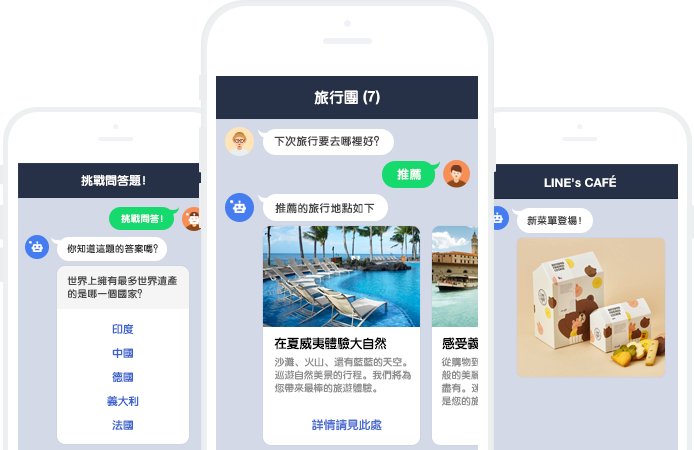
### Line Bot
----
## Chat Bot 聊天機器人
---
### 有人說聊天機器人(with AI)將要取代APP
- [Why chatbots are replacing apps](http://venturebeat.com/2016/08/02/why-chatbots-are-replacing-apps/)
- [This is how Chatbots will Kill 99% of Apps](https://chatbotslife.com/this-is-how-chatbots-will-kill-99-of-apps-2fd938a22c99#.tdfugot4m)
----
### 各大軟體公司爭相提供Bot的服務
- [Facebook Messenger Platform](https://messengerplatform.fb.com)
- [Line Messaging API](https://developers.line.me/messaging-api/overview)
- [Slack API](https://api.slack.com)
- [Telegram Bot Platform](https://core.telegram.org/bots/api)
---
## What can Bot Do?
{%youtube C7ZuzJe24y4 %}
----
### 影片中出現了什麼?
- 預約餐廳
- 訂車
- 偵測beacon提供coupon
- 遠端控制家中的IoT設備澆水
----
原本在App上處理的這些服務
未來都有可能被Chat Bot取代
----
### 背後發生了什麼事
e.g. 預約餐廳
1. User傳一個訊息給Bot的帳號 <!-- .element: class="fragment" data-fragment-index="1" -->
2. Bot把訊息傳給服務提供者的Server <!-- .element: class="fragment" data-fragment-index="2" -->
3. 服務提供者的Server把訊息,傳給指定的Server <!-- .element: class="fragment" data-fragment-index="3" -->
4. 指定的Server做了適當的運算和判斷 <!-- .element: class="fragment" data-fragment-index="4" -->
把結果回傳給服務提供者Server
5. 服務提供者Server收到後,再傳給User的帳號 <!-- .element: class="fragment" data-fragment-index="5" -->
---
## Why Chat Bot?
- 市面上App太多
- 每裝一個APP都要學一次,使用者沒你想的勤勞!
- 不如把服務嵌入現在使用者常用的App
(e.g. Facebook Messenger, Line)
- 文字是人類相對直覺的溝通方式
----
## Why not Chat Bot?
- 設計彈性不如App (e.g. 介面受限嵌入的App)
- 文字處理依然不夠好
---
## How to Design a Bot?
1. 選擇使用的Bot平台 (e.g. Facebook, Line and etc.)
2. 寫一些服務 (e.g. 訂票、新聞推播) <!-- .element: class="fragment" data-fragment-index="1" -->
3. 把服務架在一台https server <!-- .element: class="fragment" data-fragment-index="2" -->
4. 用Bot平台提供的sdk,把Server跟平台串起來 <!-- .element: class="fragment" data-fragment-index="3" -->
5. 用NLP精準的判斷使用者的意思,串到服務上 <!-- .element: class="fragment" data-fragment-index="4" -->
----
用NLP精準的判斷使用者的意思,串到服務上
`Just like the fifth step of...` <!-- .element: class="fragment" data-fragment-index="1
" -->
----
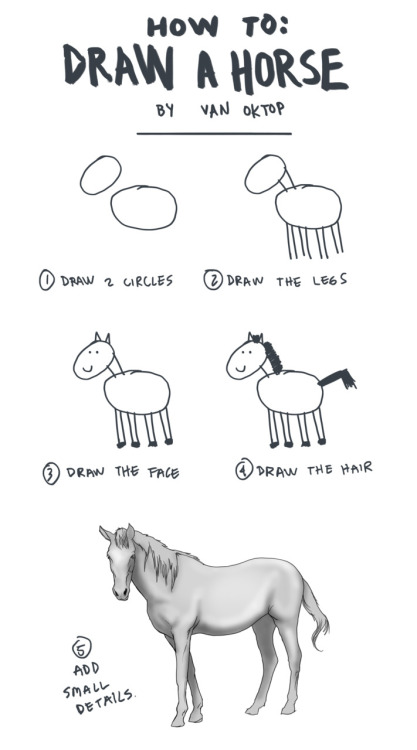
by Van Oktop
---
## Implement an Echo Bot
(The Simplest ChatBot)
----
## How to Build an Echo Bot?
1. 選擇使用的Bot平台 (e.g. Facebook, Line and etc.)
2. ~~寫一些服務 (e.g. 訂票、新聞推播)~~
3. 把寫的服務,架在一台https server
4. 用Bot平台提供的sdk,把Server跟平台串起來
5. ~~用NLP精準的判斷使用者的意思,串到服務上~~
----
## How to Build an Echo Bot?
1. 選擇使用的Bot平台 (e.g. Facebook, Line and etc.)
2. 接受訊息並Echo,把這個功能架在一台https server
3. 用Bot平台的提供的sdk,把Server跟平台串起來
---
## Let's Build an Echo Bot
----
## Tools


---
## Create a Line@ Account
[[Bot] Apply Line Messaging API](http://lee-w-blog.logdown.com/posts/1129876-apply-line-messaging-api)
---
## Create Project
```sh
# Create a line_echobot project
django-admin startproject line_echobot
# Create an echobot app
python3 manage.py startapp echobot
```
---
## Setup Line Secrets
- Channel Secret
- Channel Access Token
----
## Setup Line Secrets
不過這些值不該被git記錄
所以不該被寫死在`settings.py`中
建議寫入環境變數
```sh
export SECRET_KEY='Your django secret key'
export LINE_CHANNEL_ACCESS_TOKEN='Your line channel access token'
export LINE_CHANNEL_SECRET='Your line channel secret'
```
----
## Setup Line Secrets
```python
# line_echobot/settings.py
......
def get_env_variable(var_name):
try:
return os.environ[var_name]
except KeyError:
error_msg = 'Set the {} environment variable'.format(var_name)
raise ImproperlyConfigured(error_msg)
SECRET_KEY = get_env_variable('SECRET_KEY')
LINE_CHANNEL_ACCESS_TOKEN = get_env_variable('LINE_CHANNEL_ACCESS_TOKEN')
LINE_CHANNEL_SECRET = get_env_variable('LINE_CHANNEL_SECRET')
```
---
## Setup Line Webhook URL
設定一個Webhook URL
讓Line可以把Bot收到的訊息傳給我們
----
## Setup Line Webhook URL
讓project找到app
```python
# line_echobot/urls.py
......
import echobot
urlpatterns = [
......,
url(r'^echobot/', include('echobot.urls')),
]
......
```
----
## Setup Line Webhook URL
將app的url導到相對應的function
```python
# echobot/urls.py
from django.conf.urls import url
from . import views
urlpatterns = [
url('^callback/', views.callback),
]
```
----
## Setup Line Webhook URL
**https://"your domain name"/echobot/callback/**
---
## Implement Callback Funtion
----
import相關的函式庫
```python
from django.conf import settings
from django.http import HttpResponse, HttpResponseBadRequest, HttpResponseForbidden
from django.views.decorators.csrf import csrf_exempt
from linebot import LineBotApi, WebhookParser, WebhookHanlder
from linebot.exceptions import InvalidSignatureError, LineBotApiError
from linebot.models import MessageEvent, TextMessage, TextSendMessage
```
----
透過line_bot_api傳訊息給Line,讓Line轉傳給使用者
```python
line_bot_api = LineBotApi(settings.LINE_CHANNEL_ACCESS_TOKEN)
```
----
### Callback Function
有兩種方法可以處理Line Server送過來的訊息
這裡先用Todo記著,待會再來補上
```python
# TODO: Define Receiver
@csrf_exempt
def callback(request):
if request.method == 'POST':
signature = request.META['HTTP_X_LINE_SIGNATURE']
body = request.body.decode('utf-8')
# TODO: Handler when receive Line Message
return HttpResponse()
else:
return HttpResponseBadRequest()
```
----
### Validate Signature
確認這個request是不是從Line Server傳來的
要確認這件事,需要
- request的body
- request header中的X-Line-Signature
```python
signature = request.META['HTTP_X_LINE_SIGNATURE']
body = request.body.decode('utf-8')
```
----
## Handle Recevied Message
取得body跟signature後
Line Bot API會在處理訊息的同時驗證訊息來源
----
## WebhookParser
Parse出訊息的所有欄位
e.g.
- UserID
- Event Type
- Message Content
- and etc.
```python
parser = WebhookParser(settings.LINE_CHANNEL_SECRET)
```
----
### Handle Line Related Exception
```python
try:
events = parser.parse(body, signature)
except InvalidSignatureError:
return HttpResponseForbidden()
except LineBotApiError:
return HttpResponseBadRequest()
```
----
### Echo
如果是文字訊息,就回傳給使用者
```python
for event in events:
if isinstance(event, MessageEvent):
if isinstance(event.message, TextMessage):
line_bot_api.reply_message(
event.reply_token,
TextSendMessage(
text=event.message.text
)
)
```
----
## WebhookHandler
針對每一種不同的訊息型態註冊一個處理器
只要收到這樣的訊息,就會丟給對應的處理器
```python
handler = WebhookHandler(settings.LINE_CHANNEL_SECRET)
```
----
### Text Message Handler
```python
@handler.add(MessageEvent, message=TextMessage)
def handle_text_message(event):
line_bot_api.reply_message(
event.reply_token,
TextSendMessage(text=event.message.text)
)
```
----
### Default Handler
```python
@handler.default()
def default(event):
print(event)
line_bot_api.reply_message(
event.reply_token,
TextSendMessage(
text='Currently Not Support None Text Message'
)
)
```
----
### Handle
```python
try:
handler.handle(body, signature)
except InvalidSignatureError:
return HttpResponseForbidden()
except LineBotApiError:
return HttpResponseBadRequest()
```
----
## Full Code
兩種不同處理方式的完整Code
- [views.py (WebhookParser)](https://github.com/Lee-W/line_echobot/blob/master/echobot/views.py)
- [views.py (WebhookHandler)](https://github.com/Lee-W/line_echobot/blob/webhookhandler/echobot/views.py)
到了這裡,echo bot實作的部分就完成了
---
## Https Server
1. 自己架一個Https Server `(Skip)`<!-- .element: class="fragment" data-fragment-index="1" -->
2. 使用[ngrok](https://ngrok.com)
3. 架在[Heroku](https://www.heroku.com)
----
### ngrok

----
### ngrok
先把django的server run起來
```sh
python3 manage.py runserver
```
----
### ngrok
用ngrok將request導到本地端的port 8000
```sh
ngrok http 8000
```

----
### ngrok
再來到Line Bot的`Line Developer`頁面
設定Webhook URL
----
### ngrok
然後就可以跟Bot聊天了

---
## Heroku
----
### Why not always use ngrok
- 本地端必須一直開著
- 免費版的ngrok每次都會改url
----
### When to use ngrok or Heroku?
- ngrok -> 基本Bot除錯
- Heroku -> 開放給其他人測試Bot功能
- 自己架Https Server -> 上線
----
### Create App
先上[Heroku](https://www.heroku.com)辦個帳號
到個人的dashboard
`New` -> `Create New App`
選一個名字,就創好App了
----
## Deploy
### Add Remote
在部署之前要先安裝[Heroku CLI](https://devcenter.heroku.com/articles/heroku-command-line)
```sh
heroku login
heroku git:remote -a leewbot
```
----
### Environment Variables
```sh
heroku config:set "env key":"env value"
```
----
### Python Envrionments
- Heroku透過`requirements.txt`來判斷是否為Python專案
- 指定Python版本(`runtime.txt`)
- `python-2.7.12`
- `python-3.5.2`
----
### Deploy Settings - Procfile
使用gunicorn部署到Heroku上
- 在`requirements.txt`加入`gunicorn==19.0.0`
- 在`Procfile`寫入
```
web: gunicorn line_echobot.wsgi --log-file -
```
接著
```sh
git push heroku master
```
就部署到Heroku上了
---
## More than just an Echo Bot
----
## How to Design a Bot?
1. 選擇使用的Bot平台 (e.g. Facebook, Line and etc.)
2. 寫一些服務 (e.g. 訂票、新聞推播)
3. 把寫的服務,架在一台https server
4. 用Bot平台提供的sdk,把Server跟平台串起來
5. 用NLP精準的判斷使用者的意思,串到服務上
----
## How to Design a Bot?
1. ~~選擇使用的Bot平台 (e.g. Facebook, Line and etc.)~~
2. 寫一些服務 (e.g. 訂票、新聞推播)
3. ~~把寫的服務,架在一台https server~~
4. ~~用Bot平台提供的sdk,把Server跟平台串起來~~
5. 用NLP精準的判斷使用者的意思,串到服務上
----
## How to Design a Bot?
1. ~~選擇使用的Bot平台 (e.g. Facebook, Line and etc.)~~
2. ~~寫一些服務 (e.g. 訂票、新聞推播)~~
3. ~~把寫的服務,架在一台https server~~
4. ~~用Bot平台提供的sdk,把Server跟平台串起來~~
5. 用NLP精準的判斷使用者的意思,串到服務上
---
## 淺談如何判斷使用者的意圖
如果使用者問:
- 「今天天氣如何?」
- 「天氣今天好嗎?」
要如何知道,他都是要詢問今天的天氣狀況
也就是使用者的「意圖」
---
## Based on Keyword
同樣是天氣的問題
- 試著找出「天氣」是否有出現在使用者的問句中
- 再來判斷「今天」, 「明天」這樣敘述時間的詞
----
## Based on Keyword
e.g.
```python
if '天氣' in text:
if '今天' in text:
return today_s_weather
elif '明天' in text:
return tomorrow_s_weather
```
----
## Based on Keyword
- Pros
- 不需要其他的背景知識,容易實作
- 運算量小
- Cons
- 建立規則很麻煩
- 規則很容易就會出現例外,很難定義得完整
- 只要使用者無法觸發到關鍵字,就無法使用功能
- 一堆if else造成程式冗長,不易擴充和維護
---
## AIML
一款基於XML的markup language
這是最基本的AIML
```xml
<aiml version="1.0.1" encoding="UTF-8"?>
<category>
<pattern> HELLO ALICE </pattern>
<template>
Hello User!
</template>
</category>
</aiml>
```
----
## AIML
- Pros
- 比起只用if else更結構化,較易維護和擴充
- Cons
- 依然很難包含所有的狀況
---
## Other NLP Service
- [Wit.ai](https://wit.ai) (Facebook)
- COSCUP 2016的聊天機器人小啄
- [LUIS](https://www.luis.ai) (Microsoft)
- [API.ai](https://api.ai) (Google)
----
## Other NLP Service
這些服務能透過標記和訓練
解析出這句話的每一個片段,所具有的意義
- e.g. 「今天西雅圖天氣如何」
- 時間:今天
- 地點:西雅圖
- 意圖:天氣如何
----
### Wit.ai
Wit.ai跟Luis, API.ai比較不同的地方是
從Wit.ai得到的是,我們設定的回覆
而不是一句話解析後的結果
----
### LUIS
- Question
```
how is the weather in the Taipei
```
- Response
```json
{
"query": "how is the weather in the Taipei",
"topScoringIntent": {
"intent": "GetCurrentWeather",
"score": 0.50119406,
"actions": [
{
"triggered": false,
"name": "GetCurrentWeather",
"parameters": [
{
"name": "location",
"required": true,
"value": null
}
]
}
]
},
"entities": [],
"dialog": {"contextId": "80cd646a-d85d-4b40-873d-1b47fa49adc8",
"status": "Question",
"prompt": "Where would you like to get the current weather for?",
"parameterName": "location"
}
}
```
----
### API.ai
- Question
```
Hey Calendar, schedule lunch with
Mary Johnson at 12 pm tomorrow.
```
- Response
```json
{
"action":"meeting.create",
"name":"Lunch with Mary Johnson",
"invitees":["Mary Johnson"],
"time":"2014-08-06T12:00:00-07:00"
}
```
---
## Implement Through Powerful Libraries
- [NLTK](http://www.nltk.org)
- Python經典的NLP函式庫
- [word2vec](https://radimrehurek.com/gensim/)
- 透過詞向量,找出相似詞
- [jieba](https://github.com/fxsjy/jieba)
- 中文斷詞
- 判斷句子中的關鍵詞
***
[NLP Libs Sample](https://gist.github.com/Lee-W/72f3a59b015cd67b3a939bf8a12680ac)
---
## Beyond NLP
不過就算做了這些分詞、判斷意圖
也不能保證使用者就會買單
有人稱Chat Bot為下一代的UX Design
----
### Issue
- 如何讓使用者,在Chat Bot的Scope內不會碰壁
- 如何讓Chat Bot的判斷足夠robust
不會每次都不懂使用者的意思
- 如何讓使用者在最少的操作下,得到想得到的服務
----
### Issue
更進一步是
如何設計一個有個性、有溫度的機器人
---
# Reference
- [[Bot] Introduction to Chatbot](http://lee-w-blog.logdown.com/posts/1126591-introduction-to-chatbot)
- [[Bot] Apply Line Messaging API](http://lee-w-blog.logdown.com/posts/1129876-apply-line-messaging-api)
- [[Bot] Line Echo Bot on Django](http://lee-w-blog.logdown.com/posts/1134898-line-echo-bot-on-django)
- [[Bot] Deploy LineBot on Heroku](http://lee-w-blog.logdown.com/posts/1148021-deploy-linebot-on-heroku)
- [[Bot] More About Line Messaging API - Template Messages](http://lee-w-blog.logdown.com/posts/1148026-more-about-line-messaging-api-template-messages)
- [[Bot] More than Just Echo Bot](http://lee-w-blog.logdown.com/posts/1151669-more-than-just-echo-bot)
----
# Reference
- [Van Oktop](http://oktop.tumblr.com/post/15352780846)
- [icon infinder](https://www.iconfinder.com/icons/317727/facebook_social_social_media_icon#size=128)
- [django Logo](https://www.djangoproject.com/community/logos/)
- [Line Logo](https://line.me/en/logo)
---
## Thanks For Your Attention
 Google Drive
Gist
Clipboard
Google Drive
Gist
Clipboard
 Sign in with Wallet






