---
canonical_url: https://www.scaler.com/topics/difference-between-pert-and-cpm/
title: Difference Between PERT and CPM | Scaler Topics
description: Read the article to find out the key differences between PERT and CPM. In Scaler topics, learn the comparison, technique, advantages, and disadvantages of PERT and CPM.
author: Aman Kumar
category: Miscellaneous
amphtml: https://www.scaler.com/topics/difference-between-pert-and-cpm/amp/
publish_date: 2021-11-30
---
:::section{.main}
## Introduction
Managing projects well is important, whether it's a small office or a huge project like Apple Park. You have many tasks to do, some that rely on others and some you can do independently.
To handle all this, there are two methods: PERT (Program Evaluation and Review Technique) and CPM (Critical Path Method). PERT was made in the 1950s by the Navy with help from Booz, Allen, and Hamilton. CPM was made by J.E. Kelly in 1957. These methods help plan and watch over projects. Let's learn more about the difference between PERT and CPM and dive deeper into each of them
:::
:::section{.main}
## PERT (Project Evaluation and Review Technique)
`PERT` is a project scheduling and management technique that helps in analyzing and monitoring the progress of our project using various statistical tools. Using this technique, we cannot indicate the earliest completion time of the project, but rather only the expected time (with various levels of uncertainties) taking into account various risks which might hinder the project completion (for example, change in requirements, budget risks etc.). Formally speaking,
`PERT` (Project/ Program Evaluation and Review Technique) is a probabilistic (or non-deterministic), network-analysis based technique used to plan, schedule, and control projects involving non-repeating and uncertain activities.
### What are the Steps Involved in PERT Analysis?
1. The project is divided into different constituent activities (along with associated time and resources).
2. The various precedence relationships are defined amongst those activities (for example, the activity of buying computers must precede the activity of installing software on those computers).
The above two steps are the most important part of any PERT and CPM projects. This step must be performed with utmost seriousness taking inputs from all the stakeholders.
3. The various defined activities are further incorporated into a PERT chart which is a network diagram. Each activity is represented using an arrow, which is termed a branch or an arc. The beginning and end of an activity are depicted using a `node`, which is where the arcs start as well as terminate. We analyze this PERT chart and draw various conclusions.
**Example PERT diagram is shown below:**
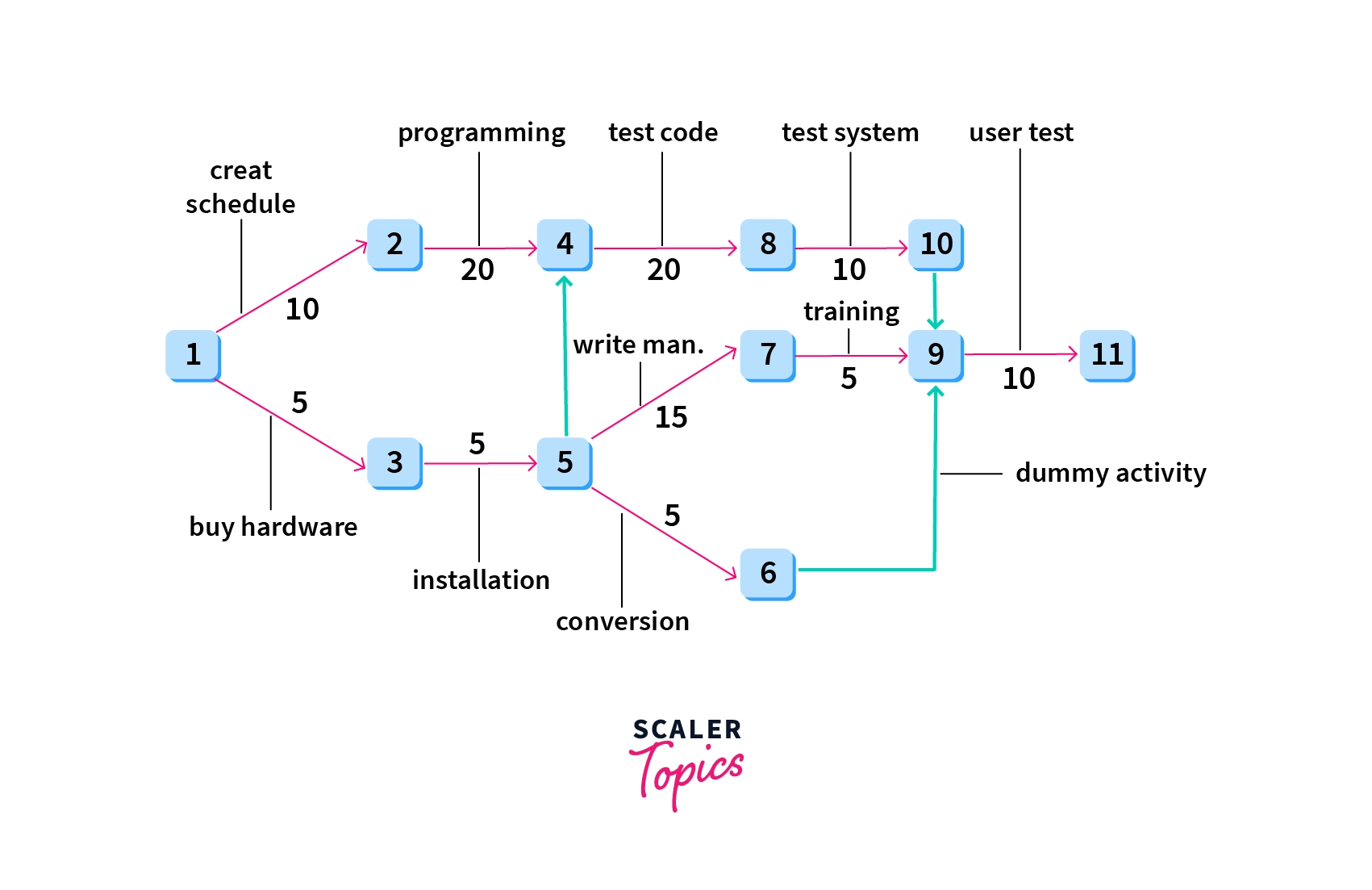
**Explanation of Diagram:**
1. All the activities (such as creating schedules, installation of hardware, testing code, etc) are represented using `arrows/arcs` in the diagram.
2. All the arrows start as well as terminate at a node (which are represented using labeled squares), which represent the stage of completion of certain events in the project timeline.
3. The `numbers/labels` on the arcs represent the `time units` (such as weeks) required to complete the activity the corresponding arc depicts. Arcs emerging from the same node represent concurrent activities.
4. The dashed arrow `(from events 6 to 9)` shows a dummy activity which is an activity that requires no time or resources. It is merely a theoretical tool that helps us to maintain proper precedence relationships
5. `PERT` evolved as a project management technique for research-oriented projects because the outcomes of activities undertaken during research remain mostly uncertain. Therefore we cannot plan a definite way ahead beforehand. The best we can do is to devise a path for all possible outcomes at all stages. All the outcomes branching out from a given stage may or may not be equally probable, hence we can not ascertain the exact time we might take to go along a given path, since there are many. Therefore we have estimates or bounds for these time measures.
`PERT` provides us with `three high precision time estimates` (which inform the user about deadlines and thus helps in setting goals for the project) to handle this mess of uncertainty. We have the `optimistic time estimate`, the `most likely time estimate`, and `the pessimistic time estimate`, which provide us with the best, average, and worst time in which the project could be taken to completion. (isn’t this quite similar to `time-complexity analysis` where we use the worst case, average case, and the best case time complexity to ascertain the efficiency of the algorithms?). In fact, time analysis is the only concern of PERT. It does not take into account the cost problems which the teams might incur during the execution.
The various time estimates are made using `time-network analysis techniques` on the various events planned out in the PERT chart. Discussing the network analysis techniques and procedures for minutely analyzing the PERT chart is out of scope for this article, and we leave it up to the readers’ curiosity to look up further literature on the subject.
### Advantages of PERT
1. PERT can be used to design an optimum resource utilization method for project completion
2. Time estimates in PERT are highly precise, unlike CPM where it is reasonably precise at best
3. PERT analysis can deal with unpredictable activities which might occur during the lifetime of the project, such as delay in development, unforeseen hardware failure, etc.
4. PERT is very useful for research-oriented projects and projects which don’t have a predefined structural path for completion (also called construction based projects, which are planned using CPM)
### Disadvantages of PERT
1. High focus on time analysis sometimes leads to ignoring the cost aspect of the project
2. PERT analysis has a highly complex structure and is consequently difficult to implement and maintain
3. Doesn’t work with projects which have iterative or repetitive phases, such as projects requiring multiple designs and verification cycles
4. Since PERT doesn’t have a past project history to learn from (since it is used with new projects as mentioned above) the initial raw data might not provide the most accurate prediction/estimates of the project timeline
5. Implementation and maintenance cost is also high
:::
:::section{.main}
## CPM (Critical Path Method)
`CPM`, like `PERT`, is a project management technique used for project progress monitoring through network analysis tools. However, CPM is favored in cases with historical project data, such as past project logs, aiding in cost and resource estimation.
Formally, CPM (Critical Path Method) is a deterministic technique for planning, scheduling, and controlling projects involving repetitive, predetermined activities.
Before reading more about CPM, let us first try to understand what is meant by a critical path. The `'critical path'` in project management represents the longest sequence of essential activities needed to conclude a project. Activities on this path are called `'critical activities'` and determine the project's duration and scheduling.
CPM's primary objective is to identify the minimum time required to complete a project by following the critical path. Unlike PERT, CPM distinguishes between critical and non-critical tasks, and including all critical tasks is vital to minimize project duration.
CPM follows a procedure similar to PERT, defining required activities and their dependencies. It operates on deterministic projects, eliminating uncertainties common in research-based projects. Such projects, termed construction-based projects, aim to complete the project through predefined paths without unpredictability
Here too, we use network analysis techniques (forward-pass and backward-pass, to be precise) to determine the minimum time in which we can finish the project. But unlike PERT, here we have only one-time estimate, and it helps us to understand the `time-cost trade-offs` too.

**Explanation:** Here too we’ve created a network diagram that is very similar to the one we had created while discussing PERT. But here, we’ve also shown the “critical path”, the path of activities along the minimum time which will be taken by the project to be finished. All other activities run parallel to some critical activity, and hence will be completed within the `critical time`.
In CPM, key time-related terms include:
* ES (Earliest Start Time)
* LS (Latest Start Time)
* EF (Earliest Finish Time)
* LF (Latest Finish Time)
CPM also considers:
**Float/Slack:** Measures the leeway to delay a task without risking the project's deadline. Critical activities on the project's path have zero float. Negative float means a delay endangers the deadline, while positive float doesn't affect the timeline.
**Critical Path Drag:** Measures delays due to constraints on critical path tasks.
**Crash Duration:** Refers to compressing a project's completion time with minimal additional cost. Unlike PERT, CPM allows crashing by reallocating resources, reducing the overall project duration while potentially incurring extra costs. CPM emphasizes understanding cost-time trade-offs.
### Advantages of CPM
1. As with PERT, CPM allows the user to figure out the dependencies which help in proper scheduling and planning of the project
2. Optimizations are possible (like crashing, identifying the critical tasks etc.) in CPM
3. CPM allows the users to understand the various `cost` and `time trade-offs`
4. CPM is the best-suited technique for planning the execution of `construction based projects`
5. CPM allows the user to figure out activities/tasks which can be executed concurrently without affecting the overall dependencies
6. CPM is also the best-suited technique for projects which have iterative or repetitive activities
### Disadvantages of CPM
1. In CPM, time estimates the completion of an activity/task is reasonable at best
2. CPM cannot handle the scheduling of personnel and resource allocation
3. The critical path may not always be very clear to the project manager. This is a big issue since precisely identifying the critical path is one of the most crucial steps in CPM.
4. Just like PERT, CPM networks can be highly complicated for bigger projects, which can lead to poor maintenance and workflow of the project
:::
:::section{.main}
## Key Difference Between PERT and CPM
The key difference between PERT (Program Evaluation and Review Technique) and CPM (Critical Path Method) lies in their approach to project management. PERT is a probabilistic technique suitable for research and development (R&D) projects, where outcomes are uncertain. It provides three time estimates, emphasizing precision but not considering cost. In contrast, CPM is deterministic, best suited for predictable projects like construction, offering a single time estimate. CPM balances time and cost considerations and is effective for projects with clear critical tasks. PERT employs event-oriented analysis, while CPM uses activity-oriented analysis, distinguishing critical tasks distinctly.
:::
:::section{.main}
## Difference Between PERT and CPM
|PERT|CPM|
|:----:|:---:|
|PERT (Project/ Program Evaluation and Review Technique) is a probabilistic (or non-deterministic), network-analysis based technique used to plan, schedule, and control projects involving non-repeating and uncertain activities.|CPM (Critical Path Method) is a deterministic, network analysis based technique used to plan, schedule, and control projects involving repeating and predetermined activities.|
|Most suited for research and development (R&D) projects where all the outcomes may or may not be predictable|Best applicable for non-research or construction based projects (e.g. civil construction) where activities and project stages are predictable|
|Time estimates are highly precise|Time estimates are reasonably precise|
|Three time estimates are present, that are optimistic time, most likely time, and pessimistic time estimates|Only one time estimate is present|
|Crashing is not applicable since time uncertainties are present|Crashing is applicable since time uncertainties are not that prevalent|
|Has a high focus on time analysis|Equal focus on time and cost. Helps us to understand the various time-cost trade-offs|
|Analysis is probabilistic|Analysis is deterministic|
|Deals with projects having non-repeating activities|Deals with projects which have iterative or repetitive activities|
|The analysis is event-oriented rather than being activity oriented (that is, the network is designed using events that might occur in the project).|The analysis is more activity-oriented rather than event-oriented (that is, the network is designed using predetermined activities of the project)|
|No clear distinction between critical and non-critical activities of the project|A clear distinction is present between critical and non-critical activities of the project|
It doesn’t use any dummy activities.| It uses dummy activities for representing sequence of activities.|
It is suited for projects requiring flexibility and adaptability. | It is ideal for projects with established workflows and limited variation.|
:::
:::section{.main}
## Applications of PERT and CPM
1. PERT and CPM help in planning and scheduling various projects (which might not be always related to software engineering)
2. Projects related to research and development `(R&D)` as well as `construction based projects` (like building dams, office building, developing embedded software, manufacturing processes)
3. Design and maintenance of all sorts of equipment, industrial plants, and systems.
4. Manufacturing and marketing products on different scales
5. And something as simple as organizing seminars and workshops too
:::
:::section{.summary}
## Conclusion
After gaining a deep insight into PERT vs CPM, it's clear that the choice between these project management techniques depends on several critical factors.
* **Management Versatility**: PERT and CPM are valuable project management techniques, with PERT suited for uncertain research projects and CPM for well-defined construction-type projects.
* **Precision vs. Simplicity**: PERT provides precise time estimates, while CPM offers simplicity with a single time estimate.
* **Crashing and Cost**: CPM allows time-cost optimization through crashing, unlike PERT.
* **Time and Cost Balance**: PERT emphasizes time analysis, while CPM considers both time and cost.
* **Project Type and Approach**: PERT suits non-repeating, uncertain tasks, while CPM fits projects with predictable, repeating activities.
In summary, choosing between PERT and CPM depends on project nature, precision needs, time-cost trade-offs, and the balance between time and cost, enabling effective project management.
:::
 Google Drive
Gist
Clipboard
Google Drive
Gist
Clipboard
 Sign in via Facebook
 Sign in via X(Twitter)
 Sign in via GitHub
 Sign in via Dropbox
 Sign in with Wallet






