# Proposal: Add Fluentd to Fluent Operator as an optional log aggregation and forwarding layer
## Table of contents
- [Introduction](#Introduction)
- [Why adding Fluentd CRDs to Fluent Operator? ](#Why-adding-Fluentd-CRDs-to-Fluent-Operator? )
- [How to integrate fluentd ?](#How-to-integrate-fluentd)
- [Introduction to the types of CRD](#Introduction-to-the-types-of-CRD-and-workflow)
- [Support for namespaces isolation and cloud native selectors](#Support-for-namespaces-isolation-and-cloud-native-selectors)
- [Support for strict configuration validation](#Support-for-strict-configuration-validation)
- [Select popular Fluentd plugins to add CRD support](#Select-popular-fluentd-plugins-to-add-crd-support)
- [Support for custom plugins installation](#Support-for-custom-plugins-installation)
- [Enable filesystem pvc for buffer](#Enable-filesystem-pvc-for-buffer)
- [Add ClusterDirectives CRD to support directives predefined](#Add-ClusterDirectives-CRD-to-support-directives-predefined)
- [Fluentd CRDs Design](#Fluentd-CRDs-Design)
- [Fluentd CRD](#Fluentd-CRD)
- [FluentdClusterConfig CRD Or FluentdConfig CRD](#FluentdClusterConfig-CRD-Or-FluentdConfig-CRD)
- [Output CRD Or ClusterOutput CRD](#Output-CRD-Or-ClusterOutput-CRD)
- [Configuration Supplement](#Configuration-Supplement)
- [Common Directive Configuration Supplement](#Common-Directive-Configuration-Supplement)
- [Buffer Directive Configuration Supplement](#Buffer-Directive-Configuration-Supplement)
- [Format Directive Configuration Supplement](#Format-Directive-Configuration-Supplement)
- [Inject Directive Configuration Supplement](#Inject-Directive-Configuration-Supplement)
- [Transport Directive Configuration Supplement](#Transport-Directive-Configuration-Supplement)
- [Storage Directive Configuration Supplement](#Storage-Directive-Configuration-Supplement)
- [Service Discovery Directive Configuration Supplement](#Service-Discovery-Directive-Configuration-Supplement)
- [Parts that need to be discussed or added](#Parts-that-need-to-be-discussed-or-added)
## Introduction
Currently, we have not integrated log processing tool like `fluentd` which has more plugins for use. The benefits are obvious, and we don't want to start from scratch. This proposal tries to design `fluentd crds`, aims to integrate `fluentd` as a optional log aggregation and forwarding layer.
### FluentBit CRDs refactoring
Now all FluentBit CRDs are namespace level. We should use cluster level CRDs for FluentBit because it acts as an cluster-wide log agent that collects both system/node logs like kubelet and application logs like container. The idea is to add the following cluster CRDs for FluentBit under group `fluentbit.fluent.io`:
- FluentBit
- FluentBitClusterConfig
- ClusterParser
- ClusterOutput
### Why adding Fluentd CRDs to Fluent Operator?
The following table from [Fluent Bit documentation](https://docs.fluentbit.io/manual/about/fluentd-and-fluent-bit) describes a comparison in different areas of the two projects:
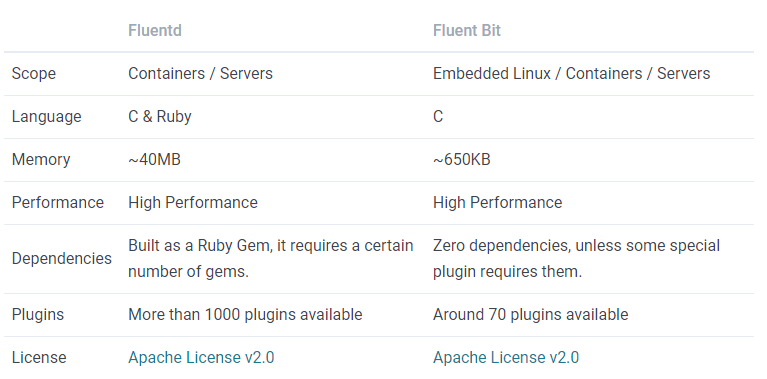
The rich plugins is one of the reasons, which helps to do better handling of logging in some complex scenarios.
### How to integrate fluentd?
We have `fluentbit-operator` in use for generating configurations for fluent-bit daemonset apps. The configuration generation of `fluentd` should be similar with that. However, the biggest challenge is that the directives in `fluentd` are too complicated, which would make it more difficult.
In order to make the integration work easier, we consider these parts to finish this work:
- Introduction to the types of CRD and workflow
- Support for namespace isolation and cloud native selectors
- Support for strict configuration validation
- Select popular Fluentd plugins to add CRD support
- Support for custom plugins installation
- Enable filesystem pvc for buffer
- Add ClusterDirectives CRD to support directives predefined
#### Introduction to the types of CRD and workflow:
A pipeline below describes the working principle of FluentBit Operator and Fluentd Operator:

The pipeline describes that the Log Producers or the Log Collection Phase are responsible for the collection of logs. The Fluentd instances controlled by the Fluentd Operator use the http/forward connection to collect logs from the former, while the fluentbit instances in the latter deployed on each node use the forward definition to send logs, or use the http connection defined in fluentd instance to collect logs.
During the log Aggregation & Forwarding Phase, the Fluentd Operator defines five custom resources using CustomResourceDefinition (CRD):
- Fluentd: Defines Fluentd instances and its associated config.
- defines common properties like pvc, replicas, resources, etc.
- select FluentdClusterConfig/FluentdConfig CRDs to bind with this instance.
- FluentdClusterConfig:
- Support for multiple namespaces isolation and cloud native selectors.
- Integrate the logic of input and filter sections.
- Select any cluster/namespaced scope output crds.
- FluentdConfig:
- Support for single namespace isolation and cloud native selectors in this namespace.
- Integrate the logic of input and filter sections
- Select any cluster/namespaced scope output crds, the output log should be from this namespace.
- ClusterOutput: Defines an output section without namespace restriction.
- Output: Defines an output section with a specified namespace.
Each FluentdClusterConfig or FluentdConfig represents a workflow configuration, which is selected by every Fluentd instance via label selectors. At last, these selected configurations would be merged and mounted(the operator watches those objects, constructs the final config, and finally creates a Secret to store the config.) to the Fluentd instance. In this scenario, a FluentdClusterConfig CRD will use the selectedNamespaces field(if this field is empty, will not limit the namespaces.), and selectors defined by the matchLabels field to filter namespaced logs, and a namespaced FluentdConfig CRD will limit the logs in this namespace.
At the last storage stage, sinks like elasticsearch/loki/s3/kafka are supported. Also, Each ClusterOutput CRD or Output CRD represents a Fluentd output config section, which is selected by FluentdClusterConfig or FluentdConfig. In this scenario, a FluentdClusterConfig CRD represents a global output config section that every tenant can use, and an Output CRD limits its namespace. That is to say,a FluentdConfig CRD defined by a tenant will use the global output plugins if no custom output CRD is defined and the FluentdConfig CRD matches the ClusterOutput CRD.
#### Support for namespaces isolation and cloud native selectors
With the integration of some plugins, we can achieve precise filtering based on namespaces isolation and cloud native selectors.
> Plugins: https://github.com/banzaicloud/fluent-plugin-label-router
For `FluentdClusterConfig` crd, we can use `matchLabels` section defines the labels to be selected, and `selectedNamespaces` field limits the selected namespaced. An example can be defined as follows:
```
apiVersion: fluentd.fluent.io/v1alpha1
kind: FluentdClusterConfig
metadata:
name: fluentdCofig-sample
labels:
fluentd.fluent.io/config: "true"
spec:
# The two properties below depend on the upstream containing the K8S metadata.
# The value of selectedNamespace can be empty, which means the matchLabels field will be used directly.
# Otherwise, the related namepace will be limited.
# The given namespaces and labels would be used for filtering K8s logs.
selectedNamespaces: []
matchLabels:[]
...
```
For `FluentdConfig` crd:
```
apiVersion: fluentd.fluent.io/v1alpha1
kind: FluentdConfig
metadata:
name: fluentdCofig-sample
namespace: kubesphere-logging-system
labels:
fluentd.fluent.io/config: "true"
spec:
# The property below depend on the upstream containing the K8S metadata.
# The default namespace is set in the metadata area.
# The given namespace and labels would be used for filtering K8s logs.
matchLabels:[]
...
```
#### Support for strict configuration validation
The spec section in CRD will be designed in full compliance with the configuration of fluentd.
This is an example of the input forward plugin for FluentdConfig CRD:
```
apiVersion: fluentd.fluent.io/v1alpha1
kind: FluentdConfig
metadata:
name: forward-sample
namespace: kubesphere-logging-system
labels:
fluentd.fluent.io/config: "true"
spec:
tag: "kube.*"
inputs:
forward:
port: "24224"
bind: "0.0.0.0"
add_tag_prefix: "xxx"
linger_timeout: "xxx"
resolve_hostname: "true"
chunk_size_limit: "nil"
skip_invalid_event: "true"
transport:
protocol: tls
cert_path: /path/to/fluentd.crt
security:
self_hostname: "xxx"
shared_key: "xxx"
user_auth: "true"
allow_anonymous_source: "false"
user:
username: "xxx"
password: "xxx"
client:
host: "xxx"
network: "xxx"
shared_key: "xxx"
users: "xxx"
```
#### Select popular Fluentd plugins to add CRD support
The follows described popular Fluentd plugins:
- Input plugins: forward, http
- Filter plugins: record_transformer, grep, parser, stdout
- Output plugins: forward, http, stdout, kafka, elasticsearch, s3, loki
These plugins are a high priority to integrate, however, this is not to say that other configurations won't be supported.
#### Support for custom plugins installation
Some plugins in fluentd are useful for implementing extended functionality. For example, the following repository is useful for namespace isolation:
> https://github.com/banzaicloud/fluent-plugin-label-router
To install the plugins in the image, a link for reference described as following:
> https://hub.docker.com/r/fluent/fluentd/#:~:text=3.1%20For%20current%20images
#### Enable filesystem pvc for buffer
From the fluentd docs, if fluentd uses memory to store buffer chunks, buffered logs that cannot be written quickly are deleted when it was shut down. As an option, the file buffer plugin provides a persistent buffer implementation. It uses files to store buffer chunks on disk.
Therefore, we can use `enableFilesystemBuffer` field to enable the filesystem pvc.
```
apiVersion: fluentd.fluent.io/v1alpha1
kind: Fluentd
metadata:
name: fluentd
namespace: kubesphere-logging-system
labels:
app.kubernetes.io/name: fluentd
spec:
buffer:
# If enabled, the filesystem will be enabled to store buffer chunks.
# Otherwise, will use memory to store buffer chunks.
# The default setting is false.
enableFilesystemBuffer: true
pvc:
name: buffer-filesystem
accessModes:
- ReadWriteOnce
resources:
requests:
storage: 1Gi
volumeMode: Filesystem
...
```
#### Add ClusterDirectives CRD to support directives predefined
```
apiVersion: fluentd.fluent.io/v1alpha1
kind: ClusterDirectives
metadata:
name: common-directives
labels:
fluentd.fluent.io/directives: "true"
spec:
servers:
- host: 192.168.1.3
port: 24224
weight: 60
username: xxx
password: xxx
service_discovery:
file:
path: /path/to/servers.yaml
security:
self_hostname: "xxx"
shared_key: "xxx"
user_auth: "true"
allow_anonymous_source: "false"
---
forward:
send_timeout: "60s"
recover_wait: "10s"
hard_timeout: "60s"
transport: "tls"
tls_cert_thumbprint: "xxx"
tls_cert_logical_store_name: "Trust"
tls_verify_hostname: "true"
tls_cert_use_enterprise_store: "true"
directives:
name: common-directives
overrides:
service_discovery:
file:
path: /path/to/servers2.yaml
add:
secondary:
type: "file"
path: "/var/log/fluent/forward-failed"
discard:
- security
```
## Fluentd CRDs Design
This part has a detailed description for Fluentd Crds Design.
By default, the Fluentd instance would be deployed with deployment.
### Fluentd CRD
```
apiVersion: fluentd.fluent.io/v1alpha1
kind: Fluentd
metadata:
name: fluentd-sample
namespace: kubesphere-logging-system
labels:
logging.kubernetes.io/name: fluentd
spec:
replica: 3
buffer:
# If enabled, the filesystem will be enabled to store buffer chunks.
# Otherwise, will use memory to store buffer chunks.
# The default setting is false.
enableFilesystemBuffer: true
pvc:
name: buffer-filesystem
accessModes:
- ReadWriteOnce
resources:
requests:
storage: 1Gi
matchConfigSelectors:
- fluentd.fluent.io/config: "true"
image: fluent/fluentd: latest
resources:
requests:
cpu: 10m
memory: 25Mi
limits:
cpu: 500m
memory: 200Mi
tolerations:
- operator: Exists
affinity:
nodeAffinity:
requiredDuringSchedulingIgnoredDuringExecution:
nodeSelectorTerms:
- matchExpressions:
- key: node-role.kubernetes.io/edge
operator: DoesNotExist
```
By the way, there should be a [service]( https://github.com/platform9/fluentd-operator) that can accept the output of fluent-bit.
Here's an example:
```
apiVersion: v1
kind: Service
metadata:
labels:
app.kubernetes.io/name: fluentd
name: fluentd
namespace: default
spec:
ports:
- name: forward
port: 24224
protocol: TCP
targetPort: forward
selector:
app.kubernetes.io/name: fluentd
sessionAffinity: None
type: ClusterIP
```
### FluentdClusterConfig CRD Or FluentdConfig CRD
A FluentdClusterConfig CRD without namespace in metadata section defines a cluster scope resource, while a FluentdConfig CRD defines a namespaced scope resource.
For FluentdClusterConfig CRD:
```
---
apiVersion: fluentd.fluent.io/v1alpha1
kind: FluentdClusterConfig
metadata:
name: cluster-fluentd-config-sample
labels:
app.kubernetes.io/name: fluentd
spec:
# The two properties below depend on the upstream containing the K8S metadata.
# The value of selectedNamespace can be empty, which means the matchLabels field will be used directly.
# Otherwise, the related namepace will be limited.
# The given namespaces and labels would be used for filtering K8s logs.
selectedNamespaces: []
matchLabels:[]
# The tag field would be used in inputs/filters/outputs sections to match the given tag
tag: kube.*
inputs:
...
filters:
...
outputs:
matchLabels:
fluentd.fluent.io/output: "true"
....
```
For FluentdConfig CRD:
```
---
apiVersion: fluentd.fluent.io/v1alpha1
kind: FluentdConfig
metadata:
name: fluentd-config-sample
namespace: kubesphere-logging-system
labels:
app.kubernetes.io/name: fluentd
spec:
# The property below depend on the upstream containing the K8S metadata.
# The default namespace is set in the metadata area.
# The given namespace and labels would be used for filtering K8s logs.
matchLabels:[]
# The tag field would be used in inputs/filters/outputs sections to match the given tag
tag: kube.*
inputs:
...
filters:
...
outputs:
matchSelector:
- fluentd.fluent.io/output: "true"
....
```
> Note that the inputs/filters/outputs areas of multiple instances would be duplicated and need to be merged.
#### Input Section Of FluentdClusterConfig CRD or FluentdConfig CRD
##### forward
```
forward:
port: "24224"
bind: "0.0.0.0"
add_tag_prefix: "xxx"
linger_timeout: "xxx"
resolve_hostname: "true"
chunk_size_limit: "nil"
skip_invalid_event: "true"
transport:
protocol: tls
cert_path: /path/to/fluentd.crt
security:
self_hostname: "xxx"
shared_key: "xxx"
user_auth: "true"
allow_anonymous_source: "false"
user:
username: "xxx"
password: "xxx"
client:
host: "xxx"
network: "xxx"
shared_key: "xxx"
users: "xxx"
...
```
##### http
```
- http:
port: 9880
bind: 0.0.0.0
body_size_limit: 32m
keepalive_timeout: 10s
add_remote_addr: true
transport:
protocol: tls
cert_path: /path/to/fluentd.crt
parse:
type: regexp
expression: "^(?<name>[^ ]*) (?<user>[^ ]*) (?<age>\d*)$"
...
```
#### Filters Section Of the FluentdClusterConfig Crd or FluentdConfig Crd
##### record_transformer
```
spec:
filters:
- record_transformer:
enable_ruby: true
auto_typecast: true
renew_record: true
renew_time_key: nil
keep_keys:
- key1
- key2
remove_keys:
- key1
- key2
record: # use map[string]string type
message: "hello, ${record["message"]}"
service_name: "${tag_parts[1]}"
avg: "${record["total"]/record["count"]}"
...
```
##### grep
```
spec:
match: kube.*
filters:
- grep:
regexp:
- key: container_name
pattern: /^app\d{2}/
- key: item_name
pattern: /^book_/
...
```
Some directives have complex combination, a reference example can be found [here](https://docs.fluentd.org/filter/grep).
For `and` section:
```
- grep:
and:
regexp:
- key: container_name
pattern: /^app\d{2}/
- key: item_name
pattern: /^book_/
...
```
For `or` section:
```
- grep:
or:
exclude:
- key: price
pattern: /[1-9]\d*/
- key: price
pattern: /^book_/
```
##### parser
```
spec:
filters:
- parser:
key_name: "log"
reverse_time: "xx"
reserve_data: "true"
remove_key_name_field: "true"
inject_key_prefix: "data."
hash_value_field: "parsed"
...
parse:
type: "regex"
expression: "^(?<name>[^ ]*) (?<user>[^ ]*) (?<age>\d*)$"
time_format: "%d/%b/%Y:%H:%M:%S %z"
...
```
##### stdout
```
spec:
filters:
- stdout:
format:
type: "json"
inject:
time_key: "fluentd_time"
time_type: "string"
time_format: "%Y-%m-%dT%H:%M:%S.%NZ"
tag_key: "fluentd_tag"
...
```
### Output CRD Or ClusterOutput CRD
The skeleton of Output CRD and ClusterOutput CRD is the same with each other, while the only difference is that the latter does not contain the namespace field.
For head part of ClusterOutput CRD:
```
apiVersion: fluentd.fluent.io/v1alpha1
kind: ClusterOutput
metadata:
name: cluster-output-sample
labels:
fluentd.fluent.io/output: "true"
```
For head part of Output CRD:
```
apiVersion: fluentd.fluent.io/v1alpha1
kind: Output
metadata:
name: output-sample
namespace: kubesphere-logging-system
labels:
fluentd.fluent.io/output: "true"
```
The `spec` part of the CRD can be defined by the following description.
#### forward
```
spec:
forward:
send_timeout: "60s"
recover_wait: "10s"
hard_timeout: "60s"
transport: "tls"
tls_cert_thumbprint: "xxx"
tls_cert_logical_store_name: "Trust"
tls_verify_hostname: "true"
tls_cert_use_enterprise_store: "true"
servers:
- host: 192.168.1.3
port: 24224
weight: 60
username: xxx
password: xxx
service_discovery:
file:
path: /path/to/servers.yaml
security:
self_hostname: "xxx"
shared_key: "xxx"
user_auth: "true"
allow_anonymous_source: "false"
secondary:
type: "file"
path: "/var/log/fluent/forward-failed"
...
```
#### http
```
spec:
http:
endpoint: "http://logserver.com:9000/api"
open_timeout: "2"
content_type: "json"
...
format:
type: json
buffer:
flush_interval 10s
auth:
method: "basic"
username: "fluentd"
password: "hello"
...
```
#### stdout
```
spec:
stdout:
format:
type: json
buffer:
flush_interval 10s
inject:
time_key: "fluentd_time"
time_type: "string"
time_format: "%Y-%m-%dT%H:%M:%S.%NZ"
tag_key: "fluentd_tag"
...
```
#### kafka
```
spec:
kafka2:
brokers: "<broker1_host>:<broker1_port>,<broker2_host>:<broker2_port>"
use_event_time: "true"
topic_key: "topic"
default_topic: "messages"
required_acks: -1
compression_codec: "gzip"
...
format:
type: json
buffer:
flush_interval:"10s"
...
```
#### elasticsearch
```
spec:
elasticsearch:
host: "localhost"
port: "9200"
logstash_format: "true"
logstash_prefix: "xxx"
user: "fluent"
password: "mysecret"
buffer:
flush_interval 10s
...
```
#### s3
```
spec:
s3:
aws_key_id: <YOUR_AWS_KEY_ID>
aws_sec_key: <YOUR_AWS_SECRET_KEY>
s3_bucket: <YOUR_S3_BUCKET_NAME>
s3_region: "xxx"
path: "logs/"
buffer:
type: file
flush_interval: 10s
path: /var/log/fluent/s3
timekey: 3600 # 1 hour partition
timekey_wait: 10m
timekey_use_utc: true # use utc
chunk_limit_size: 256m
...
```
### Configuration Supplement
This part inspired by [fluentd configuration section docs](https://docs.fluentd.org/configuration) which defines detailed directives description.
#### Common Directive Configuration Supplement
##### type
The type parameter is equivalent to the @type field in fluentd, specifies the type of the plugin.
##### id
The id parameter is equivalent to the @id field in fluentd, specifies a unique name for the configuration. It is used as paths for buffer, storage, logging and for other purposes.
For `buffer` directive:
```
buffer:
type: file
id: service_www_accesslog
path: /path/to/my/access.log
```
##### log_level
This parameter is equivalent to the @log_level field in fluentd, specifies the plugin-specific logging level. The default log level is info. Global log level can be specified by setting log_level in <system> section. The @log_level parameter overrides the logging level only for the specified plugin instance.
```
system:
loglevel:info
```
Or add `log_level` field filed in plugin:
```
log_level:"debug" # shows debug log only for this plugin
```
###### label
The label parameter is equivalent to the @label field in fluentd, and which is to route the input events to <label> sections, the set of the <filter> and <match> subsections under <label>.
```
label:
name: "@access_log"
type: "file"
path: "xxx"
```
For inputs section:
```
tail:
labelName: "@access_log"
labels:
- name: "@access_log"
match: "**"
type: "file"
path: "xxx""
```
This is equivalent to the configuration described as follows:
```
<source>
@type tail
@label @access_logs
</source>
<label @access_log>
<match **>
@type file
path ...
</match>
</label>
```
#### Buffer Directive Configuration Supplement
The usable types of the Fluentd Buffer Directive are as follows:
- file
- memory
For common buffer directive definition:
```
buffer:
type: file
tag: **
id: service_www_accesslog
path: /path/to/my/access.log
timekey: "1h"
timekey_wait: "5m"
timekey_use_utc: false
timekey_zone: "Asia/China"
flush_at_shutdown: false
flush_mode: "default" # enum: default/lazy/interval/immediate
flush_interval: "5s"
flush_thread_count:"1"
flush_thread_interval: "1.0"
flush_thread_burst_interval: "1.0"
delayed_commit_timeout:"60"
overflow_action: "throw_exception" #[enum: throw_exception/block/drop_oldest_chunk]
retry_timeout: "72h"
retry_forever: "false"
retry_max_times: "none"
retry_secondary_threshold: "0.8"
retry_type: "exponential_backoff" # [enum: exponential_backoff/periodic]
retry_wait: "1s"
retry_exponential_backoff_base: "2"
retry_max_interval: "none"
retry_randomize: "true"
disable_chunk_backup: "false"
...
```
Refer to the [fluentd official document](https://docs.fluentd.org/configuration/buffer-section#buffer-plugin-type), the tag field can be omitempty or defined as multiple types:
- time
- A key in record, i.e.: "key1"
- Nested Field Support, i.e.: "$.nest.field"
- Combination of Chunk Keys, i.e: "tag,time"
- Empty Keys, i.e: "[]"
- Placeholders, i.e: "tag,key1"
- The path field would be like `/data/${tag}/access.${key1}.log`
#### Format Directive Configuration Supplement
For common format directive definition:
```
format:
type: "csv"
time_type: "float" # Available values: float, unixtime, string
time_format: "nil"
localtime: "tue"
utc: "false"
timezone: "nil"
```
Here's the list of built-in formatter plugins:
- out_file
- json
- ltsv
- csv
- msgpack
- hash
- single_value
#### Inject Directive Configuration Supplement
For common inject directive definition:
```
inject:
hostname_key: "nil"
hostname: "Socket.gethostname"
time_key: "fluentd_time"
tag_key: "fluentd_tag"
time_type: "float"
time_format: "%Y-%m-%dT%H:%M:%S.%NZ"
localtime: "tue"
utc: "false"
timezone: "nil"
```
#### Transport Directive Configuration Supplement
For common transport directive definition:
```
transport:
protocol: "tls" # enum: tcp/udp/tls
# The fields described as follows are tls settings.
version: "TLSv1_2" # enum: TLS1_1/TLS1_2/TLS1_3
min_version: "nil" # enum: TLS1_1/TLS1_2/TLS1_3
max_version: "nil" # enum: TLS1_1/TLS1_2/TLS1_3
ciphers: "ALL:!aNULL:!eNULL:!SSLv2"
insecure: false
ca_cert_path: "xxx"
ca_private_key_path: "xxx"
ca_private_key_passphrase: "nil"
generate_private_key_length: "2048"
generate_cert_country: "US"
generate_cert_state: "CA"
generate_cert_locality: "Mountain View"
generate_cert_common_name: "nil"
generate_cert_expiration: "86400" # one day
generate_cert_digest:"sha256" # enum: sha1/sha256/sha384/sha512
...
```
#### Storage Directive Configuration Supplement
Some of the Fluentd plugins support the <storage> section to specify how to handle the plugin's internal states.
The storage section can be under <source>, <match> or <filter> section.
For common storage directive definition:
```
storage:
type: "local"
tag: "awesome_path"
```
#### Service Discovery Directive Configuration Supplement
For `file` type of service discovery directive definition:
```
service_discovery:
file:
path: "/etc/fluentd/sd.yaml"
conf_encoding: "utf-8"
```
For `static` type of service discovery directive definition:
```
service_discovery:
static:
servers:
- host: "191.168.88.6"
port: "24224"
name:"xxx"
shared_key: "nil"
username: xxx
password: xxx
standby: false
weight: 60
```
For `srv` type of service discovery directive definition:
```
service_discovery:
srv:
service: "fluentd"
proto: "tcp"
hostname: "example.com"
dns_lookup: "true"
interval: "60"
shared_key:"nil"
username: "xxx"
password: "xxx"
```
## Parts that need to be discussed or added
- A tail Input for Fluentd is not necessary because it's not a DaemonSet like FluentBit, so just network inputs like forward and HTTP are ok (@benjaminhuo)
- Do we want to mention the other operators and how this aligns/complements each of them? (@Pat)
- We do need to capture the RBAC roles and the like required of course as well. (@Pat)
- A pipeline that validates the config is not going to fail prior to applying it would be good.(@Pat)
- The definition of FluentdClusterConfig or FluentdConfig CRD (@zhu733756)
- A FluentdClusterConfig CRD will use the selectedNamespaces field(if this field is empty, will not limit the namespaces.)
and selectors defined by the matchLabels field to filter namespaced logs. Also, a namespaced FluentdConfig CRD will limit the logs in this namespace. (@zhu733756)
- The definition of ClusterOutput or Output CRD(@zhu733756)
- We can only keep the cluster scope output CRD. By the control of FluentdClusterConfig/Conifg, the logs already could be limited in namespaces. The purpose of this global output CRD is to provide output and everyone can use it. Or do we need to control more fine-grained log segmentation with soft-Multi-tenant? (@zhu733756)
- The description "Support for strict configuration validation" (@Pat)
I think using both struct and map. (@zhu733756)
```
struct inputs {
common
tail Tail
parse map[string]string
}
struct common {
id string
type string
...
}
struct Tail map[string]string
```
- Add more plugins(@Pat)
- Input plugins: Add dummy(Completed by @zhu733756)
- Filter plugins: Add LUA(Need to be confirmed, not find it at https://docs.fluentd.org/filter.)
- Output plugins: Add Loki( Cannot find the loki plugin here at https://docs.fluentd.org/output, Maybe we can use the http plugin instead.)
- Can we add our own custom regex parsers rather than have to define them each time? (@Pat)
Maybe we need a global directive CRD and be able to modify their values via the tail section here. (@zhu733756)
For example:
```
apiVersion: fluentd.fluent.io/v1alpha1
kind: ClusterDirectives
metadata:
name: common-directives
labels:
fluentd.fluent.io/directives: "true"
spec:
servers:
- host: 192.168.1.3
port: 24224
weight: 60
username: xxx
password: xxx
service_discovery:
file:
path: /path/to/servers.yaml
security:
self_hostname: "xxx"
shared_key: "xxx"
user_auth: "true"
allow_anonymous_source: "false"
---
forward:
send_timeout: "60s"
recover_wait: "10s"
hard_timeout: "60s"
transport: "tls"
tls_cert_thumbprint: "xxx"
tls_cert_logical_store_name: "Trust"
tls_verify_hostname: "true"
tls_cert_use_enterprise_store: "true"
directives:
name: common-directives
overrides:
service_discovery:
file:
path: /path/to/servers2.yaml
add:
secondary:
type: "file"
path: "/var/log/fluent/forward-failed"
discard:
- security
...
```
 Google Drive
Gist
Clipboard
Google Drive
Gist
Clipboard
 Sign in with Wallet






