# Git and Github Training
[](https://hackmd.io/6jsLSmuBQXmdcdM64udlbg)
## Use-cases
* Single-user: Recover previous state (or a paper; or script; maybe you want to work on different computer [add, commit, push, pull, checkout, revert]; talk about conflict resolution in this context)
* Publish code to GitHub (possibly as a publication requirement [add, commit, push])
* Work as a group on a project (paper or script [checkout, branch])
* Contribute to an open-source project ([github PRs, Forking,]) _(Concept)_
## Tasks
### Basic Tasks
* Version control a (new) local project
* Copy a remote project (manuscript, script, app, library, ...) onto your computer
* Make changes to your own project script/manuscript/...
* Update the remote repository with your changes
* Update your project with changes from the remote repository
### Advanced Tasks
* Use the commit history to understand why a change was made
* Fix a mistake or undo a change
* `git commit --amend [--no-edit]`
* `git revert`
* `git reset`
* `git restore`
* `git rebase -i`
* `git reflog`
* `rm -r my_git_repo`
* Make experimental changes without affecting a known-good-state
* Work collaboratively with others (or yourself) on a project
__________________________
__________________________
## New Syllabus
### Prior to course day
1. Install practicalities (check in; as students are arriving)
* GitHub account
* Install git
* Tools to be used
* Ungit
* Meld
2. Git configuration (check in; as students are arriving)
* name
* email
* ssh
* Default `main` branch: `git config --global init.defaultBranch main`
* Issues with branch naming `master` vs `main` (Resolved by configuration)
* Name: `git config --global user.name "My Full Name"`
* Email: `git config --global user.email my@email.address`
* Editor (optional) `git config --global core.editor ${your_fav_editor}`
### On the day
1. Check installations and configs
1. Motivate version control
* Ask, **"what is the problem here?"**
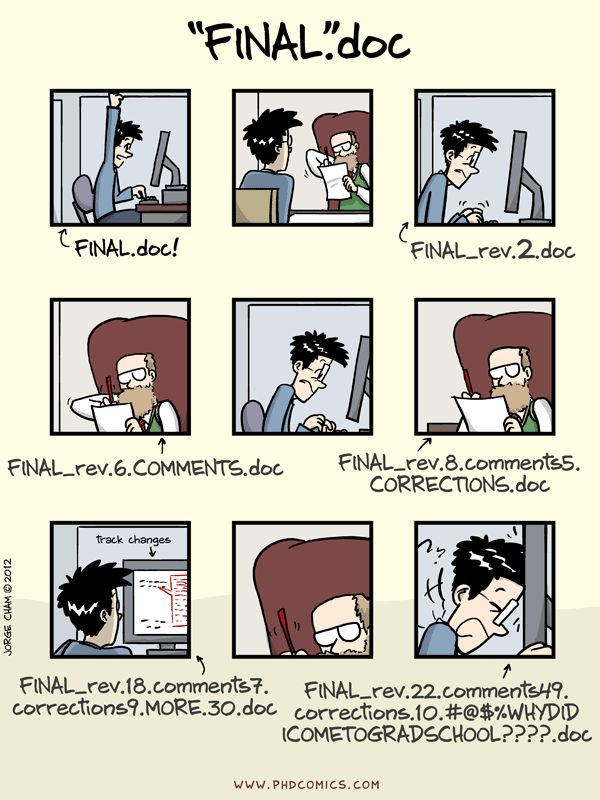
4. What is version control?
* Analogy with "undo/redo" in word processors.
* What does "undo/redo" lack that would be nice?
* label changes
* annotate why a change was made
* ability to move back and forth between alternative versions
* ...
6. Git and GitHub
* Are they the same?

7. Introduce 4 conceptual "areas"/"locations"/"spaces" when using `git`.
* Picture for visualization of concepts !
* Development area **(Work folder)**
* Staging area
* Local Repository
* Remote Repository

* **In the beginning:**

* **`git init`**

* **`git add`**

* **`git commit`**

* **`git remote add`**

* **`git push`**

* **`git pull`**

* **`git reset`**

=

* **`git restore`**

* Remote repository `git remote`
1. Practical
* Today you will write yourself a `git` reference/tutorial/cheatsheet (up to you).
* Try to keep a reference/dictionary of important terms.
* Create a folder and save a new text document inside it `tutorial.md`
* Working folder
* Where is it?
* What is it for?
1. Create a repository
* `git init`
* Local repository
* Where it is?
* `.gitignore` (Github provides some templates)
7. Routine usage _(relating to conceptual areas)_
* `git add` to add files to the staging area
* Staging area (`git add`)
* Where is it?
* What is it for?
* `git commmit` to commit added files
* What is the difference Commit vs Staging
* Why write a commit message?
* How to write a good commit message:
* Describe why the change was made.
* How does it address the issue?
* What effects does the change have?
* Describe any limitations of the change.
* Do not assume the person who later reads the message (probably you) will understand what the original problem was.
* The first commit line is the most important. This is what will be displayed in summaries.
* https://tbaggery.com/2008/04/19/a-note-about-git-commit-messages.html
* This all adds context that will be useful when you have to come back to it one day. This context is usually missing from your code and would otherwise be lost forever.
1. Remote repository (use-case: single-user on multiple computers or backup; collaboration)
* There are many possible remotes
* Your own computer
* Your colleagues computer
* GitHub et al.
* Create _empty_ GitHub repository
* `git remote`
* `git push` (local repo to remote)
1. Collaborating
* In your repo, go to Settings -> Collaborators -> Type password -> Add collaborator -> type in their username
* Your partner should check their email for the invitation and accept it.
* Next, you will be teaching each other a skill. Then you will document the skill you learned in your teachers respository.
* Peer teaching tasks (individually to share later):
* CATASTOPHE!!! Delete the **LOCAL** tutorial folder (repository). How do I recover my files? `git clone` [^mean]
* Once your partner makes their changes to your repository, how do you retrieve those changes? (answer: `git pull`)
* `git clone` your partner's repository.
* Write tutorial notes in your teachers repository for the concept you were taught.
* Check what you're commiting **BEFORE** you commit: `git status`.
* `git commit`
* and `git push` your change to your partners repository.
* `git pull` from your own repo to get your partners changes.
* Exercise: what are some risks working like this? Advantages / disadvantages?
1. How to experiment risk free? (when you're working alone)
* What is the state of your repository: `git status`
* Do you have uncommitted changes?
* Do you have staged changes?
* Do you have untracked files?
* `git tag` Name a commit that is "known good"
* Then you can add new commits that are experimental.
* Demo in "ungit"
* When you want to go back to your "known good" commit: `git log` to see history
* aliases - What they are? / How they help? --> Shortcuts
* Issues with paging in the terminal. How to **Q**uit
* Then, `git checkout` to go back to your tagged commit
* Why is it useful to have the author’s name and e-mail address in the history log?
1. How to experiment risk-free? (When you're working with others)
* Make a "branch" (a parallel history)
* How to create a branch locally?
* This can be explained with "ungit"
* A common technique in open-source
* Create a local branch starting from `main` called `exp`.
* Make some (experimental) changes, commit.
* `git checkout main` to see that the experimental changes are no longer there.
* `git checkout exp` to see that the changes are back.
* `git merge` experimental changes into `main`
* Exercise: make some changes in a local branch
1. Later (other stuff)
* Other tools to consider:
* GitKraken
* Github desktop
* Backtrack
* discarding local changes
* "Stash" local changes
* `git reset`
* Checkout
* `git show`
* `git blame`
* `git diff`
* `.git/` folder, what is a repository
## Useful Resources (for us)
* 
* https://education.github.com/git-cheat-sheet-education.pdf
* Conflict resolution
* 
* 
> https://madusudanan.com/blog/best-practices-for-using-version-control-systems/
* https://ohshitgit.com/
* https://wizardzines.com/zines/oh-shit-git/
* https://xosh.org/explain-git-in-simple-words/
* https://dev.to/unseenwizzard/learn-git-concepts-not-commands-4gjc
* https://www.slideshare.net/raquelmorenocarmena/git-challenges
* 
* 
> https://eheidi.dev/blog/stage-commit-push-a-git-story-comic-a37
* [Versioning image source](https://the-turing-way.netlify.app/reproducible-research/vcs.html) 
* ![push] (https://www.reddit.com/r/ProgrammerHumor/comments/l15v60/git_push_meme_force/)
* 
*
## Ideas:
* The whole day each student is writing a `git` tutorial for themselves, commiting all of their changes along the way. The end result is a personalised `git` reference that they can use.
* Groups teach each other a concept (); alternative split everyone into pairs (one teaches the other).
* I would like to look inside the `.git/` folder a little. Take away some of the magic.
## Questions 4 reflexion (to be pottentially used)
- In what point of the project should I start usigin Git/Github?
## Porcelains to suggest
* [GitFiend](https://gitfiend.com/)
* [Ungit](https://github.com/FredrikNoren/ungit)
* [Kraken](https://help.gitkraken.com/gitkraken-client/gitkraken-client-home/)
### Paid and/or proporitary
* [Fork](https://git-fork.com/)
---
---
## Old syllabus
1. Motivate version control
3. What is version control
4. Install practicalities
* GitHub account
* Install git
1. Introduce 3 conceptual "areas"/"locations"/"spaces" when using `git`.
* Development area
* Staging area
* Committed repository
* `git/` folder`git/` folder
1. Git configuration
* name
* email
* ssh
* aliases
1. Routine usage
* `git add` to add files to the staging area
* `git commmit` to commit added files
* `git push` to push commits to GitHub
* `checkout` a previous commit
1. Create a GitHub repository
* `git clone` the repository
* Commit message hygiene (practical question)
* What happened after committing?
* What would have happened if we forgot about the message argument when committing a file (`-m`)
* Push commits to GitHub
* Create a new repository locally
* Issues with branch naming `master` vs `main` (Resolved by configuration)
* Practical: create a repo from existing files (eek)
* What's the point fo the "staging area"
* `git pull`
1. History and status
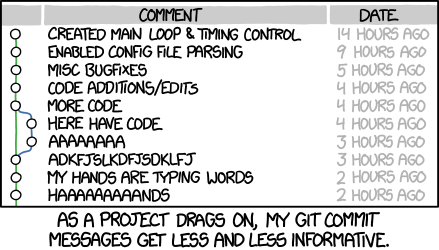
* Writing "good" commit messages (utility)
* `git status`
* `git log`
* > Why is it useful to have the author’s name and e-mail address in the history log?
* Issues with paging in the terminal. How to **Q**uit
1. Branches and merging
* What is a branch?
* How to create a branch in the GitHub interface
* Exercise: make some changes in a local branch
* Create a pull-request on GitHub
* How to create a branch locally
* Delete a branch in the GitHub interface
* Delete a branch locally
1. GitHub "Fork"s
* What is a fork
* Pull requests on forks
* Practical: make a pull request from your fork to the upstream repository
1. `.gitignore`
* Github provides some templates
1. Using RStudio as a git porcelain
## QUIZ for 2nd day of training
1. What is True about Git / GitHub?
a. GitHub is software for versioning
b. Git is a website to keep backups of git projects
c. GitHub is a website for backups and collaborations
d. Git and GitHub are the same
2. To start a new Git project I should:
a. `git add 'project name'`
b. `git init`
c. `git commit -m 'project description'`
d. `git remote add`
3. To save one version of the project in git I:
a. `git add` then `git commit -m "msg"` then `git push`
b. `git add` then `git commit -m "msg"`
c. `git commit` then `git push`
d. `git save --version`
4. What should I consider when writing the commit message?
a. I write a reference to explain to myself what changes were made.
b. I write my considerations on why and how changes were made.
c. I write about possible effects and limitations of my changes.
d. I write about why, how, effects and limitations of my changes.
4. What would be the best commit message:
a. `.`
b. `Changes`
c. `Changed the file zzz.py on Tuesday`
d. `Reworded unclear sentence in Introduction`
5. If I initialize a new git repository in a subdirectory of an existing repository, what should I do:
a. Delete both repositories, nothing else works.
b. Delete the new folder completely.
c. Delete the '.git' from the new repo.
d. Just commit in both and all works fine.
```
folder/
.git/
subfolder/
important_data.txt
.git/
```
6. I want to check what I have commited and what not. I can use:
a. `git status`
b. `git check`
c. `git commit --list`
d. `git summary`
7. I believe my previous version is better, how can I check?
a. `git compare`
b. `git diff`
c. `git show`
d. `git gud`
8. I want to go back to my previous version, I need to use:
a. it is not possible
b. `git commit --undo`
c. `git rebase`
d. `git revert`
9. I have started a collaboration with a friend, how do I get a copy of the repo on my computer?
a. `git push`
b. `git clone`
c. `git pull`
d. I just need an invitation
10. To share my modifications with my friend we (Myself // My friend) both need:
a. I `commit` THEN `push` // THEY `pull`
b. I `commit` THEN `pull` // THEY `clone`
c. I `pull` THEN `clone` // THEY `push`
d. I `push` // THEY `clone` THEN `pull`
11. Why does git use the concept of a staging area?
a. life is complex, so is software
b. you want to be able aggregate changes in larger logical units
c. I like shopping, putting items in baskets makes me happy
d. I just have to do it -- [Shia LaBeolf](https://youtu.be/ZXsQAXx_ao0)
## Footnotes
[^mean]: Could potentially trick students into running `rm -r ${REPO_FOLDER}`
 Google Drive
Gist
Clipboard
Google Drive
Gist
Clipboard
 Sign in with Wallet






