# 9001 python week 6 lists
## list and tuples
```python=
a = ['Please Please Me', 'Help!', 'Abbey Road']
b = a
print(a)
print(b)
b[1] = 'Let It Be'
print(a)
print(b) # a 和 b 指代的数组都变了。因为a,b没有新创地址存值,而是新值。 memory address!
```
## sys.argv 的解释和使用
Another way for users to put in information is by using command line arguments. They are inserted when running the program in terminal, after the program name. To access these arguments, you will need to import sys module at the beginning of your program. sys.argv gives you all the command line arguments in a list of strings. The program name is always the first command line argument (with index 0)!
```python=
import sys
n_args = len(sys.argv)
i = 0
while i < n_args:
argument = sys.argv[i]
# print(argument[0], end='')
print(argument) # phonetic_spelling.py hotel echo lima lima oscar
i += 1
print(sys.argv) # ['phonetic_spelling.py', 'hotel', 'echo', 'lima', 'lima', 'oscar']
```
---
# 9001 python week 7 break ,continue , return
break : To break out of a loop
continue: To continue to the next iteration of a loop
return: The return keyword is to exit a function and return a value.
raise: To raise an exception
* break may only occur syntactically nested in a for or while loop.
* continue may only occur syntactically nested in a for or while loop.
demo
```python=
keep_running = True
i = 0
while i < 10 and keep_running:
j = 0
while j < 10 and keep_running:
if i == 5 and j == 5:
keep_running = False
break
print("i: {}, j: {}".format(i, j))
j += 1
print("hello")
i += 1
```
---
# 9001 python week 8 testing
作业要求:
## Explain the difference between **assert** and **raise** statements. **When** do you use these statements?
### Assert:
格式: assert <condition> , "This is an optional error message!"
The assert statement will assess a Boolean condition that is given to it.
If true: then nothing happend,
if false: it will raise an ***AssertionError***
用途:testing:
This can be very useful for testing!
We can take simple unit test cases and convert them quite easily into a series of assert statements - all we'd have to do is simply call the function with the correct inputs and compare the result against our expected output.
demo:
```python=
def some_function(a, b):
if not isinstance(a, int) or not isinstance(b, int):
return None
return a + b
assert some_function(1, 2) == 3, "Test case 1 failed."
print("Test case 1 passed!") # These print statements are optional.
assert some_function(0, 0) == 0, "Test case 2 failed."
print("Test case 2 passed!")
```
Usually, however, tests are kept in a file that is **separate** from the code that we are looking to examine. This file is sometimes called a **test driver program**.
### Raise:
Raise an exception
To throw (or raise) an exception, use the raise keyword.
```python=
x = -1
if x < 0:
raise Exception("Sorry, no numbers below zero")
```
也可以是 TypeError; ValueError ; ZeroDivisionError
### Test Driver 案例
1. Import the components that you want to test from your source code.
2. Define a function for each test case, using assert statements to enforce each one.
3. Call the functions as necessary.
```python=
from some_program import some_function
def test_happy_path_1():
assert some_function(1, 2) == 3, "Test case 1 failed."
print("Test case 1 passed!")
def test_happy_path_2():
assert some_function(0, 0) == 0, "Test case 2 failed."
print("Test case 2 passed!")
def test_invalid_type():
assert some_function("Oh no", 3) == None, "Invalid type mishandled."
print("Invalid type handled correctly!")
# ... and so on.
# Run these tests
if __name__ == "__main__":
test_happy_path_1()
test_happy_path_2()
test_invalid_type()
```
---
## Explain the difference between **end-to-end tests**, **integration test** and **unit test**. What type of testing did you **perform** in this question?
* Unit Tests describe fast, simple tests that target the smallest possible. see the function is running correct or not.
* Integration Tests examine how different components of a system interact with one another.
* End-to-End Tests are large, complex tests that assess the full functionality of a system or program.
### Test Case Design
* Positive test cases
* Negative test cases
* Edge cases
---
End-To-End Testing 用diff bash command。
```bash=
diff a.py b.py
```
Unit Tests & white box 用 assert。
---
## Are the **test cases** that you have generated sufficient to thoroughly test your program? Explain your answer.
---
## bash redirection & pipe
* Input redirection
```shell=
python3 print_num.py < number.txt (input redirection)
```
* Output redirection
```shell=
python3 print_num.py < number.txt > out.txt && cat out.txt (combining input & output redirection)
```
* Pipe (This allows outputs (stdout) from program1 to be used as input (stdin) of program2.)
```shell=
cat number.txt | python3 print_num.py
pwd | cowsay
```
* diff (symbol: a for add, c for change, or d for delete)
```shell=
diff groceries-a.txt groceries-b.txt
```
进阶:
```shell=
python3 [program name] < [test].in | diff - [test].out
```
```shell=
#! /usr/bin/env sh
echo "##########################"
echo "### Testing quadratic.py"
echo "##########################\n"
count=0 # number of test cases run so far
# Assume all `.in` and `.out` files are located in a separate `tests` directory
for test in tests/*.in; do
name=$(basename $test .in)
expected=tests/$name.out
python3 quadratic.py < $test | diff - $expected || echo "Test $name: failed!\n"
count=$((count+1))
done
echo "Finished running $count tests!"
```
---
## try / expect 使用
```python=
try:
print(x)
except:
print("Something went wrong")
else:
print("no error")
finally:
print("The 'try except' is finished")
```
```python=
try:
num = int(input("Enter first number: "))
denom = int(input("Enter second number: "))
print("{} divided by {} is {}.".format(num, denom, num/denom))
# except Exception:
# print("Wait a second, what went wrong?")
except ValueError:
print("Please only enter integers!")
except ZeroDivisionError:
print("Division by zero is undefined :(")
except:
print("Wait a second, what went wrong?")
```
***注意: 尽力不用Exception ,因为不知道具体哪里出了问题***
---
# 9001 python week 9 file
## read file
```python=
filename = "alphabet.txt"
f = open(filename, "r")
print(f.read()) # 也可以显示要读字数的内容 eg:print(f.read(1))
```
```python=
filename = "alphabet.txt"
filea = open(filename, 'r')
print("This is the start of the NATO phonetic alphabet:")
while True:
line = filea.readline() # 显示每一行
if line == "":
break
print(line)
filea.close()
```
## write file
```python=
# Write to file
filename = "shopping.txt"
fobj = open(filename, "w")
char = fobj.write("Coffee\n")
print("Milk", file=fobj)
fobj.close()
```
## Extra: with
You may have seen that we can open files (in any mode) in Python with a with statement, like so:
```python=
with open('my_file.txt', 'w') as f:
f.write('Hello world!')
```
---
# Week 10 Object
## Basic Class
```python=
class <ClassName>:
#It must always have the __init__(self, ...) function,
#which is also known as the constructor of the class.
#It constructs the class objects! init stands for initialise.
def __init__(self, ...):
pass
<!-- just with init value -->
class Fruit:
def __init__(self, weight, sweetness, colour):
self.weight = weight
self.sweetness = sweetness
self.colour = colour
<!-- 创建对象 -->
apple = Fruit(50, 90, 'red')
<!-- 带function的 class -->
class Fruit:
def __init__(self, weight, sweetness, colour):
self.weight = weight
self.sweetness = sweetness
self.colour = colour
def value(self):
return self.weight * self.sweetness
apple = Fruit(10,5,'red')
print(apple.value())
<!-- Static methods are methods that DO NOT depend on the instance. -->
class Fruit:
def __init__(self, weight, sweetness, colour):
self.weight = weight
self.sweetness = sweetness
self.colour = colour
def value(self):
return self.weight * self.sweetness
def total_value(list_of_fruits):
total = 0
for fruit in list_of_fruits:
total += fruit.value() # Call each fruit's value and add it.
return total
ls = [Fruit(10, 15, 'black'), Fruit(5, 50, 'red')]
print(Fruit.total_value(ls))
```
---
# week 11 Recursion
## 递归回顾
递归是解决问题的一种简单直观的方法。它的工作原理是反复将较大的问题分解为较小的问题,这些问题更容易解决。
递归有两个基本成分:
基本情况(要停止的地方)
递归关系(一种继续的方式)
```python=
def print_num(n):
if n<0:
return
print(n)
print_num(n-1)
print_num(5)
```
## 扩展 DFS 和 BFS (不考)
---
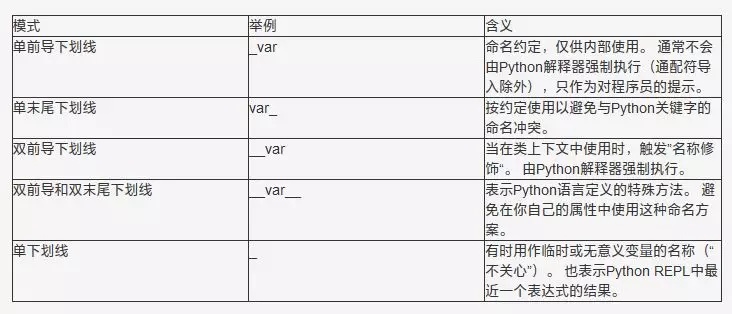
Python 中下划线的 5 种含义:
https://www.runoob.com/w3cnote/python-5-underline.html
 Google Drive
Gist
Clipboard
Google Drive
Gist
Clipboard
 Sign in with Wallet






