Ming Hung Tsai
    • Create new note
    • Create a note from template
      • Sharing URL Link copied
      • /edit
      • View mode
        • Edit mode
        • View mode
        • Book mode
        • Slide mode
        Edit mode View mode Book mode Slide mode
      • Customize slides
      • Note Permission
      • Read
        • Only me
        • Signed-in users
        • Everyone
        Only me Signed-in users Everyone
      • Write
        • Only me
        • Signed-in users
        • Everyone
        Only me Signed-in users Everyone
      • Engagement control Commenting, Suggest edit, Emoji Reply
    • Invite by email
      Invitee

      This note has no invitees

    • Publish Note

      Share your work with the world Congratulations! 🎉 Your note is out in the world Publish Note No publishing access yet

      Your note will be visible on your profile and discoverable by anyone.
      Your note is now live.
      This note is visible on your profile and discoverable online.
      Everyone on the web can find and read all notes of this public team.

      Your account was recently created. Publishing will be available soon, allowing you to share notes on your public page and in search results.

      Your team account was recently created. Publishing will be available soon, allowing you to share notes on your public page and in search results.

      Explore these features while you wait
      Complete general settings
      Bookmark and like published notes
      Write a few more notes
      Complete general settings
      Write a few more notes
      See published notes
      Unpublish note
      Please check the box to agree to the Community Guidelines.
      View profile
    • Commenting
      Permission
      Disabled Forbidden Owners Signed-in users Everyone
    • Enable
    • Permission
      • Forbidden
      • Owners
      • Signed-in users
      • Everyone
    • Suggest edit
      Permission
      Disabled Forbidden Owners Signed-in users Everyone
    • Enable
    • Permission
      • Forbidden
      • Owners
      • Signed-in users
    • Emoji Reply
    • Enable
    • Versions and GitHub Sync
    • Note settings
    • Note Insights New
    • Engagement control
    • Make a copy
    • Transfer ownership
    • Delete this note
    • Save as template
    • Insert from template
    • Import from
      • Dropbox
      • Google Drive
      • Gist
      • Clipboard
    • Export to
      • Dropbox
      • Google Drive
      • Gist
    • Download
      • Markdown
      • HTML
      • Raw HTML
Menu Note settings Note Insights Versions and GitHub Sync Sharing URL Create Help
Create Create new note Create a note from template
Menu
Options
Engagement control Make a copy Transfer ownership Delete this note
Import from
Dropbox Google Drive Gist Clipboard
Export to
Dropbox Google Drive Gist
Download
Markdown HTML Raw HTML
Back
Sharing URL Link copied
/edit
View mode
  • Edit mode
  • View mode
  • Book mode
  • Slide mode
Edit mode View mode Book mode Slide mode
Customize slides
Note Permission
Read
Only me
  • Only me
  • Signed-in users
  • Everyone
Only me Signed-in users Everyone
Write
Only me
  • Only me
  • Signed-in users
  • Everyone
Only me Signed-in users Everyone
Engagement control Commenting, Suggest edit, Emoji Reply
  • Invite by email
    Invitee

    This note has no invitees

  • Publish Note

    Share your work with the world Congratulations! 🎉 Your note is out in the world Publish Note No publishing access yet

    Your note will be visible on your profile and discoverable by anyone.
    Your note is now live.
    This note is visible on your profile and discoverable online.
    Everyone on the web can find and read all notes of this public team.

    Your account was recently created. Publishing will be available soon, allowing you to share notes on your public page and in search results.

    Your team account was recently created. Publishing will be available soon, allowing you to share notes on your public page and in search results.

    Explore these features while you wait
    Complete general settings
    Bookmark and like published notes
    Write a few more notes
    Complete general settings
    Write a few more notes
    See published notes
    Unpublish note
    Please check the box to agree to the Community Guidelines.
    View profile
    Engagement control
    Commenting
    Permission
    Disabled Forbidden Owners Signed-in users Everyone
    Enable
    Permission
    • Forbidden
    • Owners
    • Signed-in users
    • Everyone
    Suggest edit
    Permission
    Disabled Forbidden Owners Signed-in users Everyone
    Enable
    Permission
    • Forbidden
    • Owners
    • Signed-in users
    Emoji Reply
    Enable
    Import from Dropbox Google Drive Gist Clipboard
       Owned this note    Owned this note      
    Published Linked with GitHub
    1
    • Any changes
      Be notified of any changes
    • Mention me
      Be notified of mention me
    • Unsubscribe
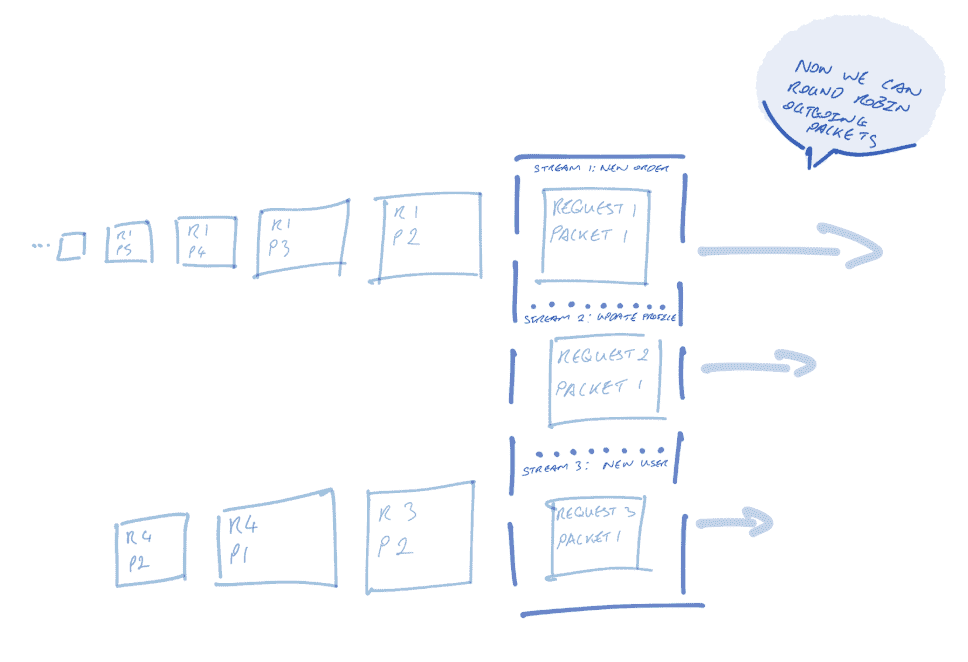
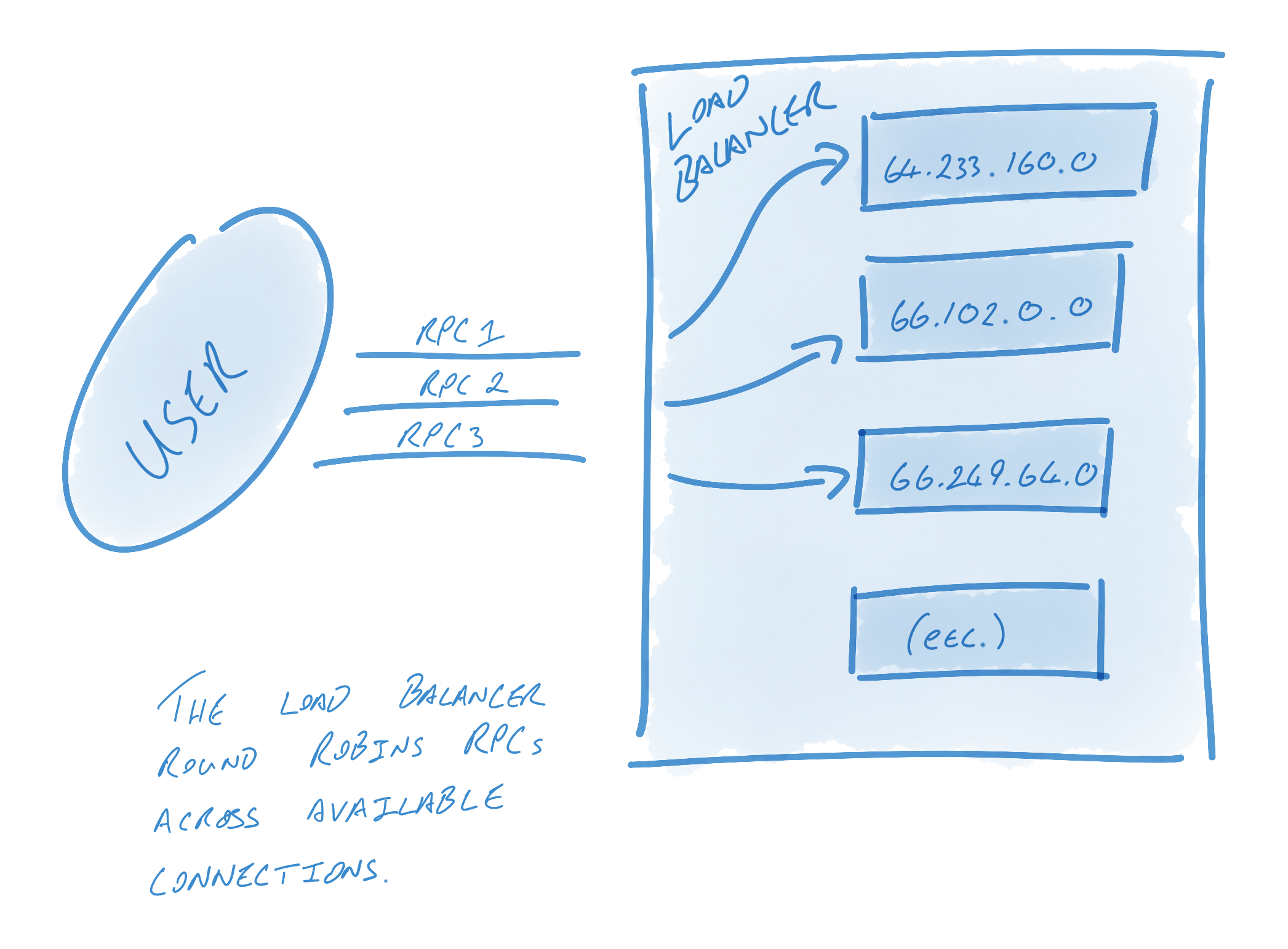
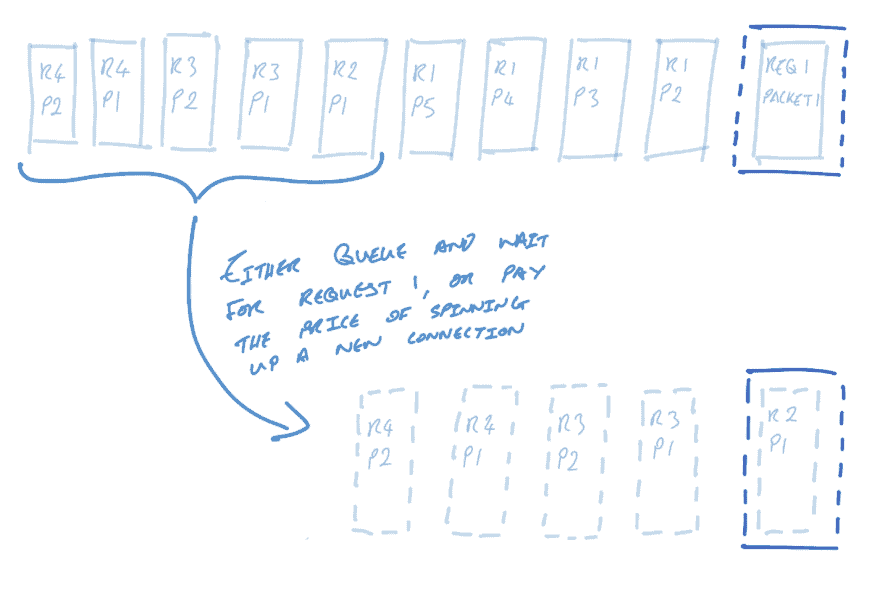
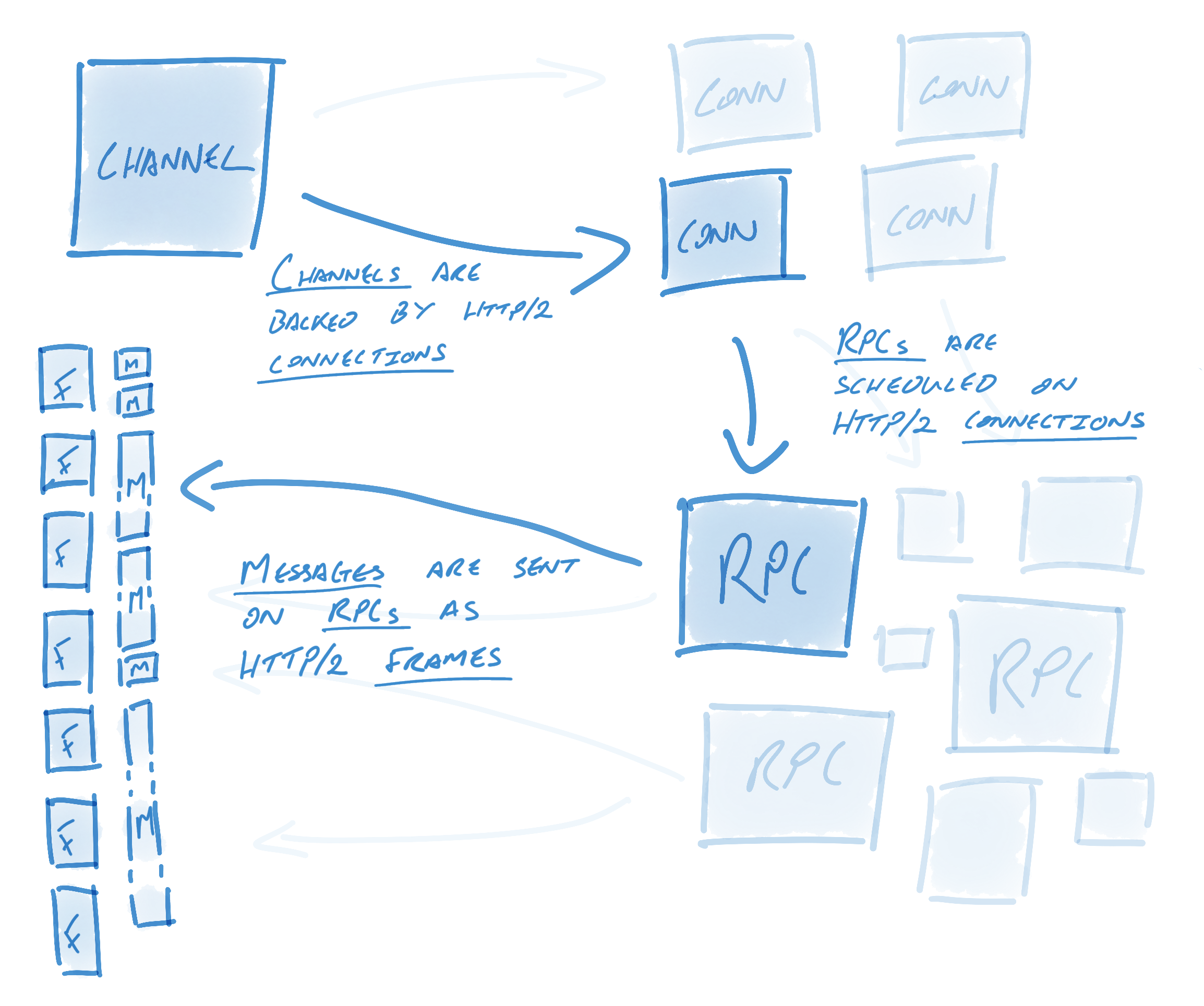
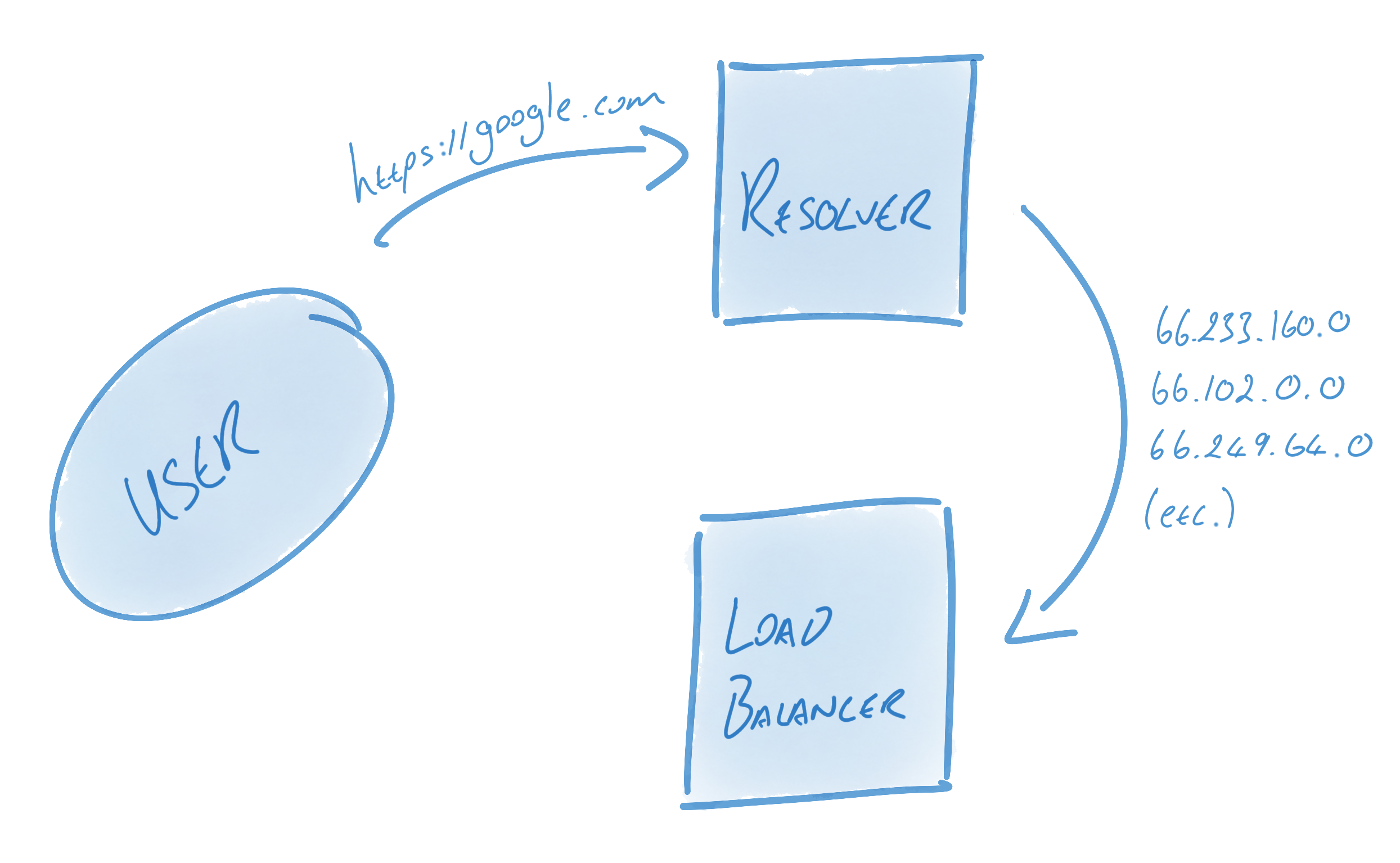
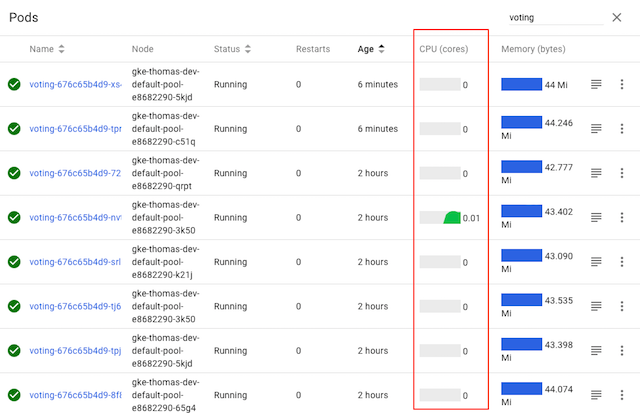
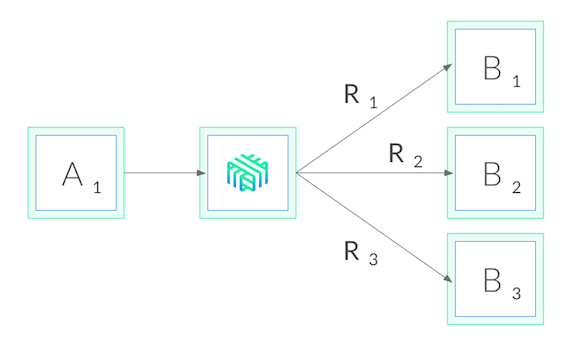
    # Why we open new connection for every request > Infrastructure doesn't support service mesh, so we need to dial new connection for every request. [Slack conversation](https://deliveryhero.slack.com/archives/C4U7N89PZ/p1639476059219900?thread_ts=1614839138.360600&cid=C4U7N89PZ) > you will have a lot od failed conenctions and downtime when pods reschedule and rotate [Slack conversation](https://deliveryhero.slack.com/archives/C4TL8T5U4/p1675245946130519) > yes, just to confirm - right now to use gRPC you need to bring up and tear down the connection every time, similar to how you would handle a REST connection - the reason for this is that if you don't, then when the cluster starts to scale, your persistent connections will still go to the existing pods, meaning the new pods won't get traffic, which in turn means that a. you won't get the benefit of the new pods and b. the service won't scale further as the new pods will have no traffic and so the average CPU usage across the pods won't trigger a scaling event # Why GRPC is fast 1. HTTP/2 * Connection Multiplexing - streams provide concurrency * Flow Control 2. Protocol Buffer * Efficient and compact binary encoding # What is HTTP/2 [Reference](https://www.cncf.io/blog/2018/07/03/http-2-smarter-at-scale/) ## Streams * Open connection is a expensive operation * Establish TCP connection / Handshake * Secure connection using TLS * Exchange Headers and Setting * HTTP/1.1 - Providing a long-lived, reusable connection * One request at a time - Starving if processing a large payload request * New request either waits for its completion or, more frequently, open a new connection * HTTP/2 Stream comes to the rescue * A series of semantically connected messages, called **frames** * connection concurrency, i.e. the ability to interleave messages on a single connection. * Concurrency does not mean parallelism, though; we can only send one packet at a time on the connection * Round Robin * User Customized priority ![image alt](https://www.cncf.io/wp-content/uploads/2020/08/Screen-Shot-2018-06-29-at-3.10.57-PM-1.png "HTTP/1.1") ![image alt](https://www.cncf.io/wp-content/uploads/2020/08/Screen-Shot-2018-06-29-at-3.10.52-PM-1.png "HTTP/2") ## Flow Control * Without Flow Control, a large stream would still break the TCP buffer size. * Stream A might be interfered by the Stream B with large payload * Flow control is used to limit the amount of outstanding data on a per-stream (and per-connection) basis * It operates as a credit system in which the receiver allocates a certain “budget” and the sender “spends” that budget # gRPC on HTTP/2 Engineering a Robust, High-performance Protocol [Reference](https://grpc.io/blog/grpc-on-http2/) ## GRPC semantics * Channel(ClientConn in Go) * RPC * Message Each channel may have many RPCs while each RPC may have many messages. how gRPC semantics relate to HTTP/2 ![image alt](https://grpc.io/img/grpc_on_http2_mapping_2.png) * HTTP/2 enable mutiple concurrent conversation on a single connection * Channel Extend this concept by multiple streams over multiple concurrent connections * an incredible amount of engineering goes into keeping these connections **alive, healthy, and utilized.** * Channels represent virtual connections to an endpoint, which in reality may be backed by many HTTP/2 connections * RPCs are in practice plain HTTP/2 streams * Messages are associated with RPCs and get sent as HTTP/2 data frames. ## Resolvers and Load Balancer * In order to keep connections alive, healthy, and utilized, gRPC utilizes a number of components, foremost among them name resolvers and load balancers * Resolver: turn name into address and hand them to the load balancer.(Example: DNS resolver) * Load Balancer: In charge of creating connection from these addresses & load balancing RPCs between them ![image alt](https://grpc.io/img/dns_to_load_balancer_mapping_3.png) ![image alt](https://grpc.io/img/load_balance_round_robins_2.png) > Alternatively, a user who wants multiple connections but knows that the host name will only resolve to one address might have their balancer create connections against each address 10 times to ensure that multiple connections are used. [GRPC balancer package](https://pkg.go.dev/google.golang.org/grpc/balancer) * Take away * GRPC manage the connection pool in nature * GRPC provides the client side load balancing if a name can resolves to multiple ip addresses. ## Connection Management * Once configured, gRPC will keep the pool of connections - as defined by the resolver and balancer - healthy, alive, and utilized. * When a connection fails * Load Balancer would reconnection using the last know addresses * The Resolver would re-resolve the addresses * Once resolution is done * Load balancer would tear down the connection to address not present in the list * Load balancer would create new connection to addresses that weren't here previously ## Identifying Failed Connections 1. Clean Failure: the failure is communicated * For example, the server gracefully shutdown(morty deployment) * This ends the HTTP/2 connection, GRPC would reconnect as described above 3. less-clean Failure * when configured using KeepAlive, gRPC will periodically send HTTP/2 PING frames * If a PING response does not return within a timely fashion, gRPC will consider the connection failed, close the connection, and begin reconnecting (as described above) * Take away * The first statement is not fully ture: "you will have a lot od failed conenctions and downtime when pods reschedule and rotate". * Grpc would manage the failed connection in the background in theory. For less-clean failure, we can resolve through keep-alive grpc feature([Go example code](https://github.com/grpc/grpc-go/tree/master/examples/features/keepalive)) * Load Balancing is built in the GRPC, should be no problem? Would discover this in the following chapters. # K8s load balancing ## [Services](https://kubernetes.io/docs/concepts/services-networking/service/) * Pods are ephemeral resources - the set of Pods running in one moment in time could be different from the set of Pods running that application a moment later * The Service API, part of Kubernetes, is an abstraction to help you expose groups of Pods over a network. Each Service object defines a logical set of endpoints (usually these endpoints are Pods) along with a policy about how to make those pods accessible. * [Cluster IP](https://kubernetes.io/docs/concepts/services-networking/service/#type-clusterip) by default: One host can be resolved to only one cluster IP address. * [gRPC Load Balancing on Kubernetes without Tears](https://kubernetes.io/blog/2018/11/07/grpc-load-balancing-on-kubernetes-without-tears/) ![image alt](https://d33wubrfki0l68.cloudfront.net/8ce21facff302ed07c286ea5608b6a6e04ae01b5/931f0/images/blog/grpc-load-balancing-with-linkerd/screenshot2018-11-0116-c4d86100-afc1-4a08-a01c-16da391756dd.34.36.png) * Service Mesh - gRPC load balancing on Kubernetes with Linkerd * these proxies watch the Kubernetes API and do gRPC load balancing automatically * It would require a control plane installed in our cluster, which requires infra support. It's still in progress ![image alt](https://d33wubrfki0l68.cloudfront.net/c53a0b6d4b3ab1889d2bedb8c4f59a3767da7510/26152/images/blog/grpc-load-balancing-with-linkerd/linkerd-8df1031c-cdd1-4164-8e91-00f2d941e93f.io.png) # What's our option to improve our client 1. Customize the grpc balancer component 2. Refresh the connection in a interval * The rationale behind this is that opening a new connection and let k8s connection load balancing reschule a pod for us to connect. 3. [KubeResolver](https://github.com/sercand/kuberesolver) # Other useful References [gRPC Load Balancing on Kubernetes examples](https://github.com/jtattermusch/grpc-loadbalancing-kubernetes-examples) [Load balancing and scaling long-lived connections in Kubernetes](https://learnk8s.io/kubernetes-long-lived-connections) [API Gateway to Service Mesh: Navigating a Changing Landscape - Zhamak Dehghani](https://www.youtube.com/watch?v=QYdOJ0QJptE)

    Import from clipboard

    Paste your markdown or webpage here...

    Advanced permission required

    Your current role can only read. Ask the system administrator to acquire write and comment permission.

    This team is disabled

    Sorry, this team is disabled. You can't edit this note.

    This note is locked

    Sorry, only owner can edit this note.

    Reach the limit

    Sorry, you've reached the max length this note can be.
    Please reduce the content or divide it to more notes, thank you!

    Import from Gist

    Import from Snippet

    or

    Export to Snippet

    Are you sure?

    Do you really want to delete this note?
    All users will lose their connection.

    Create a note from template

    Create a note from template

    Oops...
    This template has been removed or transferred.
    Upgrade
    All
    • All
    • Team
    No template.

    Create a template

    Upgrade

    Delete template

    Do you really want to delete this template?
    Turn this template into a regular note and keep its content, versions, and comments.

    This page need refresh

    You have an incompatible client version.
    Refresh to update.
    New version available!
    See releases notes here
    Refresh to enjoy new features.
    Your user state has changed.
    Refresh to load new user state.

    Sign in

    Forgot password
    or
    Sign in via Facebook Sign in via X(Twitter) Sign in via GitHub Sign in via Dropbox Sign in with Wallet
    Wallet ( )
    Connect another wallet

    New to HackMD? Sign up

    By signing in, you agree to our terms of service.

    Help

    • English
    • 中文
    • Français
    • Deutsch
    • 日本語
    • Español
    • Català
    • Ελληνικά
    • Português
    • italiano
    • Türkçe
    • Русский
    • Nederlands
    • hrvatski jezik
    • język polski
    • Українська
    • हिन्दी
    • svenska
    • Esperanto
    • dansk

    Documents

    Help & Tutorial

    How to use Book mode

    Slide Example

    API Docs

    Edit in VSCode

    Install browser extension

    Contacts

    Feedback

    Discord

    Send us email

    Resources

    Releases

    Pricing

    Blog

    Policy

    Terms

    Privacy

    Cheatsheet

    Syntax Example Reference
    # Header Header 基本排版
    - Unordered List
    • Unordered List
    1. Ordered List
    1. Ordered List
    - [ ] Todo List
    • Todo List
    > Blockquote
    Blockquote
    **Bold font** Bold font
    *Italics font* Italics font
    ~~Strikethrough~~ Strikethrough
    19^th^ 19th
    H~2~O H2O
    ++Inserted text++ Inserted text
    ==Marked text== Marked text
    [link text](https:// "title") Link
    ![image alt](https:// "title") Image
    `Code` Code 在筆記中貼入程式碼
    ```javascript
    var i = 0;
    ```
    var i = 0;
    :smile: :smile: Emoji list
    {%youtube youtube_id %} Externals
    $L^aT_eX$ LaTeX
    :::info
    This is a alert area.
    :::

    This is a alert area.

    Versions and GitHub Sync
    Get Full History Access

    • Edit version name
    • Delete

    revision author avatar     named on  

    More Less

    Note content is identical to the latest version.
    Compare
      Choose a version
      No search result
      Version not found
    Sign in to link this note to GitHub
    Learn more
    This note is not linked with GitHub
     

    Feedback

    Submission failed, please try again

    Thanks for your support.

    On a scale of 0-10, how likely is it that you would recommend HackMD to your friends, family or business associates?

    Please give us some advice and help us improve HackMD.


    Thanks for your feedback

    Remove version name

    Do you want to remove this version name and description?

    Transfer ownership

    Transfer to
      Warning: is a public team. If you transfer note to this team, everyone on the web can find and read this note.

        Link with GitHub

        Please authorize HackMD on GitHub
        • Please sign in to GitHub and install the HackMD app on your GitHub repo.
        • HackMD links with GitHub through a GitHub App. You can choose which repo to install our App.
        Learn more  Sign in to GitHub

        Push the note to GitHub Push to GitHub Pull a file from GitHub

          Authorize again
         

        Choose which file to push to

        Select repo
        Refresh Authorize more repos
        Select branch
        Select file
        Select branch
        Choose version(s) to push
        • Save a new version and push
        • Choose from existing versions
        Include title and tags
        Available push count

        Pull from GitHub

         
        File from GitHub
        File from HackMD

        GitHub Link Settings

        File linked

        Linked by
        File path
        Last synced branch
        Available push count

        Danger Zone

        Unlink
        You will no longer receive notification when GitHub file changes after unlink.

        Syncing

        Push failed

        Push successfully