# Free5GC
[Reference of installing free5gc](https://free5gc.org/guide/3-install-free5gc/#a-prerequisites)
[Reference of install ueransim](https://free5gc.org/guide/5-install-ueransim/)(Unorganized)
>[!Note]
>The note was tested based on v3.3.0 with some updated info, so the dependencies using here are for v3.3.0.
## Version update
> [!Note] Reference
> [Free5GC official update](https://free5gc.org/history/)
> [Gihub release](https://github.com/free5gc/free5gc/releases)
### Notes for timeline
* 2021/02/01 v3.0.5
* N3IWF: Update N3IWF module
* **2022/03/30** v3.1.0
* **2022/06/30** v3.2.0
* 2022/07/06 v3.2.1 **(OAI tested)**
* Update N3IWF module hash
* **2023/06/08** v3.3.0 **(TEEP OAI tested)** **(Need to test again)**
* Update N3IWF hash
* **2024/02/16** v3.4.0
* Update AMF, N3IWF hash due to sctp module update
* 2024/09/05 v3.4.3
* Add TNGF
* Update N3IWF (Second registration problem debugging)
* 2024/11/12 v3.4.4
* N3IWF support NAT-T with N3IWUE
* N3IWF Refactor, including the configuration file
* 2025/03/03 v4.0.0
* R15 > R17
### Realease details
:::spoiler Copypaste from v3.4.0 to v4.0.0
March 3, 2025: v4.0.0
---------------------
The release v4.0.0 of free5GC upgrade the SBI server/consumer implementaions for All of NFs (except for NEF) to 3GPP R17 standards.
The NEF upgrade is ongoing, and the R17 support will be released in v4.0.1.
Feb 26, 2025: v3.4.5
--------------------
The release v3.4.5 of free5GC fixed a series of bugs, which including:
- Online Charging feature with ULCL deployment
- [SMF #71: SM contexts collection Response not compliant to standard](https://github.com/free5gc/smf/issues/71)
- [free5GC #627: There is an error in the information listed for QoS-related parameters](https://github.com/free5gc/free5gc/issues/627)
- [free5GC #630: Regarding the PDU session release process during IDLE state](https://github.com/free5gc/free5gc/issues/630)
- free5GC Issue #617 - #620, #635 - #638
Besides, the version v3.4.5 is the final release for 3GPP R15.
We're no longer maintain the 3GPP R15 branch, any technical issue/vulnerability/feature will be added in the 3GPP R17 branch only.
2024 Roadmap
------------
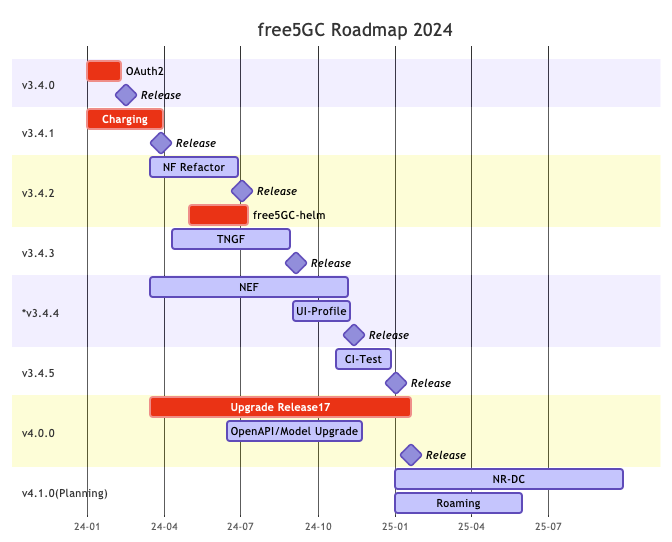
Nov 12, 2024: v3.4.4
--------------------
The release of free5GC v3.4.4 includes several new features, including default profile values in the Webconsole, a search bar for profiles and subscribers, NEF support for Traffic Influence, and NAT-T support for N3IWUE in N3IWF. The N3IWF configuration file has been refactored. Bug fixes address SMF ULCL charging issues, AMF authentication procedures, UE RAT type determination, and a UDM SUCI profile B decrypt error, along with other issues reported on GitHub and the free5GC forum.
**\[Features\]**
- Add Profile(default values) for create subscriber in Webconsole
- Add Webconsole Search Bar for Profiles and Subscribers
- Released NEF that supporting Traffic Influence
- N3IWF support NAT-T with N3IWUE
- Go-UPF with [v0.9.3 GTP5G Version](https://github.com/free5gc/gtp5g/tree/v0.9.3)
- SMF support SDM Subscription and Unsubscription for UE Session [#123](https://github.com/free5gc/smf/pull/123)
**\[Refactor\]**
- N3IWF Refactor, including the configuration file [#618](https://github.com/free5gc/free5gc/pull/618)
- SMF Refactor, using Go context to track UPF association state [#122](https://github.com/free5gc/smf/pull/122)
**\[Bugs\]**
- SMF ULCL Charging Bugs
- AMF authentication procedure and UE RAT type determination issues.
- UDM SUCI profile B decrypt error [#41](https://github.com/free5gc/udm/pull/41)
- Fix some bug reports from [Issues](https://github.com/free5gc/free5gc/issues) or [Forum](https://forum.free5gc.org/)
Sep 5, 2024: v3.4.3
-------------------
The release of free5GC v3.4.3 includes several new features, such as new network function TNGF, support for an empty SD value in SNSSAI, and the ability to disable CGF in CHF. It also features a refactored Subscriber Modal Page in the Webconsole. Additionally, several bugs have been fixed, including issues with double registration with N3IWF and unauthorized UE context releases, along with other bug fixes reported via GitHub issues and the free5GC forum.
**\[Features\]**
- Release TNGF & TNGFUE
- Support empty SD value (SNSSAI)
- Support disable CGF in CHF
**\[Refactor\]**
- Refactor Subscriber Modal Page in Webconsole
**\[Bugs\]**
- Fix can't registration with N3IWF twice problems
- Fix UEs can be context released by a second UE without authentication (src: [Issue](https://github.com/free5gc/free5gc/issues/580))
- Fix some bug reports from [Issues](https://github.com/free5gc/free5gc/issues) or [Forum](https://forum.free5gc.org/)
July 3, 2024: v3.4.2
--------------------
The free5GC v3.4.2 includes a Go version update to 1.21 and refactoring all Network Functions. New features include setting static IPs for UEs and OAuth2 authentication for the webconsole, plus a ULCL example in free5gc-compose. Bug fixes and a new commit message check are also included.
**\[Refactor\]**
- Go version bump to Go1.21
- Refactor NFs for preparation upgrading openapi to Release17
**\[Features\]**
- Set Static-IP for UE in webconsole
- Webconsole acts as AF and uses OAuth2 authentication to get OAM service from NFs
- Add ULCL docker-compose example in [free5gc-compose](https://github.com/free5gc/free5gc-compose)
- Session AMBR in Data Plane
- CHF on k8s
**\[Bugs\]**
- Fix N3IWUE fails to ping when having flow rules([v1.0.1](https://github.com/free5gc/n3iwue/tree/v1.0.1))
- Fix some bug reports from [Issues](https://github.com/free5gc/free5gc/issues) or [Forum](https://forum.free5gc.org/)
**\[Chore\]**
- Apply [Conventional Commit Message](https://www.conventionalcommits.org/en/v1.0.0/) check in Pull Request
March 28, 2024: v3.4.1
----------------------
In free5GC v3.4.1, Convergent Charging on PDU Session will be fully supported!
Users will see the data usage on the webconsole after the PDU Session is created (please note that: The charging method (Online/Offline) needs to be determined during the subscription creation).
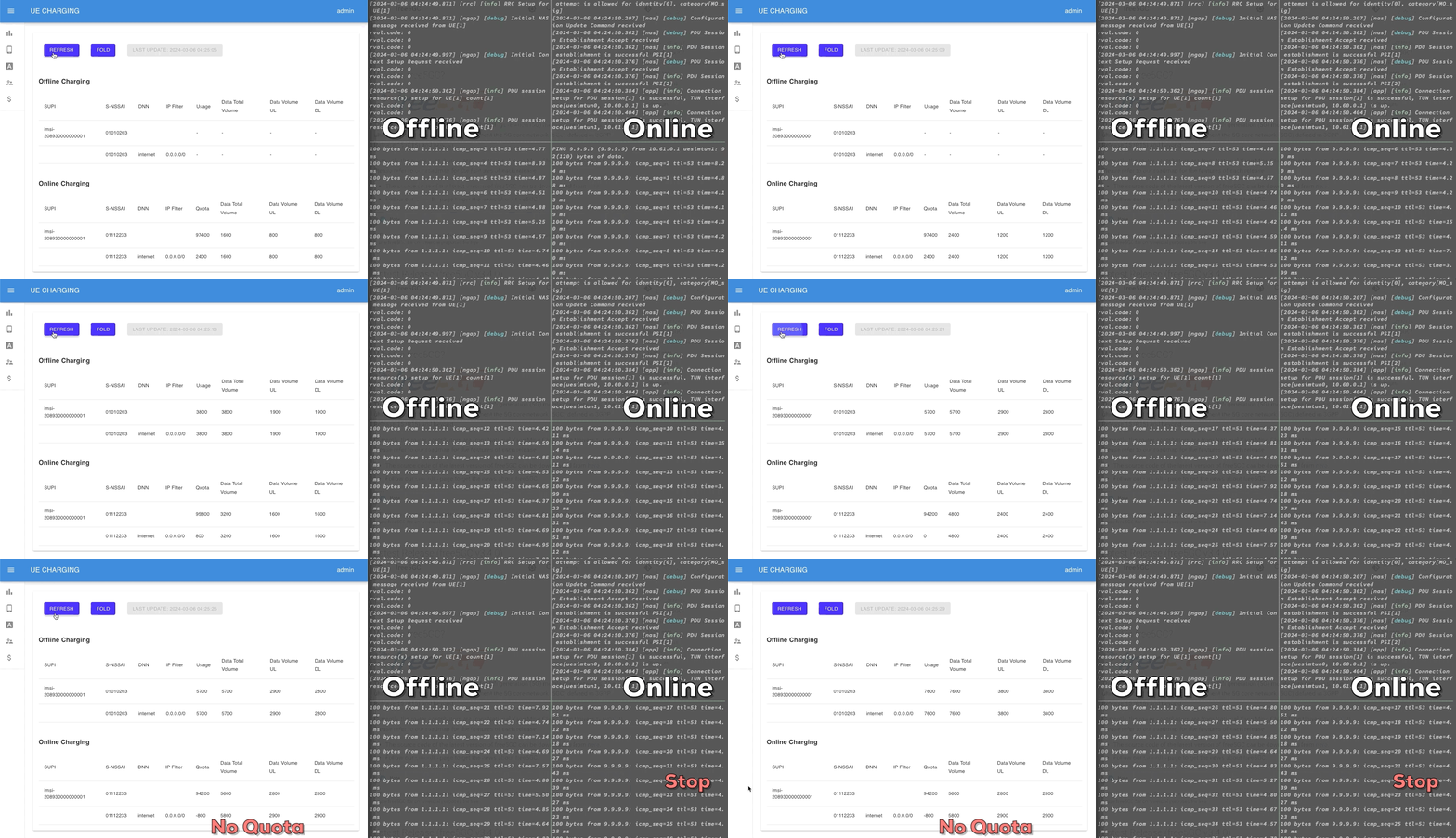
If you're interested in the implementation details, please visit the [CHF design document](https://free5gc.org/guide/Chf/design/).
Feb 16, 2024: v3.4.0
--------------------
We are delighted to unveil the release of free5GC v3.4.0! In this latest version, free5GC now boasts support for [OAuth](https://oauth.net/2/) within the Service-Based Architecture (SBA), marking a significant advancement in its capabilities. Furthermore, we have diligently addressed several issues and bugs that were reported by the Open-Source community, ensuring a smoother and more reliable user experience.
- OAuth Support
- NRF acts as authorization server
- All Services in AMF, SMF, NRF, PCF, UDR, UDM, AUSF, NSSF are supported to validate/request access token
- Implicit De-registration
- Use case: UE has registered on Old AMF and send registration request to new AMF
- New AMF is able to get the UE context by asking the old AMF, and old AMF will do the implicit de-registration.
- Support NAS Reroute ([Issue #413](https://github.com/free5gc/free5gc/issues/413))
- Support NITZ (Network Identiy and Time Zone) in UE Configuration Update Command ([Issue #113](https://github.com/free5gc/free5gc/issues/113))
- Bugfix
- [Issue #421](https://github.com/free5gc/free5gc/issues/421)
- [Issue #387](https://github.com/free5gc/free5gc/issues/387)
- Release N3IWUE
- Source code: [https://github.com/free5gc/n3iwue](https://github.com/free5gc/n3iwue)
:::
:::spoiler v3.4.1
Now the newest version is : [free5GC github](https://github.com/free5gc/free5gc/releases)
* Version 3.4.1
* The SBA implementation has added support for the OAuth authorization protocol, to validate and request an access token. The NRF has added the ability to work as an authorization server.
* Added support for explicit De-registration.
* For example, a UE registered with an old AMF may send a registration request to a new AMF, and this new AMF may request the old AMF to stop registering.
* Added support for routing change requests (“NAS Reroute”).
* Support for the mechanism has been added to the UE Configuration Update command NITZ (Network Identity and Time Zone) to transfer time and time zone information to the user's device.
:::
## Prerequisites
### Two VM(Ubuntu20.04)
* Free5GC(v3.3.0):192.168.1.217
* UERANSIM:192.168.1.216
* nodejs(v16.20.2)
(Same setup as the testing of free5GC & open5GS)
* Wireshark in your own PC
* VS code to ssh to VM
### Linux Kernel Version
* In order to use the UPF element, you must use the 5.0.0-23-generic or 5.4.x version of the Linux kernel.
* If you installed Ubuntu 20.04, the version should be like 5.4.x.
* Free5gc uses the gtp5g kernel module, which has been tested and compiled against that kernel versions only.
```bash=
ubuntu@ubuntu:~$ uname -r
5.4.0-166-generic
```
:::warning
* This ubuntu version is also OK.

* But for ubuntu 22.04, you may get this version, which is not sure about the problem, so recommend to use 20.04 for stability.

:::
### Go version
* Free5gc v3.3.0 and v3.2.1 are built and tested with Go 1.18.10
```bash=
ubuntu@ubuntu:~$ go version
go version go1.17.8 linux/amd64
```
* If another version of Go is installed, remove the existing version and install Go 1.18.10:
```Linux=
# this assumes your current version of Go is in the default location:
sudo rm -rf /usr/local/go
wget https://dl.google.com/go/go1.18.10.linux-amd64.tar.gz
sudo tar -C /usr/local -zxvf go1.18.10.linux-amd64.tar.gz
```
:::warning
* Go version will update to newest in official website.
* Free5GC v3.4.2, v3.4.5 is 1.21.8
```
sudo rm -rf /usr/local/go
wget https://dl.google.com/go/go1.21.8.linux-amd64.tar.gz
sudo tar -C /usr/local -zxvf go1.21.8.linux-amd64.tar.gz
```
:::
:::spoiler Log
```shell=
ubuntu@ubuntu:~$ sudo rm -rf /usr/local/go
[sudo] password for ubuntu:
ubuntu@ubuntu:~$ wget https://dl.google.com/go/go1.18.10.linux-amd64.tar.gz
--2023-12-26 08:48:08-- https://dl.google.com/go/go1.18.10.linux-amd64.tar.gz
Resolving dl.google.com (dl.google.com)... 142.251.43.14, 2404:6800:4012::200e
Connecting to dl.google.com (dl.google.com)|142.251.43.14|:443... connected.
HTTP request sent, awaiting response... 200 OK
Length: 141977100 (135M) [application/x-gzip]
Saving to: ‘go1.18.10.linux-amd64.tar.gz’
go1.18.10.linux-amd64.tar.gz 100%[=====================================================================================================================>] 135.40M 35.3MB/s in 3.8s
2023-12-26 08:48:12 (35.7 MB/s) - ‘go1.18.10.linux-amd64.tar.gz’ saved [141977100/141977100]
ubuntu@ubuntu:~$ sudo tar -C /usr/local -zxvf go1.18.10.linux-amd64.tar.gz
......
```
:::
>
* If Go is not installed on your system:
```yaml=
wget https://dl.google.com/go/go1.18.10.linux-amd64.tar.gz
sudo tar -C /usr/local -zxvf go1.18.10.linux-amd64.tar.gz
mkdir -p ~/go/{bin,pkg,src}
# The following assume that your shell is bash:
echo 'export GOPATH=$HOME/go' >> ~/.bashrc
echo 'export GOROOT=/usr/local/go' >> ~/.bashrc
echo 'export PATH=$PATH:$GOPATH/bin:$GOROOT/bin' >> ~/.bashrc
echo 'export GO111MODULE=auto' >> ~/.bashrc
source ~/.bashrc
```
### Control-plane Supporting Packages
```=
sudo apt -y update
sudo apt -y install mongodb wget git
sudo systemctl start mongodb
```
* MongoDB 5.0+ requires a CPU with AVX support. Or downgrade your MongoDB to 4.4
* [Check way](https://forum.gamer.com.tw/C.php?bsn=742&snA=250632)
* The check command in Ubuntu, no output if not supported,
```shell=
lscpu | grep avx
grep avx /proc/cpuinfo
```

* See this [post on MongoDB's official forum](https://www.mongodb.com/community/forums/t/mongodb-5-0-cpu-intel-g4650-compatibility/116610/2)
* See also [docker-library/mongo#485 (comment)](https://github.com/docker-library/mongo/issues/485#issuecomment-891991814)
* Some solution : [VirtualBox](https://hackmd.io/@coding-guy/tf-04)
:::warning
* The newest version (v3.4) on official website use different method to install mongoDB from last version (v3.3), is may cause the problem that UE in webconsole can not be inserted.
```
# Import the public key used by the package management system
sudo apt install -y gnupg curl
curl -fsSL https://www.mongodb.org/static/pgp/server-7.0.asc | \
sudo gpg -o /usr/share/keyrings/mongodb-server-7.0.gpg --dearmor
# Create a list file for MongoDB
# Ubuntu 22.04 (Jammy)
echo "deb [ arch=amd64,arm64 signed-by=/usr/share/keyrings/mongodb-server-7.0.gpg ] https://repo.mongodb.org/apt/ubuntu jammy/mongodb-org/7.0 multiverse" | sudo tee /etc/apt/sources.list.d/mongodb-org-7.0.list
# Ubuntu 20.04 (Focal)
echo "deb [ arch=amd64,arm64 signed-by=/usr/share/keyrings/mongodb-server-7.0.gpg ] https://repo.mongodb.org/apt/ubuntu focal/mongodb-org/7.0 multiverse" | sudo tee /etc/apt/sources.list.d/mongodb-org-7.0.list
# Reload local package database & Install the MongoDB packages
sudo apt update
sudo apt install -y mongodb-org
# Run MongoDB Community Edition
# using systemd
sudo systemctl start mongod
sudo systemctl status mongod
sudo systemctl enable mongod # optional
# using init
sudo service mongod start
sudo service mongod status
# When you are using Ubuntu 20.04 and a CPU without AVX support, you can use the mongodb package provided by Ubuntu.
sudo apt install mongodb # MongoDB Server v3.6.8
```


```shell=
[ERRO][WEBUI][CTX] RestfulAPIGetMany err: server selection error: server selection timeout, current topology: { Type: Unknown, Servers: [{ Addr: localhost:27017, Type: Unknown, Last error: connection() error occured during connection handshake: dial tcp 127.0.0.1:27017: connect: connection refused }, ] }
[GIN-debug] [WARNING] You trusted all proxies, this is NOT safe. We recommend you to set a value.
```
:::
### User-plane Supporting Packages
```linux=
sudo apt -y update
sudo apt -y install git gcc g++ cmake autoconf libtool pkg-config libmnl-dev libyaml-dev
```
### Linux Host Network Settings
```linux=
sudo sysctl -w net.ipv4.ip_forward=1
sudo iptables -t nat -A POSTROUTING -o <dn_interface> -j MASQUERADE
sudo iptables -A FORWARD -p tcp -m tcp --tcp-flags SYN,RST SYN -j TCPMSS --set-mss 1400
sudo systemctl stop ufw
sudo systemctl disable ufw # prevents the firewall to wake up after a OS reboot
```
:::warning
For v3.4 :

:::
* Comfirm the <dn_interface>
```shell=
ifconfig
if a
```
:::spoiler Log
```shell=
ubuntu@ubuntu:~$ sudo sysctl -w net.ipv4.ip_forward=1
net.ipv4.ip_forward = 1
ubuntu@ubuntu:~$ sudo iptables -t nat -A POSTROUTING -o <dn_interface> -j MASQUERADE
-bash: dn_interface: No such file or directory
ubuntu@ubuntu:~$ ifconfig
ens18: flags=4163<UP,BROADCAST,RUNNING,MULTICAST> mtu 1500
inet 192.168.1.217 netmask 255.255.255.0 broadcast 192.168.1.255
inet6 fe80::456:bfff:fea3:777 prefixlen 64 scopeid 0x20<link>
inet6 fd27:41a0:607c:0:456:bfff:fea3:777 prefixlen 64 scopeid 0x0<global>
inet6 fdb8:b8d5:b0cd:1:456:bfff:fea3:777 prefixlen 64 scopeid 0x0<global>
inet6 fdb8:b8d5:b0cd:0:456:bfff:fea3:777 prefixlen 64 scopeid 0x0<global>
ether 06:56:bf:a3:07:77 txqueuelen 1000 (Ethernet)
RX packets 226027698 bytes 19968242014 (19.9 GB)
RX errors 0 dropped 7809507 overruns 0 frame 0
TX packets 3794680 bytes 655133874 (655.1 MB)
TX errors 0 dropped 0 overruns 0 carrier 0 collisions 0
lo: flags=73<UP,LOOPBACK,RUNNING> mtu 65536
inet 127.0.0.1 netmask 255.0.0.0
inet6 ::1 prefixlen 128 scopeid 0x10<host>
loop txqueuelen 1000 (Local Loopback)
RX packets 7560650 bytes 1670967143 (1.6 GB)
RX errors 0 dropped 0 overruns 0 frame 0
TX packets 7560650 bytes 1670967143 (1.6 GB)
TX errors 0 dropped 0 overruns 0 carrier 0 collisions 0
tailscale0: flags=4305<UP,POINTOPOINT,RUNNING,NOARP,MULTICAST> mtu 1280
inet 100.92.61.138 netmask 255.255.255.255 destination 100.92.61.138
inet6 fd7a:115c:a1e0:ab12:4843:cd96:625c:3d8a prefixlen 128 scopeid 0x0<global>
inet6 fe80::de4f:420e:573e:a56b prefixlen 64 scopeid 0x20<link>
unspec 00-00-00-00-00-00-00-00-00-00-00-00-00-00-00-00 txqueuelen 500 (UNSPEC)
RX packets 154047 bytes 8606483 (8.6 MB)
RX errors 0 dropped 0 overruns 0 frame 0
TX packets 250982 bytes 33744840 (33.7 MB)
TX errors 0 dropped 0 overruns 0 carrier 0 collisions 0
ubuntu@ubuntu:~$ sudo iptables -t nat -A POSTROUTING -o ens18 -j MASQUERADE
ubuntu@ubuntu:~$ sudo iptables -A FORWARD -p tcp -m tcp --tcp-flags SYN,RST SYN -j TCPMSS --set-mss 1400
ubuntu@ubuntu:~$ sudo systemctl stop ufw
ubuntu@ubuntu:~$ sudo systemctl disable ufw # prevents the firewall to wake up after a OS reboot
Synchronizing state of ufw.service with SysV service script with /lib/systemd/systemd-sysv-install.
Executing: /lib/systemd/systemd-sysv-install disable ufw
Removed /etc/systemd/system/multi-user.target.wants/ufw.service.
ubuntu@ubuntu:~$
```
:::
## Install free5gc
### Install Control Plane Elements
1. Clone the free5GC repository
* Install the latest stable build (v3.3.0), you can change the version number to install the version you want.
```linux=
git clone --recursive -b v3.3.0 -j `nproc` https://github.com/free5gc/free5gc.git
```
:::spoiler (Alternatively) to install the latest nightly build:
```linux=
cd ~/free5gc
git checkout main
git submodule sync
git submodule update --init --jobs `nproc`
git submodule foreach git checkout main
git submodule foreach git pull --jobs `nproc`
```
:::
>
2. Compile network function services in free5gc **(You also need this part after code modification)**
```=
# Build all
cd ~/free5gc
make
# Build individually
make amf
......
# Build the UPF (you may skip this step if you built all network functions above)
make upf
```
:::spoiler Correct result log
```bash=
ubuntu@ubuntu:~/free5gc$ make
Start building amf....
cd NFs/amf/cmd && \
CGO_ENABLED=0 go build -gcflags "" -ldflags "-X github.com/free5gc/util/version.VERSION=v3.3.0 -X github.com/free5gc/util/version.BUILD_TIME=2023-12-26T09:31:05Z -X github.com/free5gc/util/version.COMMIT_HASH=7907d3c0 -X github.com/free5gc/util/version.COMMIT_TIME=2023-05-20T15:04:00Z" -o /home/ubuntu/free5gc/bin/amf main.go
Start building ausf....
cd NFs/ausf/cmd && \
CGO_ENABLED=0 go build -gcflags "" -ldflags "-X github.com/free5gc/util/version.VERSION=v3.3.0 -X github.com/free5gc/util/version.BUILD_TIME=2023-12-26T09:31:22Z -X github.com/free5gc/util/version.COMMIT_HASH=64f47ebe -X github.com/free5gc/util/version.COMMIT_TIME=2023-05-11T08:11:05Z" -o /home/ubuntu/free5gc/bin/ausf main.go
Start building nrf....
cd NFs/nrf/cmd && \
CGO_ENABLED=0 go build -gcflags "" -ldflags "-X github.com/free5gc/util/version.VERSION=v3.3.0 -X github.com/free5gc/util/version.BUILD_TIME=2023-12-26T09:31:28Z -X github.com/free5gc/util/version.COMMIT_HASH=db4c0f90 -X github.com/free5gc/util/version.COMMIT_TIME=2023-05-11T08:14:48Z" -o /home/ubuntu/free5gc/bin/nrf main.go
Start building nssf....
cd NFs/nssf/cmd && \
CGO_ENABLED=0 go build -gcflags "" -ldflags "-X github.com/free5gc/util/version.VERSION=v3.3.0 -X github.com/free5gc/util/version.BUILD_TIME=2023-12-26T09:31:37Z -X github.com/free5gc/util/version.COMMIT_HASH=28cd7936 -X github.com/free5gc/util/version.COMMIT_TIME=2023-05-11T08:20:43Z" -o /home/ubuntu/free5gc/bin/nssf main.go
Start building pcf....
cd NFs/pcf/cmd && \
CGO_ENABLED=0 go build -gcflags "" -ldflags "-X github.com/free5gc/util/version.VERSION=v3.3.0 -X github.com/free5gc/util/version.BUILD_TIME=2023-12-26T09:31:40Z -X github.com/free5gc/util/version.COMMIT_HASH=17f2a8fc -X github.com/free5gc/util/version.COMMIT_TIME=2023-05-11T08:21:46Z" -o /home/ubuntu/free5gc/bin/pcf main.go
Start building smf....
cd NFs/smf/cmd && \
CGO_ENABLED=0 go build -gcflags "" -ldflags "-X github.com/free5gc/util/version.VERSION=v3.3.0 -X github.com/free5gc/util/version.BUILD_TIME=2023-12-26T09:31:45Z -X github.com/free5gc/util/version.COMMIT_HASH=8eb6843b -X github.com/free5gc/util/version.COMMIT_TIME=2023-05-31T04:43:19Z" -o /home/ubuntu/free5gc/bin/smf main.go
Start building udm....
cd NFs/udm/cmd && \
CGO_ENABLED=0 go build -gcflags "" -ldflags "-X github.com/free5gc/util/version.VERSION=v3.3.0 -X github.com/free5gc/util/version.BUILD_TIME=2023-12-26T09:31:54Z -X github.com/free5gc/util/version.COMMIT_HASH=f9aad0ef -X github.com/free5gc/util/version.COMMIT_TIME=2023-05-11T08:24:25Z" -o /home/ubuntu/free5gc/bin/udm main.go
Start building udr....
cd NFs/udr/cmd && \
CGO_ENABLED=0 go build -gcflags "" -ldflags "-X github.com/free5gc/util/version.VERSION=v3.3.0 -X github.com/free5gc/util/version.BUILD_TIME=2023-12-26T09:31:58Z -X github.com/free5gc/util/version.COMMIT_HASH=a8ef9d9f -X github.com/free5gc/util/version.COMMIT_TIME=2023-05-11T08:26:37Z" -o /home/ubuntu/free5gc/bin/udr main.go
Start building n3iwf....
cd NFs/n3iwf/cmd && \
CGO_ENABLED=0 go build -gcflags "" -ldflags "-X github.com/free5gc/util/version.VERSION=v3.3.0 -X github.com/free5gc/util/version.BUILD_TIME=2023-12-26T09:32:02Z -X github.com/free5gc/util/version.COMMIT_HASH=22988ee2 -X github.com/free5gc/util/version.COMMIT_TIME=2023-06-07T05:56:10Z" -o /home/ubuntu/free5gc/bin/n3iwf main.go
Start building upf....
cd NFs/upf/cmd && \
CGO_ENABLED=0 go build -gcflags "" -ldflags "-X github.com/free5gc/util/version.VERSION=v3.3.0 -X github.com/free5gc/util/version.BUILD_TIME=2023-12-26T09:32:08Z -X github.com/free5gc/util/version.COMMIT_HASH=4474dc86 -X github.com/free5gc/util/version.COMMIT_TIME=2023-06-08T03:37:39Z" -o /home/ubuntu/free5gc/bin/upf main.go
```
:::
### Install User Plane Function (UPF)
1. Retrieve the 5G GTP-U kernel module using git and build it
* Originally I thought I need to clone in the free5gc folder, but when the gtp5g folder is cloned in the /home/ubuntu and complile it, the free5gc still works will, which means we dont need to clone gtp5g to free5gc folder.
```linux=
## For Free5GC v3.3.0, v3.2.1
git clone -b v0.8.3 https://github.com/free5gc/gtp5g.git
## For Free5GC v3.4.2, v3.3.0
git clone -b v0.8.6 https://github.com/free5gc/gtp5g.git
## For Free5GC v3.4.5
git clone -b v0.9.5 https://github.com/free5gc/gtp5g.git
cd gtp5g
make
sudo make install
## Do this to re-compile
```
:::success
If reinstall and re-compile new new version of gtp5g is not useful, try these command.
```shell=
## 確認目前載入的 gtp5g 版本
modinfo gtp5g
##手動移除舊的 gtp5g 模組
sudo rmmod gtp5g
## 強制卸載
sudo rmmod -f gtp5g
## 重新載入 gtp5g 模組
sudo modprobe gtp5g
```
:::
:::spoiler Log
```shell=
ubuntu@ubuntu:~$ git clone -b v0.8.3 https://github.com/free5gc/gtp5g.git
fatal: destination path 'gtp5g' already exists and is not an empty directory.
ubuntu@ubuntu:~$ cd gtp5g
ubuntu@ubuntu:~/gtp5g$ make
make -C /lib/modules/5.4.0-166-generic/build M=/home/ubuntu/gtp5g modules
make[1]: Entering directory '/usr/src/linux-headers-5.4.0-166-generic'
Building modules, stage 2.
MODPOST 1 modules
make[1]: Leaving directory '/usr/src/linux-headers-5.4.0-166-generic'
ubuntu@ubuntu:~/gtp5g$ sudo make install
[sudo] password for ubuntu:
cp gtp5g.ko /lib/modules/5.4.0-166-generic/kernel/drivers/net
modprobe udp_tunnel
/sbin/depmod -a
modprobe gtp5g
echo "gtp5g" >> /etc/modules
ubuntu@ubuntu:~/gtp5g$
```
:::
:::danger
**Compile here again if you have this kind of problem.**


:::
:::danger

* sudo make install is not useful.
* sudo reboot is useful.
:::
>
2. Customize the UPF as desired. The UPF configuration file in run.sh is free5gc/config/upfcfg.yaml.
### Install WebConsole (v3.3)
1. Before building WebConsole, install nodejs and yarn packages first:
```bash=
sudo apt remove cmdtest
sudo apt remove yarn
curl -sS https://dl.yarnpkg.com/debian/pubkey.gpg | sudo apt-key add -
echo "deb https://dl.yarnpkg.com/debian/ stable main" | sudo tee /etc/apt/sources.list.d/yarn.list
sudo apt update
sudo apt install -y nodejs yarn
```
:::warning
* Newest install way (v3.4) from official website.
```bash=
curl -fsSL https://deb.nodesource.com/setup_20.x | sudo -E bash -
sudo apt update
sudo apt install -y nodejs
corepack enable # setup yarn automatically
```
:::
2. Build WebConsole
* to build using make:
```bash=
cd ~/free5gc
make webconsole
```
:::danger
* It may has a compiling problem that node version is not compatible, want v12 -> but v10.
* See [below.](https://hackmd.io/4wMHlTGbQR6MZ-ZqSFevtw#WebConsole-problem)
:::
:::spoiler (Alternatively) to build manually:
```bash=
cd ~/free5gc/webconsole/frontend
yarn install
yarn build
rm -rf ../public
cp -R build ../public
cd ..
go build -o bin/webconsole server.go
```
:::
:::spoiler Log
```bash=
Start building webconsole....
cd webconsole/frontend && \
yarn install && \
yarn build && \
rm -rf ../public && \
cp -R build ../public
yarn install v1.22.19
warning package-lock.json found. Your project contains lock files generated by tools other than Yarn. It is advised not to mix package managers in order to avoid resolution inconsistencies caused by unsynchronized lock files. To clear this warning, remove package-lock.json.
[1/4] Resolving packages...
[2/4] Fetching packages...
[3/4] Linking dependencies...
warning " > eslint-config-react-app@2.1.0" has incorrect peer dependency "babel-eslint@^7.2.3".
warning " > react-bootstrap-table@4.3.1" has incorrect peer dependency "react@^15.0.0 || ^16.0.0".
warning "react-bootstrap-table > react-modal@3.11.2" has incorrect peer dependency "react@^0.14.0 || ^15.0.0 || ^16".
warning "react-bootstrap-table > react-modal@3.11.2" has incorrect peer dependency "react-dom@^0.14.0 || ^15.0.0 || ^16".
warning "react-bootstrap-table > react-s-alert@1.4.1" has incorrect peer dependency "react@^15.0.0 || ^16.0.0".
warning "react-bootstrap-table > react-s-alert@1.4.1" has incorrect peer dependency "react-dom@^15.0.0 || ^16.0.0".
warning " > react-redux@5.1.2" has incorrect peer dependency "react@^0.14.0 || ^15.0.0-0 || ^16.0.0-0".
warning " > redux-form@7.4.2" has incorrect peer dependency "react@^15.0.0-0 || ^16.0.0-0".
[4/4] Building fresh packages...
Done in 15.51s.
yarn run v1.22.19
$ NODE_PATH=./src node scripts/build.js
Creating an optimized production build...
Warning: React version not specified in eslint-plugin-react settings. See https://github.com/yannickcr/eslint-plugin-react#configuration .
Deprecation Warning: Using / for division outside of calc() is deprecated and will be removed in Dart Sass 2.0.0.
Recommendation: math.div(15, 16) or calc(15 / 16)
More info and automated migrator: https://sass-lang.com/d/slash-div
╷
2 │ $ct-scales: ((1), (15/16), (8/9), (5/6), (4/5), (3/4), (2/3), (5/8), (1/1.618), (3/5), (9/16), (8/15), (1/2), (2/5), (3/8), (1/3), (1/4)) !default;
│ ^^^^^
╵
src/assets/styles/base/mixins/_chartist.scss 2:20 @import
src/assets/styles/base/_mixins.scss 22:9 @import
stdin 4:9 root stylesheet
Deprecation Warning: Using / for division outside of calc() is deprecated and will be removed in Dart Sass 2.0.0.
Recommendation: math.div(8, 9) or calc(8 / 9)
More info and automated migrator: https://sass-lang.com/d/slash-div
╷
2 │ $ct-scales: ((1), (15/16), (8/9), (5/6), (4/5), (3/4), (2/3), (5/8), (1/1.618), (3/5), (9/16), (8/15), (1/2), (2/5), (3/8), (1/3), (1/4)) !default;
│ ^^^
╵
src/assets/styles/base/mixins/_chartist.scss 2:29 @import
src/assets/styles/base/_mixins.scss 22:9 @import
stdin 4:9 root stylesheet
Deprecation Warning: Using / for division outside of calc() is deprecated and will be removed in Dart Sass 2.0.0.
Recommendation: math.div(5, 6) or calc(5 / 6)
More info and automated migrator: https://sass-lang.com/d/slash-div
╷
2 │ $ct-scales: ((1), (15/16), (8/9), (5/6), (4/5), (3/4), (2/3), (5/8), (1/1.618), (3/5), (9/16), (8/15), (1/2), (2/5), (3/8), (1/3), (1/4)) !default;
│ ^^^
╵
src/assets/styles/base/mixins/_chartist.scss 2:36 @import
src/assets/styles/base/_mixins.scss 22:9 @import
stdin 4:9 root stylesheet
Deprecation Warning: Using / for division outside of calc() is deprecated and will be removed in Dart Sass 2.0.0.
Recommendation: math.div(4, 5) or calc(4 / 5)
More info and automated migrator: https://sass-lang.com/d/slash-div
╷
2 │ $ct-scales: ((1), (15/16), (8/9), (5/6), (4/5), (3/4), (2/3), (5/8), (1/1.618), (3/5), (9/16), (8/15), (1/2), (2/5), (3/8), (1/3), (1/4)) !default;
│ ^^^
╵
src/assets/styles/base/mixins/_chartist.scss 2:43 @import
src/assets/styles/base/_mixins.scss 22:9 @import
stdin 4:9 root stylesheet
Deprecation Warning: Using / for division outside of calc() is deprecated and will be removed in Dart Sass 2.0.0.
Recommendation: math.div(3, 4) or calc(3 / 4)
More info and automated migrator: https://sass-lang.com/d/slash-div
╷
2 │ $ct-scales: ((1), (15/16), (8/9), (5/6), (4/5), (3/4), (2/3), (5/8), (1/1.618), (3/5), (9/16), (8/15), (1/2), (2/5), (3/8), (1/3), (1/4)) !default;
│ ^^^
╵
src/assets/styles/base/mixins/_chartist.scss 2:50 @import
src/assets/styles/base/_mixins.scss 22:9 @import
stdin 4:9 root stylesheet
Warning: 12 repetitive deprecation warnings omitted.
Compiled successfully.
File sizes after gzip:
314.18 KB build/static/js/main.5cd6c424.js
31.76 KB build/static/css/main.e1d396c1.css
The project was built assuming it is hosted at the server root.
To override this, specify the homepage in your package.json.
For example, add this to build it for GitHub Pages:
"homepage" : "http://myname.github.io/myapp",
The build folder is ready to be deployed.
You may serve it with a static server:
yarn global add serve
serve -s build
Done in 16.74s.
cd webconsole && \
CGO_ENABLED=0 go build -ldflags "-X github.com/free5gc/util/version.VERSION=v3.3.0 -X github.com/free5gc/util/version.BUILD_TIME=2024-05-15T07:43:10Z -X github.com/free5gc/util/version.COMMIT_HASH=2b9cc4c3 -X github.com/free5gc/util/version.COMMIT_TIME=2023-05-31T04:51:46Z" -o /home/jimmy/free5gc/webconsole/bin/webconsole ./server.go
```
:::
>
* Note: 2GB or more of OS memory is recommended. WebConsole may be failed to build if memory is less then 1GB.
## Install UERANSIM
```shell=
cd ~
git clone https://github.com/aligungr/UERANSIM
cd UERANSIM
## if using free5GC v3.3.0 or below
git checkout 3a96298
## if using free5GC v3.4.0 or above
git checkout e4c492d
sudo apt update
sudo apt upgrade
sudo apt install make
sudo apt install g++
sudo apt install libsctp-dev lksctp-tools
sudo apt install iproute2
sudo snap install cmake --classic
cd ~/UERANSIM
make
```
:::danger
* Sometimes there is a problem about the cmake version when you want to compile the UERANSIM again.

* Or the problem in this link : [Link](https://github.com/aligungr/UERANSIM/issues/240)
:::
:::success
* Solution.
```shell=
sudo apt remove cmake
sudo snap remove cmake
sudo snap install cmake --classic
```
* After reinstallation, it will change to the newer version, and can compile successfully.


:::
:::warning
* New function

:::
## Problems in some plugin
### Go building was not finished.
```bash=
go: not found Makefile:45: recipe for target 'bin/amf' failed make: *** [bin/amf] Error 127
```
**path was not set right!
need to type every command**

## WebConsole problem
* The screenshots are gone,so keep it clean,and see some records are [here](https://1drv.ms/b/s!AndI1JV-h1Q5qyGMuoyyvMAZ3HB8?e=3z9iUc).
### Some solution adresses
* Another way to install nodejs.
```shell=
sudo apt install npm
npm cache clean -f
sudo npm install -g n
## For Free5GC v3.3.0, v3.2.1
sudo n 16.20.2
## For Free5GC v3.4.2, v3.4.5
sudo n 18.12.0
node -v
sudo apt remove node // if the old version from apt install is still there.
n rm <node-version>
```

https://kiiuo.com/archives/3220/node-%E7%B4%80%E9%8C%84%E6%9B%B4%E6%96%B0-node-js-%E8%88%87-npm-%E6%9B%B4%E6%96%B0%E7%9A%84%E6%96%B9%E5%BC%8F/
https://medium.com/%E4%BC%81%E9%B5%9D%E4%B9%9F%E6%87%82%E7%A8%8B%E5%BC%8F%E8%A8%AD%E8%A8%88/node%E7%89%88%E6%9C%AC%E7%AE%A1%E7%90%86%E7%9A%84%E6%9C%80%E4%BD%B3%E5%B7%A5%E5%85%B7-n-52f90b6bc91f
https://stackoverflow.com/questions/72921215/getting-glibc-2-28-not-found
### Webconle problem on local PC (192.168.0.2)
* I followed the chatgpt to do some test and reinstall the go to 1.17.8, but now use v1.18 following free5gc installation.
* The screenshots are broken

* This assumes your current version of Go is in the default location
```bash=
sudo rm -rf /usr/local/go
wget https://dl.google.com/go/go1.17.8.linux-amd64.tar.gz
sudo tar -C /usr/local -zxvf go1.17.8.linux-amd64.tar.gz
```
```bash=
mkdir -p ~/go/{bin,pkg,src}
# The following assume that your shell is bash
echo 'export GOPATH=$HOME/go' >> ~/.bashrc
echo 'export GOROOT=/usr/local/go' >> ~/.bashrc
echo 'export PATH=$PATH:$GOPATH/bin:$GOROOT/bin' >> ~/.bashrc
echo 'export GO111MODULE=auto' >> ~/.bashrc
source ~/.bashrc
```
* 打完官網的上面的指令後再用go version還是停留在1.10版本,回到根目錄ls發現有go資料夾以及前面下載的3個1.17.8的壓縮檔,remove掉它們:
```bash=
sudo rm -rf go1.17.8.linux-amd64.tar.gz.1
sudo rm -rf go1.17.8.linux-amd64.tar.gz.2
sudo rm -rf go1.17.8.linux-amd64.tar.gz.3
```
* Remove掉go資料夾後,用which go尋找go程式的位置,再cd /usr/bin/,remove掉go程式,go version就變成1.17.8了,之後再從新跑一次裝go的流程
## Config. setting in file
### cd ~/free5gc/config/
nano to files below to check if the ip has been changed :
:::spoiler amfcfg.yaml
```linux=
...
ngapIpList: # the IP list of N2 interfaces on this AMF
- 192.168.1.217 # 127.0.0.1
```
:::
:::spoiler smfcfg.yaml
```linux=
...
interfaces: # Interface list for this UPF
- interfaceType: N3 # the type of the interface (N3 or N9)
endpoints: # the IP address of this N3/N9 interface on this UPF
- 192.168.1.217 # 127.0.0.8
```
:::
:::spoiler upfcfg.yaml
```linux=
...
gtpu:
forwarder: gtp5g
# The IP list of the N3/N9 interfaces on this UPF
# If there are multiple connection, set addr to 0.0.0.0 or list all the addresses
ifList:
- addr: 192.168.1.217 # 127.0.0.8
type: N3
```
:::
---
The plmnid(mcc&mnc) also needs to be checked if they are same as gnb :
> * Note that pcf, udm, udr and upf dont have to change.
> * Working slice of sst=1, sd=010203.
> * The value of tac=1.
> * What mentioned here keeping default is OK.
:::spoiler amfcfg.yaml
```linux=
...
servedGuamiList: # Guami (Globally Unique AMF ID) list supported by this AMF
# <GUAMI> = <MCC><MNC><AMF ID>
- plmnId: # Public Land Mobile Network ID, <PLMN ID> = <MCC><MNC>
mcc: 208 # Mobile Country Code (3 digits string, digit: 0~9)
mnc: 93 # Mobile Network Code (2 or 3 digits string, digit: 0~9)
amfId: cafe00 # AMF identifier (3 bytes hex string, range: 000000~FFFFFF)
supportTaiList: # the TAI (Tracking Area Identifier) list supported by this AMF
- plmnId: # Public Land Mobile Network ID, <PLMN ID> = <MCC><MNC>
mcc: 208 # Mobile Country Code (3 digits string, digit: 0~9)
mnc: 93 # Mobile Network Code (2 or 3 digits string, digit: 0~9)
tac: 000001 # Tracking Area Code (3 bytes hex string, range: 000000~FFFFFF)
plmnSupportList: # the PLMNs (Public land mobile network) list supported by this AMF
- plmnId: # Public Land Mobile Network ID, <PLMN ID> = <MCC><MNC>
mcc: 208 # Mobile Country Code (3 digits string, digit: 0~9)
mnc: 93 # Mobile Network Code (2 or 3 digits string, digit: 0~9)
...
```
:::
:::spoiler ausfcfg.yaml
```linux=
...
plmnSupportList: # the PLMNs (Public Land Mobile Network) list supported by this AUSF
- mcc: 208 # Mobile Country Code (3 digits string, digit: 0~9)
mnc: 93 # Mobile Network Code (2 or 3 digits string, digit: 0~9)
...
```
:::
:::spoiler nrfcfg.yaml
```linux=
...
DefaultPlmnId:
mcc: 208 # Mobile Country Code (3 digits string, digit: 0~9)
mnc: 93 # Mobile Network Code (2 or 3 digits string, digit: 0~9)
serviceNameList: # the SBI services provided by this NRF, refer to TS 29.510
...
```
:::
:::spoiler nssfcfg.yaml
```linux=
...
supportedPlmnList: # the PLMNs (Public land mobile network) list supported by this NSSF
- mcc: 208 # Mobile Country Code (3 digits string, digit: 0~9)
mnc: 93 # Mobile Network Code (2 or 3 digits string, digit: 0~9)
supportedNssaiInPlmnList: # Supported S-NSSAI List for each PLMN
- plmnId: # Public Land Mobile Network ID, <PLMN ID> = <MCC><MNC>
mcc: 208 # Mobile Country Code (3 digits string, digit: 0~9)
mnc: 93 # Mobile Network Code (2 or 3 digits string, digit: 0~9)
supportedSnssaiList: # Supported S-NSSAIs of the PLMN
- sst: 1 # Slice/Service Type (uinteger, range: 0~255)
sd: 010203 # Slice Differentiator (3 bytes hex string, range: 000000~FFFFFF)
...
```
:::
:::spoiler smfcfg.yaml
```linux=
...
plmnList: # the list of PLMN IDs that this SMF belongs to (optional, remove this key when unnecessary)
- mcc: 208 # Mobile Country Code (3 digits string, digit: 0~9)
mnc: 93 # Mobile Network Code (2 or 3 digits string, digit: 0~9)
...
```
:::
### config files cant be read(the setting be changed in no reason)


#### Normal

#### Abnormal


:::success
#### Solution(But i dont know if it's right or not)
* Copy the orginal config files from the 5gc_v3.3 which hasnt been modified(Need to confirm the version is match or not).
* But the build process is still not work with the same error(UPF makefile doesnt exist problem)

- The point is that 5GC can run successfully with some warning messages:
1. The same UPF make error.

2. NRF registered problem

3. NN3IWF key problem

4. SMF select the UPF problem

- 1 and 2 are solved after running again.
- The result is that it can setup the gnb and access the UE.


:::
:::warning
* It's probably caused by submodule problem recorded in this [note](https://hackmd.io/@ywZGdjNcRxeVSxyd3g0xAA/ry9sVrAVT).
:::
## Commands for running webconsole, core, gnb and UE
* The original run command for webconsole is
```bash=
go run server.go
```
* The newest run command on website is
```bash=
./free5gc/webconsole/bin/webconsole
```
* But it will has error like this

```bash=
# You can run this code to refresh the cache of 5gc before ./run.sh
./force_kill.sh
cd ~/free5gc
./run.sh
cd ~/UERANSIM
build/nr-gnb -c config/free5gc-gnb.yaml
sudo build/nr-ue -c config/free5gc-ue.yaml
# for multiple-UEs, use -n and -t for number and delay
```
## Problems in 5gc running and gnb connecting
Reboot your VM can deal with some annoying problems that you dont have a solution.
```linux=
sudo reboot
```
### Network problems
:::danger
Some errors messages likes this :
```linux=
Failed to setup an association with UPF[127.0.0.8], error:Request Transaction
```
or others I didnt record.
:::
:::success
**Solusion**
After rebooting, you need to type these commands to set Linux Host Network Settings.
```linux=
sudo sysctl -w net.ipv4.ip_forward=1
sudo iptables -t nat -A POSTROUTING -o ens18 -j MASQUERADE
sudo iptables -A FORWARD -p tcp -m tcp --tcp-flags SYN,RST SYN -j TCPMSS --set-mss 1400
sudo systemctl stop ufw
```
And also this one:
```linux=
sudo iptables -I FORWARD 1 -j ACCEPT
```
:::
### Last 5gc is still running, hasnt been killed
:::danger
Error massage :
```linux=
...adress already in use
```
or others.
:::
:::success
**Solutions:**
```linux=
lsmod | grep <8000,tcp,udp,amf,upf...>
```
```linux=
kill -9 <ID>
```
```linux=
ps nux | grep <open,free,listen>
```
```linux=
ss -ltcp
```
```linux=
sudo lsof <-i:80,8000,...>
```
```linux=
./force_kill.sh
```
:::
### My eyes are poor
:::danger
Error massage from 5gc :
```linux=
Cannot find Served TAI in AMF
```
Error massage from gnb :
```linux=
NG Setup procedure is failed. Cause: misc/unknown-PLMN
```
:::
:::success
Wrong command in running gnb, remember to check it's not open5gs :
```linux=
build/nr-gnb -c config/open5gs-gnb.yaml
```
:::
### RAN simulator shutdown (Test on 1 PC)

* It can not be solved by set the config file, restart UERANSIM, or compile again.
* Delete the UERANSIM, reinstall and compile again.
:::danger
2024/06
* The same situation occured but reinstall didnt worked.
* The weird thing is it can still connect to 5GC, and works well without core dumped.
* Reboot didnt worked -> not the porblem of didnt fully shutdown the UERANSIM.

* After a while, it turned off.

:::
:::success
* Need to assign a V-NIC for UERANSIM.
* If a V-NIC is assigned, restart or force shutdown will not have problem.
```shell=
sudo ifconfig rename2:0 192.168.0.101
```

:::
## Test
* webcondole setting

* The screenshots are gone,so keep it clean,and see some records are [here](https://1drv.ms/b/s!AndI1JV-h1Q5qyGMuoyyvMAZ3HB8?e=3z9iUc).
* ping not sucessful problem : [Link](https://hackmd.io/LjvxZkAVRPuQPgfdpdnhgg#5-UEs)
## Open5GS
:::spoiler
{%hackmd @ywZGdjNcRxeVSxyd3g0xAA/Sy4JfTaR2 %}
:::
# Askey BBU
* Askey BBU 連線要設同網段的虛擬網卡
* free5gc v3.3 和 UE 的連線有問題(error資訊待補,當初沒有截圖
* free5gc v3.1 可以成功連線,但不穩定,會被release掉,然後重連,又被release掉
:::danger
在裝3.1版本測試時webconsole出問題:
* 無法繼承先前3.3版本存在mongoDB的UE設定
* webconsole的介面可以登入,但點進去調整設定時網頁會卡住
* 介面樣式照理3.1、3.2版的和3.3版的會長得不一樣,是比較舊的設計,但這時候卻長得一樣。
:::success
Solution:用chrome的無痕分頁開啟webconsole就成功了,所以是cookie出了問題
:::
:::danger
Problem:
```Linux=
CreateSmContextRequest Error: undefined response type
```
:::success
Solution:
Reinstall the ubuntu18.04.
重灌之後重新安裝free5gc_v3.2就成功連線
:::
# Tools - Mobax
## VNC viwer & MobaXterm
In this [link](https://juejin.cn/post/6939860863125815303), I install the VNC so I can do remote work.
```
sudo apt-get install x11vnc -y
```

> The first code, I got a problem in getting the vnc, then I knew the command apt-get need update, after updating it worked.
>

```
sudo x11vnc -storepasswd /etc/x11vnc.pass
sudo nano /etc/systemd/system/x11vnc.service
```
```
[Unit]
Description=Start x11vnc at startup.
After=multi-user.target
[Service]
Type=simple
ExecStart=/usr/bin/x11vnc -auth /run/user/1000/gdm/Xauthority -forever -loop -noxdamage -repeat -rfbauth /etc/x11vnc.pass -rfbport 5900 -shared
[Install]
WantedBy=multi-user.target
```
```
sudo systemctl enable x11vnc
sudo service x11vnc start
```

> Then kept doing the instructions to set password, give the config, enable it.
```
ifconfig
```
```
sudo apt install net-tool
```


> Installing net-tool, so we can get the information of network interface card.Then take a look in rename3, the inet 192.168.31.18 is what we need to connect this computer in LAN with VNC.

> How about doing that in diffrent network doamin, with Annie's help, set the ip 140.118.121.99:1111 for WAN use by entering Xiaomi router setting page(192.168.31.1).
```
sudo apt-get upgrade
sudo apt-get update
sudo apt-get install openssh-service
(sudo apt-get install -y openssh-service)
sudo nano /etc/ssh/sshd_config
sudo /etc/init.d/ssh restart
```


> The other option to do remote work is by SSH terminal, then we enabled it in this computer too.
# Tools - Wireshark
## Search
## Problems in installing and running
:::danger
When using sudo apt install wireshark, I got this error:
```linux=
Waiting for cache lock: Could not get lock /var/lib/dpkg/lock-frontend. It is held by process 4000 (apt)
```
:::
:::success
Wait a minute and type again, because there is another app installing.
:::
:::danger
After command like this :
```linux=
wireshark
```
The window of wireshark will jump out on your computer but there doesnt have your network interface.
:::
:::success
```linux=
sudo dpkg-reconfigure wireshark-common
sudo usermod -a -G wireshark <ubuntu,$user,...>
```
Then log out and log back in (or reboot), and Wireshark should work correctly without needing additional privileges. Finally, if the problem is still not resolved, it may be that dumpcap was not correctly configured, or there is something else preventing it from operating correctly. In this case, you can set the setuid bit for dumpcap so that it always runs as root.
```linux=
sudo chmod 4711 `which dumpcap`
```
One some distros you might get the following error when you execute the command above:
```linux=
chmod: missing operand after ‘4711’
Try 'chmod --help' for more information.
```
In this case try running
```linux=
sudo chmod 4711 `sudo which dumpcap`
```
:::
:::danger
### Cant open gui on ubuntu's terminal

:::
:::success
**Solution**
* Use wine to open mobax and use mobax to open wireshark.


:::
:::info
* Some problems when using this.
Keyboard doesnt work in wireshark
==>winecfg,change to win10 and save.
==>Change the input source to English(US).
:::
# Tools - MongoDB
```bash=
mongo
```

```bash=
show dbs
```

```bash=
use free5gc
```

```bash=
db
```

```bash=
db.stats()
```

```bash=
show collections
```

```bash=
db.<collection_name>.insertOne({ <document } })
db.<collection_name>.find({ <query> })
db.<collection_name>.updateOne({ <query> }, { $set: { <update> } })
db.<collection_name>.deleteOne({ <query> })
db.<collection_name>.drop()
db.dropDatabase()
```
## MongoDB compass
* Download
* [Windows](https://www.mongodb.com/try/download/compass)
* [Ubuntu](https://www.mongodb.com/docs/compass/current/install/)
* Change the bind ip from 127.0.0.1 to 192.168.0.2
```bash=
sudo nano /etc/mongo.conf
sudo systemctl restart mongodb.service
```

* Enter the ip, and default port is 27017


:::danger
* Changing bind IP will cause the error in free5GC, it can not access mongoDB for subscriber info.

:::
:::success
* Use mongoDB gui on Ubuntu, and use mobaX to open it and connect to 127.0.0.1
* Dont forget to modify the mongo.conf
```bash=
wget https://downloads.mongodb.com/compass/mongodb-compass_1.43.0_amd64.deb
sudo dpkg -i mongodb-compass_1.43.0_amd64.deb
mongodb-compass
```

:::
 Google Drive
Gist
Clipboard
Google Drive
Gist
Clipboard
 Sign in with Wallet






