---
title: Structure of Java Program - Scaler Topics
description: Learn about the structure of Java program and Java syntax by Scaler Topics. To get well-versed in any language, you must know its syntax and code structure.
author: Sakhi Bhagwat
category: Java
---
:::section{.main}
Java, initially named Oak, was created by James Gosling for Sun Microsystems in 1991 and later acquired by Oracle. Renamed Java symbolizes James Gosling, Arthur Van Hoff, and Andy Bechtolsheim. Java follows the "Write Once, Run Anywhere" principle as an object-oriented, platform-independent language, compiling code into bytecode. JVM translates bytecode into machine code for execution, enabling Java programs to operate seamlessly across diverse systems.
It is essential to understand the structure of java program. With a defined syntax, Java ensures portability, security, and ease of debugging, embodying high-level language principles.
[IMAGE {1} {} START SAMPLE]
https://static.javatpoint.com/core/images/structure-of-java-program.png
[IMAGE {1} FINISH SAMPLE]
A Java program typically consists of the following components:
1. Documentation Section
1. Package Declaration
1. Import Statements
1. Interface Section
1. Class Definition
1. Class Variables and Variables
1. Main Method Class
1. Methods and Behaviors
:::
:::section{.main}
## Documentation Section
The documentation section in the structure of a Java program serves as a vital but optional part of a Java program, providing essential details about the program. This includes the author's name, creation date, version, program name, company name, and a brief description. While these details enhance the program's readability, the Java compiler ignores them during program execution. To include these details, programmers typically use comments.
Comments are ``non-executable`` parts of a program. A compiler does not execute a comment. It is used to improve the ``readability`` of the code.
Writing comments is a good practice as it improves the documentation of the code. There are three different types of comments- single-line, multi-line and documentation comments.
* ``Single line comment``- It is a comment that starts with ``//`` and is only used for a single line.
``` java
//Single-line comment
```
* ``Multi line comment``- It is a comment that starts with `` /* `` and ends with ``*/ `` and is used when more than one line has to be enclosed as comments.
```java
/* Multiline comment
in Java */
```
* ``Documentation comment``- It is a comment that starts with /** and ends with */
```java
/** Documentation comment */
```
:::
:::section{.main}
## Package Declaration
Declaring the package in the structure of Java is optional. It comes right after the documentation section. You mention the package name where the class belongs. Only one package statement is allowed in a Java program and must come before any class or interface declaration. This declaration helps organize classes into different directories based on the modules they're used in. You use the keyword package followed by the package name. For instance:
```java
package scaler; //scaler is the package name
package com.scaler; //com is the root directory, and scaler is the subdirectory
```
In Java, we have to save the program file name with the ``same name`` as the name of ``public class`` in that file.
The above is a good practice as it tells JVM which class to load and where to look for the entry point (main method).
The extension should be ``java``. Java programs are run using the following two commands:
```java
javac fileName.java // To compile the Java program into byte-code
java fileName // To run the program
```
:::
:::section{.main}
## Import Statements
Import statements are used to ``import classes``, interfaces or enums that are stored in packages or the entire package. A package contains many ``predefined`` classes and interfaces.
We need to mention which package we are using at the beginning of the program. We do it by using the ``import`` keyword. We either import the entire package or a specific class from that package.
The following is the description of how we can write the import statement.
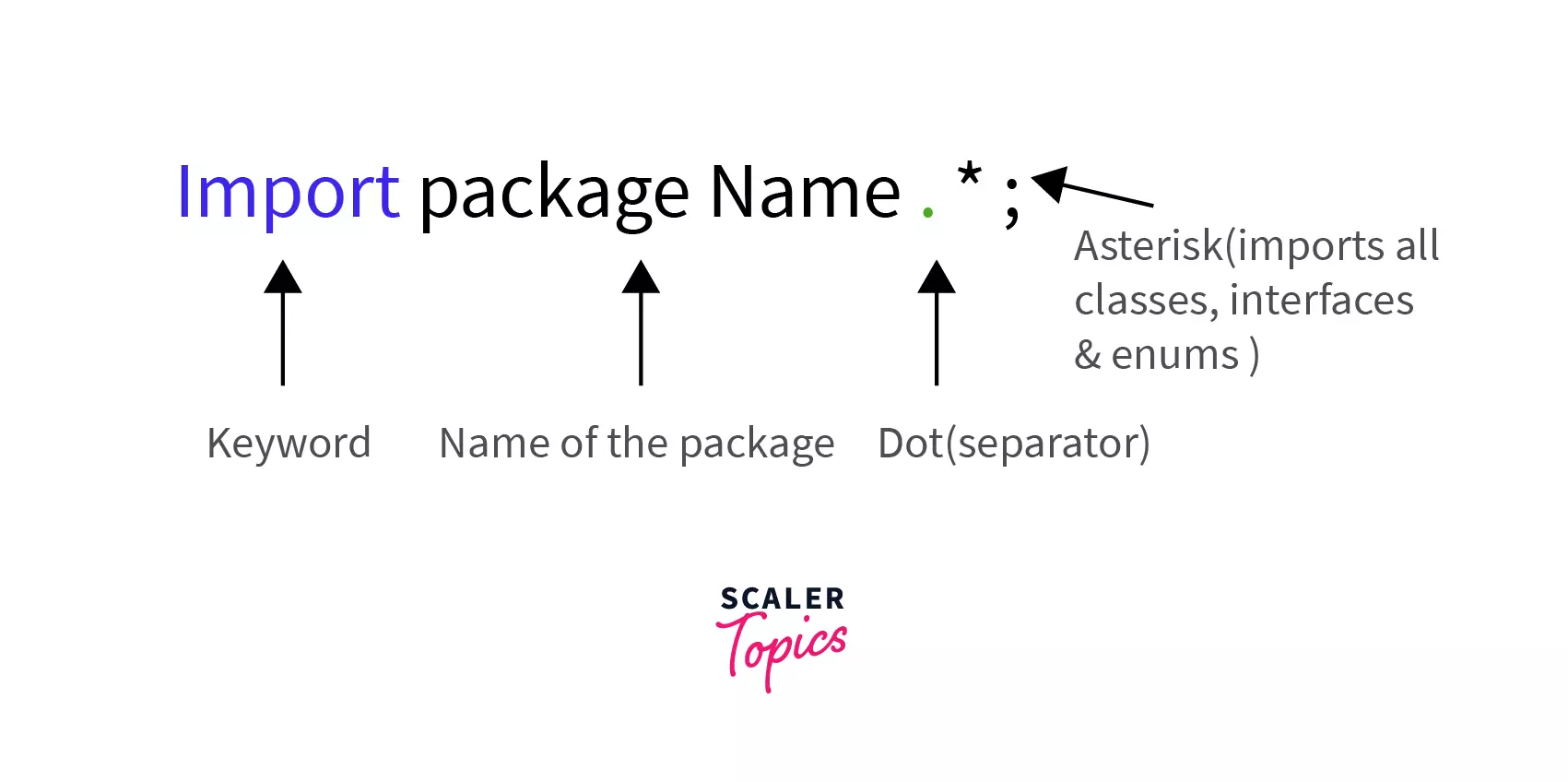
```java
import java.util.*; //imports all the classes in util package
import java.util.StringTokenizer; // imports only the StringTokenizer class from util package
```
**Explanation-**
We have imported *java.util* package in the first and second lines we have imported only the `StringTokenizer` class from java.util package.
:::
:::section{.main}
## Interface Section
This is an ``optional`` section. The keyword ``interface`` is used to create an interface. An interface comprises a set of cohesive methods that lack implementation details., i.e. method declaration and constants.
```java
interface Code {
void write();
void debug();
}
```
**Explanation-**
In the above code, we have defined an interface named `Code`, which contains two method declarations, namely `write()` and `debug()`, with no method body. The body of abstract methods is implemented in those classes that implement the interface `Code`.
:::
:::section{.main}
## Class Definition
This is a ``mandatory section`` in structure of java program. Each Java program has to be written ``inside`` a class as it is one of the main principles of Object-oriented programming that Java strictly follows, i.e., its Encapsulation for data security.
There can be ``multiple`` classes in a program. Some conventions need to be followed to name a class. They should begin with an uppercase letter.
``` java
class Program{
// class definition
}
```
:::
:::section{.main}
## Class Variables and Variables
Identifiers are used to name ``classes, methods and variables``. It can be a sequence of uppercase and lowercase characters. It can also contain '_' (underscore) and '$' (dollar) signs. It should not start with a digit(0-9) and not contain any special characters.
Variables are also known as ``identifiers`` in Java. It is a ``named memory location`` which contains a value. In a single statement, we're able to declare multiple variables of the same type.
**Syntax:**
```java
<Data-Type> <Variable Name> or <Data-Type> <Variable Name> = value;
```
**Example:**
```java
int var=100;
int g;
char c,d; // declaring more than one variable in a statement
```
### Rules for Naming a Variable-
* A variable may contain characters, digits and underscores.
* The underscore can be used in between the characters.
* Variable names should be meaningful and depict the program's logic.
* Variable names should not start with a digit or a special character.
:::
:::section{.main}
## Main Method Class
This is a ``compulsory part`` of the structure of java program. This is the **entry point** of the compiler where the execution starts. It is called/invoked by the Java Virtual Machine or JVM.
The `main()` method should be defined inside a class. We can call other functions and create objects using this method. The following is the syntax that is used to define.
**Syntax**
```java
public static void main(String[] args) {
// Method logic
}
```
:::
:::section{.main}
## Methods and Behaviors
A method is a ``collection`` of statements that perform a ``specific task``.Method names typically begin with a lowercase letter.
It provides the ``reusability`` of code as we write a method once and use it many times by invoking the method. The most important method is Java's ``main()`` method.
The following are the important components of the method declaration.
``Modifier``- Defines access type, i.e., the method's scope.
``The return data type``-It is the data type returned by the method or void if does not return any value.
``Method Name``- The method names should start with a lowercase letter (convention) and not be a keyword.
``Parameter list``- It is the list of the input parameters preceded by their data type within the enclosed parenthesis. If there are no parameters, you must put empty parentheses ().
``Exception list``- The exceptions that a method might throw is specified.
``Method body``- It is enclosed between braces {}. The code to be executed is encapsulated within them.
``Method signature``-It contains the method name and a parameter list (number, type and order of the parameters). The return data type and exceptions are not a part of it.
**Example:**
```java
public void add(int a, int b){
int c = a + b;
System.out.println(c);
}
```
**Explanation-**
In the above method, we added two numbers passed as parameters and printed the result after adding them. This is only executed when the method is called.
The resulting structure typically resembles the following format when incorporating the components above into a Java program.
```java
import java.io.*;
public class Main{
public static void main(String[] args) throws Exception {
System.out.println("Hello, Java!");
}
}
```
**Output-**
```java
Hello, Java!
```
**Explanation-**
In the above program, we printed a line on the console using `System.out.println()`, which gets displayed after the code gets executed.
:::
:::section{.summary}
## Conclusion
* Java is an **OOP language** which is case-sensitive, platform-independent, and uses both [compiler and interpreter](https://www.scaler.com/topics/c/difference-between-compiler-and-interpreter/).
* java program structure consists of compulsory classes to be written.
* The main() method is the **entry point** of the compiler from where it starts the execution.
* **Variables and identifiers** are used for naming variables and classes.
* Keywords are **reserved words** which are predefined and have a meaning.
* **Access modifiers** serve to specify the visibility and accessibility of classes, methods, constructors, or data members within a program.
* Java file should be saved with the name of the public class and should have the extension .java after the file name.
:::
 Google Drive
Gist
Clipboard
Google Drive
Gist
Clipboard
 Sign in with Wallet






