# Introduction
- What is OO
- Why learn OO
- [Example](https://www.canva.com/design/DAGbDMnYmks/Be1tmFOVpqubOsY71vo4jg/edit?utm_content=DAGbDMnYmks&utm_campaign=designshare&utm_medium=link2&utm_source=sharebutton)
Note:
[clang-uml](https://github.com/bkryza/clang-uml)
[plantUML web editor](https://www.plantuml.com/plantuml/umla/SoWkIImgAStDuNBCoKnELT2rKt3AJx9IS2mjoKZDAybCJYp9pCzJ24ejB4qjBk42oYde0jM05MDHLLoGdrUSoeLkM5u-K5sHGY9MGw6ARNHryQb66EwGcfS2T300)
[github](https://github.com/JeffBla/art-center-local-sys/tree/main/src/models)
[cpp ref](https://cplusplus.com/reference/)
---
# 第一堂:函式與遞迴
---
- **學習目標:**
- 認識函式基本結構與使用方式
- 理解遞迴原理並學會實作遞迴函式
---
## 🔖 函式的基本概念
- 函式是一段可重複呼叫的程式碼區塊。
- 好處:
- 重用程式碼(Code reuse)
- 增進程式可讀性
- 容易維護與除錯
---
## 📌 函式的基本語法
```cpp
return_type function_name(parameter_list) {
// 函式主體
return value;
}
```
- return_type:回傳資料型態
- function_name:函式名稱
- parameter_list:參數清單(可有可無)
---
### 🚩 函式範例
```cpp
// 計算兩數之和
int add(int a, int b) {
return a + b;
}
int main() {
int result = add(5, 3); // <-- 5, 3 稱為 argument
cout << "5 + 3 = " << result; // 輸出 5 + 3 = 8
}
```
---
### 📗 函式參數傳遞方式
兩種參數傳遞方式:
- 傳值(`Call by value`):傳遞複製值給函式
- 傳參考(`Call by reference`):傳遞參考,直接修改原值
Note:
- 一般來說,call by ref 的方式較好,尤其對於龐大的資料結構如:long long[100000],避免重複資料複製,造成記憶體不足。
----
### 🚩 傳值範例
```cpp
void increment(int x) {
x = x + 1;
}
int main() {
int num = 5;
increment(num);
cout << num; // 輸出仍為 5
}
```
----
### 🚩 傳參考範例
```cpp
void increment(int &x) {
x = x + 1;
}
int main() {
int num = 5;
increment(num);
cout << num; // 輸出為 6
}
```
----
傳指標
```cpp
void increment(int *x) {
*x = *x + 1; // x = &num
}
int main() {
int num = 5;
increment(&num); // &num 是一個 int 指標
cout << num; // 輸出為 6
}
```
---
### 🎲 函式重載(`Overloading`)
- 函式重載允許同名稱函式透過不同參數進行區別:
```cpp
int square(int x) { return x * x; }
double square(double x) { return x * x; }
int main() {
cout << square(5); // int 版本
cout << square(3.5); // double 版本
}
```
---
## 🔄 遞迴函式(`Recursion`)
- 遞迴函式定義:
- 一個函式在函式內部直接或間接呼叫自己。
- 遞迴需具備:
- 終止條件(Base Case)
- 遞迴步驟(Recursive Step)
Note:
- 在 linux kernel 上通常不用 recursion,而是用 loop 或是展開,因為 kernel 能用的記憶體空間很小,recursion 容易造成記憶體空間不足,但優點是簡單易讀。
----
### 🚩 遞迴範例:階乘函式
階乘定義:$n!=n \cdot (n-1)!$
```cpp
int factorial(int n) {
if (n == 0) return 1; // Base case
int c = n * factorial(n - 1); // Recursive step
return c;
}
```
----
### 🎯 遞迴執行流程圖示
```text
factorial(3)
= 3 × factorial(2)
= 3 × (2 × factorial(1))
= 3 × (2 × (1 × factorial(0)))
= 3 × (2 × (1 × 1))
= 3 × (2 × 1)
= 3 × 2
= 6
```
---
### ⚠️ 遞迴使用注意
- 如迴圈一樣,必須設立明確終止條件
- 遞迴可能導致效能問題(Stack overflow)
Note:
- 在 linux kernel 上通常不用 recursion,而是用 loop 或是展開,因為 kernel 能用的記憶體空間很小,recursion 容易造成記憶體空間不足,但優點是簡單易讀。
---
### 🚩 經典練習:費氏數列
定義: $F(n)=F(n−1)+F(n−2)$
```cpp
int fib(int n) {
if(n <= 1) return n;
return fib(n-1) + fib(n-2);
}
```
----
實驗一下遞迴導致的 stack overflow
---
## 🛠️ 課堂練習 (Lab)
- 實作一個函式,計算兩數的最大公因數(`GCD`),並使用遞迴方式完成。
Note:
```cpp
int gcd(int a, int b) {
if(b == 0) return a;
return gcd(b, a % b);
}
```
---
## 💡 作業
- 撰寫一個函式,可判斷輸入的整數是否為質數 `Prime Number`。
- 用遞迴撰寫 `Fibonacci` 函式,並比較遞迴版與迴圈版的效率差異。
Note:
補充:`recursion` 的概念需搭配演算法與資料結構才好融會貫通,可以看一下 binary tree 的 preorder/inorder/postorder traversial
---
# 第二堂:陣列與向量
(Array & Vector)
---
- **學習目標:**
- 熟悉陣列與向量的基本觀念與操作
- 學習如何透過陣列與向量處理資料
---
## 🔖 陣列 `Array` 基本概念
- 陣列:一系列具有相同資料型態的元素集合。
- 優點:
- 存取元素速度快(使用索引直接存取)
- 缺點:
- 長度固定,無法動態調整
---
## 📌 陣列宣告與初始化
```cpp
// 宣告並初始化陣列
int arr1[5] = {1, 2, 3, 4, 5};
// 不指定大小,自動推導大小
int arr2[] = {1, 2, 3, 4, 5};
arr2[0] = 10; // 修改第一個元素
cout << arr2[2]; // 輸出第三個元素 (3)
```
----
### 利用 `Object-orient program` 技巧
```cpp
int arr3[5]{1, 2, 3, 4, 5};
cout << arr3[2];
```
---
### 🚩 陣列與迴圈搭配使用
使用迴圈快速操作陣列:
```cpp
int scores[5] = {80, 75, 90, 85, 70};
int sum = 0;
for(int i = 0; i < 5; i++) {
sum += scores[i];
}
cout << "平均成績:" << sum / 5.0;
```
---
### 🔖 二維陣列(多維陣列)
常用於處理矩陣資料:
```cpp
int matrix[2][3] = {
{1, 2, 3},
{4, 5, 6}
};
cout << matrix[1][2]; // 輸出 6
```
---
### 🔖 向量(Vector)基本概念
- 向量 (std::vector) 為動態大小的陣列
- 優點:
- 可自動調整大小
- 操作靈活且方便
- 📌 建議:一般情況多使用 vector 提高程式彈性。
---
## 📌 向量基本操作
```cpp
#include <vector>
using namespace std;
vector<int> v; // 宣告空向量
v.push_back(10); // 加入元素 10
v.push_back(20); // 加入元素 20
cout << v.size(); // 輸出元素個數 (2)
cout << v[0]; // 存取第一個元素 (10)
vector<int> vec{1,2,3}; // 宣告存有 1,2,3 的向量
```
---
### 🚩 遍歷向量的方法
方法一:使用 `for` 迴圈
```cpp
for (int i = 0; i < v.size(); i++) {
cout << v[i] << " ";
}
```
方法二:範圍 `for (Range-based for loop)`
```cpp
for(int num : v) {
cout << num << " ";
}
```
方法三:利用 `iterator`
```cpp
for (auto it = v.begin(); it!=v.end(); it++){
cout << v[i] << " ";
}
```
Note:
iterator 是 cpp 獨有的物件,利用此物件來優化/統整/自訂迴圈運算。
---
### 🎯 範例:找出向量中的最大值
```cpp
#include <vector>
#include <iostream>
using namespace std;
int main() {
vector<int> nums{2, 9, 5, 7, 4};
// vector<int> nums = {2, 9, 5, 7, 4} 也是等效 *注1
int maxVal = nums[0];
for (int num : nums) {
if (num > maxVal) maxVal = num;
}
cout << "最大值:" << maxVal;
}
```
> **\*注1**:由於其根本是指定,因此底層實作是先建立 `vector<int>{2, 9, 5, 7, 4}` 在指定給 `nums`,因此較慢
---
### 🚩 二維向量(Vector of Vectors)
```cpp
vector<vector<int>> matrix = {
{1, 2, 3},
{4, 5, 6}
};
matrix[1][1] = 10; // 修改元素
for (auto &row : matrix) {
for (int val : row) {
cout << val << " ";
}
cout << endl;
}
```
---
### 🛠️ 課堂練習 (Lab)
- 練習一:
- 將 vector 內的元素由小到大排序
Note:
```cpp
#include <vector>
#include <iostream>
#include <algorithm>
using namespace std;
void printVector(vector <int> &target){
for(auto v : target){
cout << v << " ";
}
cout << endl;
}
int main() {
vector<int> nums{2, 9, 5, 7, 4};
for(int i = 0; i < nums.size(); i++){
for(int j = 0; j < nums.size(); j++){
if(nums[i] < nums[j]){
swap(nums[i], nums[j]);
}
}
}
printVector(nums);
}
```
---
# 第三堂:指標
(Pointer)
---
- **學習目標:**
- 了解指標與記憶體管理的概念
- 學習指標與陣列的關係與動態記憶體配置
---
## 🔖 指標的基本概念
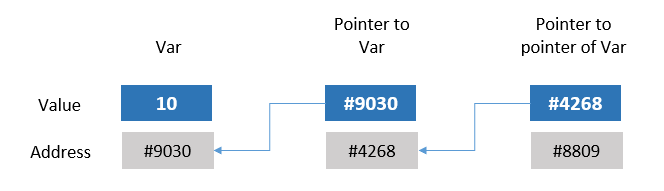
- 指標是一種變數,用來存放**記憶體位址**。
- 透過指標可以間接存取其他變數。
- 📌 優點:
- 有效處理動態記憶體
- 實現更複雜的資料結構
----
---
## 📌 指標變數宣告
指標的宣告方式:
```cpp
int *ptr; // 整數型別的指標
double *dptr; // 浮點數型別的指標
vector<int> *vec; // vector<int> 的指標 -> 物件的指標
```
---
### 🚩 取得記憶體位址(& 運算子)
```cpp
int num = 100;
int *ptr = # // 存放num的位址
cout << # // 輸出 num 的記憶體位址
cout << ptr; // 同上,ptr 存放 num 位址
```
---
### 🚩 存取指標所指內容(* 運算子)
```cpp
int num = 100;
int *ptr = #
cout << *ptr; // 透過指標取得 num 的值 (100)
*ptr = 200; // 修改 num 的值為 200
cout << num; // 輸出變為 200
```
---
### 🎯 指標與陣列的關係
陣列名稱本身即為位址:
```cpp
int arr[3] = {10, 20, 30};
int *ptr = arr; // arr即為 &arr[0]
cout << ptr[1]; // 20
cout << *(arr+2); // 30
```
---
### 📗 指標的算術運算
指標可透過加減運算移動到相鄰元素
```cpp
int arr[3] = {10, 20, 30};
int *ptr = arr;
ptr++; // 指向 arr[1]
cout << *ptr; // 20
ptr += 1; // 指向 arr[2]
cout << *ptr; // 30
```
---
### 進階:pointer to pointer
```cpp
#include <iostream>
using namespace std;
int main() {
// 建立三筆資料
const char *data1 = "Alice";
const char *data2 = "Bob";
const char *data3 = "Charlie";
// 建立一個陣列來模擬「下一個」的關係(鏈結)
const char **links[3];
links[0] = &data1; // 第 1 個指向 data1
links[1] = &data2; // 第 2 個指向 data2
links[2] = &data3; // 第 3 個指向 data3
// 遍歷所有資料
for (int i = 0; i < 3; ++i) {
cout << "節點 " << i + 1 << ": " << *(links[i]) << endl;
}
return 0;
}
```
----
### 進階: function as a pointer
- 在 C++ 中,函式本身也可以被當作一種「可以指向的東西」。這就像是指向變數的指標,不同的是它指向的是一個函式的起始位置,可以用來:
1. 傳遞函式當作參數
2. 動態決定要呼叫哪個函式
3. 實作 callback(回呼函式)
----
### 🧪 範例:簡單的函式指標
```cpp
#include <iostream>
using namespace std;
void greet() {
cout << "Hello!\n";
}
int main() {
void (*funcPtr)() = greet; // 宣告一個指向 greet 的函式指標
funcPtr(); // 呼叫函式(就像呼叫 greet 一樣)
return 0;
}
```
----
### 🧠 說明
- void (*funcPtr)() 表示一個「指向回傳 void、無參數」的函式指標。
- 把 greet 指給它,就能用 funcPtr() 呼叫。
- 和普通函式呼叫沒兩樣,但可以讓程式在執行時選擇呼叫哪個函式。
----
### 🧪 範例:計算機功能選單
```cpp
#include <iostream>
using namespace std;
int add(int a, int b) { return a + b; }
int sub(int a, int b) { return a - b; }
int mul(int a, int b) { return a * b; }
int divide(int a, int b) { return b != 0 ? a / b : 0; }
int main() {
// 定義一個陣列,裡面放四個函式指標
int (*ops[4])(int, int) = {add, sub, mul, divide};
int a = 10, b = 2;
int choice;
cout << "請選擇操作:0加 1減 2乘 3除: ";
cin >> choice;
if (choice >= 0 && choice < 4) {
cout << "結果為: " << ops[choice](a, b) << endl;
} else {
cout << "無效選項" << endl;
}
return 0;
}
```
---
### 🚩 動態記憶體配置(new 與 delete)
- 用於物件建立
- 動態配置可於執行期間決定大小:
```cpp
int *ptr = new int; // 動態配置整數記憶體
*ptr = 100;
cout << *ptr; // 100
delete ptr; // 釋放記憶體
```
----
```cpp
#include <iostream>
using namespace std;
class Student {
private:
string name;
int score;
public:
Student(string name):name(name){};
void setInfo(string n, int s) {
name = n;
score = s;
}
void printInfo() {
cout << name << " 成績: " << score << endl;
}
string getName(){
return name;
}
};
int main() {
Student *me = new Student("Jeff");
cout << me->getName() << endl;
}
```
----
## 重要
- new 必須要搭配 delete,因為 new 是在記憶體中分配空間,沒有用到時,必須手動釋放空間,以免空間占滿沒有記憶體使用。
---
### 🚩 動態配置陣列
```cpp
int n;
cin >> n;
int *arr = new int[n]; // 動態陣列配置
for(int i = 0; i < n; i++)
arr[i] = i + 1;
delete[] arr; // 釋放陣列記憶體
```
---
### 📌 指標與函式參數傳遞
- 透過指標傳遞參數:
- 可以把它看成一種 call by ref
```cpp
void swap(int *a, int *b) {
int temp = *a;
*a = *b;
*b = temp;
}
int main() {
int x = 5, y = 10;
swap(&x, &y);
cout << x << ", " << y; // 10, 5
}
```
---
### ⚠️ 常見指標錯誤
未初始化指標:
```cpp
int *p;
*p = 10; // 未初始化,危險!
```
使用已釋放的記憶體:
```cpp
int *p = new int;
delete p;
*p = 5; // 錯誤!
```
----
### Pointer 進階技巧
- 利用 pointer 改變取用元素屬性
```cpp
#include <iostream>
#include <bitset>
using namespace std;
int main() {
int a = 2147483647; // 2^31-1
char *c_1 = (char *)&a, *c_2 = c_1 + 1, *c_3 = c_1 + 2, *c_4= c_1 + 3;
cout << "Binary: " << bitset<32>(a) << endl; // 8 表示用 8 位元顯示
cout << "Pointer4: " << bitset<32>((unsigned char)*c_4) << endl;
cout << "Pointer3: " << bitset<32>((unsigned char)*c_3) << endl;
cout << "Pointer2: " << bitset<32>((unsigned char)*c_2) << endl;
cout << "Pointer1: " << bitset<32>((unsigned char)*c_1) << endl;
cout << "Pointer: " << bitset<8>((unsigned char)*c_4) << bitset<8>((unsigned char)*c_3)
<< bitset<8>((unsigned char)*c_2) << bitset<8>((unsigned char)*c_1) << endl;
return 0;
}
```
---
## 🛠️ 課堂練習 (Lab)
- 練習一:
- 建立一個 linkedlist 並印出儲存元素
Note:
```cpp
#include <iostream>
using namespace std;
// Define a node structure
struct Node {
int data;
Node* next;
};
void append(Node*& head, int value) {
Node* newNode = new Node{value, nullptr};
if (head == nullptr) {
head = newNode;
return;
}
Node* current = head;
while (current->next != nullptr) {
current = current->next;
}
current->next = newNode;
}
void printList(Node* head) {
while (head != nullptr) {
cout << head->data << " -> ";
head = head->next;
}
cout << "null" << endl;
}
void freeList(Node* head) {
while (head != nullptr) {
Node* temp = head;
head = head->next;
delete temp;
}
}
int main() {
Node* head = nullptr;
append(head, 10);
append(head, 20);
append(head, 30);
printList(head); // Output: 10 -> 20 -> 30 -> null
freeList(head); // Clean up memory
return 0;
}
```
 Google Drive
Gist
Clipboard
Google Drive
Gist
Clipboard
 Sign in via Google
 Sign in via Facebook
 Sign in via X(Twitter)
 Sign in via GitHub
 Sign in via Dropbox
 Sign in with Wallet






