---
title: DSA 第十一週講義 臺中一中電研社
slideOptions:
theme: sky
transition: 'convex'
---
<style>
h2{
color:#8B4746;
}
.blue{
color:#4A919E
}
</style>
<font color="#4A919E">DSA 第十一週講義</font>
===
>[name= 沈奕呈、陳睿倬][time=Apr 15,2022 ]
###### tags:`DSA` `Data Structure and Algorithm` `資料結構` `演算法` `Data Structure` `Algorithm` `tcirc39th` `社課` `臺中一中電研社`
[TOC]
---
## <div class="blue">電研社</div>
社網:[tcirc.tw](https://tcirc.tw)
online judge:[judge.tcirc.tw](https://judge.tcirc.tw)
IG:[TCIRC_39th](https://www.instagram.com/tcirc_39th)
社課點名表單:[google 表單](
https://reurl.cc/02VY7K)
---
## 圖論(graph)
---
### 介紹
圖(graph),是一種用來表示關聯、關係的概念,由數個點(vertex)與數個邊(edge)組成,邊可以用來連接任兩點,表示兩點之間有關係
----
#### 點
個別的資料點,若沒有邊,每個點都是獨立的(與其他點沒有關係)
ex.車站、人
----
#### 邊
用來連通兩個點,表示點與點的關係,分成有向邊和無向邊
- 有向邊:代表兩個點之間具有單向關係,只有一個方向有通(可以從A點走到B點,但不能從B點走到A點)
- 無向邊:代表兩個點之間具有雙向關係,雙向互通
ex.鐵路、朋友關係
---
#### 權重
有些情況下,點與點的關係與數值有關,這時可以幫邊加上權重
---
### 圖的儲存
沒有學會如何儲存圖,就沒辦法做圖的題目,所以先來看看圖的儲存方式吧
圖的實用儲存方式有以下2種
- Adjacency matrix
- Adjacency list
----
#### Adjacency matrix
中文叫「相鄰矩陣」,當點的數量為N,用一個N*N的二維陣列儲存,適合用於邊比點多很多的情況
----
<!--https://judge.tcirc.tw/ShowProblem?problemid=d090-->
``` cpp=
#include <bits/stdc++.h>
using namespace std;
const int max_n=1e2;
const int max_m=3e4;
int n,m,s;
int graph[max_n][max_n];//紀錄n個點的圖
int main() {
cin>>n>>m>>s;
for(int i=0;i<m;i+=1){//注意是要輸入m條邊,所以放m
int a,b;//起點、終點
cin>>a>>b;
graph[a][b]+=1;//無向圖時須寫下一行
//graph[b][a]+=1;
}
for(int i=0; i<n;i+=1){
for(int j=0;j<n;j+=1)
cout<<graph[i][j]<<' ';
cout<<'\n';
}
return 0;
}
```
----
```
/*INTPUT---
7 6
1
5 1
1 3
1 4
2 3
4 6
6 0
------------*/
```
----
可以看到,當點多而邊少(相對),Adjacency matrix浪費了不少空間
但是當邊的數量接近或超過N*N,或是重複的邊常常出現的話,Adjacency matrix可以將重復的那一格加1,就能節省不少空間
```
/*OUTPUT---
0 0 0 0 0 0 0
0 0 0 1 1 0 0
0 0 0 1 0 0 0
0 0 0 0 0 0 0
0 0 0 0 0 0 1
0 1 0 0 0 0 0
1 0 0 0 0 0 0
------------*/
```
----
#### Adjacency list
中文叫「相鄰列表」,當點的數量為N,儲存方式為,宣告一個長度為N的一維陣列,陣列資料型態使用vector或list ,適合用於點多,而邊不多的情況
```cpp=
#include <bits/stdc++.h>
using namespace std;
const int max_n=1e2;
const int max_m=3e4;
int n,m,s;
vector<int> graph[max_n];
int main() {
ios::sync_with_stdio(0);
cin.tie(0);
cin>>n>>m>>s;
for(int i=0;i<m;i+=1){//注意是要輸入m條邊,所以放m
int a,b;//起點、終點
cin>>a>>b;
graph[a].push_back(b);//無向圖時須寫下一行
//graph[b].push_back(a);
}
for(int i=0; i<n;i+=1){
cout<<i<<':';
for(int j=0;j<graph[i].size();j+=1)
cout<<graph[i][j]<<' ';
cout<<'\n';
}
return 0;
}
```
----
```
/*INTPUT---
7 6
1
5 1
1 3
1 4
2 3
4 6
6 0
---------*/
```
----
可以看到,當點多而邊少(相對),Adjacency list節省了不少空間
但是當邊的數量接近或超過N*N,或是重複的邊常常出現的話,Adjacency list就會浪費不少空間
```
/*OUTPUT---
0:
1:3 4
2:3
3:
4:6
5:1
6:0
------------*/
```
----
### 樹 vs 圖
樹的定義較為嚴格,樹的每個點須與其他點連通,且不能形成環,圖則無此規定
---
### 最小生成樹
全名為最小權重生成樹,也就是把一個無向圖中取出一顆樹,且樹包含所有點。
下面將簡單介紹如何求出最小生成樹。
----
#### Kruskal_Algorithm
將每個點視作獨立的樹。接著,將權重由小到大,將兩個不同的樹連在一起。若選到的邊會讓樹形成一個環,就跳過不執行合併。
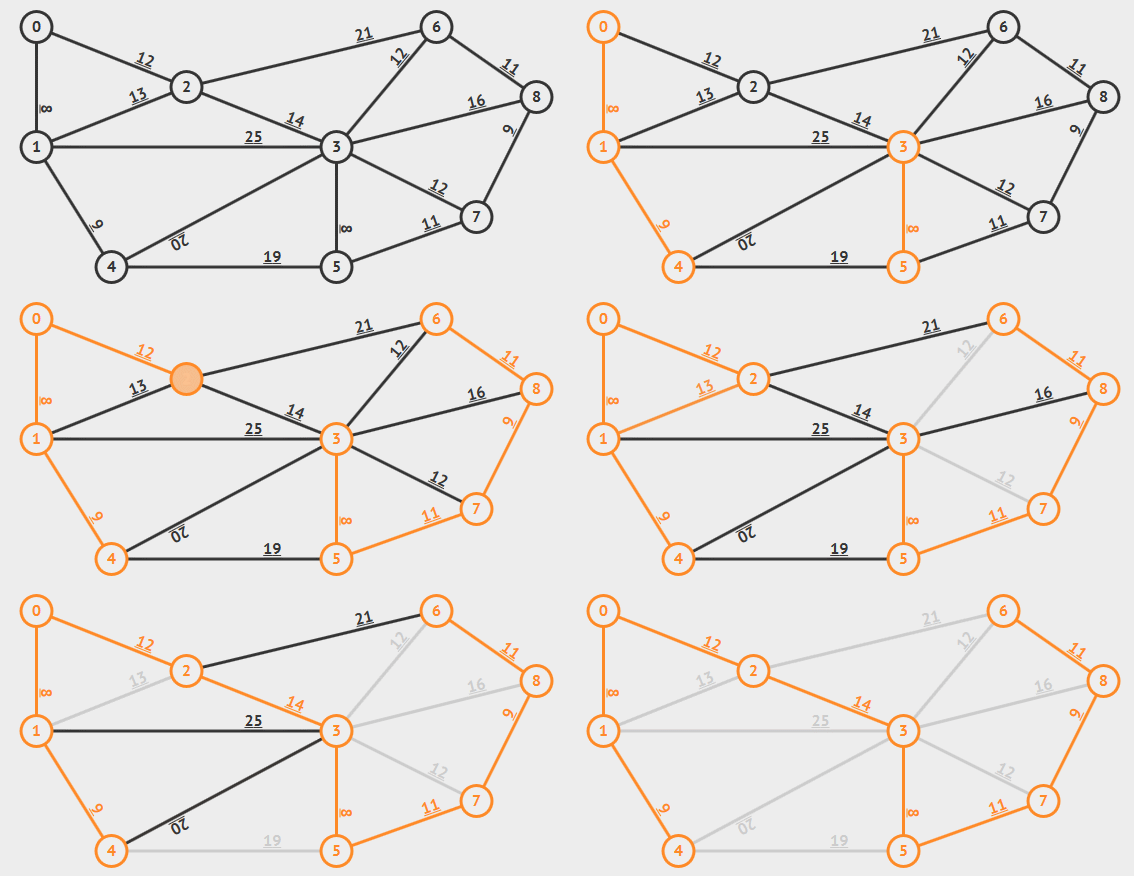
[來源](https://www.google.com/url?sa=i&url=https%3A%2F%2Fredspider110.github.io%2F2018%2F08%2F30%2F0097-algorithms-mst-kruskal%2F&psig=AOvVaw1vdtJdYReLdfaGdPfN_vC6&ust=1649854050066000&source=images&cd=vfe&ved=0CAoQjRxqFwoTCKjPvrjHjvcCFQAAAAAdAAAAABBF)
----
這裡有個新的概念,叫DSU演算法,又稱併查集。可用於分類的問題。由兩個功能組成,查詢和合併。
套用到圖論,我們可以將起始的每個節點視為獨立的樹,而我們的目標就是將這些樹結合為最小生成樹。
在DSU裡,我們會開一個陣列root紀錄每個節點屬於哪顆樹,若兩個節點在同個樹裡,則它們的根節點相同,所以會有同一個root。
查詢的部分,就是查詢每個節點的root。
至於將兩棵樹合併成同一棵樹時,只需要將兩棵樹的root變成同一個就好。但是要先檢查它們的root是否不同,否則最後會求出一個環。
----
```cpp=
#include <bits/stdc++.h>
using namespace std;
int N, S;
int root[100];
struct side{
int a = a, b = b;
int s = s;
};
side Side[100];
bool cmp(side a, side b){
return a.s < b.s;
}
int FindRoot(int x){ // 查詢樹的root
if (root[x] == x)return x;
else return root[x] = FindRoot(root[x]);
}
int DSA(int a, int b){
int ra = FindRoot(a);
int rb = FindRoot(b);
if (ra == rb)return false;
root[rb] = ra; // 兩棵不同的樹合併
return true;
}
int main() {
cin >> N >> S;
for(int i=0;i<N;i++)
root[i] = i;
for (int i = 0;i<S;i++){
cin >> Side[i].a >> Side[i].b >> Side[i].s;
}
sort(Side, Side+S, cmp); // 先將邊由小到大排好
for (int i=0;i<S;i++){
// cout << Side[i].s << ' ';
int a = Side[i].a, b = Side[i].b;
cout << a << ' ' << b << ' ' << Side[i].s << endl;
if (DSA(a, b)){
cout << "combine successfully\n";
}else{
cout << "combine fail\n";
}
}
return 0;
}
```
----
https://ideone.com/LBgxEo
輸出太長,這裡就先不放
----
#### Prim_Algorithm
選擇任一樹根作為樹根(起點)。接著,尋找尚未加入樹的點中,離樹根最近的點加入樹。重複此步驟直到所有點加進樹裡。

[來源](https://www.google.com/url?sa=i&url=https%3A%2F%2Fithelp.ithome.com.tw%2Farticles%2F10248017%3Fsc%3Dhot&psig=AOvVaw2MRAkwKrJnsN7IIlEVL1xl&ust=1650028635737000&source=images&cd=vfe&ved=0CAwQjRxqFwoTCKDf6vHRk_cCFQAAAAAdAAAAABAD)
----
```cpp=
#include <bits/stdc++.h>
using namespace std;
#define ppii pair<pair<int, int>, int>
int N, S;
int n[10];
int G[11][11];
struct cmp{
bool operator()(ppii a, ppii b){
return a.second > b.second; // 由於pq會將cmp 視為 !cmp,
// 所以我們倒著寫
}
};
int main() {
char ch[10]; // 數字轉換成字母
for (int i=0;i<10;i++){
ch[i] = 'a'+i;
}
cin >> N >> S;
memset(G, -1, sizeof(G));
for (int i=0;i<S;i++){
int a, b, s;
cin >> a >> b >> s;
G[a][b] = s; // a to b, w = s
G[b][a] = s; // b to a, w = s
}
int cnt = 0; // 若所有點都加進樹 --> cnt == N
int v[10] = {0};// 紀錄是否以加進樹裡
// init 先將a (0) 加入
priority_queue<ppii , vector<ppii>, cmp> pq; // 紀錄和樹連結的點
cnt+=1;
v[0] = 1;
for (int i=0;i<N;i++){
if (G[0][i] != -1)
pq.push({{0, i}, G[0][i]});
}
while (cnt < N){ // all nodes are in tree , then stop
int a = pq.top().first.first;
int b = pq.top().first.second;
int s = pq.top().second;
pq.pop();
if (v[b] == 1)continue; // already in tree, pass
// else add it into the tree
v[b] = 1;cnt++;
//cout << a << ' ' << b << ' ' << s << endl;
cout << ch[a] << ' ' << ch[b] << ' ' << s << endl;
cout << "combine successfully\n";
for (int i=0;i<N;i++){ // 新增和樹連結的邊
if (G[b][i] != -1)
pq.push({{b, i}, G[b][i]});
}
}
return 0;
}
```
----
output
https://ideone.com/dQel5R
---
### 圖的遍歷
圖的便利方式有兩種
- BFS:廣度優先搜尋
- DFS:深度優先搜尋
----
### BFS
又稱廣度優先搜尋,是一種遍歷整個圖的演算法。一開始先選擇一個點最為起始點,並往周圍連結的點散開。持續上述步驟直到所有的點都被讀取過。
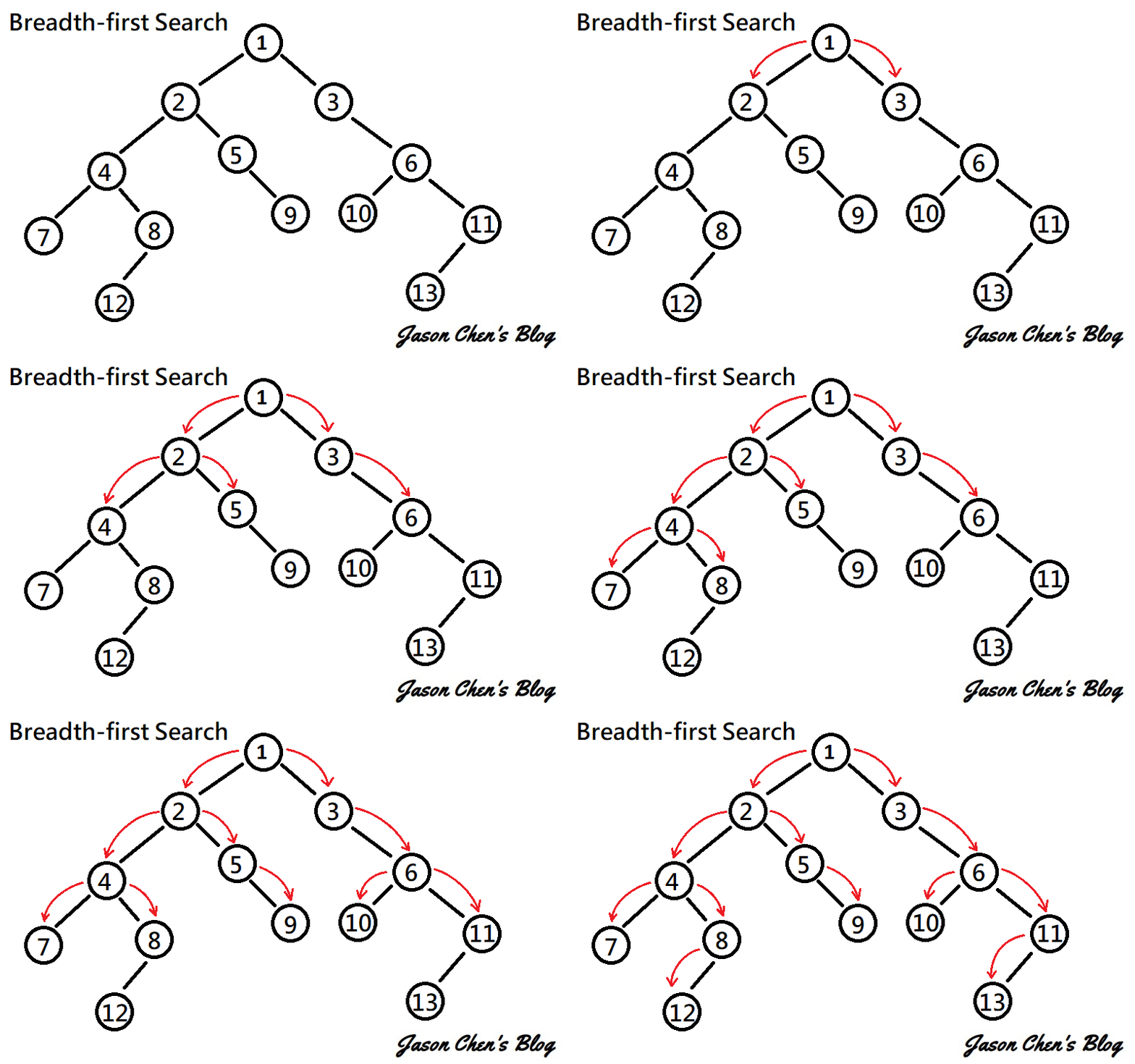
[連結](https://www.google.com/url?sa=i&url=https%3A%2F%2Fjason-chen-1992.weebly.com%2Fhome%2F-graph-searching-methods&psig=AOvVaw3Tz-mTy8ujaZLhQmiWb8Ex&ust=1650028138654000&source=images&cd=vfe&ved=0CAwQjRxqFwoTCIDs8P7Pk_cCFQAAAAAdAAAAABAD)
----
圖論和樹的廣度優先搜尋一樣,我們可以拿queue實作。先挑選一個點,把他加進queue裡,接著讀取queue第一個元素,將和它連結的點加進queue。
所以整個流程就是:
讀取 -->pop -->加進周圍的點 -->讀取
直到沒有元素在queue裡時,我們可以停止了,因為已經拜訪過每個和出發點有連通的點了。
要注意的是,不要將已被拜訪過的元素加進queue裡,否則程式不會停止(因為會永遠讀不完)。所以可以開個陣列紀錄是否已走訪過該元素。
為了實際了解bfs的應用,我們參考下面的例題。
----
套用到圖論也是相同概念

[來源](https://www.google.com/url?sa=i&url=https%3A%2F%2Fvictorqi.gitbooks.io%2Fswift-algorithm%2Fcontent%2Fbreadth-first_search_bfs.html&psig=AOvVaw2peftVZi5zcdJcejsYhJMx&ust=1649855906983000&source=images&cd=vfe&ved=0CAoQjRxqFwoTCPC19K3OjvcCFQAAAAAdAAAAABAX)
----
### 例題: [倒水時間](https://zerojudge.tw/ShowProblem?problemid=d406)
這題是非常典型的bfs應用,雖然不明顯看出他是一個圖。不過可以把每個水管看成是一個點,所以此圖變成一個有向圖(方向由上而下,往右或往左),兩相鄰的點形成一邊。
----
0 0 1 0 0
0 0 1 1 0
0 1 1 1 1
1 1 0 0 0

----
由於題目已經指定由上面倒水,所以我們將第一排的點都設為1。接著將第一排的水管都加進queue裡。
後面就簡單了,重複執行上述我們所說的步驟。
至於往上的水管,就只是要多拜訪一個元素。
```cpp=
#include <bits/stdc++.h>
using namespace std;
int const MaxN = 101;
int N, M;
int S;
int G[101][101];
int a[101][101];
bool Inrange(int r, int c){
if (r >= 0 and r < N and c >= 0 and c < M)return true;
else return false;
}
void bfs1(){
int dc[3] = {1, -1, 0};
int dr[3] = {0,0, 1};
deque<pair<int, int>> dq; // 設定空queue
for (int i=0;i<M;i++){ // 初始化第一排的水管
if (G[0][i] == 0)cout << 0 << ' ';
else{
cout << 1 << ' ';
a[0][i] = 1;
dq.push_back({0, i}); // 將水管加進dq
}
}cout << endl;
//cout << "=================\n";
while (dq.empty() == 0){
//cout << dq.size() << endl;
int r = dq.front().first; // 讀取dq節點
int c = dq.front().second;
//cout << r << ' ' << c << endl;
dq.pop_front();
for (int k=0;k<3;k++){ // 拜訪周圍的點
int nxt_r = r + dr[k];
int nxt_c = c + dc[k];
if (Inrange(nxt_r, nxt_c) and G[nxt_r][nxt_c] == 1 and a[nxt_r][nxt_c] == 0){
// 若該點為水管,則時間就是上個節點+1
a[nxt_r][nxt_c] = a[r][c] + 1;
dq.push_back({nxt_r, nxt_c});
// 記得加進queue
}else{
continue;
// 若不是水管,代表無節點,跳過
}
}
}
for (int i=1;i<N;i++){// 輸出answer
for (int j=0;j<M;j++){
if (a[i][j] == 0)cout << '0' << ' ';
else
cout << a[i][j] << ' ';
}cout << endl;
}
}
void bfs2(){
int dc[4] = {1, -1, 0, 0};
int dr[4] = {0, 0, -1, 1};
deque<pair<int, int>> dq;
for (int i=0;i<M;i++){
if (G[0][i] == 0)cout << 0 << ' ';
else{
cout << 1 << ' ';
a[0][i] = 1;
dq.push_back({0, i});
}
}cout << endl;
//cout << "=================\n";
while (dq.empty() == 0){
//cout << dq.size() << endl;
int r = dq.front().first;
int c = dq.front().second;
//cout << r << ' ' << c << endl;
dq.pop_front();
for (int k=0;k<4;k++){
int nxt_r = r + dr[k];
int nxt_c = c + dc[k];
if (Inrange(nxt_r, nxt_c) and G[nxt_r][nxt_c] == 1 and a[nxt_r][nxt_c] == 0){
a[nxt_r][nxt_c] = a[r][c] + 1;
dq.push_back({nxt_r, nxt_c});
}else{
continue;
}
}
}
for (int i=1;i<N;i++){
for (int j=0;j<M;j++){
if (a[i][j] == 0)cout << '0' << ' ';
else
cout << a[i][j] << ' ';
}cout << endl;
}
}
int main() {
ios::sync_with_stdio(0);
cin.tie(0);
int t = 1;
while (cin >> S){
cin >> N >> M;
memset(a, 0, sizeof(a));
for (int i=0;i<N;i++){
for (int j=0;j<M;j++)
cin >> G[i][j];
}
cout << "Case " << t++ <<":" << endl;
if (S == 1)
bfs2();
else
bfs1();
}
return 0;
}
```
---
### DFS
又稱深度優先搜尋
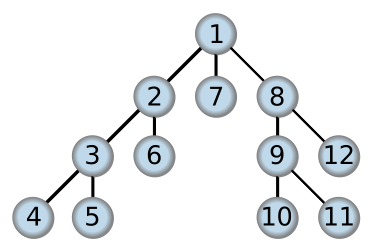
[圖源](https://zh.wikipedia.org/wiki/%E6%B7%B1%E5%BA%A6%E4%BC%98%E5%85%88%E6%90%9C%E7%B4%A2)
----
造訪順序
1.由root當起點,選擇一個child拜訪,再由這個node(節點)繼續選擇一個child拜訪,不斷重複直到遇到leaf(沒有子節點)
2.從現在這一層sbiling(同層的其他節點)中選一個當起點,執行步驟1,不斷重複直到該層的sbiling都已經拜訪過
3.處理往上一層的其他sbiling,執行步驟2,不斷重複直到回到root那一層
可以發現我們在過程中都是先處理剛加入的節點,所以適合用stack--先進先出的概念來實做
----
作法:
1. 將起點加入stack
2. 紀錄 .top()的元素A,然後.pop()
3. 將A能連到的點全部.push()進去
4. 重複動作直到stack變成空的(代表有與起點連通的點均已拜訪過了)
----
### 例題: [觀光景點](https://zerojudge.tw/ShowProblem?problemid=c812)
有n個點,n-1個邊,任兩點間一定會有單一路徑連通(代表這是一棵樹),請求出與起點相關性大於等於q的景點數量(不包含起點本身)
兩景點間的相關性為沿路的邊中,權重最小的,所以如果在行經的路線中遇到權重小於題目要求的,就不用再走下去了(因為之後遇到的景點關連性都會小於q)
----
換句話說,當邊的權重<q,那條邊就可以直接不要連了,反正通過那條路後的所有景點都不符合題目要求,<font color="#ff0000">所以我們不須額外紀錄邊的權重</font>,只需要遍歷與起點連通的所有點,並記錄這些點的數量就可以了。
<font color="#ff0000">注意!</font>:需要另外開一個一維陣列紀錄每個點有沒有被走訪過,有被走訪過的點不能再走(不然你的遍歷永遠不會結束)
----
我們這次試試看用dfs的方式遍歷吧(要用 bfs 或是 dsu 也可以)
邊和點差不多,且不用紀錄權重,可以用adjacency list,不過點的數量不算太多,要用adjacency matrix也行
----
```cpp=
#include <bits/stdc++.h>
using namespace std;
const int max_n=5e3;
const int max_e=5e3-1;
const int max_q=1e9;
int n,v,q;
vector<int> to[max_n+1];//點從1開始
vector<int> stk;
bool flag[max_n+1];//紀錄點有沒有拜訪過
int main() {
cin>>n>>v>>q;//點的數量,起點,相關性
n-=1;//邊的數量
while(n-->0){
int i,j,r;
cin>>i>>j>>r;//兩點,權重
if(r<q) continue;
to[i].push_back(j);
to[j].push_back(i);//無向圖
}
int ans=0;
stk.push_back(v);//起點放入stack
while(stk.empty()==0){//當stack不是空的
int now=stk.back(); stk.pop_back();
flag[now]=1;//紀錄已經拜訪過此點
//等同於 int nxt=to[now].begin;nxt!=to[now].end();nxt++
for(int nxt : to[now]){
if(flag[nxt]) continue;//此點已拜訪過
stk.push_back(nxt);
ans+=1;
}
}
cout<<ans<<'\n';
return 0;
}
```
 Google Drive
Gist
Clipboard
Google Drive
Gist
Clipboard
 Sign in with Wallet






