Ander Liu
    • Create new note
    • Create a note from template
      • Sharing URL Link copied
      • /edit
      • View mode
        • Edit mode
        • View mode
        • Book mode
        • Slide mode
        Edit mode View mode Book mode Slide mode
      • Customize slides
      • Note Permission
      • Read
        • Only me
        • Signed-in users
        • Everyone
        Only me Signed-in users Everyone
      • Write
        • Only me
        • Signed-in users
        • Everyone
        Only me Signed-in users Everyone
      • Engagement control Commenting, Suggest edit, Emoji Reply
    • Invite by email
      Invitee

      This note has no invitees

    • Publish Note

      Share your work with the world Congratulations! 🎉 Your note is out in the world Publish Note

      Your note will be visible on your profile and discoverable by anyone.
      Your note is now live.
      This note is visible on your profile and discoverable online.
      Everyone on the web can find and read all notes of this public team.
      See published notes
      Unpublish note
      Please check the box to agree to the Community Guidelines.
      View profile
    • Commenting
      Permission
      Disabled Forbidden Owners Signed-in users Everyone
    • Enable
    • Permission
      • Forbidden
      • Owners
      • Signed-in users
      • Everyone
    • Suggest edit
      Permission
      Disabled Forbidden Owners Signed-in users Everyone
    • Enable
    • Permission
      • Forbidden
      • Owners
      • Signed-in users
    • Emoji Reply
    • Enable
    • Versions and GitHub Sync
    • Note settings
    • Note Insights New
    • Engagement control
    • Transfer ownership
    • Delete this note
    • Save as template
    • Insert from template
    • Import from
      • Dropbox
      • Google Drive
      • Gist
      • Clipboard
    • Export to
      • Dropbox
      • Google Drive
      • Gist
    • Download
      • Markdown
      • HTML
      • Raw HTML
Menu Note settings Note Insights Versions and GitHub Sync Sharing URL Create Help
Create Create new note Create a note from template
Menu
Options
Engagement control Transfer ownership Delete this note
Import from
Dropbox Google Drive Gist Clipboard
Export to
Dropbox Google Drive Gist
Download
Markdown HTML Raw HTML
Back
Sharing URL Link copied
/edit
View mode
  • Edit mode
  • View mode
  • Book mode
  • Slide mode
Edit mode View mode Book mode Slide mode
Customize slides
Note Permission
Read
Only me
  • Only me
  • Signed-in users
  • Everyone
Only me Signed-in users Everyone
Write
Only me
  • Only me
  • Signed-in users
  • Everyone
Only me Signed-in users Everyone
Engagement control Commenting, Suggest edit, Emoji Reply
  • Invite by email
    Invitee

    This note has no invitees

  • Publish Note

    Share your work with the world Congratulations! 🎉 Your note is out in the world Publish Note

    Your note will be visible on your profile and discoverable by anyone.
    Your note is now live.
    This note is visible on your profile and discoverable online.
    Everyone on the web can find and read all notes of this public team.
    See published notes
    Unpublish note
    Please check the box to agree to the Community Guidelines.
    View profile
    Engagement control
    Commenting
    Permission
    Disabled Forbidden Owners Signed-in users Everyone
    Enable
    Permission
    • Forbidden
    • Owners
    • Signed-in users
    • Everyone
    Suggest edit
    Permission
    Disabled Forbidden Owners Signed-in users Everyone
    Enable
    Permission
    • Forbidden
    • Owners
    • Signed-in users
    Emoji Reply
    Enable
    Import from Dropbox Google Drive Gist Clipboard
       Owned this note    Owned this note      
    Published Linked with GitHub
    1
    • Any changes
      Be notified of any changes
    • Mention me
      Be notified of mention me
    • Unsubscribe
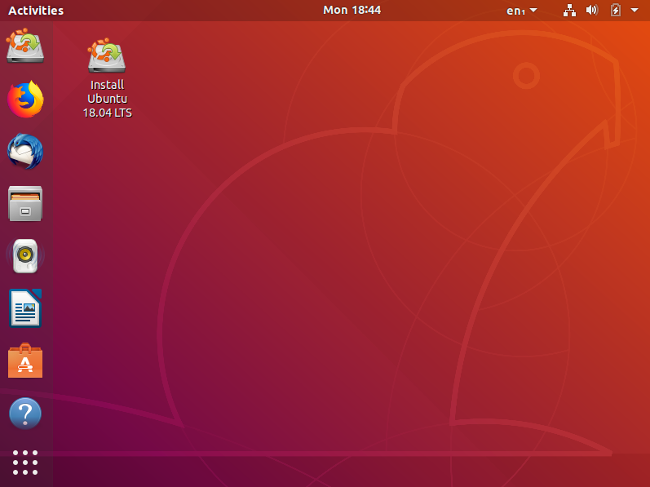
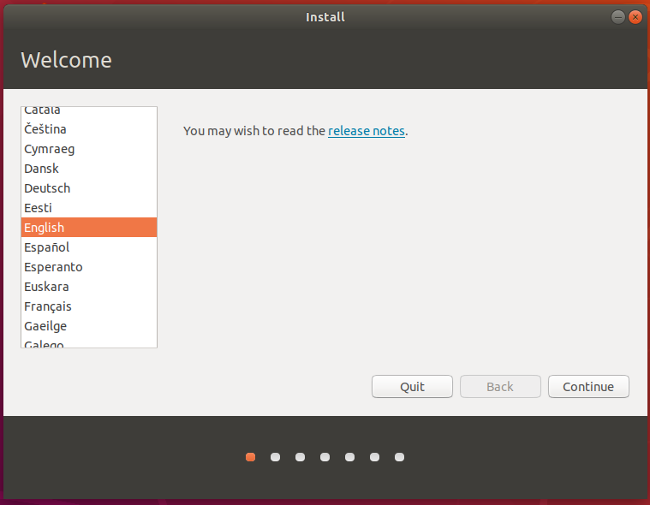
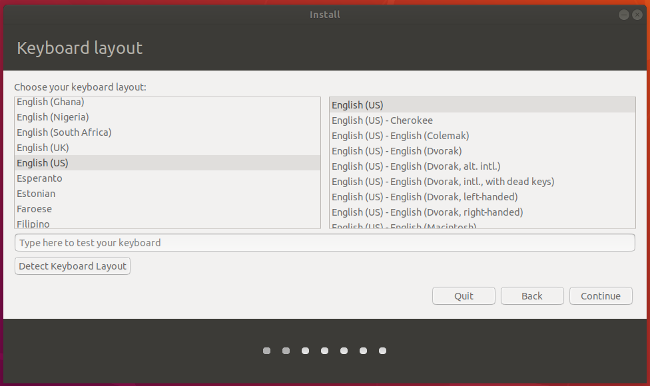
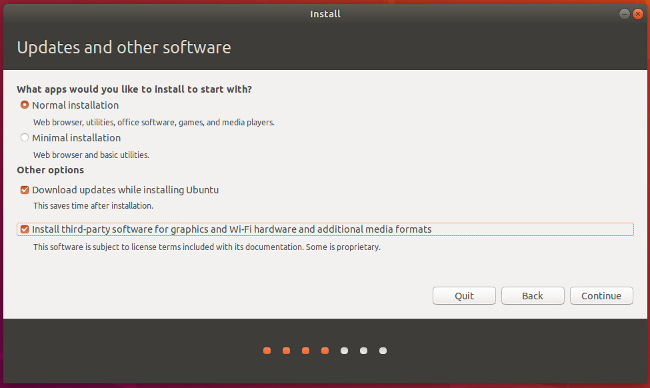
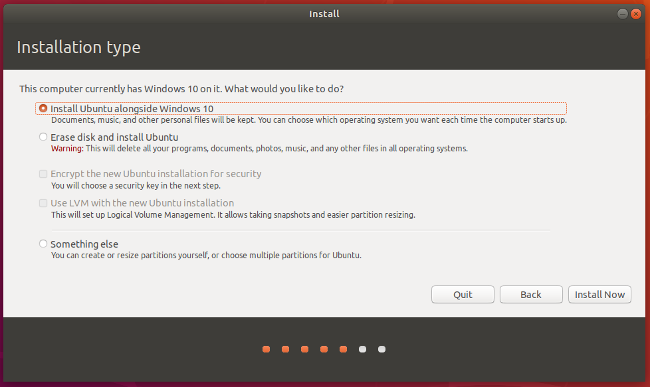
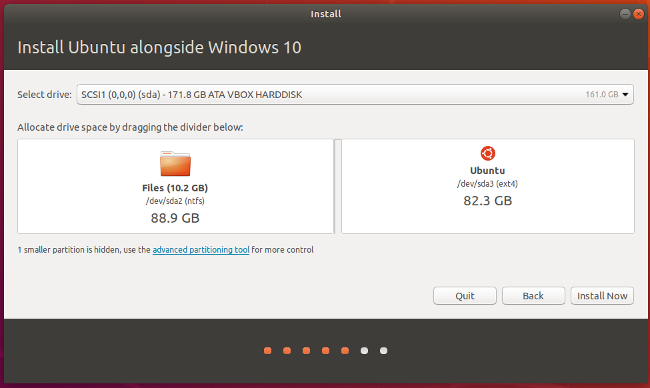
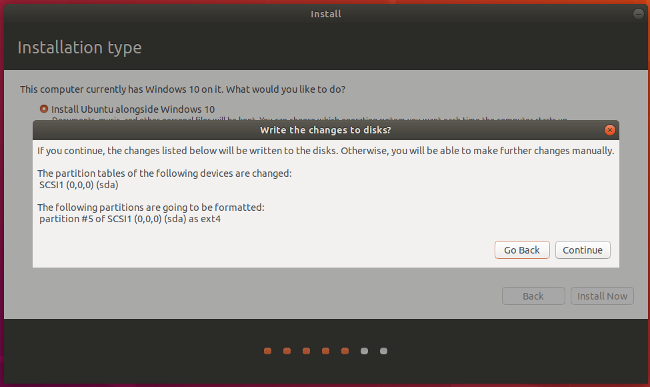
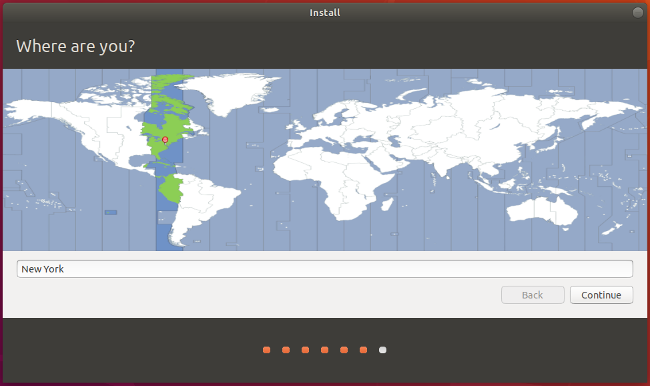
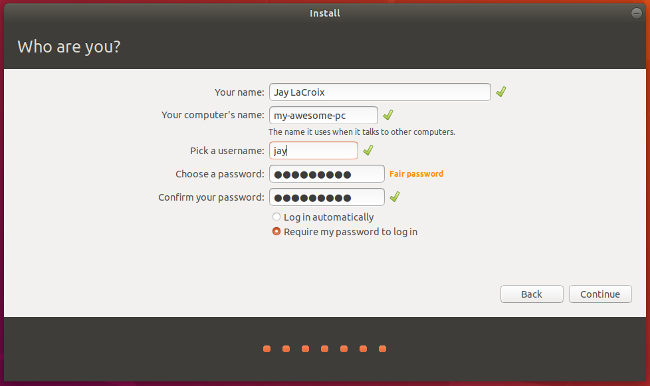
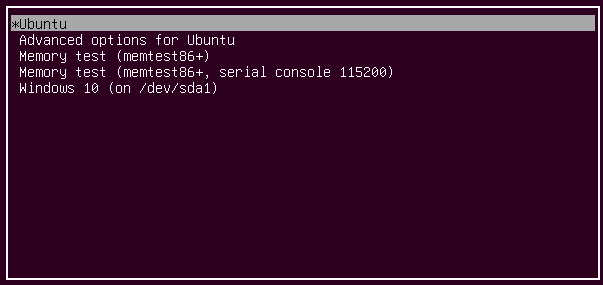
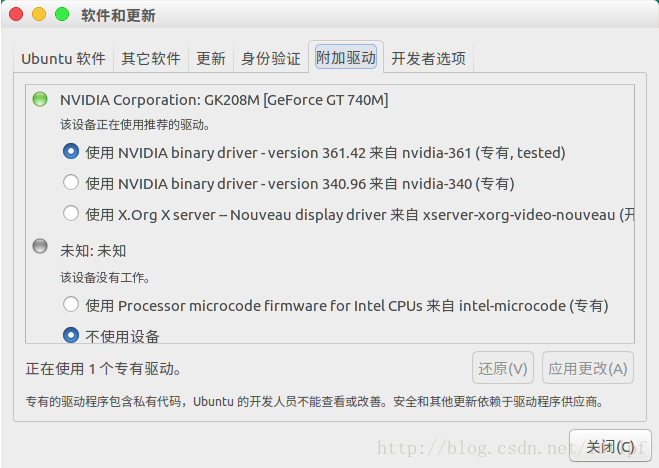
    Ubuntu Windows 10/11 dual boot === * [name=Ander Liu] ###### tags: `Linux` `Ubuntu` [TOC] ## OS version * Ubuntu 22.04.3 LTS * Windows 11 <!-- * Windows 10 home 1903 (18362.356) --> ## Google it yourself !!! * [Useful Reference](http://lmgtfy2.com/?q=Ubuntu+Windows+dual+boot) ## Dual boot 1. **IMPORTANT !!!** Back up your computer 2. Download [Ubuntu 22.04 LTS](https://ubuntu.com/download/desktop) 3. Create Ubuntu live USB * Download [Etcher](https://www.balena.io/etcher/) * Click Select image, and point it to the Ubuntu ISO you downloaded in step 2. Next, click Select drive to choose your flash drive, and click Flash! to start the process of turning a flash drive into an Ubuntu installer. ![](https://www.balena.io/static/steps-8006dca57323756b1b84fb9408742409.gif) 4. Disable Fast Startup in Windows (recommend) * `設定` > `系統` > `電源與睡眠` > `其他電源設定` > `選擇按下電源按鈕時的行為` * 取消勾選 `開啟快速啟動` 5. Disable Secure Boot and Rapid Start in BIOS * [how to enter BIOS](https://www.tomshardware.com/reviews/bios-keys-to-access-your-firmware,5732.html) 6. Plug in Ubuntu live USB and reboot !!! 7. Try Ubuntu * You can select between Try Ubuntu or Install Ubuntu. Don't install just yet; Instead, choose Try Ubuntu. After it finishes loading, you should see the Ubuntu desktop. ![](https://opensource.com/sites/default/files/uploads/linux-dual-boot_13.png) * Here, in Live mode, you can play around with Ubuntu and make sure everything works before you commit to the installation. 8. Install Ubuntu !!! * Once you're ready to go, double-click on the `Install Ubuntu 18.04 LTS` icon on the desktop to launch the installer. * Choose the language you want to use for the installation process, then click `Continue`. ![](https://opensource.com/sites/default/files/uploads/linux-dual-boot_15.png) * Next, choose the keyboard layout. Once you've made your selection, click `Continue`. ![](https://opensource.com/sites/default/files/uploads/linux-dual-boot_16.png) * You have a few options on the screen below. One, you can choose a Normal or a Minimal installation. For most people, the Normal installation is ideal. * In addition, you can choose to download updates and whether or not to include third-party software and drivers. I recommend checking both of those boxes. When done, click `Continue`. ![](https://opensource.com/sites/default/files/uploads/linux-dual-boot_17.png) * The next screen asks whether you want to erase the disk or set up a dual-boot. Since you're dual-booting, choose `Install Ubuntu alongside Windows 10`. Click `Install Now`. ![](https://opensource.com/sites/default/files/uploads/linux-dual-boot_18.png) * Select a disk at the top. If you have just one disk, you can choose how much space to steal from Windows and apply to Ubuntu. You can drag the vertical line in the middle left and right with your mouse to take space away from one and gives it to the other. Adjust this exactly the way you want it, then click `Install Now`. ![](https://opensource.com/sites/default/files/uploads/linux-dual-boot_18b.png) * You should see a confirmation screen indicating what Ubuntu plans on doing. If everything looks right, click `Continue`. ![](https://opensource.com/sites/default/files/uploads/linux-dual-boot_19.png) * While Ubuntu tries its best to figure out your location, you can click on the map to narrow it down to ensure your time zone and other things are set correctly. ![](https://opensource.com/sites/default/files/uploads/linux-dual-boot_20.png) * Next, fill in the user account information: your name, computer name, username, and password. Click `Continue` when you're done. ![](https://opensource.com/sites/default/files/uploads/linux-dual-boot_21.png) * There you have it! The installation is complete. Go ahead and reboot the PC. ![](https://opensource.com/sites/default/files/uploads/linux-dual-boot_22.png) 9. Booting into Ubuntu !!! * If all went according to plan, you should see a screen similar to this when your computer restarts. ![](https://opensource.com/sites/default/files/uploads/linux-dual-boot_23.png) :::info If Ubuntu cannot be successfully booted, here is one possible reason. 如果你 GPU 是 NVIDIA 的話,按 e 進入編輯開機指令的模式,找到`quite splash`並在 splash 這個字之後空一格,再加上`nomodeset`。 ::: * Choose Ubuntu * 開機後立刻去軟體與更新,更新NVIDIA驅動 ![](https://s1.ax1x.com/2018/02/06/9MHUuF.png) * Try booting into both Ubuntu and Windows to test them out and make sure everything works as expected. :::success Complete !!! ::: :::info (Optional) Installing a decent GRUB theme to make it looks better ::: :::danger If your failed to install Ubuntu, please google it for solutions. ::: ## Some Useful Skill * 如何連結 PEAP 網路 ![](https://i.imgur.com/ktoINCl.png) :::info Alt 按下去,關機鍵會變成睡眠鍵 ::: :::warning If Ubuntu consumes too much power, here is one possible reason. 有關省電,建議關掉 NVIDIA 獨顯,因為官方沒有幫 linux 寫一個可降頻的驅動 ::: ### 中文輸入法 1. Language Support > Install / Remove Languages... ![image](https://hackmd.io/_uploads/rJMZtD1xbx.png) 2. choose Chinese (traditional) ![image](https://hackmd.io/_uploads/H14JYDyl-e.png) 3. Settings > Keyboard > Input Sources > Add Input Source... ![image](https://hackmd.io/_uploads/S1AcyOygWx.png) 4. Add Input source > Chinese (Taiwan) > Chinese (Chewing) ![image](https://hackmd.io/_uploads/SJy9FvkgZx.png) ## Some Useful Website * [Fix Time Differences in Ubuntu Windows Dual Boot](http://ubuntuhandbook.org/index.php/2016/05/time-differences-ubuntu-1604-windows-10/) <!-- TODO: maybe need update --> * [Make Ubuntu Look Like MacOS](https://itsfoss.com/make-ubuntu-look-like-macos/) * [Make Ubuntu Look Like MacOS (Outdated)](https://www.omgubuntu.co.uk/2017/03/make-ubuntu-look-like-mac-5-steps) * [Fusuma - Multitouch Gesture](https://github.com/iberianpig/fusuma) > my Fusuma config ```YAML swipe: 2: left: command: "xdotool key alt+Right" # History forward right: command: "xdotool key alt+Left" # History back 3: left: command: "xdotool key alt+Shift+Tab" right: command: "xdotool key alt+Tab" up: command: "xdotool key super" # Activity down: command: "xdotool key super+d" # Activity 4: left: command: "xdotool key ctrl+alt+Right" # Switch to next workspace right: command: "xdotool key ctrl+alt+Left" # Switch to previous workspace up: command: "xdotool key ctrl+alt+Down" # Switch to next workspace down: command: "xdotool key ctrl+alt+Up" # Switch to previous workspace pinch: in: command: "xdotool keydown ctrl click 4 keyup ctrl" # Zoom in out: command: "xdotool keydown ctrl click 5 keyup ctrl" # Zoom out hold: 4: command: "xdotool key super" # Activity ``` * [TLP - Power Management](https://github.com/linrunner/TLP) ## Recommend GNOME Extension for 22.04 LTS Jammy Jellyfish * [AlternateTab (only required before GBOME 3.32)](https://extensions.gnome.org/extension/15/alternatetab/?c=76627) > For GNOME 3.32 or later, see https://blogs.gnome.org/fmuellner/2018/10/11/the-future-of-alternatetab-and-why-you-need-not-worry/ * [Applications Menu](https://extensions.gnome.org/extension/6/applications-menu/) * [Apt Update Indicator (no longer supported)](https://extensions.gnome.org/extension/1139/apt-update-indicator/) * [CPU Power Manager](https://extensions.gnome.org/extension/945/cpu-power-manager/) * [Dash to Dock](https://extensions.gnome.org/extension/307/dash-to-dock/) * [No Title Bar](https://extensions.gnome.org/extension/2015/no-title-bar-forked/) * [Workspace Matrix](https://extensions.gnome.org/extension/1485/workspace-matrix/) * [CHC-E - Custom Hot Corners - Extended](https://extensions.gnome.org/extension/4167/custom-hot-corners-extended/) ## Reference * https://opensource.com/article/18/5/dual-boot-linux * https://itsfoss.com/install-ubuntu-1404-dual-boot-mode-windows-8-81-uefi/ * https://medium.com/caesars-study-review-on-web-development/win10-and-ubuntu-%E9%9B%99%E7%B3%BB%E7%B5%B1%E5%AE%89%E8%A3%9D%E7%AD%86%E8%A8%98-bc824bef7fb4 * https://medium.com/caesars-study-review-on-web-development/ubuntu-18-04%E5%AF%A6%E9%9A%9B%E5%AE%89%E8%A3%9D-%E7%B0%A1%E7%95%A5%E6%AD%A5%E9%A9%9F-b023f61436bf * https://wiki.ubuntu-tw.org/index.php?title=FAQinstall * https://blog.csdn.net/tjuyanming/article/details/79267984 * [`Uninstall Ubuntu Windows Dual Boot`](https://itsfoss.com/uninstall-ubuntu-linux-windows-dual-boot) * https://medium.com/caesars-study-review-on-web-development/acpi-osi-linux-nomodeset%E6%98%AF%E4%BB%80%E9%BA%BC%E6%84%8F%E6%80%9D-%E5%8A%9F%E8%83%BD-42d8e2c444c3 ## See also * [Linux command](/I4-elt5QT_O34kwp_AvFag) * [Bash / shell](/RMLrGdhFQ1muCOYBGeVoSQ) ## Homepage * [Homepage](/@NDR/Homepage)


    Import from clipboard

    Paste your markdown or webpage here...

    Advanced permission required

    Your current role can only read. Ask the system administrator to acquire write and comment permission.

    This team is disabled

    Sorry, this team is disabled. You can't edit this note.

    This note is locked

    Sorry, only owner can edit this note.

    Reach the limit

    Sorry, you've reached the max length this note can be.
    Please reduce the content or divide it to more notes, thank you!

    Import from Gist

    Import from Snippet

    or

    Export to Snippet

    Are you sure?

    Do you really want to delete this note?
    All users will lose their connection.

    Create a note from template

    Create a note from template

    Oops...
    This template has been removed or transferred.
    Upgrade
    All
    • All
    • Team
    No template.

    Create a template

    Upgrade

    Delete template

    Do you really want to delete this template?
    Turn this template into a regular note and keep its content, versions, and comments.

    This page need refresh

    You have an incompatible client version.
    Refresh to update.
    New version available!
    See releases notes here
    Refresh to enjoy new features.
    Your user state has changed.
    Refresh to load new user state.

    Sign in

    Forgot password

    or

    By clicking below, you agree to our terms of service.

    Sign in via Facebook Sign in via Twitter Sign in via GitHub Sign in via Dropbox Sign in with Wallet
    Wallet ( )
    Connect another wallet

    New to HackMD? Sign up

    Help

    • English
    • 中文
    • Français
    • Deutsch
    • 日本語
    • Español
    • Català
    • Ελληνικά
    • Português
    • italiano
    • Türkçe
    • Русский
    • Nederlands
    • hrvatski jezik
    • język polski
    • Українська
    • हिन्दी
    • svenska
    • Esperanto
    • dansk

    Documents

    Help & Tutorial

    How to use Book mode

    Slide Example

    API Docs

    Edit in VSCode

    Install browser extension

    Contacts

    Feedback

    Discord

    Send us email

    Resources

    Releases

    Pricing

    Blog

    Policy

    Terms

    Privacy

    Cheatsheet

    Syntax Example Reference
    # Header Header 基本排版
    - Unordered List
    • Unordered List
    1. Ordered List
    1. Ordered List
    - [ ] Todo List
    • Todo List
    > Blockquote
    Blockquote
    **Bold font** Bold font
    *Italics font* Italics font
    ~~Strikethrough~~ Strikethrough
    19^th^ 19th
    H~2~O H2O
    ++Inserted text++ Inserted text
    ==Marked text== Marked text
    [link text](https:// "title") Link
    ![image alt](https:// "title") Image
    `Code` Code 在筆記中貼入程式碼
    ```javascript
    var i = 0;
    ```
    var i = 0;
    :smile: :smile: Emoji list
    {%youtube youtube_id %} Externals
    $L^aT_eX$ LaTeX
    :::info
    This is a alert area.
    :::

    This is a alert area.

    Versions and GitHub Sync
    Get Full History Access

    • Edit version name
    • Delete

    revision author avatar     named on  

    More Less

    Note content is identical to the latest version.
    Compare
      Choose a version
      No search result
      Version not found
    Sign in to link this note to GitHub
    Learn more
    This note is not linked with GitHub
     

    Feedback

    Submission failed, please try again

    Thanks for your support.

    On a scale of 0-10, how likely is it that you would recommend HackMD to your friends, family or business associates?

    Please give us some advice and help us improve HackMD.


    Thanks for your feedback

    Remove version name

    Do you want to remove this version name and description?

    Transfer ownership

    Transfer to
      Warning: is a public team. If you transfer note to this team, everyone on the web can find and read this note.

        Link with GitHub

        Please authorize HackMD on GitHub
        • Please sign in to GitHub and install the HackMD app on your GitHub repo.
        • HackMD links with GitHub through a GitHub App. You can choose which repo to install our App.
        Learn more  Sign in to GitHub

        Push the note to GitHub Push to GitHub Pull a file from GitHub

          Authorize again
         

        Choose which file to push to

        Select repo
        Refresh Authorize more repos
        Select branch
        Select file
        Select branch
        Choose version(s) to push
        • Save a new version and push
        • Choose from existing versions
        Include title and tags
        Available push count

        Pull from GitHub

         
        File from GitHub
        File from HackMD

        GitHub Link Settings

        File linked

        Linked by
        File path
        Last synced branch
        Available push count

        Danger Zone

        Unlink
        You will no longer receive notification when GitHub file changes after unlink.

        Syncing

        Push failed

        Push successfully

