# 第七講:不只挑選任務的排程器
> 本筆記僅為個人紀錄,相關教材之 Copyright 為[jserv](http://wiki.csie.ncku.edu.tw/User/jserv)及其他相關作者所有
* 直播:
* ==[Linux 核心設計:不只挑選任務的排程器(上) - 2023/3/13](https://youtu.be/X2T7U6AEWrY)==
* ==[Linux 核心設計:不只挑選任務的排程器(中) - 2023/3/13](https://youtu.be/S2MP4hqNXX0)==
* ==[Linux 核心設計:不只挑選任務的排程器(下) - 2022/4/19](https://youtu.be/-wn-ttOvQl0)==
* 詳細共筆:[Linux 核心設計:不只挑選任務的排程器](https://hackmd.io/@sysprog/linux-scheduler)
* 主要參考資料:
* [Evolution of the x86 context switch in Linux](https://www.maizure.org/projects/evolution_x86_context_switch_linux/)
* [CPU Scheduling of the Linux Kernel (2022)](https://docs.google.com/presentation/d/1qDSFOfhGF-AX3O8CNzoAkQr_5ohr0nMVDlNfPnM9hOI/edit?usp=sharing)
---
本課整理了 Linux 核心中 CPU 排程器 (CPU Scheduler) 的相關概念、演化以及面臨的挑戰。排程器不僅僅是挑選下一個任務執行,它需要考慮公平性 (fairness)、反應時間 (interactiveness)、多核處理器的負載平衡 (load balancing)、進階電源管理以及即時處理 (real-time processing) 等多個複雜議題。
---
## 排程器的目標與概念
排程器 (Scheduler) 在計算機科學中,是將待辦任務分配給可用資源以完成工作的方法。以數學觀點來看,==**排程是個函數,將任務集合映射到資源集合**==。
### Linux CPU 排程器:
其核心任務是 **將一系列的行程 (Process),即各種工作負載,映射到一個個 CPU 核心上執行**。這些任務包括常駐系統的服務、各式代理程式 (Agent)、初始化腳本 (initscripts) 及週期性任務等。
#### 排程器的挑戰:
作為一個特殊的函數,排程器需要考量多方面因素,包括:
* **公平性 (Fairness)**:確保各個任務能獲得合理的執行機會。
* **優先權 (Priority)**:允許重要性較高的任務優先執行。
* **搶佔 (Preemption)**:允許高優先權任務中斷低優先權任務的執行。
* **反應時間 (Interactiveness/Response Time)**:對於 time sharing,應能快速回應使用者的操作。
* **吞吐量 (Throughput)**:單位時間內完成的工作總量應最大化。
* **效率 (Efficiency)**:最小化排程器本身的開銷。
* **可擴展能力 (Scalability)**:系統從單核擴展到多核,乃至於 NUMA (Non-Uniform Memory Access) 架構時,排程器依然能有效運作。
* **電源管理 (Power Management)**:在行動裝置和伺服器環境中,有效降低功耗,如[EAS, Energy Aware Scheduling](https://developer.arm.com/open-source/energy-aware-scheduling)。
* **即時性 (Real-time Capability)**:對於即時任務,必須在限定的時間內完成。
#### 排程器的任務分類
不同應用場景有不同需求,因此任務可分類為:
* **普通行程 (Normal process)**
* **即時行程 (Real-time process)**:對反應時間的快與精準要求最高。
* **互動式行程 (Interactive process)**:與使用者互動,對排程延遲敏感。
* **批次處理行程 (Batch process)**:背景執行,更注重吞吐量。
#### Linux 排程的設計式與權衡 (Patterns / Trade-offs)
設計排程器時,需考慮以下問題:
* **任務組織**:
* **共享單一執行佇列 (RunQueue)**:所有資源共享一個任務佇列,排程時需透過鎖定 (locking) 保證互斥。
* **每個資源獨立的執行佇列**:減少鎖定開銷,但需處理資源閒置時從其他佇列「偷取」任務的問題。
* **資源利用**:
* **執行到完成 (Run to completion)**:適用於計算密集且在意延遲的場景 (如網路設備的訊息處理)。
* **時間分片 (Time slicing)**:適用於 I/O 密集或在意系統總體使用率的場景。
* **RunQueue 資料結構**:各有優劣
* FIFO 佇列 (Linked-List)
* 紅黑樹 (Red-Black Tree)
* 點陣圖 (bitmap) + FIFO 佇列 ...
* **演算法**:
* 迭代走訪挑選任務 ($O(N)$)
* 對任意任務進行循環分配 (Round Robin)
* 加權循環分配 (Weighted Round Robin) ...
### 資訊系統中的其他排程器:
1. **Erlang scheduler**:負責 Erlang 行程到作業系統 Thread 之間的映射。
2. **Nginx**:負責將 HTTP/HTTPS 請求映射到後端的行程或應用程式。
3. **記憶體管理器 (Memory manager)**:負責虛擬記憶體到實體記憶體之間的映射。
4. **Hypervisor**:負責虛擬機器 (VM) 到實體硬體資源之間的映射。
5. **Amazon Elastic Compute Cloud (EC2)**:負責 VM 到 Hypervisor 之間的映射。
6. **Apache Spark**:負責 Map/Reduce 任務到計算節點之間的映射。
#### 這些映射帶來的好處包括:
* 資源更高效的利用
* 降低任務與資源間的耦合度 (Indirection)
* 更好的服務品質 (Quality of Service, QoS)。
:::success
正如 David Wheeler 所言:
> "All problems in computer science can be solved by another level of indirection" (電腦科學中的所有問題都可以透過增加一個間接層來解決)。
:::
許多系統都面臨任務數量遠大於資源數量的挑戰,這種情況稱為「超額認購」(Oversubscribed)。排程器透過引入間接層,降低資源兩端的耦合度,從而有效地支援超額認購。
---
## CPU 排程對系統的影響
排程器本身的運作會消耗系統資源,這是其主要代價。理想情況下,這個代價應越小越好。
```graphviz
digraph G {
size="5!";
// 使用無形狀或純文字節點以呈現 HTML 標籤
node [shape=none];
// 定義橫向長條:採用 HTML 表格,每個 <TD> 設定背景色與寬度
bar [
label=<<TABLE BORDER="0" CELLBORDER="1" CELLSPACING="0">
<TR>
<TD BGCOLOR="#D1E9E9" WIDTH="90" HEIGHT="20"></TD>
<TD PORT="p1" BGCOLOR="orange" WIDTH="40" HEIGHT="20"></TD>
<TD PORT="p0" BGCOLOR="#D1E9E9" WIDTH="110" HEIGHT="20"></TD>
<TD BGCOLOR="orange" WIDTH="30" HEIGHT="20"></TD>
<TD BGCOLOR="#D1E9E9" WIDTH="90" HEIGHT="20"></TD>
<TD BGCOLOR="orange" WIDTH="40" HEIGHT="20"></TD>
<TD BGCOLOR="#D1E9E9" WIDTH="105" HEIGHT="20"></TD>
</TR>
</TABLE>>
];
// 在第一個橘色段上方放置文字節點,文字顏色設為橘色
lbl [
label="Scheduling time, as little as possible",
fontcolor="orange",
fontsize="20",
fontname="Arial"
];
lbl2 [
label="Task running time",
fontcolor="black",
fontsize="20",
fontname="Arial"
];
// 讓 lbl 在 bar 的上方 (透過 rank 來控制垂直位置)
{ rank=source; lbl; }
{ rank=sink; lbl2; }
// 從文字節點連一條箭頭到 bar 的第一個橘色段
lbl2:w -> bar:p0 [color="black", arrowhead="vee"];
lbl:w -> bar:p1 [color="orange", arrowhead="vee"];
}
```
### 測量排程器成本 - 實驗
要測量 Linux 進行一次重新排程 (reschedule) 的成本,可以使用 GNU/Linux 下的 [perf 工具](http://wiki.csie.ncku.edu.tw/embedded/perf-tutorial)。
1. 使用 `perf bench sched pipe` 命令可以測量兩個行程之間 **透過管道 (pipe) 進行百萬次操作的總時間**,從而推算出單次操作的成本。
```shell
$ perf bench sched pipe
# Running 'sched/pipe' benchmark:
# Executed 1000000 pipe operations between two processes
Total time:33.412 [sec]
33.412879 usecs/op
29928 ops/sec
```
> [!Note]測試結果
> 在 16 核 Intel i7-12650H 上 (WSL2),每次操作約耗時 33.41 $\mu s$。
2. 為了消除多核心環境下行程分佈帶來的影響,可以使用 `taskset` 工具將 process **固定在特定的 CPU 核心上執行**:
```shell
$ taskset -c 0 perf bench sched pipe
# Running 'sched/pipe' benchmark:
# Executed 1000000 pipe operations between two processes
Total time:2.408 [sec]
2.408468 usecs/op
415201 ops/sec
```
> [!Note] 固定在單一核心後
> 每次操作的成本降至約 2.4 $\mu s$。顯示了 process 在不同核心間遷移的成本。
這些測試雖然不夠嚴謹 (未完全排除其他系統行程的影響),但能提供排程器處理速度的數量級概念。**排程器切分出的時間片段 (timeslice) 應高於這個數量級才有意義**。與其說是排程效能,不如說是上下文交換 (Context Switch) 的表現,其中也包含了切換頁表 (page table) 的成本。
> 相比之下,使用者層級的排程器 (如 Golang 的 goroutine 排程器) 由於沒有核心層級的複雜性 (如優先權、搶佔),其延遲可以低得多。
---
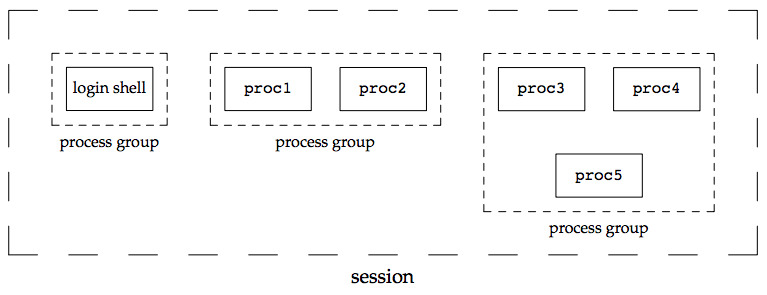
## 行程、執行緒、群組、會話 (Process, Thread, Group, Session)
Linux 核心在處理 process 和 thread 時,其界線相對模糊,主要是為了最大化程式碼的重用性。理解 Linux 中任務的組織方式對於理解排程器至關重要。
### 多層級結構
* **執行緒 (Thread)**:
* **獨立**:執行上下文 (Execution Context) 和執行緒 ID (Thread ID)。
* **共享**:大部分其他資源,特別是 Address Space、Signal Handlers 和 Process ID (PID)。
* **執行緒群組 (Thread Group)**
* Thread Group 共享的識別碼是 **Thread Group Leader (TGL) 的 PID**,即群組中第一個 Thread 的 PID。
* Thread 只能透過退出 (exiting) 來離開一個 Process。
* **行程 (Process)**:擁有獨立的 Address Space。
* **行程群組 (Process Group)**:
* 每個 **行程描述子 (Process Descriptor,即 `task_struct`)** 包含一個行程群組 ID (Process Group ID, PGID) 欄位。
* Process Group Leader (PGL) 的 PID 與 PGID 相同。PGL 同時也必須是TGL。
* Process 可以在不同的 Process Group 之間移動。
* **登入會話 (Login Session)**:
* 包含了一個 Process 的所有後代 (descendants),該 Process 啟動了在特定終端上的工作會話,**通常是為使用者建立的第一個命令殼層 (Shell) Process**。
* 一個 Process 群組中的所有 Process 必須屬於同一個登入會話。
* 會話領導者 (Session Leader) **可以** 在會話中其他 Process 結束前退出,如 `./process &` 背景執行後,關閉終端。
<center>
<img src="https://static.lwn.net/images/2014/cgroups-procs.png" alt="image" width="40%" />
</center>
> (圖中藍色部分代表 struct pid)
> 圖片來源:[Control groups, part 6:A look under the hood, 2014](https://lwn.net/Articles/606925/)
<!--  -->
Linux 核心使用 `task_struct` 結構來描述任務 (task),此處的任務可以是 process 或 thread。
### 相關結構
* **PID 類型**:
`include/linux/pid_types.h`
```c=5
enum pid_type {
PIDTYPE_PID, // 行程 ID
PIDTYPE_TGID, // 執行緒群組 ID
PIDTYPE_PGID, // 行程群組 ID
PIDTYPE_SID, // 會話 ID
PIDTYPE_MAX, // 以上共 4 種類型
};
```
* **struct task_struct**:核心中描述一個任務 ( Process 或 Thread) 的主要資料結構。
`include/linux/sched.h`
```c=813
struct task_struct {
struct task_struct *group_leader; // thread group leader
...
pid_t pid; /* 全域 PID */
pid_t tgid; /* 全域 TGID */
...
struct pid *thread_pid;
struct hlist_node pid_links[PIDTYPE_MAX]; // 舊版核心使用
struct list_head thread_node; // 串聯 thread group 內部的頭
...
struct signal_struct *signal; // 指向 signal
...
}
```
### 行程識別碼 (Process Identifier, PID)
Linux 核心對 PID 的處理具有 **層次性** 和 **命名空間 (Namespace)** 的概念。
* **PID 命名空間 (PID Namespace)**:
為了支援容器化 (如 Docker),Linux 引入了 PID Namespace。每個 Namespace 擁有獨立的 PID 集合。PID Namespace 是層級式的,父 Namespace 可以看見子 Namespace 中的任務,反之則不行。一個任務在不同的 Namespace 中可以有不同的 PID。
* 新的 PID Namespace 透過呼叫 `clone()` 系統呼叫並帶上 `CLONE_NEWPID` 旗標來建立。
<center>
<img src="https://hackmd.io/_uploads/SycI-zN7ee.png" alt="image" width="60%" />
</center>
* **全域 ID (Global ID) vs. 區域 ID (Local ID)**:
* **全域 ID**:在 **核心本身** 及 **初始全域 Namespace** 中有效的識別碼,保證在整個系統中唯一。全域 PID 和 TGID 直接儲存在 `task_struct` 的 `pid` 和 `tgid` 欄位中。
* **區域 ID**:屬於特定 Namespace,並非全域有效。
* **struct pid**:核心內部對 PID 的表示。它指向單獨的 task、process group 和 session。
`include/linux/pid.h`
```c=55
struct pid
{
refcount_t count; // 引用計數
unsigned int level; // 包含該 ns 的層級 = 該 proces 在多少個 ns 中可見
...
/* lists of tasks that use this pid */
struct hlist_head tasks[PIDTYPE_MAX]; // hash table,將使用此 pid 的任務連結起來
...
struct rcu_head rcu;
struct upid numbers[]; // 每層級一個 upid 實例陣列
};
```
* **PID 雜湊表 (PID Hash Table)**:用於快速根據 PID 數值查找 `struct pid`。
不同的 PID 可能會雜湊到同一個槽位,透過 linked-list 解決碰撞。
<center>
<img src="https://hackmd.io/_uploads/HywbZM4Xge.png" alt="image" width="50%" />
</center>
* **struct upid**:用於取得 `struct pid` 在特定 Namespace 中的 ID。
```c=50
struct upid { // 用於獲取`struct pid`在特定 ns 中的 ID
int nr;
struct pid_namespace *ns;
};
```
* **find_pid_ns()**:根據 `nr` (Namespace 中的 ID) 和 `*ns` (Namespace 指標) 查找 `struct pid`。
```c=120
extern struct pid *find_pid_ns(int nr, struct pid_namespace *ns);
```
* **IDR 機制 (ID Radix Tree)**:用於整數 ID 管理,可將整數 ID 映射到任意指標,適用於稀疏 ID 的場景。
> 延伸閱讀:[idr – integer ID management (2004)](https://lwn.net/Articles/103209/)
下圖展示一個 PID 命名空間的層級結構範例:

> 圖片來源:[How containers use PID namespaces to provide process isolation, Red Hat (2020)](https://www.youtube.com/watch?v=J17rXQ5XkDE)
* **PID 最大值**:可以透過讀取 `/proc/sys/kernel/pid_max` 來查看系統允許的最大 PID 值。
* **Bitmap Pages**:用於表示 PID 空間。
> PID 的分配和釋放是無鎖 (lockless) 的。
* **signal_struct**:儲存與 signal 相關的資訊,包含 Process 擁有的 Thread 數量
`include/linux/sched/signal.h`
```c=94
struct signal_struct {
int nr_threads; // Process 擁有的 Thread 數量
struct list_head thread_head;
/* PID/PID hash table linkage. */
...
struct pid *pids[PIDTYPE_MAX]; // 根據 `PIDTYPE` 儲存不同類型的 PID
...
};
```
* **常用的涵式**:
`include/linux/pid.h`
```c=212
static inline struct pid *task_pid(struct task_struct *task)
{
return task->thread_pid;
}
```
`include/linux/sched/signal.h`
```c=685
static inline struct pid *task_tgid(struct task_struct *task)
{
return task->signal->pids[PIDTYPE_TGID];
}
static inline struct pid *task_pgrp(struct task_struct *task)
{
return task->signal->pids[PIDTYPE_PGID];
}
static inline struct pid *task_session(struct task_struct *task)
{
return task->signal->pids[PIDTYPE_SID];
}
static inline int get_nr_threads(struct task_struct *task)
{
return task->signal->nr_threads;
}
```
* **pidfd**:一個參照到 process 的 **檔案描述符 (file descriptor)**。
`include/uapi/linux/pidfd.h`
* **引入目的**:
* 避免 **PID 重用 (PID reuse)** 可能導致的安全問題:當一個 process 退出後,其 PID 可能會被一個完全不相關的新 Process 使用。
* 支援 **需要建立不可見輔助 Process** 的共享函式庫。
* 讓 process-management app 能將特定 process 的處理委派給非父行程。
> e.g. For waiting, signalling (examples are the Android low-memory killer daemon and systemd).
* **參照對象**:process 的 TGL 的 `pid` 結構。
* **特性**:對於擁有者是穩定且私有的。
> 相關閱讀:[Adding the pidfd abstraction to the kernel (2019)](https://lwn.net/Articles/801319/)
### 指向目前 Process 的指標:current 巨集
核心經常透過指向 process descriptor (`task_struct`) 的指標來參照 Process。**為了快速存取**,核心使用了一個特殊的、架構相依的巨集 `current`。
* 在某些架構中,指向目前 Process 的指標,儲存在暫存器中。如果沒有足夠的暫存器,則使用 stack pointer (如`esp` in x86) 來定位。
> 核心模式下的 process,`esp`指向該特定 Process 的 kernel mode stack 的頂部。
* **實作**:通常是透過 `get_current()` 內聯函式完成,該函式讀取特定於 CPU 的 `current_task` 變數。
* **範例**:`arch/x86/include/asm/current.h`
```c=15
DECLARE_PER_CPU(struct task_struct *, current_task);
static __always_inline struct task_struct *get_current(void) {
return this_cpu_read_stable(current_task);
}
#define current get_current()
```
* `current` 和 `current_thread_info` 巨集常作為 `task_struct` 欄位的前綴出現在核心程式碼中。
---
## 上下文交換 (Context Switch)
當 `schedule()` 函式被呼叫時 (可能由於處理 interrupt 或 syscall),可能需要進行 Context Switch,即改變目前 CPU 上執行的 Process。
### 切換內容
1. **硬體上下文 (Hardware Context)**: Process 恢復執行前必須載入到 CPU 暫存器中的資料集合,如程式計數器 (Program Counter)、通用暫存器等。
> 在 Linux 中,一部分 Hardware Context 儲存在 process descriptor (`task_struct`) 中,其餘部分則保存在該 Process 的核心模式堆疊 (Kernel Mode Stack) 中。
2. **分頁全域目錄 (Page Global Directory, PGD)**:切換 PGD 以安裝新的位址空間。
3. **核心模式堆疊 (Kernel Mode Stack)**
Linux 使用 **軟體** 來執行 Process 交換,且 Process 交換只發生在核心模式。使用者模式下的所有暫存器內容在執行 Process 交換前已經保存在 Kernel Mode Stack 中。
### x86 架構的 Context Switch:從 TSS 到現代 Linux
#### 任務狀態區段 (TSS) 的角色
* **硬體基礎**:早期 x86 架構設計了任務狀態區段 (Task State Segment, TSS),用於硬體層面儲存任務的上下文。每個 TSS 由 `tss_struct` 結構描述。
`arch/x86/include/asm/processor.h`
```c=400
struct tss_struct {
/*
* The fixed hardware portion...
*/
struct x86_hw_tss x86_tss;
struct x86_io_bitmap io_bitmap;
};
```
* **Linux 的用法**:
* 與早期為每個任務維護一個 TSS 不同,Linux 為系統中 **每個 CPU 維護一個 TSS** (`init_tss` 陣列)。
* 這個 TSS 主要用於指定當前 CPU 上核心模式操作的 **stack pointer (RSP0)** 和 **I/O 權限點陣圖** 等。
* 核心在每次行程切換時 **更新 TSS 的某些欄位**。TSS 反映了當前行程在 CPU 上的特權,但當行程未執行時,無需為其維護 TSS。取而代之,核心將被切換的 Hardware Context (如暫存器狀態) 儲存在該 process descriptor (`task_struct`) 內的`thread_struct`欄位中。
`include/linux/sched.h`
```c=813
struct task_struct {
...
struct thread_struct thread;
...
};
```
`arch/x86/include/asm/processor.h`
```c=448
struct thread_struct {
/* Cached TLS descriptors:*/
struct desc_struct tls_array[GDT_ENTRY_TLS_ENTRIES];
unsigned long sp;
unsigned short es;
unsigned short ds;
unsigned short fsindex;
unsigned short gsindex;
...
/* IO permissions:*/
struct io_bitmap *io_bitmap;
...
};
```
#### switch_to:Context Switch 的核心
* **本質**:交換 **stack pointer (ESP/RSP)** 和 **instruction pointer (EIP/RIP)**,從而將 CPU 的控制權從一個 process 轉移到另一個 process。

* **呼叫**:通常由 `context_switch()` 函式呼叫 `switch_to(prev, next, last)`:
* **`prev`**:指向 **將被暫停** process 的描述符。
* **`next`**:指向 **將要執行** process 的描述符。
* **`last`**:一個巧妙的參數。當 Process A 切換到 B,然後經過一系列切換 (B, C, ..., X),最終由 X 切換回 A。`last` 參數 **確保了恢復執行的 A 能準確知道是從 X 切換回來的**。
:::success
* **原理**:在恢復執行的 Process A 中,`last` 變數所得到的值,其實是來自於那個「喚醒它」的 Process X 在呼叫 `switch_to` 時所傳入的 `prev` 參數。
> 在 x86 架構上,`switch_to` 巨集會將它的第一個輸入參數 (`prev`) 放在回傳值專用的暫存器 (`eax`) 中。因此,當 X 執行 `switch_to(prev=X, next=A)` 後,恢復執行的 A 就會從「回傳值」中得到 X 的指標。
* **目的**:
* 讓 A 能夠 **安全地為 X 進行收尾工作** (如呼叫 `finish_task_switch(last)`,清理一個已經結束的 zombie process 所遺留的資源)。
* 解決了控制流直接「跳轉 (如 goto)」到函式中間,無法使用標準函式回傳值,使 zombie 無法自己釋放自己腳下的地毯的問題。
:::

> 圖片來源:[UnderStanding The Linux Kernel](https://www.cs.utexas.edu/~rossbach/cs380p/papers/ulk3.pdf)
> `switch_to`實際上做的就是 prev = switch_to(prev,next)
#### Context Switch 的演化歷程
* **早期 (80x86,硬體交換)**:
* 依賴 CPU 的 Hardware Context Switch 機制。透過 `ljmp` 指令跳轉到目標任務的 TSS 描述子,CPU 自動完成狀態保存與載入。

* **Linux 1.x (概念驗證)(1994)**:
* `switch_to` 參數調整,引入中斷控制 (`cli`/`sti`) 增強原子性,但仍主要依賴硬體 TSS 交換。

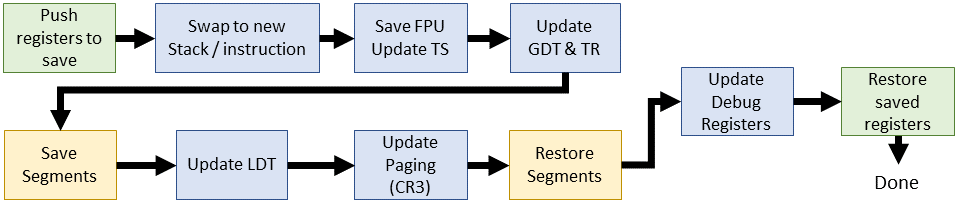
* **Linux 2.2 (轉向軟體交換 - 重大變革)(1999)**:
* `switch_to` 巨集不再直接觸發硬體 TSS 交換,而是改為:
1. **軟體** 保存當前 process 的 ESP (stack pointer) 和 EIP (instruction pointer) 到其 `thread_struct`。
2. 更新 `thread_struct` 中新 process 的 ESP 和 EIP。
3. 呼叫 C 函式 `__switch_to()` 來完成剩餘工作:
* FPU 狀態保存/恢復
* 更新 GDT (Global Descriptor Table) 中 TSS 的忙碌位元
* 載入任務暫存器 (TR)
* 處理 segment 暫存器 (FS/GS)
* 重載 LDT (Local Descriptor Table) (若需要)
* 切換 Page Table (CR3)
* 恢復 除錯暫存器
* **Linux 2.4 (細化)(2001)**:
* 與 2.2 版相似,但不再頻繁更新 TR,而是直接修改 CPU 當前活動 TSS 中的資料 (如 RSP0)。
* stack / instruction pointer 由 `prev->thread.esp` 和 `next->thread.esp` 管理。
* **Linux 2.6 (Linux 走向主流,x86_64 時代)(2003)**:
* **i386**:變化不大。
* **x86_64**:`switch_to` 巨集使用輔助巨集 (`SAVE_CONTEXT`, `RESTORE_CONTEXT`) 保存/恢復 RSP,然後呼叫 `__switch_to` C 函式。
* **`__switch_to()` C 函式**:
* 處理 FPU/SIMD 狀態
* 載入核心 stack pointer (更新 TSS 中的 SP0)
* 更新 Page Table
* 載入 TLS (Thread-Local Storage) 描述子到 GDT
* 透過 MSR (Model-Specific Register) 設定 FS/GS 基底
* 處理 除錯暫存器 和 I/O bitmap

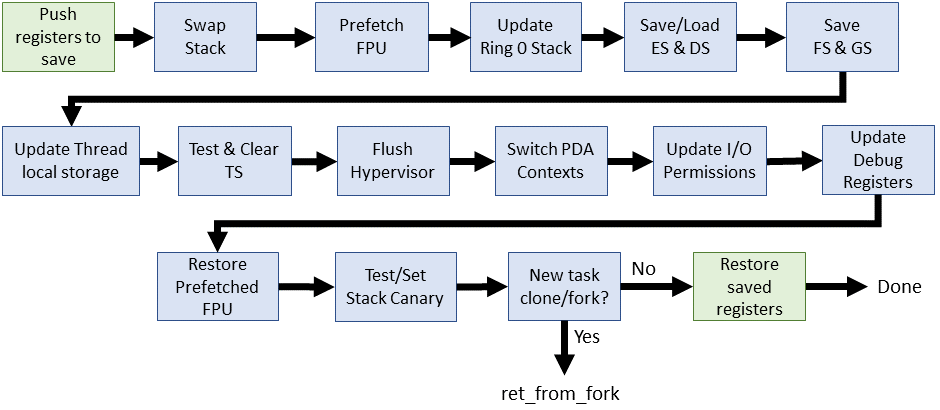
* **Linux 3.0 - 4.x (持續演進與結構化)**:
* x86_64 的 `switch_to` 巨集引入堆疊保護 (`__switch_canary`)。
* **`switch_to()`** 結構更清晰:
* **`prepare_switch_to()` 巨集**:確保核心 stack 就緒 (尤其對 VMAP_STACK)。
* **`__switch_to_asm` 組合語言函式**:
* 執行 callee 保存暫存器的推入/彈出
* RSP 交換
* 處理堆疊保護和 Retpoline (針對 Spectre) 等底層操作
* 最後跳轉到 `__switch_to` C 函式。
* **`__switch_to` C 函式**:增加 **FPU 預載入** 優化、**虛擬化環境支援**。
* **Linux 4.16 ~ 至今 (成熟與優化)**:
* **核心機制穩定**:`__switch_to_asm` 組語函式 和 `__switch_to` C 函式,在後續版本的分工幾乎保持一致。
* **`switch_to` 巨集**:
* 棄用 `prepare_switch_to()` 巨集。
* **`__switch_to_asm` (組合語言)**:持續精煉暫存器操作效率,深化旁路攻擊緩解措施。
`arch/x86/include/asm/switch_to.h`
```c=49
#define switch_to(prev, next, last) \
do { \
((last) = __switch_to_asm((prev), (next))); \
} while (0)
```
`arch/x86/entry/entry_64.S`
```asm=177
SYM_FUNC_START(__switch_to_asm)
ANNOTATE_NOENDBR
/*
* Save callee-saved registers
* This must match the order in inactive_task_frame
*/
pushq %rbp
...
jmp __switch_to
SYM_FUNC_END(__switch_to_asm)
```
* **`__switch_to` (C 函式)**:
* 精細的 FPU/SIMD 狀態管理 (如 AVX512, AMX)。
* 保存/載入 FS/GS 基底 (TLS)。
* 更新 current_task 和 TSS 中的 RSP0。
* 處理 __switch_to_xtra() (除錯、I/O bitmap)。
* 整合硬體新特性 (如 Intel RDT)、虛擬化優化、電源管理考量。
`arch/x86/kernel/process_64.c`
```c=610
__switch_to(struct task_struct *prev_p, struct task_struct *next_p)
{
struct thread_struct *prev = &prev_p->thread;
struct thread_struct *next = &next_p->thread;
...
return prev_p;
}
```
* **整體趨勢**:
* **安全性**:持續應對新硬體漏洞。
* **效能**:在多核環境下降低交換開銷。
* **可維護性**:程式碼結構清晰。
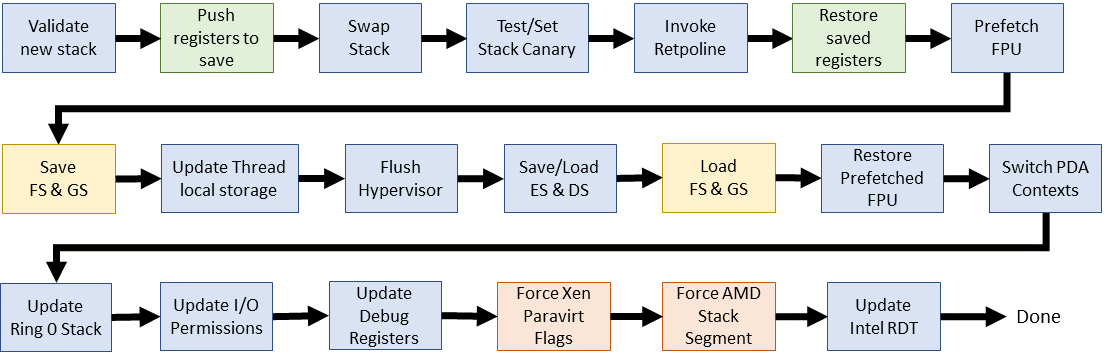
> 參考資料:[Evolution of the x86 context switch in Linux](https://www.maizure.org/projects/evolution_x86_context_switch_linux/)
> 延伸閱讀:[不同架構下的 switch_to](https://hackmd.io/@Jaychao2099/linux-switch_to)
---
## 排程類別 (Scheduling Classes) 與 `task_struct` 中的相關欄位
Linux 核心使用排程類別來區分不同類型任務的排程策略。優先權高的類別會先被排程器考慮。
排程類別按優先權降序排列:
1. **`SCHED_STOP` (Stop Task)**:
* **特性**:最高優先權,會停止其他所有任務。
* **用途**:SMP 的任務遷移 (Task Migration)、CPU 熱插拔 (CPU Hotplug)、`ftrace` 等。
3. **`SCHED_DEADLINE` (Deadline)**:
* **特性**:基於 EDF (Earliest Deadline First) 演算法。
* **用途**:週期性的即時任務,如影音編解碼。
5. **`SCHED_FIFO` (First-In, First-Out) / `SCHED_RR` (Round-Robin)**:
* **特性**:標準的 Real-Time 排程策略。
* **FIFO**:一直執行直到它阻塞、退出或被更高優先權的任務搶佔。
* **RR** :執行一個 Timeslice 後,如果仍可執行,會被放到其 priority queue 的末尾。
6. **`SCHED_NORMAL` (CFS) / `SCHED_BATCH` (Batch)**:
* **NORMAL**:預設排程策略,由 **CFS (Completely Fair Scheduler)** 實現。
* **BATCH**:適用於 **CPU 密集型** 的批次處理任務,會降低其被搶佔的頻率,以利於快取使用和減少 context switch,但會犧牲互動性。
7. **`SCHED_IDLE` (Idle Task)**:
* **特性**:最低優先權。
* **用途**:系統閒置時執行的任務,如讓 CPU 進入低功耗狀態。
```mermaid
flowchart LR
Stop-Task --> Deadline
Deadline --> Real-Time
Real-Time --> Fair
Fair --> Idle-Task
```
### `task_struct` 中與排程相關的欄位
`include/linux/sched.h`
```c=615
struct sched_rt_entity {
...
unsigned int time_slice; // 時間片段 for RR
...
}
```
```c=813
struct task_struct {
...
int prio; // 動態優先權。對於普通 Process,基於 static_prio 和 bonus 計算
int static_prio; // 靜態優先權,根據 nice 值計算,用於計算 timeslice
int normal_prio; // 一般優先權,記錄 prio 在 priority boost (如 取得 mutex 時被提昇) 前的值
unsigned int rt_priority; // Real-time Process 的優先權,不依賴 nice 值
struct sched_entity se; // CFS 排程實體
struct sched_rt_entity rt; // Real-time 排程實體
...
const struct sched_class *sched_class; // 指向所屬排程類別的實作函式
// (如 pick_next_task, enqueue_task 等)
...
struct task_group *sched_task_group; // 指向任務所屬的 cgroup
...
unsigned int policy; // Process 的排程模式 (SCHED_NORMAL, SCHED_FIFO ...)
...
}
```
* `static_prio`:建立 child process 時,parent process 的靜態優先權會均分給父子。
* `prio`:(高) 100 ~ 139 (低)。Bonus = 0 ~ 10。$$\text{dynamic priority} = \max(100, \min(\text{static priority} - \text{bonus} + 5, 139))$$
* `rt_priority`:(高) 0 ~ 99 (低)
<center>
<img src="https://hackmd.io/_uploads/HyhvWBB7le.png" alt="image" width="30%" />
</center>
```c=2060
static inline int test_tsk_thread_flag(struct task_struct *tsk, int flag)
{
return test_ti_thread_flag(task_thread_info(tsk), flag);
}
...
static inline int test_tsk_need_resched(struct task_struct *tsk)
{
return unlikely(test_tsk_thread_flag(tsk,TIF_NEED_RESCHED));
}
...
static __always_inline bool need_resched(void)
{
return unlikely(tif_need_resched());
}
```
* `TIF_NEED_RESCHED`: Process 旗標 (`thread_info->flags`) 中的一個位元,表示 **應盡快重新排程**。由 `need_resched()` 函式提供其值。
`linux/jiffies.h`
```c=85
extern u64 __cacheline_aligned_in_smp jiffies_64;
extern unsigned long volatile __cacheline_aligned_in_smp __jiffy_arch_data jiffies;
```
* `jiffies`:系統時間計數器,表示 **開機以來發生的 clock interrupt 次數**。
### 優先權與 Nice 值
* Linux 內部將 `nice` 值映射到一個 0-139 的優先權範圍:
* 0-99:保留給即時 Process。數值越小,優先權越高。
* 100-139:給普通 Process。數值越小,優先權越高 (對應 `nice` 值 -20 到 +19)。
* `static_prio` 可以透過 `sys_nice()` 或 `sys_setpriority()` 系統呼叫改變。
* `task_prio()` 函式返回在 `/proc` 中看到的任務優先權值。
* `task_nice()` 函式根據給定的 `static_prio` 計算 nice 值。
* `NICE_TO_PRIO()` 巨集根據給定的 nice 值計算 `static_prio`。
`kernel/sched/syscalls.c`
```c=191
int task_prio(const struct task_struct *p)
{
return p->prio - MAX_RT_PRIO;
}
```
`include/linux/sched.h`
```c=1898
extern int task_prio(const struct task_struct *p);
...
static inline int task_nice(const struct task_struct *p)
{
return PRIO_TO_NICE((p)->static_prio);
}
```
`include/linux/sched/prio.h`
```h=5
#define MAX_NICE 19
#define MIN_NICE -20
#define NICE_WIDTH (MAX_NICE - MIN_NICE + 1) // 40
#define MAX_RT_PRIO 100 // 即時優先權 0-99
#define MAX_DL_PRIO 0
#define MAX_PRIO (MAX_RT_PRIO + NICE_WIDTH) // 140
#define DEFAULT_PRIO (MAX_RT_PRIO + NICE_WIDTH / 2) // 120 (對應 nice 0)
// 轉換 nice 值 (-20 ~ 19) 變成 內部優先權 (100 ~ 139)
#define NICE_TO_PRIO(nice) ((nice) + DEFAULT_PRIO)
#define PRIO_TO_NICE(prio) ((prio) - DEFAULT_PRIO)
```
### 排程器主要函式
* **`schedule()`**:主要的排程程序,選擇下一個要執行的 Process 並將處理器交給它。
* **調用時機**:當核心希望 Process 睡眠或 Process 需要被 preempt 時。
* **作用**:如果新的 Process (`next`) 不同於先前執行的 Process (`prev`),則進行 context switch。
`kernel/sched/core.c`
```c=6645
static void __sched notrace __schedule(int sched_mode)
{
struct task_struct *prev, *next;
...
is_switch = prev != next;
if (likely(is_switch)) {
rq->nr_switches++;
RCU_INIT_POINTER(rq->curr, next);
++*switch_count;
...
rq = context_switch(rq, prev, next, &rf);
...
}
...
}
```
```c=6841
static __always_inline void __schedule_loop(int sched_mode)
{
do {
preempt_disable();
__schedule(sched_mode); /* <----- */
sched_preempt_enable_no_resched();
} while (need_resched());
}
asmlinkage __visible void __sched schedule(void)
{
struct task_struct *tsk = current;
...
if (!task_is_running(tsk)) sched_submit_work(tsk);
__schedule_loop(SM_NONE); /* <----- */
sched_update_worker(tsk);
}
EXPORT_SYMBOL(schedule);
```
* **`scheduler_tick()`**:每個時鐘中斷 (tick) 調用一次,用於重新計算優先權和時間片段,並觸發重新排程 (如果需要)。
> (已棄用,新版核心邏輯已整合調整)
---
## CPU 排程器的演化
Linux CPU 排程器經歷了多次重大演變,以適應不斷變化的硬體和應用需求。
### 主要開發者
* **Ingo Molnár**:匈牙利籍,Red Hat 員工,Linux 核心排程器的主要開發者之一,$O(1)$ 排程器和 CFS 的作者。也曾開發過核心內 Web 伺服器 Tux。
* **Peter Zijlstra**:Intel 員工,排程器、鎖定原語和效能監控等多個核心子系統的共同維護者。
* **Con Kolivas (CK)**:澳大利亞麻醉科醫師,業餘核心開發者,專注於桌面環境的反應性和良好效能。開發了 RSDL/SD、BFS、MuQSS 等排程器。也曾領導團隊 3D 列印 COVID-19 檢測設備。
### 發展時間線
* **1991 (Linux 初始版本)**:最早的 Linux 行程排程器。只有一個 Process 佇列,選擇新 Process 時遍歷整個佇列。
* **1999 (Linux 2.2)**:引入排程類別 (即時 vs. 非即時),支援 `SCHED_RR` 和 `SCHED_FIFO`。
* **2001 (Linux 2.4)**:實作了後來被歸類為 **$O(N)$ 排程器**。這個排程器在選擇下一個任務時,最壞情況下需要遍歷所有活動任務,因此其時間複雜度與任務數量成正比。
* **2003 (Linux 2.6.0 - 2.6.22)**:引入了 **$O(1)$ 排程器**。其設計目標是在常數時間內完成任務的選擇,與系統中活動任務的數量無關。它為每個 CPU 維護獨立的 RunQueue,並使用 bitmap 來快速定位最高優先權的非空佇列。
* **2007 (Linux 2.6.23)**:引入了 **CFS (Completely Fair Scheduler)**,取代了 $O(1)$ 排程器,成為預設排程器至今。CFS 的目標是為每個任務提供公平的 CPU 時間分配,其時間複雜度約為 $O(\log N)$ ,主要來自紅黑樹的操作。
* **2014 (Linux 3.14)**:引入了 **`SCHED_DEADLINE`**,基於 EDF (Earliest Deadline First) 和 CBS (Constant Bandwidth Server) 演算法,為即時任務提供更強的截止時間保證。
* **2019 (Linux 5.0)**:引入了 **EAS (Energy-Aware Scheduling)**,使排程器能夠感知 CPU 的功耗/效能特性,以優化能源消耗,特別適用於大小核 (big.LITTLE) 架構。
### 衡量排程器的指標
* 應當 **最大化** 的指標:
* **CPU 利用率 (CPU utilization)**:CPU 執行 **非閒置任務** 的時間比例。
* **吞吐量 (Throughput)**:單位時間內完成的 Process 數量。
* 應當 **最小化** 的指標:
* **周轉時間 (Turnaround time)**: Process **從提交到完成** 的總時間。
* **等待時間 (Waiting time)**: Process **在 WaitingQueue 中等待執行** 的總時間。
* **排程器延遲 (Scheduler latency)**:從 **喚醒訊號發送到 Thread** 到排程器 **實際執行該 Thread** 的時間。包括分派延遲 (dispatch latency):處理 Context Switch、切換到 user mode 並跳轉到起始位置的時間。
### $O(N)$ 排程器 (Linux 2.4 及更早版本)
* **設計**:使用單一全域執行佇列 (RunQueue),所有 CPU 核心競爭同一個佇列中的任務。
* **問題**:
* **可擴展性差**:在 SMP 系統中,全域佇列需要鎖 (lock) 保護,導致嚴重的競爭和效能瓶頸。
* **時間複雜度 $O(N)$**:挑選下一個任務或插入任務時,最壞情況下需要遍歷整個佇列,排程時間不確定,隨系統負載變化大。
```graphviz
graph Fig2_4 {
layout=neato; /* 改用 neato 引擎 */
overlap=true; /* 避免自動調整節點重疊 */
size="3!";
rankdir=TB;
splines=polyline; // 或 splines=ortho
/* 節點外觀設定 */
node [shape=box, style=filled, fontname="Helvetica"];
/* RunQueue 方塊 */
RunQueue [pos="0,0!", z=1, shape=rectangle, width=0.5, height=3, label="Run\nQueue", fillcolor=white, style="solid"];
/* 四顆 CPU */
CPU1 [fillcolor="#4fd5eb", label="CPU 0", pos="-1.5,-2.5!", fontcolor=yellow];
CPU2 [fillcolor="#51a7f4", label="CPU 1", pos="-0.5,-2.5!", fontcolor=yellow];
CPU3 [fillcolor="#4f5def", label="CPU 2", pos="0.5,-2.5!", fontcolor=yellow];
CPU4 [fillcolor="#250368", label="CPU 3", pos="1.5,-2.5!", fontcolor=yellow];
/* 在 RunQueue 上方要加的小方塊 */
Top1 [pos="-0.4,1.2!", z=3, shape=rectangle, width=0.5, height=0.2, label="", fillcolor="#4fd5eb"];
Top2 [pos="-0.4,0.9!", z=3, shape=rectangle, width=0.5, height=0.2, label="", fillcolor="#250368"];
Top3 [pos="0.4,-0.9!", z=3, shape=rectangle, width=0.5, height=0.2, label="", fillcolor="#4f5def"];
Top4 [pos="-0.4,-0.6!", z=3, shape=rectangle, width=0.5, height=0.2, label="", fillcolor="#4fd5eb"];
Top5 [pos="-0.4,-1.2!", z=3, shape=rectangle, width=0.5, height=0.2, label="", fillcolor="#250368"];
Top6 [pos="0.4,0.9!", z=3, shape=rectangle, width=0.5, height=0.2, label="", fillcolor="#51a7f4"];
/* 從 RunQueue 的南側同一個點,連出到各 CPU 的北側 */
RunQueue:s -- CPU1:n [style=dashed];
RunQueue:s -- CPU2:n [style=dashed];
RunQueue:s -- CPU3:n [style=dashed];
RunQueue:s -- CPU4:n [style=dashed];
}
```
### $O(1)$ 排程器 (Linux 2.6.0 - 2.6.22)
* **目標**:解決 $O(N)$ 排程器的可擴展性和不確定性問題,使得關鍵排程操作 (如挑選任務、插入任務) 的時間複雜度達到常數級別 $O(1)$。
* **設計**:
* **Per-CPU Runqueue**:每個 CPU 核心擁有各自的 RunQueue,大幅減少 SMP 的鎖競爭。每個 RunQueue 包含 **兩個優先權陣列 (Priority Array)**
* **優先權陣列 (Priority Array)**:包含 140 個佇列頭的陣列,每個佇列對應一個優先權等級。同一優先權的行程以 FIFO 方式組織。
* `active` 陣列:包含 **尚未用完 Timeslice** 的 Process。
* `expired` 陣列:包含 **已用完 Timeslice** 的 Process。
<center>
<img src="https://i.imgur.com/EeB2VmP.png" alt="image" width="80%" />
</center>
* **Bitmap**:使用一個 bitmap 來標記哪些 Priority Queue 中有待執行的行程。
* **任務選擇**:透過在 bitmap 中查找第一個被設定的位元 (Find First Set, FFS) 來定位最高優先權的非空佇列,時間複雜度為 $O(1)$ (依賴硬體指令)。

* **佇列切換**:當 `active` 陣列中的 **所有任務都耗盡 Timeslice 後**,`active` 和 `expired` 陣列指標互換,時間複雜度為 $O(1)$。
```graphviz
digraph RunQueueDiagram {
rankdir=BT;
size="6!";
splines=polyline;
node [shape=record, style=filled, fillcolor=white, fontname="Helvetica"];
edge [arrowhead=none];
// CPU nodes
CPU0 [label="CPU 0", shape=rectangle, fillcolor="#4fd5eb", fontcolor=yellow];
CPU1 [label="CPU 1", shape=rectangle, fillcolor="#51a7f4", fontcolor=yellow];
CPU2 [label="CPU 2", shape=rectangle, fillcolor="#4f5def", fontcolor=yellow];
CPU3 [label="CPU 3", shape=rectangle, fillcolor="#250368", fontcolor=yellow];
// RunQueue nodes with two Priority Arrays each
RQ0 [shape=plaintext, margin=0, label=<
<TABLE BORDER="0" CELLBORDER="1" CELLSPACING="0">
<TR><TD BGCOLOR="#84e878">0</TD></TR>
<TR><TD BGCOLOR="#84e878">1</TD></TR>
<TR><TD BGCOLOR="#84e878"><BR/><BR/><BR/></TD></TR>
<TR><TD BGCOLOR="#84e878">99</TD></TR>
<TR><TD BGCOLOR="#e95646">100</TD></TR>
<TR><TD BGCOLOR="#e95646"><BR/><BR/></TD></TR>
<TR><TD BGCOLOR="#e95646">139</TD></TR>
</TABLE>
>];
RQ1 [shape=plaintext, margin=0, label=<
<TABLE BORDER="0" CELLBORDER="1" CELLSPACING="0">
<TR><TD BGCOLOR="#b2e892">0</TD></TR>
<TR><TD BGCOLOR="#b2e892">1</TD></TR>
<TR><TD BGCOLOR="#b2e892"><BR/><BR/><BR/></TD></TR>
<TR><TD BGCOLOR="#b2e892">99</TD></TR>
<TR><TD BGCOLOR="#fca699">100</TD></TR>
<TR><TD BGCOLOR="#fca699"><BR/><BR/></TD></TR>
<TR><TD BGCOLOR="#fca699">139</TD></TR>
</TABLE>
>];
RQ2 [shape=plaintext, margin=0, label=<
<TABLE BORDER="0" CELLBORDER="1" CELLSPACING="0">
<TR><TD BGCOLOR="#84e878">0</TD></TR>
<TR><TD BGCOLOR="#84e878">1</TD></TR>
<TR><TD BGCOLOR="#84e878"><BR/><BR/><BR/></TD></TR>
<TR><TD BGCOLOR="#84e878">99</TD></TR>
<TR><TD BGCOLOR="#e95646">100</TD></TR>
<TR><TD BGCOLOR="#e95646"><BR/><BR/></TD></TR>
<TR><TD BGCOLOR="#e95646">139</TD></TR>
</TABLE>
>];
RQ3 [shape=plaintext, margin=0, label=<
<TABLE BORDER="0" CELLBORDER="1" CELLSPACING="0">
<TR><TD BGCOLOR="#b2e892">0</TD></TR>
<TR><TD BGCOLOR="#b2e892">1</TD></TR>
<TR><TD BGCOLOR="#b2e892"><BR/><BR/><BR/></TD></TR>
<TR><TD BGCOLOR="#b2e892">99</TD></TR>
<TR><TD BGCOLOR="#fca699">100</TD></TR>
<TR><TD BGCOLOR="#fca699"><BR/><BR/></TD></TR>
<TR><TD BGCOLOR="#fca699">139</TD></TR>
</TABLE>
>];
RQ4 [shape=plaintext, margin=0, label=<
<TABLE BORDER="0" CELLBORDER="1" CELLSPACING="0">
<TR><TD BGCOLOR="#84e878">0</TD></TR>
<TR><TD BGCOLOR="#84e878">1</TD></TR>
<TR><TD BGCOLOR="#84e878"><BR/><BR/><BR/></TD></TR>
<TR><TD BGCOLOR="#84e878">99</TD></TR>
<TR><TD BGCOLOR="#e95646">100</TD></TR>
<TR><TD BGCOLOR="#e95646"><BR/><BR/></TD></TR>
<TR><TD BGCOLOR="#e95646">139</TD></TR>
</TABLE>
>];
RQ5 [shape=plaintext, margin=0, label=<
<TABLE BORDER="0" CELLBORDER="1" CELLSPACING="0">
<TR><TD BGCOLOR="#b2e892">0</TD></TR>
<TR><TD BGCOLOR="#b2e892">1</TD></TR>
<TR><TD BGCOLOR="#b2e892"><BR/><BR/><BR/></TD></TR>
<TR><TD BGCOLOR="#b2e892">99</TD></TR>
<TR><TD BGCOLOR="#fca699">100</TD></TR>
<TR><TD BGCOLOR="#fca699"><BR/><BR/></TD></TR>
<TR><TD BGCOLOR="#fca699">139</TD></TR>
</TABLE>
>];
RQ6 [shape=plaintext, margin=0, label=<
<TABLE BORDER="0" CELLBORDER="1" CELLSPACING="0">
<TR><TD BGCOLOR="#84e878">0</TD></TR>
<TR><TD BGCOLOR="#84e878">1</TD></TR>
<TR><TD BGCOLOR="#84e878"><BR/><BR/><BR/></TD></TR>
<TR><TD BGCOLOR="#84e878">99</TD></TR>
<TR><TD BGCOLOR="#e95646">100</TD></TR>
<TR><TD BGCOLOR="#e95646"><BR/><BR/></TD></TR>
<TR><TD BGCOLOR="#e95646">139</TD></TR>
</TABLE>
>];
RQ7 [shape=plaintext, margin=0, label=<
<TABLE BORDER="0" CELLBORDER="1" CELLSPACING="0">
<TR><TD BGCOLOR="#b2e892">0</TD></TR>
<TR><TD BGCOLOR="#b2e892">1</TD></TR>
<TR><TD BGCOLOR="#b2e892"><BR/><BR/><BR/></TD></TR>
<TR><TD BGCOLOR="#b2e892">99</TD></TR>
<TR><TD BGCOLOR="#fca699">100</TD></TR>
<TR><TD BGCOLOR="#fca699"><BR/><BR/></TD></TR>
<TR><TD BGCOLOR="#fca699">139</TD></TR>
</TABLE>
>];
// RunQueues at the top
{ rank = max; RQ0; RQ1; RQ2; RQ3; RQ4; RQ5; RQ6; RQ7; }
// CPUs at the bottom
{ rank = min; CPU0; CPU1; CPU2; CPU3; }
// Connections: each CPU connects to its two RunQueues
CPU0:n -> RQ0:s;
CPU0:n -> RQ1:s;
CPU1:n -> RQ2:s;
CPU1:n -> RQ3:s;
CPU2:n -> RQ4:s;
CPU2:n -> RQ5:s;
CPU3:n -> RQ6:s;
CPU3:n -> RQ7:s;
}
```
#### $O(1)$ 排程器的特性與問題
* **優點**:
* **常數時間操作**:排程操作 (任務選擇、佇列切換) 時間複雜度為 $O(1)$。
* **SMP 可擴展性**:Per-CPU Runqueue 提高了多處理器環境下的效能。
* **CPU 親和性 (Affinity)**:傾向於將行程保留在同一個 CPU 上執行,以利用快取。
* **互動式行程支援**:透過啟發式演算法 (heuristics) 和獎勵 (bonus) 機制提升互動式行程的反應速度。
* **公平性**:宣稱 Process 不會餓死 (starved)。
* **負載平衡 (Load Balancing)**:當某些 CPU 過於繁忙或空閒時,會在 CPU 之間遷移任務。
* **時間片段分配問題 (Priorities and Timeslices)**:
* 根據 static_prio 分配的 Timeslice 長度差異巨大,且非線性。(分配不均)
* 優先權 100 的任務比優先權 101 的任務多獲得 2.5% 的 CPU 時間。
* 優先權 119 的任務比優先權 120 的任務多獲得 4 倍 CPU 時間。
* 優先權 138 的任務比優先權 139 的任務多獲得 2 倍 CPU 時間。

> 相同優先權差異,CPU 時間比例可能差異很大。
* **啟發式規則 (Heuristics) 與獎勵 (Bonus)**:
* **Heuristics**:為了改善互動性,引入了複雜規則來判斷 Process 是 I/O-bound 還是 CPU-bound。
* **Bonus**:**睡眠較多** 的 Process (等待 I/O) 被視為互動式,會獲得優先權獎勵 (bonus),範圍為 -5 到 +5。
* **矛盾現象 (Paradox)**:
* **互動式 Process**:需要較短時間但頻繁執行,可能因為獎勵而獲得較長的 Timeslice。
* **批次處理 Process**:能有效利用 cpu,反而可能獲得較短的 Timeslice。
* **"會哭的小孩有糖吃"**:過多的 Heuristics 規則導致系統行為難以預測,前景任務容易霸佔 CPU,而背景任務 (如[音樂播放](https://marc.info/?l=linux-kernel&m=104759311126102&w=2)) 可能因得不到足夠 CPU 時間而卡頓。
* **獎勵過度問題**:如果某些 Process 獲得過大的互動性獎勵,它們可能會主導處理器,導致其他 Process 飢餓。
> S. Takeuchi, 2007 的測試顯示,在極端情況下少數 Process 佔用了 98% 的處理器時間。
* $O(1)$ 排程器雖然核心操作是 $O(1)$,但大量的 Heuristics 計算和 Bonus 調整使得整體行為複雜、難以預測和調整、且不夠公平,有時甚至產生反效果。
* **對桌面應用不友好**:過於注重伺服器端的吞吐量和可擴展性,有時犧牲了桌面應用的反應速度和流暢性。Con Kolivas 等開發者對此提出了批評。
<center>
<img src="https://hackmd.io/_uploads/rk9oBCHQel.png" alt="image" width="50%" />
</center>
> 圖片來源:[xkcd:Supported Features](https://xkcd.com/619/)
> 諷刺開發者專注於某些技術指標 (如支援超多核心),而忽略了使用者實際體驗 (如 Flash 影片播放流暢度)。$O(1)$ 排程器在追求 $O(1)$ 複雜度和可擴展性的同時,犧牲了部分桌面應用的公平性和體驗。
### RSDL (Rotating Staircase Deadline) 排程器
由 Con Kolivas 在 2007 年針對 $O(1)$ 排程器的問題提出的改進方案。
* **設計思想**:基於 **多級回饋佇列 (Multi-level Feedback Queue)** 的概念:
1. 為每個優先權等級分配一個預設 Timeslice。Process 在其 static priority queue 中執行。
2. 用完 Timeslice 後會被放到下一級 (更低) 優先權的佇列中 ("走下樓梯")。
3. **minor rotation (微小輪轉)**:每個優先權級別有執行時間限制。時限到時,該級別所有 Process (無論剩餘 Timeslice 多少) 都會被降級。
4. **Major rotation (主輪轉)**:當一個優先權時代 (era) 的所有行程都執行完畢或用盡 Timeslice,進入 `expired` 陣列,等待 Major rotation。
<center>
<img src="https://static.lwn.net/images/ns/kernel/RSDL1.png" alt="image" width="50%" />
</center>
* **特點**:
* **公平性**:避免了複雜的 heuristics,對待行程更為公平。
* **簡單性**:演算法相對簡單,易於理解和調整。
* **桌面應用優化**:旨在提升桌面應用的反應速度和流暢性。
* **結果**:Linus Torvalds 曾對 RSDL 表示讚賞,並考慮將其合併。但最終 Ingo Molnár 快速開發並提出了 CFS,吸取了 RSDL 的一些思想,但採用了不同的實現方式。RSDL 未被合併到主線核心。
### CFS (Completely Fair Scheduler)
由 Ingo Molnár 在 2007 年提出,取代了 $O(1)$ 排程器,成為 Linux 至今的預設排程器。
* **核心目標**:實現處理器共享 (Processor Sharing),模擬一個「理想、精確的多工 CPU」。在理想情況下,如果系統中有 N 個任務,每個任務應獲得 1/N 的 CPU 時間。
* **虛擬執行時間 (Virtual Runtime, vruntime)**:
* 每個 Process 維護一個 `vruntime` 值。(不直接分配 Timeslice)
* 任務的 **實際執行時間** 會根據其優先權 (nice 值) 進行加權,**轉換為 `vruntime`**:
* 高優先權任務的 `vruntime` 增長較慢。
* 低優先權任務的 `vruntime` 增長較快。
* CFS 總是 **選擇 `vruntime` 最小的任務** 來執行。
* 當一個任務執行完畢或被搶佔時,其 `vruntime` 會更新。
* **資料結構**:使用 [紅黑樹 (Red-Black Tree)](https://hackmd.io/@sysprog/linux-rbtree) 來儲存可執行任務,樹中的節點按 `vruntime` 排序。
* **時間複雜度**:整體時間複雜度被認為是 $O(\log N)$。
* 選取 `vruntime` 最小的任務 (樹的最左節點) = $O(1)$。
* 插入 / 刪除任務 = $O(\log N)$。

* **公平性實現**:
* 透過 `vruntime` 和權重 (weight) 機制,確保了不同優先權的 Process 能按比例獲得 CPU 時間。
* 權重與 nice 值相關,nice 值越低 (優先權越高),權重越大 (增長越慢),保證了 CPU 時間的幾何級數分配。$$\text{prio_to_weight[nice]} \approx \text{prio_to_weight[nice+1]} \times 1.25$$
* 這種機制確保了所有行程的 `vruntime` 趨於平衡,從而實現了 CPU 時間的公平分配。
<center>
<img src="https://hackmd.io/_uploads/H13Ay2UXll.png" alt="image" width="80%" />
</center>
* **排程實體 (Scheduler Entities, `struct sched_entity`)**:
* CFS 排程的對象是 **排程實體**,而非直接的 `task_struct`。一個 sched_entity 可以代表一個任務,也可以代表一組任務,這種階層式的實體與資源結構稱為 **cgroups**。
`/include/linux/sched.h`
```c=569
struct sched_entity {
/* For load-balancing: */
struct load_weight load;
struct rb_node run_node;
...
u64 vruntime;
...
struct sched_entity *parent;
/* rq on which this entity is (to be) queued: */
struct cfs_rq *cfs_rq;
/* rq "owned" by this entity/group: */
struct cfs_rq *my_q;
...
}
```
```c=813
struct task_struct {
...
struct sched_entity se; // 用來向 CFS 註冊排程
struct task_group *sched_task_group; // 指向所屬的 task_group
...
}
```
* 透過定義 **`task_group` 結構**,描述由多個任務組成的群組:
* `task_group` 中也包含 `sched_entity` 實體,因此其也可以做為一個 CFS 所管理的對象,被加入到一個 runqueue 之中。
* 並且,`task_group` 中對於自己群組中的任務也存在自己的 runqueue 中。換句話說,系統中的 runqueue 其實是階層式樹狀結構的。
`kernel/sched/sched.h`
```c=431
struct task_group {
...
/* schedulable entities of this group on each CPU */
struct sched_entity **se;
/* runqueue "owned" by this group on each CPU */
struct cfs_rq **cfs_rq;
...
}
```
<center>
<img src="https://i.imgur.com/gOgkZ2I.png" alt="image" width="90%" />
</center>
* **目標延遲 (Target Latency) 和最小粒度 (Minimum Granularity)**:
CFS 的執行時間取決於 Process 的 `vruntime` 何時不再是最小的。不過,為了避免過於頻繁的 context switch,CFS 仍然有一個最小執行粒度 (minimum granularity) 的概念。
* **`sched_latency_ns`**:一個排程週期的 **目標延遲**,預設 20ms。表示 **所有執行中任務應在此時間內至少執行一次**。
* **`sched_min_granularity_ns`**:任務執行的 **最小 Timeslice**,預設 4ms。
* **時間片段 (`ideal_slice`) 動態計算**:$$\color{red}{\text{epoch}} = \max\{(\text{sched_latency_ns}),\ (\text{sched_min_granularity_ns} \times \text{nr_running})\}$$$$\text{ideal_slice} = \color{red}{\text{epoch}} \times \frac{\text{weight}}{\text{sum_of_weights}}$$
* **排程夥伴 (Scheduler Buddies)**:CFS 中用於調度的一些輔助指標,如:
* `next` (最近喚醒的任務)
* `last` (最近被換出的任務)
* `skip` (呼叫 `sched_yield()` 的任務)。
* **優點**:
* **高度公平**:相對於 $O(1)$ 排程器,CFS 在 CPU 時間分配上更為公平。
* **簡潔的設計**:核心概念 (`vruntime` 和紅黑樹) 相對簡單,避免了大量 Heuristics 和 Bouns。
* **良好的可調整性**:可以透過調整 nice 值和一些 sysctl 參數來影響排程行為。
* **與 $O(1)$ 的比較**:CFS 放棄了 $O(1)$ 排程器對嚴格常數時間操作的追求,但通過更公平的機制和合理的資料結構選擇,達到了更好的整體效果,尤其是在互動性和桌面體驗方面。
* **後續討論**:
* Con Kolivas 指責 CFS 借鑒了他的 `plugsched` (一個允許輕鬆更換排程器的模組化框架) 思想,儘管之前這一想法曾被批評。
* Linus Torvalds 則認為伺服器和桌面的排程需求差異不大,好的演算法應該能透過自動調整 (auto-tune) 來適應。
> 延伸閱讀:[Linux 核心設計: Scheduler(2): 概述 CFS Scheduler](https://hackmd.io/@sysprog/B18MhT00t)
### BFS (Brain F*ck Scheduler)
由 Con Kolivas 在 2009 年重出江湖 (CFS 出現後),認為 CFS 仍然過於複雜且對桌面應用不夠友好,於是再次提出新的排程器。
* **設計哲學**:極度簡潔,專為 **桌面** 和 **低延遲場景** 設計,不追求極致的伺服器吞吐量或可擴展性。
* **核心特點**:
* **單一執行佇列 (Single Runqueue)**:回歸到類似 $O(N)$ 的設計。有鎖競爭現象,但 CK 認為對於核心數不多的桌面系統,這不是問題。
* **$O(N)$ 查找**:任務選擇是 $O(N)$ 的,因為它遍歷一個簡單的列表。CK 認為對於核心數不多的桌面系統,這不是問題。
* **最早有效虛擬截止時間優先 (Earliest Effective Virtual Deadline First, EEVDF)**:這是 BFS 的核心演算法思想,用於計算虛擬截止時間:$$\text{deadline} = \text{jiffies} + (\text{prio_ratio} * \text{rr_interval})$$
* `rr_interval`:時間片段,預設 6ms。
* `prio_ratio`:類似 CFS 中的權重,幾何依賴於優先權。
* 排程器選擇具有最早 deadline (已過期或最接近) 的任務執行。
* **無複雜 Heuristics**:避免了 CFS 和 $O(1)$ 中的複雜權重計算和動態調整。

* **爭議與效能比較 (CFS vs. BFS)**:
* [Ingo Molnár 的測試 (2009)](http://marc.info/?l=linux-kernel&m=125227082723350&w=2):在多核心伺服器環境下,BFS 在核心編譯、管道延遲、訊息傳遞、OLTP 等方面均不如 CFS。
* [Con Kolivas 的回應](https://lwn.net/Articles/351504/):Ingo 的測試場景不符合普通桌面PC的使用情況。BFS 的目標是提升互動性和反應速度。
* [Groves, Knockel, Schulte 的測試 (2009)](http://cs.unm.edu/~eschulte/classes/cs587/data/bfs-v-cfs_groves-knockel-schulte.pdf):
* BFS 在最小化**延遲**方面優於 CFS (適用於互動式任務)。
* CFS 在最小化**周轉時間**方面優於 BFS (適用於批次處理任務)。
* [Graysky 的測試 (2012)](http://repo-ck.com/bench/cpu_schedulers_compared.pdf):在少量核心 (1-4核) 的 CPU 上,CK 的補丁 (基於 BFS) 在壓縮、編譯、影片編碼等桌面常見任務上,通常比原版 CFS 有小幅 (1-8%) 的效能提升。但在更多核心 (如16核) 的情況下,BFS 的優勢減小或消失。
* **結果**:BFS 未被合併到主線核心。
### SCHED_DEADLINE
在 Linux 3.14 中加入,是一個針對 **即時系統** 的排程策略。
* **目標**:提供比傳統 `SCHED_FIFO` 和 `SCHED_RR` 更強的即時保證,特別是對於有明確截止時間 (deadline) 要求的週期性任務。
* **核心演算法**:
* **最早截止時間優先 (Earliest Deadline First, EDF)**:
* **使用**:SCHED_DEADLINE 的主要演算法,屬於 Dynamic Priority 排程。
* **作法**:總是執行 **絕對截止時間 (absolute deadline) 最早** 的任務。
* **特性**:其理論上的 CPU 可排程利用率上限為 100%。$$U = \sum_{i=1}^{n}\frac{\text{runtime}_i}{\text{period}_i} \leq 1$$
* **速率單調排程 (Rate Monotonic Scheduling, RMS)**:
* **使用**:另一種常見的即時排程演算法,但屬於 Static Priority。
* **作法**:**週期越短,優先權越高**。
* **特性**:其可排程的利用率上限較低,在某些情況下,即使總利用率未滿,也可能排程失敗 $(\text{Dhall's Effect, }U > 1)$。
* **持續頻寬伺服器 (Constant Bandwidth Server, CBS)**:
* **作法**:為每個任務預留一定的 CPU 預算 (即 runtime):
* 當任務執行時,預算會被消耗。
* 如果預算耗盡,任務會被節流 (throttled) 直到下一個週期開始。
* **temporal isolation (時間隔離)**:防止 Process 超出分配的預算,進而影響其他任務的截止時間。
* **每個任務定義三個參數**:任務保證在每個 `period` 內獲得 `runtime` 的執行時間,並且此 `runtime` 必須在從週期開始計算的 `deadline` 內完成。$\text{runtime} \leq \text{deadline} \leq \text{period}$。
* `runtime` (執行時間)
* `deadline` (相對截止時間)
* `period` (週期)

* **系統呼叫**:透過 `sched_setattr()` 和 `sched_getattr()` 這兩個系統呼叫來設定和取得任務的排程屬性。
`include/linux/syscalls.h`
```c=914
sys_sched_setattr(pid_t pid,
struct sched_attr *attr,
unsigned int flags);
sys_sched_getattr(pid_t pid,
struct sched_attr *attr,
unsigned int size,
unsigned int flags);
```
`include/uapi/linux/sched/types.h`
```c=98
struct sched_attr {
__u32 size; /* Size of this structure */
__u32 sched_policy; /* 排程方法: SCHED_DEADLINE */
__u64 sched_flags;
/* SCHED_NORMAL, SCHED_BATCH */
__s32 sched_nice;
/* SCHED_FIFO, SCHED_RR */
__u32 sched_priority;
/* SCHED_DEADLINE */
__u64 sched_runtime; /* 重點 */
__u64 sched_deadline; /* 重點 */
__u64 sched_period; /* 重點 */
/* Utilization hints */
__u32 sched_util_min;
__u32 sched_util_max;
};
```
* **優勢**:
* 能更好地處理複雜的即時任務集,提供可預測的排程行為。
* 支援跨 **CPU 的負載平衡 (push/pull)** 和 **截止時間繼承 (deadline inheritance)**。
* **應用場景**:需要嚴格截止時間保證的即時系統,如影片播放、工業控制、高頻交易等。
* **挑戰與解決方案**:
* **Dhall's Effect**:在多核心處理器上,使用全域 EDF 排程時,即使總體 CPU 利用率未滿,也可能無法滿足所有即時任務的截止時間。這通常發生在 **少量執行時間很長的任務** 與 **大量執行時間很短的任務** 混合時。(太多短任務先做了,剩餘時間不夠給長任務)
* **解決方案一**:透過 **CPU cgroup** 將任務 **綁定到特定的 CPU 核心上** (Partitioned EDF)。
* **解決方案二**:讓任務在不同核心間遷移 (Global EDF) 來應對。
* **解決方案三**:永遠不對 $U>1$ 的 deadline 作即時保證。
* **WCET 計算困難**:準確計算任務的「最壞情況執行時間 (Worst-Case Execution Time)」非常困難。若估算不足,任務可能在完成前就被節流。
* **解決方案**:提出了 **GRUB (Greedy Reclaim of Unused Bandwidth)** 機制,允許任務在需要時使用系統中閒置的 CPU 頻寬,增加彈性。
* **非對稱 CPU 架構**:如 ARM big.LITTLE,負載平衡和頻寬分配仍需完善。
* **限制**:使用 `SCHED_DEADLINE` 的任務 **不能 fork** 子行程。
> SCHED_DEADLINE 的運作基礎是一個「資源預留合約」,即系統保證在每個 period 內給予該任務 runtime 的 CPU 時間。如果這個任務 fork 了一個子行程,排程器會面臨一個難題:這個預留的 CPU 資源 (頻寬) 應該如何分配給父子兩個行程?無論哪種方式,都會讓原本清晰的排程模型變得複雜且難以預測,從而破壞其提供的「即時保證」。這也意味著 **SCHED_DEADLINE 更適合用於功能單一、固定的執行緒,而不是會動態產生子行程的複雜應用**。
* **優先權**:高於 `SCHED_FIFO/RR` 及 `SCHED_NORMAL` (CFS)。
> 參考資料:[Using SCHED_DEADLINE](https://elinux.org/images/f/fe/Using_SCHED_DEADLINE.pdf)
> 延伸閱讀:
> * [Deadline scheduling](https://lwn.net/Articles/743740/)
> * [SCHED_DEADLINE: a status update - ARM](https://events.static.linuxfound.org/sites/events/files/slides/SCHED_DEADLINE-20160404.pdf)
### MuQSS (Multiple Queue Skiplist Scheduler)
Con Kolivas 在 BFS 之後又再出江湖 (約 2016 年),旨在解決 BFS 在多核擴展性上的一些問題。發音為 "mux"。
* **核心改進**:
* **多執行佇列 (Multiple Runqueues)**:每個 CPU 一個 RunQueue,類似 $O(1)$ 和 CFS,以改善 BFS 在超過 16 核時的鎖競爭問題,提升可擴展性。
* **[跳躍串列 (Skip List)](https://en.wikipedia.org/wiki/Skip_list)**:用 Skip List 取代 CFS 的紅黑樹或 BFS 的簡單列表來組織任務。Skip List 是一種基於 **機率** 的資料結構,平均查找、插入、刪除的時間複雜度為 $O(\log N)$,但最壞情況為 $O(N)$。實作比紅黑樹更簡單。

* **虛擬截止時間 (Virtual Deadline)**:概念類似 BFS 的 EEVDF 思想,但使用奈秒級解析度的單調計數器 (`niffies`) 而非 `jiffies`。
* **非阻塞 `trylock`**:從 RunQueue 彈出任務時,嘗試使用非阻塞鎖。如果失敗,則轉向其他佇列上第二近 deadline 的任務。
* **結果**:CK 在 2021 年左右因投入 COVID-19 設備開發等原因停止了 MuQSS 的維護。
---
## CPU 排程器近期發展
### CPU 閒置迴圈 (CPU Idle Loop) (Linux 4.17)
針對 CPU 空閒時的電源管理。
* **目標**:在 CPU 閒置時,更智能地決定 CPU 進入 **合適的低功耗狀態 (idle-state)**,同時在需要時能快速喚醒,以平衡節能和喚醒延遲。
* **調控器 (Governor)**:排程器呼叫 Governor 來預測 CPU 應進入哪種深度的 idle state。
* menu governor:預設的,基於歷史閒置時間和預期延遲。
* ladder governor:另一種策略。
* teo (timer events oriented) governor:考慮計時器事件。
* **停擺時鐘 (Tickless Idle / `NO_HZ`)**:在 CPU 深度閒置時,可以停止週期性的時鐘中斷 (timer tick),以進一步節能。喚醒由非週期性事件觸發。
* **議題**:預測 CPU 將空閒多長時間是關鍵,錯誤的預測可能導致頻繁進出 idle state,反而增加開銷。
<center>
<img src="https://static.lwn.net/images/2018/kr-rw-graph.jpg" alt="image" width="70%" />
</center>
> CPU Idle Loop 重構前後功耗對比。綠線為舊迴圈,紅線為新迴圈,顯示新迴圈 **功耗更低且更可預測**。
> 參考資料:
> * [CPU Idle Loop Rework](https://www.youtube.com/watch?v=QSOo5N97T0A) (Rafael J. Wysocki, Intel, 2018)
> * [What's a CPU to do when it has nothing to do?](https://lwn.net/Articles/767630/)
### 熱壓力 (Thermal Pressure)
當 CPU 過熱時,核心的散熱調節器 (thermal governor) 會限制 CPU 的最大頻率以冷卻。傳統排程器可能未意識到 CPU 容量的變化,導致分配過多工作,效能下降。
* **目標**:讓排程器感知散熱事件,從而更合理地分配任務。
* **解決方案**:增加一個介面,讓排程器了解熱事件,從而更佳地分配任務。有兩種方法協同合作:
* **Thermal Pressure Approach**:引進 Thermal Pressure API,允許排程器收到熱事件的通知。更適用於非對稱 CPU 配置。
* **EAS (energy-aware scheduling)**
> 參考資料:[Telling the scheduler about thermal pressure](https://lwn.net/Articles/788380/) (Marta Rybczyńska, 2019)
### EAS (Energy Aware Scheduling)
在 Linux 5.0 中正式加入。
* **目標**:使排程器完全感知 CPU 的功耗/效能特性,智能地分配任務,以平衡效能和功耗。特別適用於 ARM big.LITTLE 這類異質多核 (Heterogeneous Multi-Processing, HMP) 架構。
* **核心機制**:
* **能源模型 (Energy Model)**:數據描述不同 CPU 核心在不同頻率下的功耗和效能特性。
* **任務放置**:排程器根據 **任務的特性** (如計算密集度、延遲敏感度) 和 **能源模型**,將任務放置到最合適的 CPU 核心上。(例如,輕量級任務可能放在小核,重量級任務放在大核)
* **顯著影響**:在保持或輕微影響效能 (約 3-5%) 的情況下,可降低 8-11% 的能耗。廠商 (如[聯發科的 CorePilot](https://www.mediatek.tw/features/corepilot-evolution)) 基於 EAS 進行客製化可獲得更大提升。
* **挑戰**:
* 準確預測任務負載和行為。
* 在大小核之間遷移任務的成本。
* 與 CPU Frequency Scaling (DVFS) 和 CPU Idle 機制的協同工作。
* **相關技術**:
* **DVFS (Dynamic Voltage and Frequency Scaling)**:動態電壓和頻率調整。功耗與電壓平方和頻率成正比 ($P \approx CV^2f$)。
* **CPU Frequency Governor (`cpufreq_schedutil`)**:利用排程器提供的 CPU 利用率資訊 (如 PELT - Per-Entity Load Tracking) 來調整 CPU 頻率。PELT 使用 EWMA (指數移動平均) 來追蹤最近的負載。
* **PSI (Pressure Stall Information)**:核心中的一個機制,用於量化 CPU、記憶體、I/O 等資源的壓力,幫助排程器和調控器做出更明智的決策。
> 延伸閱讀:[Linux 核心設計: Scheduler(8): Energy Aware Scheduling](https://hackmd.io/@sysprog/Skelo1WY6)
### 非對稱 CPU 架構排程 (Arm big.LITTLE)
[big.LITTLE 架構](https://en.wikipedia.org/wiki/ARM_big.LITTLE),將高效能但功耗較高的大核 (big cores) 與低功耗但效能較低的小核 (LITTLE cores) 集成在同一晶片上。
* **智能分配任務**:高強度任務到大核,低強度或背景任務到小核。錯誤的分配會導致效能不佳或功耗過高。
* **任務遷移 (migration) 成本**:從小核到大核的切換存在延遲。需要預測任務類型和負載 (可能用到機器學習技術)。
* **ISA 兼容性問題**:部分 ARM 設計中,某些 CPU 核可能只支援 64 位元任務,而另一些則同時支援 32 位元和 64 位元任務。排程器必須考慮到這一點,避免將 32 位元任務分配到僅支援 64 位元的核上。

> 延伸閱讀:
> * [Scheduling for asymmetric Arm systems](https://lwn.net/Articles/838339/)
> * [成大wiki - ARMv8](https://wiki.csie.ncku.edu.tw/embedded/ARMv8)
### 核心排程 (Core Scheduling)
針對 SMT (Simultaneous Multithreading,如 Intel Hyper-Threading) 帶來的安全問題。在 Linux 5.14 納入主線。
* **SMT 的問題**:
* SMT 允許一個物理核心同時執行多個硬體 Thread,它們共享某些核心資源 (如執行單元、cache)。這可能導致旁路攻擊,一個惡意 thread 可能竊取同一核心上其他 thread 的敏感資訊 (如 L1TF, TLBleed 等漏洞)。
* OpenBSD 等注重安全的系統曾建議完全禁用 SMT,但這會導致顯著的效能損失 (約 8-30%)。
* **Core Scheduling 的目標**:在啟用 SMT 的同時,減輕這些安全風險,同時將效能影響降至最低。
* **核心機制**:
* **信任邊界 (Trust Boundaries)**:透過 `core_cookie` 來定義。具有相同 `core_cookie` 的行程被認為是相互信任的,可以同時在同一個物理核心的 SMT thread 上執行。
* **不信任的行程 (具有不同 `core_cookie`)** 則不會被同時排程到同一個物理核心的 SMT thread 上。
* **效能影響**:啟用 Core Scheduling 會帶來一定的效能開銷 (約 4%),但遠小於完全禁用 SMT 的開銷。
> 參考資料:[Core scheduling](https://lwn.net/Articles/780703/) (Jonathan Corbet, February 2019)。
---
## 總結與展望
Linux CPU 排程器從最初簡單的任務挑選機制,演化至今已成為一個極其複雜且精密的系統,需要平衡公平性、反應時間、吞吐量、功耗、即時性以及安全性等多方面需求。其發展歷程反映了硬體技術的進步 (從單核到多核、NUMA、SMT、異質多核) 以及應用場景的多樣化 (從個人電腦到伺服器、資料中心、嵌入式設備、即時系統)。
* **演化趨勢**:從簡單的 $O(N)$ 到追求確定性的 $O(1)$,再到強調公平和簡潔設計哲學的 CFS,以及針對特定需求的 `SCHED_DEADLINE` 和 EAS。
* **持續的挑戰**:
* **啟發式規則 vs. 通用性**:過多的 Heuristics 規則可能導致系統行為難以預測且只適用於特定場景 ($O(1)$ 的教訓)。
* **效能 vs. 功耗 vs. 安全**:三者之間往往存在此消彼長的關係,需要在不同層面進行權衡。
* **桌面 vs. 伺服器**:不同應用場景對排程器的側重點不同,單一排程器如何適應所有場景是一個持續的議題。Con Kolivas 的工作在這方面提供了很多有價值的探索。
* **未來方向**:
* **異質計算環境**:更好地利用 CPU、GPU、NPU 等不同處理單元。
* **細粒度的資源控制**:為容器、雲端運算、虛擬化環境、微服務等場景提供更精確的資源隔離和 QoS 保證。
* 持續應對新的硬體安全漏洞帶來的挑戰。
* **機器學習輔助**:更智能地預測任務行為和系統狀態,以優化排程決策。
Linux 核心排程器的演化是一個充滿挑戰和創新的過程,也是整個資訊科技發展的縮影;這個故事遠未結束,隨著技術推陳出新,排程器仍將持續進化。
要深入掌握其核心設計與演化脈絡,開發者除了需精通排程算法與資料結構,還必須了解處理器架構、記憶體管理、中斷處理以及各種系統級的權衡;並利用 `perf`、`ftrace` 等工具進行實際的效能分析與行為追蹤,才能在「看到漏洞並修復它」(seeing a hole and fixing it) 的精神指引下,參與並推動排程器的改進。
> 延伸閱讀:
> * [Linux 核心設計: Scheduler(1): O(1) Scheduler](https://hackmd.io/@sysprog/S1opp7-mP)
> * [Linux 核心設計: Scheduler(2): 概述 CFS Scheduler](https://hackmd.io/@sysprog/B18MhT00t)
> * [Linux 核心設計: Scheduler(3): 深入剖析 CFS Scheduler](https://hackmd.io/@sysprog/BJ9m_qs-5)
> * [Linux 核心設計: Scheduler(4): PELT](https://hackmd.io/@sysprog/Bk4y_5o-9)
> * [Linux 核心設計: Scheduler(5): EEVDF 排程器/1](https://hackmd.io/@sysprog/SyG4t5u1a)
> * [Linux 核心設計: Scheduler(5): EEVDF 排程器/2](https://hackmd.io/@sysprog/HkyEtNkjA)
> * [Linux 核心設計: Scheduler(6): 排程器測試工具](https://hackmd.io/@sysprog/H1Eh3clIp)
> * [Linux 核心設計: Scheduler(7): sched_ext](https://hackmd.io/@sysprog/r1uSVAWwp)
> * [Linux 核心設計: Scheduler(8): Energy Aware Scheduling](https://hackmd.io/@sysprog/Skelo1WY6)
---
回[主目錄](https://hackmd.io/@Jaychao2099/Linux-kernel)
 Google Drive
Gist
Clipboard
Google Drive
Gist
Clipboard
 Sign in via Google
 Sign in via Facebook
 Sign in via X(Twitter)
 Sign in via GitHub
 Sign in via Dropbox
 Sign in with Wallet






