## Introduction
Drizzle ORM is a type-safe, SQL-focused ORM for TypeScript that simplifies database modeling and queries with familiar SQL-like syntax. It integrates smoothly with PostgreSQL and modern frameworks like Next.js.
This means, we can easily connect a Drizzle powered Node.js based environment of a Next.js application to a running PostgreSQL database, and then power the React side with Drizzle based queries and server actions.
In this post, we explain with working code snippets how to adopt Drizzle ORM in an existing Next.js 15 admin panel dashboard application.
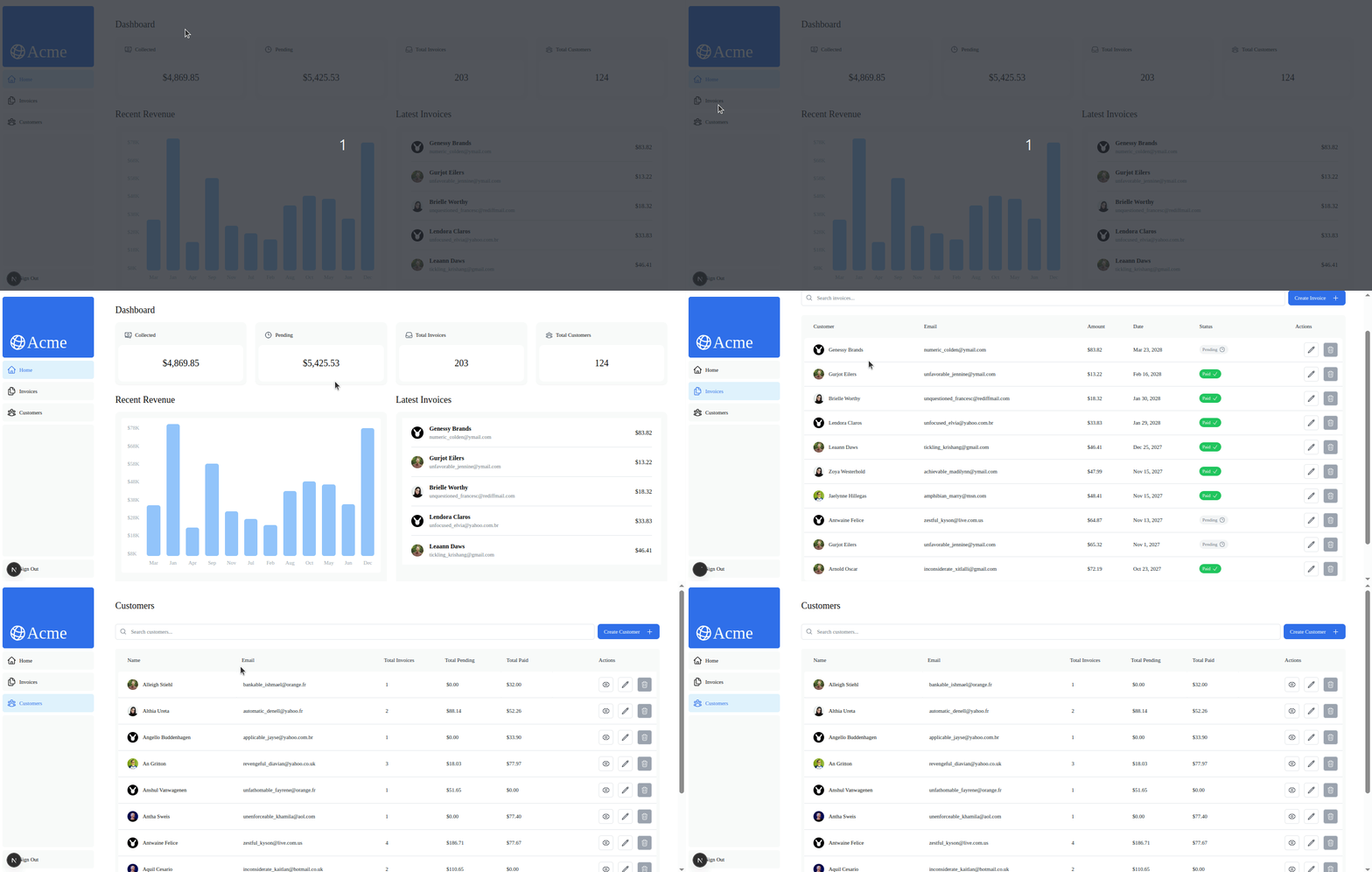
At the end of this tutorial we should have pages that fetches data to/from a PostgreSQL database and perform mutations for `customers` and `invoices` resources:
### Prerequisites
This demo demands the audience:
- are somewhat familiar with Next.js and want to build data intensive applications with Drizzle. If you are not up to speed with the Next.js app router, please follow along till [chapter 13](https://nextjs.org/learn/dashboard-app/error-handling) from [here](https://nextjs.org/learn/dashboard-app). It's a great starter.
- are familiar or are hands on with [React Hook Form and Zod](https://strapi.io/blog/yup-validation-in-react-hook-form-a-complete-guide-with-examples). It would be great if you have already worked with these headless libraries, as they are industry standards with React and Next.js.
This is particularly, because, we do not discuss them in depth, as the focus is on their integration in a Drizzle backed dashboard application. If you don't know them, there's not much harm, as the Drizzle related steps are easy to follow.
## GitHub Repo And Starter Files
The starter code for this demo application is available in this [GitHub repository](https://github.com/anewman15/nextjs-drizzle). You can begin with the code at the [prepare](https://github.com/anewman15/nextjs-drizzle/tree/prepare) branch and then follow along with this tutorial. The completed code is available inside the [drizzle](https://github.com/anewman15/nextjs-drizzle/tree/drizzle) branch.
### Drizzle in Next.js: Our Goals
Throughout the coming sections and subsections till the end of the post, we aim to rework and replace the data fetching functions in `./app/lib/mock.data.ts` by setting up a Drizzle powered PostgreSQL database first and then performing necessary queries using Drizzle.
We'll also use Drizzle mutations in the server actions inside the `./app/lib/actions.ts` file in order to perform database insertion, update and deletion.
In due steps, we aim to:
- install & configure Drizzle for connecting PostgreSQL to Node.js in a Next.js application.
- declare Drizzle schema files with tables, schemas, partial queries, views, relations and type definitions.
- generate migration files and perform migrations & seeding.
- use Drizzle for data fetching in a Next.js server side.
- use Drizzle for database mutations from client side forms with React Hook Form and Zod.
- use Drizzle Query APIs for performing relational queries that return related resources as nested objects.
#### Technical Requirements
Developers should:
- have Node.js installed in their system.
- have PostgreSQL installed locally.
- have a local PG database named `nextjs_drizzle` created and it's credentials ready for use in an app. If you need some guidelines, please feel free to follow [this Youtube tutorial](https://www.youtube.com/watch?v=KuQUNHCeKCk).
- for convenience, have [PgAdmin](https://www.pgadmin.org/download/) installed and know how to create a server, login to a database and perform PostgreSQL queries.
## Overview of Drizzle ORM Concepts and TypeScript APIs
Drizzle ORM wraps SQL in TypeScript, mirroring SQL syntax with strong type safety. It brings relational modeling, querying, and migrations into your codebase with a developer-friendly API.
### Using SQL-Like Operations in Drizzle ORM
Drizzle covers core SQL features like schemas, tables, relations, views, and [migrations](https://orm.drizzle.team/docs/kit-overview). It uses SQL-like methods (`select`, `insert`, `where`, etc.) for intuitive [query](https://orm.drizzle.team/docs/select) building in TypeScript.
### Using SQL-Like Operations in Drizzle ORM
Drizzle offers dialect-specific features through opt-in packages like `pg-core` for PostgreSQL and modules for MySQL, SQLite, and cloud services like Supabase or PlanetScale.
### How to Connect Drizzle ORM to PostgreSQL, Supabase & Serverless Backends
Drizzle supports multiple database clients with adapters for environments like Node.js (`node-postgres`), serverless (Neon), and more. It connects via the `drizzle()` function to run queries.
### Creating Schemas, Tables, and Relations with Drizzle ORM
Drizzle uses `pgTable()`, `pgView()`, and `relation()` to define your schema in TypeScript. You can also generate Zod-based validation schemas with `createSelectSchema()` and `createInsertSchema()`.
### Using Type-Safe Column Types in Drizzle ORM with PostgreSQL
Drizzle provides SQL-like TypeScript APIs for defining columns, like `uuid()` for PostgreSQL’s `UUID` type. These methods also support chaining constraints like `.primaryKey()` or `.defaultRandom()`. It supports all common SQL types—`uuid`, `text`, `int`, `boolean`, `json`, `enum`, etc.—through dialect-specific packages like `pg-core`.
👉 [See full list of column types](https://orm.drizzle.team/docs/column-types/pg)
A typical example of a schema file with tables, relations and entity types looks like this:
```ts
import { date, pgEnum, pgTable, real, uuid } from "drizzle-orm/pg-core";
import { createInsertSchema, createSelectSchema } from "drizzle-zod";
import * as zod from "zod";
import { customers } from "@/app/db/schema/customers.schema";
// An enum
export const enumInvoiceStatus = pgEnum("enumInvoiceStatus", [
"pending",
"paid",
]);
// Table definition under the `public` schema with `pgTable()`
export const invoices = pgTable("invoices", {
id: uuid("id").primaryKey().unique().defaultRandom(),
date: date("date").notNull().defaultNow(),
amount: real("amount").notNull(),
status: enumInvoiceStatus("status").notNull(),
customer_id: uuid("customer_id")
.notNull()
.references(() => customers.id, {
onDelete: "cascade",
onUpdate: "restrict",
}),
});
// Table relation declaration with `relations()`
export const invoicesRelations = relations(invoices, ({ one }) => ({
customer: one(customers, {
fields: [invoices.customer_id],
references: [customers.id],
}),
}));
// Data schemas derived with `createSelectSchema()` and `createInsertSchema()`
export const SchemaInvoice = createSelectSchema(invoices);
export const SchemaNewInvoice = createInsertSchema(invoices, {
date: (schema) =>
schema.date().nonempty({ message: "Invoice date is mandatory" }),
amount: (schema) =>
schema
.positive({ message: "Invoice amount must be positive" })
.min(1, { message: "Minimum amount must be 1$" }),
status: zod.enum(["paid", "pending"]),
customer_id: (schema) => schema.uuid({ message: "Please choose a customer" }),
}).omit({
id: true,
});
export const SchemaInvoiceEdit = createInsertSchema(invoices, {
id: (schema) => schema.uuid().nonempty(),
date: (schema) =>
schema.date().nonempty({ message: "Invoice date is mandatory" }),
amount: (schema) =>
schema
.positive({ message: "Invoice amount must be positive" })
.min(1, { message: "Minimum amount must be 1$" }),
status: zod.enum(["paid", "pending"]),
customer_id: (schema) =>
schema.uuid({ message: "Please choose a customer " }),
});
// Entity types inferred with Zod integration
export type Invoice = zod.infer<typeof SchemaInvoice>;
export type InvoiceEdit = zod.infer<typeof SchemaInvoiceEdit>;
export type NewInvoice = zod.infer<typeof SchemaNewInvoice>;
export type InvoiceForm = Omit<Invoice, "date">;
```
### How to Run Migrations and Seed PostgreSQL with Drizzle ORM
Drizzle generates migration files from predefined schema and table definitions. Any relation definitions also need to be passed to Drizzle in order for it to create database entities appropriately.
**Drizzle Kit & `drizzle.config.ts`**
To enable migrations and seeding, Drizzle uses a `drizzle.config.ts` file powered by `defineConfig()` from the `drizzle-kit` package.
You define your schema path, output folder, dialect, and database credentials here. This setup allows you to run commands like `npx drizzle-kit generate` and `npx drizzle-kit migrate`.
```ts title="drizzle.config.ts"
import "dotenv/config";
import { defineConfig } from "drizzle-kit";
export default defineConfig({
schema: "./app/db/schema/*",
out: "./drizzle",
dialect: "postgresql",
dbCredentials: {
host: process.env.DB_HOST!,
port: parseInt(process.env.DB_PORT_NO!),
user: process.env.DB_USERNAME!,
password: process.env.DB_PASSWORD!,
database: process.env.DB_NAME!,
ssl: "require",
},
verbose: true,
strict: true,
});
```
### Integrating Zod with Drizzle ORM for Schema Validation in Next.js
Drizzle is designed for strong types support with TypeScript. It provides the `drizzle-zod` opt-in package with APIs that makes it possible to easily infer Zod schemas and types from Drizzle schema declarations.
Drizzle offers types integration with other libraries such as [Typebox](https://orm.drizzle.team/docs/column-types/pg) and [Valibot](https://valibot.dev).
Visit the [Drizzle docs](https://orm.drizzle.team/docs/overview) to learn more.
## How to Perform Queries and Mutations with Drizzle ORM in Next.js (Drizzle Mutations)
Drizzle implements TypeScript APIs for almost all standard SQL operations for querying, mutations and relational associations.
In addition, Drizzle offers the magical `sql` templating operator for covering complex cases with SQL strings that the TypeScript APIs fail to handle.
### Writing Type-Safe SQL Queries in Drizzle Using `select()`
Drizzle offers vis-a-vis SQL `SELECT` queries with a straightforward `select()` API:
```ts
export const pqInvoiceById = db.select().from(invoices);
export const pqFormCustomers = db
.select({
id: customers.id,
name: customers.name,
})
.from(customers);
```
You can see that all SQL complexities are turned into intuitive JS/TS methods and objects.
With Drizzle `select()`, you can do [full select](https://orm.drizzle.team/docs/select#basic-select), [partial select](https://orm.drizzle.team/docs/select#partial-select), [conditional select](https://orm.drizzle.team/docs/select#conditional-select) and [distinct selects](https://orm.drizzle.team/docs/select#distinct-select) -- all with the elegance of JavaScript object properties.
For details feel free to refer to [the `select()` docs here](https://orm.drizzle.team/docs/select).
### Filtering and Joining Tables in Drizzle ORM (with Examples)
We can apply `WHERE` filters by chaining the `where()` method to a `select()` query:
```ts
const filteredInvoicesTable = await db
.select()
.from(invoices)
// highlight-start
.where(
or(
ilike(customers.name, `%${query}%`),
ilike(customers.email, `%${query}%`)
)
);
// highlght-end
```
Drizzle supports all standard and dialect specific [filtering helpers](https://orm.drizzle.team/docs/operators). They are pretty intuitive, but combined filters often lead to poor readability.
Likewise, we can join tables with the `leftJoin()`, `rightJoin()` and `fullJoin()` APIs:
```ts
const data = await db
.select({ count: count(invoices.id) })
.from(invoices)
// highlight-next-line
.leftJoin(customers, eq(invoices.customer_id, customers.id));
```
### Adding Pagination and Sorting in Drizzle ORM Queries
You get the idea. Drizzle is all SQL words. For sorting and pagination just tuck `.sortBy()`, `.limit()`, `.offset()` with respective operators and arguments:
```ts
const filteredInvoices = await db
.select()
.from(invoices)
// highlight-start
.limit(itemsPerPage)
.offset(offset)
.orderBy(desc(invoices.date));
// highlght-end
```
### Running SQL Aggregations with Drizzle ORM
Similarly, we do aggregations with operators of choice along with the `groupBy()` and `having()` methods chained to a query:
```ts
const customerCountPromise = await db
// highlight-next-line
.select({ count: count().as("strong_customer_base") })
.from(customers)
// highlight-start
.groupBy(customers.city)
.having(({ count }) => gt(count, 20)); // gt() is Drizzle's "greater than" comparison operator
// highlight-end
```
Drizzle provides helpers for all aggregation operations such as `sum()`, `avg()`, `count()`, `countDistinct()`, and so on.
### Inserting, Updating, and Deleting Data with Drizzle ORM
Drizzle gives [`insert()`](https://orm.drizzle.team/docs/insert), [`update()`](https://orm.drizzle.team/docs/update) and [`delete()`](https://orm.drizzle.team/docs/delete) methods for mutating data. They all take the table name on which the operation takes place.
We pass values by chaining the `values()` method. And find items with the `where()` filtering method. We can also invoke the SQL `RETURNING` clause by chaining the `returning()` method with a value.
Feel free to explore the [Drizzle mutation API docs](https://orm.drizzle.team/docs/insert) for more details.
### How to Fetch Nested Relational Data with Drizzle ORM’s Query API
Building on top of the `select()` APIs, Drizzle offers a much cleaner verbose object relational mapping of tables and joins with the [Drizzle Query API](https://orm.drizzle.team/docs/rqb). Drizzle Query operates with the `db.query` accessor method and is able to return rows by calling the name of the table. Like this:
```ts
const customer = await db.query.customers.findFirst({
where: (customers, { eq }) => eq(customers.id, id),
}) as Customer;
```
Drizzle Query is also access and return related tables as nested objects without the hassle of dealing with joining logic.
For example, thanks to Drizzle Query's `with` config option, we can include `invoices` of a row in the `customers` table as nested objects like this:
```ts
const customerById = await db.query.customers.findFirst({
// highlight-next-line
with: {
invoices: true,
},
// highlight-next-line
where: eq(customers.id, id)
});
```
Drizzle query packs all `select()` queries with an ORM wrapper. So, it is powerful and covers almost all aspects of SQL queries typical of a data dependent application.
### Using Raw SQL Queries in Drizzle ORM with the `sql` Template Tag
Drizzle provides the `sql` templating operator for writing verbose complex SQL strings. For example, we can do a PostgreSQL `CASE WHEN` clause on `SUM()`:
```ts
await db
.select({
// highlight-next-line
paid: sql`SUM(CASE WHEN invoices.status = 'paid' THEN invoices.amount ELSE 0 END)`.as("paid"),
})
.from(invoices);
```
In the `sql` operation above, we passed direct SQL strings to the template. We can also mix SQL and JavaScript variables. And the variables will be evaluated and merged with the string:
```ts
const invoiceStatusPendingPromise = await db
.select({
// highlight-next-line
pending: sql`SUM(CASE WHEN ${status} = 'pending' THEN ${amount} ELSE 0 END)`.as("pending"),
})
.from(invoices);
```
With this general overview of Drizzle concepts and APIs, we are able to integrate Drizzle in a Next.js application.
## Project Overview: Using Drizzle ORM in a Next.js 15 Admin Dashboard
This section covers how to setup and use Drizzle in a Next.js backend in order for it to interact with a PostgreSQL database. We have an existing Next.js admin panel dashboard app to which we integrate Drizzle.
The application can be found in this [GitHub repository](https://github.com/anewman15/nextjs-drizzle). In order to get a local copy and up and running with it, follow the below instructions:
- Navigate to a repository of your choice and clone the repository from [here](https://github.com/anewman15/nextjs-drizzle).
- Install the packages:
```bash
npm i
```
- Run the development server:
```bash
npm run dev
```
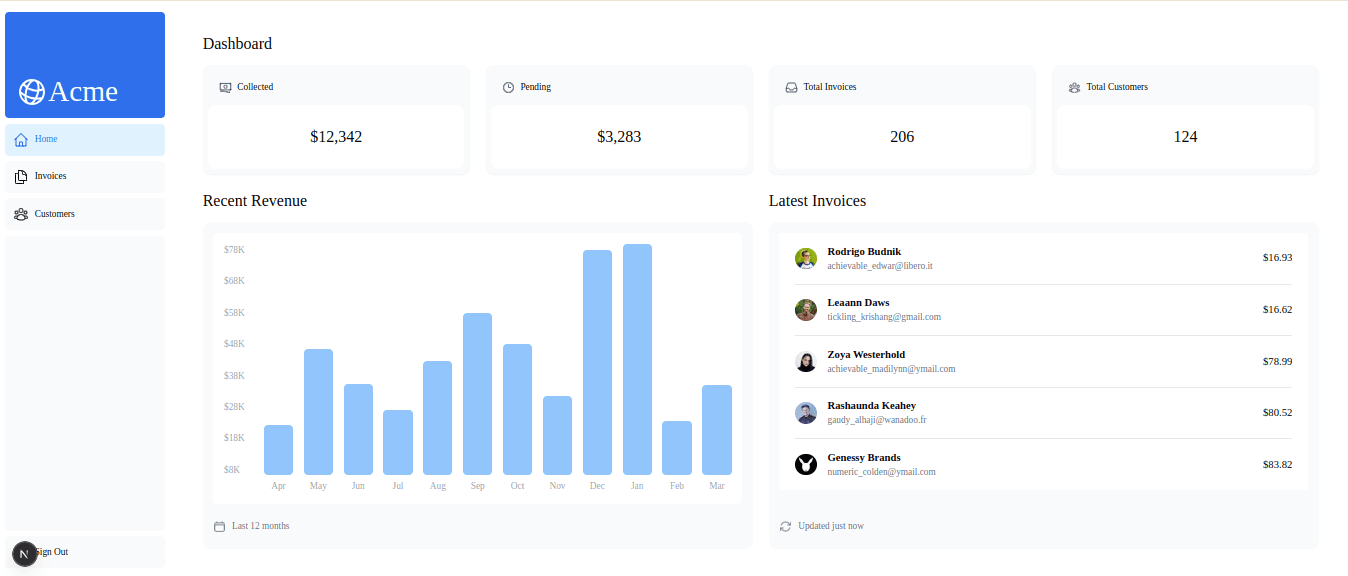
- Visit `http://localhost:3000/dashboard`, where the dashboard is running as shown below.
### Next.js 15 Admin Panel Overview with Drizzle ORM Integration
The demo dashboard application used in this post has been extended from [this Next.js app router tutorial](https://nextjs.org/learn/dashboard-app). The frontend code is just a few features more than that achieved at the end of [Chapter 13](https://nextjs.org/learn/dashboard-app/error-handling) of the tutorial. In order to keep things on course, we have discarded authentication and have replaced the original data hosted on a Vercel PostgreSQL server with some mock data.
Here's a summary of the features:
- there's an admin panel dashboard at `/dashboard` with a deck of cards, a chart and a short table.
- the admin panel has two resources: _customers_ at `/dashboard/customers` and _invoices_ at `/dashboard/invoices`.
- the _customers_ resource tabulates the list of all customers at `/dashboard/customers`. `/dashboard/customers/create` has a page with a form to create customers. `/dashboard/customers/:id` has a page that displays a customer's invoices. `/dashboard/customers/:id/edit` has a page with a form to edit a customer.
- the _invoices_ resource has pages for: listing items in a paginated table at `/dashboard/invoices`, creating an invoice at `/dashboard/invoices/create` and editing an invoice at `/dashboard/invoices/:id/edit`.
- it uses Next.js 15 server side data fetching to grab data for feeding the pages and forms.
- it uses **server actions** for performing mutations.
- the current data is stored in `./app/lib/mock.data.ts`.
- server actions are defined in `./app/lib/actions.ts`. Since we are not using a database as yet, they currently don't actually execute any mutations.
- the forms for `customers` and `invoices` use React Hook Form with Zod for field level validations.
The existing code builds on top of what we have at the end of [chapter 13 of the original Next.js app router tutorial here](https://nextjs.org/learn/dashboard-app/error-handling). Feel free to explore the codebase and make sense of what's going on. Particularly, how the server side data fetching functions gets data from the `data.mock.ts` file, instead of a real backend.
Since we are just short of adding PostgreSQL with Drizzle at this point, we don't have any mutation going on. So, the server actions in the `./app/lib/actions.ts` will return without performing any database operation.
## How to Install and Configure Drizzle in Next.js
So, first things first: we have to set up Drizzle ORM by installing necessary and relevant packages, and then configuring Drizzle behaviors we want in our application.
### Installing Drizzle & Related Packages
In your root directory, first install [drizzle-orm](https://www.npmjs.com/package/drizzle-orm) and [pg](https://www.npmjs.com/package/pg). And then [drizzle-kit](https://www.npmjs.com/package/drizzle-kit) and [@types/pg](https://www.npmjs.com/package/@types/pg) as dev dependencies:
```bash
npm i drizzle-orm pg
npm i -D drizzle-kit @types/pg
```
`drizzle-orm` will give us Drizzle's SQL functions and helper methods. `drizzle-orm` also delivers related APIs in submodules.
For example, its `drizzle-orm/node-postgres` subpackage will give us functions for connecting to PostgreSQL from our Next.js application's Node.js server. It's `drizzle-orm/pg-core` will give us functions & methods for PosgreSQL specific features.
We'll be using Zod and [drizzle-zod](https://orm.drizzle.team/docs/zod) for schema validations in forms. Zod is already packaged on the demo application along with[ React Hook Form](https://react-hook-form.com) and [Zod resolver for React Hook Form](https://github.com/react-hook-form/resolvers). So, go ahead and install `drizzle-zod`. And also `drizzle-seed` that is Drizzle's handy package for seeding in development:
```bash
npm i drizzle-zod
npm i -D drizzle-seed
```
Additionally, we'll need `tsx` to run seeding script and `dotenv` to store our env variables. So have them installed as well:
```bash
npm i tsx dotenv
```
These should now set us up for configuring Drizzle.
### Configuring Drizzle ORM in a Next.js Application
We'll use Drizzle Kit for configuring folders for Drizzle's migration files generation. The configurations are defined in the `drizzle.config.ts` file placed at the root of the application. Drizzle Kit is also used for connecting to the running database server during migrations and seeding. So, place this code inside `./drizzle.config.ts`:
```ts
import "dotenv/config";
import { defineConfig } from "drizzle-kit";
export default defineConfig({
schema: "./app/db/schema/*",
out: "./drizzle",
dialect: "postgresql",
dbCredentials: {
host: process.env.DB_HOST!,
port: parseInt(process.env.DB_PORT_NO!),
user: process.env.DB_USERNAME!,
password: process.env.DB_PASSWORD!,
database: process.env.DB_NAME!,
ssl: "require",
},
verbose: true,
strict: true,
});
```
Here is what we configured in the code above:
* We're using `defineConfig()` from Drizzle Kit to configure the path to source `schema` files to base our migrations on. And we set the `out` folder to store generated migration files. These paths can be anything consistent and convenient. So, for us, Drizzle will take the files inside `./app/db/schema/*`, produce migration files from the declarations and place them inside the `./drizzle` folder.
* We want the `"postgresql"` dialect to allow all supported PostgreSQL features in Drizzle. We have to pass the `dbCredentials` for the running database, as they are needed for performing migrations and seeding using Drizzle Kit commands.
* `verbose` and `strict` are Drizzle's internal options for printing SQL statements, when changes to schema files are pushed for migration. You can find more details in the [drizzle.config.ts docs here](https://orm.drizzle.team/docs/drizzle-config-file).
* The environment variables in the `drizzle.config.ts` file should be backed by variables stored in an `.env` file. So, feel free to copy over the content of `.env.example` and place your values.
## Define Tables, Schemas & Relationships in Drizzle ORM for Next.js Apps
With Drizzle configured with Drizzle Kit for development environment, the next thing we need to do is work on our schema files: by defining tables, necessary query views, schemas from tables and views, inferred types and relations.
### Drizzle ORM: The Source Schema Directory
We need to put all schema related files in the directory we specified in the `schema` option of the `drizzle.config.ts` file.
In our case, it's at `./app/db/schema/*`.
### Drizzle Schema Files - Single vs Multiple
We can declare all our table, view, schema, type and relations definitions in one large file and export them. But it will start to bloat in a short while, so we should separate them into multiple files.
It makes sense to divide Drizzle schema files with respect to resources -- as it would be in the case of allocating one file for each resource to have the definitions for its own table, schemas and types. Sometimes, we might find it useful to factor out partial queries and views in a separate file and derive Zod types for them. So, it is a good practice to separate Drizzle schema declarations for different concerns.
One important aspect is to separate Drizzle table **relations** in its own file in order to avoid table circular dependencies. A circular dependency issue is often encountered when we declare relations in the same file as a `pgTable()`.
You can find more information about it [in this Drizzle Discord discussion](https://discord.com/channels/1043890932593987624/1136098683679678524/1136098683679678524).
For our dashboard app, we'll have a series of schema files at `./app/db/schema/`:
- `customers.schema.ts`, `invoices.schema.ts`, `revenues.schema.ts` that define tables and entity schemas as well as derive Zod types for these entities.
- `relations.schema.ts` file that refactors the relations between tables.
- and `index.ts` file that exports necessary declarations to be used by Drizzle Kit or a `pg` client.
Let's add these files one by by, and try to make sense of them.
### Schema Definitions for `invoices`
The schema file for `invoices` looks like below:
```ts
Path: ./app/db/schema/invoices.schema.ts
import { date, pgEnum, pgTable, real, uuid } from "drizzle-orm/pg-core";
import { createInsertSchema, createSelectSchema } from "drizzle-zod";
import * as zod from "zod";
import { customers } from "@/app/db/schema/customers.schema";
export const enumInvoiceStatus = pgEnum("enumInvoiceStatus", [
"pending",
"paid",
]);
// Table
export const invoices = pgTable("invoices", {
id: uuid("id").primaryKey().unique().defaultRandom(),
date: date("date").notNull().defaultNow(),
amount: real("amount").notNull(),
status: enumInvoiceStatus("status").notNull(),
customer_id: uuid("customer_id")
.notNull()
.references(() => customers.id, {
onDelete: "cascade",
onUpdate: "restrict",
}),
});
// Schemas
export const SchemaInvoice = createSelectSchema(invoices);
export const SchemaNewInvoice = createInsertSchema(invoices, {
date: (schema) =>
schema.date().nonempty({ message: "Invoice date is mandatory" }),
amount: (schema) =>
schema
.positive({ message: "Invoice amount must be positive" })
.min(1, { message: "Minimum amount must be 1$" }),
status: zod.enum(["paid", "pending"]),
customer_id: (schema) => schema.uuid({ message: "Please choose a customer" }),
}).omit({
id: true,
});
export const SchemaInvoiceEdit = createInsertSchema(invoices, {
id: (schema) => schema.uuid().nonempty(),
date: (schema) =>
schema.date().nonempty({ message: "Invoice date is mandatory" }),
amount: (schema) =>
schema
.positive({ message: "Invoice amount must be positive" })
.min(1, { message: "Minimum amount must be 1$" }),
status: zod.enum(["paid", "pending"]),
customer_id: (schema) =>
schema.uuid({ message: "Please choose a customer " }),
});
// Types
export type Invoice = zod.infer<typeof SchemaInvoice>;
export type InvoiceEdit = zod.infer<typeof SchemaInvoiceEdit>;
export type NewInvoice = zod.infer<typeof SchemaNewInvoice>;
export type InvoiceForm = Omit<Invoice, "date">;
```
It's easy to follow. So, we are first defining the `invoices` table with `pgTable()` and necessary PostgreSQL column type helpers from `drizzle-orm/pg-core`:
```ts
export const invoices = pgTable("invoices", {
id: uuid("id").primaryKey().unique().defaultRandom(),
date: date("date").notNull().defaultNow(),
amount: real("amount").notNull(),
status: enumInvoiceStatus("status").notNull(),
customer_id: uuid("customer_id")
.notNull()
.references(() => customers.id, { onDelete: "cascade", onUpdate: "restrict" }),
});
```
Notice that we are able to apply indexes and constraints by chaining methods to column types. The `defaultRandom()` method instructs the database that the `uuid` value of `id` must be randomly generated, ensuring its presence. The `defaultNow()` method sets the value of a date to now. The `notNull()` method ensures that no row is entered to the database with a `null` value on the field.
It is important to keep in mind that the column keys defined in the table definition are for use in the JS side, i.e. in the Next.js application. Drizzle relies on the column helpers to first carry out SQL translation and then perform actual operations on the database. So, column definitions are separated out into keys and values.
Notice also: for related tables, as in the case of `customers` with `invoices`, we are chaining the `references()` method to tie up the appropriate foreign key (`customers.id`) to the field on the host table (`invoices.customer_id`).
From the table definition, we derive a series of entity schemas as needed in our application. We use `createSelectSchema()` and `createInsertSchema()` provided by `drizzle-zod`. We can create a _**select schema**_ for a query that returns all columns in a table. Like this:
```ts
export const SchemaInvoice = createSelectSchema(invoices);
```
Or we can derive an _**insert schema**_ that needs custom Zod validation messages and transformations:
```ts
export const SchemaNewInvoice = createInsertSchema(invoices, {
// Custom Zod validations with a callback that accepts the `schema`
date: (schema) => schema.date().nonempty({ message: "Invoice date is mandatory" }),
amount: (schema) => schema
.positive({ message: "Invoice amount must be positive" })
.min(1, { message: "Minimum amount must be 1$" }),
status: zod.enum(["paid", "pending"]),
customer_id: (schema) => schema.uuid({ message: "Please choose a customer" })
// highlight-start
}).omit({
id: true,
});
// highlight-end
```
### Schema Definitions for `customers`
Similarly, add the schema definitions for `customers`.
```ts
// Path: ./app/db/schema/customers.schema.ts
import { pgTable, uuid, varchar } from "drizzle-orm/pg-core";
import { createInsertSchema, createSelectSchema } from "drizzle-zod";
import * as zod from "zod";
export const customers = pgTable("customers", {
id: uuid("id").primaryKey().unique().defaultRandom(),
name: varchar("name").notNull(),
email: varchar("email").unique().notNull(),
image_url: varchar("image_url")
.notNull()
.default("/customers/balazs-orban.png"),
});
export const SchemaCustomer = createSelectSchema(customers);
export const SchemaCustomerList = zod.array(SchemaCustomer);
export const SchemaCustomerEdit = createInsertSchema(customers, {
id: (schema) => schema.uuid().nonempty(),
name: (schema) =>
schema
.min(1, { message: "Name cannot be empty" })
.max(55, { message: "Name should not exceed 55 characters" }),
email: (schema) =>
schema
.email({ message: "Enter a valid email" })
.nonempty("Please enter your email"),
image_url: (schema) => schema.optional(),
});
export const SchemaNewCustomer = createInsertSchema(customers, {
name: (schema) =>
schema
.min(1, { message: "Name cannot be empty" })
.max(55, { message: "Name should not exceed 55 characters" }),
email: (schema) =>
schema
.email({ message: "Enter a valid email" })
.nonempty("Please enter your email"),
image_url: (schema) => schema.optional(),
}).omit({
id: true,
});
export type Customer = zod.infer<typeof SchemaCustomer>;
export type CustomerEdit = zod.infer<typeof SchemaCustomerEdit>;
export type NewCustomer = zod.infer<typeof SchemaNewCustomer>;
export type CustomerField = Pick<Customer, "id" | "name">;
```
### Schema Definitions for `revenues`
In the same tone, add the definitions for `revenues`.
```ts
// Path="./app/db/schema/revenues.schema.ts"
import {
uuid,
varchar,
real,
pgTable,
} from "drizzle-orm/pg-core";
import { createSelectSchema } from "drizzle-zod";
import * as zod from "zod";
// Table
export const revenues = pgTable("revenues", {
id: uuid("id").primaryKey().unique().defaultRandom(),
month: varchar("month").unique().notNull(),
revenue: real("revenue").notNull(),
});
// Schemas
export const RevenueSchema = createSelectSchema(revenues);
// Types
export type Revenue = zod.infer<typeof RevenueSchema>;
```
### Drizzle Relations Between Tables
The relations between `customers` and `invoices` look like below:
```ts
// Path: ./app/db/schema/relations.schema.ts
import { relations } from "drizzle-orm";
import { invoices } from "./invoices.schema";
import { customers } from "./customers.schema";
export const customersRelations = relations(customers, ({ many }) => ({
invoices: many(invoices),
}));
export const invoicesRelations = relations(invoices, ({ one }) => ({
customer: one(customers, {
fields: [invoices.customer_id],
references: [customers.id],
}),
}));
```
So, for a given relation in Drizzle, we use the `relations()` API from the standard `drizzle-orm` package. We pass the host table name which owns the relation. And from a callback function that returns a relation object, pass the name of the target table as a key. Then we specify as its value the type of relation: as in `many()` or `one()`.
Depending on whether the relation is `one()` or `many()`, the name of the target table is singular or plural. The target table name ends up being a related field on the joined table.
For `many()` relations, we need to assign a foreign key. So, we have to specify the fields in the host table with `fields: [table.col_name, table.col2_name]` array. And set the related table fields with `references: [table.col_name]` array.
```ts
export const invoicesRelations = relations(invoices, ({ one }) => ({
customer: one(customers, {
// highlight-start
fields: [invoices.customer_id],
references: [customers.id],
// highlight-end
}),
}));
```
### Drizzle Schema `index.ts` File
After completing the above definitions, we can export the Drizzle tables and relations from an `index.ts` file. This will help avail them to a Node.js client connection for PostgreSQL.
In an `index.ts` file under `./app/db/schema/`, add the following:
```tsx
export { customers } from "@/app/db/schema/customers.schema";
export { invoices } from "@/app/db/schema/invoices.schema";
export { revenues } from "@/app/db/schema/revenues.schema";
export {
invoicesRelations,
customersRelations,
} from "./relations.schema";
```
The `index.ts` file exports only the definitions we need for setting up a Drizzle client and allows us to import them all with the `*` wildcard.
## Run Migrations and Seed PostgreSQL in Next.js with Drizzle ORM
Now, with the schema files ready, we can go ahead and work on migrations and seeding the database.
### Setting Up a PostgreSQL Client for Drizzle
For accomplishing these, we need a PostgreSQL client first. So, inside the `./app/db/` directory, inside a `client.ts` file, add the following `client` instance:
```ts title="./app/db/client.ts"
// Path: ./app/db/client.ts
import "dotenv/config";
import { Pool } from "pg";
import { dbCredentials } from "./dbCredentials";
export const client = new Pool(dbCredentials);
```
The above is just a `pg` stuff for any JavaScript environment. We have not used anything Drizzle yet. We created a connection `Pool` instance by passing in the credentials from the running PostgreSQL server.
The `dbCredentials` should have these following properties taken from an `.env` file:
```ts title='./app/db/dbCredentials.ts"
export const dbCredentials = {
host: process.env.DB_HOST!,
port: parseInt(process.env.DB_PORT_NO!),
user: process.env.DB_USERNAME!,
password: process.env.DB_PASSWORD!,
database: process.env.DB_NAME!,
};
```
Make sure the the `.env` file has the credentials for `nextjs_drizzle` database created earlier.
### Connecting Drizzle to PostgreSQL Database in Next.js
We should now use the `drizzle()` function provided by `drizzle-orm` to create a Drizzle instance, which we can use for seeding, queries and mutations. Under `./app/db/`, add an `index.ts` file with the following code:
```ts title="./app/db/index.ts"
import * as schema from "@/app/db/schema";
import { drizzle } from "drizzle-orm/node-postgres";
import { client } from "@/app/db/client";
export const db = drizzle(client, { schema });
```
Here, we have to pass the `pg` `client` to `drizzle()` and the Drizzle schemas & relations imported as a `schema` object.
There are other ways of creating a Drizzle `db` connection instance: for example, with only one large schema file, or by combining parts or multiple schemas in one object. You can find different ways of creating a Drizzle instance from [the docs here](https://orm.drizzle.team/docs/sql-schema-declaration#organize-your-schema-files) and [here](https://orm.drizzle.team/docs/get-started-postgresql#node-postgres).
We'll be using the `db` instance for seeding, as well as in queries and mutations in the Next.js app later on.
### Generating Migration Files with Drizzle Kit
Earlier on, with Drizzle Kit's `defineConfig()` function, we specified the `./app/db/schema/*` directory, where we now house our schemas. And we passed the same PostgreSQL credentials.
Drizzle Kit uses the `drizzle.config.ts` configurations to generate migration files according to the schema definitions.
Now that we have the schema files, we can go ahead and generate migration files using the following command:
```bash
npx drizzle-kit generate
```
Or better yet, we can have a dedicated `npm` script:
```ts
"scripts": {
// highlight-next-line
"db:drizzle-generate": "npx drizzle-kit generate",
},
```
So now, as per the `out` path in the `drizzle.config.ts` file, running `npm run db:drizzle-generate` produces a `drizzle` folder at the root of the application with migration files ready to run migrations on.
### Running Migrations with Drizzle Kit
After generating migration files, we run Drizzle Kit's `npx drizzle-kit migrate` to perform migrations. We can also create a script for that. In your `package.json`, update the scripts with this:
```ts
"scripts": {
// highlight-next-line
"db:drizzle-migrate": "npx drizzle-kit migrate",
},
```
So, now run `npm run db:drizzle-migrate`, and the tables will be created under a database with the name `nextjs_drizzle`.
At this point, you can examine the results with pgAdmin, since we have not started querying it yet. Feel free to use [this pgAdmin Youtube tutorial](https://www.youtube.com/watch?v=anF0q6fFKpg) as a resource if you need to.
### Seeding a Database with Drizzle Seed
Drizzle offers the `drizzle-seed` opt-in package for seeding. You can choose to populate a Drizzle backed database by running usual database operations with TypeScript scripts executed on `tsx`. However, `drizzle-seed` gives the `seed()` function that makes life much easier.
With the `seed()` function, you pass the `db` instance and the `schema` object, and then add mock data generated by the package. You can also refine or customize them the way you want. There are a lot you can accomplish with Drizzle seed. However, we're not covering them here. Feel free to go through [the Drizzle Seed docs for more details](https://orm.drizzle.team/docs/seed-overview).
Copy over the following code in a `seed.ts` file under the `./app/db/` directory: [👉 Drizzle seed file](https://gist.github.com/Theodore-Kelechukwu-Onyejiaku/27af728dd76be10b1436938a966a1a39)
So, here basically, we are defining & invoking the `seedDatabase()` function inside `./app/db/seed.ts`.
Now, since Drizzle Seed is not part of Drizzle Kit, there's no `npx` command for running the seeding script. We'll use `tsx` to run the file and write an `npm` command for it. Update your `package.json` with the following script:
```ts
"scripts": {
// highlight-next-line
"db:drizzle-seed": "tsx ./app/db/seed.ts"
},
```
So, now run `npm run db:drizzle-seed`. After this, if you check your pgAdmin, you should see the tables seeded with data. All these additions, allow us now to perform queries and mutations using Drizzle in the React side.
## Performing Server-Side Queries and Mutations with Drizzle ORM in Next.js
It's time for us to perform Drizzle queries and mutations from Next.js components. The sections moving forward cover using Drizzle's `select()` and Drizzle Query APIs for fetching and presenting data in React components, as well as performing mutations using `insert()`, `update()` and `delete()` methods.
We aim to use Drizzle queries in the data fetching functions inside `./app/lib/data.ts` and replace the existing mock data with real data from our Drizzle powered backend. We will also define server actions for performing mutations on `invoices` and `customers` tables. While making these changes, we demonstrate how to use partial queries and views where necessary and see how to generate Zod types for ensuring strong type-safety of the handled data.
### Drizzle Operations & React Server Components
Next.js version > 13.4 offers React Server Components that are rendered server side. Next.js 15 by default apply React Server components on app router pages. This allows us to perform Drizzle queries from a Next.js page by making it an `async` function.
In contrast, for performing Drizzle mutations such as insert, update or delete, we need to use Next.js _**server actions**_. Server actions have to explicitly be declared with the `"use server"` directive. Next.js passes server actions to React `<form/>` elements and dynamically rendered client side components. Afterwards, these elements are able to receive and invoke the actions on desired events.
### Using Drizzle Partial Queries, their Views & Schemas
So, we'll start with a series of partial queries for fetching data using Drizzle `select()` and associated methods.
Under `./app/db/schema/`, add a `views.schema.ts` file and use the following code: [👉 Drizzle views file](https://gist.github.com/Theodore-Kelechukwu-Onyejiaku/612d8f9f0041726da799f4e8410f3452).
Here, we have a number of queries to get data from the server side data fetching functions inside the `./app/lib/data.ts` file. These are also aimed at producing schemas for inferring types using Drizzle Zod. These queries are just enough to derive a schema shape for type safety, but are left for extensions. They will be put into appropriate use with their extensions for fetching data in their server side functions:
- `pqLatestInvoices`: will be used in `fetchLatestInvoices()` function for fetching latest invoices data.
- `pqFilteredInvoicesTable`: will be used in `fetchFilteredInvoices()` function for fetching filtered invoices.
- `pqFilteredCustomersTable`: will be used in the `fetchFilteredCustomers()` function for fetching filtered customers.
Notice, we have corresponding views for these partial queries: `viewLatestInvoices`, `viewFilteredInvoicesTable` and `viewFilteredCustomersTable`. We need them for generating schemas for type inference of custom returned objects. And as it happens, we use them to ensure type safety while presenting the data in our page components.
### Centrally Manage Schema Types with Drizzle Zod
Notice towards the end of the file, we have stored some Zod types. They were derived to represent the shapes of the partial queries:
```ts
export type LatestInvoiceRaw = zod.infer<typeof SchemaLatestInvoices>;
export type LatestInvoice = Omit<LatestInvoiceRaw, "amount"> & {
amount: string;
};
export type InvoicesTable = zod.infer<typeof SchemaInvoicesTable>;
export type FilteredInvoicesTable = zod.infer<typeof SchemaFilteredInvoicesTable>;
export type CustomersTableType = zod.infer<typeof SchemaCustomersTable>;
export type FormattedCustomersTable = zod.infer<typeof SchemaFilteredCustomersTable>;
```
Thanks to Drizzle's schema centric approach, Zod, and Drizzle Zod, we are able to generate entity and view types at the root of Drizzle definitions out-of-the-box. So, by now, we have effectively replaced the original type definitions at `./app/lib/definitions.ts` with those from Drizzle.
This alleviates the tedious task of manually annotating types for every database entity or view we need in our application.
### Server Side Data Fetching with Drizzle `select()`
With the queries & views in place, it's time to update the server side data fetching functions in the `./app/lib/data.ts` file. The functions now return mock data imported from `./app/lib/mock.data.ts`. Instead, now we will use the partial queries above and other Drizzle APIs to grab the data: [👉 Data Fetching (`./app/lib/data.ts`)](https://gist.github.com/Theodore-Kelechukwu-Onyejiaku/6a4ab4514bbf3cdae7ace055ca520502)
Here, the names of the data fetching function remain the same as in the original Next.js app router tutorial. We just reimplement them with Drizzle.
For example, inside the `fetchLatestInvoices()` function, we have used the `pqLatestInvoices` partial query. We have also chained and extended it according to our needs to fetch and sort only the first 5 items:
```ts
export async function fetchLatestInvoices() {
try {
const data = await pqLatestInvoices
// highlight-start
.orderBy(desc(invoices.date))
.limit(5);
// highlight-end
const latestInvoices = data.map((invoice) => ({
...invoice,
amount: formatCurrency(invoice.amount as number),
}));
return latestInvoices;
} catch (error) {
console.error('Database Error:', error);
throw new Error('Failed to fetch the latest invoices.');
};
};
```
Likewise, according to our needs in the `fetchFilteredInvoices()` function, we have smoothly appended query filters to `pqFilteredInvoicesTable` with `where()`, pagination limit with `limit()` and offset with `offset()`:
```ts
export async function fetchFilteredInvoices(
query: string,
currentPage: number,
) {
const offset = (currentPage - 1) * ITEMS_PER_PAGE;
try {
const filteredInvoicesTable = await pqFilteredInvoicesTable
// highlight-start
.where(
or(
ilike(customers.name, `%${query}%`),
ilike(customers.email, `%${query}%`)
)
)
.limit(ITEMS_PER_PAGE)
.offset(offset);
// highlight-end
return filteredInvoicesTable;
} catch (error) {
console.error('Database Error:', error);
throw new Error('Failed to fetch invoices.');
};
};
```
Drizzle partial queries like these help refactor commonly applied queries and reduce the need to store them in subqueries and views. As Drizzle is essentially SQL of the TypeScript world, partial queries turn database operations into a TS thing.
### Drizzle ORM: SQL with TypeScript Convenience
You can store an entire database table with its schema in a variable:
```ts
const { id: customersId, name, email, image_url } = customers;
const { id: invoicesId, customer_id, amount, date, status } = invoices;
```
And then access their columns with JS/TS anyhow you wish. This reduces plenty of code duplication you'd otherwise employ in SQL strings.
Apart from using SQL the JS/TS way, for features not supported on Drizzle yet, we can apply the `sql` operator. For example, PostgreSQL `CASE WHEN` clauses are not yet implemented in Drizzle. In such cases, we resort to magical `sql` templating:
```ts
const invoiceStatusPaidPromise = await db.select({
paid: sql`SUM(CASE WHEN invoices.status = 'paid' THEN invoices.amount ELSE 0 END)`.as("paid")
})
.from(invoices);
```
The `sql` operator allows composing SQL strings anywhere inside Drizzle statements. It then merges the supplied string and performs SQL operations. The `sql` operator also evaluates any JS variable to its SQL equivalent and then invokes the query. So, we can mix any variable with an SQL value into the template. How good is this:
```ts
const invoiceStatusPendingPromise = await db.select({
pending: sql`SUM(CASE WHEN ${status} = 'pending' THEN ${amount} ELSE 0 END)`.as("pending")
})
.from(invoices);
```
With these changes completed, the dashboard items at `/dashboard` will fetch real data from the PostgreSQL database powered by Drizzle.
The customers table at `/dashboard/customers` and the invoices table at `/dashboard/invoices` should also fetch data using Drizzle. Their filters and pagination should work as expected, by grabbing the sought data.
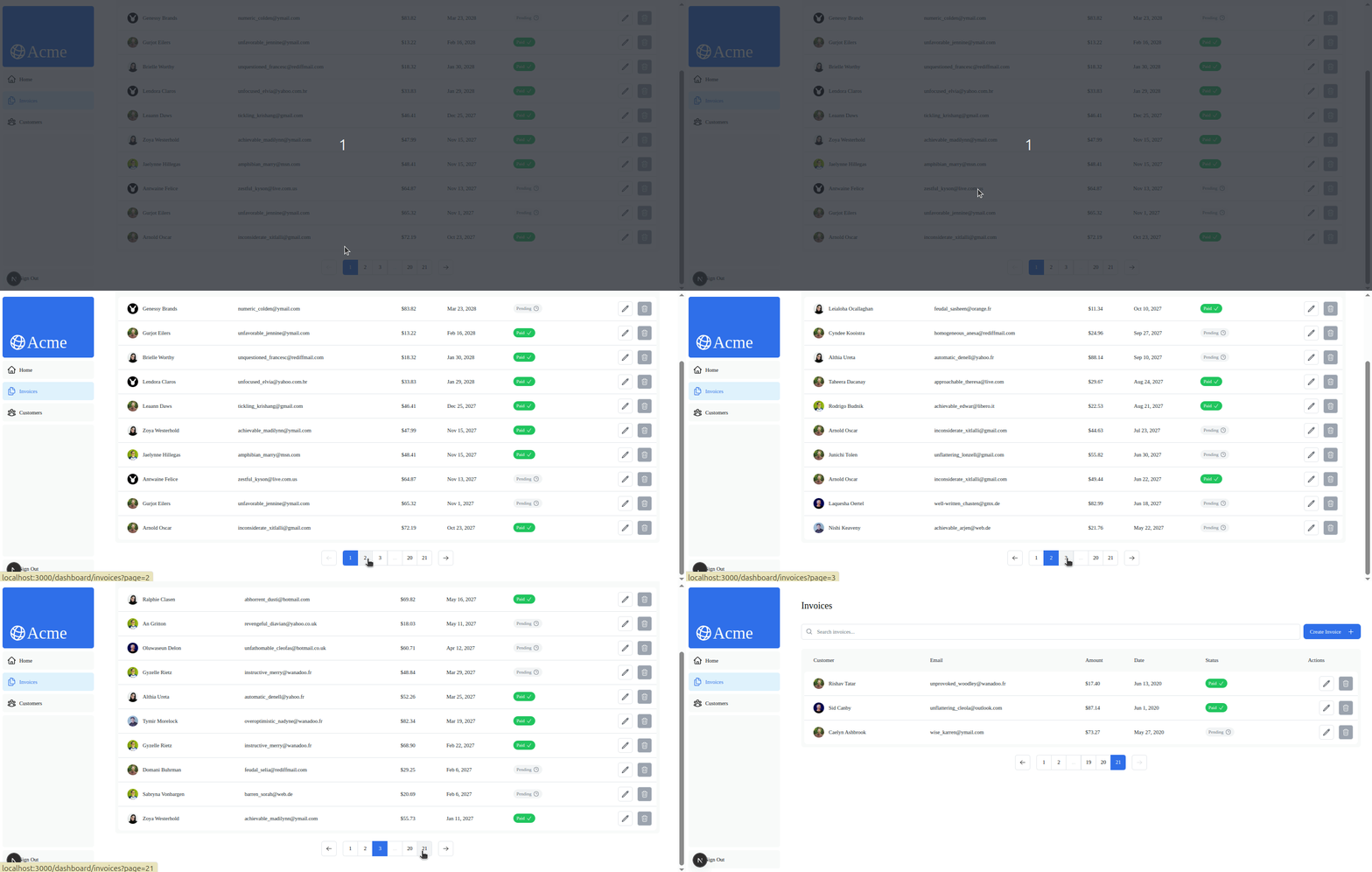
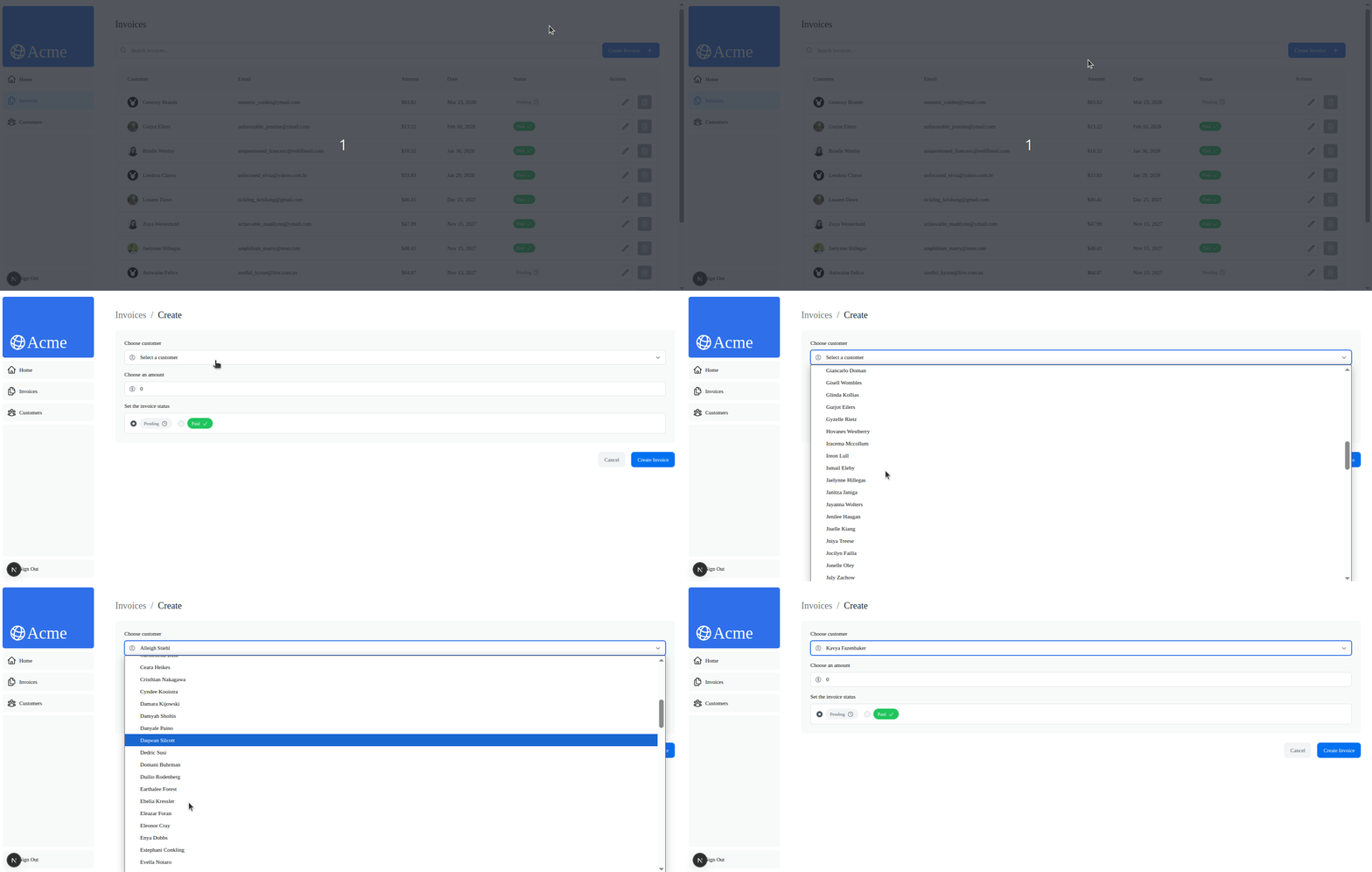
In the same way, the invoice edit form at `/dashboard/invoices/:id/edit` should fetch its data from the database. It will, however, not perform the expected action, since we have not yet updated the server actions inside `./app/lib/actions.ts`.
## How to Use Drizzle Query APIs on Next.js `async` Pages
So, Drizzle makes SQL a TypeScript things. And we have used the `select()` API for our queries. However, we needed to resort to joining tables too often than we'd like to.
Drizzle implements an ORM for relational queries. That's with the Drizzle Query APIs. And we'll now move on to demonstrating how to use Drizzle Query for fetching data in Next.js `async` server rendered pages.
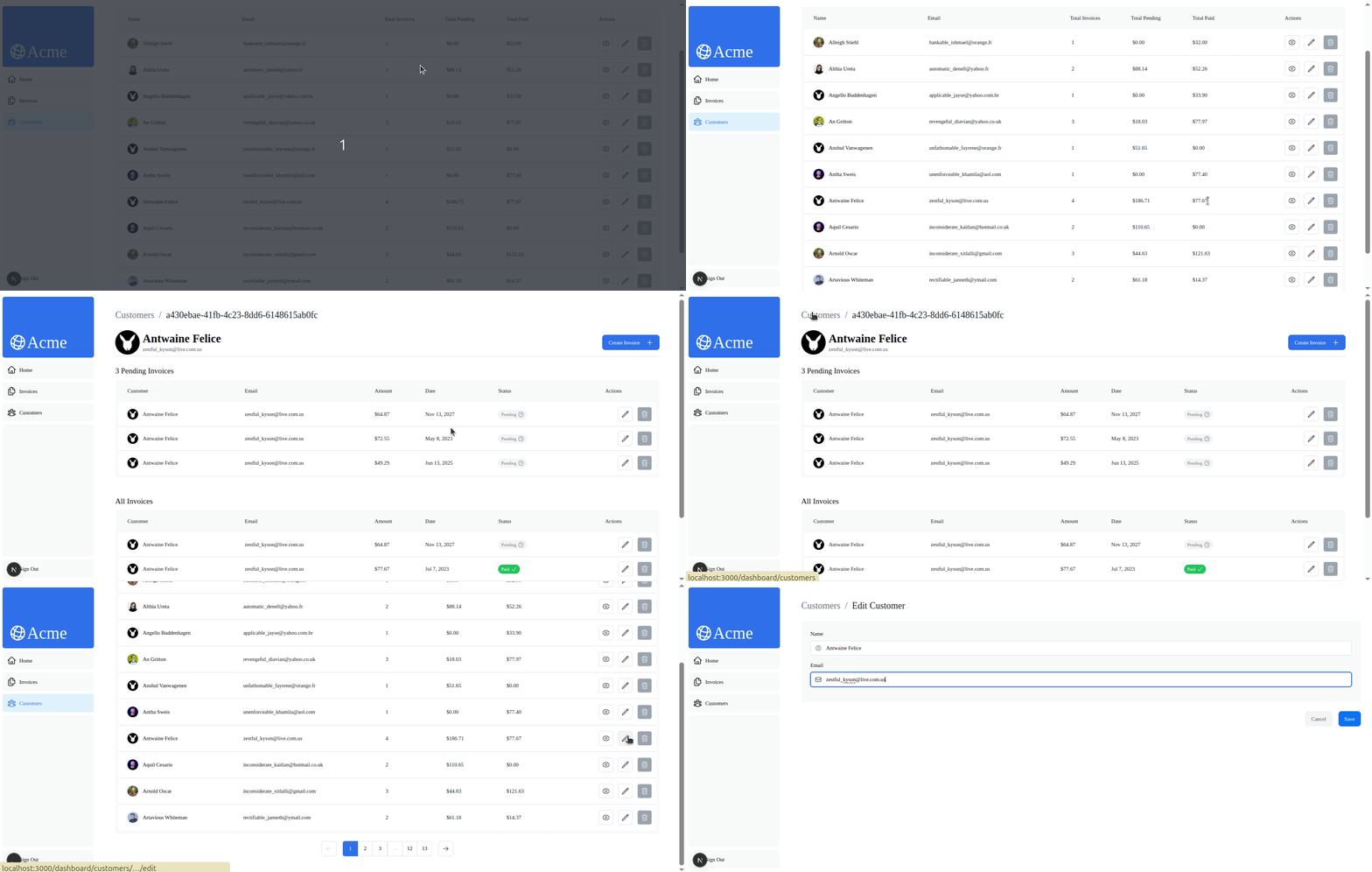
We have two pages on which we want to fetch data with Drizzle Queries: `/dashboard/customers/:id/edit` and `/dashboard/customers/:id`.
Let's update them one by one.
### Update Data Fetching on `customers` Edit Page
The customer item edit page at `/dashboard/customers/:id/edit` is an `async` component. This means, it can readily query the PostgreSQL database with Drizzle in the server side.
> Update its content to this: [👉 Edit Customers Page (`./app/dashboard/customers/[:id]/edit/page.tsx`)](https://gist.github.com/Theodore-Kelechukwu-Onyejiaku/9caa4071cb40971e05155f5dcb22a470)
For this, we are fetching the customer item using Drizzle Query API. Drizzle Query APIs start by chaining `.query` to the `db` connection instance and gives access to the tables. We can then find an item with `findFirst()`:
```ts
const customer = await db.query.customers.findFirst({
// highlight-next-line
where: (customers, { eq }) => eq(customers.id, id),
}) as Customer;
```
Notice, we have to pass in a config object to the query. It should contain all necessary clauses with operators. In our case, a `WHERE` clause is passed as a configuration option on the query.
### Update Data Fetching on `customers` Item Page
We can get related items with Drizzle Query. For example, the following query would get a customer's invoices as nested object on `invoices` as one of it's properties:
```ts
const customerById = await db.query.customers.findFirst({
// highlight-start
with: {
invoices: true,
},
// highlight-end
where: eq(customers.id, id)
});
```
Here the `with` option invokes inclusion of items from related table. In this case, we are including the customer's items in the `invoices` table.
We use this last query, along with another in the customer item page at `/dashboard/customers/[:id]/page.tsx`.
> Let's update it like below: [👉 Customer Item Page (`./app/dashboard/customers/[id]/page.tsx`)](https://gist.github.com/Theodore-Kelechukwu-Onyejiaku/8a5d77048f7d4d03ab7bf6118e207940)
Here, we are also executing a `findMany()` query on `invoices()`:
```ts
const pendingCustomerInvoices: Invoice[] = await db.query.invoices.findMany({
where: (invoices, { and, eq }) => and(
eq(invoices.customer_id, id),
eq(invoices.status, "pending")
)
});
```
This query filters `invoices` items for the `invoices.customer_id` to equal the page's `id` param, as well as seeking the status to be `pending`.
All the changes so far should now fill all tables, item pages and edit forms with data from the PostreSQL database.
## Next.js Server Actions with Drizzle ORM
Now it's turn for us to rework the server actions for mutation operations using Drizzle `insert()`, `update()` and `delete()` methods. We have a number of actions for creating, updating and deleting `customers` and `invoices`.
> We'll update the`actions.ts` file at `./app/lib/` to this code: [👉 Actions file (`./app/lib/actions.ts`)](https://gist.github.com/Theodore-Kelechukwu-Onyejiaku/8a16eb3c45598aaa7c529e11b609bfec)
The `./app/lib/actions.ts` file contains Next.js server actions in a regular sense. So, we need all server actions to use the `"use server"` directive.
We're handling errors in `try/catch` blocks. And after returning from the promise we are renewing the cache with `revalidatePath()`.
Create functions use the `insert()` method chained with `values()`. As with the `createInvoice()` action:
```ts
export const createInvoice = async (formData: NewInvoice) => {
const { amount } = formData;
const amountInCents = amount * 100;
const data: NewInvoice = {
...formData,
amount: amountInCents,
};
try {
// highlight-next-line
await db.insert(invoices).values(data);
} catch (e: any) {
return e;
}
revalidatePath("/dashboard/invoices");
};
```
Update functions use the `update()` mutation function and sets new values with the `set()` method chained. It also chains the `where()` filter in order to find the target record:
```ts
export const updateInvoice = async (formData: Invoice) => {
const { amount, id } = formData;
const amountInCents = amount * 100;
const updatedData = {
...formData,
amount: amountInCents,
};
try {
await db
// highlight-start
.update(invoices)
.set(updatedData)
.where(eq(invoices.id, id as string));
// highlight-start
} catch (e: any) {
return e;
}
revalidatePath("/dashboard/invoices");
};
```
Delete actions perform a delete operation after finding a record with the `where()` filter:
```ts
export const deleteCustomer = async (id: string) => {
try {
// highlight-next-line
await db.delete(customers).where(eq(customers.id, id));
} catch (e) {
return e;
}
revalidatePath("/dashboard/customers");
};
```
### Unified Zod Validations with Drizzle Zod and React Hook Form
Notice the type annotations for the form data: `Customer`, `NewCustomer`, `Invoice` and `NewInvoice`. They are Zod types derived directly from schemas defined in the Drizzle schema files. Drizzle Zod delivers Zod schemas for applying validations anywhere across the Next.js stack. They can be run on chosen events on the form, in server actions before database operations, and prior to entering rows inside tables.
In the case of React Hook Form, Drizzle Zod performs validations according to the settings chosen with `useForm()` configurations with Zod resolver. And the best part: Drizzle Zod facilitates merging database level errors into Zod validation errors and relays them directly to the form. So, with Drizzle ORM, we get an unified form fields feedback in Zod based RHF forms.
With the server actions reimplemented, it's time to update the forms and action pages for customers and invoices. Let's do that next.
### Updating `customers` Forms
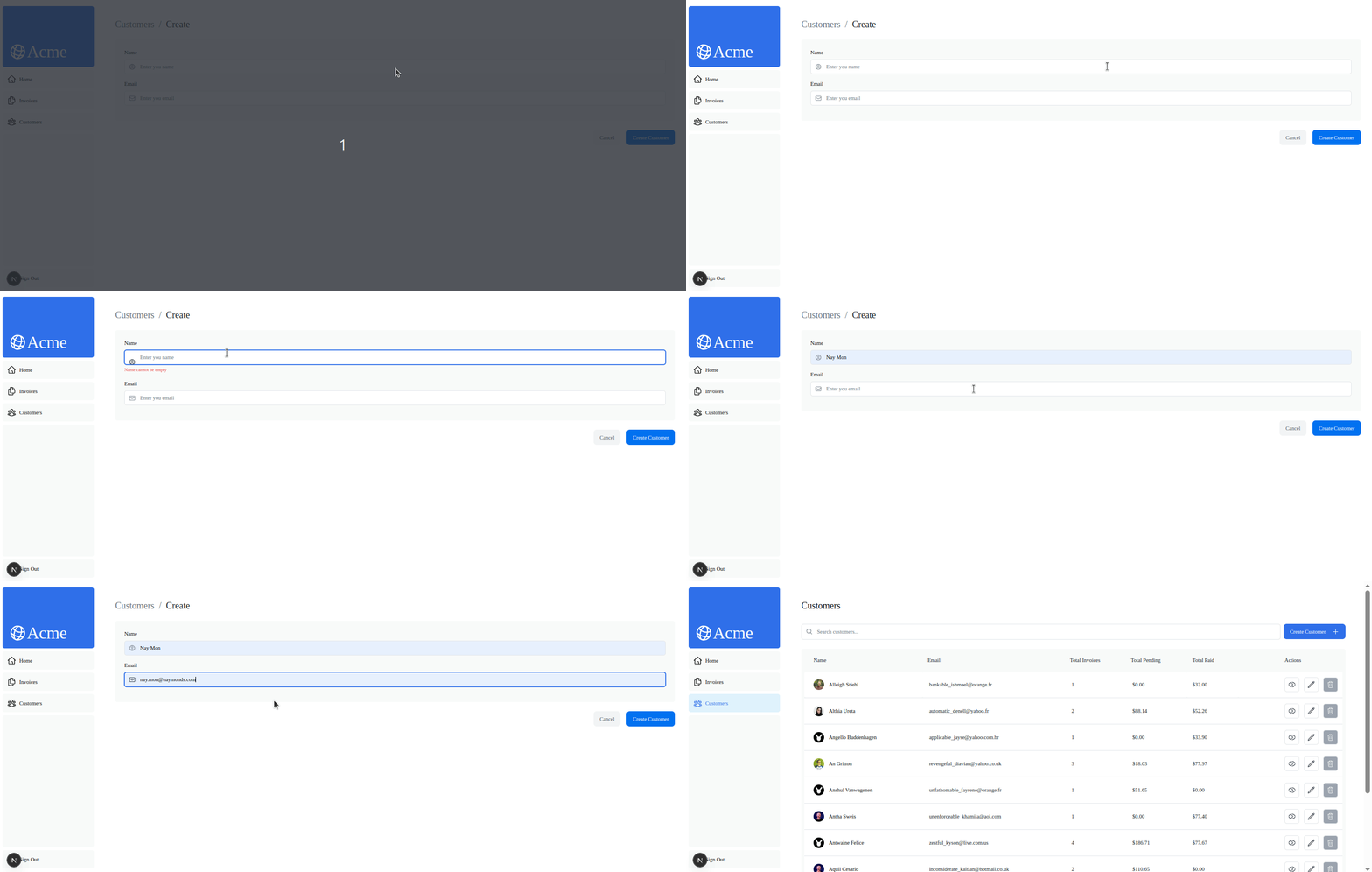
The `createNewCustomer()` form handler in `<CreateCustomerForm />` currently does not invoke any server. So, submitting the form does not create a customer. We'd like to invoke the `createCustomer()` action:
```ts
const createNewCustomer: SubmitHandler<NewCustomer> = async (data) => {
// highlight-next-line
await createCustomer(data);
redirect("/dashboard/customers");
};
```
> So, update the `<CreateCustomerForm />` inside `./app/ui/customers/create-customer-form.tsx` like this: [👉 Create Customer Form](https://gist.github.com/Theodore-Kelechukwu-Onyejiaku/cc07de1fac4fad4c34469dee454905d4)
Submission of the form now successfully create a customer and redirect to `/dashboard/customers`:
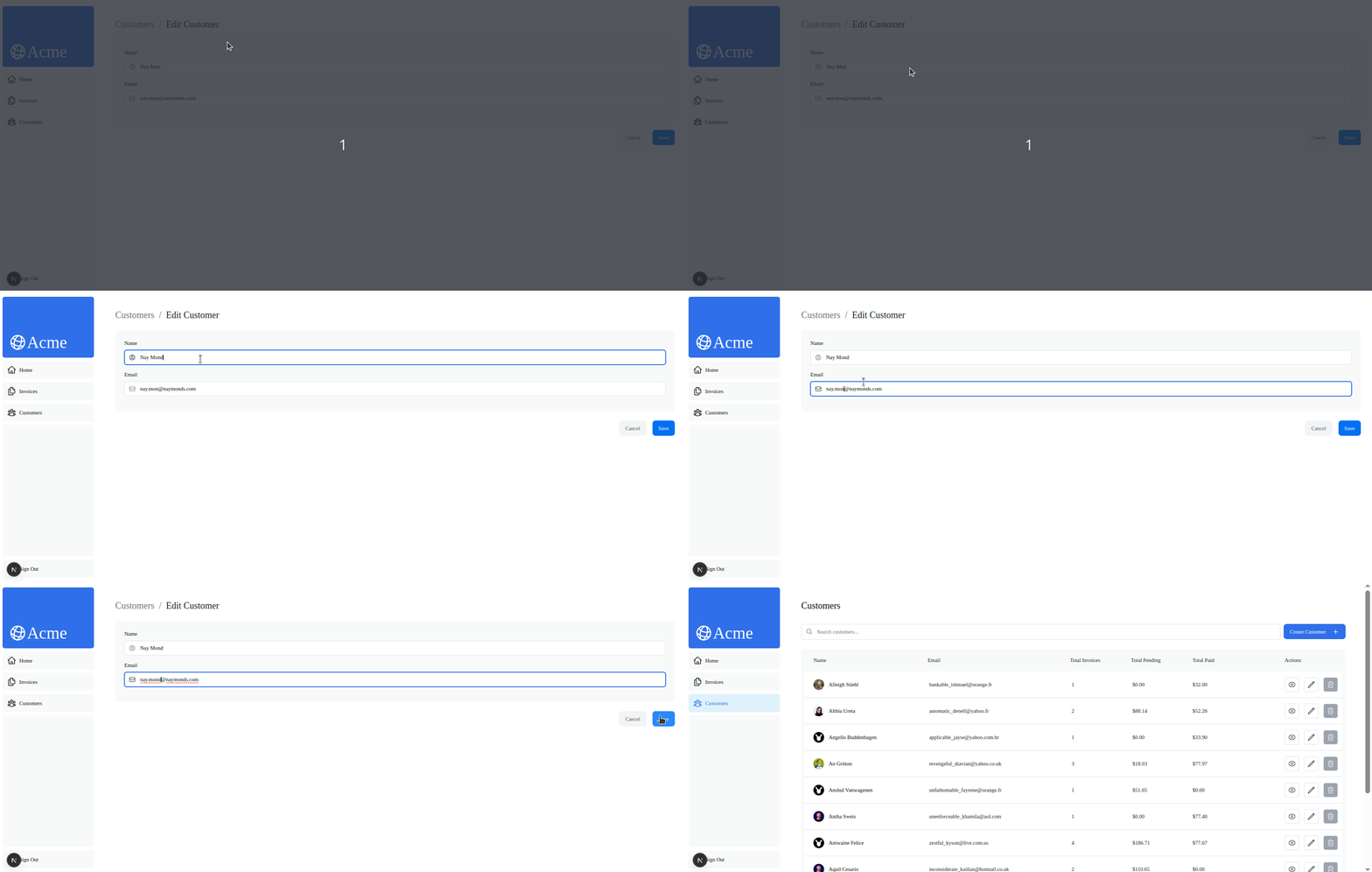
> Similarly, invoke the `updateCustomer()` action from inside the `updateCurrentCustomer()` function, inside `<EditCustomerForm />`: [👉 Invoke Action (`./app/ui/customers/edit-customer-form.tsx`)](https://gist.github.com/Theodore-Kelechukwu-Onyejiaku/0bdebcc11fedaa71b78025dbb22f12d3)
This change will now trigger update mutations on `customers` entries.
### Updating `invoices` Forms
Similarly, update the forms for `invoices` across `/dashboard/invoices/:id`.
> Use this code for the `<Form />` component at `./app/ui/invoices/create-form.tsx`: [👉 Updating invoices Forms: ./app/ui/invoices/create-form.tsx](https://gist.github.com/Theodore-Kelechukwu-Onyejiaku/acfb3a6fbfffa4ef36088d6955e1fc18)
Form submission should now successfully create an invoice.
> For the `<EditInvoiceForm />` at `./app/ui/invoices/edit-form.tsx`, use this code: [👉 Updated `EditInvoiceForm` Component ](https://gist.github.com/Theodore-Kelechukwu-Onyejiaku/78328a85d288f752ee275a649fd92218)
With all these changes, we have successfully adopted Drizzle in the backend and frontend of the Next.js admin panel dashboard application. We should be now able to view data cards, charts and latest invoices in the `/dashboard` path with its data feed from a PostgreSQL database powered by Drizzle.
For both the `customers` and `invoices` resources, we should be able to view their paginated tables, as well as create and edit items.
## Conclusion
In this article, we walked through the full process of integrating Drizzle ORM with a PostgreSQL database in a Next.js 15 dashboard application.
We started by introducing Drizzle ORM, an SQL-focused, type-safe ORM built for TypeScript—and its seamless compatibility with modern frameworks and libraries like Zod, React Hook Form, and PostgreSQL.
By the end, we built a fully functional, PostgreSQL-powered admin panel built with Next.js 15 and Drizzle ORM—complete with relational logic, real-time updates, and unified type validation across the stack.
 Google Drive
Gist
Clipboard
Google Drive
Gist
Clipboard
 Sign in with Wallet






