---
# System prepended metadata
title: 用 TypeScript 中的裝飾器 (Decorators) 做 Logging
tags: [TypeScript, 翻譯, 自主學習]
---
# 用 TypeScript 中的裝飾器 (Decorators) 做 Logging
###### 2020.07.12
###### tags: `自主學習` `翻譯` `TypeScript`
---
原始文章
[Logging with Decorators in TypeScript](https://medium.com/swlh/logging-with-decorators-in-typescript-1c3ce13576d5)
---
隨著代碼庫的增長,複雜的依賴關係網和各個模塊所依賴的關注點也隨之增長。
Logging 功能是一個主要的例子。我們可能有一個 Logging 的功能性模組,然後在 app 內橫切性的使用它。
(按 : 參考[橫切關注點](https://zh.wikipedia.org/wiki/%E6%A8%AA%E5%88%87%E5%85%B3%E6%B3%A8%E7%82%B9))
看看以下例子
兩個 Class 注入同一個 Logger

Logger 是一個橫切關注點。它在 app 的各處被使用,雖然用注入的方式使用它,但是如果一旦 log() 方法變更了,維護程式就是個負擔。
## 使用裝飾器 (Decorators )
裝飾器 裝飾一個 class 或 method 並且在初始化 class 或 method 時提供一些額外的功能。
在本例中我們會實作一個裝飾器,當 method 被呼叫時 logging 一些資訊,這樣就能移除注入的 Logger,並且不用呼叫它的 log 方法。
TypeScript 中的裝飾器長的像這樣
``` javascript=1
@decorator()
public class Foo { ... }
```
在實作裝飾器前,我們需要先有一些 logging 功能,由一個 Logger 介面和兩個 class ConsoleLogger 、LoggerFactory 處理。
Logger 介面
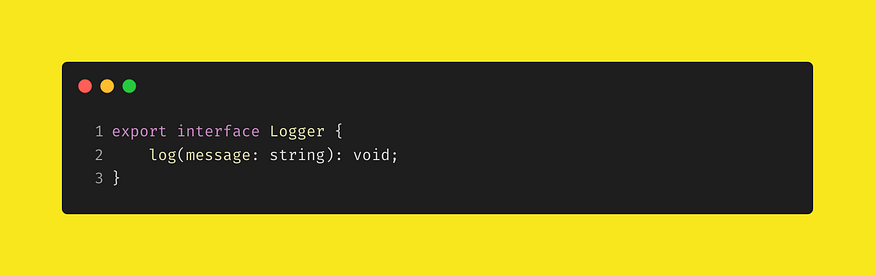
Logger 介面有一個方法 log() 接受一個字串參數
ConsoleLogger class

Logger class 實作 Logger。
LoggerFactory

LoggerFactory 負責產生以及返回 ConsoleLogger 的單一實例。Singleton Pattern。
有了上述可以對控制台做 logging 的工具後,接下來實作裝飾器。
簡單裝飾器

第 3 行使用 LoggerFactory 取得 Logger 的實體。
第 5 行開始,建立一個 simpleLog 的 function,並且返回另外一個 function。
simpleLog 這個 function 實際上是一個裝飾器工廠,這個 工廠建立並且返回實際的裝飾器 function (內部的 function)。
我們可以用裝飾器工廠來接受參數並且對實際產生的裝飾器功能做客製。
(按 : 參考 angular 的 Injectable(),Injectable() 是裝飾器工廠,接收 {provideIn:any} 參數 )
實際的裝飾器是第 6 行到第 8 行的 function。做的是單純呼叫 log() 方法。這個裝飾器是一個 method 裝置器,只能適用在 class 的 method 上。
(按 : TypeScript 中的 class 裝飾器和 method 裝飾器能夠接收的參數不同,參見 [TypeScript 官方文件](https://www.typescriptlang.org/docs/handbook/decorators.html))
裝飾器 function 有三個參數 : target、propertyKey、descriptor
- target : member 所屬 class (按 : 被裝飾的 method 所屬 class)
- propertyKey : class member 名稱 (按 : 被裝飾的 method 名稱)
- descriptor : 如果用 JavaScript 寫這個 class 時傳給 Object.defineProperty 方法的參數>。
接下來實作文章開頭的 Counter class。(參考本文第一張圖)
node app 的 index.ts

在這個 node app 中,在程式進入點的 index.ts 內,建立一個 simpleLog ,因此可以移除原本注入的 Logger 以及在方法中呼叫 log()。
Counter class 不再依賴 Logger。
下面是列印的結果
> ❯ node index
> Calling currentCount
> Calling incrementCount
> 0
> 1
> 2
> 3
> 4
> 5
> 6
> 7
> 8
> 9
裝飾器有印出正確的方法名稱,但是不在每個迴圈中印出。
還記得文章開始提到,裝飾器方法被呼叫,是在 初始化時 而不是在 裝飾的方法被呼叫時。這就是為什麼會是上面印出的結果。
寫第二個裝飾器 : usefulLog。
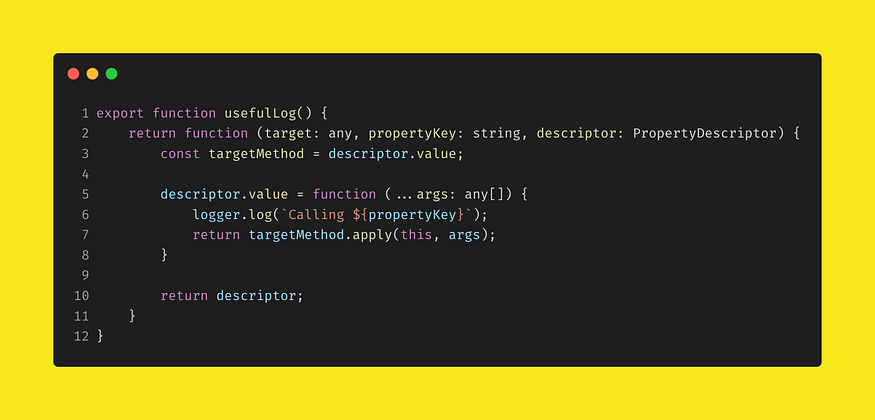
第 3 行複製 descriptor 的 value 屬性的值到 targetMethod 變數。這個值就是 被這個裝飾器裝飾的 method。
第 5 到 8 行將一個新的 function 賦值給 descriptor.value。第 6 行做 logging,第 7 行執行原本的 method 程式並返回執行結果。
(按 : 這個裝飾器的程式是很常見的用來增加原 class 方法內程式的作法,將原 function 存到變數,將新 function 賦值給 原 function 的 class 的屬性,新 function 內執行新增加的程式並返回原 function 的執行結果)
適用 usefulLog 後的 index.ts 程式如下:
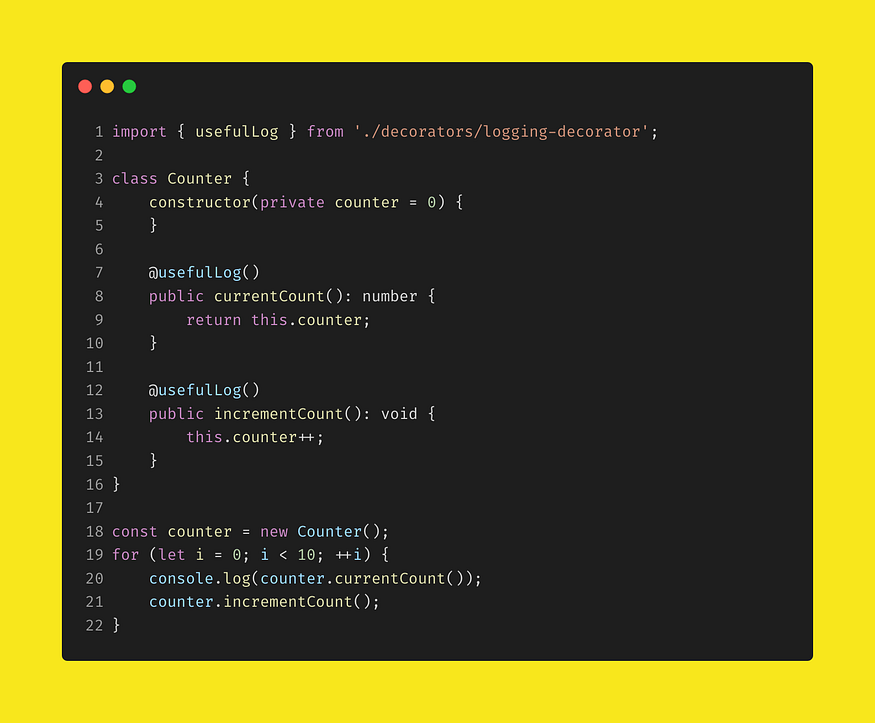
執行結果如下:
> Calling currentCount
> 0
> Calling incrementCount
> Calling currentCount
> 1
> Calling incrementCount
> Calling currentCount
> 2
> Calling incrementCount
> Calling currentCount
> 3
> Calling incrementCount
> Calling currentCount
> 4
> Calling incrementCount
> Calling currentCount
> 5
> Calling incrementCount
> Calling currentCount
> 6
> Calling incrementCount
> Calling currentCount
> 7
> Calling incrementCount
> Calling currentCount
> 8
> Calling incrementCount
> Calling currentCount
> 9
> Calling incrementCount
## 總結
本篇文章示範如何使用裝飾器,在方法被呼叫的時候列印出方法名稱。
同時需要 logging 的方法,不再需要依賴 Logger 介面並呼叫它的 log() 方法。
目前裝飾器在 TypeScript 和 JavaScript 都還是實驗性質。但是在 JAVA 和 C# 中都已經是廣泛使用,並且能解決橫切關注點的問題。