---
# System prepended metadata
title: 自然人眼中的 GPU 通訊技術
tags: [自然組眼中系列]
---
# 自然人眼中的 GPU 通訊技術
## 前言
工作上需要用到單計算機多 GPU 的運算推論 LLM,但是在 AMD R9700 下需要 `NCCL_P2P_DISABLE=1`,因此來探討 GPU 彼此之間是如何通訊的?
## GPUDirect
根據 [NVDAI 敘述](https://developer.nvidia.com/gpudirect) GPUDirect 可以讓 network adapters 跟 storage drives 直接讀/寫 GPU memory。這不需要大量的資料搬運,因此減輕了 CPU 的負擔也就是能夠變相提升 CPU 效能。技術內容包涵:
### GPUDirect Storage: 單機多卡,GPU <-> storage
模型可以直接從 storage 透過 NVMe(非揮發性記憶體快遞,一種本地內部儲存協定)經 PCIe switch 把模型傳到 GPU,如果模型在外部就是透過 NICs(網路介面卡)接著一樣經 PCIe switch 把模型傳到 GPU(->綠線),而不再需要搬運到 system memory(->粉紅線)。

[reference]: https://nvdam.widen.net/s/k8vrp9xkft/tech-overview-magnum-io-1790750-r5-web
[reference]: https://docs.nvidia.com/gpudirect-storage/design-guide/index.html#
### GPUDirect RDMA: 多機多卡,GPU <-> NICs/device
GPUDirect Remote Direct Memory Access (RDMA) 能夠讓 NVIDIA GPU 在遠端系統之間進行直接通訊,兩系統皆無需透過 CPU 或在系統 memory 中進行額外的資料緩衝複製,能提供高達 10 倍的效能提升。

### GPUDirect Peer to Peer (P2P):GPU <-> GPU
GPUDirect P2P 讓同一台主機內的 GPU 彼此直接搬資料,可以透過 NVLink 也可以是 PCIe。NVIDIA 開發的 NCCL 也提供針對 GPUDirect P2P 的特別優化。
[NVDIA 2012 GPUDirect report](https://developer.download.nvidia.com/devzone/devcenter/cuda/docs/GPUDirect_Technology_Overview.pdf)
### NVLink
#### 歷史產品
NVLink 由 NVIDIA 於 2014 年正式發布,並在 2016 年隨 Pascal 世代的 Tesla P100 首度商用落地。這技術的革新在於能夠在多 GPU 與 CPU 之間實現跳躍級的 bandwidth,以當時的第一個搭載 NVlink 的產品 P100 為例,單 GPU 的NVLink 總雙向 bandwidth 最高可以達到 160 GB/s,相當於 PCIe Gen3 * 16 的五倍;到了 2017 的 Volta Tesla V100,NVlink2.0 更是來到 300 GB/s bandwidth,快約等於PCIe Gen3 x16 的十倍。
[reference]:https://github.com/bbw7561135/ParallelComputing/blob/master/notes/gpus_communication.md
其後 A100(NVLink3.0) 提升到 600 GB/s,H100/H200 的 NVLink4.0 提升到 900 GB/s,而 B200/GB200(Blackwell) 世代第五代 NVLink 則達到 1.8 TB/s。
NVIDIA 也已公布 Rubin 平台將採用第六代 NVLink,單顆 GPU 頻寬可達 3.6 TB/s。
#### DGX-1 topology
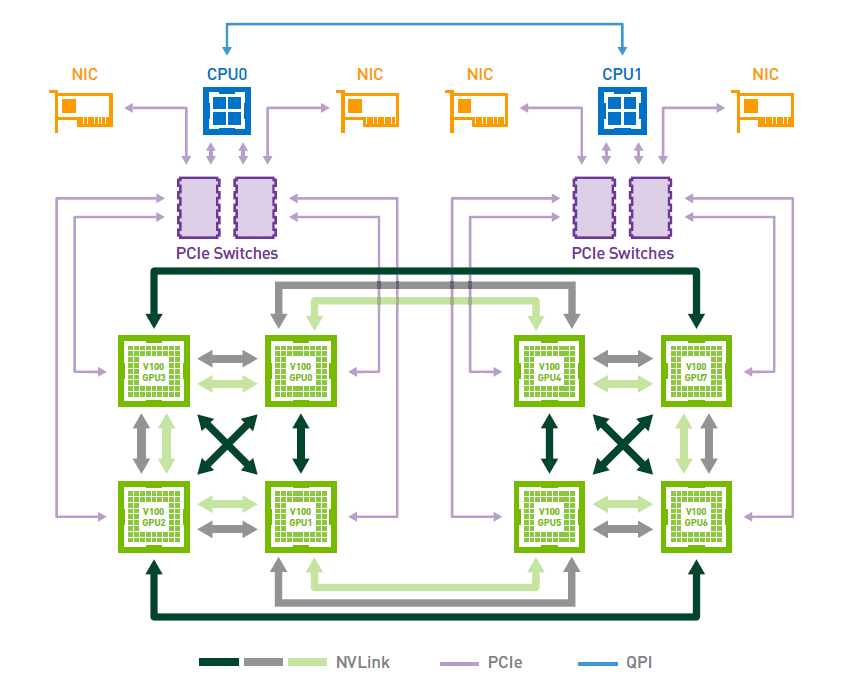
下圖展示的是 HGX-1 / DGX-1 採用 8 張 Tesla V100 時的 Hybrid Cube Mesh 拓樸。每張 V100 配備 6 條第二代 NVLink,單顆 GPU 的 NVLink 總雙向頻寬最高可達 300 GB/s。不過,這並不代表每兩張 GPU 都能彼此直接全連接;在這個拓樸中,只有部分 GPU pair 是直接相連,而且直接相連的兩張 GPU 最多共享 2 條 NVLink,因此單一 GPU pair 之間的直接頻寬最高約為 50 GB/s 單向、100 GB/s 雙向。GPU 與 CPU 之間的資料傳輸仍然是透過 PCIe,雙路 CPU 之間則是透過 Intel 的 UPI 互連。雖然這種拓樸不是全連接設計,但相較於純 PCIe 架構,仍大幅提升了同一台系統內 GPU 彼此之間的通訊頻寬及擴展效率。
[reference]: https://images.nvidia.com/content/pdf/dgx1-v100-system-architecture-whitepaper.pdf?utm_source=chatgpt.com
### NVSwitch
如果說 PCIe 是通用道路(正式應該說通用型 I/O 匯流排)、NVLink 是 GPU 之間的高速專用道路,那 NVSwitch 就像是把很多條 NVLink 組成大型交換網路的交換器(switch fabric)。
它的用途不是取代 NVLink,而是把多顆 GPU 透過 NVLink 連成更大、近似全互連的拓樸,讓每顆 GPU 不必只依賴少數直連鄰居。
以 NVIDIA 早期的技術文件來看,NVSwitch 本質上是一個 NVLink switch chip。第一代 NVSwitch 有 18 個 NVLink ports,內部是 18×18 fully connected crossbar;任一 port 都能以完整 NVLink 速度和其他 port 通訊。官方文件給出的數字是每個 port 50 GB/s(雙向總計),整顆 switch 的 aggregate bandwidth 為 900 GB/s
[reference]: https://images.nvidia.com/content/pdf/nvswitch-technical-overview.pdf?utm_source=chatgpt.com
## AMD 工作站實驗
因為筆者的實驗機器是主板[WRX90 WS EVO](https://www.asrock.com/mb/AMD/WRX90%20WS%20EVO/index.tw.asp)+[AMD Radeon™ AI PRO R9700](https://www.amd.com/zh-tw/products/graphics/workstations/radeon-ai-pro/ai-9000-series/amd-radeon-ai-pro-r9700.html) x4,沒有 NVLink 做加速,因此 GPU 之間的傳輸只能是透過 P2P,先用 [AMD SMI CLI tool](https://rocm.docs.amd.com/projects/amdsmi/en/latest/how-to/amdsmi-cli-tool.html?utm_source=chatgpt.com#amd-smi-topology) 來觀察 GPUs 之間的 topology。
使用 AMD SMI CLI tool 指令:`amd-smi topology --json` 並總結:
amd-smi topology --json
```json
[
{
"gpu": 0,
"bdf": "0000:03:00.0",
"links": [
{
"gpu": 0,
"bdf": "0000:03:00.0",
"weight": 0,
"link_status": "ENABLED",
"link_type": "SELF",
"num_hops": 0,
"bandwidth": "N/A",
"coherent": "SELF",
"atomics": "SELF",
"dma": "SELF",
"bi_dir": "SELF"
},
{
"gpu": 1,
"bdf": "0000:06:00.0",
"weight": 40,
"link_status": "ENABLED",
"link_type": "PCIE",
"num_hops": 2,
"bandwidth": "N/A",
"coherent": "NC",
"atomics": "64,32",
"dma": "T",
"bi_dir": "F"
},
{
"gpu": 2,
"bdf": "0000:e3:00.0",
"weight": 40,
"link_status": "ENABLED",
"link_type": "PCIE",
"num_hops": 2,
"bandwidth": "N/A",
"coherent": "NC",
"atomics": "64,32",
"dma": "T",
"bi_dir": "F"
},
{
"gpu": 3,
"bdf": "0000:e6:00.0",
"weight": 40,
"link_status": "ENABLED",
"link_type": "PCIE",
"num_hops": 2,
"bandwidth": "N/A",
"coherent": "NC",
"atomics": "64,32",
"dma": "T",
"bi_dir": "F"
}
]
},
{
"gpu": 1,
"bdf": "0000:06:00.0",
"links": [
{
"gpu": 0,
"bdf": "0000:03:00.0",
"weight": 40,
"link_status": "ENABLED",
"link_type": "PCIE",
"num_hops": 2,
"bandwidth": "N/A",
"coherent": "NC",
"atomics": "64,32",
"dma": "T",
"bi_dir": "F"
},
{
"gpu": 1,
"bdf": "0000:06:00.0",
"weight": 0,
"link_status": "ENABLED",
"link_type": "SELF",
"num_hops": 0,
"bandwidth": "N/A",
"coherent": "SELF",
"atomics": "SELF",
"dma": "SELF",
"bi_dir": "SELF"
},
{
"gpu": 2,
"bdf": "0000:e3:00.0",
"weight": 40,
"link_status": "ENABLED",
"link_type": "PCIE",
"num_hops": 2,
"bandwidth": "N/A",
"coherent": "NC",
"atomics": "64,32",
"dma": "T",
"bi_dir": "F"
},
{
"gpu": 3,
"bdf": "0000:e6:00.0",
"weight": 40,
"link_status": "ENABLED",
"link_type": "PCIE",
"num_hops": 2,
"bandwidth": "N/A",
"coherent": "NC",
"atomics": "64,32",
"dma": "T",
"bi_dir": "F"
}
]
},
{
"gpu": 2,
"bdf": "0000:e3:00.0",
"links": [
{
"gpu": 0,
"bdf": "0000:03:00.0",
"weight": 40,
"link_status": "ENABLED",
"link_type": "PCIE",
"num_hops": 2,
"bandwidth": "N/A",
"coherent": "NC",
"atomics": "64,32",
"dma": "T",
"bi_dir": "F"
},
{
"gpu": 1,
"bdf": "0000:06:00.0",
"weight": 40,
"link_status": "ENABLED",
"link_type": "PCIE",
"num_hops": 2,
"bandwidth": "N/A",
"coherent": "NC",
"atomics": "64,32",
"dma": "T",
"bi_dir": "F"
},
{
"gpu": 2,
"bdf": "0000:e3:00.0",
"weight": 0,
"link_status": "ENABLED",
"link_type": "SELF",
"num_hops": 0,
"bandwidth": "N/A",
"coherent": "SELF",
"atomics": "SELF",
"dma": "SELF",
"bi_dir": "SELF"
},
{
"gpu": 3,
"bdf": "0000:e6:00.0",
"weight": 40,
"link_status": "ENABLED",
"link_type": "PCIE",
"num_hops": 2,
"bandwidth": "N/A",
"coherent": "NC",
"atomics": "64,32",
"dma": "T",
"bi_dir": "F"
}
]
},
{
"gpu": 3,
"bdf": "0000:e6:00.0",
"links": [
{
"gpu": 0,
"bdf": "0000:03:00.0",
"weight": 40,
"link_status": "ENABLED",
"link_type": "PCIE",
"num_hops": 2,
"bandwidth": "N/A",
"coherent": "NC",
"atomics": "64,32",
"dma": "T",
"bi_dir": "F"
},
{
"gpu": 1,
"bdf": "0000:06:00.0",
"weight": 40,
"link_status": "ENABLED",
"link_type": "PCIE",
"num_hops": 2,
"bandwidth": "N/A",
"coherent": "NC",
"atomics": "64,32",
"dma": "T",
"bi_dir": "F"
},
{
"gpu": 2,
"bdf": "0000:e3:00.0",
"weight": 40,
"link_status": "ENABLED",
"link_type": "PCIE",
"num_hops": 2,
"bandwidth": "N/A",
"coherent": "NC",
"atomics": "64,32",
"dma": "T",
"bi_dir": "F"
},
{
"gpu": 3,
"bdf": "0000:e6:00.0",
"weight": 0,
"link_status": "ENABLED",
"link_type": "SELF",
"num_hops": 0,
"bandwidth": "N/A",
"coherent": "SELF",
"atomics": "SELF",
"dma": "SELF",
"bi_dir": "SELF"
}
]
}
]
```
`2 hops, NC, atomic 64/32, DMA` | PCIE
`2 hops, NC, atomic 64/32, DMA` | PCIE
`2 hops, NC, atomic 64/32, DMA` |
| **GPU 1** | PCIE
`2 hops, NC, atomic 64/32, DMA` | SELF | PCIE
`2 hops, NC, atomic 64/32, DMA` | PCIE
`2 hops, NC, atomic 64/32, DMA` |
| **GPU 2** | PCIE
`2 hops, NC, atomic 64/32, DMA` | PCIE
`2 hops, NC, atomic 64/32, DMA` | SELF | PCIE
`2 hops, NC, atomic 64/32, DMA` |
| **GPU 3** | PCIE
`2 hops, NC, atomic 64/32, DMA` | PCIE
`2 hops, NC, atomic 64/32, DMA` | PCIE
`2 hops, NC, atomic 64/32, DMA` | SELF |
### HIP runtime
硬體的部分確定是可以用 PCIe 做連通,接下來就是看 HIP runtime 能不能用
```cpp=
#include
#include
#include
#include
#define HIP_CHECK(cmd) \
do { \
hipError_t e = (cmd); \
if (e != hipSuccess) { \
std::cerr << "HIP error: " << hipGetErrorString(e) \
<< " at " << __FILE__ << ":" << __LINE__ << "\n"; \
std::exit(EXIT_FAILURE); \
} \
} while (0)
int main() {
int count = 0;
HIP_CHECK(hipGetDeviceCount(&count));
std::cout << "GPU count: " << count << "\n";
if (count < 2) {
std::cout << "Need at least 2 GPUs.\n";
return 0;
}
std::cout << "\n[Step 1] hipDeviceCanAccessPeer matrix\n";
for (int i = 0; i < count; ++i) {
for (int j = 0; j < count; ++j) {
int can = 0;
HIP_CHECK(hipDeviceCanAccessPeer(&can, i, j));
std::cout << i << " -> " << j << " : " << can << "\n";
}
}
// 先拿 GPU0 與 GPU1 示範
int src = 0;
int dst = 1;
std::cout << "\n[Step 2] Enable peer access\n";
// 讓 GPU0 可以看 GPU1
HIP_CHECK(hipSetDevice(src));
hipError_t e1 = hipDeviceEnablePeerAccess(dst, 0);
if (e1 == hipSuccess) {
std::cout << "Enabled peer access from GPU " << src
<< " to GPU " << dst << "\n";
} else if (e1 == hipErrorPeerAccessAlreadyEnabled) {
std::cout << "Peer access already enabled from GPU " << src
<< " to GPU " << dst << "\n";
} else {
std::cerr << "Enable failed: " << hipGetErrorString(e1) << "\n";
return 1;
}
// 也讓 GPU1 可以看 GPU0
HIP_CHECK(hipSetDevice(dst));
hipError_t e2 = hipDeviceEnablePeerAccess(src, 0);
if (e2 == hipSuccess) {
std::cout << "Enabled peer access from GPU " << dst
<< " to GPU " << src << "\n";
} else if (e2 == hipErrorPeerAccessAlreadyEnabled) {
std::cout << "Peer access already enabled from GPU " << dst
<< " to GPU " << src << "\n";
} else {
std::cerr << "Enable failed: " << hipGetErrorString(e2) << "\n";
return 1;
}
std::cout << "\n[Step 3] Do one hipMemcpyPeerAsync\n";
const size_t bytes = 64 * 1024 * 1024; // 64 MiB
void* src_ptr = nullptr;
void* dst_ptr = nullptr;
hipStream_t stream;
HIP_CHECK(hipSetDevice(src));
HIP_CHECK(hipMalloc(&src_ptr, bytes));
HIP_CHECK(hipMemset(src_ptr, 0x5A, bytes));
HIP_CHECK(hipSetDevice(dst));
HIP_CHECK(hipMalloc(&dst_ptr, bytes));
HIP_CHECK(hipMemset(dst_ptr, 0x00, bytes));
HIP_CHECK(hipStreamCreate(&stream));
HIP_CHECK(hipMemcpyPeerAsync(dst_ptr, dst, src_ptr, src, bytes, stream));
HIP_CHECK(hipStreamSynchronize(stream));
std::cout << "P2P copy success: GPU " << src << " -> GPU " << dst
<< ", bytes = " << bytes << "\n";
HIP_CHECK(hipStreamDestroy(stream));
HIP_CHECK(hipSetDevice(dst));
HIP_CHECK(hipFree(dst_ptr));
HIP_CHECK(hipSetDevice(src));
HIP_CHECK(hipFree(src_ptr));
return 0;
}
```
結果 HIP 已經能在系統上啟用 GPU-to-GPU 的 peer memory access,並且成功做跨單向 GPU copy。
```bash
❯ ./hip_p2p_min
GPU count: 4
[Step 1] hipDeviceCanAccessPeer matrix
0 -> 0 : 0
0 -> 1 : 1
0 -> 2 : 1
0 -> 3 : 1
1 -> 0 : 1
1 -> 1 : 0
1 -> 2 : 1
1 -> 3 : 1
2 -> 0 : 1
2 -> 1 : 1
2 -> 2 : 0
2 -> 3 : 1
3 -> 0 : 1
3 -> 1 : 1
3 -> 2 : 1
3 -> 3 : 0
[Step 2] Enable peer access
Enabled peer access from GPU 0 to GPU 1
Enabled peer access from GPU 1 to GPU 0
[Step 3] Do one hipMemcpyPeerAsync
P2P copy success: GPU 0 -> GPU 1, bytes = 67108864
```
### vLLM / NCCL / ROCm 上的實際應用
目前(2026/3/9)在 vllm 上嘗試 serve `qwen3.5-27B-FP8` 模型服務,必須要有環境變數 `NCCL_P2P_DISABLE=1`,才能成功運行於我們的工作站。推測與 [RCCL libary](https://github.com/ROCm/rocm-systems) 有關,vLLM 在 tensor parallel 等多卡情境下,通常不是自己直接呼叫 `hipMemcpyPeerAsync()` 來完成所有跨卡通訊,而是依賴 RCCL 來做 collective communication。
[NVIDA ](https://docs.nvidia.com/deeplearning/nccl/user-guide/docs/env.html)寫得很直接:`NCCL_P2P_DISABLE` 停用的是 P2P transport,而這個 transport 使用的是 GPU 之間的 direct access,介質可以是 NVLink 或 PCI。如果設了環境變數 `NCCL_P2P_DISABLE=1` 之後是不走 direct P2P,會改走 host/shared memory 的替代路徑,也就是可以退回 SHM 等其他 transport