AI Tools for Artists
===
Media Manipulation
---
This guide is meant to identify unique tools that give users the ability to manipulate images in highly specific ways, as well as methods of maintaining creative autonomy over parts of your work. While also using the computational power of AI tools to help lower the bar to access tools that previously needed a more specialized knowledge.
In the same way Photoshop has always been used to manipulate images for artistic purposes, Stable Diffusion and OpenCV are fantastic tools for highly specific manipulations of media.
You can find links below to take you through several guides on how to implement some of these tools, with relatively little technological knowledge.
## [Stable Diffusion](https://hackmd.io/bm-sLALRQ_-wVwhR4_bX7g)
SD is an engine for image generation, just like Midjourney or Dall-E, but with quite a bit more control. The rough idea of how it works is this:
1. Choose a model.
Models are the style guides for image generators. They determine the artistic styles that can be "requested". They are also what tends to determine the quality and accuracy of the render. Finding the right model will go a long way to creating the image you're hoping to. Many of them will also have content guardrails, that help prevent the user from generating unwanted content(look for "safety-checkers"). Some popular models are Dreamshaper 8 and SDXL.
2. Create a prompt
You'll want to give the generator as much detailed information about what you'd like. Including references to specific styles, if you want it in a purely `sumi ink painting` style. You'll also want to include some artist's names, information like `high contrast`, `black and white`, and `ink brush strokes`, in addition to the content of your image.
3. Generate a dozen images
There is an element of randomness to all image generations, by their very nature, two generations will never be exactly the same. So you'll want to iterate them, refining as you go. Very rarely will you get exactly what you want the first time around.
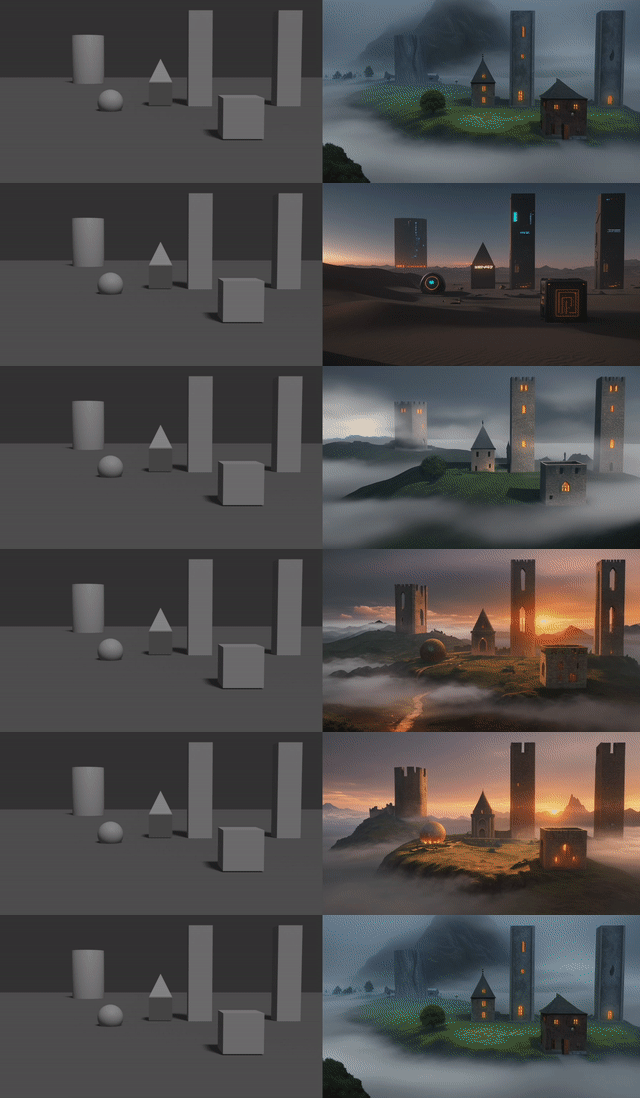
In the link above, you'll find a step-by-step guide on how to do this, as well as how to implement Controlnet, which will allow you to closely control exactly what elements of an image you'd like to generate, without losing control of your subject or style.
## [Prompt Engineering for OpenCV](/L9RHcgxiQbS82S7iI2H82w)
OpenCV is one of the largest Computer Vision tools available, but its a bit tricky to refine control, as it tends to lean on the technical side of coding.
BUT, now with the use of chatbots, that access is being quickly democratized. This is a low-code guide to implementing OpenCV, using Python scripting and Google Colab. But most importantly, you **will not need to know or write code to follow it**(though it certainly never hurts). The use of ChatGPT allows us to write in pseudo-code and have the chatbot translate it into the implementation of our choice.
The challenging part of this process is isolating what a computer can see and converting that into what humans *want* to see. As computers don't have inference capabilities, you have to think in terms of color, contrast, form, and comparison to achieve this.
{"title":"AI Tools for Artists","description":"AI Tools for Artists","contributors":"[{\"id\":\"cea8fa24-5fd8-42d1-8448-1ee3f1eb93fc\",\"add\":3593,\"del\":257}]"}