---
title: Robot
tags: Templates, Talk
description: View the slide with "Slide Mode".
---
# Robot Maker
<!-- Put the link to this slide here so people can follow -->
slide:https://docs.google.com/presentation/d/1POpx0dMKzTCuJ2h_2FsgI1d4SMJDjbcL96PRvpiEAsM/edit?usp=drive_web&authuser=0
---
We have a special course in the school
This website is about to introduce our learning process and our accomplishments
---
## The progress of the course
```flow
st=>start: install Arduino
e=>end: 撰寫報告
op=>operation: 接線路
op2=>operation: 撰寫程式
op3=>operation: 將過程記錄
st->op->op2->op3->e
```
---
## The slide of the project
---
https://docs.google.com/presentation/d/1POpx0dMKzTCuJ2h_2FsgI1d4SMJDjbcL96PRvpiEAsM/edit?usp=drive_web&authuser=0
---
### The necessary hardware
1. NodeMCU ESP8266

2. 超音波感測器

3. 擴充版
4. 杜邦線
---
### The necessary software
---
1. [check here](https://www.arduino.cc/en/software) to downlaod Arduino
2. [check here](https://drive.google.com/file/d/1di1bxuuKS7947Yezd2Y-3wIYxyHi3Qyw/view?usp=drive_web&authuser=0) to downlaod ArduBlock
3. 貼上的網址
http://arduino.esp8266.com/stable/package_esp8266com_index.json
超音波測距
---
### 原理
---
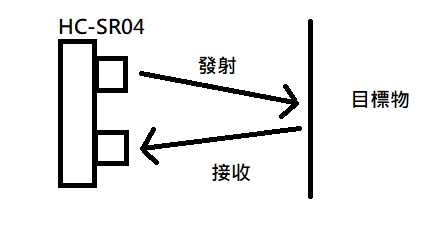
超聲波測距是利用超聲波在空氣中傳播時間來測距
HC-SR04發射超聲波後遇到障礙反射回來的時間
我們藉由發射和接收的時間差就可得知與物體的實際距離
(2倍距離除上時間)
#### 接線路的圖
Gnd-Gnd
Vcc-V
echo-D(digital)
Trig-D(digital)
#### 程式
```
void setup() {
}
//void setup() {
void loop() {
const int trigPin = 5;
const int echoPin = 6;
long duration;
int distance;
pinMode(trigPin, OUTPUT);
pinMode(echoPin, INPUT);
Serial.begin(9600);
// Clears the trigPin
digitalWrite(trigPin, LOW);
delayMicroseconds(2);
digitalWrite(trigPin, HIGH);
delayMicroseconds(10);
digitalWrite(trigPin, LOW);
duration = pulseIn(echoPin, HIGH);
distance= duration*0.034/2;
Serial.print("Distance: ");
Serial.println(distance);
delay(2000);
}
//}
```
* The problem

>a function-definition is not allowed here before '{' token
### 多設一個setup (一個程式只能有一個setup)
- #### The solution of problem
```
void setup() {
}
void loop() {
const int trigPin = 5;
const int echoPin = 6;
long duration;
int distance;
pinMode(trigPin, OUTPUT);
pinMode(echoPin, INPUT);
Serial.begin(9600);
// Clears the trigPin
digitalWrite(trigPin, LOW);
delayMicroseconds(2);
digitalWrite(trigPin, HIGH);
delayMicroseconds(10);
digitalWrite(trigPin, LOW);
duration = pulseIn(echoPin, HIGH);
distance= duration*0.034/2;
Serial.print("Distance: ");
Serial.println(distance);
delay(2000);
}
```
### time table
---
```mermaid
gantt
title A Gantt Diagram
section Section
A task :a1, 2014-01-, 30d
Another task :after a1 , 20d
section Another
Task in sec :2014-01-12 , 12d
anther task : 24d
```
---
## My thought
 Sign in with Wallet
Connect another wallet
Sign in with Wallet
Connect another wallet