# [Vue] Vuex 3
###### tags: `Vue.js`
:::warning
以下資料適用於 Vuex 3 & Vue 2
如果是用 Vuex 4 & Vue 3,要看[這邊的文件](https://next.vuex.vuejs.org/ "Vuex")
但 Vue 3 建議使用 [Pinia](https://pinia.vuejs.org/)
:::
* Vue 應用程式的狀態管理
* 單向資料流
* 將資料、方法放到 Vuex 內管理,所有元件都可呼叫方法,並維持資料雙向綁定的特性
## Vuex 流程
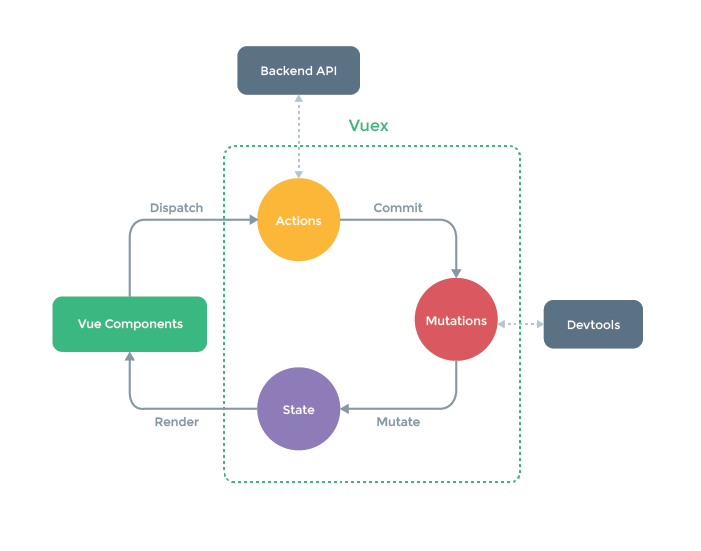
圖片來源:[Vuex 是什么?](https://vuex.vuejs.org/zh/ "Vuex 是什么? | Vuex")
Vue Component 透過 Dispatch 觸發 Actions,Actions 會去取得遠方資料或處理非同步行為,再使用 Commit 方式呼叫 Mutations,透過 Mutations 改變 State 資料狀態,最後將資料回應給 Vue Component Render 到畫面
| 核心概念 | 說明 |
| ---- | --- |
| State | 如同 data,儲存資料狀態的地方<br>屬於模組區域變數 |
| Actions | 如同 methods,進行非同步的行為及取得資料,不會改變 state 資料狀態<br>屬於全域變數 |
| Getters | 如同 computed,資料呈現的方式<br>屬於全域變數 |
| Mutations | 改變資料內容的方法,不會執行非同步的行為<br>屬於全域變數 |
## 使用範例
### /store/index.js
```javascript=
import Vue from 'Vue';
import Vuex form 'Vuex';
import axios from 'axios';
import productsModule from '.products.js';
Vue.use(Vuex);
export default new Vuex.store({
strict: process.env.NODE_ENV !== 'production', // 嚴謹模式,若在 mutations 以外改變資料會提示,但不要在正式環境使用
state: {
isLoading: true,
products: [],
},
actions: {
// payload 只能接受一個參數,若要一次傳多個,可以用物件形式傳遞,例:{ id, qty }
updateLoading(context, payload) {
context.commit('LOADING', payload);
},
getProducts(context) {
const url = `${process.env.APIPATH}/api/${process.env.CUSTOMPATH}/products`
context.dispatch('updateLoading', true);
axios.get(url).then((resp) => {
context.commit('PRODUCTS', resp.data.products);
context.dispatch('updateLoading', false);
});
},
},
mutations: {
LOADING(state, payload) {
state.isLoading = payload;
},
PRODUCTS(state, payload) {
state.products = payload;
},
},
getters: {
products(state) {
return state.products;
},
},
// 可以依功能將相關的程式碼獨立出來,維護上較方便
modules: {
productsModule,
},
});
```
### .vue 檔的 <script></script>
```javascript=
import { mapGetters, mapActions } from 'vuex';
export default {
created() {
this.getProducts();
},
methods: {
showLoading() {
// Dispatching Actions 方法一
this.$store.dispatch('updateLoading', true);
},
// Dispatching Actions 方法二
...mapActions(['getProducts']),
},
computed: {
...mapGetters(['products']),
},
};
```
## namespaced: true
Actions、Getters、Mutations 屬於全域變數,若在不同 module 內用到相同的命名會有衝突,可以加上 `namespaced: true`,這樣就會變成模組區域變數,但在使用上就要改成下方寫法
### 使用範例
#### /store/products.js
```javascript=
import axios from 'axios';
export default {
namespaced: true,
state: {
products: [],
},
actions: {
getProducts(context) {
const url = `${process.env.APIPATH}/api/${process.env.CUSTOMPATH}/products`
context.dispatch('updateLoading', true, { root: true }); // 不在此 module 內,是 Global 的,要加上 { root: true }
axios.get(url).then((resp) => {
context.commit('PRODUCTS', resp.data.products);
context.dispatch('updateLoading', false, { root: true });
});
},
},
mutations: {
PRODUCTS(state, payload) {
state.products = payload;
},
},
getters: {
products(state) {
return state.products;
},
},
});
```
### .vue 檔的 <script></script>
```javascript=
import { mapGetters, mapActions } from 'vuex';
export default {
created() {
this.getProducts();
},
methods: {
...mapActions('productsModule', ['getProducts']),
},
computed: {
...mapGetters('productsModule', ['products']),
},
};
```
### [官方的範例](https://vuex.vuejs.org/zh/guide/modules.html#%E5%91%BD%E5%90%8D%E7%A9%BA%E9%97%B4 "Module 命名空间")
```javascript=
// 模块内容(module assets)
const store = new Vuex.Store({
modules: {
account: {
namespaced: true,
// 模块内容(module assets)
state: () => ({ ... }), // 模块内的状态已经是嵌套的了,使用 `namespaced` 属性不会对其产生影响
getters: {
isAdmin () { ... } // -> getters['account/isAdmin']
},
actions: {
login () { ... } // -> dispatch('account/login')
},
mutations: {
login () { ... } // -> commit('account/login')
},
// 嵌套模块(nested modules)
modules: {
// 继承父模块的命名空间(inherits the namespace from parent module)
myPage: {
state: () => ({ ... }),
getters: {
profile () { ... } // -> getters['account/profile']
}
},
// 进一步嵌套命名空间(further nest the namespace)
posts: {
namespaced: true,
state: () => ({ ... }),
getters: {
popular () { ... } // -> getters['account/posts/popular']
}
}
}
}
}
})
```
## 注意事項
* 不要直接取用 state 的資料,透過 gettets 可以寫處理資料的邏輯,這樣 component 只要單純取出資料即可
* 不建議直接在 `<template>` 內寫 `store.getters.xxx`,透過 `computed()` 取得較好
* 統一整個架構的資料流向:在 component 使用 `dispatch` 呼叫 `actions` 觸發 `mutations` 改變資料,不要直接用 `store.commit` 觸發 `mutations`
## 參考資料
* [Vuex](https://v3.vuex.vuejs.org/ "Vuex")
* [Vue 出一個電商網站](https://www.udemy.com/course/vue-hexschool/ "Vue 出一個電商網站")
---
:::info
建立日期:2021-01-02
更新日期:2023-08-11
:::
 Sign in with Wallet
Connect another wallet
Sign in with Wallet
Connect another wallet