<style>
.reveal {
font-size: 30px;
}
.reveal h1 {
font-size: 42px;
}
</style>
# NCKU ES Python 視覺化 - Numpy
###### tags:`NCKU_ES` `python lecture`
---
## Intro
利用 Python 原本的 list 並不適合處理大量資料(基於原本 Python 設計的特性),因此如何利用 Python 高效率處理資料呢? 機器學習、圖像處理又如何以 Python 快速實作?
----
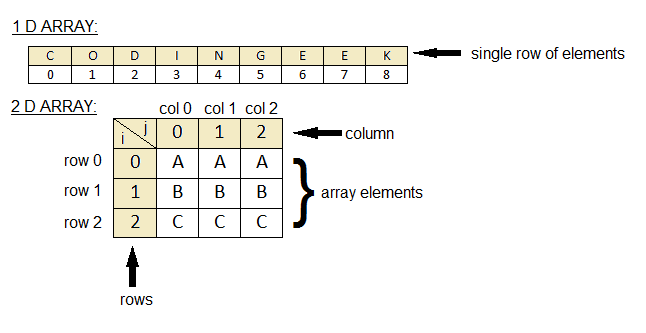
## Numpy Array
----
## Numpy Array 的幾個資料特徵
- `ndarray`:numpy array
- `shape`:structure of dimensions
- `dtype`:element type of the array
```python=
import numpy as np
np1 = np.array([[1, 2, 3], [1, 2, 3]])
print(np1.shape)
print(np1.dtype)
```
Output:
```bash
(2, 3)
int32
```
----
<img src="https://i.redd.it/ux25x879dqv31.jpg" style="height:550px">
----
## Data type
<img src="https://miro.medium.com/max/875/0*iISwXpti0yoko803.png" style="height:550px">
----
## Array Indexing
```python=
print(np[0, 1])
```
:::info
ndarray 和 python list 的 indexing 方式不一樣
:::
---
## Table of mathematic functions
[連結](https://numpy.org/doc/stable/reference/routines.math.html)
---
## 常用於設定初值的方法
```python=
np.array([1, 2, 3]) # 從一個 list type 轉為 ndarray
np.zeros((2, 3)) # 建立一個2x3全為0的陣列
np.ones((2, 3, 4)) # 建立一個2x3x4全為1的陣列
np.arange(1, 10, 2) # 建立一個由1開始,不超過10,間隔值為2的均勻數值陣列
np.linspace(0, 10, 5) # 建立一個0到10之間,均勻的5個數值陣列
np.full((3,2), 8) # 建立一個3x2全為8的陣列
np.eye(2) # 建立一個5x5的單位矩陣
np.random.random((2,3)) # 建立一個2x3的隨機值矩陣
```
Example:
```python=
>>> np.arange(3)
array([0, 1, 2])
>>> np.arange(3,9,2)
array([3, 5, 7])
```
----
## [arange()](https://numpy.org/doc/stable/reference/generated/numpy.arange.html)
與 python 的 range 類似,但是 return 的是 np.array 物件。
```python=
numpy.arange([start, ]stop, [step, ]dtype=None)
```
----
## [linspace()](https://numpy.org/doc/stable/reference/generated/numpy.linspace.html)
產生均勻分布的點,預設包含邊界,也可以用 `endpoint` 指定是否要包含邊界。
```python=
numpy.linspace(start, stop, num=50, endpoint=True, retstep=False, dtype=None, axis=0)
```
Example:
```python=
>>> np.linspace(0, 4, 10)
array([0. , 0.44444444, 0.88888889, 1.33333333, 1.77777778,
2.22222222, 2.66666667, 3.11111111, 3.55555556, 4. ])
```
---
## 常用的函數
- sum
- max / argmax
- min / argmin
- sort
- mean
- std
- reshape
- transpose
----
# 資料整併
- append
- concatenate
- vstack
- hstack
- vsplit
- hsplit
{"metaMigratedAt":"2023-06-15T15:16:51.281Z","metaMigratedFrom":"YAML","title":"NCKU ES Python 部課 - Numpy","breaks":true,"slideOptions":"{\"theme\":\"League\",\"transition\":\"fade\",\"spotlight\":{\"enabled\":false},\"slideNumber\":true,\"parallaxBackgroundImage\":\"https://wallpaperboat.com/wp-content/uploads/2019/10/programming-02.jpg\"}","contributors":"[{\"id\":\"af67681e-fb2e-4298-8e92-448b36d346a6\",\"add\":2849,\"del\":232}]"}