# Lab3: Reindeer - RISCV RV32I[M] Soft CPU
contributed by < `xl86305955` >
###### tags:`Computer Architecture`, `RISC-V`
## Requirements
1. Following the instructions of [Lab3: Reindeer - RISCV RV32I[M] Soft CPU](https://hackmd.io/@sysprog/rJw2A5DqS), you shall modify the assembly programs used/done with [Assignment1](https://hackmd.io/ZHsZ-7HBTvqtH8SoDHxQoQ) or [Assignment2](https://hackmd.io/@sysprog/rJdsV7Btr) as new test case(s) for [Reindeer](https://github.com/PulseRain/Reindeer) Simulation with Verilator.
* [ I-ADD-01](https://github.com/riscv/riscv-compliance/blob/master/riscv-test-suite/rv32i/src/I-ADD-01.S) is a good starting point for writing test cases.
* You have to ensure signature matched with the requirements described in [RISC-V Compliance Tests](https://github.com/riscv/riscv-compliance/blob/master/doc/README.adoc).
2. Check the generated VCD file and use GTKwave to view the waveform. Then, explain how your program is executed along with [Reindeer](https://github.com/PulseRain/Reindeer) Simulation.
3. Write down your thoughts and progress in [HackMD notes](https://hackmd.io/s/features).
* Explain how [Reindeer](https://github.com/PulseRain/Reindeer) works with [Verilator](https://www.veripool.org/wiki/verilator).
* What is "Hold and Load"? And, how the simulation does for bootstraping?
* Can you show some signals/events inside [Reindeer](https://github.com/PulseRain/Reindeer) and describe?
* Insert your HackMD notes and programs in the following table.
## Environment Setup
### [Reindeer](https://github.com/PulseRain/Reindeer) - RISCV `RV32I[M]` Soft CPU
PulseRain [Reindeer](https://github.com/PulseRain/Reindeer) is a soft CPU of Von Neumann architecture. It supports RISC-V `RV32I[M]` instruction set, and features a 2 x 2 pipeline. It strives to make a balance between speed and area, and offers a flexible choice for soft CPU across all FPGA platforms.
#### 2 x 2 Pipeline
Reindeer's pipeline is composed of 4 stages:
1. Instruction Fetch (IF)
2. Instruction Decode (ID)
3. Instruction Execution (IE)
4. Register Write Back and Memory Access (MEM)
However, unlike traditional pipelines, Reindeer's pipeline stages are mapped to a 2 x 2 layout, as illustrated below:

In the 2 x 2 layout, each stage is active every other clock cycle. For the even cycle, only IF and IE stages are active, while for the odd cycle, only ID and MEM stages are active. In this way, the Instruction Fetch and Memory Access always happen on different clock cycles, thus to avoid the structural hazard caused by the single port memory.
### What is Verilator

From the official website:
>Welcome to Verilator, the fastest free Verilog HDL simulator.
• Accepts synthesizable Verilog or SystemVerilog
• Performs lint code-quality checks
• Compiles into multithreaded C++, SystemC, or (soon) C++-under-Python
• Creates XML to front-end your own tools Logo
### Installation
We will get the [Reideer](https://github.com/PulseRain/Reindeer) soft CPU and simulated with [Verilator](https://www.veripool.org/wiki/verilator)
First of all, install the [Verilator](https://www.veripool.org/wiki/verilator) by apt-get install
```
$ sudo add-apt-repository ppa:iztok.jeras/ppa
$ sudo apt update
$ sudo apt install verilator
```
Don't forget to check the version:
```
$ verilator --version
Verilator 4.008 2018-12-01 rev UNKNOWN_REV
```
We need the GNU Toolchain for RISC-V, `source` the environment before used. Because I didn't write into `.bashrc`, so I had to source it whenever I reboot
```
$ source /home/fred/riscv-none-embed-gcc/setenv
```
Check whether it worked:
```
$ riscv-none-embed-gcc --version | head -1
riscv-none-embed-gcc (xPack GNU RISC-V Embedded GCC, 64-bit) 8.2.0
```
Install the [GTKWave](http://gtkwave.sourceforge.net/) for checking the waveform `.vcd` file generate by [Reideer](https://github.com/PulseRain/Reindeer)
```
$ sudo apt-get install gtkwave
```
Get the [Reideer](https://github.com/PulseRain/Reindeer) via git
```
git clone https://github.com/PulseRain/Reindeer.git
```
Under the `Reindeer/sim/verilator/` place the C++ program simulate the soft CPU with [Verilator](https://www.veripool.org/wiki/verilator)
```
$ cd Reindeer/sim/verilator
```
Build the verilog code and C++ test bench
```
$ make
```
Run the simulation for compliance test, it will test the 55 compilance test, the diagram below showed the importance of compiliance test
About the compliance test:
>At the heart of the testing infrastructure is the detailed compliance test. This is the RISC-V assembler code that is executed on the processor and that provides results in a defined memory area (the signature). The test should only use the minimum of instructions and only those absolutely necessary. It should only use instructions and registers from the ISA instruction set on which it is targeted.
```
$ make test_all
```
Also can test the single elf file:
```
$ make test I-ADD-01
```
Check the waveform:


Now can prepare to test our program
## Sum of First N Nature Number
This assignment I am going to simulate the sum of first N nature numbers. Befor started, I have to generate the `.elf` file for the [Reideer](https://github.com/PulseRain/Reindeer)
### Get [RISC-V Compilance](https://github.com/riscv/riscv-compliance)
In the [riscv-compliance/doc/README.adoc](https://github.com/riscv/riscv-compliance/blob/master/doc/README.adoc#purpose-of-compliance-tests), point 3 tell you the things yo should beware of while making a new test
#### Edit Makefile
The testing `.S` will place it in `/home/fred/Documents/ComputerArchitecture/riscv-compliance/riscv-test-suite/rv32i/src`, go to the directory that run these `.S` file
```
$ cd /home/fred/Documents/ComputerArchitecture/riscv-compliance/riscv-test-suite/rv32i
```
Modify the Makefile to meet the requirements:
```
ROOTDIR ?= /home/fred/Documents/ComputerArchitecture/riscv-compliance
TARGETDIR := /home/fred/Documents/ComputerArchitecture/riscv-compliance/riscv-target
RISCV_TARGET := riscvOVPsim
RISCV_DEVICE := rv32i
```
:::info
"__=__" in Makefile:
= values within it are recursively expanded when the variable is used, not when it's declared
:= values within it are expanded at declaration time
?= if there is no definition, then assign with value given
+= Concatenation with the variable behhind
:::
Check it on stackoverflow: [What is the difference between the GNU Makefile variable assignments =, ?=, := and +=?](https://stackoverflow.com/questions/448910/what-is-the-difference-between-the-gnu-makefile-variable-assignments-a)
The Makefile above will go to the directory`/home/fred/Documents/ComputerArchitecture/riscv-compliance/riscv-target/riscvOVPsim/device/rv32i` to fetch the `Makefile.include` file by `INCLUDE=$(TARGETDIR)/$(RISCV_TARGET)/device/$(RISCV_DEVICE)/Makefile.include`
The [riscvOVP](https://github.com/riscv/riscv-compliance/blob/master/riscv-ovpsim/README.md) is charged for the simulation of the compliance test inside the `/riscv-compliance/riscv-test-suite/rv32i/src`
Quaoted from [README.md](https://github.com/riscv/riscv-compliance/blob/master/riscv-ovpsim/README.md) `About riscvOVPsim`
>The riscvOVPsim simulator implements the full and complete functionality of the RISC-V Foundation's public Uhaveser and Privilege specifications.
Modify the `Makefile.include`:
```
ROOT_DIR ?= /home/fred/Documents/ComputerArchitecture/riscv-compliance
TARGET_SIM ?= /home/fred/Documents/ComputerArchitecture/riscv-compliance/riscv-ovpsim/bin/$(ARCH)/riscvOVPsim.exe
RISCV_PREFIX ?= riscv-none-embed-
RISCV_GCC ?= $(RISCV_PREFIX)gcc
RISCV_OBJDUMP ?= $(RISCV_PREFIX)objdump
RISCV_GCC_OPTS ?= -static -mcmodel=medany -fvisibility=hidden -nostdlib -nostartfiles
```
The `RISCV_PREFIX ?= riscv-none-embed-` is the GNU toolchain we used in [Lab1: R32I Simulator](https://hackmd.io/ZHsZ-7HBTvqtH8SoDHxQoQ)
### Sum of First N Nature numbers
```
.data
arg: .word 10
.text
main:
li a5,0 # sum = 0
li a4,1 # i = 1
lw a2, arg # First N
loop:
add a5, a5, a4 # sum += i
addi a4,a4,1 # i = i + 1
bge a2,a4,loop # if (N >= i)
mv a3,a5 # store the sum value
```
We can use [Ripes](https://github.com/mortbopet/Ripes) to check the correctness of Registers value

Now we can modify it and add it to `/home/fred/Documents/ComputerArchitecture/riscv-compliance/riscv-test-suite/rv32i/src`
```
#include "compliance_test.h"
#include "compliance_io.h"
#include "test_macros.h"
# Test Virtual Machine (TVM) used by program.
RV_COMPLIANCE_RV32M
# Test code region.
RV_COMPLIANCE_CODE_BEGIN
RVTEST_IO_INIT
RVTEST_IO_ASSERT_GPR_EQ(x31, x0, 0x00000000)
RVTEST_IO_WRITE_STR(x31, "# Test Begin\n")
# ---------------------------------------------------------------------------------------------
RVTEST_IO_WRITE_STR(x31, "# Test part A1 - general test of value 10 register values\n");
# Addresses for test data and results
la x1, test_A1_data
la x2, test_A1_res
# Load testdata
lw x3, 0(x1)
# Register initialization
li x15, 0 # result
li x14, 1 # i
li x12, 10 # round
# Test
loop:
add x15, x15, x14
addi x14, x14, 1
bge x12, x14, loop
mv x3, x15
# Store results
sw x3, 0(x2)
//
// Assert
//
RVTEST_IO_CHECK()
RVTEST_IO_ASSERT_GPR_EQ(x2, x3, 55)
RVTEST_IO_WRITE_STR(x31, "# Test part A1 - Complete\n");
# ---------------------------------------------------------------------------------------------
RV_COMPLIANCE_HALT
RV_COMPLIANCE_CODE_END
# Input data section.
.data
test_A1_data:
.word 10
#Output data section.
RV_COMPLIANCE_DATA_BEGIN
.align 4
test_A1_res:
.fill 5, 4, -1
RV_COMPLIANCE_DATA_END
```
Before make, don't forget to add your program into `Makefrag`
Now we can generate our `.elf` file:
```
$ make Sum.elf
riscv-none-embed-gcc -march=rv32i -mabi=ilp32 -static -mcmodel=medany -fvisibility=hidden -nostdlib -nostartfiles -I/home/fred/Documents/ComputerArchitecture/riscv-compliance/riscv-test-env/ -I/home/fred/Documents/ComputerArchitecture/riscv-compliance/riscv-test-env/p/ -I/home/fred/Documents/ComputerArchitecture/riscv-compliance/riscv-target/riscvOVPsim/ -T/home/fred/Documents/ComputerArchitecture/riscv-compliance/riscv-test-env/p/link.ld src/Sum.S -o /home/fred/Documents/ComputerArchitecture/riscv-compliance/work//Sum.elf; riscv-none-embed-objdump -D /home/fred/Documents/ComputerArchitecture/riscv-compliance/work//Sum.elf > /home/fred/Documents/ComputerArchitecture/riscv-compliance/work//Sum.elf.objdump
```
The generate file will be store in `/home/fred/Documents/ComputerArchitecture/riscv-compliance/work`. There will be two files `.elf` and `.elf.objdump`
```
$ make Sum.elf
riscv-none-embed-gcc -march=rv32i -mabi=ilp32 -static -mcmodel=medany -fvisibility=hidden -nostdlib -nostartfiles -I/home/fred/Documents/ComputerArchitecture/riscv-compliance/riscv-test-env/ -I/home/fred/Documents/ComputerArchitecture/riscv-compliance/riscv-test-env/p/ -I/home/fred/Documents/ComputerArchitecture/riscv-compliance/riscv-target/riscvOVPsim/ -T/home/fred/Documents/ComputerArchitecture/riscv-compliance/riscv-test-env/p/link.ld src/Sum.S -o /home/fred/Documents/ComputerArchitecture/riscv-compliance/work//Sum.elf; riscv-none-embed-objdump -D /home/fred/Documents/ComputerArchitecture/riscv-compliance/work//Sum.elf > /home/fred/Documents/ComputerArchitecture/riscv-compliance/work//Sum.elf.objdump
```
We finally generate the `.elf` and `.elf.objdump` that can be read by [Reideer](https://github.com/PulseRain/Reindeer)
Copy the file and place it under `/home/fred/Documents/ComputerArchitecture/Reindeer/sim/compliance`
Don't forget to add the option into `Makefile`
Finaly, we can test our program now
```
$ make test Sum
```
Then, the program will dump out the wave form, use `GTKWave` to check it. There is a `start` signal, after the `4` clocks later, the program will start to execute

Also, we can see that the pc changes every two clock, because of the 2 x 2 design

`x12` is for loop control, it will always be `10`

The result is stored in `x15` , so it goes like `0,1,3,...45,55`


We can check the `x14` `i's` value also, and the `sum's` value is adding `i's` value each time

## Hold and Load
The tradition approach is writing a boot loader in software and store it into ROM. When the computer power on, the boot loader will load the first program to the machine and determine the state of computer (eg. kernel mode, user mode), usually the kernel mode will take control of the system after loading the boot loader. The boot loader is similar to the BIOS in the computer.
When I checked the signal of `CSR`, I saw bit-wise of the RISC-V mode, it is 2 bit-wise. I only learned the kernel mode and user mode in operating system class, so I go chekecked the [The RISC-V Instruction Set Manual](https://content.riscv.org/wp-content/uploads/2017/05/riscv-spec-v2.2.pdf), but the manual does'nt describe in detail
[How Genode came to RISC-V](https://genode.org/documentation/articles/riscv#Privilege_modes) descibe these modes:
There are `Machine mode`, `hypervisor mode`, `supervisor mode`, and `user mode` four modes, and they have different permission to the privilege instructions and 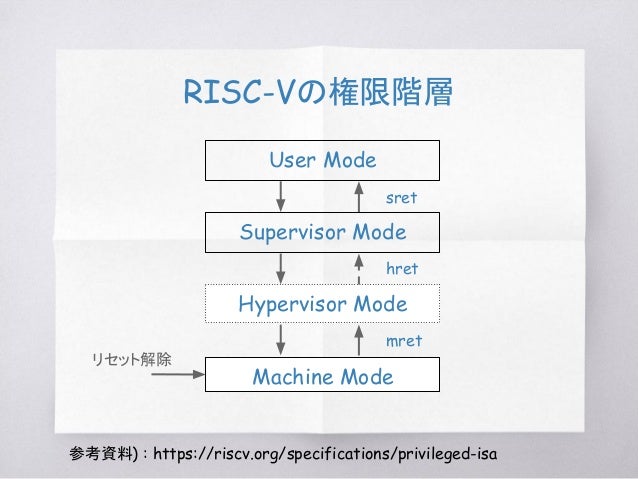
### CSR
:::warning
to be continued
:::
### Hold and Load
Descripition in [Reideer](https://github.com/PulseRain/Reindeer)
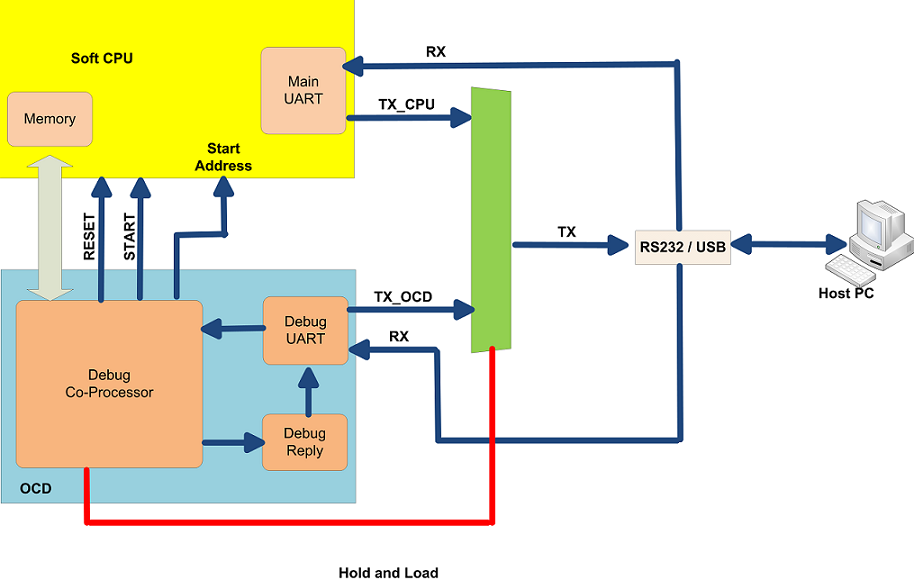
The soft CPU and the OCD can share the same UART port, as illustrated above. The RX signal goes to both the soft CPU and OCD, while the TX signal has to go through a mux. And that mux is controlled by the OCD.
After reset, the soft CPU will be put into a hold state, and it will have access to the UART TX port by default. But a valid debug frame sending from the host PC can let OCD to reconfigure the mux and switch the UART TX to OCD side, for which the memory can be accessed, and the control frames can be exchanged. A new software image can be loaded into the memory during the CPU hold state, which gives rise to the name "hold-and-load".
After the memory is loaded with the new image, the OCD can setup the start-address of the soft CPU, and send start pulse to make the soft CPU active. At that point, the OCD can switch the UART TX back to the CPU side for CPU's output.
As the hold-and-load gets software images from an external host, it does not need any ROM to begin with. This makes it more portable across all FPGA platforms. If Flash is used to store the software image, the OCD can be modified a little bit to read from the flash instead of the external host.
 Sign in with Wallet
Connect another wallet
Sign in with Wallet
Connect another wallet