# Stack The Flags 2022 Writeups
## Misc / HeatKeeb
### Challenge
**Description**
```
Jaga had gained interest in custom keyboards and has created a platform to create your own keebs!
We know we created his custom keeb on the 22nd of September 2022, at 12:00:00 SGT. Oddly specific but we know it's true.
```
We are provided a server to connect to, as well as an archive ``misc_heatkeeb.zip`` that contains a folder ``app`` storing the servers' files.
In particular, we are provided with ``app.py`` and ``keebcreator.py``.
**app.py**
```python
import uvicorn
from fastapi import FastAPI, Request, Form, BackgroundTasks
from fastapi.responses import FileResponse, RedirectResponse, JSONResponse
from fastapi.staticfiles import StaticFiles
from fastapi.templating import Jinja2Templates
from fastapi.middleware import Middleware
from starlette.middleware.sessions import SessionMiddleware
from keebcreator import draw_keeb, draw_heatmap
import os
from pathlib import Path
from PIL import Image
import shelve
import datetime, pytz
import random
middleware = [
Middleware(SessionMiddleware, secret_key="h34tk33bl0l")
]
app = FastAPI(middleware=middleware)
app.mount("/static", StaticFiles(directory="static"), name="static")
templates = Jinja2Templates(directory="templates")
FLAG = "STF22{REDACTED}"
KEY = "REDACTED"
ADMIN_TOKEN = "REDACTED"
def hex_to_rgb(hex):
h = hex.lstrip('#')
return tuple(int(h[i:i+2], 16) for i in (0, 2, 4))
admin_token = ""
adminName = 'j4g4h1ms3lf'
adminFrame = hex_to_rgb('#000000')
adminKeys = hex_to_rgb('#dcdedb')
adminText = hex_to_rgb('#000000')
adminKeys = hex_to_rgb('#98b5bb')
with shelve.open('keebdb') as db:
db[ADMIN_TOKEN] = {
'name': adminName,
'frameColor': adminFrame,
'keyColor': adminKeys,
'textColor': adminText,
'specialColor': adminKeys,
'text': KEY
}
img = draw_keeb(adminName, adminFrame, adminKeys, adminText, adminKeys)
img.save(f'keebs/keeb-{ADMIN_TOKEN}.png')
img = draw_heatmap(adminName, adminFrame, adminKeys, adminText, adminKeys, KEY)
imgSmall = img.resize((int(img.width / 100), int(img.height / 100)), Image.BILINEAR)
result = imgSmall.resize(img.size, Image.NEAREST)
result.save(f'keebs/heatmap-{ADMIN_TOKEN}.png')
@app.get("/")
def root(request: Request):
return templates.TemplateResponse("index.html", {"request": request})
@app.get("/menu")
def root(request: Request):
if 'token' in request.session:
return templates.TemplateResponse("menu.html", {"request": request})
else:
return RedirectResponse('/')
@app.post("/menu")
def keeb(request: Request, token: str = Form(...)):
with shelve.open('keebdb') as db:
if token in db:
# set token cookie
request.session['token'] = token
return templates.TemplateResponse("menu.html", {"request": request, "token": token})
else:
return templates.TemplateResponse("index.html", {"request": request})
@app.get("/keeb")
def keeb(request: Request):
# use pathlib to open keeb
if 'token' in request.session:
token = request.session['token']
with shelve.open('keebdb') as db:
if token in db:
return FileResponse(f"keebs/keeb-{token}.png")
else:
return templates.TemplateResponse("index.html", {"request": request})
@app.get("/build")
def build(request: Request):
return templates.TemplateResponse("build.html", {"request": request})
@app.post("/build")
def build(request: Request, name: str = Form(...), frameColor: str = Form(...), keyColor: str = Form(...), textColor: str = Form(...), specialColor: str = Form(...)):
t = datetime.datetime.now(pytz.timezone('Asia/Singapore'))
seed = int(t.timestamp())
random.seed(seed)
token = ''.join(random.choices('abcdefghijklmnopqrstuvwxyzABCDEFGHIJKLMNOPQRSTUVWXYZ0123456789', k=16))
with shelve.open('keebdb') as db:
db[token] = {
'name': name,
'frameColor': hex_to_rgb(frameColor),
'keyColor': hex_to_rgb(keyColor),
'textColor': hex_to_rgb(textColor),
'specialColor': hex_to_rgb(specialColor),
'text': 'default'
}
img = draw_keeb(name, hex_to_rgb(frameColor), hex_to_rgb(keyColor), hex_to_rgb(textColor), hex_to_rgb(specialColor))
img.save(f'keebs/keeb-{token}.png')
request.session['token'] = token
return templates.TemplateResponse("build.html", {"request": request, "resp": "Success!", "token": token})
@app.get('/rebuild')
def rebuild(request: Request):
if 'token' in request.session:
return templates.TemplateResponse("rebuild.html", {"request": request})
@app.post('/rebuild')
def rebuild(request: Request, frameColor: str = Form(...), keyColor: str = Form(...), textColor: str = Form(...), specialColor: str = Form(...)):
if 'token' in request.session:
token = request.session['token']
with shelve.open('keebdb') as db:
if token in db:
img = draw_keeb(db[token]['name'], hex_to_rgb(frameColor), hex_to_rgb(keyColor), hex_to_rgb(textColor), hex_to_rgb(specialColor))
img.save(f'keebs/keeb-{token}.png')
db[token] = {
'name': db[token]['name'],
'frameColor': hex_to_rgb(frameColor),
'keyColor': hex_to_rgb(keyColor),
'textColor': hex_to_rgb(textColor),
'specialColor': hex_to_rgb(specialColor),
'text': db[token]['text']
}
return templates.TemplateResponse("rebuild.html", {"request": request, "resp": "Success!"})
else:
return templates.TemplateResponse("index.html", {"request": request})
@app.get('/heatmap/generate')
def generate_heatmap(request: Request):
if 'token' in request.session:
return templates.TemplateResponse("heatmap-gen.html", {"request": request})
@app.post('/heatmap/generate')
def generate_heatmap(request: Request, text: str = Form(...)):
if 'token' in request.session:
token = request.session['token']
with shelve.open('keebdb') as db:
if token in db:
name = db[token]['name']
frameColor = db[token]['frameColor']
keyColor = db[token]['keyColor']
textColor = db[token]['textColor']
specialColor = db[token]['specialColor']
img = draw_heatmap(name, frameColor, keyColor, textColor, specialColor, text.upper())
imgSmall = img.resize((int(img.width / 100), int(img.height / 100)), Image.BILINEAR)
result = imgSmall.resize(img.size, Image.NEAREST)
result.save(f'keebs/heatmap-{token}.png')
db[token] = {
'name': name,
'frameColor': frameColor,
'keyColor': keyColor,
'textColor': textColor,
'specialColor': specialColor,
'text': text.upper()
}
return FileResponse(f"keebs/heatmap-{token}.png")
@app.get('/heatmap/view')
def heatmap(request: Request, background_tasks: BackgroundTasks):
if 'token' in request.session:
token = request.session['token']
with shelve.open('keebdb') as db:
if token in db:
try:
img = Image.open(f'keebs/heatmap-{token}.png')
img.close()
except FileNotFoundError:
return RedirectResponse('/heatmap/generate')
return FileResponse(f"keebs/heatmap-{token}.png")
else:
return templates.TemplateResponse("index.html", {"request": request})
@app.get('/text')
def flag(request: Request):
if 'token' in request.session:
return templates.TemplateResponse("flag.html", {"request": request})
@app.post('/text')
def flag(request: Request, text: str = Form(...)):
if 'token' in request.session:
with shelve.open('keebdb') as db:
token = request.session['token']
if token in db:
if token == ADMIN_TOKEN and text.upper() == KEY:
return templates.TemplateResponse("flag.html", {"request": request, "word": text, "flag": FLAG})
elif text.upper() == db[token]['text']:
return templates.TemplateResponse("flag.html", {"request": request, "word": text})
return templates.TemplateResponse("flag.html", {"request": request})
if __name__ == "__main__":
uvicorn.run("app:app", host="0.0.0.0", port=8000, reload=True)
```
**keebcreator.py**
```python
import numpy as np
from PIL import ImageFont, ImageDraw, Image
def key(text, w=1):
return {'t': text, 'w': w}
'''
keeb = [
[key('Esc'), key('1'), key('2'), key('3'), key('4'), key('5'), key('6'), key('7'), key('8'), key('9'), key('0'), key('-'), key('='), key('Backspace', 2), key('Home')],
[key('Tab', 1.5), key('Q'), key('W'), key('E'), key('R'), key('T'), key('Y'), key('U'), key('I'), key('O'), key('P'), key('['), key(']'), key('\\', 1.5), key('PgUp')],
[key('Caps Lock', 1.75), key('A'), key('S'), key('D'), key('F'), key('G'), key('H'), key('J'), key('K'), key('L'), key(';'), key("'"), key('Enter', 2.25), key('PgDn')],
[key('Shift', 2.25), key('Z'), key('X'), key('C'), key('V'), key('B'), key('N'), key('M'), key(','), key('.'), key('/'), key('Shift', 1.75), key('↑'), key('End')],
[key('Ctrl', 1.25), key('Win', 1.25), key('Alt', 1.25), key('Space', 6.25), key('Alt'), key('Fn'), key('Ctrl'), key('←'), key('↓'), key('→')]
]
'''
keeb = [
[key(''), key('1'), key('2'), key('3'), key('4'), key('5'), key('6'), key('7'), key('8'), key('9'), key('0'), key('-'), key('='), key('', 2), key('')],
[key('', 1.5), key('Q'), key('W'), key('E'), key('R'), key('T'), key('Y'), key('U'), key('I'), key('O'), key('P'), key('['), key(']'), key('\\', 1.5), key('')],
[key('', 1.75), key('A'), key('S'), key('D'), key('F'), key('G'), key('H'), key('J'), key('K'), key('L'), key(';'), key("'"), key('', 2.25), key('')],
[key('', 2.25), key('Z'), key('X'), key('C'), key('V'), key('B'), key('N'), key('M'), key(','), key('.'), key('/'), key('', 1.75), key(''), key('')],
[key('', 1.25), key('', 1.25), key('', 1.25), key('', 6.25), key(''), key(''), key(''), key(''), key(''), key('')]
]
def draw_keeb(name, frameColor, keyColor, textColor, specialColor, keeb=keeb, height=580, width=1720, unit=100):
def draw_key(image, key, x, y, w, h, color):
x = int(x)
y = int(y)
text = key['t']
color = specialColor if text == '' else color
image[y:int(y+h), x:int(x+w)] = color
img_pil = Image.fromarray(image)
draw = ImageDraw.Draw(img_pil)
font = ImageFont.truetype('Poppins-Regular.ttf', 20)
textsize = font.getsize(text)
textX = (w - textsize[0]) / 2
textY = (h + textsize[1]) / 2
draw.text((x+textX, y+textY), text, textColor, font=font, align='center')
return np.array(img_pil)
image = np.zeros((height, width, 3), np.uint8)
image[:] = frameColor
img_pil = Image.fromarray(image)
draw = ImageDraw.Draw(img_pil)
font = ImageFont.truetype('Poppins-Regular.ttf', 20)
textsize = font.getsize(name)
textX = (width - textsize[0]) / 2
textY = height - 30
draw.text((textX, textY), name, (255,255,255,255), font=font, align='center')
image = np.array(img_pil)
x = 30
y = 30
for row in keeb:
gap = (width - x * 2 - unit * sum([key['w'] for key in row])) / (len(row) - 1)
for key in row:
w = unit * key['w']
h = unit
image = draw_key(image, key, x, y, w, h, keyColor)
x += w + gap
# draw gap
x = 30
y += unit + 5
image = Image.fromarray(image)
return image
def draw_heatmap(name, frameColor, keyColor, textColor, specialColor, htext, keeb=keeb, height=580, width=1720, unit=100):
def draw_key(image, key, x, y, w, h, color):
x = int(x)
y = int(y)
text = key['t']
if text == '':
color = specialColor
elif text in htext:
color = (255, 84, 84)
image[y:int(y+h), x:int(x+w)] = color
img_pil = Image.fromarray(image)
draw = ImageDraw.Draw(img_pil)
font = ImageFont.truetype('Poppins-Regular.ttf', 20)
textsize = font.getsize(text)
textX = (w - textsize[0]) / 2
textY = (h + textsize[1]) / 2
draw.text((x+textX, y+textY), text, textColor, font=font, align='center')
return np.array(img_pil)
image = np.zeros((height, width, 3), np.uint8)
image[:] = frameColor
img_pil = Image.fromarray(image)
draw = ImageDraw.Draw(img_pil)
font = ImageFont.truetype('Poppins-Regular.ttf', 20)
textsize = font.getsize(name)
textX = (width - textsize[0]) / 2
textY = height - 30
draw.text((textX, textY), name, (255,255,255,255), font=font, align='center')
image = np.array(img_pil)
x = 30
y = 30
for row in keeb:
gap = (width - x * 2 - unit * sum([key['w'] for key in row])) / (len(row) - 1)
for key in row:
w = unit * key['w']
h = unit
image = draw_key(image, key, x, y, w, h, keyColor)
x += w + gap
# draw gap
x = 30
y += unit + 5
image = Image.fromarray(image)
return image
if __name__ == '__main__':
img = draw_keeb('John Doe', (0, 0, 0), (214, 218, 217), (0, 0, 0), (160, 189, 195))
img.save('keeb.png')
heatmap = draw_heatmap('John Doe', (0, 0, 0), (214, 218, 217), (0, 0, 0), (160, 189, 195), "H34TKEYB0ARD")
heatmap.save('heatmap.png')
```
### Solution
In order to obtain the flag, we need to call the ``/text`` endpoint as the admin (using the ``ADMIN_TOKEN``) with the text as the ``KEY``. Both the ``ADMIN_TOKEN`` and the ``KEY`` are static, but redacted in the source code.
### Leaking ADMIN_TOKEN
When we first connect to the server, a random token will be generated for us via the ``/build`` endpoint. Based on the code, it can be seen that the token is generated based on the current time.
Fortunately, from the challenge description, we are informed that Jaga (presumably the admin) "created his custom keeb on the 22nd of September 2022, at 12:00:00 SGT". Using this timestamp, we can generate Jaga's token from the following script:
**Script**
```python
import random
#From https://www.epochconverter.com/
#Epoch timestamp: 1663810877
#Date and time (GMT): Thursday, September 22, 2022 1:41:17 AM
#Date and time (your time zone): Thursday, September 22, 2022 9:41:17 AM GMT+08:00
seed = 1663810877
random.seed(seed)
admin_token = ''.join(random.choices('abcdefghijklmnopqrstuvwxyzABCDEFGHIJKLMNOPQRSTUVWXYZ0123456789', k=16))
print(admin_token)
```
**Output**
```
rMwwbpMkzAwyRoWs
```
Logging in with this token, we manage to successfully log in as the admin.
### Leaking KEY
When the server is initialized, the ``KEY`` variable is used to generate a heatmap image using the ``draw_heatmap()`` function.
By calling the ``/heatmap/view`` endpoint, we are able to get Jaga's last generated heatmap (which was generated using ``KEY``) when logged in as Jaga, which is the following image:

By analyzing the ``draw_heatmap()`` function code, it can be observed that the squares in the heatmap image correspond to the characters in a keyboard. When a square is colored red ``(255, 84, 84)``, it means that the keyboard character at that position is present in the text provided to the function (in this case, the text provided is ``KEY``). Note that due to the "bluring" of colors with adjacent squares, the square's color may not be exactly ``(255, 84, 84)``.
Nonetheless, this means that we can leak the characters in ``KEY`` based on the heatmap image above. By manually mapping the squares to the keyboard characters, one can obtain the following annotated heatmap image:
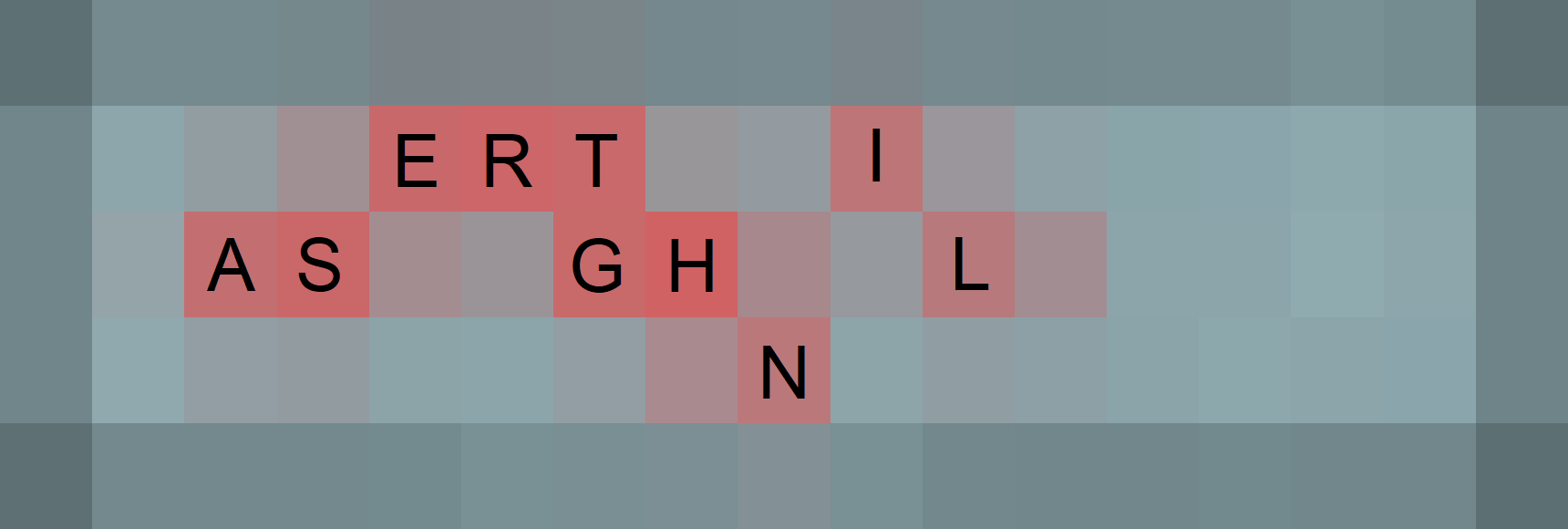
The characters found can be confirmed by generating another heatmap image via the ``/heatmap/generate`` endpoint with the text ``ASERTGHNIL``, and comparing the newly generated image with Jaga's last generated heatmap.
Although we managed to figure out the characters present in ``KEY``, we do not know the exact order that they are in. Fortunately, we can use an online [Anagram Solver](https://www.thewordfinder.com/anagram-solver/) to find all possible valid English anagrams for ``ASERTGHNIL``. Based on the Anagram Solver, there are only 2 possible anagrams: ``EARTHLINGS`` and ``SLATHERING``.
By calling the ``/text`` endpoint with the text ``EARTHLINGS`` while being logged in as Jaga, we successfully manage to obtain the flag ``STF22{h34t_k3yb04rD}``.
## Misc / 2 Pain
### Challenge
We are given an APK file called ``2pain4you.apk``.
### Initial Analysis
1. [VirusTotal](https://www.virustotal.com/gui/file/fa3b425bb3e592f99588e74f4c7cb4e0b9151b774e7198d1596c326788457ebc) was used to analyze the APK;
2. An [Online APK Decompiler](http://www.javadecompilers.com/apk) was used to decompile the APK
From the VirusTotal analysis, we are able to find out a few things:
- Contrary to the name of the challenge, the APK appears to be safe to run;
- ``com.example.deva.MainActivity`` is the main activity;
- The APK appears to be bundled with some Linux executables
### Solution
For starters, an attempt was made to run the APK.
Unfortunately, the APK only seems to produce a few meme images/gifs:
Since there was nothing of significance found, we took a look at the decompiled ``com.example.deva.MainActivity`` class:
```java
package com.example.deva;
import android.content.Context;
import android.content.DialogInterface;
import android.os.Bundle;
import android.util.Log;
import android.view.LayoutInflater;
import android.view.Menu;
import android.view.MenuItem;
import android.view.View;
import android.view.ViewGroup;
import android.widget.Toast;
import androidx.appcompat.app.AlertDialog;
import androidx.appcompat.app.AppCompatActivity;
import androidx.customview.widget.Openable;
import androidx.navigation.ActivityKt;
import androidx.navigation.NavController;
import androidx.navigation.NavGraph;
import androidx.navigation.p004ui.AppBarConfiguration;
import androidx.navigation.p004ui.NavControllerKt;
import com.example.deva.databinding.ActivityMainBinding;
import com.scottyab.rootbeer.RootBeer;
import kotlin.Metadata;
import kotlin.jvm.functions.Function2;
import kotlin.jvm.internal.Intrinsics;
@Metadata(mo13378d1 = {"\u0000<\n\u0002\u0018\u0002\n\u0002\u0018\u0002\n\u0002\b\u0002\n\u0002\u0018\u0002\n\u0000\n\u0002\u0018\u0002\n\u0000\n\u0002\u0010\u000b\n\u0000\n\u0002\u0010\u0002\n\u0000\n\u0002\u0018\u0002\n\u0002\b\u0002\n\u0002\u0018\u0002\n\u0002\b\u0002\n\u0002\u0018\u0002\n\u0002\b\u0002\u0018\u00002\u00020\u0001B\u0005¢\u0006\u0002\u0010\u0002J\b\u0010\u0007\u001a\u00020\bH\u0002J\u0012\u0010\t\u001a\u00020\n2\b\u0010\u000b\u001a\u0004\u0018\u00010\fH\u0014J\u0010\u0010\r\u001a\u00020\b2\u0006\u0010\u000e\u001a\u00020\u000fH\u0016J\u0010\u0010\u0010\u001a\u00020\b2\u0006\u0010\u0011\u001a\u00020\u0012H\u0016J\b\u0010\u0013\u001a\u00020\bH\u0016R\u000e\u0010\u0003\u001a\u00020\u0004X.¢\u0006\u0002\n\u0000R\u000e\u0010\u0005\u001a\u00020\u0006X.¢\u0006\u0002\n\u0000¨\u0006\u0014"}, mo13379d2 = {"Lcom/example/deva/MainActivity;", "Landroidx/appcompat/app/AppCompatActivity;", "()V", "appBarConfiguration", "Landroidx/navigation/ui/AppBarConfiguration;", "binding", "Lcom/example/deva/databinding/ActivityMainBinding;", "isRootDevice", "", "onCreate", "", "savedInstanceState", "Landroid/os/Bundle;", "onCreateOptionsMenu", "menu", "Landroid/view/Menu;", "onOptionsItemSelected", "item", "Landroid/view/MenuItem;", "onSupportNavigateUp", "app_release"}, mo13380k = 1, mo13381mv = {1, 5, 1}, mo13383xi = 48)
/* compiled from: MainActivity.kt */
public final class MainActivity extends AppCompatActivity {
private AppBarConfiguration appBarConfiguration;
private ActivityMainBinding binding;
/* access modifiers changed from: protected */
public void onCreate(Bundle bundle) {
super.onCreate(bundle);
ActivityMainBinding inflate = ActivityMainBinding.inflate(getLayoutInflater());
Intrinsics.checkNotNullExpressionValue(inflate, "inflate(layoutInflater)");
this.binding = inflate;
if (inflate != null) {
setContentView((View) inflate.getRoot());
ActivityMainBinding activityMainBinding = this.binding;
if (activityMainBinding != null) {
setSupportActionBar(activityMainBinding.toolbar);
if (isRootDevice()) {
finishAffinity();
}
NavController findNavController = ActivityKt.findNavController(this, C0631R.C0634id.nav_host_fragment_content_main);
NavGraph graph = findNavController.getGraph();
Intrinsics.checkNotNullExpressionValue(graph, "navController.graph");
Openable openable = null;
AppBarConfiguration build = new AppBarConfiguration.Builder(graph).setOpenableLayout((Openable) null).setFallbackOnNavigateUpListener(new C0630xbc9c60e7(MainActivity$onCreate$$inlined$AppBarConfiguration$default$1.INSTANCE)).build();
Intrinsics.checkExpressionValueIsNotNull(build, "AppBarConfiguration.Buil…eUpListener)\n .build()");
this.appBarConfiguration = build;
AppCompatActivity appCompatActivity = this;
if (build != null) {
androidx.navigation.p004ui.ActivityKt.setupActionBarWithNavController(appCompatActivity, findNavController, build);
ActivityMainBinding activityMainBinding2 = this.binding;
if (activityMainBinding2 != null) {
activityMainBinding2.fab.setOnClickListener(new MainActivity$$ExternalSyntheticLambda2(this));
} else {
Intrinsics.throwUninitializedPropertyAccessException("binding");
throw null;
}
} else {
Intrinsics.throwUninitializedPropertyAccessException("appBarConfiguration");
throw null;
}
} else {
Intrinsics.throwUninitializedPropertyAccessException("binding");
throw null;
}
} else {
Intrinsics.throwUninitializedPropertyAccessException("binding");
throw null;
}
}
/* access modifiers changed from: private */
/* renamed from: onCreate$lambda-2 reason: not valid java name */
public static final void m69onCreate$lambda2(MainActivity mainActivity, View view) {
Intrinsics.checkNotNullParameter(mainActivity, "this$0");
Context context = mainActivity;
AlertDialog.Builder builder = new AlertDialog.Builder(context);
View inflate = LayoutInflater.from(context).inflate(C0631R.layout.popup, (ViewGroup) null);
builder.setNegativeButton(17039369, (DialogInterface.OnClickListener) new MainActivity$$ExternalSyntheticLambda0(new MainActivity$onCreate$1$negativeButtonClick$1(mainActivity)));
builder.setView(inflate);
builder.show();
}
/* access modifiers changed from: private */
/* renamed from: onCreate$lambda-2$lambda-1$lambda-0 reason: not valid java name */
public static final void m70onCreate$lambda2$lambda1$lambda0(Function2 function2, DialogInterface dialogInterface, int i) {
Intrinsics.checkNotNullParameter(function2, "$tmp0");
function2.invoke(dialogInterface, Integer.valueOf(i));
}
public boolean onCreateOptionsMenu(Menu menu) {
Intrinsics.checkNotNullParameter(menu, "menu");
getMenuInflater().inflate(C0631R.C0635menu.menu_main, menu);
return true;
}
public boolean onOptionsItemSelected(MenuItem menuItem) {
Intrinsics.checkNotNullParameter(menuItem, "item");
if (menuItem.getItemId() == C0631R.C0634id.action_settings) {
Context context = this;
AlertDialog.Builder builder = new AlertDialog.Builder(context);
View inflate = LayoutInflater.from(context).inflate(C0631R.layout.popup2, (ViewGroup) null);
builder.setNegativeButton(17039369, (DialogInterface.OnClickListener) new MainActivity$$ExternalSyntheticLambda1(new MainActivity$onOptionsItemSelected$negativeButtonClick$1(this)));
builder.setView(inflate);
builder.show();
} else {
Toast.makeText(getApplicationContext(), "Click Previous man", 1).show();
}
return true;
}
/* access modifiers changed from: private */
/* renamed from: onOptionsItemSelected$lambda-4$lambda-3 reason: not valid java name */
public static final void m71onOptionsItemSelected$lambda4$lambda3(Function2 function2, DialogInterface dialogInterface, int i) {
Intrinsics.checkNotNullParameter(function2, "$tmp0");
function2.invoke(dialogInterface, Integer.valueOf(i));
}
public boolean onSupportNavigateUp() {
NavController findNavController = ActivityKt.findNavController(this, C0631R.C0634id.nav_host_fragment_content_main);
AppBarConfiguration appBarConfiguration2 = this.appBarConfiguration;
if (appBarConfiguration2 != null) {
return NavControllerKt.navigateUp(findNavController, appBarConfiguration2) || super.onSupportNavigateUp();
}
Intrinsics.throwUninitializedPropertyAccessException("appBarConfiguration");
throw null;
}
private final boolean isRootDevice() {
try {
RootBeer rootBeer = new RootBeer(this);
if (!rootBeer.detectRootCloakingApps() && !rootBeer.checkForSuBinary() && !rootBeer.checkForDangerousProps() && !rootBeer.checkForRWPaths() && !rootBeer.checkSuExists() && !rootBeer.checkForRootNative()) {
return false;
}
Log.e("ERR", "ROOT DETECTED");
return true;
} catch (Exception e) {
Log.e("ERR", "Root check passed");
e.printStackTrace();
return false;
}
}
}
```
Unfortunately, there also appears to be nothing of significance found.
Taking a look at the other decompiled classes in the ``com.example.deva`` package, we find the ``com.example.deva.pain`` class:
```java
package com.example.deva;
public class pain {
byte[] painz = {-55, -98, 98, 14, -121, -110, 84, -3, 74, 10, 106, -27, -13, -112, -42, 111, -1, -89, -64, 46, -15, -108, -26, 59, -111, 113, 2, -69, -83, 45, -31, -103, 46, -84, -113, 116, -110, -36, 22, -23, 86, 38, -17, 0, 100, -65, 94, 48, 76, 17, 35, -117, -51, -81, -95, 49, 62, -28, 96, 86, 65, 76, 57, 40};
String something_else = "stinger is all lower-case and absolutely no 1337 speak here";
String something_wrong_with_stinger = "Seems like someone ate the first char of stinger, oh no!";
String stinger = "Ghpcy1pc3NhLXdlaXJkLWtleQ==";
}
```
This class defines a few suspicious values, notably the base64-encoded ``stinger``.
Following the hint stored in ``something_wrong_with_stinger``, a single character was added to the front of ``stinger``, e.g. ``aGhpcy1pc3NhLXdlaXJkLWtleQ==``, which when decoded yields ``hhis-issa-weird-key``.
From this, we can guess that the ``stinger`` should be ``this-issa-weird-key`` (base64: ``dGhpcy1pc3NhLXdlaXJkLWtleQ==``).
Upon further inspection, we also find the ``com.example.deva.rightOfPassage`` class:
```java
package com.example.deva;
import java.security.MessageDigest;
import java.security.SecureRandom;
import javax.crypto.Cipher;
import javax.crypto.spec.IvParameterSpec;
import javax.crypto.spec.SecretKeySpec;
public class rightOfPassage {
public static byte[] feelpain(String str, String str2) throws Exception {
byte[] bytes = str.getBytes();
byte[] bArr = new byte[16];
new SecureRandom().nextBytes(bArr);
IvParameterSpec ivParameterSpec = new IvParameterSpec(bArr);
MessageDigest instance = MessageDigest.getInstance("SHA-256");
instance.update(str2.getBytes("UTF-8"));
byte[] bArr2 = new byte[16];
System.arraycopy(instance.digest(), 0, bArr2, 0, 16);
SecretKeySpec secretKeySpec = new SecretKeySpec(bArr2, "AES");
Cipher instance2 = Cipher.getInstance("AES/CBC/PKCS5Padding");
instance2.init(1, secretKeySpec, ivParameterSpec);
byte[] doFinal = instance2.doFinal(bytes);
byte[] bArr3 = new byte[(doFinal.length + 16)];
System.arraycopy(bArr, 0, bArr3, 0, 16);
System.arraycopy(doFinal, 0, bArr3, 16, doFinal.length);
return bArr3;
}
}
```
In essence, the ``feelpain(str, str2)`` function appears to perform AES [Encryption](https://docs.oracle.com/javase/7/docs/api/constant-values.html#javax.crypto) (CBC mode, with PKCS5 Padding) on ``str``, with the key being ``SHA-256(str2)``, and with the IV being randomly generated.
From this, we can assume that ``painz`` in the ``com.example.deva.pain`` class is the ciphertext, while ``SHA-256(this-issa-weird-key)`` is the key. Unfortunately, we do not have the IV used.
Nevertheless, we still attempted to perform decryption with a null IV (should be fine, as not knowing the IV will only affect decryption for the first AES block):

Short python utility script to convert ``painz`` into a hex string:
```python
painz = [-55, -98, 98, 14, -121, -110, 84, -3, 74, 10, 106, -27, -13, -112, -42, 111, -1, -89, -64, 46, -15, -108, -26, 59, -111, 113, 2, -69, -83, 45, -31, -103, 46, -84, -113, 116, -110, -36, 22, -23, 86, 38, -17, 0, 100, -65, 94, 48, 76, 17, 35, -117, -51, -81, -95, 49, 62, -28, 96, 86, 65, 76, 57, 40]
s = ""
for x in painz:
if x < 0:
x += 256
s += hex(x)[2:].zfill(2)
print(s)
```
Output:
```
c99e620e879254fd4a0a6ae5f390d66fffa7c02ef194e63b917102bbad2de1992eac8f7492dc16e95626ef0064bf5e304c11238bcdafa1313ee46056414c3928
```
In addition, [Cyberchef](https://gchq.github.io/CyberChef/#recipe=SHA2('256',64,160)&input=dGhpcy1pc3NhLXdlaXJkLWtleQ) was used to get ``SHA-256("this-issa-weird-key") = 317515b6d4eb725e11ef6bd047eca21ffd880b39610902c6ce77a33909641a90``.
From this, we should be able to attempt AES decryption.
Unfortunately, the AES decryption was unsuccessful.
Fortunately, after closer inspection we realized that only the first ``16`` bytes of the SHA-256 digest were actually being used, due to the the following line:
```java
System.arraycopy(instance.digest(), 0, bArr2, 0, 16);
```
Amending the key to be ``317515b6d4eb725e11ef6bd047eca21f`` instead, the [AES decryption](https://gchq.github.io/CyberChef/#recipe=AES_Decrypt(%7B'option':'Hex','string':'317515b6d4eb725e11ef6bd047eca21f'%7D,%7B'option':'Hex','string':'00000000000000000000000000000000'%7D,'CBC','Hex','Raw',%7B'option':'Hex','string':''%7D,%7B'option':'Hex','string':''%7D)&input=Yzk5ZTYyMGU4NzkyNTRmZDRhMGE2YWU1ZjM5MGQ2NmZmZmE3YzAyZWYxOTRlNjNiOTE3MTAyYmJhZDJkZTE5OTJlYWM4Zjc0OTJkYzE2ZTk1NjI2ZWYwMDY0YmY1ZTMwNGMxMTIzOGJjZGFmYTEzMTNlZTQ2MDU2NDE0YzM5Mjg) was successful, and we obtained the flag ``STF22{f33l_p41n_4nd_n0w_y0u_w1ll_kn0w_0urs}``.
## Misc / Jaga Almighty's Grand Adventure
### Challenge
We are given an executable that is essentially a clone of the game Flappy Bird.
We are told that we need to pass ``69`` pipes in order to win and get the flag.
### Idea
There was an attempt to run ``strings`` on the executable to look for the flag, as well as decompile the executable to find some flag generation function, however both attempts were unsuccessful.
Instead, Cheat Engine was used to try and manipulate the score counter in order to trick the game into thinking we had actually passed ``69`` pipes.
### Attempt 1 - Modify Score Counter Directly (Unsuccessful)
To do this, we first need to get the address of the score counter. This can be done by starting a "New Scan", and running multiple rounds of the game and running "Next Scan" with the score value at the end of each round.
After a few rounds, one should notice that the address ``super_jaga_adventure.exe+55ECB8`` is the score counter.
From there, one can use Cheat Engine's "Change value of selected addresses" function to modify the value to ``69``.
However, this is unsuccessful, as it is observed that this address is being constantly updated, causing our modified value to be discarded.
### Attempt 2 - Disable Opcodes that Modify Score Counter (Unsuccessful)
To do this, we can use Cheat Engine's "Find out what writes to this address" function.
From there, one should notice that the ``mov`` operation at address ``super_jaga_adventure.exe+21CE8F`` is responsible for updating the score counter.
An attempt was made to replace the ``mov`` operation there with a ``nop`` operation, followed by modifing the score counter value similar to Attempt 1.
However, this too is unsuccessful, as it appears that our modified value is not being read by the flag generation function.
### Attempt 3 - Change Win Condition (Successful)
To do this, we can use Cheat Engine's "Find out what accesses this address" function.
From there, one should notice that the ``cmp`` operation at address ``super_jaga_adventure.exe+21C8E0`` is responsible for reading the score counter. This presumably, is done to check for the win condition of passing through ``>= 69`` pipes.
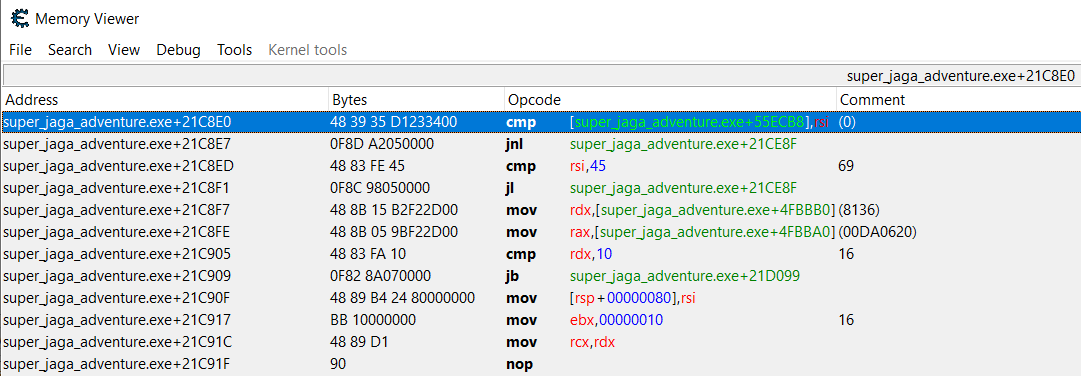
A few lines below, one can see the ``cmp rsi, 45`` operation.
By double-clicking on the operation, one can modify it to ``cmp rsi, 00``.
Upon playing another round of the game, eventually one will notice a text at the Top-Left of the screen:

After navigating to the folder that contains the executable, one should notice a file called ``nice_flag.bin`` has been created, which contains the flag ``STF22{iF_n0_s@vep0int_s@d_lIfE}``.
## Crypto / jagacha
### Challenge
We are provided a server to connect to, as well as ``jagacha.py`` and ``config.py``:
**config.py**
```python
#!/usr/bin/env python3
import time
def get_seed():
SEED = 0xdeadc0de
return SEED + time.time_ns()
# Rest of the file has been omitted since it is just ASCII Art
```
**jagacha.py**
```python
#!/usr/bin/env python3
import asyncio
import logging
import random
from config import (
get_seed,
FLAG,
ASCII_JAGA,
ASCII_JAGAHACKER,
ASCII_JAGASCHOLAR,
ASCII_JAGASUPER,
)
logger = logging.basicConfig(level=logging.INFO)
HOST = "127.0.0.1"
PORT = 8080
GACHAS = {
"Jaga-chan": ASCII_JAGA,
"Jaga Hacker": ASCII_JAGAHACKER,
"Jaga Scholar": ASCII_JAGASCHOLAR,
"Super Jaga": ASCII_JAGASUPER,
}
GACHA_KEYS = [*GACHAS.keys()]
async def print_menu(writer: asyncio.StreamWriter):
writer.writelines(
(
b"Welcome to the Jaga Gacha!\n",
b"We have an event going on featuring the limited SSS-rarity flag-chan!\n",
b"Here are the Gacha pull rates:\n",
*[f"- {v}: 25 %\n".encode() for v in GACHAS],
b"- flag-chan: 0 %\n",
b"All the best!\n",
b"\n",
b"Options:\n",
b"1. Roll a Gacha\n",
b"2. I'm Feeling Lucky!\n",
b"3. Exit\n",
)
)
await writer.drain()
async def read_number(
reader: asyncio.StreamReader, writer: asyncio.StreamWriter, prompt=b"> "
):
writer.write(prompt)
await writer.drain()
while not (line := await reader.readline()).rstrip().isdigit():
writer.writelines((
b"Input is not a valid number\n",
prompt,
))
await writer.drain()
return int(line)
async def handler(reader: asyncio.StreamReader, writer: asyncio.StreamWriter):
client_ip, client_port = reader._transport.get_extra_info('peername')
logging.info(f"New connection from: {client_ip}:{client_port}")
rand = random.Random(get_seed())
try:
option = None
while option != 3:
await print_menu(writer)
option = await read_number(reader, writer)
if option == 1:
num = rand.getrandbits(64)
gacha = GACHA_KEYS[num % len(GACHA_KEYS)]
writer.writelines(
(
f"Congrats! You have pulled a {gacha}!\n".encode(),
GACHAS[gacha],
b"Here are the stats of your character:\n",
f"STR: {num>>48 & 0xffff}\n".encode(),
f"DEX: {num>>32 & 0xffff}\n".encode(),
f"INT: {num>>16 & 0xffff}\n".encode(),
f"LUK: {num & 0xffff}\n".encode(),
b'\n',
)
)
elif option == 2:
num = rand.getrandbits(64)
lucky_number = await read_number(
reader, writer, b"Enter your lucky number: "
)
if lucky_number == num:
writer.writelines((
b"Congrats! You have pulled the limited SSS-rated rarity flag-chan!\n",
FLAG,
))
option = 3 # Quit
else:
writer.write(
b"Oops! Looks like you are not as lucky as you thought! Try again!\n\n"
)
elif option == 3:
writer.write(b"See you again!\n")
await writer.drain()
finally:
writer.write_eof()
writer.close()
async def main(host, port):
srv = await asyncio.start_server(handler, host, port)
await srv.serve_forever()
if __name__ == "__main__":
asyncio.run(main(HOST, PORT))
```
### Observations & Ideas
- In order to get the flag, we need to select option ``2``, and be able to produce a "lucky number" such that it is equal to ``rand.getrandbits(64)`` (i.e. we need to be able to predict the output of ``rand.getrandbits(64)`` without knowing the random seed). It is not possible to brute force this, as the probability of randomly guessing the correct "lucky number" is a ``1/(2^64)`` probability.
- Although we know that the random seed is generated by ``get_seed()``, which makes use of ``time.time_ns()``, and we roughly know the time when the connection is made to the server, because ``get_seed()`` uses time in nanoseconds it would likely be infeasible to brute force the correct seed.
- By selecting option ``1``, we are able to get the output of a ``rand.getrandbits(64)`` call since the resulting ``num``'s bits are split up into 4x 16-bit integers, ``STR``, ``DEX``, ``INT``, and ``LUK`` (i.e. we can reconstruct the original ``num`` returned by the ``rand.getrandbits(64)`` call).
- The ``getrandbits()`` function found in Python's ``random`` module is [**pseudo-random** and **deterministic**](https://docs.python.org/3/library/random.html) as it uses the Mersenne Twister as the random number generator, meaning it is possible for one to predict the result of a ``getrandbits()`` call without knowing the seed.
- There are multiple open-source libraries, such as [RandCrack](https://github.com/tna0y/Python-random-module-cracker) that can automatically crack the seed and perform predictions (e.g. ``getrandbits()``) given sufficient input data.
### Solution
Implementation Note: RandCrack's ``submit()`` function only takes in the output of ``getrandbits(32)``. However, for this challenge, the server returns ``getrandbits(64)``. This issue can be resolved by treating the server's ``getrandbits(64)`` result as 2x ``getrandbits(32)``, and submitting it to RandCrack accordingly.
```python
from randcrack import RandCrack
rc = RandCrack()
def submit64Bits(x):
rc.submit(x & 0xffffffff) #32 LSB
rc.submit(x >> 32 & 0xffffffff) #32 MSB
from pwn import *
r = remote("178.128.20.125", 31594)
#Step 1: Get sufficient samples of getrandbits() for RandCrack
for rnd in range(312): #RandCrack needs 624x getrandbits(32) samples (i.e. 312x getrandbits(64) samples)
for _ in range(14):
r.readline()
r.sendline("1")
r.recvuntil("Here are the stats of your character:") #Skip all the ASCII Art
r.readline()
dat = []
for _ in range(4): #Read the STR, DEX, INT, LUK values
dat.append(int(r.readline()[5:-1]))
num = (dat[0]<<48) + (dat[1]<<32) + (dat[2]<<16) + dat[3] #Reconstruct num
print(rnd, num)
submit64Bits(num)
r.readline()
#Step 2: Predict getrandbits() to get flag
for _ in range(14):
r.readline()
r.sendline("2")
r.sendline(str(rc.predict_getrandbits(64)))
r.interactive()
```
From this, we get the flag ``STF22{W@IFU5_L@1FU5}``.
## Crypto / Encryptdle
### Challenge
We are provided a server to connect to, as well as ``server.py``:
```python
import os
from typing import List
from cryptography.hazmat.primitives import padding
from cryptography.hazmat.primitives.ciphers import Cipher, algorithms, modes
from fastapi import FastAPI, Query
from fastapi.staticfiles import StaticFiles
from pydantic import BaseModel
import uvicorn
try:
with open('flag.txt', 'rb') as f:
FLAG = f.read()
except:
FLAG = b'FLAGFLAGFLAGFLAGFLAGFLAGFLAGFLAG'
KEY = os.urandom(32)
IV = os.urandom(16)
MAX_LEN = 32
def pad(bstring):
return (bstring + FLAG + b'\x00' * MAX_LEN)[:MAX_LEN]
def encrypt(bstring):
padded_data = pad(bstring)
cipher = Cipher(algorithms.Camellia(KEY), modes.CBC(IV))
encryptor = cipher.encryptor()
return encryptor.update(padded_data) + encryptor.finalize()
ANSWER = encrypt(FLAG).hex().upper()
# correct, present, absent
def judge(guess, answer):
ALPHABET = '0123456789ABCDEF'
result = [{'letter': c, 'presence': 'absent'} for c in guess]
count = [0 for i in range(len(ALPHABET))]
for c in answer:
count[int(c, 16)] += 1
for i in range(len(guess)):
if(guess[i] == answer[i]):
result[i]['presence'] = 'correct'
count[int(guess[i], 16)] -= 1
for i in range(len(guess)):
if(result[i]['presence'] == 'correct'):
continue
if(count[int(guess[i], 16)] > 0):
result[i]['presence'] = 'present'
count[int(guess[i], 16)] -= 1
return result
app = FastAPI()
class LetterResult(BaseModel):
letter: str
presence: str
@app.post("/api/compare", response_model=List[LetterResult])
async def compare(guess: str = Query(..., min_length=1, max_length=MAX_LEN)):
enc_guess = encrypt(guess.encode()).hex().upper()
return judge(enc_guess, ANSWER)
@app.get("/api/ping")
async def ping():
return "pong"
app.mount("/", StaticFiles(directory="frontend/dist/", html=True), name="static")
if __name__ == '__main__':
uvicorn.run(app, host='127.0.0.1', port=80)
```
### Observations & Ideas
- We can connect to the server via a web browser to enter any input string of our choice (length must be in range [1, 32]). After which, the server will encrypt the first 32 bytes in ``<input string> + flag + 32x \x00 bytes`` and return the ciphertext to us.
- The bytes being encrypted are encrypted using the [Camellia Cipher](https://en.wikipedia.org/wiki/Camellia_(cipher)), which is a symmetric block cipher (similar to AES). We can treat it as though it is basically AES, since Camellia has "security levels and processing abilities comparable to the Advanced Encryption Standard" and also shares the same block size of 128-bits as AES.
- Since we treat Camellia as being just as secure as AES, this means that vulnerabilities in AES' block cipher mode of operation will also apply to Camellia here. For this challenge, the cipher's ``KEY`` and ``IV`` values are random, and we will not be able to extract their values.
- However, since we are able to **prepend** data **before the flag** and get the resulting ciphertext, the flag can be leaked via a [Chosen Plaintext/Oracle Attack](https://crypto.stackexchange.com/questions/42891/chosen-plaintext-attack-on-aes-in-ecb-mode), meaning we can ignore the "correct"/"present"/"not present" Wordle data. The Oracle Attack is a classic exploit, and can be found in [Cryptopals](https://cryptopals.com/sets/2/challenges/12) as well as [CryptoHack's ECB Oracle Challenge](https://cryptohack.org/challenges/aes/).
- Although we are provided a UI to enter our predictions, if we use the UI, we are limited to a maximum of 10 attempts before we would need to reset the Docker instance. However, if we use the ``/api/compare`` endpoint, we have unlimited attempts, and can automate the Oracle Attack.
- Since we are using a web endpoint to transmit our input string via a URL query string, we have to be careful when sending reserved characters (e.g. '&', '=', etc.). This can be avoided by letting the Python ``requests`` module automatically do the URL escaping for us.
### Solution
```python
import requests
import json
from binascii import unhexlify
def encrypt(payload): #payload is in hex
payload = unhexlify(payload)
print(payload)
res = requests.post("http://206.189.89.253:31120/api/compare", params=[('guess', payload)]).text #Ensure payload is properly URL-escaped
ans = ""
dat = json.loads(res)
for x in dat:
ans += x["letter"]
return ans
def encryptC(payload, c): #Returns c-th chunk
return encrypt(payload)[(c-1)*32:c*32]
flag = ""
for x in range(15, 0, -1): #Leak first chunk
prepayload = x * "00"
print(prepayload)
target = encryptC(prepayload, 1)
print(target)
for i in range(32, 127):
res = encryptC(prepayload + flag.encode().hex() + hex(i)[2:], 1)
if res == target:
flag += chr(i)
print("Leaked " + flag)
break
for x in range(16, 0, -1): #Leak second chunk, start from 16 because we are not allowed to encrypt nothing (i.e. 0-length string)
prepayload = x * "00"
print(prepayload)
target = encryptC(prepayload, 2)
print(target)
for i in range(32, 127):
res = encryptC(prepayload + flag.encode().hex() + hex(i)[2:], 2)
if res == target:
flag += chr(i)
print("Leaked " + flag)
break
```
From this, we get the flag ``STF22{iNS3CuR3!_S+4+iC_IVs!!}``.
## Crypto / Pad the Flag
### Challenge
We are provided a server to connect to, as well as ``source.py``:
```python
import rsa
from Crypto.Util.number import bytes_to_long, long_to_bytes
from secret import FLAG
ENCRYPTED_FLAG = "AAC249B3678C794D115E35E895966E69EE110F9483733602FE27075DB677EA616A5FF69FA22B7E303A4EC7D4FC39E9E62DFF1BDC7A386480F7AD1248D66061D14179B0C5455C48B329D338A9637818794532813940614F367466B49CBECB0A19E74E056170E7049F5F627ABEFB0915CDBDB9E1A5AC5AFFD2F0BE5826A0A9D0C2336CCADDC119CC64B97AF203DCF0E27D3F544A5944485BB9EE935B432BEB39B18410A78B2BC0F5585D6058B2DD3516E6B2F6375B885E6339FED7E7DCD89476D221C7C5A0EB14351373882768894FC154FAB68C45B16047AB85801198CC8050EAD6ABFC30E125A34951DDE958B1054CAE9240A52AF77A59445C20182C1FD5B601"
PADDING = b"\x00\x04"
with open("private_key.pem", "rb") as f:
PRIVATE_KEY = rsa.PrivateKey.load_pkcs1(f.read())
with open("public_key.pem", "rb") as f:
RSA_PUBLIC_KEY = rsa.PublicKey.load_pkcs1(f.read())
class RSA():
def __init__(self):
self.private_key = PRIVATE_KEY
self.padding = PADDING
def rsa_decrypt(self, ciphertext, priv_key) -> bytes:
encrypted = bytes_to_long(ciphertext)
decrypted = priv_key.blinded_decrypt(encrypted)
cleartext = long_to_bytes(decrypted,256)
return cleartext
def unpad(self, padded):
padded = padded[2:]
idx = padded.find(b'\x00')
if (idx == -1):
return b""
else:
message = padded[idx + 1:]
return message
def valid(self, plaintext):
if len(plaintext) < 11:
return False
return plaintext[:2] == self.padding
def decrypt(self, ciphertext):
try:
return self.rsa_decrypt(bytes.fromhex(ciphertext), self.private_key)
except Exception as e:
print(e)
return None
def main():
rsa = RSA()
while True:
option = int(input("option: "))
if option == 1:
print(f'n: {RSA_PUBLIC_KEY.n}')
print(f'e: {RSA_PUBLIC_KEY.e}')
elif option == 2:
print(f'Encrypted Flag: {ENCRYPTED_FLAG}')
elif option == 3:
encrypted = input("Enter Encrypted Flag: ")
plaintext = rsa.decrypt(encrypted)
if plaintext is None:
print("Decryption Failed!")
continue
if not rsa.valid(plaintext):
print("Invalid Padding!")
continue
plaintext = rsa.unpad(plaintext)
if plaintext == FLAG:
print("The flag is correct!")
else:
print("The flag is incorrect!")
else:
print("Goodbye")
exit(1)
if __name__ == "__main__":
main()
```
### Observations & Ideas
- We are given an RSA public key (``n`` and ``e``), as well as the encrypted flag (``ENCRYPTED_FLAG``). Before being encrypted, the flag is padded in the form ``\x00 \x04 <some non-\x00 bytes> \x00 <flag>`` such that the length of the padded string is exactly 256 bytes.
- We are able to submit ciphertexts to the server (via option ``3``) for decryption. Assuming that we have formatted the ciphertext properly, the server will return one of 3 outputs (invalid padding, valid padding with incorrect flag, and valid padding with correct flag).
- Since the public key appears secure ([RsaCtfTool](https://github.com/RsaCtfTool/RsaCtfTool) finds no vulnerabilities), and no extra data is provided, we can presume that we have to extract the flag through some form of Oracle Attack using option ``3``.
- After Googling [Chosen Ciphertext Attacks](https://en.wikipedia.org/wiki/Chosen-ciphertext_attack), one will be able to find [Bleichenbacher's Attack](https://medium.com/@c0D3M/bleichenbacher-attack-explained-bc630f88ff25) which is a Padding Oracle Attack (i.e. Oracle Attack that makes use of the server telling us if the ciphertext is incorrectly padded).
- Bleichenbacher's Attack works on the [PKCS #1 Padding Scheme](https://crypto.stackexchange.com/questions/12688/can-you-explain-bleichenbachers-cca-attack-on-pkcs1-v1-5), in which plaintext is padded in the form ``\x00 \x02 <some non-\x00 bytes> \x00 <plaintext>``, which is very similar to the padding used in this challenge (the only difference is ``\x02`` being replaced with ``\x04``). As such, the only thing that needs to be changed is that the value of ``B`` should be doubled (refer to [this article](https://medium.com/@c0D3M/bleichenbacher-attack-explained-bc630f88ff25)).
### Solution
Solution is adapted from [emilystamm's rsa-bleichenbacher](https://github.com/emilystamm/rsa-bleichenbacher), with all functions/indivdual lines changed being marked with ``# MODIFIED``.
**main.py**
```python
from rsa import RSA_Cipher
from attack import Bleichenbacher
from Crypto.Util.number import bytes_to_long, long_to_bytes # MODIFIED
if __name__ == "__main__":
# Initial Message
message = "AES Session Key = 1234567890ABCDEF"
encoded = "AES Session Key = 1234567890ABCDEF".encode("utf-8")
# Create RSA Cipher
bits = 2048 # Choose bits (1024, 2048, ...) # MODIFIED
RSA_Cipher = RSA_Cipher(bits)
# Encryption
ciphertext = 0xAAC249B3678C794D115E35E895966E69EE110F9483733602FE27075DB677EA616A5FF69FA22B7E303A4EC7D4FC39E9E62DFF1BDC7A386480F7AD1248D66061D14179B0C5455C48B329D338A9637818794532813940614F367466B49CBECB0A19E74E056170E7049F5F627ABEFB0915CDBDB9E1A5AC5AFFD2F0BE5826A0A9D0C2336CCADDC119CC64B97AF203DCF0E27D3F544A5944485BB9EE935B432BEB39B18410A78B2BC0F5585D6058B2DD3516E6B2F6375B885E6339FED7E7DCD89476D221C7C5A0EB14351373882768894FC154FAB68C45B16047AB85801198CC8050EAD6ABFC30E125A34951DDE958B1054CAE9240A52AF77A59445C20182C1FD5B601 # MODIFIED
ciphertext = long_to_bytes(ciphertext) # MODIFIED
# Attack
stolen_message = Bleichenbacher(ciphertext, RSA_Cipher)
print("\nBleichenbacher Stolen Message:", stolen_message)
print("\nOriginal Message:", message)
print("\nStolen Message == Original Message:", message == stolen_message)
```
**rsa.py**
```python
from Crypto.PublicKey import RSA
from Crypto.Util.number import bytes_to_long, long_to_bytes # MODIFIED
from pwn import * # MODIFIED
r = remote("167.99.77.149", 30984) # MODIFIED
n = 27745498838268342270390541832410459717876029506186104405197835711890151776448053156671628267359667675031113730557765107424510849444151656396790371676445777855008849863539302384743329990999275939998343733038454223585107152570883409665827946862924689758759230343926979376299418234007499792518418292789552633399836649032240094044536084198009044814206431438837607278069180294900543129080438000781188486862675568725667427075189589807189475163889785156857630938353589579525509381815160099955761294061615683975133026307438754024582460800766260510600437895339795565140736784017970754976295616609792522708200768185786779871199 # MODIFIED
e = 65537 # MODIFIED
class RSA_Cipher:
def __init__(self, bits): # MODIFIED
self.bits = bits
self.public_key = RSA.construct((n, e))
def PublicKey(self):
return self.public_key
def Bits(self):
return self.bits
def Encrypt(self, message): # MODIFIED
return long_to_bytes(pow(bytes_to_long(message), self.public_key.e, self.public_key.n))
def Oracle(self, ciphertext): # MODIFIED
ciphertext = bytes_to_long(ciphertext)
r.sendline("3")
send = hex(ciphertext)[2:].zfill(512)
r.sendline(send)
res = r.readline()
return b"Invalid Padding!" not in res
```
**attack.py**
```python
from Crypto.Util.number import bytes_to_long, long_to_bytes
import intervals as I
import time
def ceil(a, b): return a // b + (a % b > 0)
def floor(a,b): return a // b
# Decode message
def PKCS1_decode(encoded):
encoded = encoded[2:]
idx = encoded.index(b'\x00')
message = encoded[idx + 1:]
return message.decode("utf-8")
# Call oracle with integer c to determine if corresponding plaintext conforms
def CallOracle(c, RSA_Cipher):
ciphertext = long_to_bytes(c)
return RSA_Cipher.Oracle(ciphertext)
# Calculate c_i
def CalculateC_i(c,e,n, lower, upper, calls_to_oracle, RSA_Cipher):
s_i = lower
c_i = (c * pow(s_i,e,n)) % n
while not CallOracle(c_i, RSA_Cipher) and s_i <= upper:
# To keep track of iterations
if calls_to_oracle % 10000 == 0: print("Calls to Oracle : ", calls_to_oracle)
calls_to_oracle += 1
# Increment s_i
s_i += 1
# Calculate the new c_i
c_i = (c * pow(s_i,e,n)) % n
if s_i > upper: return 0, calls_to_oracle
else: return s_i, calls_to_oracle
# Bleichenbacher attack
def Bleichenbacher(ciphertext, RSA_Cipher):
# Initialize variables
bits = RSA_Cipher.Bits()
public_key = RSA_Cipher.PublicKey()
e = public_key.e
n = public_key.n
i = 1
calls_to_oracle = 0
start_time = time.time()
# Compute constant variable B and initial interval M_0 = [a,b]
B = pow(2, 8 * (bits // 8 - 2))
B = B*2 # MODIFIED - To fit new 0x00 0x04 padding
a = 2 * B
b = 3 * B - 1
M_i_1 = I.closed(a,b)
# Step 1: Calculate c, s_0
c = bytes_to_long(ciphertext)
s_i_1 = 1
# Printing
print("\n\n======================================================\n",
"Bleichenbacher Attack on RSA PKCS v1.5",
"\n======================================================\n",
"\nPublic Key\ne =", e, "\nn =", n, " (", bits, "bits )\n\nCiphertext")
print(ciphertext)
print("\n\nIteration 0\n---------------------------------------------")
print("\nStep 1: find ciphertext c in integer form\nc =", c)
print("\nConfirm Call Oracle on Given Ciphertext:", CallOracle(c, RSA_Cipher)) # Check that CallOracle works
print("\nM_0 =", M_i_1)
# Repeat until you M_i a single interval with one element
while M_i_1.lower != M_i_1.upper:
print("\n\nIteration ", i,
"\n---------------------------------------------")
# Step 2 : Find s_i
# Step 2a: Calculate s_i, smallest int >= n/3B that conforms
if i == 1:
print("\nStep 2a: find smallest s_1 >= n/3B such that plaintext corresponding to c(s_1^e) mod n conforms")
s_i, calls_to_oracle = CalculateC_i(c, e, n, ceil(n, 3 * B), n-1, calls_to_oracle, RSA_Cipher)
print("s_" + str(i), " = ", s_i, "\n")
# Step 2b: If M_i-1 has multiple disjoint intervals,
# Calculate smallest s_i > s_i_1 that conforms
elif len(M_i_1) > 1:
print("\nStep 2b: find smallest s_i > s_(i-1) such that plaintext corresponding to c(s_i^e) mod n conforms\ns_i_1 = ", s_i_1)
s_i, calls_to_oracle = CalculateC_i(c, e, n, s_i_1 + 1, n-1, calls_to_oracle, RSA_Cipher) #change to s_i + 1
print("s_" + str(i), " = ", s_i, "\n")
# Step 2c: Number of intervals = 1 -> find s_i
else:
print("\nStep 2c: vary integer r_i and s_i until find s_i such that plaintext corresponding to c(s_i^e) mod n conforms")
a , b = M_i_1.lower , M_i_1.upper
r_i = ceil(2 * b * s_i_1 - 2 * B, n)
s_i = 0
# While s_i corresponding plaintext to c(s_i)^e mod n does not conform
while s_i == 0:
lower = ceil(2 * B + r_i * n, b)
upper = ceil(3 * B + r_i * n, a) - 1
s_i, calls_to_oracle = CalculateC_i(c, e, n, lower, upper, calls_to_oracle, RSA_Cipher)
r_i += 1
print("s_" + str(i), " = ", s_i, "\n")
# Step 3: Reduce M_i_1 to M_i and store
# Initialize M_i
print("\nStep 3: after s_i found, reduce set M_(i-1) to M_i")
M_i = I.empty()
# For each disjoint interval [a,b] in M_(i-1)
for interval in M_i_1:
a , b = interval.lower , interval.upper
low_r = ceil(a * s_i - 3 * B + 1, n)
high_r = ceil(b * s_i - 2 * B, n)
for r in range(low_r, high_r):
i_low = max(a , ceil(2 * B + r * n, s_i))
i_high = min(b , floor(3 * B - 1 + r * n, s_i))
M_new = I.closed(i_low, i_high)
M_i = M_i | M_new
print("M_" + str(i), " = ", M_i)
# Reset variables for next round
M_i_1 = M_i
s_i_1 = s_i
i += 1
# Step 4: single remaining element (M_i.lower = M_i.upper) * (s_0 ^-1 mod n)
print("Calls to Oracle: ", calls_to_oracle)
print("\nStep 4: M_i.lower = M_i.higher = m, the message in integer form")
m = M_i.lower
print("\nRecovered Message Integer = ", m)
sbytes = long_to_bytes(m)
print("\nMessage Converted to Bytes", sbytes)
message = PKCS1_decode(sbytes)
elapsed_time = time.time() - start_time
print("\n---------------------------------------------\nTime Elapsed:", elapsed_time / 60, " minutes\n")
return message
```
From this, the flag is ``STF22{p@dd1ng_pr0b13m_3v3rywh3r3}``.
 Sign in with Wallet
Connect another wallet
Sign in with Wallet
Connect another wallet