# Designing a Database in Real Life
#### Using a real client Yalla Project
---
## Who are we?
- Yalla Cooperative
- A new cooperative run across UK, Germany and Gaza :heart:
---
## Tell me the plan!
- Look at a real project we worked on: Tempo
- Think about what we want to store in the database
- Turn that into a real database schema
---
## Tempo
Tempo is a UK charity where people can earn Time Credits for helping out in the community, and then spend those Time Credits on specific activities (e.g. going to the cinema)
---
## What they wanted from us
#### The problem:
All their time credits are physical which costs lots of money to make and there is no way of tracking them
#### Our solution:
Build a web app that lets Tempo generate QR codes for their users, so each user has a Time Credits Card which they can get scanned to earn / spend time credits
---
### User Journeys
#### Describes all the interactions required to achieve a user goal.
#### It is made up of several User stories.
---
### Charity:
I can give out time credits to a volunteer by scanning their Time Credit Card and get a log of all time credits that have been earned by my volunteers
----
### Volunteer:
I can log into my Tempo account to see how many credits I have earned
----
### Spend Partner:
I can scan someone’s Time Credit Card to approve their Time Credits for the use of my services
----
### Tempo:
I can track all Time Credit transactions, each attributed to a volunteer and where/how they earn/spend their credits
---
### User Stories
#### Defines a single testable interaction. Each of these are steps on the way to completing each user journey.
https://hackmd.io/kEe9rVEmSpaQXQkyD5xCog
---
### What did this look like?
[Click me to find out](https://www.figma.com/proto/DbHj4Cgz0V24BgIDRGGtm3Ij/Tempo?node-id=7%3A7&scaling=scale-down)
---
## Challenge #1
#### Go through the user stories and write down everything you think we should be storing in the database
(e.g. user email, password etc)
Don't worry about schemas! Just for now write a list
### Time: 10 minutes :clock2:
---
## Let's review!
---
```
- user email,
- user name,
- user password,
- role of user (tempo, charity, spendPartner, volunteer),
- how many credits the user currently has,
- volunteer time credits card active/not active,
- name of activity they can purchase
- how many time credits this activity costs,
- who the spend partner is,
- who spent the time credits,
- who they gave those time credits to,
- transaction amount,
- transaction date,
- what activity the transaction was for (e.g. spend activities like cinema, and earn activites like volunteering at the library)
```
---
## Database Schemas
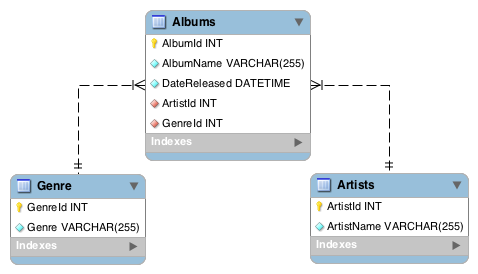
---
## Now over to you :smile:
---
## Challenge #2
#### Sort the data we want to store into groups
#### Which groups link together? What is it that links them?
### Time: 15 minutes :clock3:
---
## Let's review!
---

---
# Quick note
---
Schemas can change!
## But
They become harder to change when your app is being used by real users
---
## Useful database tool
[Draw.io](https://www.draw.io/)
---
# You've now built your first database for a real client
### :100: :muscle: :tada:
---
{"metaMigratedAt":"2023-06-14T23:28:04.867Z","metaMigratedFrom":"YAML","title":"Designing a Database in Real Life","breaks":true,"description":"View the slide with \"Slide Mode\".","contributors":"[{\"id\":\"c2a4e289-557a-4b5d-93da-4f374570a91e\",\"add\":4140,\"del\":3526},{\"id\":\"28421f83-a24f-4d41-b816-6cf938a582bc\",\"add\":811,\"del\":286}]"}